
NAME
App::Greple::xlate - translation support module for greple
SYNOPSIS
greple -Mxlate::deepl --xlate pattern target-file

greple -Mxlate::gpt4 --xlate pattern target-file

greple -Mxlate::gpt5 --xlate pattern target-file

greple -Mxlate --xlate-engine gpt5 --xlate pattern target-file
VERSION
Version 1.01
DESCRIPTION
Greple xlate module find desired text blocks and replace them by
the translated text. Currently DeepL (deepl.pm), ChatGPT 4.1
(gpt4.pm), and GPT-5 (gpt5.pm) module are implemented as a back-end engine.
If you want to translate normal text blocks in a document written in
the Perl's pod style, use greple command with xlate::deepl and
perl module like this:
greple -Mxlate::deepl -Mperl --pod --re '^([\w\pP].*\n)+' --all foo.pm
In this command, pattern string ^([\w\pP].*\n)+ means consecutive
lines starting with alpha-numeric and punctuation letter. This
command show the area to be translated highlighted. Option --all
is used to produce entire text.
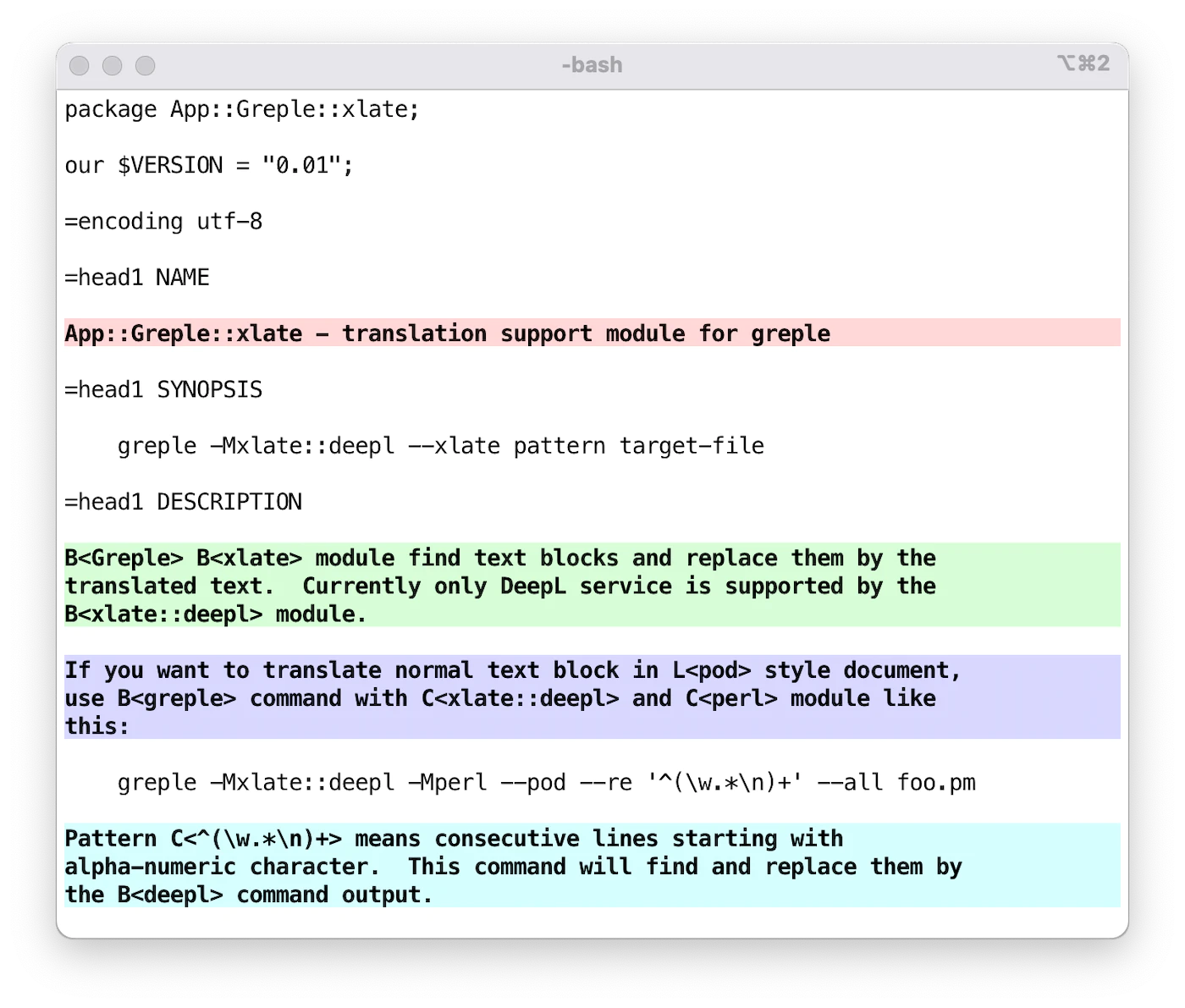
Then add --xlate option to translate the selected area. Then, it
will find the desired sections and replace them by the deepl
command output.
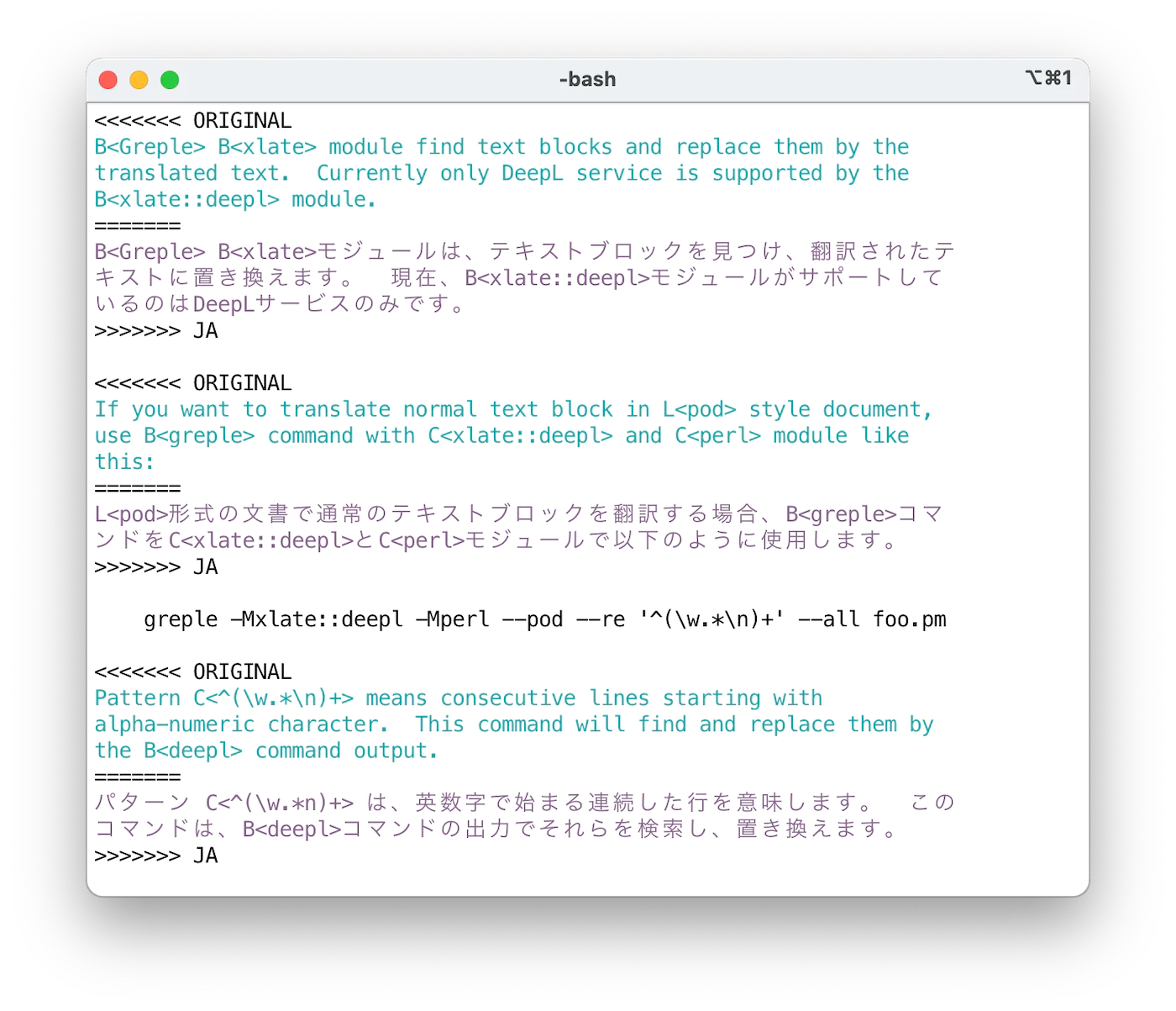
By default, original and translated text is printed in the "conflict
marker" format compatible with git(1). Using ifdef format, you
can get desired part by unifdef(1) command easily. Output format
can be specified by --xlate-format option.
If you want to translate entire text, use --match-all option. This
is a short-cut to specify the pattern (?s).+ which matches entire
text.
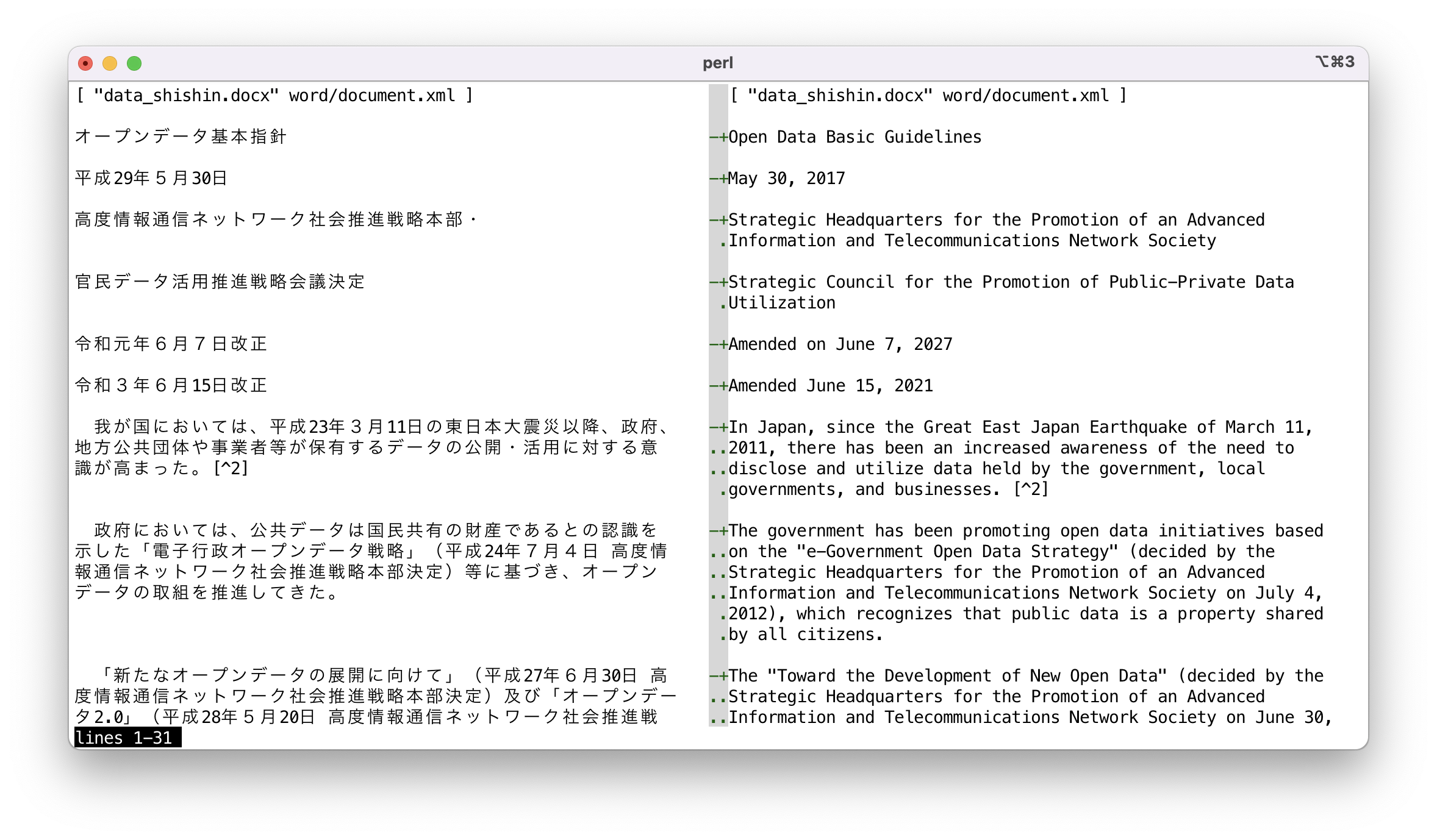
Conflict marker format data can be viewed in side-by-side style by
sdif command with -V option. Since it makes no sense
to compare on a per-string basis, the --no-cdif option is
recommended. If you do not need to color the text, specify
--no-textcolor (or --no-tc).
sdif -V --no-filename --no-tc --no-cdif data_shishin.deepl-EN-US.cm
NORMALIZATION
Processing is done in specified units, but in the case of a sequence of multiple lines of non-empty text, they are converted together into a single line. This operation is performed as follows:
- Remove white space at the beginning and end of each line.
- If a line ends with a full-width punctuation character, concatenate with next line.
- If a line ends with a full-width character and the next line begins with a full-width character, concatenate the lines.
- If either the end or the beginning of a line is not a full-width character, concatenate them by inserting a space character.
Cache data is managed based on the normalized text, so even if modifications are made that do not affect the normalization results, the cached translation data will still be effective.
This normalization process is performed only for the first (0th) and even-numbered pattern. Thus, if two patterns are specified as follows, the text matching the first pattern will be processed after normalization, and no normalization process will be performed on the text matching the second pattern.
greple -Mxlate -E normalized -E not-normalized
Therefore, use the first pattern for text that is to be processed by
combining multiple lines into a single line, and use the second
pattern for pre-formatted text. If there is no text to match in the
first pattern, use a pattern that does not match anything, such as
(?!).
MASKING
Occasionally, there are parts of text that you do not want translated. For example, tags in markdown files. DeepL suggests that in such cases, the part of the text to be excluded be converted to XML tags, translated, and then restored after the translation is complete. To support this, it is possible to specify the parts to be masked from translation.
--xlate-setopt maskfile=MASKPATTERN
This will interpret each line of the file MASKPATTERN as a regular
expression, translate strings matching it, and revert after
processing. Lines beginning with # are ignored.
Complex pattern can be written on multiple lines with backslash escpaed newline.
How the text is transformed by masking can be seen by --xlate-mask option.
This interface is experimental and subject to change in the future.
OPTIONS
-
--xlate
-
--xlate-color
-
--xlate-fold
-
--xlate-fold-width=n (Default: 70)
Invoke the translation process for each matched area.
Without this option, greple behaves as a normal search command. So you can check which part of the file will be subject of the translation before invoking actual work.
Command result goes to standard out, so redirect to file if necessary, or consider to use App::Greple::update module.
Option --xlate calls --xlate-color option with --color=never option.
With --xlate-fold option, converted text is folded by the specified width. Default width is 70 and can be set by --xlate-fold-width option. Four columns are reserved for run-in operation, so each line could hold 74 characters at most.
-
--xlate-engine=engine
Specifies the translation engine to be used. If you specify the engine module directly, such as
-Mxlate::deepl, you do not need to use this option.At this time, the following engines are available
-
deepl: DeepL API
-
gpt3: gpt-3.5-turbo
-
gpt4: gpt-4.1
-
gpt4o: gpt-4o-mini
gpt-4o's interface is unstable and cannot be guaranteed to work correctly at the moment.
-
gpt5: gpt-5
-
-
--xlate-labor
-
--xlabor
Instead of calling translation engine, you are expected to work for. After preparing text to be translated, they are copied to the clipboard. You are expected to paste them to the form, copy the result to the clipboard, and hit return.
-
--xlate-to (Default:
EN-US)Specify the target language. You can get available languages by
deepl languagescommand when using DeepL engine. -
--xlate-format=format (Default:
conflict)Specify the output format for original and translated text.
The following formats other than
xtxtassume that the part to be translated is a collection of lines. In fact, it is possible to translate only a portion of a line, but specifying a format other thanxtxtwill not produce meaningful results.-
conflict, cm
Original and converted text are printed in git(1) conflict marker format.
  <<<<<<< ORIGINAL
  original text
  =======
  translated Japanese text
  >>>>>>> JA
You can recover the original file by next sed(1) command.
sed -e '/^<<<<<<< /d' -e '/^=======$/,/^>>>>>>> /d' -
colon, :::::::
The original and translated text are output in a markdown's custom container style.
  ::::::: ORIGINAL
  original text
  :::::::
  ::::::: JA
  translated Japanese text
  :::::::
Above text will be translated to the following in HTML.
  <div class="ORIGINAL">
  original text
  </div>
  <div class="JA">
  translated Japanese text
  </div>
Number of colon is 7 by default. If you specify colon sequence like
:::::, it is used instead of 7 colons. -
ifdef
Original and converted text are printed in cpp(1)
#ifdefformat.#ifdef ORIGINAL original text #endif #ifdef JA translated Japanese text #endifYou can retrieve only Japanese text by the unifdef command:
unifdef -UORIGINAL -DJA foo.ja.pm -
space
-
space+
Original and converted text are printed separated by single blank line. For
space+, it also outputs a newline after the converted text. -
xtxt
If the format is
xtxt(translated text) or unkown, only translated text is printed.
-
-
--xlate-maxlen=chars (Default: 0)
Specify the maximum length of text to be sent to the API at once. Default value is set as for free DeepL account service: 128K for the API (--xlate) and 5000 for the clipboard interface (--xlate-labor). You may be able to change these value if you are using Pro service.
-
--xlate-maxline=n (Default: 0)
Specify the maximum lines of text to be sent to the API at once.
Set this value to 1 if you want to translate one line at a time. This option takes precedence over the
--xlate-maxlenoption. -
--xlate-prompt=text
Specify a custom prompt to be sent to the translation engine. This option is only available when using ChatGPT engines (gpt3, gpt4, gpt4o). You can customize the translation behavior by providing specific instructions to the AI model. If the prompt contains
%s, it will be replaced with the target language name. -
--xlate-context=text
Specify additional context information to be sent to the translation engine. This option can be used multiple times to provide multiple context strings. The context information helps the translation engine understand the background and produce more accurate translations.
-
--xlate-glossary=glossary
Specify a glossary ID to be used for translation. This option is only available when using the DeepL engine. The glossary ID should be obtained from your DeepL account and ensures consistent translation of specific terms.
-
--[no-]xlate-progress (Default: True)
See the tranlsation result in real time in the STDERR output.
-
--xlate-stripe
Use App::Greple::stripe module to show the matched part by zebra striping fashion. This is useful when the matched parts are connected back-to-back.
The color palette is switched according to the background color of the terminal. If you want to specify explicitly, you can use --xlate-stripe-light or --xlate-stripe-dark.
-
--xlate-mask
Perform masking function and display the converted text as is without restoration.
-
--match-all
Set the whole text of the file as a target area.
-
--lineify-cm
-
--lineify-colon
In the case of the
cmandcolonformats, the output is split and formatted line by line. Therefore, if only a portion of a line is to be translated, the expected result cannot be obtained. These filters fix output that is corrupted by translating part of a line into normal line-by-line output.In the current implementation, if multiple parts of a line are translated, they are output as independent lines.
CACHE OPTIONS
xlate module can store cached text of translation for each file and
read it before execution to eliminate the overhead of asking to
server. With the default cache strategy auto, it maintains cache
data only when the cache file exists for target file.
Use --xlate-cache=clear to initiate cache management or to clean up all existing cache data. Once executed with this option, a new cache file will be created if one does not exist and then automatically maintained afterward.
-
--xlate-cache=strategy
-
auto(Default)Maintain the cache file if it exists.
-
createCreate empty cache file and exit.
-
always,yes,1Maintain cache anyway as far as the target is normal file.
-
clearClear the cache data first.
-
never,no,0Never use cache file even if it exists.
-
accumulateBy default behavior, unused data is removed from the cache file. If you don't want to remove them and keep in the file, use
accumulate.
-
-
--xlate-update
This option forces to update cache file even if it is not necessary.
COMMAND LINE INTERFACE
You can easily use this module from the command line by using the
xlate command included in the distribution. See the xlate man
page for usage.
The xlate command supports GNU-style long options such as
--to-lang, --from-lang, --engine, and --file. Use
xlate -h to see all available options.
The xlate command works in concert with the Docker environment, so
even if you do not have anything installed on hand, you can use it as
long as Docker is available. Use -D or -C option.
Docker operations are handled by App::dozo, which can also be
used as a standalone command. The dozo command supports the
.dozorc configuration file for persistent container settings.
Also, since makefiles for various document styles are provided,
translation into other languages is possible without special
specification. Use -M option.
You can also combine the Docker and make options so that you can
run make in a Docker environment.
Running like xlate -C will launch a shell with the current working
git repository mounted.
Read Japanese article in "SEE ALSO" section for detail.
EMACS
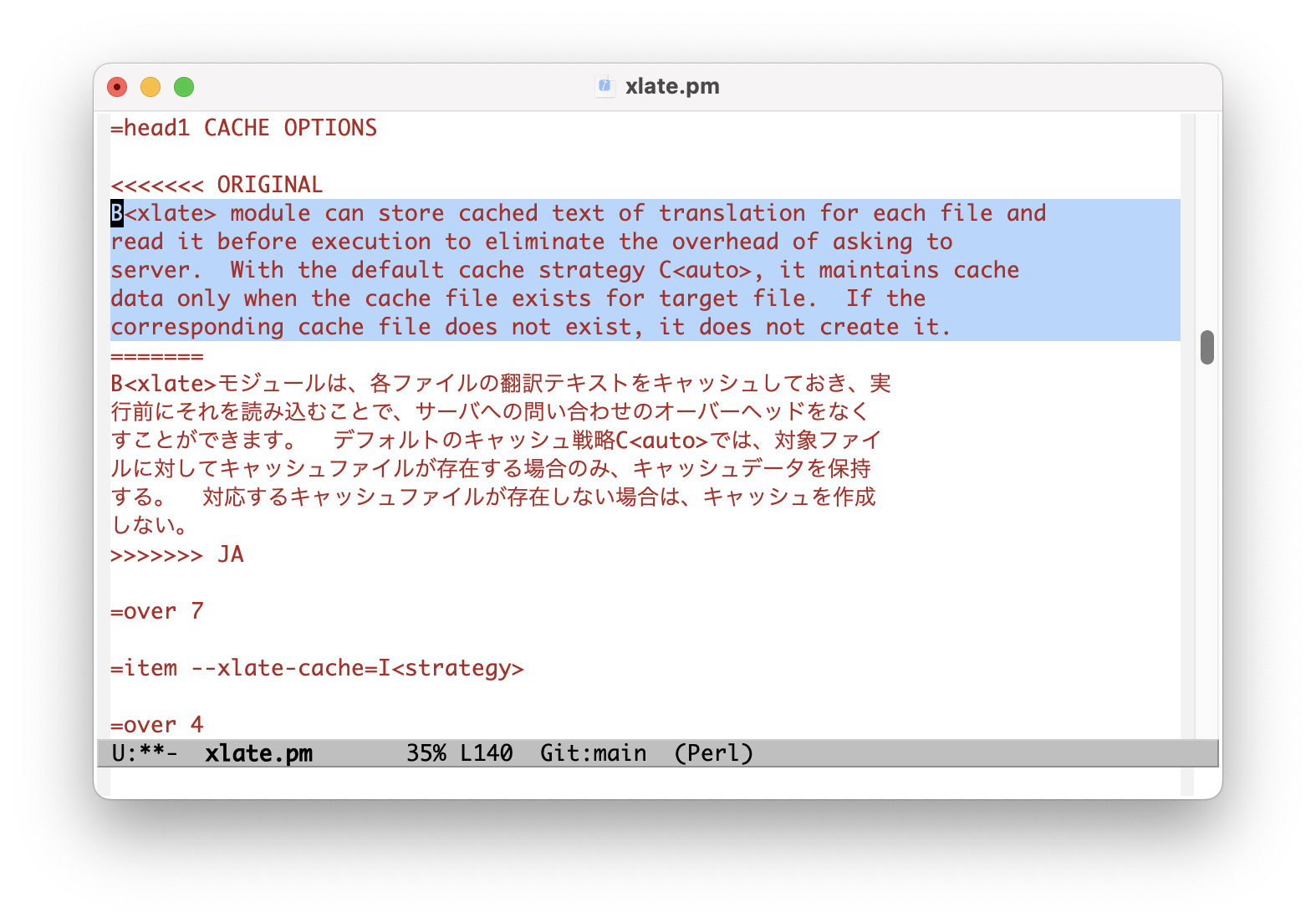
Load the xlate.el file included in the repository to use xlate
command from Emacs editor. xlate-region function translate the
given region. Default language is EN-US and you can specify
language invoking it with prefix argument.
ENVIRONMENT
-
DEEPL_AUTH_KEY
Set your authentication key for DeepL service.
-
OPENAI_API_KEY
OpenAI authentication key.
INSTALL
CPANMINUS
$ cpanm App::Greple::xlate
TOOLS
You have to install command line tools for DeepL and ChatGPT.
https://github.com/DeepLcom/deepl-python
https://github.com/tecolicom/App-gpty
SEE ALSO
MODULES
App::Greple::xlate::deepl, App::Greple::xlate::gpt4, App::Greple::xlate::gpt5
App::dozo - Generic Docker runner used by xlate for container operations
RELATED MODULES
-
See the greple manual for the detail about target text pattern. Use --inside, --outside, --include, --exclude options to limit the matching area.
-
You can use
-Mupdatemodule to modify files by the result of greple command. -
Use sdif to show conflict marker format side by side with -V option.
-
Greple stripe module use by --xlate-stripe option.
RESOURCES
-
https://hub.docker.com/r/tecolicom/xlate
Docker container image.
-
https://github.com/tecolicom/getoptlong
The
getoptlong.shlibrary used for option parsing in thexlatescript and App::dozo. -
https://github.com/DeepLcom/deepl-python
DeepL Python library and CLI command.
-
https://github.com/openai/openai-python
OpenAI Python Library
-
https://github.com/tecolicom/App-gpty
OpenAI command line interface
ARTICLES
-
https://qiita.com/kaz-utashiro/items/1c1a51a4591922e18250
Greple module to translate and replace only the necessary parts with DeepL API (in Japanese)
-
https://qiita.com/kaz-utashiro/items/a5e19736416ca183ecf6
Generating documents in 15 languages with DeepL API module (in Japanese)
-
https://qiita.com/kaz-utashiro/items/1b9e155d6ae0620ab4dd
Automatic translation Docker environment with DeepL API (in Japanese)
AUTHOR
Kazumasa Utashiro
LICENSE
Copyright © 2023-2026 Kazumasa Utashiro.
This library is free software; you can redistribute it and/or modify it under the same terms as Perl itself.