

NAME
ansicolumn - ANSI terminal sequence aware column command
SYNOPSIS
ansicolumn [options] [file ...]
-w#, -c#             output width
-s#                  separator string
-l#                  maximum number of table columns
-x                   exchange rows and columns
-o#                  output separator

-P[#], --page=#      page mode, with optional page length
       --no-page     disable page mode
-U[#], --up=#        show in N-up format (-WC# --linestyle=wrap)
--2up .. --9up       same as -U2 .. -U9
-D,  --document      document mode
-V,  --parallel      parallel view mode
-H,  --filename      print filename header in parallel view mode
-I,  --ignore-empty  ignore empty files
-X#, --cell=#        set text width for files in parallel view mode
-C#, --pane=#        number of panes
-S#, --pane-width=#  pane width
-W,  --widen         widen to terminal width
-p,  --paragraph     paragraph mode
-r,  --regex-sep     treat separator string as regex

-B,  --border[=#]    print border with optional style
-F,  --fillup[=#]    fill-up unit (pane|page|none)

--height=#           page height
--column-unit=#      column unit (default 8)
--margin=#           column margin width (default 1)
--linestyle=#        folding style (none|truncate|wrap|wordwrap)
--boundary=#         line-end boundary
--linebreak=#        line-break mode (none|all|runin|runout)
--runin=#            run-in width
--runout=#           run-out width
--runlen=#           set both run-in and run-out width
--[no-]pagebreak     allow page break
--border-style=#     border style
--label POS=TEXT         pane border label
--page-label POS=TEXT    page border label
--[no-]ignore-space  ignore space in table output
--[no-]white-space   allow white spaces at the top of each pane
--[no-]isolation     page-end isolated line
--tabstop=#          set tab width
--tabhead=#          tab-head character
--tabspace=#         tab-space character
--tabstyle=#         tab style
--ambiguous=#        ambiguous character width (narrow|wide)
--pages              split file by formfeed
--colormap=#         color mapping (LABEL=COLOR)
Table style options:
-t,  --table           table style output
-A,  --table-align     align table output to column unit
-T,  --table-tabs      align items by tabs
-TT                    reformat tab aligned text
-R#, --table-right=#   right adjust table columns
     --table-center=#  center table columns
-K#, --table-remove=#  discard specified columns
     --item-format=#   apply sprintf format to each cell
     --table-squeeze   remove all-empty columns
     --padding         pad last column to full width
Default alias options:
--board-color FG BG    board style pages with FG and BG colors
--white-board          black on white board
--black-board          white on black board
--green-board          white on green board
--slate-board          white on dark slategray board
VERSION
Version 1.5702
DESCRIPTION
ansicolumn is a column(1) command clone that can handle ANSI terminal sequences, backspaces, and Asian wide characters. It supports traditional options, some of the Linux extended options, and many of its own original options.
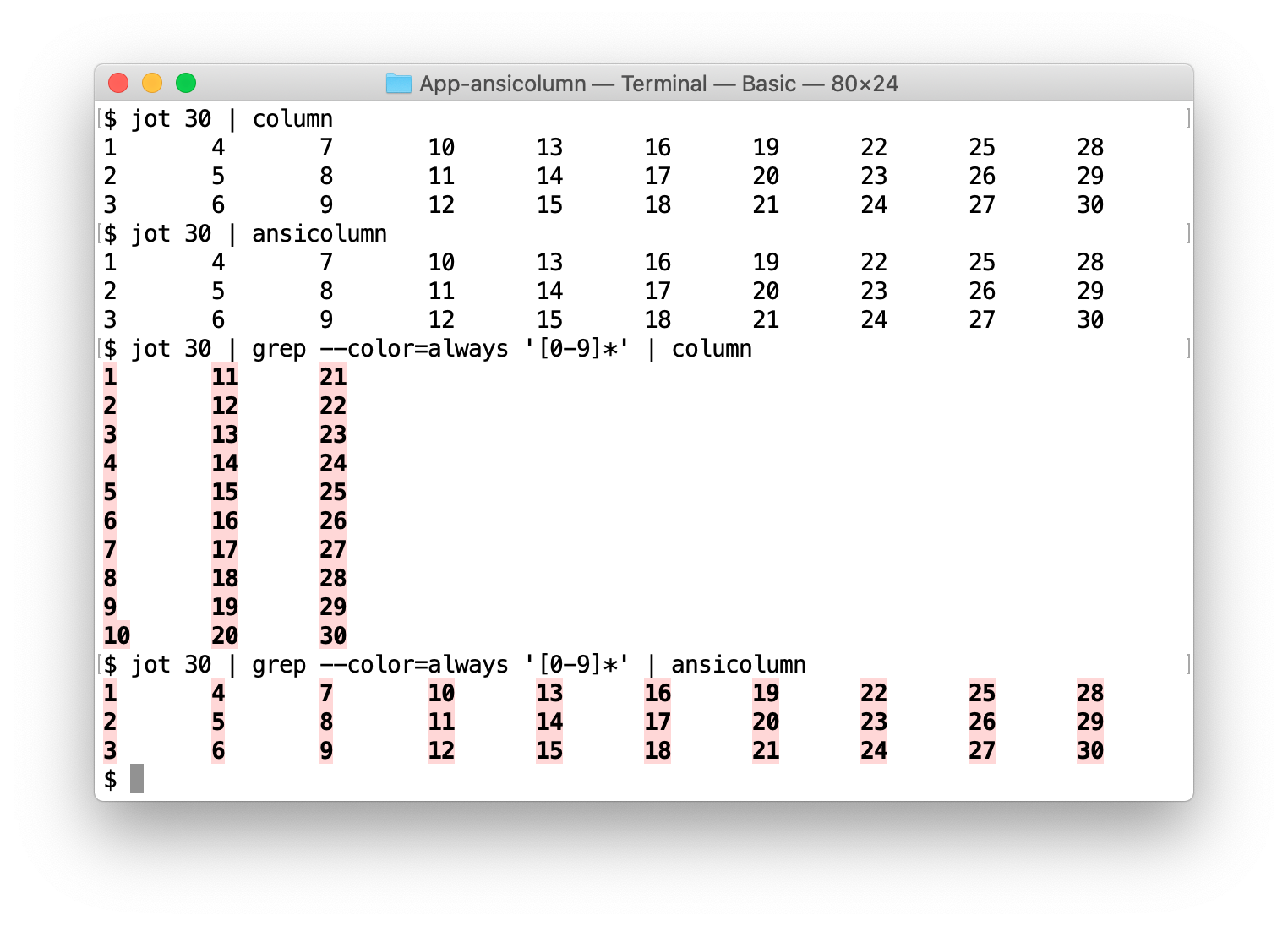
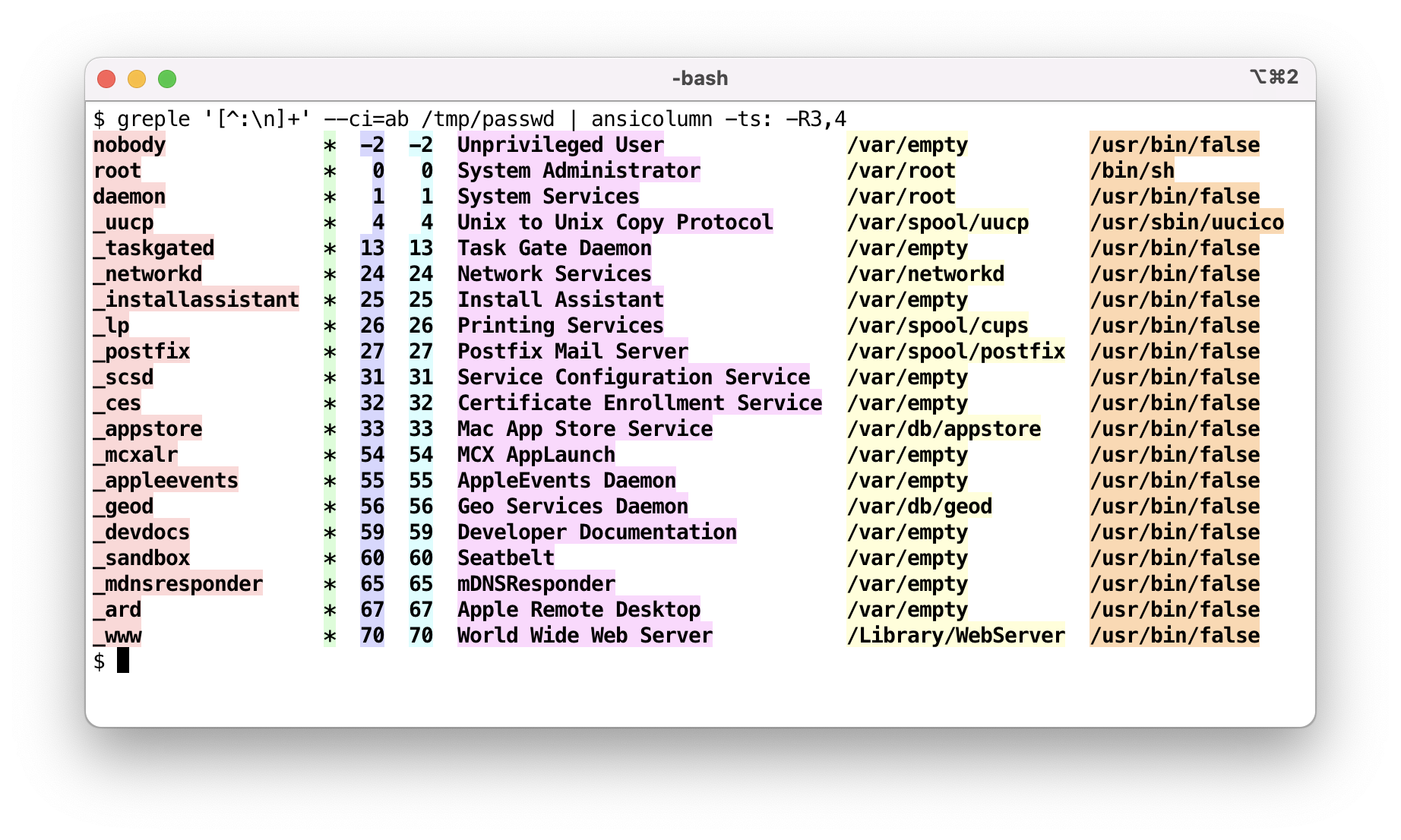
In addition to normal operation, table style output (-t) is
supported as well.
In contrast to the original column(1) command which handles mainly short item lists, and the Linux variant which has been expanded to have rich table style output, ansicolumn(1) has been expanded to show text files in a multi-column view. Combined with pagination and a document-friendly folding mechanism, it can be used as a document viewing preprocessor for a pager program.
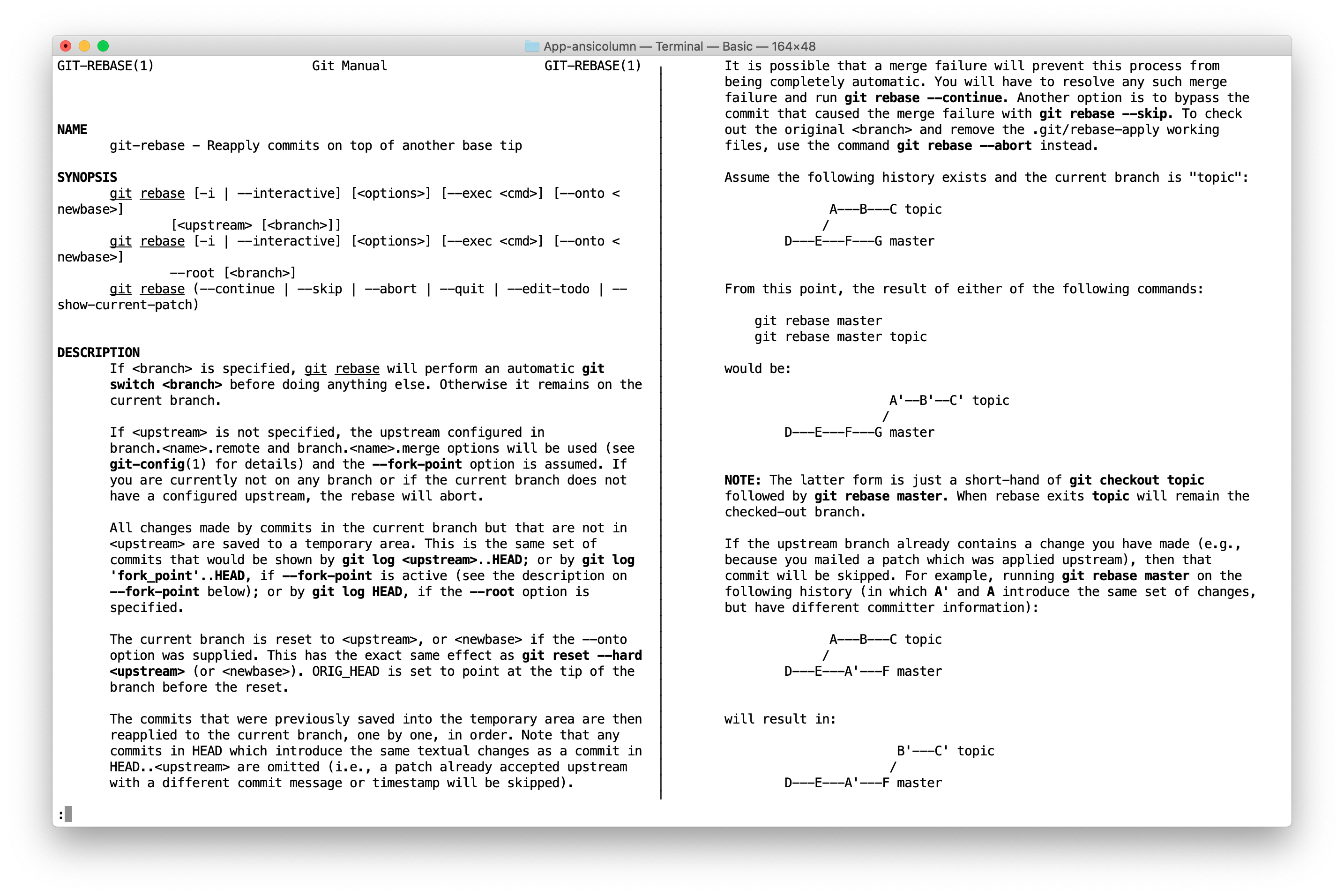
To accurately display file contents, blank lines that were ignored by the original column(1) command are preserved.
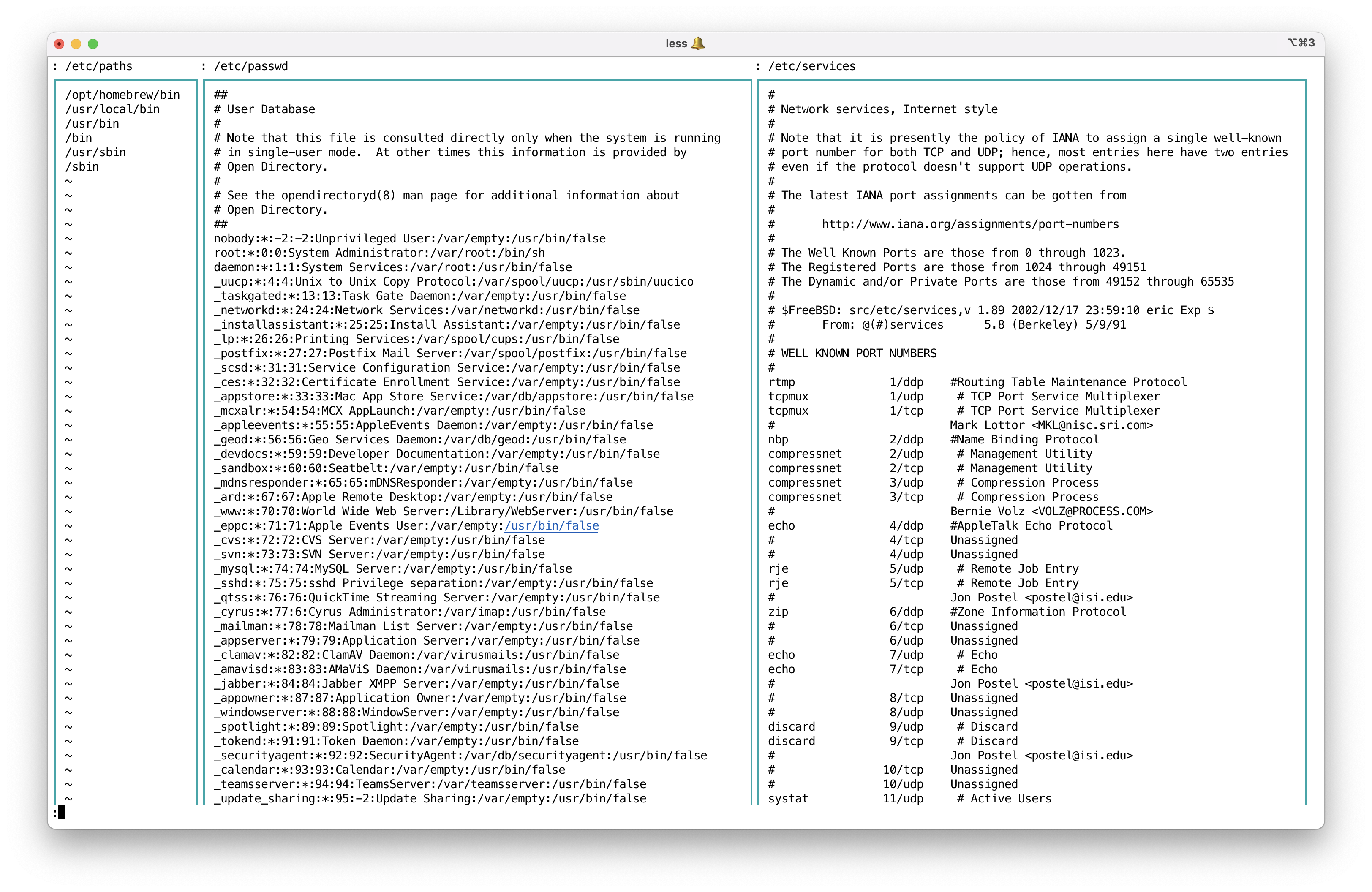
When multiple files are given as arguments, it enters parallel view mode and shows all files in parallel. This is convenient for viewing multiple files side-by-side.
COMPATIBLE OPTIONS
The column utility formats its input into multiple columns. Rows are filled before columns. Input is taken from file operands, or, by default, from the standard input.
-
-w#, -c#, --width=#, --output-width=#
Output is formatted for a display # columns wide. See "CALCULATION" section.
Accepts
-cfor compatibility, but-wis more popular. -
-s#, --separator=#
Specify a set of characters to be used to delimit columns for the
-toption. When used with the--regex-sepor-roption, it is treated as a regex rather than a character set. -
-t, --table
Determine the number of columns the input contains and create a table. Columns are delimited with whitespace, by default, or with the characters supplied using the
-soption. Useful for pretty-printing displays.Unlike the original column(1) command, empty fields are not ignored.
-
-l#, --table-columns-limit=#
Specify the maximum number of input columns. The last column will contain all remaining line data if the limit is smaller than the number of columns in the input data.
If the value is negative (default is -1), trailing empty fields are preserved. This is useful when processing tables with empty cells at the end of rows. Set to 0 to ignore trailing empty fields.
-
-x, --fillrows
Fill columns before filling rows.
-
-o#, --output-separator=#
When the
--tableor-toption is used, columns are joined by two space characters (' ') by default. This option changes the separator. -
-R#, --table-right=#
Right align text in the specified columns. Multiple columns are separated by commas. Only numbers are supported.
Parameters are parsed by the Getopt::EX::Numbers module, so you can specify a range of numbers, as in
-R2:5which is equivalent to-R2,3,4,5. Option-R:makes all fields right-aligned. -
--table-center=#
Center text in the specified columns. Column specification is the same as
--table-right. When the remaining space is odd, the extra space is placed on the right side (i.e., the text is shifted slightly to the left). -
--item-format=#
Apply sprintf-style format to each cell content. For example,
--item-format=' %s 'adds a space before and after each cell. This is applied before column width calculation, so the padding is included in the column width. -
--table-remove=#
Discard specified columns. Column numbers are 1-based, and negative numbers count from the end (
-0is the last column,-1is the second to last). Multiple columns are separated by commas. Ranges can be specified as1:3.For example,
--table-remove=1,-0removes the first and last columns. This is useful when processing pipe-delimited data with border characters where the leading and trailing delimiters create extra columns.Column numbers are parsed by the Getopt::EX::Numbers module.
-
--table-squeeze
Remove columns where all items are empty. This is useful when processing pipe-delimited data with border characters (e.g., Markdown tables
| col1 | col2 |, MySQL output), where the leading and trailing|create empty columns. -
--padding
Pad the last column to its full width. Normally the last column is not padded to avoid trailing whitespace, but this option forces all columns including the last to be padded to their calculated width.
EXTENDED OPTIONS
-
-P[#], --page[=#], --no-page
Enable page mode. Sets the following options:
  --height=# or 1-
  --linestyle=wrap
  --border
  --fillup
If an optional number is given, it is used as the page height unless the
--heightoption is also specified. Otherwise, the page height is set to the terminal height minus one.Use
--no-pageto disable page mode. -
-U#, --up=#, --2up .. --9up
Show in N-up format. Almost the same as
-Pbut does not set page height. This is convenient when you want multi-column output without page control. -
-D, --[no-]document
Document mode. Sets the following options:
  --widen
  --linebreak=all
  --linestyle=wrap
  --boundary=word
  --no-white-space
  --no-isolation
The following command displays DOCX text in 3-up format using App::optex::textconv.
optex -Mtextconv ansicolumn -DPC3 foo.docx | less -
-V, --[no-]parallel
Parallel view mode. Implicitly enabled when multiple files are specified. Use
--no-parallelto disable.Sets the following options and cancels all pagination behavior:
  --widen
  --linestyle=wrap
  --border
By default, all files are displayed in parallel. In other words, the number of panes is set to the number of files. You can use the
-Coption to specify the number of files displayed simultaneously.This option can be combined with the
-Doption to view document files.If you want to display multiple parts in a single stream in parallel, use the
--pagesoption. It will split the data by form feed characters and treat each part as a separate file. -
-H, --filename
-
--filename-format=format (DEFAULT:
: %s)Print a filename header before contents. Currently, this option is effective only in
--parallelmode. Filenames are truncated to fit within each pane width.This option is convenient to look over many small files at once.
ansicolumn -VHC1 *.txt | lessFilenames are printed in the format specified by the
--filename-formatoption. The default is: %s, which makes it easy to move to the next file using^:pattern search. -
-I, --[no-]ignore-empty
Ignore empty files. Default false.
-
-X#, --cell=#
Sets the display width of each file. This option is only valid in parallel view mode. For example, if you are displaying three files and want the first file to be displayed in 80 columns and the remaining files in 40 columns, specify it like this:
--cell 80,40,40This is the same as
--cell 80,40since the last value specified is repeated.
You can also specify values relative to the default width. For example, to display the first column 20 columns more and the remaining columns 10 columns less, use
--cell +20,-10To return to the default display width for the fourth and subsequent files, use
--cell +20,-10,-10,+0If
=is specified as the value, it is set to the width of the longest line in the file.-X=Then all specified files will be displayed with the width of the longest line they contain.
=may be followed by a maximum value.-X=80will set the cell width to the length of the longest line if it is less than 80, or to 80 if it is greater than 80.
<may be used instead of=.-X'<80'The correspondence between file and display width remains the same even when the number of columns to be displayed simultaneously is specified with the
-Coption. -
-C#, --pane=#
Output is formatted in the specified number of panes. Setting the number of panes implies the
--widenoption is enabled. See "CALCULATION" section. -
-S#, --pane-width=#, --pw=#
Specify the span of each pane. This includes border spaces. See "CALCULATION" section.
-
-W, --widen
Use the full width of the terminal. Each pane is expanded to fill the terminal width, unless
--pane-widthis specified. -
-p, --paragraph
Insert an empty line between every pair of successive non-empty lines.
-
-B, --border[=style] (DEFAULT:
box)Print border. Automatically enabled by the
--pageoption. If the optional style is given, it is used as the border style and takes precedence over the--border-styleoption. Use--border=noneto disable it.The border style is specified by the
--border-styleoption. -
--no-border
Shortcut for
--border=none. -
-F, --fillup[=
pane|page|none]Fill up the final pane or page with empty lines. The parameter is optional and defaults to 'pane'. Automatically set by the
--pageoption. Use--fillup=noneto explicitly disable it.Option
-Fis a shortcut for--fillup=pane. -
--fillup-str=string
Set the string used for filling up space. Default is empty.
Use
--fillup-str='~'to fill up the area after EOF with the~character, like vi(1) or more(1). -
--height=#
Set page height and enable page mode. See "CALCULATION" section.
-
--column-unit=#, --cu=# (DEFAULT: 8)
Each column is placed at a unit of 8 by default. This option changes the unit size.
-
--margin=#
Each column has at least a single character margin on the right side so that they are not placed back-to-back. This option specifies the margin width.
-
-A, --table-align
Align each field in the table output to the column unit. If this option is specified, the
--output-separatoroption is ignored. Implicitly enables the--tableoption. -
-T, -TT, --table-tabs
This option enables the
--tableand--table-alignoptions, and forces the use of tab characters between items. The tab width uses the value of--column-unit. The--table-rightand--table-centeroptions do not take effect.If the
-Toption is specified twice, the input separator is set to repeating tabs (same as-rs '\t+'). Thus, the-TToption can be used to reformat tab-aligned text. -
--linestyle=
none|truncate|wrap|wordwrap, --ls=...Set the style of treatment for longer lines. Default is
none.Option
--linestyle=wordwrapsets--linestyle=wrapand--boundary=wordat once. -
--boundary=
none|word|spaceSet text wrap boundary. If set to
wordorspace, text is not wrapped in the middle of an alphanumeric word or non-space sequence. The--documentoption sets this toword. See Text::ANSI::Fold for details. -
--linebreak=
none|all|runin|runout, --lb=...Set the linebreak mode.
-
--runin=#, --runout=#, --runlen=#
Set the number of runin/runout columns.
--runlensets both. The default is 2 for both.For Japanese text, only one character can be moved with the default value. A larger value allows more flexible arrangement but makes the text area shorter. The author uses the command with a custom
~/.ansicolumnrclike this:option default --runin=4 --runout=4 -
--[no-]pagebreak
Move to the next pane when a form feed character is found. Default is true.
-
-r, --regex-sep
Treat the separator option as a regex pattern. The following example specifies a space character just before
(as a separator.gem list | ansicolumn -trs ' (?=\()' -
--border-style=style, --bs=...
Set the border style. The default style is
box, which encloses each pane with box-drawing characters. The special stylerandomchooses a random style.Sample styles: none, space, vbar, heavy-vbar, fat-vbar, line, heavy-line, hline, heavy-hline, bottom-line, heavy-bottom-line, stick, heavy-stick, ascii-frame, ascii-box, c-box, box, heavy-box, fat-box, very-fat-box, dash-box, heavy-dash-box, fat-dash-box, round-box, inner-box, outer-box, frame, heavy-frame, fat-frame, very-fat-frame, ladder, heavy-ladder, dash-frame, heavy-dash-frame, fat-dash-frame, page-frame, heavy-page-frame, zebra-frame, checker-box, checker-frame, shadow, shin-shadow, shadow-box, shin-shadow-box, heavy-shadow-box, comb, heavy-comb, rake, heavy-rake, mesh, heavy-mesh, dumbbell, heavy-dumbbell, ribbon, heavy-ribbon, round-ribbon, double-ribbon, corner, crop, paren, etc.
These are experimental and subject to change, and this document is not always up-to-date. See `perldoc -m App::ansicolumn::Border` for actual data.
You can define your own style in a module or startup file. For example, put the following lines in your
$HOME/.ansicolumnrcfile.option default --border-style myheart __PERL__ App::ansicolumn::Border->add_style( myheart => { left => [ "\N{WHITE HEART SUIT} ", "\N{BLACK HEART SUIT} " ], center => [ "\N{WHITE HEART SUIT} ", "\N{BLACK HEART SUIT} " ], right => [ "\N{WHITE HEART SUIT}" , "\N{BLACK HEART SUIT}" ], }, ); -
--label position=string
Place a label string on the border of each pane. Requires
--borderto be active. The position specifies where on the border the label appears:NW ------ N ------ NE | | SW ------ S ------ SEPosition names are case-insensitive. This option can be specified multiple times to set labels at different positions.
--label NW=Title --label SE=%nThe following placeholders are expanded:
  %n    sequential pane number (1-based, across pages)
  %p    page number (1-based)
  %f    filename (basename only)
  %F    filename (path as given)
By default, left labels (
NW,SW) start just inside the fill region, and right labels (NE,SE) end at the right edge of it. Append@N to the string to set an explicit offset from the border corner.@0places the label directly on the corner character.--label NW='Title@0' # overwrite corner character --label SE='%n@3' # 3 columns from cornerExample with page mode:
seq 100 | ansicolumn -P --label SE=%n --2upUse
--cm BORDER_LABEL=color to colorize labels:seq 100 | ansicolumn -P --label SE=%n --cm BORDER_LABEL=RD --2up -
--page-label position=string
Place a label string on the border of the entire page. Unlike
--labelwhich places labels on individual panes, this option places a single label spanning the full-width border line. Positions, placeholders, and@N offset syntax are the same as--label.When both
--labeland--page-labelare specified, pane labels are applied first, then page labels are overlaid on top.seq 100 | ansicolumn -P --label NW=Title --page-label SE=%p --2up -
--colormap=spec, --cm=spec
Specify color mapping. This option can be used multiple times. The spec is in the form of
LABEL=COLOR. Available labels are:TEXT text color BORDER border color BORDER_LABEL border label colorFor example, to set the border color to red:
--cm=BORDER=RTo set the border label color:
--cm=BORDER_LABEL=RDSee Getopt::EX::Colormap for color specification details.
-
--[no-]ignore-space, --[no-]is
When the
-toption is used, leading spaces are ignored by default. Use the--no-ignore-spaceoption to disable this. -
--[no-]white-space
Allow white spaces at the top of each pane, or clean them up. Default true. Negated by the
--documentoption. -
--[no-]isolation
Allow a line to be isolated at the bottom of a pane when preceded by a blank line. Default true. If false, move it to the top of the next pane. This applies to both single-line paragraphs (such as titles) and the first line of multi-line paragraphs. Negated by the
--documentoption. -
--tabstop=# (DEFAULT: 8)
Set tab width.
-
--tabhead=#
-
--tabspace=#
Set the head and following space characters. Both are space by default. If the option value is longer than a single character, it is evaluated as a Unicode name.
-
--tabstyle, --ts
-
--tabstyle=style, --ts=...
-
--tabstyle=head-style,space-style --ts=...
Set how tabs are expanded. Select
symbolorshadefor example. If two style names are combined, likesquat-arrow,middle-dot, usesquat-arrowfor tabhead andmiddle-dotfor tabspace.Shows the available style list if called without a parameter. Styles are defined in the Text::ANSI::Fold library.
-
--ambiguous=
wide|narrow(DEFAULT:narrow)Specifies how to treat Unicode ambiguous width characters. Takes a value of
narroworwide. Default isnarrow. -
--pages
Split file content by formfeed characters, and treat each part as an individual file. Use with the
--paralleloption.
DEFAULT ALIASES
The following options are defined in App::ansicolumn::default.pm.
-
--board-color fg-color bg-color
This option is defined as follows:
  option --board-color \
         --bs=inner-box \
         --cm=BORDER=$<2>,TEXT=$<shift>/$<shift>
The resulting text is displayed in an fg-color font on an bg-color panel.
-
--white-board
-
--black-board
-
--green-board
-
--slate-board
Use the
--board-coloroption to display text on white, black, green, or dark slate panels.
CALCULATION
For the --height, --width, --pane, --up and --pane-width
options, besides giving numeric digits, you can calculate the number
using the terminal size. If the expression contains a non-digit
character, it is evaluated as an RPN (Reverse Polish Notation)
expression with the terminal size pushed on the stack. The initial
value for --height is the terminal height, and the terminal width
for others.
OPTION              VALUE
=================   =========================
--height 1-         height - 1
--height 2/         height / 2
--height 1-2/       (height - 1) / 2
--height dup2%-2/   (height - height % 2) / 2
Space and comma characters are ignored in the expression. So 1-2/
and 1 - 2 / and 1,-,2,/ are all the same. See perldoc Math::RPN for details.
The next example selects the number of panes by dividing the terminal width by 85:
ansicolumn --pane 85/
If you need to handle the case where the terminal width is less than 85:
ansicolumn --pane 85/,DUP,1,GE,EXCH,1,IF
This RPN means $width/85 >= 1 ? $width/85 : 1.
STARTUP
This command is implemented with the Getopt::EX module, so the
~/.ansicolumnrc
file is read at startup. If you always want to use
--no-white-space, put this line in your ~/.ansicolumnrc:
option default --no-white-space
The command can also be extended with custom modules using the -M
option. See perldoc Getopt::EX for details.
INSTALL
CPANMINUS
$ cpanm App::ansicolumn
To get the latest code, use this:
$ cpanm https://github.com/tecolicom/App-ansicolumn.git
EXAMPLES
https://github.com/tecolicom/App-ansicolumn/tree/master/images
SEE ALSO
https://github.com/tecolicom/ANSI-Tools
column(1), https://man7.org/linux/man-pages/man1/column.1.html
App::ansicolumn, https://github.com/tecolicom/App-ansicolumn
Text::ANSI::Printf, https://github.com/tecolicom/Text-ANSI-Printf
Articles (in Japanese)
- https://qiita.com/kaz-utashiro/items/345cd9abcd8e1f0d81a2
- https://qiita.com/kaz-utashiro/items/1cdd71d44eb11f3fb36e
- https://qiita.com/kaz-utashiro/items/32e1c2d4c42a80c42422
- https://qiita.com/kaz-utashiro/items/a347628da09638e633ed
RELATED WORKS
https://github.com/LukeSavefrogs/column_ansi
AUTHOR
Kazumasa Utashiro
LICENSE
Copyright © 2020-2026 Kazumasa Utashiro.
This library is free software; you can redistribute it and/or modify it under the same terms as Perl itself.