

NAME
ansiecho - Colored echo command using ANSI terminal sequence
SYNOPSIS
ansiecho [ options ] args ...
Command Options:
-n                 Do not print the trailing newline
-j --join          Do not print space between arguments
-e --escape        Enable backslash escape notation
   --rgb24         Produce 24bit color sequence
   --separate=s    Set argument separator
-h --help          Print this message
-v --version       Print version
Prefix Options:
-s/-S SPEC         Produce ANSI sequence(s)
-c/-C SPEC ARG     Colorize next argument(s)
-u/-U NAME         Convert to named Unicode char(s)
-f/-F FORMAT ARGS  Format arguments
   -E              Terminate -C -S -F effect
-i/-a SPEC         Insert/Append ANSI sequence
-x[u] STRING       Set STRING as a separator
Example:
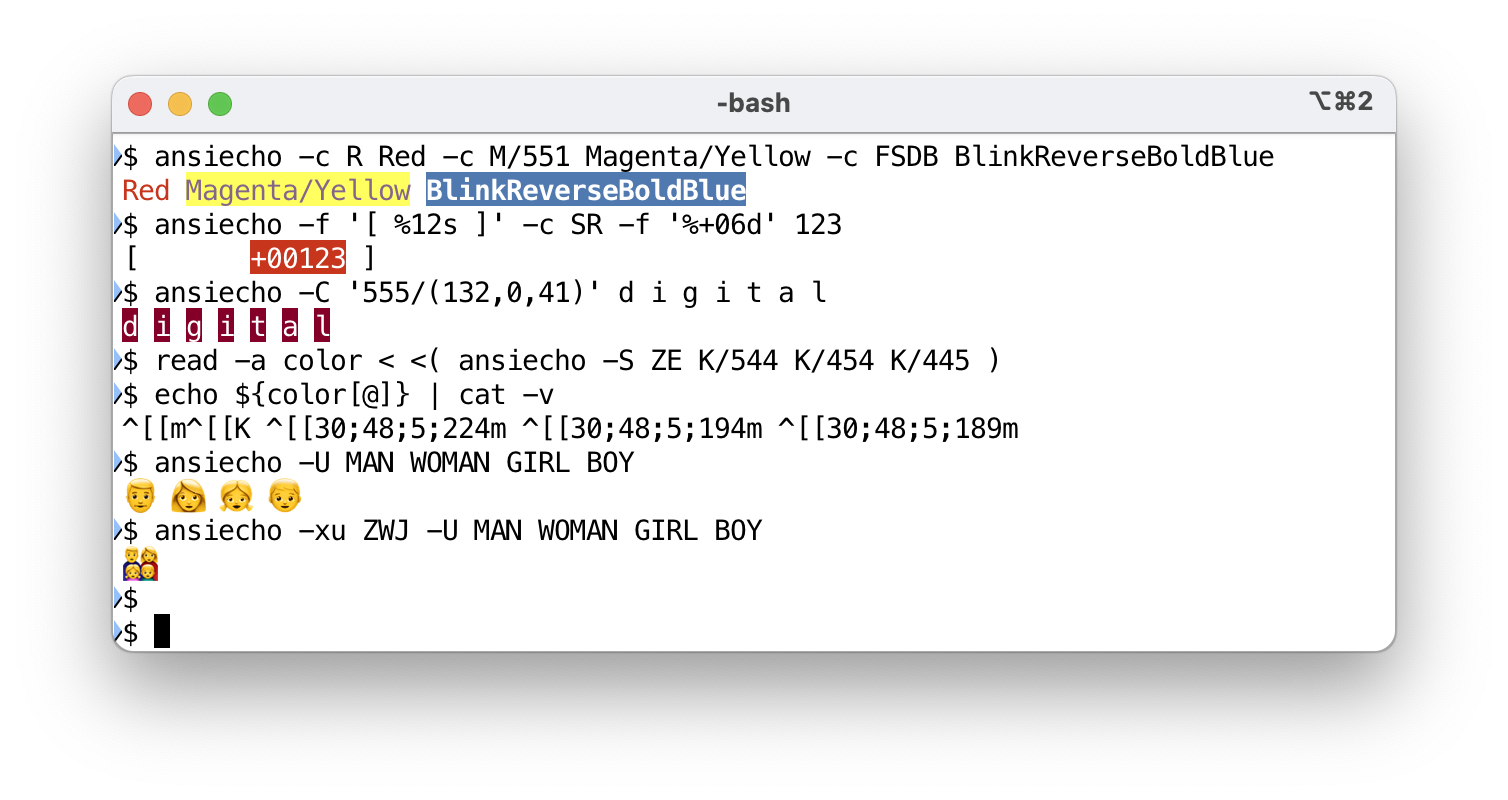
ansiecho -c R Red -c M/551 Magenta/Yellow -c FSDB BlinkReverseBoldBlue
         ┗color━┛ ┗color━━━━━━━━━━━━━━━━┛ ┗color━━━━━━━━━━━━━━━━━━━━━┛

ansiecho -f '[ %12s ]' -c SR -f '%+06d' 123
         ┃             ┃     ┗format━━━━━━┛
         ┃             ┗color━━━━━━━━━━━━━┛
         ┗format━━━━━━━━━━━━━━━━━━━━━━━━━━┛

ansiecho -C '555/(132,0,41)' d i g i t a l
         ┗color━━━━━━━━━━━━━━━━━━━━━━━━━━┛

read -a color < <( ansiecho -S ZE K/544 K/454 K/445 )
                            ┗sequence━━━━━━━━━━━━━┛

ansiecho  -xu ZWJ  -U MAN WOMAN GIRL BOY
         ┗combine┛ ┗unicode━━━━━━━━━━━━┛
VERSION
Version 1.10
DESCRIPTION
ECHO
ansiecho print arguments with ANSI terminal escape sequence according to a given color and format specification.
In a simple case, ansiecho behave exactly same as echo command.
ansiecho a b c
Like echo command, option -n disables to print newline at the
end. Option -j (or --join) removes white space between
arguments.
Arguments can include backslash escaped characters, such as \n for
a new line. There is an bash-echo-compatible -e option, but it is
enabled by default. You can include control and named Unicode
characters using this.
ansiecho '\t\N{ALARM CLOCK}\a'
See "STRING LITERAL" section for detail.
COLOR and EFFECT
You can specify color of each argument by preceding with -c option:
ansiecho -c R foo -c GI bar -c BD baz
This command print strings foo, bar and baz according to the
color spec of R (Red), GI (Green Italic) and BD (Blue
Bold) respectively.
Foreground and background color is specified in the form of
fore/back.
ansiecho -c B/M 'Blue on Magenta' -c '<pink>/<salmon>' fish
Color can be described by 8+8 standard colors, 24 gray scales, 6x6x6 216 colors, RGB values or color names, with special effects such as I (Italic), D (Double-struck; Bold), S (Stand-out; Reverse Video) and such. More information is described in "COLOR SPEC" section.
FORMAT
Format string can be specified by -f option, and it behaves like a
printf(1) command.
ansiecho -f '[ %5s : %5s : %5s ]' -c R RED -c G GREEN -c B BLUE
As in above example, colored text can be given as an argument for
-f option, and the string width is calculated as you expect,
including multibyte Unicode characters.
Formatted result ends up to a single argument, and can be a subject of other operation. In the next example, numbers are formatted, colored, and given to another format.
ansiecho -f '\N{ALARM CLOCK} %s' -c KF/544 -f ' %02d:%02d:%02d ' 1 2 3
Formatting is done by Perl sprintf function. See
"sprintf" in perlfunc for detail.
REORDERED ARGUMENTS
Position specifiers may also be used in the format string.
Next command produces 34 12.
ansiecho -f '%2$d %1$d' 12 34
Oddly enough
ansiecho -f '%2$d %d %d' 12 34
prints 34 12 34, but don't be surprised. When using position
specifiers, it is safe to use them for all arguments.
If you are using perl v5.24 or later, you can also use reordered precision arguments.
ANSI SEQUENCE
To get desired ANSI sequence, use -s option. Next example produce
ANSI terminal sequence to indicate deeppink color on lightyellow
background.
ansiecho -n -s '<deeppink>/<lightyellow>'
You will get the next result for the 256-color terminal:
^[[38;5;198;48;5;230m
and the next for the full-color terminal:
^[[38;2;255;20;147;48;2;255;255;224m
Using -S option, you can set multiple ANSI sequences at once in a
shell script. Next bash code will initialize multiple variables
with the sequence for given color specs.
read ZE C M Y < <( ansiecho -S ZE K/355 K/535 K/553 )
Or you can set array variable.
read -a color < <( ansiecho -S ZE K/533 K/353 K/335 )
Then use this variable like:
echo "${C} Cyan     ${ZE}"
echo "${M} Mafenata ${ZE}"
echo "${Y} Yellow   ${ZE}"

reset=${color[0]}
echo "${color[1]} Red   ${reset}"
echo "${color[2]} Green ${reset}"
echo "${color[3]} Blue  ${reset}"
COMMAND OPTIONS
-
-n
Do not print newline at the end.
-
-e, --[no-]escape
Enable interpretation of backslash escapes in the normal string argument. This option is enabled by default, unlike bash built-in echo(1) command. Use
--no-escapeto disable it. -
-j, --join
Do not print space between arguments. This is a short-cut for
--separate ''. -
--separate string
Set separator string between arguments.
-
--[no-]rgb24
Produce 24bit full-color sequence for 12bit/24bit specified colors. They are converted to 216 colors by default.
-
-h, --help
Print help.
-
-v, --version
Print version.
PREFIX OPTIONS
-
-s spec
Print raw ANSI sequence for given spec.
-
-c spec string
Print string in a color given by spec.
-
-u NAME
Print Unicode character described by NAME. Specifically,
NAMEis converted to\N{NAME}. However, if theNAMElooks like a hexadecimal number, it is converted to\N{U+NAME}. -
-f format args ...
Print args in a given format. Backslash escape is always interpreted in the format string.
The result of
-fsequence ends up to a single argument, and can be a subject of other-cor-foption.Number of arguments are calculated from the number of
%characters in the format string except%%. Variable width and precision parameter*can be used like%*sor%*.*s.Format string also can be made by
-foption. Next commands produce same output, but second one looks better.ansiecho -f -f '%%%ds' 16 hello ansiecho -f '%*s' 16 hello -
-x string
-
-xu name
Sets the argument separator to string. Unlike the Β<--separate> option, it can be used in the middle of processing arguments, and the string will be inserted before each subsequent argument.
When the -xu option is used, the given string is interpreted as a unicode name. The following command uses unicode's
ZERO WIDTH JOINERto generate the characters that make up a family of four.ansiecho -xu ZWJ -U MAN WOMAN GIRL BOY -
-S spec
If option
-Sfound, all following arguments are considered as a color spec given to-soption, until option-Eis found.Next two commands are equivalent.
ansiecho -s ZE -s K/544 -s K/454 -s K/445 ansiecho -S ZE K/544 K/454 K/445 -
-C spec
Option
-Cset permanent color which is applied to all following arguments until option-Efound.Next command prints only a word
Yellowin yellow, but second one printYellow,Brick, andRoadin yellow.ansiecho Follow the -cYS Yellow Brick Road ansiecho Follow the -CYS Yellow Brick RoadYou may want to color the phrase instead.
ansiecho Follow the -cYS "Yellow Brick Road"Option
-Ccan be used multiple times mixed with-Foption. See below. -
-U
All subsequent arguments are interpreted as unicode names or code points, until option
-Eis found.Option
-xucan be used to combine emoji and such by using the UnicodeZERO WIDTH JOINER(ZWJin short) character.ansiecho -xu ZWJ -U MAN WOMAN GIRL BOY -
-F format
As with the
-Coption,-Fdefines a format which is applied to all arguments until option-Eis found. Format string have to include single%splaceholder.ansiecho Follow the -CYS -F ' %s ' Yellow Brick RoadOption
-Cand-Fcan be used repeatedly, and they will take effect in the reverse order of their appearance.Next command show argument
Ain underline/bold with blinking red arrow.ansiecho -cRF -f'->%s' -cUD A B CNext one does the same thing for all arguments.
ansiecho -CRF -F'->%s' -CUD A B C ↑ ↑ ↑ -
-E
Terminates
-S,-C,-Uand-Feffects. -
-i spec
-
-a spec
Add raw ANSI sequence given by spec. Option
-iinsert the sequence before the next argument, while-aappend to the final argument.Next two commands are equivalent.
  ansiecho -c R Red

  ansiecho -i R Red -a ZE
Color spec
ZEproduces RESET and ERASE LINE sequence.Because
-iand-adoes not produce RESET sequence, you can use them to accumulate the effects.ansiecho -i R R -i U RU -i I RUI -i S RUIS -i F RUISF -a Z
STRING LITERAL
This is a backslash escape samples described in "Quote and Quote-like Operators" in perlop. Non-alphabetical character after backslash is always correspond to the character itself.
Sequence     Description
\t           tab               (HT, TAB)
\n           newline           (NL)
\r           return            (CR)
\f           form feed         (FF)
\b           backspace         (BS)
\a           alarm (bell)      (BEL)
\e           escape            (ESC)
\x{263A}     hex char          (example: SMILEY)
\x1b         restricted range hex char (example: ESC)
\N{name}     named Unicode character or character sequence
\N{U+263D}   Unicode character (example: FIRST QUARTER MOON)
\c[          control char      (example: chr(27))
\o{23072}    octal char        (example: SMILEY)
\033         restricted range octal char  (example: ESC)
COLOR SPEC
This is a brief summary. Read "COLOR SPEC" in Term::ANSIColor::Concise for complete description. Try next command to see 256 color table.
perl -MTerm::ANSIColor::Concise::Table=:all -E colortable
Color specification is a combination of single uppercase character representing 8 colors, and alternative (usually brighter) colors in lowercase :
R  r  Red
G  g  Green
B  b  Blue
C  c  Cyan
M  m  Magenta
Y  y  Yellow
K  k  Black
W  w  White
or RGB values and 24 grey levels if using ANSI 256 or full color terminal :
(255,255,255)      : 24bit decimal RGB colors
#000000 .. #FFFFFF : 24bit hex RGB colors
#000    .. #FFF    : 12bit hex RGB 4096 colors
000 .. 555         : 6x6x6 RGB 216 colors
L00 .. L25         : Black (L00), 24 grey levels, White (L25)
or color names enclosed by angle bracket :
<red> <blue> <green> <cyan> <magenta> <yellow>
<aliceblue> <honeydew> <hotpink> <moccasin>
<medium_aqua_marine>
with other special effects :
N    None
Z  0 Zero (reset)
D  1 Double strike (boldface)
P  2 Pale (dark)
I  3 Italic
U  4 Underline
F  5 Flash (blink: slow)
Q  6 Quick (blink: rapid)
S  7 Stand out (reverse video)
H  8 Hide (concealed)
X  9 Cross out

E    Erase Line

;    No effect
/    Toggle foreground/background
^    Reset to foreground
~    Cancel following effect
Samples:
RGB  6x6x6    12bit      24bit           color name
===  =======  =========  =============  ==================
B    005      #00F       (0,0,255)      <blue>
 /M     /505      /#F0F   /(255,0,255)  /<magenta>
K/W  000/555  #000/#FFF  000000/FFFFFF  <black>/<white>
R/G  500/050  #F00/#0F0  FF0000/00FF00  <red>/<green>
W/w  L03/L20  #333/#ccc  303030/c6c6c6  <dimgrey>/<lightgrey>
256/24BIT COLORS
12bit/24bit colors are converted to 216 colors because most terminal
can not display them. On some terminals which set the environment
variable COLORTERM as truecolor (e.g. iTerm), 24bit color mode
is automatically enabled. Otherwise, use --rgb24 option or set
GETOPTEX_RGB24 environment variable to produce full-color sequence.
INSTALL
CPANMINUS
From CPAN archive:
cpanm App::ansiecho
From GIT repository:
cpanm https://github.com/kaz-utashiro/App-ansiecho.git
SEE ALSO
"Quote and Quote-like Operators" in perlop
https://en.wikipedia.org/wiki/ANSI_escape_code
https://en.wikipedia.org/wiki/X11_color_names
App::ansifold, App::ansicolumn
AUTHOR
Kazumasa Utashiro
LICENSE
Copyright © 2021-2025 Kazumasa Utashiro.
This library is free software; you can redistribute it and/or modify it under the same terms as Perl itself.