NAME
LibUI - Simple, Portable, Native GUI Library
SYNOPSIS
use LibUI;

sub onClosing ( $window, $data ) {
    uiQuit();
    return 1;
}

my $err = uiInit( { Size => 0 } );
if ( defined $err ) {
    printf "Error initializing libui-ng: %s\n", $err;
    uiFreeInitError($err);
    return 1;
}

# Create a new window
my $w = uiNewWindow( "Hello, World!", 320, 120, 0 );
uiWindowOnClosing( $w, \&onClosing, undef );
uiWindowSetMargined( $w, 1 );

#
my $l = uiNewLabel("Hello, World!");
uiWindowSetChild( $w, $l );

#
uiControlShow($w);
uiMain();
uiUninit();
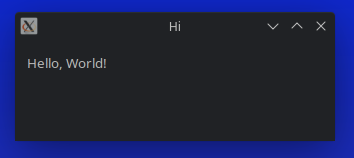
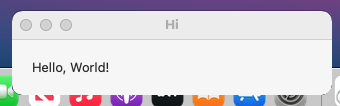
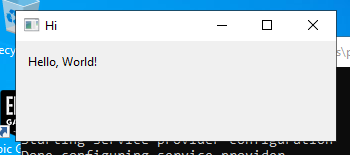
Screenshots
Linux
MacOS
Windows
DESCRIPTION
LibUI is a simple and portable (but not inflexible) GUI library in C that uses the native GUI technologies of each platform it supports.
Functions
LibUI, keeping with the ethos of simplicity, is functional.
You may import any of them by name or with their given import tags.
Default Functions
These are basic functions to get the UI started and may be imported with the :default tag.
uiInit( ... )
my $err = uiInit({ Size => 0 });Ask LibUI to do all the platform specific work to get up and running. If LibUI fails to initialize itself, this will return a string.
You must call this before creating widgets.
uiUninit( )
uiUninit( );Ask LibUI to break everything down before quitting.
uiMain( )
uiMain( );Let LibUI's event loop run until interrupted.
uiMainSteps( )
uiMainSteps( );You may call this instead of uiMain( ) if you want to run the main loop yourself.
uiMainStep( ... )
my $ok = uiMainStep( 1 );Runs one iteration of the main loop.
It takes a single boolean argument indicating whether to wait for an even to occur or not.
It returns true if an event was processed (or if no even is available if you don't wish to wait) and false if the event loop was told to stop (for instance, uiQuit() was called).
uiQuit( )
uiQuit( );Signals LibUI that you are ready to quit.
uiQueueMain( )
uiQueueMain( sub { }, $values );Trigger a callback on the main thread from any other thread. This is likely unstable. It's for sure untested as long as perl threads are garbage.
uiTimer( ... )
uiTimer( 1000, sub { die 'do not do this here' }, undef);

uiTime(
    1000,
    sub {
        my $data = shift;
        return 1 unless ++$data->{ticks} == 5;
        0;
    },
    { ticks => 0 }
);
Expected parameters include:
$time-
Time in milliseconds.
$func-
Callback that will be triggered when
$timeruns out.Return a true value from your
$functo make your timer repeating. $data-
Any userdata you feel like passing. It'll be handed off to your function.
uiOnShouldQuit( ... )
uiOnShouldQuit( sub {}, undef );Callback triggered when the GUI is prepared to quit.
Expected parameters include:
uiFreeText( ... )
uiFreeText( $title );Free a string with LibUI.
Control Functions
These functions may be used by all subclasses of the base control.
Import them with the :control tag.
uiControlDestroy( ... )
uiControlDestroy( $button );Dispose and free all allocated resources related to a control.
uiControlHandle( ... )
my $ptr = uiControlHandle( $button );Returns the control's OS-level handle.
uiControlParent( ... )
my $window = uiControlParent( $button );Returns the parent control.
uiControlSetParent( ... )
my $ptr = uiControlSetParent( $button, $window );Sets the control's parent.
uiControlToplevel( ... )
my $top = uiControlToplevel( $window );Returns whether or not the control is a top level control.
uiControlVisible( ... )
my $visible = uiControlVisible( $label );Returns whether or not the control is visible.
uiControlShow( ... )
uiControlShow( $window );Shows the control.
uiControlHide( ... )
uiControlHide( $label );Hides the control.
Hidden controls do not take up space within the layout.
uiControlEnabled( ... )
my $enabled = uiControlEnabled( $label );Returns whether or not the control is enabled.
uiControlEnable( ... )
uiControlEnable( $label );Enables the control.
uiControlDisable( ... )
uiControlDisable( $label );Disables the control.
uiAllocControl( ... )
uiAllocControl( $label );Allocates a new custom uiControl.
Expected parameters include:
This function is undocumented upstream.
uiFreeControl( ... )
uiFreeControl( $button );Frees a control.
uiControlVerifySetParent( ... )
uiControlVerifySetParent( $button, $window );Makes sure the control's parent can be set to parent.
uiControlEnabledToUser( ... )
my $enabled = uiControlEnabledToUser( $label );Returns whether or not the control can be interacted with by the user.
Checks if the control and all its parents are enabled to make sure it can be interacted with by the user.
Window Functions
A window control that represents a top-level window.
A window contains exactly one child control that occupies the entire window and cannot be a child of another control.
These functions may be imported with the :window tag.
uiWindowTitle( ... )
my $title = uiWindowTitle( $window );Returns the window title.
uiWindowSetTitle( ... )
uiWindowSetTitle( $window, 'Petris 1.0' );Sets the window title.
uiWindowPosition( ... )
uiWindowPosition( $window, my $x, my $y );Gets the window position.
Coordinates are measured from the top left corner of the screen. This method may return inaccurate or dummy values on X11.
uiWindowSetPosition( ... )
uiWindowSetPosition( $window, 300, 50 );Moves the window to the specified position.
Coordinates are measured from the top left corner of the screen. This method is merely a hint and may be ignored on X11.
uiWindowOnPositionChanged( ... )
uiWindowOnPositionChanged(
    $window,
    sub {
        my ($w, $data) = @_;
        uiWindowPosition( $w, my $x, my $y );
        warn sprintf 'x: %d, y: %d', $x, $y;
    },
    undef
);
Registers a callback for when the window moved.
Expected parameters include:
$window-
The window to bind.
$code_ref-
Code reference that should expect a reference back to the instance that triggered the callback and user data registered with the sender instance.
$user_data-
Whatever you feel like passing along.
The callback is not triggered when calling uiWindowSetPosition( ... ).
uiWindowContentSize( ... )
uiWindowContentSize( $window, my $w, my $h );Gets the window content size.
The content size does NOT include window decorations like menus or title bars.
uiWindowSetContentSize( ... )
uiWindowSetContentSize( $window, 500, 100 );Sets the window content size.
The content size does NOT include window decorations like menus or title bars.
This method is merely a hint and may be ignored by the system.
uiWindowFullscreen( ... )
my $full = uiWindowFullscreen( $window );Returns whether or not the window is full screen.
uiWindowSetFullscreen( ... )
uiWindowSetFullscreen( $window, 1 );Sets whether or not the window is full screen.
This method is merely a hint and may be ignored by the system.
uiWindowOnContentSizeChanged( ... )
uiWindowOnContentSizeChanged(
    $w,
    sub {
        uiWindowContentSize( $w, my $w, my $h );
        say "w: $w, h: $h";
    },
    undef
);
Registers a callback for when the window content size is changed.
Expected parameters include:
$window-
The window to bind.
$code_ref-
Code reference that should expect a reference back to the instance that triggered the callback and user data registered with the sender instance.
$user_data-
Whatever you feel like passing along.
The callback is not triggered when calling uiWindowSetContentSize( ... ).
uiWindowOnClosing( ... )
uiWindowOnClosing(
    $w,
    sub {
        say 'Goodbye...';
        return 1;
    },
    undef
);
Registers a callback for when the window is to be closed.
Expected parameters include:
$window-
The window to bind.
$code_ref-
Code reference that should expect a reference back to the instance that triggered the callback and user data registered with the sender instance.
Return a true value to destroy the window. Return an untrue value to abort closing and keep the window alive and visible.
$user_data-
Whatever you feel like passing along.
The callback is not triggered when calling uiWindowSetContentSize( ... ).
uiWindowOnFocusChanged( ... )
uiWindowOnFocusChanged(
    $w,
    sub {
        say LibUI::uiWindowFocused($w) ? 'in focus' : 'lost focus';
    },
    undef
);
Registers a callback for when the window focus changes.
Expected parameters include:
$window-
The window to bind.
$code_ref-
Code reference that should expect a reference back to the instance that triggered the callback and user data registered with the sender instance.
$user_data-
Whatever you feel like passing along.
uiWindowFocused( ... )
my $in_focus = uiWindowFocused( $w );Returns whether or not the window is focused.
uiWindowBorderless( ... )
my $no_border = uiWindowBorderless( $w );Returns whether or not the window is borderless.
uiWindowSetBorderless( ... )
uiWindowSetBorderless( $w, 1 );Sets whether or not the window is borderless.
This method is merely a hint and may be ignored by the system.
uiWindowSetChild( ... )
uiWindowSetChild( $w, $box );Sets the window's child.
uiWindowMargined( ... )
my $comfortable = uiWindowMargined( $w );Returns whether or not the window has a margin.
uiWindowSetMargined( ... )
uiWindowSetMargined( $w, 1 );Sets whether or not the window has a margin.
The margin size is determined by the OS defaults.
uiWindowResizeable( ... )
my $resizable = uiWindowResizeable( $w );Returns whether or not the window is user resizable.
uiWindowSetResizeable( ... )
uiWindowSetResizeable( $w, 1 );Sets whether or not the window is user resizable.
The margin size is determined by the OS defaults.
uiNewWindow( ... )
Creates a new uiWindow.
Expected parameters include:
$title-
Window title.
$width-
Window width in pixels.
$height-
Window height in pixels.
$hasMenubar-
Whether or not the window should display a menu bar.
Button Functions
These functions create and wrap a control that visually represents a button to be clicked by the user to trigger an action.
Import these functions with the :button tag.
uiButtonText( ... )
my $label = uiButtonText( $button );Returns the button label text.
uiButtonSetText( ... )
uiButtonSetText( $button, 'Click again' );Sets the button label text.
uiButtonOnClicked( ... )
uiButtonOnClicked( $button, sub { my ($btn, data) = @_; }, undef );Registers a callback for when the button is clicked.
uiNewButton( ... )
my $button = uiNewButton( 'Click me' );Creates a new button.
Expected parameters include:
Box Functions
These functions wrap a boxlike container that holds a group of controls.
The contained controls are arranged to be displayed either horizontally or vertically next to each other.
You may import these functions with the :box tag.
uiBoxAppend( ... )
uiBoxAppend( $box, $child, 1 );Appends a control to the box.
Stretchy items expand to use the remaining space within the box. In the case of multiple stretchy items the space is shared equally.
Expected parameters include:
uiBoxNumChildren( ... )
my $kids = uiBoxNumChildren( $box );Returns the number of controls contained within the box.
uiBoxDelete( ... )
uiBoxDelete( $box, 3 );Removes the control at a given index from the box.
uiBoxPadded( ... )
my $comfortable = uiBoxPadded( $box );Returns whether or not controls within the box are padded.
Padding is defined as space between individual controls.
uiBoxSetPadded( ... )
uiBoxSetPadded( $box, 1 );Sets whether or not controls within the box are padded.
Padding is defined as space between individual controls. The padding size is determined by the OS defaults.
uiNewHorizontalBox( )
uiNewHorizontalBox( );Creates a new horizontal box.
Controls within the box are placed next to each other horizontally.
uiNewVerticalBox( )
my $vbox = uiNewVerticalBox( );Creates a new vertical box.
Controls within the box are placed next to each other vertically.
Checkbox Functions
The functions wrap a control with a user checkable box accompanied by a text label.
You may import them with the :checkbox tag.
uiCheckboxText( ... )
my $label = uiCheckboxText( $chk );Returns the checkbox label text.
uiCheckboxSetText( ... )
uiCheckboxSetText( $chk, 'Show Small Files' );Sets the checkbox label text.
uiCheckboxOnToggled( ... )
uiCheckboxOnToggled( $chk, sub { my ($check, $data) = @_; }, undef );Registers a callback for when the checkbox is toggled by the user.
The callback is not triggered when calling uiCheckboxSetChecked( ... ).
uiCheckboxChecked( ... )
my $on = uiCheckboxChecked( $chk );Returns whether or the checkbox is checked.
uiCheckboxSetChecked( ... )
uiCheckboxSetChecked( $chk, 1 );Sets whether or not the checkbox is checked.
uiNewCheckbox( ... )
my $chk = uiNewCheckbox( 'Save automatically' );Creates a new checkbox.
Entry Functions
An entry is a control with a single line text entry field.
You may import these functions with the :entry tag.
uiEntryText( ... )
my $text = uiEntryText( $field );Returns the entry's text.
uiEntrySetText( ... )
uiEntrySetText( $field, 'Once upon a time ' );Sets the entry's text.
uiEntryOnChanged( ... )
uiEntryOnChanged( $field, sub { my ($txt, $data) = @_; }, undef );Registers a callback for when the user changes the entry's text.
The callback is not triggered when calling uiEntrySetText( ... ).
uiEntryReadOnly( ... )
my $ro = uiEntryReadOnly( $field );Returns whether or not the entry's text can be changed. A true value if readonly, otherwise false.
uiEntrySetReadOnly( ... )
uiEntrySetReadOnly( $field, 1 );Sets whether or not the entry's text is read only.
uiNewEntry( )
my $field = uiNewEntry( );Creates a new entry.
uiNewPasswordEntry( ... )
my $pass = uiNewPasswordEntry( );Creates a new entry suitable for sensitive inputs like passwords.
The entered text is NOT readable by the user but masked as *******.
uiNewSearchEntry( ... )
my $search = uiNewSearchEntry();Creates a new entry suitable for search.
Some systems will deliberately delay the uiEntryOnChanged( ... ) callback for a more natural feel.
Label Functions
A label is a control that displays non-interactive text.
You may import these functions with the :label tag.
uiLabelText( ... )
my $text = uiLabelText( $label );Returns the label text.
uiLabelSetText( ... )
uiLabelSetText( $label, 'Status: Okay' );Sets the label text.
uiNewLabel( ... )
my $label = uiNewLabel( 'Status: Init' );Creates a new label.
Tab Functions
A tab represents a multi-page control interface that displays one page at a time.
Each page/tab has an associated label that can be selected to switch between pages/tabs.
uiTabAppend( ... )
uiTabAppend( $container, 'Home', $box_1 );Appends a control in form of a page/tab with label.
uiTabInsertAt( ... )
uiTabInsertAt( $container, 'Advanced', 5, $box_2 );Inserts a control in as a page/tab with label at $index.
uiTabDelete( ... )
uiTabDelete( $container, 5 );Removes the control at $index.
uiTabNumPages( ... )
my $tabs = uiTabNumPages( $container );Returns the number of pages contained.
uiTabMargined( ... )
my $comfortable = uiTabMargined( $container, 3 );Returns whether or not the page/tab at $index has a margin.
uiTabSetMargined( ... )
uiTabSetMargined( $container, 3, 0 ); # where 3 is the inded and 0 is falseSets whether or not the page/tab at $index has a margin.
The margin size is determined by the OS defaults.
uiNewTab( )
my $container = uiNewTab( );Creates a new tab container.
Group Functions
A group is a control container that adds a label to the contained child control.
This control is a great way of grouping related controls in combination with uiBox. A visual box will or will not be drawn around the child control dependent on the underlying OS implementation.
You may import these functions with the :group tag.
uiGroupTitle( ... )
my $title = uiGroupTitle( $group );Returns the group title.
uiGroupSetTitle( ... )
uiGroupSetTitle( $group, 'Subscriptions' );Sets the group title.
uiGroupSetChild( ... )
uiGroupSetChild( $group $box );Sets the group's child.
uiGroupMargined( ... )
my $comfortable = uiGroupMargined( $group );Returns whether or not the group has a margin.
uiGroupSetMargined( ... )
uiGroupSetMargined( $group, 1 );Sets whether or not the group has a margin.
The margin size is determined by the OS defaults.
uiNewGroup( ... )
my $group = uiNewGroup( 'Introduction' );Creates a new group.
Spinbox Functions
A spinbox is a control to display and modify integer values via a text field or +/- buttons.
This is a convenient control for having the user enter integer values. Values are guaranteed to be within the specified range.
The + button increases the held value by 1.
The - button decreased the held value by 1.
Entering a value out of range will clamp to the nearest value in range.
You may import these functions with the :spinbox tag.
uiSpinboxValue( ... )
my $value = uiSpinboxValue( $spinner );Returns the spinbox value.
uiSpinboxSetValue( ... )
uiSpinboxSetValue( $spinner, 30 );Sets the spinbox value.
Setting a value out of range will clamp to the nearest value in range.
uiSpinboxOnChanged( ... )
uiSpinboxOnChanged( $spinner, sub { my ($spin, $user_data) = @_; }, undef );Registers a callback for when the spinbox value is changed by the user.
The callback is not triggered when calling uiSpinboxSetValue( ... ).
uiNewSpinbox( ... )
my $spinner = uiNewSpinbox( 1, 100 );Creates a new spinbox.
The initial spinbox value equals the minimum value.
In the current implementation upstream, $min and $max are swapped if $min is greater than $max. This may change in the future though.
Slider Functions
A slider is a control to display and modify integer values via a user draggable slider.
Values are guaranteed to be within the specified range.
Sliders by default display a tool tip showing the current value when being dragged.
Sliders are horizontal only.
You may import these functions with the :slider tag.
uiSliderValue( ... )
my $value = uiSliderValue( $slider );Returns the slider value.
uiSliderSetValue( ... )
uiSliderSetValue( $slider, 59 );Sets the slider value.
uiSliderHasToolTip( ... )
my $enabled = uiSliderHasToolTip( $slider );Returns whether or not the slider has a tool tip.
uiSliderSetHasToolTip( ... )
uiSliderSetHasToolTip( $slider, 1 );Sets whether or not the slider has a tool tip.
uiSliderOnChanged( ... )
uiSliderOnChanged( $slider, sub { my ($sl, $user_data) = @_; }, undef );Registers a callback for when the slider value is changed by the user.
The callback is not triggered when calling uiSliderSetValue( ... ).
uiSliderOnReleased( ... )
uiSliderOnReleased( $slider, sub { my ($sl, $user_data) = @_; }, undef );Registers a callback for when the slider is released from dragging.
uiSliderSetRange( ... )
uiSliderSetRange( $slider, 1, 500 );Sets the slider range.
Make sure to clamp the slider value to the nearest value in range - should it be out of range. Manually call uiSliderOnChanged( ... )'s callback in such a case.
uiNewSlider( ... )
my $slider = uiNewSlider( 1, 100 );Creates a new slider.
The initial slider value equals the minimum value.
In the current implementation upstream, $min and $max are swapped if $min is greater than $max. This may change in the future though.
ProgressBar Functions
A ProgressBar is a control that visualizes the progress of a task via the fill level of a horizontal bar.
Indeterminate values are supported via an animated bar.
uiProgressBarValue( ... )
my $value = uiProgressBarValue( $bar );Returns the progress bar value.
uiProgressBarSetValue( ... )
uiProgressBarSetValue( $bar, 100 );Sets the progress bar value.
Valid values are [0 .. 100] for displaying a solid bar imitating a percent value.
Use a value of -1 to render an animated bar to convey an indeterminate value.
uiNewProgressBar( )
Creates a new progress bar.
Separator Functions
A separator is a control to visually separate controls, horizontally or vertically.
Import these functions with the :separator tag.
uiNewHorizontalSeparator( )
my $hsplit = uiNewHorizontalSeparator( );Creates a new horizontal separator.
uiNewVerticalSeparator( )
my $hsplit = uiNewVerticalSeparator( );Creates a new vertical separator.
Combobox Functions
A combobox is a control to select one item from a predefined list of items via a drop down menu.
You may import these functions with the :combobox tag.
uiComboboxAppend( ... )
uiComboboxAppend( $combo, 'Candy' );Appends an item to the combo box.
uiComboboxInsertAt( ... )
uiComboboxInsertAt( $combo, 4, 'Salty snacks' );Inserts an item at $index to the combo box.
uiComboboxDelete( ... )
uiComboboxDelete( $combo, 4 );Deletes an item at $index from the combo box.
Deleting the index of the item currently selected will move the selection to the next item in the combo box or -1 if no such item exists.
uiComboboxClear( ... )
uiComboboxClear( $combo );Deletes all items from the combo box.
uiComboboxNumItems( ... )
my $options = uiComboboxNumItems( $combo );Returns the number of items contained within the combo box.
uiComboboxSelected( ... )
my $current = uiComboboxSelected( $combo );Returns the index of the item selected or -1 on empty selection.
uiComboboxSetSelected( ... )
uiComboboxSetSelected( $combo, 2 );Sets the item selected. -1 to clear selection.
uiComboboxOnSelected( ... )
uiComboboxOnSelected( $combo, sub { my ($c, $user_data) = @_; }, undef );Registers a callback for when a combo box item is selected.
The callback is not triggered when calling uiComboboxSetSelected( ... ), uiComboboxInsertAt( ... ), uiComboboxDelete( ... ), or uiComboboxClear( ... ).
uiNewCombobox( )
my $combo = uiNewCombobox( );Creates a new combo box.
Editable Combobox Functions
An editable combobox is a control to select one item from a predefined list of items or enter ones own.
Predefined items can be selected from a drop down menu.
A customary item can be entered by the user via an editable text field.
You may import these functions with the :editablecombobox tag.
uiEditableComboboxAppend( ... )
uiEditableComboboxAppend( $combo, 'Fire' );Appends an item to the editable combo box.
uiEditableComboboxText( ... )
my $text = uiEditableComboboxText( $combo );Returns the text of the editable combo box.
This text is either the text of one of the predefined list items or the text manually entered by the user.
uiEditableComboboxSetText( ... )
uiEditableComboboxSetText( $combo, "Floating" );Sets the editable combo box text.
uiEditableComboboxOnChanged( )
uiEditableComboboxOnChanged( $combo, sub { my ($cb, user_data) = @_; }, undef );Registers a callback for when an editable combo box item is selected or user text changed.
The callback is not triggered when calling uiEditableComboboxSetText( ... ).
uiNewEditableCombobox( )
my $combo = uiNewEditableCombobox( );Creates a new editable combo box.
Menu Functions
Menus provide the standard menu functionality found at the top of application windows.
Each menu has a name and can contain items, check items, quit, preferences, about, and separators.
You may import these functions with the :menu tag.
uiNewMenu( ... )
my $menu = uiNewMenu( 'File' );Creates a new menu with the given name.
uiMenuAppendItem( ... )
my $item = uiMenuAppendItem( $menu, 'Open' );Appends a new item to the menu with the given name.
uiMenuAppendCheckItem( ... )
my $item = uiMenuAppendCheckItem( $menu, 'Show Toolbar' );Appends a new item with a checkbox to the menu with the given name.
uiMenuAppendQuitItem( ... )
my $item = uiMenuAppendQuitItem( $menu );Appends a quit item to the menu.
On platforms where there is a standard quit item, this is it. On other platforms, this is just a normal item.
uiMenuAppendPreferencesItem( ... )
my $item = uiMenuAppendPreferencesItem( $menu );Appends a preferences item to the menu.
On platforms where there is a standard preferences item, this is it. On other platforms, this is just a normal item.
uiMenuAppendAboutItem( ... )
my $item = uiMenuAppendAboutItem( $menu );Appends an about item to the menu.
On platforms where there is a standard about item, this is it. On other platforms, this is just a normal item.
uiMenuAppendSeparator( ... )
uiMenuAppendSeparator( $menu );Appends a separator to the menu.
uiMenuItemEnable( ... )
uiMenuItemEnable( $item );Enables the menu item.
uiMenuItemDisable( ... )
uiMenuItemDisable( $item );Disables the menu item.
uiMenuItemOnClicked( ... )
uiMenuItemOnClicked(
    $item,
    $window,
    sub {
        my ($item, $window, $data) = @_;
    },
    undef
);
Registers a callback for when the menu item is clicked.
Expected parameters include:
$item-
The menu item to bind.
$window-
The window this menu item is associated with.
$code_ref-
Code reference that should expect a reference back to the menu item that triggered the callback, the window associated with the menu item, and user data registered with the sender instance.
$user_data-
Whatever you feel like passing along.
uiMenuItemChecked( ... )
my $checked = uiMenuItemChecked( $item );Returns whether or not the menu item is checked.
uiMenuItemSetChecked( ... )
uiMenuItemSetChecked( $item, 1 );Sets whether or not the menu item is checked.
DateTime Picker Functions
A date time picker is a control to select a date, time, or both.
You may import these functions with the :datetimepicker tag.
uiNewDatePicker( )
my $picker = uiNewDatePicker( );Creates a new date picker.
uiNewTimePicker( )
my $picker = uiNewTimePicker( );Creates a new time picker.
uiNewDateTimePicker( )
my $picker = uiNewDateTimePicker( );Creates a new date and time picker.
uiDateTimePickerOnChanged( ... )
uiDateTimePickerOnChanged(
    $picker,
    sub {
        my ($picker, $data) = @_;
    },
    undef
);
Registers a callback for when the date time picker value is changed.
Expected parameters include:
$picker-
The date time picker to bind.
$code_ref-
Code reference that should expect a reference back to the instance that triggered the callback and user data registered with the sender instance.
$user_data-
Whatever you feel like passing along.
uiDateTimePickerTime( ... )
uiDateTimePickerTime( $picker, $time );Gets the time value of the date time picker.
Expected parameters include:
$picker-
The date time picker to query.
$time-
A pointer to a
LibUI::TMstruct that will receive the time value.
uiDateTimePickerSetTime( ... )
uiDateTimePickerSetTime( $picker, $time );Sets the time value of the date time picker.
Expected parameters include:
$picker-
The date time picker to modify.
$time-
A pointer to a
LibUI::TMstruct containing the new time value.
Color Button Functions
A color button is a control that allows the user to select a color.
You may import these functions with the :colorbutton tag.
uiNewColorButton( )
my $button = uiNewColorButton( );Creates a new color button.
uiColorButtonColor( ... )
uiColorButtonColor( $button, my $r, my $g, my $b, my $a );Gets the color of the color button.
Expected parameters include:
-
The color button to query.
$r-
A pointer to a double that will receive the red component.
$g-
A pointer to a double that will receive the green component.
$b-
A pointer to a double that will receive the blue component.
$a-
A pointer to a double that will receive the alpha component.
uiColorButtonSetColor( ... )
uiColorButtonSetColor( $button, 0.5, 0.5, 0.5, 1.0 );Sets the color of the color button.
Expected parameters include:
-
The color button to modify.
$r-
The red component.
$g-
The green component.
$b-
The blue component.
$a-
The alpha component.
uiColorButtonOnChanged( ... )
uiColorButtonOnChanged(
    $button,
    sub {
        my ($button, $data) = @_;
    },
    undef
);
Registers a callback for when the color button color is changed.
Expected parameters include:
-
The color button to bind.
$code_ref-
Code reference that should expect a reference back to the instance that triggered the callback and user data registered with the sender instance.
$user_data-
Whatever you feel like passing along.
Font Button Functions
A font button is a control that allows the user to select a font.
You may import these functions with the :fontbutton tag.
uiNewFontButton( )
my $button = uiNewFontButton( );Creates a new font button.
uiFontButtonFont( ... )
uiFontButtonFont( $button, $font );Gets the font selected by the font button.
Expected parameters include:
uiFreeFontButtonFont( ... )
uiFreeFontButtonFont( $font );Frees a font descriptor obtained from uiFontButtonFont( ... ).
uiLoadControlFont( )
my $font = uiLoadControlFont( );Loads the default font used for controls.
uiFontButtonOnChanged( ... )
uiFontButtonOnChanged(
    $button,
    sub {
        my ($button, $data) = @_;
    },
    undef
);
Registers a callback for when the font button font is changed.
Expected parameters include:
-
The font button to bind.
$code_ref-
Code reference that should expect a reference back to the instance that triggered the callback and user data registered with the sender instance.
$user_data-
Whatever you feel like passing along.
Multiline Entry Functions
A multiline entry is a control to display and allow editing of a multi-line text field.
You may import these functions with the :multilineentry tag.
uiNewMultilineEntry( )
my $entry = uiNewMultilineEntry( );Creates a new multiline entry with wrapping enabled.
uiNewNonWrappingMultilineEntry( )
my $entry = uiNewNonWrappingMultilineEntry( );Creates a new multiline entry with wrapping disabled.
uiMultilineEntryText( ... )
my $text = uiMultilineEntryText( $entry );Returns the text of the multiline entry.
uiMultilineEntrySetText( ... )
uiMultilineEntrySetText( $entry, 'Hello, World!' );Sets the multiline entry text.
uiMultilineEntryAppend( ... )
uiMultilineEntryAppend( $entry, 'More text' );Appends text to the multiline entry.
uiMultilineEntryOnChanged( ... )
uiMultilineEntryOnChanged(
    $entry,
    sub {
        my ($entry, $data) = @_;
    },
    undef
);
Registers a callback for when the multiline entry text is changed by the user.
The callback is not triggered when calling uiMultilineEntrySetText( ... ) or uiMultilineEntryAppend( ... ).
uiMultilineEntryReadOnly( ... )
my $ro = uiMultilineEntryReadOnly( $entry );Returns whether or not the multiline entry text can be changed.
uiMultilineEntrySetReadOnly( ... )
uiMultilineEntrySetReadOnly( $entry, 1 );Sets whether or not the multiline entry text is read only.
Radio Buttons Functions
Radio buttons are a control to select one option from a set of options.
They are displayed as a list of labeled radio buttons.
You may import these functions with the :radiobuttons tag.
uiNewRadioButtons( )
my $radio = uiNewRadioButtons( );Creates a new radio buttons control.
uiRadioButtonsAppend( ... )
uiRadioButtonsAppend( $radio, 'Option 1' );Appends a new radio button with the given label to the radio buttons control.
uiRadioButtonsSelected( ... )
my $index = uiRadioButtonsSelected( $radio );Returns the index of the selected radio button or -1 on empty selection.
uiRadioButtonsSetSelected( ... )
uiRadioButtonsSetSelected( $radio, 2 );Sets the selected radio button. Use -1 to clear selection.
uiRadioButtonsOnSelected( ... )
uiRadioButtonsOnSelected(
    $radio,
    sub {
        my ($radio, $data) = @_;
    },
    undef
);
Registers a callback for when a radio button is selected.
Expected parameters include:
$radio-
The radio buttons control to bind.
$code_ref-
Code reference that should expect a reference back to the instance that triggered the callback and user data registered with the sender instance.
$user_data-
Whatever you feel like passing along.
Tab Extra Functions
These functions provide additional functionality for tab controls.
You may import these functions with the :tab_extra tag.
uiTabSelected( ... )
my $index = uiTabSelected( $tab );Returns the index of the currently selected page.
uiTabSetSelected( ... )
uiTabSetSelected( $tab, 2 );Sets the selected page by index.
uiTabOnSelected( ... )
uiTabOnSelected(
    $tab,
    sub {
        my ($tab, $data) = @_;
    },
    undef
);
Registers a callback for when a tab page is selected.
Expected parameters include:
$tab-
The tab control to bind.
$code_ref-
Code reference that should expect a reference back to the instance that triggered the callback and user data registered with the sender instance.
$user_data-
Whatever you feel like passing along.
Grid Functions
A grid is a container control that arranges its children in a grid layout.
You may import these functions with the :grid tag.
uiNewGrid( )
my $grid = uiNewGrid( );Creates a new grid.
uiGridAppend( ... )
uiGridAppend( $grid, $child, 0, 0, 1, 1, 1, 1, 1, 1 );Appends a control to the grid.
Expected parameters include:
$grid-
The grid to append to.
$child-
The control to append.
$left-
Column position.
$top-
Row position.
$xspan-
Number of columns spanned.
$yspan-
Number of rows spanned.
$halign-
Horizontal alignment.
$valign-
Vertical alignment.
$hstretch-
Whether or not the control will be stretched horizontally to fill available space.
$vstretch-
Whether or not the control will be stretched vertically to fill available space.
uiGridInsertAt( ... )
uiGridInsertAt( $grid, $child, $existing, 0, 0, 0, 1, 1, 1, 1, 1, 1 );Inserts a control to the grid relative to an existing control.
Expected parameters include:
$grid-
The grid to insert into.
$child-
The control to insert.
$existing-
The existing control relative to which the new control is inserted.
$at-
Position relative to the existing control.
$left-
Column position.
$top-
Row position.
$xspan-
Number of columns spanned.
$yspan-
Number of rows spanned.
$halign-
Horizontal alignment.
$valign-
Vertical alignment.
$hstretch-
Whether or not the control will be stretched horizontally to fill available space.
$vstretch-
Whether or not the control will be stretched vertically to fill available space.
uiGridPadded( ... )
my $comfortable = uiGridPadded( $grid );Returns whether or not controls within the grid are padded.
Padding is defined as space between individual controls.
uiGridSetPadded( ... )
uiGridSetPadded( $grid, 1 );Sets whether or not controls within the grid are padded.
Padding is defined as space between individual controls. The padding size is determined by the OS defaults.
Form Functions
A form is a container control that arranges its children in a form layout with labels.
You may import these functions with the :form tag.
uiNewForm( )
my $form = uiNewForm( );Creates a new form.
uiFormAppend( ... )
uiFormAppend( $form, 'Name:', $entry, 0 );Appends a control to the form.
Expected parameters include:
$form-
The form to append to.
$label-
The label for the control.
$child-
The control to append.
$stretchy-
Whether or not the control is stretchy.
uiFormNumChildren( ... )
my $kids = uiFormNumChildren( $form );Returns the number of controls contained within the form.
uiFormDelete( ... )
uiFormDelete( $form, 0 );Removes the control at the given index from the form.
uiFormPadded( ... )
my $comfortable = uiFormPadded( $form );Returns whether or not controls within the form are padded.
Padding is defined as space between individual controls.
uiFormSetPadded( ... )
uiFormSetPadded( $form, 1 );Sets whether or not controls within the form are padded.
Padding is defined as space between individual controls. The padding size is determined by the OS defaults.
File Dialog Functions
These functions display file open, file save, and folder open dialogs.
You may import these functions with the :filedialog tag.
uiOpenFile( ... )
my $file = uiOpenFile( $window );Shows an open file dialog.
Returns the selected file path or undef if the dialog was cancelled.
uiOpenFolder( ... )
my $folder = uiOpenFolder( $window );Shows an open folder dialog.
Returns the selected folder path or undef if the dialog was cancelled.
uiSaveFile( ... )
my $file = uiSaveFile( $window );Shows a save file dialog.
Returns the selected file path or undef if the dialog was cancelled.
Message Box Functions
These functions display message boxes with information or error messages.
You may import these functions with the :msgbox tag.
uiMsgBox( ... )
uiMsgBox( $window, 'Information', 'Operation completed successfully.' );Shows an informational message box.
Expected parameters include:
uiMsgBoxError( ... )
uiMsgBoxError( $window, 'Error', 'Something went wrong.' );Shows an error message box.
Expected parameters include:
Area Functions
An area is a control that provides a canvas for custom drawing and user input.
You may import area operation functions with the :area_extra tag.
uiNewArea( ... )
my $area = uiNewArea( $handler );Creates a new area with the given area handler.
uiNewScrollingArea( ... )
my $area = uiNewScrollingArea( $handler, $width, $height );Creates a new scrolling area with the given dimensions and area handler.
uiAreaSetSize( ... )
uiAreaSetSize( $area, 800, 600 );Sets the size of the area.
uiAreaQueueRedrawAll( ... )
uiAreaQueueRedrawAll( $area );Queues a full redraw of the area.
uiAreaScrollTo( ... )
uiAreaScrollTo( $area, $x, $y, $width, $height );Scrolls the area to the given rectangle.
Expected parameters include:
$area-
The area to scroll.
$x-
The horizontal position to scroll to.
$y-
The vertical position to scroll to.
$width-
The width of the scroll rectangle.
$height-
The height of the scroll rectangle.
uiAreaBeginUserWindowMove( ... )
uiAreaBeginUserWindowMove( $area );Begins moving the window that contains the area based on user input.
This is used for implementing custom window dragging.
uiAreaBeginUserWindowResize( ... )
uiAreaBeginUserWindowResize( $area, $edge );Begins resizing the window that contains the area based on user input.
Expected parameters include:
Draw Path Functions
Draw paths represent shapes that can be stroked or filled.
You may import these functions with the :drawpath tag.
uiDrawNewPath( ... )
my $path = uiDrawNewPath( $fillMode );Creates a new draw path.
Expected parameters include:
uiDrawFreePath( ... )
uiDrawFreePath( $path );Frees a draw path.
uiDrawPathNewFigure( ... )
uiDrawPathNewFigure( $path, $x, $y );Starts a new figure at the given point.
uiDrawPathNewFigureWithArc( ... )
uiDrawPathNewFigureWithArc(
    $path, $xCenter, $yCenter, $radius,
    $startAngle, $sweep, $negative
);
Starts a new figure with an arc.
Expected parameters include:
$path-
The draw path.
$xCenter-
The X coordinate of the arc center.
$yCenter-
The Y coordinate of the arc center.
$radius-
The arc radius.
$startAngle-
The start angle in radians.
$sweep-
The sweep angle in radians.
$negative-
Whether or not the arc is counter-clockwise.
uiDrawPathLineTo( ... )
uiDrawPathLineTo( $path, $x, $y );Draws a line to the given point.
uiDrawPathArcTo( ... )
uiDrawPathArcTo(
    $path, $xCenter, $yCenter, $radius,
    $startAngle, $sweep, $negative
);
Draws an arc to the path.
Expected parameters include:
$path-
The draw path.
$xCenter-
The X coordinate of the arc center.
$yCenter-
The Y coordinate of the arc center.
$radius-
The arc radius.
$startAngle-
The start angle in radians.
$sweep-
The sweep angle in radians.
$negative-
Whether or not the arc is counter-clockwise.
uiDrawPathBezierTo( ... )
uiDrawPathBezierTo( $path, $x0, $y0, $x1, $y1, $x2, $y2 );Draws a Bézier curve to the path.
Expected parameters include:
$path-
The draw path.
$x0-
First control point X.
$y0-
First control point Y.
$x1-
Second control point X.
$y1-
Second control point Y.
$x2-
End point X.
$y2-
End point Y.
uiDrawPathCloseFigure( ... )
uiDrawPathCloseFigure( $path );Closes the current figure by drawing a line from the current point to the starting point of the figure.
uiDrawPathAddRectangle( ... )
uiDrawPathAddRectangle( $path, $x, $y, $width, $height );Adds a rectangle to the path.
uiDrawPathEnded( ... )
my $ended = uiDrawPathEnded( $path );Returns whether or not the path has been ended.
uiDrawPathEnd( ... )
uiDrawPathEnd( $path );Ends the path. The path cannot be modified after this.
Draw Stroke and Fill Functions
These functions stroke and fill draw paths on a draw context.
You may import these functions with the :drawstroke tag.
uiDrawStroke( ... )
uiDrawStroke( $context, $path, $brush, $params );Strokes a draw path on the draw context.
Expected parameters include:
$context-
The draw context.
$path-
The draw path to stroke.
$brush-
A
LibUI::DrawBrushdescribing the stroke appearance. $params-
A
LibUI::DrawStrokeParamsdescribing the stroke parameters.
uiDrawFill( ... )
uiDrawFill( $context, $fillMode, $brush, $matrix );Fills a draw path on the draw context.
Expected parameters include:
$context-
The draw context.
$fillMode-
The fill mode.
$brush-
A
LibUI::DrawBrushdescribing the fill appearance. $matrix-
A
LibUI::DrawMatrixtransform applied to the brush, orundeffor no transform.
Draw Matrix Functions
Draw matrices are used to transform coordinates and sizes during drawing operations.
You may import these functions with the :drawmatrix tag.
uiDrawMatrixSetIdentity( ... )
uiDrawMatrixSetIdentity( $matrix );Sets the matrix to the identity matrix.
uiDrawMatrixTranslate( ... )
uiDrawMatrixTranslate( $matrix, $x, $y );Translates the matrix.
uiDrawMatrixScale( ... )
uiDrawMatrixScale( $matrix, $xCenter, $yCenter, $x, $y );Scales the matrix around the given center point.
uiDrawMatrixRotate( ... )
uiDrawMatrixRotate( $matrix, $x, $y, $radians );Rotates the matrix around the given point.
uiDrawMatrixSkew( ... )
uiDrawMatrixSkew( $matrix, $x, $y, $xAmount, $yAmount );Skews the matrix.
uiDrawMatrixMultiply( ... )
uiDrawMatrixMultiply( $dest, $src );Multiplies the destination matrix by the source matrix.
uiDrawMatrixInvertible( ... )
my $ok = uiDrawMatrixInvertible( $matrix );Returns whether or not the matrix is invertible.
uiDrawMatrixInvert( ... )
my $ok = uiDrawMatrixInvert( $matrix );Inverts the matrix.
Returns true on success, false if the matrix is not invertible.
uiDrawMatrixTransformPoint( ... )
uiDrawMatrixTransformPoint( $matrix, $x, $y );Transforms a point using the matrix.
uiDrawMatrixTransformSize( ... )
uiDrawMatrixTransformSize( $matrix, $width, $height );Transforms a size using the matrix.
Draw Context Functions
These functions perform operations on the draw context beyond basic path drawing.
You may import these functions with the :drawcontext tag.
uiDrawTransform( ... )
uiDrawTransform( $context, $matrix );Transforms the coordinate space of the draw context.
uiDrawClip( ... )
uiDrawClip( $context, $path );Clips drawing to the given path.
uiDrawSave( ... )
uiDrawSave( $context );Saves the current draw context state.
uiDrawRestore( ... )
uiDrawRestore( $context );Restores a previously saved draw context state.
Image Functions
These functions manage images used in the UI.
You may import these functions with the :image tag.
uiNewImage( ... )
my $image = uiNewImage( $width, $height );Creates a new image with the given dimensions.
uiFreeImage( ... )
uiFreeImage( $image );Frees an image.
uiImageAppend( ... )
uiImageAppend( $image, $pixels, $width, $height, $stride );Appends pixel data to the image.
Expected parameters include:
$image-
The image to append to.
$pixels-
Pointer to the pixel data.
$width-
Width of the pixel data in pixels.
$height-
Height of the pixel data in pixels.
$stride-
Stride of the pixel data in bytes.
Text Attribute Functions
Text attributes modify the appearance of text in an attributed string.
You may import these functions with the :attr tag.
uiFreeAttribute( ... )
uiFreeAttribute( $attr );Frees a text attribute.
uiAttributeGetType( ... )
my $type = uiAttributeGetType( $attr );Returns the type of a text attribute.
uiNewFamilyAttribute( ... )
my $attr = uiNewFamilyAttribute( 'Helvetica' );Creates a new font family attribute.
uiAttributeFamily( ... )
my $family = uiAttributeFamily( $attr );Returns the font family from a font family attribute.
uiNewSizeAttribute( ... )
my $attr = uiNewSizeAttribute( 14.0 );Creates a new font size attribute.
uiAttributeSize( ... )
my $size = uiAttributeSize( $attr );Returns the font size from a font size attribute.
uiNewWeightAttribute( ... )
my $attr = uiNewWeightAttribute( $weight );Creates a new font weight attribute.
uiAttributeWeight( ... )
my $weight = uiAttributeWeight( $attr );Returns the font weight from a font weight attribute.
uiNewItalicAttribute( ... )
my $attr = uiNewItalicAttribute( $italic );Creates a new font italic attribute.
uiAttributeItalic( ... )
my $italic = uiAttributeItalic( $attr );Returns the font italic style from a font italic attribute.
uiNewStretchAttribute( ... )
my $attr = uiNewStretchAttribute( $stretch );Creates a new font stretch attribute.
uiAttributeStretch( ... )
my $stretch = uiAttributeStretch( $attr );Returns the font stretch from a font stretch attribute.
uiNewColorAttribute( ... )
my $attr = uiNewColorAttribute( $r, $g, $b, $a );Creates a new text color attribute.
uiAttributeColor( ... )
uiAttributeColor( $attr, my $r, my $g, my $b, my $a );Returns the color from a text color attribute.
uiNewBackgroundAttribute( ... )
my $attr = uiNewBackgroundAttribute( $r, $g, $b, $a );Creates a new text background color attribute.
uiNewUnderlineAttribute( ... )
my $attr = uiNewUnderlineAttribute( $underline );Creates a new underline attribute.
uiAttributeUnderline( ... )
my $underline = uiAttributeUnderline( $attr );Returns the underline style from an underline attribute.
uiNewUnderlineColorAttribute( ... )
my $attr = uiNewUnderlineColorAttribute( $color, $r, $g, $b, $a );Creates a new underline color attribute.
uiAttributeUnderlineColor( ... )
uiAttributeUnderlineColor( $attr, my $color, my $r, my $g, my $b, my $a );Returns the underline color from an underline color attribute.
OpenType Features Functions
OpenType features provide fine-grained control over text rendering.
You may import these functions with the :opentype tag.
uiNewOpenTypeFeatures( )
my $features = uiNewOpenTypeFeatures( );Creates a new OpenType features map.
uiFreeOpenTypeFeatures( ... )
uiFreeOpenTypeFeatures( $features );Frees an OpenType features map.
uiOpenTypeFeaturesClone( ... )
my $clone = uiOpenTypeFeaturesClone( $features );Clones an OpenType features map.
uiOpenTypeFeaturesAdd( ... )
uiOpenTypeFeaturesAdd( $features, $a, $b, $c, $d, $value );Adds a feature to the OpenType features map.
The four character tags identify the feature.
uiOpenTypeFeaturesRemove( ... )
uiOpenTypeFeaturesRemove( $features, $a, $b, $c, $d );Removes a feature from the OpenType features map.
uiOpenTypeFeaturesGet( ... )
my $ok = uiOpenTypeFeaturesGet( $features, $a, $b, $c, $d, $value );Gets a feature from the OpenType features map.
Returns true if the feature was found, false otherwise.
uiOpenTypeFeaturesForEach( ... )
uiOpenTypeFeaturesForEach(
    $features,
    sub {
        my ($features, $a, $b, $c, $d, $value, $data) = @_;
    },
    $user_data
);
Iterates over all features in the OpenType features map.
uiNewFeaturesAttribute( ... )
my $attr = uiNewFeaturesAttribute( $features );Creates a new OpenType features attribute.
uiAttributeFeatures( ... )
my $features = uiAttributeFeatures( $attr );Returns the OpenType features map from a features attribute.
Attributed String Functions
An attributed string is a string with associated text attributes that modify its appearance.
You may import these functions with the :attrstr tag.
uiNewAttributedString( ... )
my $str = uiNewAttributedString( 'Hello' );Creates a new attributed string with the given initial text.
uiFreeAttributedString( ... )
uiFreeAttributedString( $str );Frees an attributed string.
uiAttributedStringString( ... )
my $text = uiAttributedStringString( $str );Returns the plain text of an attributed string.
uiAttributedStringLen( ... )
my $len = uiAttributedStringLen( $str );Returns the length in bytes of an attributed string.
uiAttributedStringAppendUnattributed( ... )
uiAttributedStringAppendUnattributed( $str, ' more text' );Appends unattributed text to the attributed string.
uiAttributedStringInsertAtUnattributed( ... )
uiAttributedStringInsertAtUnattributed( $str, 'inserted ', 6 );Inserts unattributed text at the given byte index.
uiAttributedStringDelete( ... )
uiAttributedStringDelete( $str, 0, 5 );Deletes a range of text from the attributed string.
uiAttributedStringSetAttribute( ... )
uiAttributedStringSetAttribute( $str, $attr, 0, 5 );Sets an attribute on a range of the attributed string.
Expected parameters include:
$str-
The attributed string to modify.
$attr-
The text attribute to apply.
$start-
The start byte index (inclusive).
$end-
The end byte index (exclusive).
uiAttributedStringForEachAttribute( ... )
uiAttributedStringForEachAttribute(
    $str,
    sub {
        my ($str, $attr, $start, $end, $data) = @_;
    },
    $user_data
);
Iterates over all attributes in the attributed string.
uiAttributedStringNumGraphemes( ... )
my $count = uiAttributedStringNumGraphemes( $str );Returns the number of graphemes in the attributed string.
uiAttributedStringByteIndexToGrapheme( ... )
my $grapheme = uiAttributedStringByteIndexToGrapheme( $str, $index );Converts a byte index to a grapheme index.
uiAttributedStringGraphemeToByteIndex( ... )
my $byte = uiAttributedStringGraphemeToByteIndex( $str, $index );Converts a grapheme index to a byte index.
Text Layout Functions
Text layout functions handle the rendering of attributed strings.
You may import these functions with the :textlayout tag.
uiDrawNewTextLayout( ... )
my $layout = uiDrawNewTextLayout( $params );Creates a new text layout with the given parameters.
The params struct contains the attributed string, default font, width, and alignment.
uiDrawFreeTextLayout( ... )
uiDrawFreeTextLayout( $layout );Frees a text layout.
uiDrawText( ... )
uiDrawText( $layout, $text, $x, $y );Draws text on the draw context at the given position.
uiDrawTextLayoutExtents( ... )
uiDrawTextLayoutExtents( $layout, my $width, my $height );Returns the extents (width and height) of the text layout.
Table Functions
Tables display data in rows and columns with support for various column types including text, images, checkboxes, progress bars, and buttons.
You may import these functions with the :table tag.
uiFreeTableValue( ... )
uiFreeTableValue( $value );Frees a table value.
uiTableValueGetType( ... )
my $type = uiTableValueGetType( $value );Returns the type of a table value.
uiNewTableValueString( ... )
my $value = uiNewTableValueString( 'Hello' );Creates a new table value from a string.
uiTableValueString( ... )
my $str = uiTableValueString( $value );Returns the string from a table value.
uiNewTableValueImage( ... )
my $value = uiNewTableValueImage( $image );Creates a new table value from an image.
uiTableValueImage( ... )
my $image = uiTableValueImage( $value );Returns the image from a table value.
uiNewTableValueInt( ... )
my $value = uiNewTableValueInt( 42 );Creates a new table value from an integer.
uiTableValueInt( ... )
my $int = uiTableValueInt( $value );Returns the integer from a table value.
uiNewTableValueColor( ... )
my $value = uiNewTableValueColor( $r, $g, $b, $a );Creates a new table value from a color.
uiTableValueColor( ... )
uiTableValueColor( $value, my $r, my $g, my $b, my $a );Returns the color from a table value.
uiNewTableModel( ... )
my $model = uiNewTableModel( $handler );Creates a new table model with the given handler.
uiFreeTableModel( ... )
uiFreeTableModel( $model );Frees a table model.
uiTableModelRowInserted( ... )
uiTableModelRowInserted( $model, $index );Notifies the table that a row was inserted at the given index.
uiTableModelRowChanged( ... )
uiTableModelRowChanged( $model, $index );Notifies the table that a row at the given index has changed.
uiTableModelRowDeleted( ... )
uiTableModelRowDeleted( $model, $index );Notifies the table that a row at the given index was deleted.
uiTableAppendTextColumn( ... )
uiTableAppendTextColumn( $table, 'Name', 0, 1, 2 );Appends a text column to the table.
Expected parameters include:
$table-
The table to append to.
$title-
The column title.
$textModelColumn-
The model column for the text.
$textParamsModelColumn-
The model column for text parameters, or
-1. $editableModelColumn-
The model column that indicates editability, or
-1.
uiTableAppendImageColumn( ... )
uiTableAppendImageColumn( $table, 'Icon', 0 );Appends an image column to the table.
uiTableAppendImageTextColumn( ... )
uiTableAppendImageTextColumn( $table, 'Item', 0, 1, -1, -1 );Appends an image and text column to the table.
uiTableAppendCheckboxColumn( ... )
uiTableAppendCheckboxColumn( $table, 'Done', 0, 1 );Appends a checkbox column to the table.
uiTableAppendCheckboxTextColumn( ... )
uiTableAppendCheckboxTextColumn( $table, 'Task', 0, 1, -1, -1 );Appends a checkbox with text column to the table.
uiTableAppendProgressBarColumn( ... )
uiTableAppendProgressBarColumn( $table, 'Progress', 0 );Appends a progress bar column to the table.
uiTableAppendButtonColumn( ... )
uiTableAppendButtonColumn( $table, 'Action', 0, 1 );Appends a button column to the table.
uiNewTable( ... )
my $table = uiNewTable( { Model => $model, RowBackgroundColorModelColumn => -1 } );Creates a new table with the given parameters. The Model field is a uiTableModel, and RowBackgroundColorModelColumn specifies a column index whose color value will be used as the row background color (use -1 for none).
uiTableHeaderVisible( ... )
my $visible = uiTableHeaderVisible( $table );Returns whether or not the table header is visible.
uiTableHeaderSetVisible( ... )
uiTableHeaderSetVisible( $table, 1 );Sets whether or not the table header is visible.
uiTableHeaderOnClicked( ... )
uiTableHeaderOnClicked(
    $table,
    sub {
        my ($table, $columnIndex, $data) = @_;
    },
    $user_data
);
Registers a callback for when a table header column is clicked.
uiTableOnRowClicked( ... )
uiTableOnRowClicked(
    $table,
    sub {
        my ($table, $rowIndex, $data) = @_;
    },
    $user_data
);
Registers a callback for when a table row is clicked.
uiTableOnRowDoubleClicked( ... )
uiTableOnRowDoubleClicked(
    $table,
    sub {
        my ($table, $rowIndex, $data) = @_;
    },
    $user_data
);
Registers a callback for when a table row is double-clicked.
uiTableHeaderSetSortIndicator( ... )
uiTableHeaderSetSortIndicator( $table, $column, $indicator );Sets the sort indicator for a table column.
uiTableHeaderSortIndicator( ... )
my $indicator = uiTableHeaderSortIndicator( $table, $column );Returns the sort indicator for a table column.
uiTableColumnWidth( ... )
my $width = uiTableColumnWidth( $table, $column );Returns the width of the given column.
uiTableColumnSetWidth( ... )
uiTableColumnSetWidth( $table, $column, $width );Sets the width of the given column.
uiTableGetSelectionMode( ... )
my $mode = uiTableGetSelectionMode( $table );Returns the selection mode of the table.
uiTableSetSelectionMode( ... )
uiTableSetSelectionMode( $table, $mode );Sets the selection mode of the table.
uiTableOnSelectionChanged( ... )
uiTableOnSelectionChanged(
    $table,
    sub {
        my ($table, $data) = @_;
    },
    $user_data
);
Registers a callback for when the table selection changes.
uiTableGetSelection( ... )
my $selection = uiTableGetSelection( $table );Returns the current table selection.
uiTableSetSelection( ... )
uiTableSetSelection( $table, $selection );Sets the table selection.
uiFreeTableSelection( ... )
uiFreeTableSelection( $selection );Frees a table selection.
CONSTANTS
Named constants replace magic numbers throughout the API. Import them with the :constants tag or all at once with :all.
Fill Mode
uiDrawNewPath( UI_FILL_WINDING );Draw Brush Type
my $brush = solid_brush(1, 0, 0); # Type is UI_BRUSH_SOLIDLine Cap and Join
my $s = draw_stroke( thickness => 2, cap => UI_LINE_CAP_ROUND, join => UI_LINE_JOIN_BEVEL );UI_LINE_CAP_FLAT(0)UI_LINE_CAP_ROUND(1)UI_LINE_JOIN_MITER(0)UI_LINE_JOIN_ROUND(1)UI_LINE_JOIN_BEVEL(2)
Text Alignment
Text Weight
Standard CSS/OpenType weight scale.
UI_WEIGHT_THIN(100)UI_WEIGHT_EXTRA_LIGHT(200)UI_WEIGHT_LIGHT(300)UI_WEIGHT_BOOK(350)UI_WEIGHT_NORMAL(400)UI_WEIGHT_MEDIUM(500)UI_WEIGHT_SEMI_BOLD(600)UI_WEIGHT_BOLD(700)UI_WEIGHT_EXTRA_BOLD(800)UI_WEIGHT_HEAVY(900)
Text Italic
Text Stretch
UI_STRETCH_ULTRA_CONDENSED(0)UI_STRETCH_EXTRA_CONDENSED(1)UI_STRETCH_CONDENSED(2)UI_STRETCH_SEMI_CONDENSED(3)UI_STRETCH_NORMAL(4)UI_STRETCH_SEMI_EXPANDED(5)UI_STRETCH_EXPANDED(6)UI_STRETCH_EXTRA_EXPANDED(7)UI_STRETCH_ULTRA_EXPANDED(8)
Underline
Table Column Types
Used in ColumnType callbacks.
UI_TABLE_COLUMN_STRING(0)UI_TABLE_COLUMN_IMAGE(1)UI_TABLE_COLUMN_INT(2)UI_TABLE_COLUMN_COLOR(3)
Table Selection Mode
Sort Indicator
Grid Alignment
Used with uiGridAppend.
HELPERS
Convenience functions that reduce boilerplate. Import with the :helpers tag or :all.
solid_brush( ... )
my $brush = solid_brush( $r, $g, $b, $a );Returns a DrawBrush hashref configured as a solid-color brush. $a (alpha) defaults to 1.0.
This replaces the verbose 11-field hashref:
# Before:
{ Type => 0, R => $r, G => $g, B => $b, A => 1.0,
  X0 => 0, Y0 => 0, X1 => 0, Y1 => 0, OuterRadius => 0,
  Stops => undef, NumStops => 0 }

# After:
solid_brush($r, $g, $b)
draw_stroke( ... )
my $stroke = draw_stroke( thickness => 2.0, cap => UI_LINE_CAP_ROUND );Returns a DrawStrokeParams hashref. All parameters are named and optional:
cap- Line cap style (default:UI_LINE_CAP_FLAT)join- Line join style (default:UI_LINE_JOIN_MITER)thickness- Stroke width (default:1.0)miter_limit- Miter limit (default:10.0)dashes- Array ref of dash lengths (default:undef)num_dashes- Number of dashes (default:0)dash_phase- Dash phase offset (default:0.0)
format_tm( ... )
my $str = format_tm( $tm_hashref );Formats a struct tm hashref (as returned by uiDateTimePickerTime) into a human-readable string like "Sun Jul 6 14:30:05 2026".
LibUI::Matrix
Object-oriented wrapper around uiDrawMatrix. Encapsulates the 6-field matrix struct and provides chainable methods.
use LibUI qw[:all];

my $m = LibUI::Matrix->identity();
$m->translate(100, 50)->rotate(100, 50, $angle);
$m->apply($dc);
Methods
LibUI::Matrix->new( ... )
my $m = LibUI::Matrix->new(
    m11 => 1, m12 => 0, m21 => 0, m22 => 1, m31 => 0, m32 => 0
);
Creates a new matrix. All fields default to the identity matrix.
LibUI::Matrix->identity()
my $m = LibUI::Matrix->identity();Shorthand for LibUI::Matrix->new().
$m->set_identity()
Resets the matrix to the identity matrix.
$m->translate( $x, $y )
$m->translate(100, 50);Applies a translation. Returns $self for chaining.
$m->scale( $x, $y, $w, $h )
$m->scale(200, 150, 1.5, 1.5);Applies a scale around point ($x, $y). Returns $self for chaining.
$m->rotate( $x, $y, $angle )
$m->rotate(200, 150, 3.14);Applies a rotation (in radians) around point ($x, $y). Returns $self for chaining.
$m->skew( $x, $y, $xamount, $yamount )
$m->skew(200, 150, 0.3, 0);Applies a skew around point ($x, $y). Returns $self for chaining.
$m->multiply( $other )
$m->multiply($other_matrix);Multiplies $m by $other. Returns $self for chaining.
$m->invertible()
if ($m->invertible()) { ... }Returns true if the matrix is invertible.
$m->invert()
$m->invert() or die "singular matrix";Inverts the matrix. Returns true on success.
$m->transform_point( $x, $y )
my ($rx, $ry) = $m->transform_point(10, 20);Transforms a point through the matrix. Returns ($rx, $ry).
$m->transform_size( $w, $h )
my ($rw, $rh) = $m->transform_size(100, 50);Transforms a size through the matrix. Returns ($rw, $rh).
$m->apply( $dc )
$m->apply($draw_context);Applies the matrix to a draw context via uiDrawTransform. Returns $self for chaining.
DATETIME PICKER WRAPPERS
The uiDateTimePickerTime and uiDateTimePickerSetTime functions are wrapped to work with Perl-friendly data structures instead of raw struct tm buffers.
uiDateTimePickerTime( ... )
my $tm = uiDateTimePickerTime( $picker );Returns a hashref representing struct tm:
{
    tm_sec   => 30,      # seconds (0-59)
    tm_min   => 5,       # minutes (0-59)
    tm_hour  => 14,      # hours (0-23)
    tm_mday  => 6,       # day of month (1-31)
    tm_mon   => 6,       # month (0-11, January = 0)
    tm_year  => 126,     # years since 1900
    tm_wday  => 0,       # day of week (0-6, Sunday = 0)
    tm_yday  => 186,     # day of year (0-365)
    tm_isdst => 0        # daylight saving time flag
}
uiDateTimePickerSetTime( ... )
Accepts three calling styles:
# Hashref (full control)
uiDateTimePickerSetTime( $picker, {
    tm_sec  => 0, tm_min => 0, tm_hour => 0,
    tm_mday => 1, tm_mon => 0, tm_year => 70
});

# Epoch timestamp (convenience)
uiDateTimePickerSetTime( $picker, time() );

# Positional list (sec, min, hour, mday, mon, year, ...)
uiDateTimePickerSetTime( $picker, 0, 30, 14, 6, 6, 126 );
When using the epoch form, localtime() is used internally and tm_isdst is set to -1 (let the system decide).
FONT BUTTON WRAPPERS
uiFontButtonFont( ... )
my $desc = uiFontButtonFont( $button );Returns a hashref describing the selected font. Automatically handles memory allocation and cleanup (no need for calloc, sizeof, cast, or uiFreeFontButtonFont).
my $desc = uiFontButtonFont($btn);
printf "Family: %s, Size: %.1f\n", $desc->{Family}, $desc->{Size};
# Fields: Family, Size, Weight, Italic, Stretch
uiLoadControlFont( ... )
my $desc = uiLoadControlFont();Loads the system default control font and returns a font descriptor hashref. Same structure as uiFontButtonFont.
OUT-PARAMETER WRAPPERS
Functions that previously required passing scalar references for output values now return Perl lists directly.
uiColorButtonColor( ... )
my ($r, $g, $b, $a) = uiColorButtonColor( $button );uiAttributeColor( ... )
my ($r, $g, $b, $a) = uiAttributeColor( $attribute );uiAttributeUnderlineColor( ... )
my ($underline, $r, $g, $b, $a) = uiAttributeUnderlineColor( $attribute );uiWindowPosition( ... )
my ($x, $y) = uiWindowPosition( $window );uiWindowContentSize( ... )
my ($w, $h) = uiWindowContentSize( $window );uiDrawTextLayoutExtents( ... )
my ($w, $h) = uiDrawTextLayoutExtents( $layout );uiDrawMatrixTransformPoint( ... )
my ($rx, $ry) = uiDrawMatrixTransformPoint( $matrix, $x, $y );uiDrawMatrixTransformSize( ... )
my ($rw, $rh) = uiDrawMatrixTransformSize( $matrix, $w, $h );TABLE SIMPLIFICATION
uiNewTable( ... )
# Just pass the model directly (RowBackgroundColorModelColumn defaults to -1)
my $table = uiNewTable( $model );

# Or pass a full hashref if you need control
my $table = uiNewTable({ Model => $model, RowBackgroundColorModelColumn => 2 });
When passed a model pointer directly, RowBackgroundColorModelColumn defaults to -1 (disabled).
AREA HANDLER ALIASES
uiNewArea and uiNewScrollingArea accept callbacks that trigger your coderef. Missing callbacks default to no-ops.
my $area = uiNewArea({
    Draw        => sub { ... },
    MouseEvent  => sub { ... }
});DrawMouseEventMouseCrossedDragBrokenKeyEvent
The Draw, MouseEvent, and KeyEvent callbacks receive typed hashrefs instead of raw pointers.
Requirements
Affix and Alien::libui. LibUI builds and works on Linux, Windows, macOS, etc.
See Also
From simple 'Hello, World!' scripts to a full blown threaded Net::BitTorrent wrapper may be found in eg/.
LICENSE
Copyright (C) Sanko Robinson.
This library is free software; you can redistribute it and/or modify it under the same terms as Perl itself.
AUTHOR
Sanko Robinson https://github.com/sanko