NAME
Term::Fabulous::Widget::DocumentTabs - A row of tabs for the open documents of a program
SYNOPSIS
use Term::Fabulous::Widget::DocumentTabs;

my $tabs = Term::Fabulous::Widget::DocumentTabs->new(
	tabs   => sub { map { { title => $_->name, modified => $_->is_modified, error => $_->has_errors } } @documents },
	active => 0,
);
$root->add_child( $tabs, $editor );

$tabs->on( Select   => sub ($event) { show_document( $event->index ); return } );
$tabs->on( TabClose => sub ($event) { close_document( $event->index ); return } );
$tabs->on( TabAdd   => sub ($event) { new_document(); return } );

# show_document, close_document and new_document change the list and
# then tell the tabs which one is shown:
$tabs->active($index);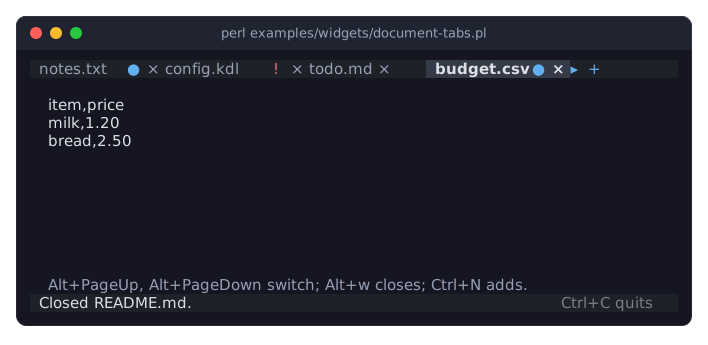
The program is examples/widgets/document-tabs.pl. A click on a tab shows its document below, a click on a close mark closes it, and the + button adds a new one. The program gives the same actions keys of its own, as commands: Alt+PageUp and Alt+PageDown switch, Alt+w closes and Ctrl+N adds. In the screenshot, README.md was closed and budget.csv chosen; the arrow leads to letter.md, which does not fit.
DESCRIPTION
Document tabs are the row of tabs an editor shows above its text: one tab per open document, with the document's title, a dot when it has unsaved changes, an exclamation mark when it has errors, and a close mark. A + button after the last tab asks for a new document. When the tabs do not fit, the row scrolls so that the active tab is shown, and an arrow at each end that has hidden tabs leads to the next one.
Unlike Term::Fabulous::Widget::Tabs, document tabs hold no pages and no widgets. They show a list of plain hashes that the program gives them, or a code reference that returns the list whenever a frame is drawn, so the tabs always show the program's documents as they are now. The program also decides which tab is the active one, the document it shows.
The tabs never change anything themselves. A click fires an event (see "EVENTS"), and the program answers it: it shows the chosen document and sets "active", closes a document (perhaps after asking whether to save it first) and removes its tab, or makes a new document. Setting active fires nothing.
Document tabs take no keyboard input and never take the focus: the program offers its own keys for them, such as Alt+PageDown for the next document. They react to the mouse only. They grow to the width of their parent and are one row high (see "Size" in Term::Fabulous::Widget::Display).
A title that is wider than the row is cut and ends in an ellipsis (…). Line breaks and runs of white space in a title become a single space.
CONSTRUCTOR
new
my $tabs = Term::Fabulous::Widget::DocumentTabs->new(%parameters);Accepts the parameters of "CONSTRUCTOR" in Term::Fabulous::Widget::Box (id, layout, background_color, ...) and the ones below. All are optional, and unknown parameters die.
tabs-
The tabs: an array reference of tabs, or a code reference that returns a list of tabs. Default:
[], no tabs.A tab is a hash reference with these keys:
title-
Required. The text of the tab, a character string.
modified-
True when the document has unsaved changes: the tab shows a dot after its title. Default: false.
error-
True when the document has errors: the tab shows an exclamation mark after its title, in place of the dot. Default: false.
closable-
False for a tab the user cannot close: it has no close mark, and a middle click on it does nothing. Default: true.
Other keys are the program's own: the tabs keep them and give them back in the events, so a tab can carry, for example, the path of its file. A tab that is not a hash reference or has no title dies, when it is given and, for a code reference, when the tabs it returned are drawn.
active-
The position of the active tab, from 0, or
undef(the default) for none. The active tab is drawn in bold on a background of its own. A position past the last tab is allowed and shows no active tab, so the program may remove tabs and setactiveafterwards. -
A boolean. Default: 1, the tabs end in a
+button. With 0, there is no button. text_color,active_text_color,active_background_color-
The colors of the tabs, in any format "Colors" in Term::Fabulous::Widget::Canvas accepts: the text of a tab (its title and close mark) and, for the active tab, its text and its background. Default: the theme's
document_tabs.text, the same in theactivestate, anddocument_tabs.backgroundin theactivestate; in the built-in themes these are thetext_dim,textandfocus_backgroundcolors. modified_color,error_color-
The colors of the dot for unsaved changes and of the exclamation mark for errors. Default: the theme's
document_tabs.modifiedanddocument_tabs.error, theaccentanddangercolors in the built-in themes. -
The color of the
+button and of the arrows. Default: the theme'sdocument_tabs.button, theaccentcolor in the built-in themes. background_color-
As for every widget: the background of the row and of the tabs that are not active. Default: the theme's
document_tabs.background,surface_lowin the built-in themes.
METHODS
The methods of Term::Fabulous::Widget::Display (mark_changed, the Box and Canvas methods), plus these. The accessors work like those of the other widgets. Without an argument they return the current value. With one they set the value, checked as new checks it, mark the tabs changed, so the next frame paints them, and return the new value. An invalid value dies and leaves the old one.
tabs
$tabs->tabs( [ { title => 'notes.txt' }, { title => 'todo.md', modified => 1 } ] );
$tabs->tabs( sub { map { { title => $_->name } } @documents } );
The tabs, as described under "new". Reading it returns the code reference, or copies of the tabs, with modified, error and closable as 0 or 1.
tab
my $title = $tabs->tab(2)->{title};The tab at a position, from 0, as the tabs show it now (for a code reference, it calls it), or undef past the last tab. A position that is not a non-negative integer dies.
count
my $open = $tabs->count;The number of tabs now. For a code reference, it calls it.
active
$tabs->active(0);
$tabs->active(undef);    # no active tab
The position of the active tab, or undef. Setting it fires nothing.
new_button
$tabs->new_button(0);Whether the tabs end in a + button.
text_color, active_text_color, active_background_color, modified_color, error_color, button_color
$tabs->modified_color('#e5c07b');
$tabs->reset_look('modified_color');    # back to the theme
The readers return [r, g, b, a].
EVENTS
Each event is fired on the tabs and bubbles to their ancestors. The tab in an event is a copy of the tab as it was drawn, the program's own keys included.
Select-
Term::Fabulous::Event::Select when the user clicks a tab, the active one included;
$event->itemis the tab and$event->indexits position. A click on an arrow at an end fires it for the next hidden tab on that side. TabClose-
Term::Fabulous::Event::TabClose when the user clicks the close mark of a tab, or clicks a tab with the middle button. A tab whose
closableis false fires nothing. TabAdd-
Term::Fabulous::Event::TabAdd when the user clicks the
+button.
KDL PROPERTIES
Document tabs are built in Perl only: their tabs come from the program's documents and they work through events, which a layout file cannot express.
SEE ALSO
Term::Fabulous::Widget::Tabs for pages with tabs, Term::Fabulous::Event::Select, Term::Fabulous::Event::TabClose, Term::Fabulous::Event::TabAdd, Term::Fabulous::Widget::Display.