NAME
Clay::XS - low-level Perl binding for the Clay C layout library
SYNOPSIS
use v5.22;
use warnings;
use feature 'signatures';
no warnings 'experimental::signatures';

use Clay::XS qw(:all);

# One context: an independent Clay instance with its own memory.
my $ctx = Clay_Initialize(
    Clay_MinMemorySize(),
    { width => 800, height => 600 },
    sub ($error, $userdata) { die "Clay error: $error->{errorText}\n" },
);

# Clay cannot measure text itself. This fake measurer assumes every
# character is half as wide as the font size.
Clay_SetMeasureTextFunction(sub ($text, $config, $userdata) {
    return { width => length($text) * $config->{fontSize} / 2, height => $config->{fontSize} };
});

# One frame: declare the whole tree, then collect the render commands.
Clay_BeginLayout();

Clay__OpenElementWithId(Clay_GetElementId('root'));
Clay__ConfigureOpenElement({
    layout => {
        sizing          => { width => sizing_grow(), height => sizing_grow() },
        padding         => padding_all(16),
        childGap        => 8,
        layoutDirection => CLAY_TOP_TO_BOTTOM,
    },
    backgroundColor => [240, 240, 240, 255],
});
Clay__OpenTextElement('Hello, Clay', { fontSize => 24, textColor => [0, 0, 0, 255] });
Clay__CloseElement();

my $commands = Clay_EndLayout(1 / 60);

for my $command (@$commands) {
    my $box = $command->{boundingBox};
    if ($command->{commandType} == CLAY_RENDER_COMMAND_TYPE_RECTANGLE) {
        say "rectangle at $box->{x},$box->{y} size $box->{width}x$box->{height}";
    }
    elsif ($command->{commandType} == CLAY_RENDER_COMMAND_TYPE_TEXT) {
        say "text '$command->{renderData}{stringContents}' at $box->{x},$box->{y}";
    }
}
DESCRIPTION
What Clay is
Clay (https://github.com/nicbarker/clay) is a small C library that computes user interface layouts. You describe a tree of boxes (with sizes, padding, gaps, alignment, borders, text and so on) and Clay computes where every box goes. Clay draws nothing. It returns a flat list of drawing instructions, the render commands, which your own code draws with any graphics library.
Clay works in immediate mode: you declare the complete tree again for every frame. Clay remembers what it needs between frames (element positions for hit testing, scroll positions, text measurements, transitions) on its own.
This distribution vendors Clay v0.14 together with five patches. Three add features: sizing groups, a wrapping flow layout and a stack layout (see "SIZING GROUPS", "FLOW LAYOUT" and "STACK LAYOUT"). The fourth fixes upstream bugs and so changes some of Clay's behaviour: every render command of a floating element carries its zIndex, a culled clip container still emits its scissor commands, CLAY_TEXT_WRAP_NONE never breaks a line, lineHeight boxes stack from the element's top, an image or custom element gets no background rectangle, an exit transition starts from the element's current look, a floating element may attach to an element declared later in the frame, and frames that reach the element count, exit transitions and large sizes can no longer crash or hang Clay (see "FUNCTIONS: TRANSITIONS" and "SIZING GROUPS"). The fifth cuts off text that does not wrap (CLAY_TEXT_WRAP_NEWLINES, CLAY_TEXT_WRAP_NONE) when its parent is too narrow even after everything else shrank, instead of letting it run past the parent (see "Text wrap modes"). No system library is needed.
What this module is
Clay::XS is a thin binding that keeps Clay's names. Every function in the "FUNCTIONS" sections that starts with Clay_ or Clay__ does what the function of the same name in clay.h does, with these differences:
Structs are Perl hashes whose keys are the exact C field names (
backgroundColor,layoutDirection, ...). The compact typesClay_Color,Clay_Vector2andClay_Dimensionsalso accept arrayrefs ([r, g, b, a],[x, y],[width, height]). A missing or undef field means the C zero value, exactly like a C designated initialiser. Functions that return a struct return a new hash reference. Every key is listed in Clay::XS::Structs.Every value is checked when it crosses into Clay. A bad value croaks instead of corrupting memory (see "ELEMENTS AND FRAMES" and "STRUCT ERRORS").
Clay_Initializetakes an arena capacity in bytes and allocates and owns the arena itself, soClay_CreateArenaWithCapacityAndMemoryis not bound. It takes the error handler and its userdata as two separate arguments and returns aClay::XS::Contextobject (see "CONTEXTS").Clay_EndLayoutreturns the render commands as an array reference of hashes (see "RENDER COMMANDS"), soClay_RenderCommandArray_Getis not bound. Its delta time argument is optional.Callbacks are Perl code references and userdata is any Perl scalar (see "CALLBACKS").
Clay_SetExternalScrollHandlingEnabledis bound although clay.h implements it without declaring it.The C macros (
CLAY(),CLAY_TEXT(),CLAY_ID(),CLAY_SIZING_GROW(), ...) have no direct Perl form. "MAPPING C MACROS TO PERL" shows how to spell each one; the snake_case helpers (sizing_grow,padding_all, ...) replace the value-building macros.set_scroll_positionreplaces the C idiom of writing through the pointer thatClay_GetScrollContainerDatareturns, andcheck_structvalidates a struct without calling Clay.
Where to go next
Clay::UI is the widget layer of this distribution. You build a tree of widget objects once, and
Clay::UI->renderdeclares it to Clay every frame and turns pointer input into widget events. Most applications want Clay::UI instead of calling Clay::XS directly.Clay::Manual explains Clay's layout model (sizing, padding, gaps, alignment, floating elements, scrolling, text) step by step.
Clay::Cookbook has short recipes for common layouts and tasks.
Clay::XS::Structs documents every struct and every key a declaration takes, for example "layout" in Clay::XS::Structs.
Terms
- context
-
One independent Clay instance, a
Clay::XS::Contextobject. Almost every function works on the current context. - frame
-
One pass from
Clay_BeginLayouttoClay_EndLayout, during which you declare the whole tree. - element
-
One box in the layout tree. A text element is a leaf that holds text.
- element id
-
A hash reference
{ id, offset, baseId, stringId }that names an element, made byClay_GetElementIdand its relatives. Functions that take an element id want this hash reference. - declaration
-
The hash reference passed to
Clay__ConfigureOpenElement; its keys are those ofClay_ElementDeclaration(see Clay::XS::Structs). - layout axis, off axis
-
The layout axis of an element is the axis along which its
layoutDirectionarranges the children: horizontal forCLAY_LEFT_TO_RIGHTandCLAY_LEFT_TO_RIGHT_WRAP, vertical forCLAY_TOP_TO_BOTTOM. The off axis is the other one. (Other layout systems call them the main axis and the cross axis.) Along the layout axis the children follow one another, so their sizes and thechildGaps add up; on the off axis each child is sized and aligned on its own within the parent's inner size.CLAY_BACK_TO_FRONThas no layout axis: it treats both axes as off axes (see "STACK LAYOUT"). - render command
-
One hash in the array reference
Clay_EndLayoutreturns. - renderer
-
Your code that draws the render commands.
- callback
-
A code reference that Clay calls while one of its own functions runs: the error handler, the measure function, the query-scroll function, hover callbacks and transition handlers.
- held error
-
An exception a callback threw, kept by the context until Clay returns (see "ERRORS FROM CALLBACKS").
IMPORTING
Nothing is exported by default. Import what you need by name, or everything with the :all tag:
use Clay::XS qw(:all);                        # every function and constant
use Clay::XS qw(Clay_BeginLayout Clay_EndLayout CLAY_TOP_TO_BOTTOM);
:all gives you a flat namespace that matches the C header. Without an import, call the fully qualified name, for example Clay::XS::Clay_BeginLayout() or Clay::XS::CLAY_TOP_TO_BOTTOM().
All constants are plain integer constant subs (see "CONSTANTS").
FUNCTIONS
This section and the next ones describe every exported function, one heading per function, grouped by topic. Each entry ends with a line of rules:
- Context
-
none: works without a context.current: needs a current context and croaks<function>: no current Clay context; call Clay_Initialize firstwithout one.optional: uses the current context when there is one. - Frame
-
any time;inside a frame(betweenClay_BeginLayoutandClay_EndLayout);element open(inside a frame, with an element open);completed frame(outside a frame, and the last frame was finished; see "ELEMENTS AND FRAMES"). - In a callback
-
allowedorrefused(see "What a callback may do"). - Held errors
-
re-thrown(once the function's Clay call has returned) ornever(see "ERRORS FROM CALLBACKS").
Every function that needs a context also croaks <function>: the current Clay::XS context belongs to a different interpreter/thread (Clay has one process-wide current context), and <function>: element/word counts changed since Clay_Initialize; call Clay_Initialize again (see "Element and word counts"). The functions that manage contexts and counts never croak the second message: Clay_Initialize, Clay_SetCurrentContext, Clay_GetCurrentContext, Clay_MinMemorySize, Clay_SetMaxElementCount, Clay_GetMaxElementCount, Clay_SetMaxMeasureTextCacheWordCount and Clay_GetMaxMeasureTextCacheWordCount.
A function whose entry names no return value returns nothing (an empty list in list context, undef in scalar context).
Plain arguments that are not structs (counts, sizes, callbacks) croak plain strings of the form <function>: <argument>: expected <what>, got <value>. Struct arguments croak a "STRUCT ERRORS" object.
FUNCTIONS: CONTEXTS AND CAPACITY
Clay_MinMemorySize
Returns the number of bytes Clay needs for a context.
my $bytes = Clay_MinMemorySize();
my $bytes = Clay_MinMemorySize(\%counts);
The size depends on the element and measure-cache word counts of the context:
\%counts-
Optional. The counts to size a context for, given explicitly; the same hash makes "Clay_Initialize" create a context with them. Nothing else changes: not the current context, not Clay's process-wide defaults. Undef or missing means the configured counts, as in C: those the next
Clay_Initializewithout counts uses, of the current context, or Clay's process-wide defaults (8192 elements and 16384 words, unless changed withClay_SetMaxElementCountorClay_SetMaxMeasureTextCacheWordCount) when no context is current.maxElementCount-
Required. The element count, an integer in
1 .. 2**31 - 1(see "Clay_SetMaxElementCount"). maxMeasureTextCacheWordCount-
Optional. The measure-cache word count, an integer in
32 .. 2**31 - 1(see "Clay_SetMaxMeasureTextCacheWordCount"). Default: twice the element count, and at least 32.
The keys are named like the getters. Explicit counts must fit together (see "Element and word counts"); configured counts are sized as they are, also when
Clay_Initializewould refuse them.
my %counts = (maxElementCount => 20_000);
my $ctx = Clay_Initialize(Clay_MinMemorySize(\%counts), [800, 600], undef, undef, \%counts);
Croaks Clay_MinMemorySize: <n> elements and <m> measure-cache words need about <bytes> bytes of arena; Clay's arena arithmetic is limited to 4 GiB for counts that large. Explicit counts also croak Clay_MinMemorySize: counts: expected a hash reference or undef, got ..., Clay_MinMemorySize: counts: unknown key '<key>'; ..., Clay_MinMemorySize: counts: maxElementCount is required, Clay_MinMemorySize: counts: <key>: expected an integer in <min>..2147483647, got ..., Clay_MinMemorySize: <n> elements would overflow the default measure-cache word count (2 x elements) and Clay_MinMemorySize: <n> measure-cache words need <b> hash buckets but only <e> elements are configured; ....
Context: none. Frame: any time. In a callback: allowed. Held errors: never.
Clay_Initialize
Creates a new context, makes it current and returns it.
my $ctx = Clay_Initialize($capacity, $dimensions);
my $ctx = Clay_Initialize($capacity, $dimensions, $error_handler, $userdata);
my $ctx = Clay_Initialize($capacity, $dimensions, $error_handler, $userdata, \%counts);$capacity-
The arena size in bytes: an integer of at least
Clay_MinMemorySize()for the counts the context is sized for (Clay_MinMemorySize(\%counts)with explicit counts). Clay::XS allocates the arena and frees it with the context. $dimensions-
The layout size, a
Clay_Dimensions({ width => 800, height => 600 }or[800, 600]). Undef means 0 x 0. Change it later with "Clay_SetLayoutDimensions". $error_handler-
Undef or a code reference that receives Clay's error reports (see "CALLBACKS"). Without one, Clay errors are ignored, as in C.
$userdata-
Any scalar; a copy is passed to the error handler as its last argument.
\%counts(Clay_Initialize)-
Optional. The element and measure-cache word counts of the new context, the hash "Clay_MinMemorySize" takes. The context gets exactly these counts; the previous current context keeps its counts and Clay's process-wide defaults stay as they are. Undef or missing: the new context is sized, as in C, for the counts of the current context, or for Clay's process-wide defaults when no context is current (see "Clay_SetMaxElementCount").
Returns a Clay::XS::Context. Keep it: the context is freed when the last reference goes away (see "CONTEXTS").
Croaks:
Clay_Initialize: capacity must be a non-negative integer number of bytes, got '...'andClay_Initialize: capacity <n> is below Clay_MinMemorySize() = <m> bytes for <e> elements and <w> measure-cache words.Clay_Initialize: dimensions: ...andClay_Initialize: error handler: expected a CODE reference or undef, got ....Clay_Initialize: <n> measure-cache words are below the minimum of 32 ...andClay_Initialize: <n> measure-cache words need <b> hash buckets but only <e> elements are configured; ...: the counts do not fit together (see "Element and word counts"). Explicit counts croak like those of "Clay_MinMemorySize", withClay_Initializein the message.Clay_Initialize: cannot allocate <n> bytesandClay_Initialize: Clay could not create a context in the arena.When the error handler dies while Clay initialises the context,
Clay_Initializecroaks with that error, frees the new context and leaves the previous context current.
Context: optional. Frame: any time. In a callback: refused. Held errors: only its own (see above).
Clay_SetCurrentContext
Makes a context the current one.
Clay_SetCurrentContext($ctx);$ctx must be a live Clay::XS::Context from Clay_Initialize or Clay_GetCurrentContext. Anything else (undef, a Storable copy, a hand-blessed object) croaks Clay::XS: argument is not a live Clay::XS::Context. A context of another thread croaks Clay_SetCurrentContext: Clay::XS context used from a different interpreter/thread. There is no way to make "no context" current.
Context: none. Frame: any time. In a callback: refused. Held errors: never.
Clay_GetCurrentContext
Returns the current context, or undef when there is none.
my $ctx = Clay_GetCurrentContext();The result is another reference to the same object: it compares equal to the reference Clay_Initialize returned (==), and it keeps the context alive like any other reference.
Context: optional. Frame: any time. In a callback: allowed. Held errors: never.
Clay_SetMaxElementCount
Sets the maximum number of elements for the next Clay_Initialize.
Clay_SetMaxElementCount($count);$count is an integer in 1 .. 2**31 - 1. The count bounds the elements, text lines and render commands of one frame, together with the copies Clay keeps of elements with exit transitions (see "FUNCTIONS: TRANSITIONS").
With a current context, the setter changes that context's count, which
Clay_MinMemorySizeand the nextClay_Initializeread. The live context itself cannot grow: every function that uses it croaks<function>: element/word counts changed since Clay_Initialize; call Clay_Initialize againuntil you create a new context (or set the count back). Only the context and count functions keep working (Clay_Initialize,Clay_SetCurrentContext,Clay_GetCurrentContext,Clay_MinMemorySizeand the count setters and getters);Clay_GetLayoutDimensions, for example, croaks.Without a current context, it changes Clay's process-wide default, which every later
Clay_Initializeuses. As in Clay, it then also sets the measure-cache word count to twice the element count, so callClay_SetMaxMeasureTextCacheWordCountafterwards if you want another word count.
Clay_Initialize refuses counts that do not fit together: fewer than 32 words, or more than 32 words per element (Clay sizes one part of its measure cache by words / 32 and indexes it by element).
Croaks Clay_SetMaxElementCount: expected an integer in 1..2147483647, got ..., Clay_SetMaxElementCount: <n> elements would overflow the default measure-cache word count (2 x elements) and, for counts whose arena would exceed 4 GiB, Clay_SetMaxElementCount: <n> elements and <m> measure-cache words need about <bytes> bytes of arena; ....
Clay_SetMaxElementCount(20_000);              # no context yet
Clay_SetMaxMeasureTextCacheWordCount(32_768);
my $ctx = Clay_Initialize(Clay_MinMemorySize(), [800, 600]);
Context: optional. Frame: any time. In a callback: refused. Held errors: never.
Clay_GetMaxElementCount
Returns the element count of the current context (or what a setter changed it to); without a context, the process-wide default the next Clay_Initialize uses.
my $count = Clay_GetMaxElementCount();Context: optional, and keeps working after a count change. Frame: any time. In a callback: allowed. Held errors: never.
Clay_SetMaxMeasureTextCacheWordCount
Sets the number of measured words Clay's text measurement cache holds, for the next Clay_Initialize.
Clay_SetMaxMeasureTextCacheWordCount($count);$count is an integer in 32 .. 2**31 - 1. The rules of "Clay_SetMaxElementCount" apply: with a current context it changes that context's count and the live context then refuses to work until the next Clay_Initialize; without one it changes the process-wide default.
Croaks Clay_SetMaxMeasureTextCacheWordCount: expected an integer in 32..2147483647, got ... and, for counts whose arena would exceed 4 GiB, Clay_SetMaxMeasureTextCacheWordCount: <n> elements and <m> measure-cache words need about <bytes> bytes of arena; ....
Context: optional. Frame: any time. In a callback: refused. Held errors: never.
Clay_GetMaxMeasureTextCacheWordCount
Returns the measure-cache word count of the current context (or what a setter changed it to); without a context, the process-wide default the next Clay_Initialize uses.
my $count = Clay_GetMaxMeasureTextCacheWordCount();Context: optional, and keeps working after a count change. Frame: any time. In a callback: allowed. Held errors: never.
Clay_SetLayoutDimensions
Sets the size of the layout, for example after the window was resized.
Clay_SetLayoutDimensions({ width => 1024, height => 768 });
Clay_SetLayoutDimensions([1024, 768]);
Takes a Clay_Dimensions; missing keys and undef mean 0. The root element takes its size from the dimensions when a frame begins, and culling (see "Clay_SetCullingEnabled") tests against them, so set them before Clay_BeginLayout.
Croaks Clay_SetLayoutDimensions: dimensions: expected a hash or array reference, got ....
Context: current. Frame: any time. In a callback: refused. Held errors: re-thrown.
Clay_GetLayoutDimensions
Returns the layout size as { width => $w, height => $h }.
my $size = Clay_GetLayoutDimensions();Context: current. Frame: any time. In a callback: allowed. Held errors: re-thrown.
FUNCTIONS: FRAMES AND ELEMENTS
Clay_BeginLayout
Starts a frame.
Clay_BeginLayout();Clay opens its own root element (id Clay__RootContainer, sized to the layout dimensions); every element you open at the top level becomes its child.
If the previous frame was never ended (an exception interrupted its declaration, say), Clay_BeginLayout finishes it first: it closes the elements still open and lets Clay end that frame, discarding its render commands (see "ELEMENTS AND FRAMES"). If the unfinished frame holds a callback error, Clay_BeginLayout then croaks with that error plus the suffix (from the previous unfinished frame) and does not start a frame; call it again to start one.
Context: current. Frame: any time. In a callback: refused. Held errors: re-throws one held by an unfinished frame (see above).
Clay_EndLayout
Ends the frame, computes the layout and returns the render commands.
my $commands = Clay_EndLayout();
my $commands = Clay_EndLayout($delta_time);
$delta_time is the time in seconds since the previous frame, a finite number (default 0). Clay uses it to advance transitions.
Returns an array reference of render command hashes in drawing order (see "RENDER COMMANDS").
Croaks:
Clay_EndLayout: called without a matching Clay_BeginLayoutoutside a frame, andClay_EndLayout: deltaTime: expected a finite number, got ....<n> element(s) still open at Clay_EndLayout (unbalanced Clay__OpenElement/Clay__CloseElement)when elements were left open. It closes them first, so Clay finishes the frame and the next frame works.Any error a callback threw during the frame (see "ERRORS FROM CALLBACKS"). The render commands of a frame whose
Clay_EndLayoutcroaked are discarded.
Context: current. Frame: inside a frame. In a callback: refused. Held errors: re-thrown.
Clay__OpenElement
Opens a new element whose id Clay derives automatically, like the C CLAY_AUTO_ID() macro.
Clay__OpenElement();The automatic id is derived from the parent's id and the element's position among its siblings, so it changes when siblings are added or removed before it. Use "Clay__OpenElementWithId" for elements you want to find again. Configure the element next, declare its children, then close it with "Clay__CloseElement".
Croaks Clay__OpenElement: called outside Clay_BeginLayout/Clay_EndLayout.
Context: current. Frame: inside a frame. In a callback: refused. Held errors: never.
Clay__OpenElementWithId
Opens a new element with the given element id, like the C CLAY(id, ...) macro.
Clay__OpenElementWithId(Clay_GetElementId('sidebar'));The argument must be an element id hash reference (see "FUNCTIONS: ELEMENT IDS"). Clay::XS reads its id, offset, baseId and stringId keys; it keeps a private copy of the string. Two elements with the same id in one frame make Clay report CLAY_ERROR_TYPE_DUPLICATE_ID to the error handler.
Croaks Clay__OpenElementWithId: called outside Clay_BeginLayout/Clay_EndLayout, and a "STRUCT ERRORS" object Clay__OpenElementWithId: element id: expected an element id hash reference (from Clay_GetElementId), got ... for anything but a hash reference, undef included.
Context: current. Frame: inside a frame. In a callback: refused. Held errors: never.
Clay__ConfigureOpenElement
Configures the element that was just opened.
Clay__ConfigureOpenElement(\%declaration);%declaration is a Clay_ElementDeclaration: layout, backgroundColor, overlayColor, cornerRadius, aspectRatio, image, floating, custom, clip, border, transition, sizingGroup and userData. Clay::XS::Structs documents every key. Undef or {} leaves every field at its zero value. Unknown keys are ignored; use "check_struct" to catch typos.
Call it at most once per element, right after opening it and before declaring any child (as the C CLAY() macro does). An element you never configure keeps the zero declaration. Once a frame has more elements than the element count allows, Clay drops every further element, and configuring one changes nothing (the declaration is still parsed and checked).
Croaks:
Clay__ConfigureOpenElement: no element is open (unbalanced Clay__OpenElement/Clay__CloseElement).Clay__ConfigureOpenElement: the open element is already configured or has children; configure an element once, right after opening it.A "STRUCT ERRORS" object for a value Clay cannot use, for example
Clay_ElementDeclaration.layout.padding.left: expected an integer in 0..65535, got '-8'.
Context: current. Frame: element open. In a callback: refused. Held errors: never.
Clay__CloseElement
Closes the innermost open element.
Clay__CloseElement();Croaks Clay__CloseElement: no element is open (unbalanced Clay__OpenElement/Clay__CloseElement).
Context: current. Frame: element open. In a callback: refused. Held errors: never.
Clay__OpenTextElement
Adds a text element to the open element, like the C CLAY_TEXT() macro.
Clay__OpenTextElement($text);
my $id = Clay__OpenTextElement($text, \%text_config);
A text element is a leaf: it has no children and needs no Clay__CloseElement. $text is a character string; Clay::XS copies it, so you may change or free your variable at once (see "STRINGS"). %text_config is a Clay_TextElementConfig (textColor, fontId, fontSize, letterSpacing, lineHeight, wrapMode, textAlignment, userData; see Clay::XS::Structs); undef means the zero config.
Clay measures the text's words during this call, so the measure function (see "Clay_SetMeasureTextFunction") may run here. Its errors are held and re-thrown by Clay_EndLayout.
Returns the element id Clay gave the text, an element id hash reference (see "element id hash" in Clay::XS::Structs): a text has no id of its own, so Clay names it. Once the frame has ended, the id finds the text through "Clay_GetElementData"; its bounding box covers all its wrapped lines, which are the TEXT render commands. Returns undef when Clay keeps no element under an id for the text: it dropped the text because the frame reached its element count (see "Clay_SetMaxElementCount"), or another element of this frame already holds that id (Clay reports CLAY_ERROR_TYPE_DUPLICATE_ID).
Croaks Clay__OpenTextElement: called outside Clay_BeginLayout/Clay_EndLayout, Clay__OpenTextElement: text must be a defined string, Clay__OpenTextElement: text length <n> exceeds INT32_MAX and "STRUCT ERRORS" objects such as Clay_TextElementConfig.fontSize: expected an integer in 0..65535, got '-1'.
Context: current. Frame: inside a frame. In a callback: refused. Held errors: never.
Clay_GetOpenElementId
Returns the numeric id of the innermost open element.
my $id = Clay_GetOpenElementId();Useful for the ids of elements opened with Clay__OpenElement and as the seed of local ids (see "Clay__HashString"). With no element of yours open it returns the id of Clay's root element.
Croaks Clay_GetOpenElementId: called outside Clay_BeginLayout/Clay_EndLayout.
Context: current. Frame: inside a frame. In a callback: refused. Held errors: never.
Clay_GetElementData
Returns the bounding box Clay computed for an element.
my $data = Clay_GetElementData(Clay_GetElementId('sidebar'));
# { boundingBox => { x => 0, y => 0, width => 200, height => 600 }, found => 1 }boundingBox(Clay_GetElementData)-
The element's box from the last completed frame, in layout coordinates (relative to the layout's top left corner).
found-
1 when Clay knows the id; 0 otherwise, and the box is all zero.
See "Clay_ElementData" in Clay::XS::Structs.
Croaks a "STRUCT ERRORS" object Clay_GetElementData: element id: expected an element id hash reference (from Clay_GetElementId), got ....
Context: current. Frame: any time. In a callback: allowed. Held errors: re-thrown.
FUNCTIONS: ELEMENT IDS
All id functions return an element id hash reference:
{
    id       => 3230707630,   # the hash Clay uses to find the element
    offset   => 0,            # the index of the WithIndex/WithOffset forms
    baseId   => 3230707630,   # the hash of the string and seed, before the offset
    stringId => 'root',       # the string; absent for an empty string
}
They need no context and work anywhere, inside callbacks too. Id strings may contain any Unicode characters (see "STRINGS"); undef croaks <function>: element id string must be defined.
Clay_GetElementId
Returns the element id for a string, like the C CLAY_ID() macro.
my $id = Clay_GetElementId('sidebar');The same string always gives the same id. It equals Clay__HashString($string, 0).
Context: none. Frame: any time. In a callback: allowed. Held errors: never.
Clay_GetElementIdWithIndex
Returns the element id for a string and an index, like the C CLAY_IDI() macro.
my $id = Clay_GetElementIdWithIndex('row', $i);Use it for elements made in a loop. $index is an integer in 0 .. 2**32 - 1; offset holds it and baseId is the id of the string alone. Croaks Clay_GetElementIdWithIndex: index: expected an integer in 0..4294967295, got ....
Context: none. Frame: any time. In a callback: allowed. Held errors: never.
Clay__HashString
Returns the element id for a string and a seed.
my $id = Clay__HashString($string);
my $id = Clay__HashString($string, $seed);
$seed is an integer in 0 .. 2**32 - 1 (default 0). With the open element's id as seed it gives an id that is local to that element, like the C CLAY_ID_LOCAL() macro:
my $id = Clay__HashString('label', Clay_GetOpenElementId());Croaks Clay__HashString: seed: expected an integer in 0..4294967295, got ....
Context: none. Frame: any time. In a callback: allowed. Held errors: never.
Clay__HashStringWithOffset
Returns the element id for a string, an offset and a seed, like the C CLAY_IDI_LOCAL() macro when the seed is the open element's id.
my $id = Clay__HashStringWithOffset($string, $offset);
my $id = Clay__HashStringWithOffset($string, $offset, $seed);
$offset (required) and $seed (default 0) are integers in 0 .. 2**32 - 1.
Context: none. Frame: any time. In a callback: allowed. Held errors: never.
FUNCTIONS: TEXT MEASUREMENT
Clay_SetMeasureTextFunction
Installs the current context's measure function, which tells Clay how large a piece of text is.
Clay_SetMeasureTextFunction($callback);
Clay_SetMeasureTextFunction($callback, $userdata);
Clay_SetMeasureTextFunction(undef);             # remove it
The callback is called as
$callback->($text, \%text_config, $userdata)and must return { width => $w, height => $h } or [$w, $h]. %text_config is the text element's Clay_TextElementConfig with every key filled in. Clay measures word by word: $text is usually a single word (text between ASCII spaces and newlines) or a single space. Clay caches the results by the text together with fontId, fontSize, letterSpacing and whether wrapMode is CLAY_TEXT_WRAP_NONE (see "Clay_ResetMeasureTextCache"). The other keys of %text_config are not part of the cache key: a measure function whose result depends on userData or lineHeight, say, gets the cached result of another config that differs only there.
Every context that lays out text needs its own measure function. Measuring text without one is a held error (Clay::XS: text measured but no measure_text function is installed for this context), and so is a result of undef (measure_text callback result: expected a hash or array reference, got undef (did the callback return its result?)) or of a plain number. See "CALLBACKS" for the general rules.
Croaks Clay_SetMeasureTextFunction: callback: expected a CODE reference or undef, got ....
Context: current. Frame: any time. In a callback: refused. Held errors: re-thrown.
Clay_ResetMeasureTextCache
Empties Clay's text measurement cache, so the next frame measures all text again.
Clay_ResetMeasureTextCache();Call it when fonts change. Clay::XS resets the cache itself after a measure function failed.
Context: current. Frame: any time. In a callback: refused. Held errors: re-thrown.
FUNCTIONS: POINTER AND HOVER
Clay tests the pointer against the layout of the last completed frame. A test therefore needs one completed frame first, and an element shows up as hovered one frame after it appeared.
Clay_SetPointerState
Tells Clay where the pointer (mouse or touch) is and whether it is pressed.
Clay_SetPointerState({ x => $x, y => $y }, $is_down);
Clay_SetPointerState([$x, $y], $is_down);
$position is a Clay_Vector2 in layout coordinates; $is_down is any Perl boolean. The call:
finds every element under the pointer (the pointer-over list, see "Clay_GetPointerOverIds") and runs their hover callbacks (see "Clay_OnHover");
then updates the pointer state: while pressed, the state goes from
CLAY_POINTER_DATA_PRESSED_THIS_FRAMEtoCLAY_POINTER_DATA_PRESSED; while released, fromCLAY_POINTER_DATA_RELEASED_THIS_FRAMEtoCLAY_POINTER_DATA_RELEASED.
A new context starts with a released pointer (CLAY_POINTER_DATA_RELEASED: Clay_Initialize sets it, where Clay's zero value would read as pressed), so the first call with $is_down true gives CLAY_POINTER_DATA_PRESSED_THIS_FRAME.
While the last frame had more elements than the element count allows, Clay ignores the call.
Croaks Clay_SetPointerState: cannot be called between Clay_BeginLayout and Clay_EndLayout; end the frame first (Clay_EndLayout, or Clay_BeginLayout, which finishes an unfinished frame) (see "ELEMENTS AND FRAMES"), and re-throws errors from hover callbacks.
Context: current. Frame: completed frame (or before the first frame). In a callback: refused. Held errors: re-thrown.
Clay_GetPointerState
Returns the pointer state.
my $pointer = Clay_GetPointerState();
# { position => { x => 10, y => 20 }, state => CLAY_POINTER_DATA_PRESSED }position-
The last position given to
Clay_SetPointerState,{ x, y }. state-
One of the "Pointer data states".
A new context reports { x => 0, y => 0 } and CLAY_POINTER_DATA_RELEASED until the first Clay_SetPointerState (see "Clay_SetPointerState").
Context: current. Frame: any time. In a callback: allowed. Held errors: re-thrown.
Clay_Hovered
Returns true when the pointer is over the open element.
my $hovered = Clay_Hovered();It looks for the open element's id in the pointer-over list of the last Clay_SetPointerState, so you can style an element while you declare it:
Clay__OpenElementWithId(Clay_GetElementId('button'));
Clay__ConfigureOpenElement({
    backgroundColor => Clay_Hovered() ? [90, 90, 255, 255] : [60, 60, 200, 255],
});
Returns a Perl boolean. Croaks Clay_Hovered: called outside Clay_BeginLayout/Clay_EndLayout.
Context: current. Frame: inside a frame. In a callback: refused. Held errors: never.
Clay_OnHover
Registers a hover callback for the open element.
Clay_OnHover($callback);
Clay_OnHover($callback, $userdata);
Once the frame is complete, every Clay_SetPointerState calls
$callback->(\%element_id, \%pointer, $userdata)when the pointer is over the element, until the next frame completes (calling Clay_SetPointerState three times between two frames runs the callback up to three times). %element_id is the element's id hash; %pointer is { position => { x, y }, state => ... } with the new position and the state from before the call.
Clay forgets an element's hover callback whenever the element is declared again, so call Clay_OnHover in every frame. Clay_SetPointerState runs the callbacks registered while declaring the last completed frame.
Croaks Clay_OnHover: no element is open (unbalanced Clay__OpenElement/Clay__CloseElement), Clay_OnHover: callback: expected a CODE reference, got ... (undef included) and Clay_OnHover: the open element has no id. The last one only happens when the open element's numeric id is 0, which in practice no id function produces. Once a frame has more elements than the element count allows, Clay drops every further element, and Clay_OnHover does nothing for them (as Clay__ConfigureOpenElement configures nothing). Errors the callback throws are re-thrown by Clay_SetPointerState.
Context: current. Frame: element open. In a callback: refused. Held errors: never.
Clay_PointerOver
Returns true when the pointer is over the element with the given id.
if (Clay_PointerOver(Clay_GetElementId('button'))) { ... }It looks the id up in the pointer-over list of the last Clay_SetPointerState. Returns a Perl boolean. Croaks a "STRUCT ERRORS" object Clay_PointerOver: element id: expected an element id hash reference (from Clay_GetElementId), got ....
Context: current. Frame: any time. In a callback: allowed. Held errors: re-thrown.
Clay_GetPointerOverIds
Returns the pointer-over list: the element ids of every element under the pointer, as found by the last Clay_SetPointerState.
my $ids = Clay_GetPointerOverIds();
say $_->{stringId} // $_->{id} for @$ids;
Returns an array reference of element id hashes (see "FUNCTIONS: ELEMENT IDS"). Elements opened with Clay__OpenElement have no stringId. The order is:
Floating element trees first, the one drawn on top (highest
zIndex) first, and the main tree last. Clay's root element (Clay__RootContainer) heads the main tree's part.Within one tree, parents before their children.
A floating tree whose
pointerCaptureModeisCLAY_POINTER_CAPTURE_MODE_CAPTURE(the default) ends the list when the pointer is over it: trees below it are not tested.
An element counts only when the pointer is also inside the element that clips it (if any). Elements in an exit transition are skipped, and so are elements whose transition disables interactions (see "Transition interaction handling").
Context: current. Frame: any time. In a callback: allowed. Held errors: re-thrown.
FUNCTIONS: SCROLLING
An element becomes a scroll container when its declaration enables clip on an axis (see "clip" in Clay::XS::Structs). Clay keeps a scroll position for every scroll container. Positions are 0 at the start and negative when scrolled: { x => 0, y => -40 } means the content moved 40 units up. Clay_UpdateScrollContainers clamps them to 0 .. -(content size - container size); a position written with "set_scroll_position" is used as given (also by Clay_GetScrollOffset) until the next Clay_UpdateScrollContainers clamps it.
Clay does not move the content by itself: pass the position as the container's childOffset every frame:
Clay__OpenElementWithId(Clay_GetElementId('list'));
Clay__ConfigureOpenElement({
    clip => { vertical => 1, childOffset => Clay_GetScrollOffset() },
});
Clay_UpdateScrollContainers
Applies scroll input and momentum to the scroll containers.
Clay_UpdateScrollContainers($enable_drag_scrolling, $scroll_delta, $delta_time);All three arguments are required.
$enable_drag_scrolling-
A Perl boolean. When true and the pointer is pressed, dragging the pointer scrolls the container under it (touch-style), with momentum after release.
$scroll_delta-
A
Clay_Vector2({ x => 0, y => -4 }or[0, -4]), usually the mouse wheel movement since the last call; undef means no movement. Clay multiplies it by 10: a delta of{ y => -4 }scrolls 40 layout units down. It goes to the innermost scroll container under the pointer (as of the lastClay_SetPointerState), on each axis that container clips and whose content is larger than the container. $delta_time-
The time in seconds since the last call, a finite number.
Call it once per frame, after Clay_SetPointerState and before Clay_BeginLayout. Clay drops the scroll state of every container that the last completed frame did not declare; calling it again before the next frame changes nothing more.
Croaks Clay_UpdateScrollContainers: cannot be called between Clay_BeginLayout and Clay_EndLayout; ... (see "Clay_SetPointerState") and Clay_UpdateScrollContainers: deltaTime: expected a finite number, got ....
Context: current. Frame: completed frame (or before the first frame). In a callback: refused. Held errors: re-thrown.
Clay_GetScrollOffset
Returns the scroll position of the open element as { x, y }.
my $offset = Clay_GetScrollOffset();Returns { x => 0, y => 0 } when the open element is not a known scroll container (for example in the first frame it appears). With external scroll handling on, it returns the offset the query function reported when the container was last configured; in the usual order (Clay_GetScrollOffset before Clay__ConfigureOpenElement) that is the previous frame's result (see "Clay_SetExternalScrollHandlingEnabled").
Croaks Clay_GetScrollOffset: called outside Clay_BeginLayout/Clay_EndLayout.
Context: current. Frame: inside a frame. In a callback: refused. Held errors: never.
Clay_GetScrollContainerData
Returns the state of a scroll container.
my $data = Clay_GetScrollContainerData(Clay_GetElementId('list'));Returns a hash reference:
{
    scrollPosition            => { x => 0, y => -40 },
    scrollContainerDimensions => { width => 200, height => 300 },
    contentDimensions         => { width => 200, height => 900 },
    config                    => { horizontal => 0, vertical => 1,
                                   childOffset => { x => 0, y => -40 } },
    found                     => 1,
}scrollPosition-
The current scroll offset,
{ x, y }. It is a copy; write it with "set_scroll_position". scrollContainerDimensions-
The container's size,
{ width, height }. contentDimensions-
The size of the container's content (including the container's padding),
{ width, height }. config-
The container's
clipdeclaration, present only while it is the container's own: between frames when the last completed frame declared the container, and during a frame once that frame has declared it. Before that, Clay would read it through the container's place in the element list, which may hold another element by then, so the key is left out (it is absent, not undef). It is also absent whenfoundis 0. found(Clay_GetScrollContainerData)-
1 when the id names a scroll container Clay knows; 0 otherwise, and everything else is zero.
See "Clay_ScrollContainerData" in Clay::XS::Structs.
The other keys are kept on Clay's own record of the container, so they can be read at any time: in the middle of a frame they describe the container as the last completed frame laid it out, with the scroll input applied since (the usual way to draw a scroll bar while declaring the frame).
Croaks a "STRUCT ERRORS" object for anything but an element id hash reference.
Context: current. Frame: any time (config between frames and, during a frame, once the container has been declared). In a callback: allowed. Held errors: re-thrown.
set_scroll_position
Sets the scroll position of a scroll container, for scroll bars, "scroll to" buttons and the like.
set_scroll_position(Clay_GetElementId('list'), { x => 0, y => -120 });The first argument is an element id hash reference, the second a Clay_Vector2. Both axes are written: a missing key or undef means 0, so to change one axis pass the current value of the other:
my $id = Clay_GetElementId('list');
set_scroll_position($id, {
    x => Clay_GetScrollContainerData($id)->{scrollPosition}{x},
    y => -120,
});
In C this is a write through the pointer Clay_GetScrollContainerData returns. The new position shows in the next frame. It is not clamped: a position beyond the content is used as given until the next Clay_UpdateScrollContainers clamps it. Every write counts as a change for Clay::UI::Revision, so a renderer that skips unchanged frames still draws the next one.
Croaks set_scroll_position: element <id> is not a known scroll container (declare it with clip enabled and complete a frame first), and "STRUCT ERRORS" objects for a bad id or position.
Context: current. Frame: any time. In a callback: refused. Held errors: re-thrown.
Clay_SetQueryScrollOffsetFunction
Installs the current context's query-scroll function, used when the host application scrolls content itself.
Clay_SetQueryScrollOffsetFunction($callback);
Clay_SetQueryScrollOffsetFunction($callback, $userdata);
Clay_SetQueryScrollOffsetFunction(undef);
The callback is called as
$callback->($element_id, $userdata)with the container's numeric id (the id of its id hash), and must return { x => $x, y => $y } or [$x, $y]. While external scroll handling is on (see "Clay_SetExternalScrollHandlingEnabled"), Clay calls it for every scroll container during that container's Clay__ConfigureOpenElement; the result becomes the container's scroll position. An undef result is a held error, re-thrown by Clay_EndLayout.
Croaks Clay_SetQueryScrollOffsetFunction: callback: expected a CODE reference or undef, got ....
Context: current. Frame: any time. In a callback: refused. Held errors: re-thrown.
Clay_SetExternalScrollHandlingEnabled
Switches external scroll handling on or off.
Clay_SetExternalScrollHandlingEnabled(1);While it is on, the host application scrolls the content itself:
Clay asks the query-scroll function for the position of every scroll container when the container is configured, instead of using its own.
Clay ignores the containers'
childOffsetwhen placing their children.The pointer counts as over an element even outside the element that clips it.
clay.h implements this function without declaring it.
Croaks Clay_SetExternalScrollHandlingEnabled: install a function with Clay_SetQueryScrollOffsetFunction first when switched on without one. Removing the function later while handling is on makes the next scroll container a held error (Clay::XS: external scroll handling is enabled but no query_scroll_offset function is installed for this context).
Context: current. Frame: any time. In a callback: refused. Held errors: re-thrown.
FUNCTIONS: DEBUGGING AND CULLING
Clay_SetDebugModeEnabled
Switches Clay's built-in debug view on or off.
Clay_SetDebugModeEnabled(1);The debug view is a panel on the right side of the layout that shows the element tree; the root element gets narrower by the panel's width. The panel is part of the render commands, so your renderer draws it. Its text uses fontId 0 and needs the measure function. The setting stays until changed.
Context: current. Frame: any time. In a callback: refused. Held errors: re-thrown.
Clay_IsDebugModeEnabled
Returns true (a Perl boolean) while the debug view is on.
my $on = Clay_IsDebugModeEnabled();Context: current. Frame: any time. In a callback: allowed. Held errors: re-thrown.
Clay_SetCullingEnabled
Switches visibility culling on or off.
Clay_SetCullingEnabled(0);With culling on (the default), Clay emits no render commands for elements whose box lies entirely outside the layout dimensions, and stops emitting the lines of a text once they pass the bottom edge. Culling tests each element on its own: the children of a culled element are still emitted when their own boxes reach into the layout. A culled clip container still emits its SCISSOR_START / SCISSOR_END pair, so children of it that reach into the layout stay clipped.
Context: current. Frame: any time. In a callback: refused. Held errors: re-thrown.
FUNCTIONS: TRANSITIONS
A transition animates an element's position, size or colours when they change, when the element appears (enter) or when it disappears (exit). An element gets one with the transition key of its declaration (see "transition" in Clay::XS::Structs); the handlers below compute the animation.
Clay runs an element's transitions only while the element has a C transition hook. Clay::XS gives it one while the context has a Perl $handler (installed with Clay_SetTransitionHandlers below), so without handlers the transition key does nothing and every change shows at once, as in C with a NULL handler. The hook is set when the element is declared: install the handlers before the frame whose transitions they should run.
An element that exits stays on screen, with its subtree as last declared, until its exit transition ends. For that Clay copies every element that has an exit transition, with its subtree, at the end of each frame and keeps the copies until the next frame ends; a frame in which elements exit also lays out a second copy of them. The copies count against the element count (see "Clay_SetMaxElementCount"): a frame has room for the element count less the copies Clay keeps, and, while elements exit, less twice that. When a frame and the copies do not fit, Clay reports CLAY_ERROR_TYPE_ELEMENTS_CAPACITY_EXCEEDED to the error handler, drops every exit transition (exiting elements disappear at once), and treats the frame like one with more elements than the element count allows (the next Clay_SetPointerState is ignored). A frame with more elements than the element count allows drops every exit transition as well. An element declared without the transition key loses its transitions, its exit included, even if it had one in the frame before.
Clay::UI has no attribute for transition, but widgets can use it: add the key in a contribute_ method of the widget class (see "Keys Clay::UI has no attribute for" in Clay::XS::Structs) and call Clay_SetTransitionHandlers right after Clay::UI->new, while the UI's context is the current one. Give such widgets an id, so the element id stays the same in every frame.
Clay_SetTransitionHandlers
Installs the current context's transition handlers.
Clay_SetTransitionHandlers($handler);
Clay_SetTransitionHandlers($handler, $set_initial, $set_final, $userdata);
Clay_SetTransitionHandlers();                  # remove all three
Each argument is undef or a code reference; $userdata goes to all three. One handler set per context serves every element with a transition config, because Clay's transition callbacks carry no element id. The callbacks are described in "CALLBACKS".
Croaks Clay_SetTransitionHandlers: <handler|setInitialState|setFinalState>: expected a CODE reference or undef, got ....
Context: current. Frame: any time. In a callback: refused. Held errors: re-thrown.
Clay_EaseOut
Computes one step of Clay's built-in ease-out curve.
my $result = Clay_EaseOut(\%args);
# { complete => 0, current => { boundingBox => {...}, backgroundColor => {...}, ... } }
%args has the shape a transition handler receives, a "Clay_TransitionCallbackArguments" in Clay::XS::Structs hash (see also "CALLBACKS"): initial, target and current transition data, elapsedTime and duration in seconds, properties (an OR of "Transition properties") and transitionState. Missing numbers mean 0, missing transition data means all zero, and a missing (or undef) current starts from initial. Unknown keys are ignored.
Returns { complete => 1|0, current => \%eased }:
complete-
1 when
elapsedTimehas reachedduration(ordurationis 0 or less), 0 otherwise. current(Clay_EaseOut result)-
%eased:currentwith every property selected inpropertieseased frominitialtowardstarget, colours and border widths included.
A transition handler can use it directly:
Clay_SetTransitionHandlers(sub ($args, $userdata) {
    my $step = Clay_EaseOut($args);
    $args->{current} = $step->{current};
    return $step->{complete};
});
Croaks a "STRUCT ERRORS" object whose path starts at Clay_EaseOut: args when \%args is not a hash reference or a value in it is out of range, for example Clay_EaseOut: args.duration: expected a finite number, got 'soon'.
Context: none. Frame: any time. In a callback: allowed. Held errors: never.
FUNCTIONS: HELPERS
These replace the value-building C macros. They return fresh hash references, need no context and work anywhere, inside callbacks too. They never re-throw a held error.
sizing_fit
Returns a FIT sizing axis: the element is as large as its content, within $min and $max. Replaces CLAY_SIZING_FIT.
sizing_fit();                 # { type => CLAY__SIZING_TYPE_FIT, min => 0, max => 0 }
sizing_fit($min, $max);
$min is a finite number (default 0). $max (default 0) is the maximum when it is a finite number above 0; 0, a negative number, +Inf or a number beyond the float range means no maximum. Croaks sizing_fit: min: expected a finite number, got ... and sizing_fit: max: expected a finite number or +Inf, got ....
sizing_grow
Returns a GROW sizing axis: the element takes a share of the free space in its parent, within $min and $max. Replaces CLAY_SIZING_GROW.
sizing_grow();                # { type => CLAY__SIZING_TYPE_GROW, min => 0, max => 0 }
sizing_grow($min, $max);
The arguments are those of "sizing_fit".
sizing_fixed
Returns a FIXED sizing axis of exactly $size units. Replaces CLAY_SIZING_FIXED.
sizing_fixed(200); # { type => CLAY__SIZING_TYPE_FIXED, min => 200, max => 200 }$size is required and must be a finite number; croaks sizing_fixed: size: expected a finite number, got ....
sizing_fixed(0) does not make an element take no space: Clay reads a max of 0 as "no maximum", so the axis behaves like sizing_fit() and the element is as big as its content. Use sizing_fixed(1) for an element that should take (almost) no space.
sizing_percent
Returns a PERCENT sizing axis: a fraction of the parent's inner size (minus padding and child gaps). Replaces CLAY_SIZING_PERCENT.
sizing_percent(0.5); # { type => CLAY__SIZING_TYPE_PERCENT, percent => 0.5 }$fraction is required and must be a number in 0 .. 1; croaks sizing_percent: percent: expected a number in 0..1, got ....
padding_all
Returns a Clay_Padding with the same value on all four sides. Replaces CLAY_PADDING_ALL.
padding_all(16); # { left => 16, right => 16, top => 16, bottom => 16 }$value is an integer in 0 .. 65535; croaks padding_all: value: expected an integer in 0..65535, got ....
border_all
Returns a Clay_BorderWidth with the same width on all four sides and between the children. Replaces CLAY_BORDER_ALL.
border_all(2); # { left => 2, right => 2, top => 2, bottom => 2, betweenChildren => 2 }$width is an integer in 0 .. 65535; croaks border_all: width: expected an integer in 0..65535, got ....
border_outside
Returns a Clay_BorderWidth with the same width on all four sides and no border between the children. Replaces CLAY_BORDER_OUTSIDE.
border_outside(2); # { left => 2, right => 2, top => 2, bottom => 2, betweenChildren => 0 }$width is an integer in 0 .. 65535.
corner_radius_all
Returns a Clay_CornerRadius with the same radius on all four corners. Replaces CLAY_CORNER_RADIUS.
corner_radius_all(8); # { topLeft => 8, topRight => 8, bottomLeft => 8, bottomRight => 8 }$radius is a number of at least 0; croaks corner_radius_all: radius: expected a number >= 0, got .... A declaration's cornerRadius also accepts the plain number.
FUNCTIONS: VALIDATION
check_struct
Validates a struct value without a context or a frame.
check_struct($type, $value);
check_struct($type, $value, $root);

check_struct('Clay_LayoutConfig', $layout);
check_struct('Clay_Padding', $padding, 'layout.padding');
$type is the exact C type name of a struct, one of:
Clay_ElementDeclaration        Clay_LayoutConfig
Clay_TextElementConfig         Clay_Sizing
Clay_SizingAxis                Clay_Padding
Clay_ChildAlignment            Clay_Color
Clay_Vector2                   Clay_Dimensions
Clay_BoundingBox               Clay_CornerRadius
Clay_BorderWidth               Clay_BorderElementConfig
Clay_AspectRatioElementConfig  Clay_ImageElementConfig
Clay_CustomElementConfig       Clay_ClipElementConfig
Clay_FloatingElementConfig     Clay_FloatingAttachPoints
Clay_TransitionElementConfig   Clay_TransitionData
Clay_TransitionCallbackArguments
Clay_SizingGroup
Clay::XS::Structs describes each. Element ids (Clay_ElementId) are not on the list: they are not checked by check_struct, only by the functions that take them. The anonymous enter and exit parts of a transition have no type name either; check them through Clay_TransitionElementConfig.
Returns nothing. Croaks a "STRUCT ERRORS" object for the first problem, or the plain string check_struct: unknown struct type '...'. See "CHECKING STRUCTS" for the rules.
Context: none. Frame: any time. In a callback: allowed. Held errors: never.
CONSTANTS
Every constant is an integer constant sub named as in clay.h (plus the ones the bundled patches add). Import them with :all or by name. Most are enum values for one declaration key; the transition properties are bit flags you combine with |. Clay::XS::Structs says which key takes which group.
Layout direction
For layout => { layoutDirection => ... }.
- CLAY_LEFT_TO_RIGHT
-
Children in a row, left to right (the default).
- CLAY_TOP_TO_BOTTOM
-
Children in a column, top to bottom.
- CLAY_LEFT_TO_RIGHT_WRAP
-
Children left to right, wrapping into new lines (see "FLOW LAYOUT").
- CLAY_BACK_TO_FRONT
-
Children stacked on top of each other (see "STACK LAYOUT").
Line sizing
For layout => { lineSizing => ... } of a CLAY_LEFT_TO_RIGHT_WRAP container (see "FLOW LAYOUT").
- CLAY_LINE_SIZING_GROW
-
Lines share the container's leftover height (the default).
- CLAY_LINE_SIZING_FIT
-
Every line is as tall as its tallest child.
Child alignment
For layout => { childAlignment => { x => ..., y => ... } }.
- CLAY_ALIGN_X_LEFT
-
Children start at the left edge, after the left padding (the default).
- CLAY_ALIGN_X_RIGHT
-
Children end at the right edge, before the right padding.
- CLAY_ALIGN_X_CENTER
-
Children are centred horizontally.
- CLAY_ALIGN_Y_TOP
-
Children start at the top edge, after the top padding (the default).
- CLAY_ALIGN_Y_BOTTOM
-
Children end at the bottom edge, before the bottom padding.
- CLAY_ALIGN_Y_CENTER
-
Children are centred vertically.
Sizing types
The type of a sizing axis (layout => { sizing => { width => ..., height => ... } }). The names keep Clay's double underscore. The "FUNCTIONS: HELPERS" build these axes for you.
- CLAY__SIZING_TYPE_FIT
-
As large as the content, within
minandmax(the default). - CLAY__SIZING_TYPE_GROW
-
Takes a share of the parent's free space, within
minandmax. - CLAY__SIZING_TYPE_PERCENT
-
A fraction (
percent, 0 to 1) of the parent's size minus padding and child gaps. - CLAY__SIZING_TYPE_FIXED
-
Exactly
min(=max) units.
Text wrap modes
For wrapMode => ... in a text config.
- CLAY_TEXT_WRAP_WORDS
-
Wraps at spaces and newlines when the text does not fit (the default).
- CLAY_TEXT_WRAP_NEWLINES
-
Breaks lines only at newline characters. A line wider than the parent leaves is cut off: the element shrinks only after the other children reached their minimum, and its
TEXTboxes are never wider than the element (see "wrapMode" in Clay::XS::Structs). - CLAY_TEXT_WRAP_NONE
-
Never wraps: the whole text, newline characters included, is one line. It is cut off like
CLAY_TEXT_WRAP_NEWLINES.
Text alignment
For textAlignment => ... in a text config: how the lines of a wrapped text are placed within the text element.
- CLAY_TEXT_ALIGN_LEFT
-
Lines start at the left edge (the default).
- CLAY_TEXT_ALIGN_CENTER
-
Lines are centred.
- CLAY_TEXT_ALIGN_RIGHT
-
Lines end at the right edge.
Floating attach points
For floating => { attachPoints => { element => ..., parent => ... } }: which point of the floating element (element) is placed on which point of the element it is attached to (parent), before offset is added. CLAY_ATTACH_POINT_LEFT_TOP is the default for both.
- CLAY_ATTACH_POINT_LEFT_TOP
-
The top left corner.
- CLAY_ATTACH_POINT_LEFT_CENTER
-
The middle of the left edge.
- CLAY_ATTACH_POINT_LEFT_BOTTOM
-
The bottom left corner.
- CLAY_ATTACH_POINT_CENTER_TOP
-
The middle of the top edge.
- CLAY_ATTACH_POINT_CENTER_CENTER
-
The centre.
- CLAY_ATTACH_POINT_CENTER_BOTTOM
-
The middle of the bottom edge.
- CLAY_ATTACH_POINT_RIGHT_TOP
-
The top right corner.
- CLAY_ATTACH_POINT_RIGHT_CENTER
-
The middle of the right edge.
- CLAY_ATTACH_POINT_RIGHT_BOTTOM
-
The bottom right corner.
Floating attach targets
For floating => { attachTo => ... }: what a floating element is positioned against. A floating element is drawn above the normal tree and does not affect the size or position of its siblings or parent.
- CLAY_ATTACH_TO_NONE
-
Not floating (the default).
- CLAY_ATTACH_TO_PARENT
-
Floats relative to its parent element.
- CLAY_ATTACH_TO_ELEMENT_WITH_ID
-
Floats relative to the element whose id is in
parentId(a numeric id or an element id hash). An unknown id makes Clay reportCLAY_ERROR_TYPE_FLOATING_CONTAINER_PARENT_NOT_FOUND. - CLAY_ATTACH_TO_ROOT
-
Floats relative to the layout's root, which with
offsetworks like absolute positioning.
Floating clipping
For floating => { clipTo => ... }.
- CLAY_CLIP_TO_NONE
-
The floating element is not clipped (the default).
- CLAY_CLIP_TO_ATTACHED_PARENT
-
The floating element is clipped like the element it is attached to.
Pointer capture modes
For floating => { pointerCaptureMode => ... } (see "Clay_GetPointerOverIds").
- CLAY_POINTER_CAPTURE_MODE_CAPTURE
-
A floating element under the pointer hides the elements below it from hit testing (the default).
- CLAY_POINTER_CAPTURE_MODE_PASSTHROUGH
-
Elements below the floating element are still hit tested.
Render command types
The commandType of a render command. "RENDER COMMANDS" describes each one in detail.
- CLAY_RENDER_COMMAND_TYPE_NONE (0)
-
Nothing to draw; skip it.
- CLAY_RENDER_COMMAND_TYPE_RECTANGLE (1)
-
A filled rectangle with rounded corners.
- CLAY_RENDER_COMMAND_TYPE_BORDER (2)
-
A border drawn inside the bounding box.
- CLAY_RENDER_COMMAND_TYPE_TEXT (3)
-
One line of text.
- CLAY_RENDER_COMMAND_TYPE_IMAGE (4)
-
An image.
- CLAY_RENDER_COMMAND_TYPE_SCISSOR_START (5)
-
Start clipping to the bounding box.
- CLAY_RENDER_COMMAND_TYPE_SCISSOR_END (6)
-
End the clipping the matching start began.
- CLAY_RENDER_COMMAND_TYPE_OVERLAY_COLOR_START (7)
-
Start tinting everything drawn with a colour.
- CLAY_RENDER_COMMAND_TYPE_OVERLAY_COLOR_END (8)
-
End the tint the matching start began.
- CLAY_RENDER_COMMAND_TYPE_CUSTOM (9)
-
Something your renderer draws in its own way.
Pointer data states
The state of "Clay_GetPointerState" and of a hover callback's pointer argument (see "Clay_SetPointerState" for how it changes).
- CLAY_POINTER_DATA_PRESSED_THIS_FRAME
-
The latest
Clay_SetPointerStatecall pressed the pointer. - CLAY_POINTER_DATA_PRESSED
-
The pointer was pressed earlier and is still down.
- CLAY_POINTER_DATA_RELEASED_THIS_FRAME
-
The latest
Clay_SetPointerStatecall released the pointer. - CLAY_POINTER_DATA_RELEASED
-
The pointer was released earlier and is still up.
Transition states
The transitionState a transition handler receives.
- CLAY_TRANSITION_STATE_IDLE
-
No transition is running.
- CLAY_TRANSITION_STATE_ENTERING
-
The element has just appeared and plays its enter transition.
- CLAY_TRANSITION_STATE_TRANSITIONING
-
A property changed and the element moves towards the new value.
- CLAY_TRANSITION_STATE_EXITING
-
The element is no longer declared and plays its exit transition.
Transition properties
Bit flags for transition => { properties => ... } and the properties argument of the transition callbacks: which values animate. Combine them with |.
- CLAY_TRANSITION_PROPERTY_NONE
-
Nothing (0).
- CLAY_TRANSITION_PROPERTY_X
-
The horizontal position (1).
- CLAY_TRANSITION_PROPERTY_Y
-
The vertical position (2).
- CLAY_TRANSITION_PROPERTY_POSITION
-
X | Y(3). - CLAY_TRANSITION_PROPERTY_WIDTH
-
The width (4).
- CLAY_TRANSITION_PROPERTY_HEIGHT
-
The height (8).
- CLAY_TRANSITION_PROPERTY_DIMENSIONS
-
WIDTH | HEIGHT(12). - CLAY_TRANSITION_PROPERTY_BOUNDING_BOX
-
POSITION | DIMENSIONS(15). - CLAY_TRANSITION_PROPERTY_BACKGROUND_COLOR
-
The background colour (16).
- CLAY_TRANSITION_PROPERTY_OVERLAY_COLOR
-
The overlay colour (32).
- CLAY_TRANSITION_PROPERTY_CORNER_RADIUS
-
The corner radius (64). Clay's transition data has no corner radius, so in this Clay version the flag has no value to animate.
- CLAY_TRANSITION_PROPERTY_BORDER_COLOR
-
The border colour (128).
- CLAY_TRANSITION_PROPERTY_BORDER_WIDTH
-
The border widths (256).
- CLAY_TRANSITION_PROPERTY_BORDER
-
BORDER_COLOR | BORDER_WIDTH(384).
Transition enter triggers
For transition => { enter => { trigger => ... } }.
- CLAY_TRANSITION_ENTER_SKIP_ON_FIRST_PARENT_FRAME
-
No enter transition when the element appears in the same frame as its parent (the default).
- CLAY_TRANSITION_ENTER_TRIGGER_ON_FIRST_PARENT_FRAME
-
Play the enter transition even then.
Transition exit triggers
For transition => { exit => { trigger => ... } }.
- CLAY_TRANSITION_EXIT_SKIP_WHEN_PARENT_EXITS
-
No exit transition when the parent disappears too (the default).
- CLAY_TRANSITION_EXIT_TRIGGER_WHEN_PARENT_EXITS
-
Play the exit transition even then.
Transition interaction handling
For transition => { interactionHandling => ... }: whether the element (with its children) stays hit-testable while it transitions.
- CLAY_TRANSITION_DISABLE_INTERACTIONS_WHILE_TRANSITIONING_POSITION
-
Not hit-testable while entering, exiting or moving (the default).
- CLAY_TRANSITION_ALLOW_INTERACTIONS_WHILE_TRANSITIONING_POSITION
-
Hit-testable except while exiting.
Exit transition sibling ordering
For transition => { exit => { siblingOrdering => ... } }: where an exiting element is drawn relative to its siblings.
- CLAY_EXIT_TRANSITION_ORDERING_UNDERNEATH_SIBLINGS
-
Below its siblings (the C default).
- CLAY_EXIT_TRANSITION_ORDERING_NATURAL_ORDER
-
At its usual place among its siblings.
- CLAY_EXIT_TRANSITION_ORDERING_ABOVE_SIBLINGS
-
Above its siblings.
Error types
The errorType the error handler receives (see "CALLBACKS").
- CLAY_ERROR_TYPE_TEXT_MEASUREMENT_FUNCTION_NOT_PROVIDED
-
Clay found no measure function. Clay::XS always gives Clay one, so it reports a missing Perl measure function as a held error instead (see "Clay_SetMeasureTextFunction").
- CLAY_ERROR_TYPE_ARENA_CAPACITY_EXCEEDED
-
The arena passed to
Clay_Initializeis too small. - CLAY_ERROR_TYPE_ELEMENTS_CAPACITY_EXCEEDED
-
The frame needs more elements, text lines or render commands than the element count allows (see "Clay_SetMaxElementCount"), or its elements and the copies of elements with exit transitions do not fit together (see "FUNCTIONS: TRANSITIONS").
- CLAY_ERROR_TYPE_TEXT_MEASUREMENT_CAPACITY_EXCEEDED
-
The text measurement cache is full (see "Clay_SetMaxMeasureTextCacheWordCount").
- CLAY_ERROR_TYPE_DUPLICATE_ID
-
Two elements in one frame have the same id.
- CLAY_ERROR_TYPE_FLOATING_CONTAINER_PARENT_NOT_FOUND
-
A floating element's
parentIdnames no element. - CLAY_ERROR_TYPE_PERCENTAGE_OVER_1
-
A
PERCENTsizing axis is above 1. - CLAY_ERROR_TYPE_INTERNAL_ERROR
-
Clay caught an out-of-bounds access in itself (a Clay bug).
- CLAY_ERROR_TYPE_UNBALANCED_OPEN_CLOSE
-
Elements were still open at the end of the frame. Clay::XS closes them before Clay checks and croaks itself (see "ELEMENTS AND FRAMES").
- CLAY_ERROR_TYPE_HASH_MAP_CAPACITY_EXCEEDED
-
Clay's element id table is full (see "Clay_SetMaxElementCount").
- CLAY_ERROR_TYPE_SIZING_GROUP_CYCLE
-
Sizing groups are nested in a cycle (see "SIZING GROUPS").
MAPPING C MACROS TO PERL
The Clay C macros expand to calls of internal functions. This is how to spell each one in Perl:
- CLAY_ID
-
CLAY_ID("foo") -> Clay_GetElementId("foo") - CLAY_IDI
-
CLAY_IDI("foo", 3) -> Clay_GetElementIdWithIndex("foo", 3) - CLAY_ID_LOCAL
-
CLAY_ID_LOCAL("foo") -> Clay__HashString("foo", Clay_GetOpenElementId()) - CLAY_IDI_LOCAL
-
CLAY_IDI_LOCAL("foo", 3) -> Clay__HashStringWithOffset("foo", 3, Clay_GetOpenElementId()) - CLAY_SIZING_FIT
-
CLAY_SIZING_FIT($min, $max) -> sizing_fit($min, $max) - CLAY_SIZING_GROW
-
CLAY_SIZING_GROW($min, $max) -> sizing_grow($min, $max) - CLAY_SIZING_FIXED
-
CLAY_SIZING_FIXED($size) -> sizing_fixed($size) - CLAY_SIZING_PERCENT
-
CLAY_SIZING_PERCENT($pct) -> sizing_percent($pct) - CLAY_PADDING_ALL
-
CLAY_PADDING_ALL($v) -> padding_all($v) - CLAY_BORDER_ALL
-
CLAY_BORDER_ALL($v) -> border_all($v) - CLAY_BORDER_OUTSIDE
-
CLAY_BORDER_OUTSIDE($v) -> border_outside($v) - CLAY_CORNER_RADIUS
-
CLAY_CORNER_RADIUS($r) -> corner_radius_all($r) - CLAY
-
CLAY(id, { ... }) { ... } -> Clay__OpenElementWithId($id); Clay__ConfigureOpenElement({ ... }); # ... children declared here ... Clay__CloseElement(); - CLAY_AUTO_ID
-
CLAY_AUTO_ID({ ... }) { ... } -> Clay__OpenElement(); Clay__ConfigureOpenElement({ ... }); # ... children ... Clay__CloseElement(); - CLAY_TEXT
-
CLAY_TEXT($text, { ... }) -> Clay__OpenTextElement($text, { ... }) - scrollPosition (programmatic scrolling)
-
Clay_GetScrollContainerData(id).scrollPosition->y = -40
                             ->  set_scroll_position($id, {
                                     x => Clay_GetScrollContainerData($id)->{scrollPosition}{x},
                                     y => -40,
                                 })
In C, programmatic scrolling writes through the
scrollPositionpointer thatClay_GetScrollContainerDatareturns. "set_scroll_position" does that write. It sets both axes (a missing key means 0), so pass the current value of the axis you keep. It croaks unless the id names a scroll container Clay knows: one declared withclipenabled in a completed frame.
For the max of the sizing_* helpers, a finite number above 0 is the maximum; 0, a negative number, +Inf or a number beyond the float range means no maximum.
CONTEXTS
A context is one independent Clay instance with its own memory, layout state, callbacks and settings.
Clay_Initialize($capacity, $dimensions, $error_handler, $userdata)returns aClay::XS::Contextobject and makes it current (see "Clay_Initialize").Every other function that touches Clay works on the current context and croaks
<function>: no current Clay context; call Clay_Initialize firstif there is none.Clay_SetCurrentContext($ctx)switches contexts.Clay_GetCurrentContext()returns the current context (another reference to the same object) or undef.
Lifetime
The context is freed when the last reference to it goes away. Freeing the current context leaves no context current.
Copies made with Storable and hand-blessed objects are not contexts: they croak Clay::XS: argument is not a live Clay::XS::Context when used.
Freeing a context that still holds a callback error (because a frame was left unfinished) warns Clay::XS: context destroyed with a held callback error: ....
Threads
Clay keeps one process-wide current context, so a context belongs to the interpreter that created it and is not copied into new threads.
While another thread's context is current, every call that touches Clay (Clay_Initialize included) croaks <function>: the current Clay::XS context belongs to a different interpreter/thread (Clay has one process-wide current context). Only Clay_SetCurrentContext with one of the thread's own contexts works.
Element and word counts
Clay_SetMaxElementCount and Clay_SetMaxMeasureTextCacheWordCount take effect at the next Clay_Initialize, which sizes the new context for them. Explicit counts (the \%counts argument of "Clay_MinMemorySize" and "Clay_Initialize") bypass the setters: they size one context and change no other counts.
The word count must be at least 32, and at most 32 words per element.
Without a current context,
Clay_SetMaxElementCountalso sets the word count to twice the element count, as Clay does. Set the word count after the element count.Clay_Initializecroaks for fewer than 32 words.Calling a setter on a live context is allowed, but every call that touches that context then croaks
<function>: element/word counts changed since Clay_Initialize; call Clay_Initialize againuntilClay_Initializehas been called again: Clay's arrays keep the sizes they were created with. OnlyClay_Initialize,Clay_SetCurrentContext,Clay_GetCurrentContext,Clay_MinMemorySizeand the four count setters and getters keep working; every other function that needs a context croaks, queries such asClay_GetLayoutDimensionsincluded.Counts whose arena would exceed 4 GiB are rejected.
ELEMENTS AND FRAMES
A frame is Clay_BeginLayout(), the element declarations, and Clay_EndLayout($delta_time), which returns the render commands.
Rules for declarations
Element declarations are checked for balance and order:
Clay__OpenElement,Clay__OpenElementWithIdandClay__OpenTextElementcroak outside a frame.Clay__CloseElement,Clay__ConfigureOpenElementandClay_OnHovercroak when no element is open.Clay__ConfigureOpenElementconfigures the element just opened, once, before any child is declared (as the CCLAY()macro does). A second call, or one after a child, croaks.Clay_SetPointerStateandClay_UpdateScrollContainerswork on the layout of the last completed frame. They croak betweenClay_BeginLayoutandClay_EndLayout, also while a frame is left unfinished (see below).Clay_EndLayoutcroaks without a matchingClay_BeginLayout. If elements are still open (for example because an exception interrupted a declaration), it closes them, lets Clay finish the frame, and croaksN element(s) still open at Clay_EndLayout (unbalanced Clay__OpenElement/Clay__CloseElement). When a callback error is held as well, the message continues with; callback error:and that error's message; a held exception object is re-thrown unchanged instead. The next frame works normally.A frame that is never ended is unfinished. The next
Clay_BeginLayoutfinishes it likeClay_EndLayoutwith a delta time of 0 would (it closes the elements still open, lets Clay compute the layout and discards the render commands), so Clay never begins a frame over an unfinished one. The finished frame counts as a completed frame: elements it did not declare start their exit transitions in it, and the pointer and scroll functions work on its layout. If the unfinished frame held a callback error, thatClay_BeginLayoutthen re-throws it and starts no frame (see "ERRORS FROM CALLBACKS"); otherwise it starts the new frame at once.
How values are parsed
Every struct field is parsed when it crosses into Clay. These croak a "STRUCT ERRORS" object naming the struct and field:
wrong reference types, at any nesting level;
non-numeric numbers;
numbers that are not finite as a C
float: NaN, infinities, and values beyond about 3.4e38 (themaxof a sizing axis may be+Infor larger, meaning no maximum);integers outside the C field's range, for example negative padding or an enum value Clay does not define.
An example message: Clay_ElementDeclaration.layout.padding.left: expected an integer in 0..65535, got '-8'.
Further rules:
userData,imageDataandcustomDatatake an unsigned integer that fits a pointer (refaddrvalues do), read exactly. Pass integers above 2**53 as Perl integers or decimal strings, not as floats.Unknown keys are ignored, and so are extra array elements. "check_struct" reports both.
floating => { parentId => ... }accepts a numeric id or an element id hash fromClay_GetElementId.
CHECKING STRUCTS
check_struct('Clay_LayoutConfig', $layout);
check_struct('Clay_Padding', $padding, 'layout.padding');
check_struct($type, $value, $root) validates $value as the struct named by its exact C type (Clay_ElementDeclaration, Clay_LayoutConfig, Clay_TextElementConfig, Clay_Color, Clay_SizingAxis, ...; "check_struct" lists every accepted name, which excludes Clay_ElementId) without a context or a frame.
It returns nothing and croaks a "STRUCT ERRORS" object for the first problem. An unknown type name croaks a plain string.
The error path starts at
$root, or at the type name when$rootis undef.An undef
$valueis accepted: it means the zero struct.
It applies the same rules as the parse that runs when the value crosses into Clay (see "How values are parsed"), and is stricter in three ways:
unknown keys croak, and the error lists the known ones;
an arrayref must have exactly one element per field (four for a colour);
a boolean field must not be a reference.
Shape errors of a few structs carry a hint, for example (padding_all(N) builds one).
STRUCT ERRORS
Struct values that cannot be used croak a Clay::XS::StructError object, both when they cross into Clay and from "CHECKING STRUCTS". Bad element id arguments croak one too.
Clay::XS::StructError
A Clay::XS::StructError object is true in boolean context and stringifies like a plain croak message:
<path>: expected <what>, got <value>[ (<hint>)] at <file> line <n>.For example:
Clay_ElementDeclaration.layout.padding.left: expected an integer in 0..65535, got '-8' at app.pl line 12.Its readers:
path-
Arrayref of names from the root (the struct or function argument) to the field, e.g.
['Clay_ElementDeclaration', 'layout', 'padding', 'left']. expected-
What the field takes, e.g.
an integer in 0..65535. got-
How the value was seen, e.g.
'-8',undefora HASH reference. hint-
A hint for building the value, or undef. Only "CHECKING STRUCTS" sets it.
unknown_keys-
For an unknown-key error: an arrayref of the offending keys, sorted. Undef otherwise.
known_keys-
For an unknown-key error: an arrayref of the keys the struct takes. Undef otherwise.
message-
The message without the location.
file-
The file where the croak happened.
line-
The line where the croak happened.
use Scalar::Util qw(blessed);

eval { check_struct('Clay_Padding', { lft => 4 }) };
if (blessed $@ && $@->isa('Clay::XS::StructError')) {
    warn "unknown keys: @{ $@->unknown_keys }\n";
}
Errors raised inside a callback (for example a bad transition handler result) are re-thrown unchanged, as described in "ERRORS FROM CALLBACKS". Plain function arguments that are not structs (counts, floats, callbacks) croak plain strings.
STRINGS
Strings are characters in and out.
Text and element ids may contain any Unicode characters. They reach Clay as UTF-8.
Text in render commands, the measure function's text and the
stringIdof element ids come back as Perl character strings.Clay splits words only at ASCII spaces and newlines, so the pieces it measures never cut a character.
Clay::XS copies text into per-context storage and interns element id strings, so the caller never has to keep strings alive between calls.
Undef text and undef id strings croak. So does every function that takes an element id (Clay__OpenElementWithId, Clay_GetElementData, Clay_PointerOver, Clay_GetScrollContainerData, set_scroll_position) when it gets anything but an element id hash reference, undef included.
CALLBACKS
All callbacks are code references, validated when installed. Undef clears a per-context callback. The callback and userdata values are copied, so reassigning the caller's variables afterwards has no effect. Every callback gets its userdata (or undef) as its last argument.
- Error handler (
Clay_Initialize) -
$handler->({ errorType => CLAY_ERROR_TYPE_..., errorText => $text }, $userdata)errorType-
One of the "Error types".
errorText-
Clay's message, a human-readable string.
The return value is ignored. Without a handler, Clay errors are ignored (as in C).
- Measure function (
Clay_SetMeasureTextFunction($cb, $userdata)) -
$cb->($text, \%text_config, $userdata) -> { width => $w, height => $h } or [ $w, $h ]%text_confighas theClay_TextElementConfigfields. Every context that lays out text needs its own measure function: measuring text in a context without one is reported as an error. A result of undef (a forgottenreturn, say) is an error too. See "Clay_SetMeasureTextFunction". - Query-scroll function (
Clay_SetQueryScrollOffsetFunction($cb, $userdata)) -
$cb->($element_id, $userdata) -> { x => $x, y => $y } or [ $x, $y ]$element_idis the numeric id. An undef result is an error. Clay calls it for every scroll container whileClay_SetExternalScrollHandlingEnabled(1)is on; the returned offset becomes the container's scroll position. Enabling external handling without a query function croaks. - Hover callback (
Clay_OnHover($cb, $userdata)) -
$cb->(\%element_id, { position => { x, y }, state => CLAY_POINTER_DATA_... }, $userdata)Registers a hover callback for the currently open element. Clay forgets an element's hover callback whenever the element is declared again, so call
Clay_OnHoverevery frame.Clay_SetPointerStateruns the callbacks registered while declaring the last completed frame, with the new position and the pointer state from before the call. The return value is ignored. - Transition handlers (
Clay_SetTransitionHandlers($handler, $set_initial, $set_final, $userdata)) -
$handler->(\%args, $userdata) -> $complete
$set_initial->(\%target_state, $properties, $userdata) -> \%initial_state
$set_final->(\%initial_state, $properties, $userdata) -> \%final_state
One handler set per context serves every element with a
transitionconfig (Clay's transition callbacks carry no element id). Clay calls them duringClay_EndLayout.%argsis a "Clay_TransitionCallbackArguments" in Clay::XS::Structs hash with these keys:transitionState-
One of the "Transition states".
initial-
Transition data: the state when the transition started.
target-
Transition data: the state the transition moves to.
current(transition handler)-
Transition data: the state to draw now; the handler updates it.
elapsedTime-
Seconds since the transition started.
duration-
The element's transition duration in seconds.
properties-
The element's "Transition properties", the ones being animated.
The handler updates
$args->{current}(keys it leaves out keep their value) and returns true when the transition is complete. Undef also counts as complete. Assigning anything but a hash reference to$_[0]is an error (Clay::XS: transition handler replaced its argument hash); a new hash reference assigned to$_[0]replaces the argument hash, and itscurrentis used.Transition data hashes have the keys
boundingBox({ x, y, width, height }),backgroundColor,overlayColor,borderColor({ r, g, b, a }) andborderWidth(aClay_BorderWidth).An element's
transition => { enter => { hasSetInitial => 1 } }routes its enter transition through$set_initial, which turns the target state into the state the element starts from.exit => { hasSetFinal => 1 }gives it an exit transition through$set_final, which turns the last state into the state it ends in. Undef from either means "unchanged"; a returned hash only changes the keys it has.Without a
$handler, elements declared with atransitionkey have no transitions at all: Clay::XS leaves Clay's handler NULL, as a C program without one would, and changes show at once (see "FUNCTIONS: TRANSITIONS"). Handlers apply to the elements declared after they were installed. Without$set_initialor$set_final, the state stays unchanged.The C default for
exit => { siblingOrdering }isCLAY_EXIT_TRANSITION_ORDERING_UNDERNEATH_SIBLINGS.
Clay_EaseOut(\%args) takes the same argument hash (current defaults to initial when absent) and returns { complete => $bool, current => \%eased_state }, easing every property selected in properties, colours and border widths included (see "Clay_EaseOut").
What a callback may do
A callback runs while Clay is in the middle of one of its own functions, so it must not change Clay's state.
Inside a callback, these croak with <function>: cannot be called from inside a Clay callback (re-thrown like any other callback error, see "ERRORS FROM CALLBACKS"): Clay_Initialize, Clay_SetCurrentContext, Clay_BeginLayout, Clay_EndLayout, the element functions (Clay__OpenElement, Clay__OpenElementWithId, Clay__ConfigureOpenElement, Clay__OpenTextElement, Clay__CloseElement, Clay_OnHover), the queries about the open element (Clay_GetOpenElementId, Clay_Hovered, Clay_GetScrollOffset), Clay_SetPointerState, Clay_UpdateScrollContainers, set_scroll_position, and every setter (Clay_SetLayoutDimensions, Clay_SetMeasureTextFunction, Clay_ResetMeasureTextCache, Clay_SetQueryScrollOffsetFunction, Clay_SetExternalScrollHandlingEnabled, Clay_SetTransitionHandlers, Clay_SetDebugModeEnabled, Clay_SetCullingEnabled, Clay_SetMaxElementCount, Clay_SetMaxMeasureTextCacheWordCount).
These calls are refused whichever context is current: Clay has a single current context. A refused call reads none of its arguments, so no tie, get-magic or overload of an argument runs. The refusal also covers code that runs when the callback's arguments are freed after it returns (a DESTROY of an object that only an argument held, say), because Clay has not returned yet.
An explicit DESTROY of the current context croaks the same way (Clay::XS::Context::DESTROY: cannot be called ... for the context the callback runs in).
Read-only queries work: Clay_GetCurrentContext, Clay_GetLayoutDimensions, Clay_GetElementData, Clay_GetPointerState, Clay_PointerOver, Clay_GetPointerOverIds, Clay_GetScrollContainerData, Clay_IsDebugModeEnabled, Clay_GetMaxElementCount, Clay_GetMaxMeasureTextCacheWordCount and the helpers that need no context (ids, hashing, the ease function, the sizing helpers, check_struct). A query called inside a callback never re-throws a held error; see "ERRORS FROM CALLBACKS".
A callback runs on a Perl stack of its own, so loop control cannot leave it: last, next, redo or goto aimed at a loop or label outside the callback dies inside it (Label not found for "last FRAME", Can't "last" outside a loop block), and that error is re-thrown like any other. die and return behave as usual.
exit in a callback takes effect once Clay has returned: no further callback runs, and the Clay::XS function that called into Clay exits with the status right after Clay's call, before it would re-throw anything. END blocks and destructors then run as for any exit and may use Clay::XS again. Code that runs while the exit unwinds the scopes of the program (a DESTROY of a lexical going out of scope, say) runs while Clay has not returned yet, so the calls listed above croak there.
Dropping the last reference to the running context inside a callback is safe: every Clay::XS call keeps its context alive until the statement that made the call has finished, and the context is freed then.
ERRORS FROM CALLBACKS
Clay calls the callbacks from inside its C code, which must never be unwound by a Perl exception. An exception thrown by a callback (or a malformed callback result, such as a measure function returning a plain number) is therefore held until Clay returns, then re-thrown by the Clay::XS function that invoked Clay.
Which function re-throws
Clay_EndLayoutre-throws errors from the measure function, the error handler, the query-scroll function and the transition handlers, including those raised while elements were being declared.Clay_SetPointerStatere-throws errors from hover callbacks.An error held when a frame is left unfinished (including one raised while
Clay_BeginLayoutfinishes it) is re-thrown by the nextClay_BeginLayoutwith the suffix(from the previous unfinished frame).A
Clay_Initializewhose error handler failed croaks with that error and leaves the previous context current.Every other function that needs a context re-throws a held error once its Clay call has returned, so its own effect (a setter's new value, say) has already taken place. The exceptions are listed next.
Between
Clay_BeginLayoutandClay_EndLayoutnothing re-throws: a query called in the middle of a declaration (Clay_PointerOverto pick a colour, say) returns normally, the elements stay open as declared, andClay_EndLayoutre-throws the error.
These never re-throw a held error: the element-construction functions (Clay__OpenElement, Clay__OpenElementWithId, Clay__ConfigureOpenElement, Clay__OpenTextElement, Clay__CloseElement, Clay_OnHover) and the in-element queries (Clay_GetOpenElementId, Clay_Hovered, Clay_GetScrollOffset), so declarations stay balanced and their errors surface when the frame ends; and the functions that manage contexts and configuration rather than layout state (Clay_SetCurrentContext, Clay_GetCurrentContext, Clay_MinMemorySize, Clay_GetMaxElementCount, Clay_SetMaxElementCount, Clay_GetMaxMeasureTextCacheWordCount, Clay_SetMaxMeasureTextCacheWordCount). Neither do the helpers that need no context.
Nothing is re-thrown while a callback runs: a query called from a callback leaves a held error in place for the function that invoked Clay.
What the error looks like
Only the first error of a frame is kept. Later ones are counted, and the message gains
(and N more callback errors this frame), or(and 1 more callback error this frame)for one.Exception objects (including a "STRUCT ERRORS" object for a malformed callback result) are re-thrown unchanged, without either suffix.
The render commands of a frame whose
Clay_EndLayoutcroaked are discarded.Callbacks do not disturb the caller's
$@.
Measuring after a failure
While the context holds a callback error of any kind (from the measure function, the error handler, the query-scroll function or a transition handler), text is measured as 0 x 0 without calling the measure function, until the error has been re-thrown. A broken measure function therefore causes one exception per frame. When the held error is re-thrown, Clay's measurement cache is reset if any text was measured as 0 x 0 (or failed to measure) in the meantime, so the next frame measures afresh.
RENDER COMMANDS
Clay_EndLayout returns an array reference of hashes, one per Clay_RenderCommand:
{
    id          => $id,                # numeric id, see below
    commandType => CLAY_RENDER_COMMAND_TYPE_...,
    zIndex      => $z,
    boundingBox => { x => ..., y => ..., width => ..., height => ... },
    userData    => $integer,           # 0 when none was set
    renderData  => { ... },            # depends on commandType
}boundingBox-
Where to draw, in layout coordinates (the layout's top left corner is 0, 0). Children of a scroll container are already moved by its
childOffset, except with external scroll handling on (see "Clay_SetExternalScrollHandlingEnabled"). commandType-
One of the "Render command types"; selects the
renderDatakeys. zIndex-
The
zIndexof the floating element the command belongs to, 0 for the main tree. The array is already sorted for drawing: draw the commands in array order and later commands correctly cover earlier ones.zIndexonly helps renderers that batch commands; every command of a floating element carries itszIndex. id-
The numeric id of the element the command belongs to.
TEXT,BORDERandSCISSOR_ENDcommands, the bars between children and theSCISSOR_STARTof a clipped floating element carry ids that Clay derives from the element's id. userData-
The element's
userData(forTEXT: the text config'suserData), an unsigned integer Clay passes through unchanged. Clay::UI uses it to find the widget behind a command. renderData-
A hash whose keys depend on the type, described below. Colours are
{ r, g, b, a }hashes, conventionally 0 to 255 per channel (the renderer decides). Corner radii are{ topLeft, topRight, bottomLeft, bottomRight }hashes.
For one element, Clay emits in this order: OVERLAY_COLOR_START, IMAGE, CUSTOM, SCISSOR_START, RECTANGLE, then the commands of its children, then BORDER, the bars between children, OVERLAY_COLOR_END and SCISSOR_END. Each is present only when the declaration asks for it. Colours with alpha 0 emit nothing: no RECTANGLE for a transparent backgroundColor, no overlay commands for a transparent overlayColor. A BORDER is emitted for any width above 0, whatever the alpha of its colour, so a renderer that draws borders without a colour of their own (a terminal's default colour) still sees them. An IMAGE or CUSTOM element emits no RECTANGLE: its backgroundColor travels in its own command.
With culling on (the default, see "Clay_SetCullingEnabled"), elements entirely outside the layout dimensions emit no commands, except that a culled clip container still emits its SCISSOR_START and SCISSOR_END. Culling does not look at clip containers: content that a clip container hides but that lies within the layout is still emitted, and the scissor commands clip it. A child that reaches into the layout from a culled clip container is emitted between its scissor commands, so it stays clipped.
CLAY_RENDER_COMMAND_TYPE_NONE
Draw nothing; skip the command. renderData is empty.
CLAY_RENDER_COMMAND_TYPE_RECTANGLE
Fill boundingBox with a colour.
renderData => { backgroundColor => { r, g, b, a }, cornerRadius => { ... } }Clay emits it for an element whose backgroundColor has an alpha above 0 (unless the element is an image or custom element, whose command carries the colour), and for each bar between children (see the BORDER command below). Round each corner by drawing a circle of the corner's radius inset into that corner.
CLAY_RENDER_COMMAND_TYPE_BORDER
Draw a border inside boundingBox.
renderData => {
    color        => { r, g, b, a },
    cornerRadius => { topLeft, topRight, bottomLeft, bottomRight },
    width        => { left, right, top, bottom, betweenChildren },
}
Draw each side with its own width, inset into the box (the outer edge of the border is the edge of boundingBox), and round the corners with cornerRadius (the element's corner radius). Clay emits it after the element's children, so the border covers them.
Ignore width->{betweenChildren}: Clay emits the bars between children as separate RECTANGLE commands right after the BORDER command, in the border colour, and only when that colour's alpha is above 0. For a CLAY_LEFT_TO_RIGHT_WRAP container see "FLOW LAYOUT"; a CLAY_BACK_TO_FRONT container gets no bars.
Clay emits a BORDER command when at least one width (including betweenChildren) is above 0.
CLAY_RENDER_COMMAND_TYPE_TEXT
Draw one line of text.
renderData => {
    stringContents => $line,           # Perl character string
    stringOffset   => $characters,     # where the line starts in the element's text
    textColor      => { r, g, b, a },
    fontId         => $font_id,
    fontSize       => $size,
    letterSpacing  => $spacing,
    lineHeight     => $line_height,    # 0 when not set
}
Clay emits one command per non-empty line of a text element. stringOffset is the number of characters of the element's text before the line, so substr($text, $offset, length $line) is the line; a renderer that styles ranges of the text finds the range of each line with it. boundingBox is the box of that line, already placed according to textAlignment. Draw stringContents into it with the font fontId at size fontSize and with letterSpacing units between characters, the same way the measure function measured it. lineHeight is the configured line height (the vertical distance between lines), not a size to draw with. userData is the text config's userData.
CLAY_RENDER_COMMAND_TYPE_IMAGE
Draw an image into boundingBox.
renderData => { backgroundColor => { r, g, b, a }, cornerRadius => { ... }, imageData => $integer }imageData is the integer from the declaration's image => { imageData => ... }; use it to look up the image (for example as a key into your own table). backgroundColor is the declaration's backgroundColor, meant as a tint; all zero means "untinted". cornerRadius rounds the image's corners.
The declaration's backgroundColor reaches the renderer only here: an image element emits no RECTANGLE of its own.
CLAY_RENDER_COMMAND_TYPE_CUSTOM
Draw something your renderer defines.
renderData => { backgroundColor => { r, g, b, a }, cornerRadius => { ... }, customData => $integer }customData is the integer from the declaration's custom => { customData => ... }; your renderer decides what it means. backgroundColor and cornerRadius come from the declaration. As with IMAGE, the element emits no RECTANGLE of its own: backgroundColor reaches the renderer only in this command.
CLAY_RENDER_COMMAND_TYPE_SCISSOR_START
Start clipping: until the matching SCISSOR_END, draw only what lies inside boundingBox.
renderData => { horizontal => 1|0, vertical => 1|0 }boundingBox is the box of the element whose declaration enables clip. horizontal and vertical say which axes it clips; a renderer may clip only those axes or simply clip to the whole box.
A floating element with clipTo => CLAY_CLIP_TO_ATTACHED_PARENT gets its own SCISSOR_START (with the box of the element that clips its parent, and both flags 0) before its commands, and a SCISSOR_END after them.
Clip containers can be nested, so SCISSOR_START / SCISSOR_END pairs nest. To restore the enclosing clip at a SCISSOR_END, keep a stack of clip rectangles.
CLAY_RENDER_COMMAND_TYPE_SCISSOR_END
End the clipping that the matching SCISSOR_START began.
renderData => { horizontal => 0, vertical => 0 }boundingBox and the flags are all zero. Clay emits it after the element's border and the bars between its children, so they are clipped too.
CLAY_RENDER_COMMAND_TYPE_OVERLAY_COLOR_START
Start tinting: until the matching OVERLAY_COLOR_END, mix every colour you draw with the overlay colour.
renderData => { color => { r, g, b, a } }Clay emits it for an element whose overlayColor has an alpha above 0, before the element's own commands; it covers the element and all its children. The intended effect is GLSL's mix(drawn_colour, color.rgb, color.a), with a scaled to 0 .. 1. boundingBox is all zero. Overlays nest like their elements.
CLAY_RENDER_COMMAND_TYPE_OVERLAY_COLOR_END
End the tint that the matching OVERLAY_COLOR_START began.
renderData => { color => { r => 0, g => 0, b => 0, a => 0 } }boundingBox and color are all zero.
SIZING GROUPS
A patched Clay adds the declaration key sizingGroup => { width => $id, height => $id } (see "sizingGroup" in Clay::XS::Structs). Clay::UI::Grid builds on it.
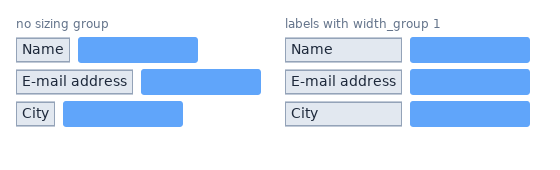
Elements that share a non-zero group id on an axis are equalized to the group's largest size on that axis, before Clay distributes free space to
GROWelements.FITandGROWelements take part.FIXEDandPERCENTsizes do not depend on content, so they do not.Each member stays within its own
max.Members also share the group's largest minimum size (for text, its longest word), so a parent that is too small compresses them like any other children, down to that minimum, and text in them wraps. Members whose parents compress alike, such as the rows of a grid, stay aligned.
Groups may nest: a member can contain members of other groups, as with a grid inside a grid cell. Equalization repeats until the sizes settle, widening containers (
FITandGROW) up the tree.Nesting that forms a cycle on one axis (a member of group 1 contains a member of group 2 whose other member contains a member of group 1) cannot settle. Clay then reports
CLAY_ERROR_TYPE_SIZING_GROUP_CYCLEthrough the error handler, stops equalizing after a fixed number of rounds, and the members of the groups in the cycle keep unequal sizes.Only elements declared in the frame take part. An element in its exit transition (see "FUNCTIONS: TRANSITIONS") keeps the sizes of its last frame, and so do the members inside it; they neither widen their groups nor take space in their parents, so a group next to exiting members keeps its size from frame to frame.
Clay's own distribution of free and missing space stops once a step changes nothing, so sizes too large for a float to take a small step (beyond about 16 million layout units) end the frame instead of stalling it.
FLOW LAYOUT
A second patch adds the layout direction CLAY_LEFT_TO_RIGHT_WRAP and the layout keys lineGap and lineSizing (see "layout" in Clay::XS::Structs).
A wrap container lays its children out left to right and starts a new line below whenever the next child would not fit into the remaining inner width.
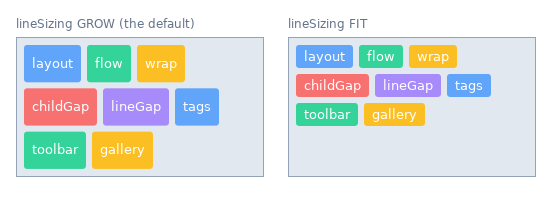
Lines are
lineGapunits apart; children within a linechildGap.Line breaks use the children's preferred widths. A child wider than the container is compressed like any overflowing child (unless the container clips horizontally) and gets a line of its own.
Within a line,
GROWchildren share the line's free width and stretch to the line's height.
Sizing the container:
A
FITwrap container prefers a single line and can be compressed down to its widest child. Give it aGROWorFIXEDwidth to make it wrap inside its parent.A
FITheight is the height of its lines.When the container is taller than its lines,
lineSizingdecides what happens to the leftover height:CLAY_LINE_SIZING_GROW(the default) adds an equal share of it to every line;CLAY_LINE_SIZING_FITkeeps every line as tall as its tallest child.
Alignment:
childAlignment.xaligns every line on its own.childAlignment.yaligns each child within its line and, withCLAY_LINE_SIZING_FIT, the block of lines within the container.A child in its exit transition (see "FUNCTIONS: TRANSITIONS") takes no space and starts no line: it is drawn where the next child goes, aligned within that child's line. One placed before the first line (exiting children come first unless their exit sibling ordering says otherwise) aligns within the first line; with no line at all, it aligns within the container.
Borders between children (betweenChildren) draw a vertical bar in the childGap between neighbours on a line, and a horizontal bar across the container in every lineGap. A vertical bar reaches halfway into the lineGaps around its line, or to the container's edge above the first line and below the last one.
Wrapping is horizontal only: Clay sizes widths before heights, so wrapping into columns cannot be expressed.
STACK LAYOUT
A third patch adds the layout direction CLAY_BACK_TO_FRONT. A stack container places all its children on top of each other inside its padding.
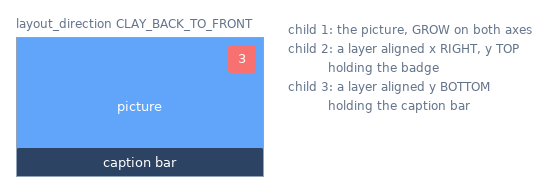
Later children are drawn over earlier ones.
childGapis unused.Both axes are sized the way the other directions size their off axis: a
FITstack is as wide as its widest child and as tall as its tallest one (plus padding),GROWchildren fill its inner size, and children larger than a non-clipping stack are compressed to it.childAlignmentplaces every child on its own, on both axes.betweenChildrenborders draw nothing.
The order also decides hit testing: Clay reports every element under the pointer, and Clay::UI sends a press to the child drawn on top (see Clay::UI::Interaction).
LIMITATIONS
Per-element transition handlers are not supported. Clay's transition callback signatures do not include the element id, so Clay::XS cannot route a call to a different Perl code reference per element. Install one set of handlers with
Clay_SetTransitionHandlers; it runs for every transitioning element. Decide what to do from the values in the callback arguments.Contexts are per interpreter (see "CONTEXTS"). One interpreter can use several contexts with
Clay_SetCurrentContext; using Clay from several threads at once is not supported.Clay's layout arithmetic is single-precision and does not guard against overflow. Sizes near the
floatlimit (text measured at about 1e38, say) can sum to infinity inside Clay, andClay_EndLayoutmay then not return. Keep sizes in a realistic pixel range.While the element count is exceeded, text that exiting elements still show is kept until a frame fits again. Clay makes no copies of exiting elements in such a frame, so Clay::XS cannot tell which text they use.
SEE ALSO
Clay::UI, Clay::Manual, Clay::Cookbook, Clay::XS::Structs, https://github.com/nicbarker/clay.
LICENSE
This binding is released under the same zlib/libpng license as Clay itself. See src/clay/LICENSE.md for the upstream notice.