NAME
Term::Fabulous::Widget::Spinner - Show that something is going on
SYNOPSIS
use Term::Fabulous::Widget::Spinner;

my $spinner = Term::Fabulous::Widget::Spinner->new( label => 'Connecting' );
$box->add_child($spinner);

# When the work is done:
$spinner->stop;
$box->remove_child($spinner);

# Other looks:
Term::Fabulous::Widget::Spinner->new( style => 'line' );                     # - \ | /
Term::Fabulous::Widget::Spinner->new( style => 'ring', color => '#98c379' ); # three rows
Term::Fabulous::Widget::Spinner->new( frames => [ 'tick', 'tock' ], interval => 0.5 );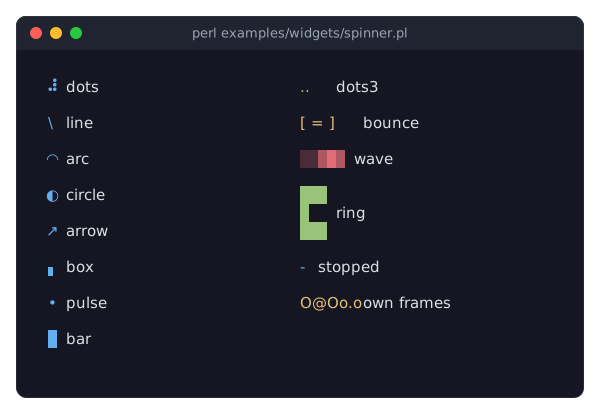
DESCRIPTION
The picture shows every ready-made style, each with its name as the label, a stopped spinner and one with frames of its own. The program is examples/widgets/spinner.pl.
A spinner shows that the program is busy with something whose progress it cannot measure: connecting, waiting for a reply, loading. It cycles through the frames of its style, a few times per second, and shows a label next to them:
⠋ ConnectingThe styles come in three sizes. One cell: dots (the default, made of Braille patterns), line, arc, circle, arrow, box, pulse and bar. A few cells: dots3 (three dots appearing one by one), bounce and wave. Three rows: ring, a square ring of blocks with a gap that runs around it. Frames of your own, including frames of several rows, replace the style's; see "frames".
The spinner runs on the application's clock without a timer of its own (see "ANIMATION" in Term::Fabulous::Widget::Display): it asks for a frame when its next one is due, so nothing is drawn while it stands still, and a stopped spinner ("stop") shows its first frame and costs nothing. It takes no input. Unless the layout sizes it, it is as big as its largest frame plus the label.
CONSTRUCTOR
new
my $spinner = Term::Fabulous::Widget::Spinner->new(%parameters);Accepts the parameters of "CONSTRUCTOR" in Term::Fabulous::Widget::Box (id, layout, background_color, the border parameters, ...) and the ones below. All are optional; unknown parameters die.
style-
The name of a ready-made style:
dots(the default),line,arc,circle,arrow,box,pulse,bar,dots3,bounce,waveorring. Anything else dies, naming them. "styles" returns the names. frames-
An array reference of one or more strings, the frames shown in turn, or
undef(the frames ofstyle). A frame of several rows has newlines in it. Every frame is drawn in the space of the largest one, so the label stays in place. Default:undef. interval-
A positive number of seconds each frame is shown, or
undeffor the style's own pace (0.08 to 0.3 seconds). Default:undef. label-
A character string shown next to the frames, in
label_color. Default:''(no label). label_position-
right(the default) orleft: on which side of the frames the label is. Anything else dies. running-
A boolean. Default: 1. Whether the spinner animates; 0 shows the first frame and stands still. Stored as 1 or 0; a reference dies.
color-
The color of the frames, in any format "Colors" in Term::Fabulous::Widget::Canvas accepts. Default: the theme's
spinner.color,[97, 175, 239, 255]in the dark theme, the blue of the input widgets' accent. label_color-
The color of the label. Default: the theme's
spinner.label,[220, 223, 228, 255]in the dark theme.
METHODS
The methods of Term::Fabulous::Widget::Display (mark_changed, the Box and Canvas methods), plus:
start
$spinner->start;Lets the spinner run. Returns the spinner.
stop
$spinner->stop;Stops the spinner at its first frame; a stopped spinner asks for no frames. Returns the spinner. Remove the spinner from its parent, or replace its label, when the work is done.
running
my $is_running = $spinner->running;
$spinner->running(0);
Accessor for the running parameter; what "start" and "stop" write. Returns 1 or 0.
style
$spinner->style('arc');Accessor for the style parameter. Writing switches to that style's frames unless frames of your own are set, and to its pace unless an interval is set. An unknown name dies and leaves the old style.
frames
my $frames = $spinner->frames;    # the frames in use, a new array reference
$spinner->frames( [ "\x{25CB}", "\x{25D4}", "\x{25D1}", "\x{25D5}", "\x{25CF}" ] );
$spinner->frames(undef);           # back to the style's frames
Accessor. The reader returns the frames shown now, the style's or your own, as a new array reference. Writing sets frames of your own, checked as new checks them; undef returns to the style's.
interval
my $seconds = $spinner->interval;    # 0.08 for dots
$spinner->interval(0.2);
$spinner->interval(undef);           # back to the style's pace
Accessor. The reader returns the seconds each frame is shown, the style's pace unless one was set. Writing checks the value as new does.
label
$spinner->label('Still connecting');Accessor for the label parameter; the new width takes effect at the next frame.
label_position
$spinner->label_position('left');Accessor for the label_position parameter.
color
$spinner->color('#e5c07b');Accessor for the color parameter. The reader returns [r, g, b, a]. An invalid color dies and leaves the old one.
label_color
$spinner->label_color('#ffffff');Accessor for the label_color parameter; works like "color".
frame_index
my $index = $spinner->frame_index;The index of the frame shown at this moment, from 0: by the clock while the spinner runs, 0 while it is stopped. Read-only.
styles
my @names = Term::Fabulous::Widget::Spinner->styles;A class method: the names of the ready-made styles, sorted.
Every writer marks the spinner changed, so the next frame paints the new look.
EVENTS
A spinner fires no events of its own.
KDL PROPERTIES
The properties of "KDL PROPERTIES" in Term::Fabulous::Widget::Box, plus style, interval, label and label_position (strings and numbers), running (#true / #false), color and label_color (color strings), and frames with one or more string arguments:
use Term::Fabulous::Widget::Spinner as Spinner

Spinner "busy" {
	style "arc"
	label "Loading"
	color "#98c379"
}

Spinner "custom" {
	frames "tick" "tock"
	interval 0.5
}
EXAMPLES
A spinner that becomes a check mark
my $spinner = Term::Fabulous::Widget::Spinner->new( label => 'Saving' );

sub saved () {
	$spinner->stop;
	$spinner->frames( ["\x{2713}"] );    # one frame: a check mark
	$spinner->color('#98c379');
	$spinner->label('Saved');
	return;
}
A spinner inside a button
my $button  = Term::Fabulous::Widget::Button->new( layout => { child_gap => 1, padding => { left => 1, right => 1 } } );
my $spinner = Term::Fabulous::Widget::Spinner->new( style => 'line', running => 0 );
$button->add_child( $spinner, Term::Fabulous::Widget::Text->new( text => 'Submit', text_color => '#ffffff' ) );
$button->on( Activate => sub ($event) { $spinner->start; submit_form(); return } );
SEE ALSO
Term::Fabulous::Widget::Display, Term::Fabulous::Widget::ProgressBar, "SPINNERS" in Term::Fabulous::Manual::Feedback.