NAME
nup - n-up, multi-column paged output for commands and files
SYNOPSIS
nup [ options ] file ...
nup -e [ options ] command ...

 -h  --help             show help
     --version          show version
 -d  --debug            debug mode
 -n  --dryrun           dry-run mode
 -e  --exec             execute command mode
     --alias=CMD=OPTS   set command alias
 -V  --parallel         parallel view mode
 -D  --document         document mode (default: on)
 -F  --no-paginate      disable page mode
 -A  --auto-paginate    auto disable page mode for single column
 -H  --filename         show filename headers (default: on)
 -G  --grid=#           grid layout (e.g., 2x3)
 -C  --pane=#           number of columns
 -R  --row=#            number of rows
 -P  --page=#           page height in lines
 -S  --pane-width=#     pane width (default: 85)
--bs --border-style=#   border style (default: heavy-box)
--ls --line-style=#     line style (none/truncate/wrap/wordwrap)
--cm --colormap=#       color mapping (LABEL=COLOR)
     --[no-]page-number page number on border (default: on)
     --textconv[=EXT]   textconv for non-text files
     --pager=#          pager command (empty to disable)
     --no-pager         disable pager
     --white-board      black on white board
     --black-board      white on black board
     --green-board      white on green board
     --slate-board      white on dark slate board
VERSION
Version 1.08
DESCRIPTION
N-up (command: nup) is a multi-column paged output tool. It provides a convenient way to view files or run commands in n-up layout using the App::optex::up module through optex.
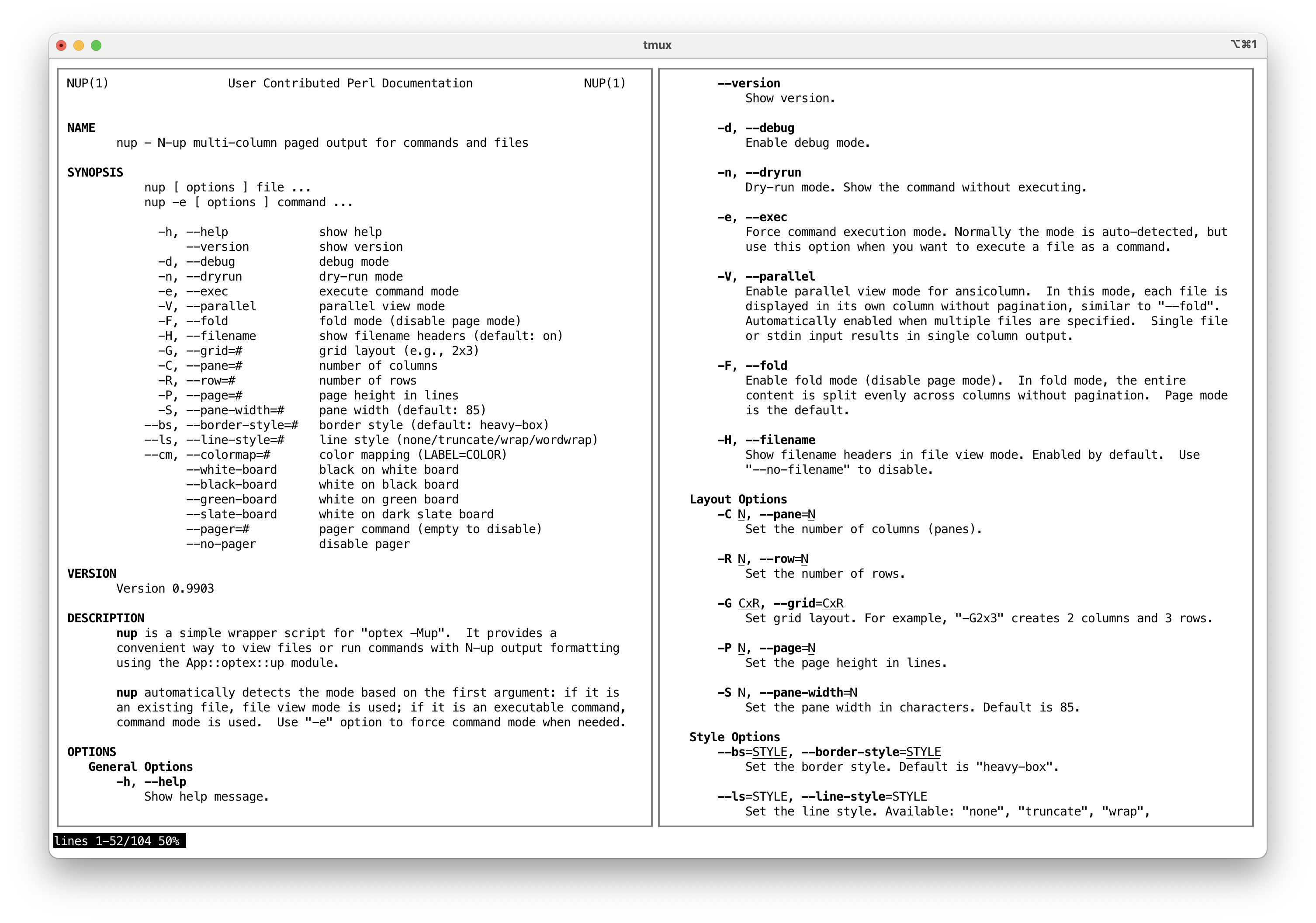
nup automatically detects the mode based on the first argument: if it is an existing file, n-up file view mode is used; if it is an executable command, n-up command mode is used. Use -e option to force command mode when needed.
OPTIONS
General Options
- -h, --help
-
Show help message.
- --version
-
Show version.
- -d, --debug
-
Enable debug mode.
- -n, --dryrun
-
Dry-run mode. Show the command without executing.
- -e, --exec
-
Force command execution mode. Normally the mode is auto-detected, but use this option when you want to execute a file as a command.
- --alias=NAME=CMD OPTS...
-
Define command alias. When a command matches NAME, it is replaced by CMD with specified OPTS. This can be used to add default options or to substitute a different command. Multiple
--aliasoptions can be specified.Default aliases:
bat     bat --style=plain --color=always
batcat  batcat --style=plain --color=always
rg      rg --color=always
tree    tree -C
Example:
nup --alias='grep=ggrep --color=always' grep pattern file - -V, --parallel
-
Enable parallel view mode for ansicolumn. In this mode, each file is displayed in its own column without pagination, similar to
--no-paginate. Automatically enabled when multiple files are specified. Single file or stdin input results in single column output. - -D, --document
-
Enable document mode for ansicolumn. This mode is optimized for viewing documents with n-up page-based layout. Enabled by default. Use
--no-documentto disable. - -F, --no-paginate
-
Disable page mode. Without pagination, the entire content is split evenly across columns. Page mode is the default; use --paginate to re-enable if needed.
- -A, --auto-paginate
-
Automatically disable page mode when only one column fits the terminal. This is useful when using
nupasMANPAGER, where single-column page splitting wastes space. - -H, --filename
-
Show filename headers in file view mode. Enabled by default. Use
--no-filenameto disable.
Layout Options
- -C N, --pane=N
-
Set the number of columns (panes).
- -R N, --row=N
-
Set the number of rows.
- -G CxR, --grid=CxR
-
Set grid layout. For example,
-G2x3creates 2 columns and 3 rows. - -P N, --page=N
-
Set the page height in lines.
- -S N, --pane-width=N
-
Set the pane width in characters. Default is 85.
Style Options
- --bs=STYLE, --border-style=STYLE
-
Set the border style. Default is
heavy-box. - --ls=STYLE, --line-style=STYLE
-
Set the line style. Available:
none,truncate,wrap,wordwrap. - --cm=SPEC, --colormap=SPEC
-
Set color mapping. Specify as
LABEL=COLOR(e.g.,--cm=BORDER=R). Available labels:TEXT,BORDER. - --[no-]page-number
-
Show page number on the bottom border of each column. Enabled by default. Use
--no-page-numberto disable. - --white-board, --black-board, --green-board, --slate-board
-
Predefined color schemes for board-style display.
Text Conversion
- --textconv[=EXT,...]
-
Enable text conversion for non-text files using App::optex::textconv. When any of the specified file extensions are found in the arguments, the
textconvmodule is loaded to convert them to text before display.Default extensions:
pdf,docx,docm,pptx,pptm,xlsx,xlsm,jpg,jpeg.Use
--textconv=noneto disable.
Pager Options
- --pager=COMMAND
-
Set the pager command. Default is
NUP_PAGERorless -F +Gg. When page mode is active,NUP_PAGE_PAGERtakes precedence overNUP_PAGER. Viewing multiple files (or-Vparallel view) produces parallel layout which has no page structure, sonupdisables page mode andNUP_PAGE_PAGERis not used there. ThePAGERvariable is not used to avoid an infinite loop whenPAGERis set tonup. Use--pager=(empty) or--no-pagerto disable pager. - --no-pager
-
Disable pager.
Less Environment Variables
nup sets the following environment variables when they are not already defined, to ensure proper display with less:
LESS-
Default:
-R. Required for ANSI color sequences. LESSANSIENDCHARS-
Default:
mK. Recognizes SGR (m) and erase line (K) sequences.
EXAMPLES
Typical n-up usage:
nup man nup                # view manual in n-up layout
nup -C2 man perl           # 2 columns
nup -G2x2 man perl         # 2x2 grid (4-up layout)
nup -F man perl            # no pagination
nup file1.txt file2.txt    # view files side by side
nup -e ./script.sh         # force command mode for a file
Using nup as a MANPAGER:
export MANPAGER="nup -A"INSTALLATION
Using cpanminus:
cpanm -n App::nupDIAGNOSTICS
Both stdout and stderr of the command are merged and passed through the n-up output filter. Error messages will appear in the paged output.
EXIT STATUS
The exit status of the executed command is not preserved because the output is passed through a filter pipeline.
SEE ALSO
App::optex::up (bundled), optex
AUTHOR
Kazumasa Utashiro
LICENSE
Copyright 2025-2026 Kazumasa Utashiro.
This software is released under the MIT License. https://opensource.org/licenses/MIT