NAME
Clay::UI::Grid - table widget role for Clay::UI with automatically sized columns and rows
SYNOPSIS
use v5.22;
use Object::Pad;
use Clay::XS qw(CLAY_ALIGN_X_RIGHT);
use Clay::UI;
use Clay::UI::Grid;
use Clay::UI::Grid::Cell;
use Clay::UI::Text;

class My::Grid  :strict(params) :does(Clay::UI::Grid) {}
class My::Label :strict(params) :does(Clay::UI::Text) {}

sub label ($text) { return My::Label->new(text => $text) }

# A cell with its content aligned to the right, for numbers.
sub amount ($text) {
	my $cell = Clay::UI::Grid::Cell->new(
		layout => { child_alignment => { x => CLAY_ALIGN_X_RIGHT } },
	);
	$cell->add_child(label($text));
	return $cell;
}

my $grid = My::Grid->new(id => 'people', cell_gap => 8, row_gap => 4);
$grid->append_row([ label('Name'),  label('E-mail'),            label('Amount') ]);
$grid->append_row([ label('Alice'), label('alice@example.com'), amount('1234') ]);
$grid->append_spanning_row(label('Guests'));    # one cell across all columns
$grid->append_row([ label('Bob'),   label('bob@example.com'),   amount('7') ]);

# Change it later; the next render shows the change.
$grid->set_cell(0, 2, label('Total'));
$grid->reorder_rows([ 0, 3, 2, 1 ]);
$grid->remove_row(2);

my $ui = Clay::UI->new(width => 800, height => 600, root => $grid);
my $commands = $ui->render;
DESCRIPTION
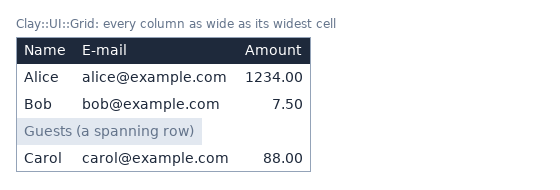
Clay::UI::Grid lays out widgets in rows and columns, like a table: every column is as wide as its widest cell and every row as tall as its tallest cell. You add rows of widgets; the grid works out the sizes in the same layout pass as the rest of the UI.
Like every widget in Clay::UI it is a role: compose it in a class of your own (as My::Grid above) to get a widget you can construct. A grid can be the root of a Clay::UI or a child of any container, and a cell may hold another grid.
This module is a guide as well as a reference. The sections up to "CONSTRUCTOR PARAMETERS" explain how to build grids; the reference follows; "GROUP IDS" at the end explains the ids the grid uses internally.
How it works
A grid is a column of rows. Each row is a Clay::UI::Grid::Row, a left-to-right container; the grid stacks the rows top to bottom. Each widget you pass becomes one cell of a row.
Clay lays out every row on its own, so cells in different rows know nothing of each other. The grid connects them with sizing groups (see Clay::UI::Role::Layout::HasSizingGroup): it gives every cell of a column the same width_group and every cell of a row the same height_group, and Clay raises all members of a group to the size of the largest one.
The grid's children are its rows. children returns the Clay::UI::Grid::Row objects, each of which knows whether it spans ("spans" in Clay::UI::Grid::Row) and its height id ("height_id" in Clay::UI::Grid::Row); use "cell_wrappers" to get at the cells. The grid composes Clay::UI::Role::Core::Element but not Clay::UI::Role::Core::Container: there is no add_child, only the row methods below change it.
BUILDING A GRID
Create the grid empty, then add rows:
my $grid = My::Grid->new(cell_gap => 8, row_gap => 4);
$grid->append_row([ $name_label, $size_label ]);
$grid->insert_row(0, [ $header_name, $header_size ]);
A row is an arrayref of widgets (element widgets or text widgets). Each widget must be free: not attached anywhere else and not in this grid already.
Rows may have different lengths. Column N is made of the Nth cells of all rows; a short row has no cells in the last columns. An empty row (
[]) is allowed.Row and column indices count from 0.
Every method that changes the grid checks all of its input before it changes anything, so a call that dies leaves the grid as it was (see "ATTACHING CHILDREN" in Clay::UI::Role::Core::Element). Every change bumps the revision (Clay::UI::Revision) and shows at the next
render.The methods return the grid, so calls chain.
CELLS AND WRAPPED WIDGETS
The grid treats the widgets you give it in one of two ways:
- a cell
-
A widget composing Clay::UI::Role::Layout::GridCell - an instance of Clay::UI::Grid::Cell or of a cell class of your own - is the cell. The grid writes the column and row group ids on it, so its box, background, border and padding cover exactly the column width and the row height. Use a cell to style it or to align its content:
my $cell = Clay::UI::Grid::Cell->new( background_color => [55, 90, 140, 255], layout => { padding => padding_all(6), child_alignment => { x => CLAY_ALIGN_X_RIGHT }, }, ); $cell->add_child(My::Label->new(text => '1,234.00')); - any other widget
-
A text widget, a Clay::UI::Box or anything else is put into a new, unstyled Clay::UI::Grid::Cell (FIT on both axes) that the grid creates, and that cell gets the group ids. The widget's own box keeps its own size inside the cell, at the left and top. This is enough when only the layout matters.
"cell_wrappers" returns the cells the grid lays out: your cells, and the cells it created around other widgets.
The grid keeps a cell's layout. Its width sizing changes the column:
sizing_grow(): the column takes a share of the space left in a grid that is wider than its columns (see "WIDE GRIDS AND GROW COLUMNS");sizing_fit($min, $max)orsizing_grow($min, $max): the maximum limits that cell only, and text in it wraps at that width. The other cells of the column still widen the column, so give every cell of the column the same maximum, or the column does not line up;sizing_fixed($n): the cell does not take part in the column sizing (FIXED members are ignored by sizing groups); give every cell of the column the same fixed width.
Text in a grid column wraps when the grid is too narrow for its columns: the cells of a column share the column's widest unwrapped width and its largest minimum (the longest word), and Clay compresses them like any other children down to that minimum. Every row of a grid compresses alike, so the columns stay aligned. To wrap a column at a chosen width instead, give it a maximum (sizing_fit(0, 200), sizing_grow(0, 200)) or a fixed width in every row.
Text that does not wrap (CLAY_TEXT_WRAP_NEWLINES, CLAY_TEXT_WRAP_NONE) keeps its width while other columns can still shrink. When they cannot, its column gets narrower too and the text is cut off, a long word as well; the cells of a column share how far they can get, so the columns stay aligned.
SPANNING ROWS
A spanning row holds a single cell as wide as the whole grid, for example a heading for the rows below it:
$grid->append_spanning_row(My::Label->new(text => 'Guests'));
$grid->insert_spanning_row(0, $title);
A cell cannot span some of the columns, only all of them: the only way to span is a whole spanning row.
The cell of a spanning row belongs to no column: it does not widen any column, and the columns do not size it. It gets a row height_group like any row.
A widget that is not a cell is put into an unstyled cell with a sizing_percent(1) width. That cell is as wide as the grid, and Clay does not count it when it fits the grid to its rows: a long heading wraps instead of widening the grid. A cell of your own keeps its layout; give it a sizing_percent(1) width for the same effect. (A sizing_grow() width fills the row too, but its content then widens a grid that fits its content.)
"is_spanning_row" tells the two kinds of rows apart. "set_cell" dies on a spanning row; "replace_row" turns a spanning row into a normal one and "replace_spanning_row" the other way round.
WIDE GRIDS AND GROW COLUMNS
By default a grid is exactly as wide as its columns (FIT). Give it a wider layout width, for example sizing_grow() or sizing_fixed(600), and it gets space left over. Every row is as wide as the grid, so cells with a sizing_grow() width share that space:
my $grid = My::Grid->new(layout => { sizing => { width => sizing_grow() } });
for my $file (@files) {
	my $name = Clay::UI::Grid::Cell->new(
		layout => { sizing => { width => sizing_grow() } },
	);
	$name->add_child(My::Label->new(text => $file->{name}));
	$grid->append_row([ $name, My::Label->new(text => $file->{size}) ]);
}
Give the cells of a growing column a sizing_grow() width in every row. Clay hands out the space row by row; a column that grows in some rows only does not stay aligned.
STYLING A ROW
A row (Clay::UI::Grid::Row) has no style of its own: it takes no background_color, border_color or corner_radius. To colour a row, such as a header row, either colour each of its cells (use Clay::UI::Grid::Cell objects with a background_color), with a cell_gap of 0 and padding in the cells so no gap shows between them, or give the grid itself a background_color.
my $grid = My::Grid->new(id => 'files', cell_gap => 0);
$grid->append_row([
	map {
		my $cell = Clay::UI::Grid::Cell->new(
			background_color => [55, 90, 140, 255],
			layout           => { padding => padding_all(4) },
		);
		$cell->add_child(My::Label->new(text => $_));
		$cell;
	} 'Name', 'Size'
]);
SHARING COLUMNS BETWEEN GRIDS
Two grids can share their columns: column N of both is sized as one column, as wide as the widest cell of column N in either grid. The typical case is a header that stays put above a body that scrolls:
my $header = My::Grid->new(id => 'header', cell_gap => 8);
my $body   = My::Grid->new(id => 'body',   cell_gap => 8, share_columns_with => $header);
my $scroll = My::ScrollBox->new(
	id     => 'body-scroll',
	layout => { sizing => { height => sizing_fixed(300) } },
);

$header->append_row([ map { My::Label->new(text => $_) } 'Name', 'Size' ]);
$body->append_row([
	My::Label->new(text => $_->{name}),
	My::Label->new(text => $_->{size}),
]) for @files;

$scroll->add_child($body);
$page->add_child($header, $scroll);(My::ScrollBox is a class composing Clay::UI::Box and Clay::UI::Role::Layout::HasScroll.)
The grids can be anywhere in the tree.
Any number of grids can share the columns of one grid. Their rows never share a height.
The grids also get a common
width_group(unless you gave one to a grid), so they are as wide as the widest of them. A grid whose rows all span, or that has no rows yet, is still as wide as the columns.Give the grids the same
cell_gap, or the columns drift apart by the difference.share_columns_withis a constructor parameter only: grids cannot start or stop sharing later.
NESTED GRIDS
A cell may hold another grid; a grid is a widget like any other. The inner grid sizes its own columns and rows, independently of the outer grid, and the outer column is as wide as the inner grid:
my $inner = My::Grid->new(id => 'details');
$inner->append_row([ My::Label->new(text => 'CPU'), My::Label->new(text => '4 cores') ]);
$inner->append_row([ My::Label->new(text => 'RAM'), My::Label->new(text => '16 GB') ]);

$outer->append_row([ My::Label->new(text => 'server-1'), $inner ]);
Every grid uses its own group ids (see "GROUP IDS"), so nested grids never get in each other's way.
THE GRID'S OWN LAYOUT AND STYLE
The grid composes Clay::UI::Role::Layout::HasLayout, Clay::UI::Role::Style::HasBackground, Clay::UI::Role::Style::HasBorder and Clay::UI::Role::Style::HasCornerRadius, so it takes layout, background_color, border_color, border_width and corner_radius like a Clay::UI::Box. It has no floating and no fire_event; it has on (Clay::UI::Role::Events::Listener).
The grid's own layout defaults to:
{
	sizing           => { width => sizing_fit(), height => sizing_fit() },
	layout_direction => CLAY_TOP_TO_BOTTOM,
	child_gap        => $row_gap,
}
A layout you give is merged over these defaults one top-level key at a time. layout => { padding => padding_all(8) } keeps the rows stacked top to bottom with row_gap between them; layout => { child_gap => 10 } replaces row_gap; a sizing replaces the whole default sizing. Do not change layout_direction: the rows must stay stacked top to bottom.
CONSTRUCTOR PARAMETERS
share_columns_with
my $body = My::Grid->new(share_columns_with => $header);Another grid (any object composing Clay::UI::Grid) whose columns this grid shares; see "SHARING COLUMNS BETWEEN GRIDS". Default undef (no sharing). The grid keeps no reference to the other grid. Dies with Clay::UI::Grid: share_columns_with must be a Clay::UI::Grid, got ... for anything else.
The parameters below come from the composed roles. Each is also a read/write accessor, as documented in the role.
id
See "id" in Clay::UI::Role::Core::Element.
layout
See "layout" in Clay::UI::Role::Layout::HasLayout; merged with the grid's defaults (see "THE GRID'S OWN LAYOUT AND STYLE").
background_color
See "background_color" in Clay::UI::Role::Style::HasBackground.
border_color
See "border_color" in Clay::UI::Role::Style::HasBorder.
border_width
See "border_width" in Clay::UI::Role::Style::HasBorder.
corner_radius
See "corner_radius" in Clay::UI::Role::Style::HasCornerRadius.
width_group
See "width_group" in Clay::UI::Role::Layout::HasSizingGroup. A grid sharing columns with another one gets a common width group unless you give it one (see "SHARING COLUMNS BETWEEN GRIDS").
height_group
See "height_group" in Clay::UI::Role::Layout::HasSizingGroup.
ATTRIBUTES
Both attributes are constructor parameters and read/write accessors. A write bumps the revision (Clay::UI::Revision), takes effect at the next render and returns the new value.
cell_gap
$grid->cell_gap(8);The space between the cells of a row, an integer from 0 to 65535. Default 0. A write updates every existing row as well. Dies with Clay::UI: 'cell_gap' expected an integer in 0..65535, got ... for anything else.
row_gap
$grid->row_gap(4);The space between rows, an integer from 0 to 65535. Default 0. It is the child_gap of the grid's layout, unless the grid's layout sets child_gap itself. Errors as for "cell_gap".
METHODS
row_count
my $rows = $grid->row_count;Returns the number of rows, spanning rows included.
is_spanning_row
if ($grid->is_spanning_row(2)) { ... }Returns 1 when the row at the index is a spanning row, 0 otherwise. Dies with Clay::UI::Grid: row index 9 out of range 0..3 for an index that is not an existing row.
cell_wrappers
my $cells = $grid->cell_wrappers;    # [ [ $cell, $cell, ... ], ... ]
my $cell  = $cells->[$row][$col];
Returns the cells the grid lays out, as a new array of rows, each a new array of cells: your cells (widgets composing Clay::UI::Role::Layout::GridCell) and the Clay::UI::Grid::Cell objects the grid created around other widgets. A spanning row holds one cell. Changing the arrays does not change the grid; the cells are the live objects.
append_row
$grid->append_row([ $widget, $widget, ... ]);Adds a row at the bottom. Dies with Clay::UI::Grid: row must be an arrayref when the argument is not an array reference, and for the widgets that cannot be attached (see "ATTACHING CHILDREN" in Clay::UI::Role::Core::Element), changing nothing. Returns the grid.
insert_row
$grid->insert_row($index, [ $widget, ... ]);Inserts a row so that it gets index $index; the rows from there on move down. $index may be 0 to row_count (the latter appends). Dies with Clay::UI::Grid: insert index 9 out of range 0..3 for another index, and like "append_row". Returns the grid.
append_spanning_row
$grid->append_spanning_row($widget);Adds a spanning row (see "SPANNING ROWS") at the bottom. Dies like "append_row" for a widget that cannot be attached. Returns the grid.
insert_spanning_row
$grid->insert_spanning_row($index, $widget);Inserts a spanning row at $index (0 to row_count). Dies like "insert_row". Returns the grid.
set_cell
$grid->set_cell($row, $col, $widget);Puts $widget into the cell at $row, $col, following the rules of "CELLS AND WRAPPED WIDGETS". The cell that was there is detached. $col may also be the current length of the row, which appends a cell to the row. Returns the grid.
Dies, changing nothing:
Clay::UI::Grid: row index ... out of range ...for a row that does not exist;Clay::UI::Grid: row 1 spans all columns; use replace_spanning_row or replace_rowfor a spanning row;Clay::UI::Grid: col index 5 out of range 0..2for a column beyond the row's length;for a widget that cannot be attached, including one that is already in this grid.
replace_row
$grid->replace_row($index, [ $widget, ... ]);Replaces all cells of the row at $index with new ones; the old cells are detached. A spanning row becomes a normal row. The row keeps its place and its height group. Dies like "append_row" and for an index that is not an existing row. Returns the grid.
replace_spanning_row
$grid->replace_spanning_row($index, $widget);Replaces the row at $index with a spanning row holding $widget; the old cells are detached. Dies like "replace_row". Returns the grid.
remove_row
$grid->remove_row($index);Removes the row at $index and detaches its cells; the rows below move up. Dies with Clay::UI::Grid: row index ... out of range ... for an index that is not an existing row. Returns the grid.
clear_rows
$grid->clear_rows;Removes all rows, as remove_row would one by one. Returns the grid.
reorder_rows
# Sort a table by its second column, keeping the header row first.
my @order = (0, sort { $names[$a] cmp $names[$b] } 1 .. $grid->row_count - 1);
$grid->reorder_rows(\@order);
Puts the rows in a new order: row $k becomes the row that was at $order->[$k]. The order must hold every row index exactly once. No row is detached, so the cells keep their parents and hover and focus stay where they were, which is what sorting a table needs. Dies, changing nothing, with Clay::UI: a new child order must be an array reference of the indices 0..3 in any order for anything else. Returns the grid.
contribute_grid_defaults
Adds the grid's default layout (see "THE GRID'S OWN LAYOUT AND STYLE") to its declaration, under any layout keys already there (see "EXTENDING THE DECLARATION" in Clay::UI::Role::Core::Element).
REUSING WIDGETS
A widget can be attached whenever it has no parent (see "ATTACHING AND REMOVING" in Clay::UI::Role::Layout::HasParent). All row and cell methods die for a widget that is still attached somewhere, including in this grid.
Widgets removed by remove_row, clear_rows, replace_row, replace_spanning_row or set_cell can be attached again, to this grid or anywhere else. A cell leaving the grid drops the column and row group ids the grid gave it; ids you set yourself stay.
One detail: a widget the grid put into a cell of its own stays the child of that cell, and the cells of a removed row stay children of the row, until the grid lets go of them. That happens at once unless you keep a reference to the cell or the row (from cell_wrappers or children); while you do, the widget is not free to be attached elsewhere.
GROUP IDS
The grid sizes its columns and rows with width_group and height_group ids it chooses itself. You rarely need to know how; this section is for alignment across grids and for reading the ids.
Overriding group ids
If a cell already has a non-zero width_group or height_group when the grid receives it, the grid leaves that axis alone. That lets a cell take part in an alignment group of your own, shared with a widget elsewhere in the UI, instead of the grid's column or row. To align all columns of two grids, use "share_columns_with" instead.
User group ids are 0 to 2**20 - 1; the grid's ids are 2**20 and above, so the two never collide (see "width_group" in Clay::UI::Role::Layout::HasSizingGroup).
How the grid numbers its groups
Each grid takes a grid number from a pool of 4095 for the whole process; a grid made with share_columns_with uses the number of the grid it shares with. The pool size follows from the user range: Clay's group ids have 32 bits, the index of a group takes the 20 bits of the user range (USER_GROUP_ID_MAX, 2**20 - 1), and the grid number the 12 that are left (2**12 - 1 = 4095). A group id is (grid_number << 20) | index, where the index counts columns (for width ids) and rows (for height ids) of that grid. This means:
Different grids never share an id, nested grids included, unless they share columns on purpose; even then their rows never share a height.
The grid never renumbers its cells when it grows: a new column or row takes the next index, or the index of a removed row.
A cell that still carries a grid's ids (one you kept after the grid was freed) keeps that grid number taken until the cell is freed or put into another grid, so no new grid gets the same ids. Once every grid using a number is freed, its ids size nothing: the kept cells'
width_groupandheight_groupread 0.The number goes back to the pool when every grid using it and every cell carrying its ids are freed, so programs that create and drop many grids do not run out. More than 4095 grid numbers taken at once makes the grid constructor die with
Clay::UI::Grid: grid-id pool exhausted (max 4095 live grids).Group ids differ between runs of the program; do not store them.
The number is held by a small internal object, not by the grid, so a class composing Clay::UI::Grid may define its own DESTROY.
SEE ALSO
Clay::UI::Grid::Cell, Clay::UI::Role::Layout::GridCell, Clay::UI::Grid::Row, Clay::UI::Role::Layout::HasSizingGroup, Clay::UI, Clay::Manual, Clay::Cookbook.