NAME
Term::Fabulous::Cookbook::Menus - Recipes: menu bars, context menus, status bars, help screens and document tabs
DESCRIPTION
This page is part of Term::Fabulous::Cookbook. Previous page: Term::Fabulous::Cookbook::Forms. Next page: Term::Fabulous::Cookbook::Layout.
The recipes on this page give a program the parts that most applications share: a menu bar that shows what the program can do, a menu that opens where the user right-clicks, a status bar that says what just happened, a help screen that lists the keys, and a tab for each open document. Each recipe is a complete program, shipped in examples/cookbook/, with a screenshot and notes on the lines that matter.
The recipes use Term::Fabulous::Commands and Term::Fabulous::Command, which keep the program's commands and their keys in one place, Term::Fabulous::Widget::MenuBar and Term::Fabulous::Widget::Menu, which show the commands, Term::Fabulous::Widget::StatusBar, Term::Fabulous::Widget::KeyReference, which lists the keys of the commands, and Term::Fabulous::Widget::DocumentTabs. How these work together is explained in Term::Fabulous::Manual::Menus; the document tabs are part of "Document tabs" in Term::Fabulous::Manual::Layout. The status bar is part of "STATUS BARS" in Term::Fabulous::Manual::Feedback. The prompts that the menu commands open are in "Confirm before quitting (Prompt)" in Term::Fabulous::Cookbook::Forms.
The recipes on this page:
Give a program a menu bar (MenuBar, Commands)
Goal: a to-do list with a menu bar. The menus add to-dos, remove the finished ones, switch a setting on and off, and quit. Every menu item also has a key that works without the menu.
This program is shipped as examples/cookbook/menu-bar.pl.
use v5.32;
use warnings;
use feature 'signatures';
no warnings 'experimental::signatures';

use Term::Fabulous;
use Term::Fabulous::Commands;
use Term::Fabulous::Widget::Box;
use Term::Fabulous::Widget::Checkbox;
use Term::Fabulous::Widget::MenuBar;
use Term::Fabulous::Widget::Prompt;
use Clay::XS qw(sizing_grow CLAY_TOP_TO_BOTTOM);

my $root = Term::Fabulous::Widget::Box->new( layout => { layout_direction => CLAY_TOP_TO_BOTTOM, sizing => { width => sizing_grow(), height => sizing_grow() } } );
my $list = Term::Fabulous::Widget::Box->new( layout => { layout_direction => CLAY_TOP_TO_BOTTOM, sizing => { width => sizing_grow(), height => sizing_grow() }, padding => { left => 2, top => 1 } } );

my @todos     = ( [ 'Water the plants', 1 ], [ 'Call the bank', 0 ], [ 'Fix the bike', 0 ], [ 'Book the train', 1 ], [ 'Answer Grace', 0 ] );
my $show_done = 1;

# The list shows a check box per to-do; checking one marks it done.
sub show_todos () {
	$list->clear_children;
	foreach my $todo ( grep { $show_done || !$_->[1] } @todos ) {
		my $box = Term::Fabulous::Widget::Checkbox->new( label => $todo->[0], checked => $todo->[1] );
		$box->on( Change => sub ($event) { $todo->[1] = $event->value; return } );
		$list->add_child($box);
	}
	return;
}
show_todos();

my $ui;
my $commands = Term::Fabulous::Commands->new(
	commands => [
		{
			id    => 'add',
			label => 'Add...',
			keys  => ['Ctrl+N'],
			run   => sub {
				Term::Fabulous::Widget::Prompt->ask( $ui, title => 'New to-do', label => 'To do', required => 1 )->on(
					Answer => sub ($event) {
						return if $event->button ne 'ok';
						push @todos, [ $event->value('value'), 0 ];
						show_todos();
						return;
					}
				);
			},
		},
		{
			id    => 'clean',
			label => 'Remove done',
			keys  => ['Ctrl+D'],
			run   => sub {
				@todos = grep { !$_->[1] } @todos;
				show_todos();
			},
			enabled => sub {
				grep { $_->[1] } @todos;
			},
		},
		{ id => 'quit', label => 'Quit', keys => ['Ctrl+Q'], run => sub { $ui->loop->stop } },
		{ id => 'done', label => 'Show done', keys => ['Alt+d'], run => sub { $show_done = !$show_done; show_todos() }, checked => sub { $show_done } },
	],
);

my $menu_bar = Term::Fabulous::Widget::MenuBar->new(
	commands => $commands,
	caption  => 'To-do',
	menus    => [ { title => 'List', items => [qw(add clean - quit)] }, { title => 'View', items => ['done'] } ],
);
$root->add_child( $menu_bar, $list );

$ui = Term::Fabulous->new( root => $root, width => 80, height => 24 );
$commands->listen($root);
$menu_bar->listen($root);
$ui->run;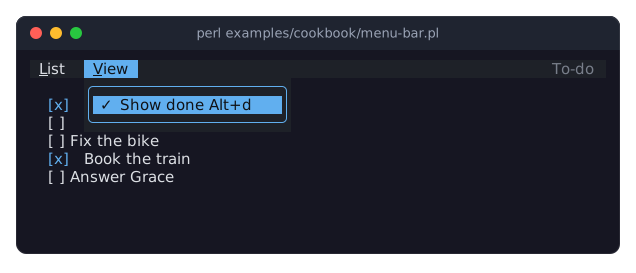
The program does not build menus item by item. It describes its commands once, in a Term::Fabulous::Commands table: an id, the label the menus show, the keys, and the code that runs. The menus then name the commands by id, and
'-'draws a line between groups of items.$commands->listen($root)makes the keys work everywhere. A key press goes to the focused check box first and bubbles up to the root, so the keys a check box does not use, such asCtrl+N, reach the commands.$menu_bar->listen($root)does the same for the keys that open the menus:F10opens the first menu, andAltwith the underlined letter of a title opens that menu (Alt+lfor List,Alt+vfor View).Remove done has an
enabledcode reference. While no to-do is checked, the menu shows the item dimmed and skips it, andCtrl+Ddoes nothing.Show done is a toggle: its
checkedcode reference tells the menu whether to draw the check mark. The menu asks the code each time it draws, so the mark always shows the current setting, whether the user switched it with the menu or withAlt+d.Add opens a prompt that asks for the text of the new to-do (see "ask" in Term::Fabulous::Widget::Prompt). The menu closes before the command runs, so the prompt gives the focus back to the to-do list when it closes.
The bar takes the keyboard focus only while a menu is open, so Tab moves between the check boxes and never stops on the bar.
Open a menu with a right click or the Menu key (Menu)
Goal: a text area with a context menu of Cut, Copy, Paste and Select all. A right click opens it where the pointer is, and Shift+F10 or the Menu key opens it from the keyboard.
This program is shipped as examples/cookbook/context-menu.pl.
use v5.32;
use warnings;
use feature 'signatures';
no warnings 'experimental::signatures';

use Term::Fabulous;
use Term::Fabulous::Termbox qw(TB_KEY_MOUSE_RIGHT TB_MOD_MOTION);
use Term::Fabulous::Widget::Box;
use Term::Fabulous::Widget::Menu;
use Term::Fabulous::Widget::Text;
use Term::Fabulous::Widget::TextArea;
use Clay::UI::Enum::Result;
use Clay::XS qw(sizing_grow CLAY_TOP_TO_BOTTOM);

my $root = Term::Fabulous::Widget::Box->new(
	layout => {
		layout_direction => CLAY_TOP_TO_BOTTOM,
		sizing           => { width => sizing_grow(), height => sizing_grow() },
		padding          => { left  => 2, right => 2, top => 1, bottom => 1 },
		child_gap        => 1,
	},
);
my $notes = Term::Fabulous::Widget::TextArea->new(
	value  => "Select some words, then right-click,\nor press Shift+F10 or the Menu key.\n",
	layout => { sizing => { width => sizing_grow(), height => sizing_grow() } },
);
$root->add_child( Term::Fabulous::Widget::Text->new( text => 'Notes' ), $notes );

# The text area knows these keys already; the menu shows them, and
# offers Cut and Copy only while text is selected.
my $editor = $notes->editor;
my $menu   = Term::Fabulous::Widget::Menu->new(
	items => [
		{ label => 'Cut',   keys => ['Ctrl+X'], run => sub { $editor->cut },  enabled => sub { $editor->has_selection } },
		{ label => 'Copy',  keys => ['Ctrl+C'], run => sub { $editor->copy }, enabled => sub { $editor->has_selection } },
		{ label => 'Paste', keys => ['Ctrl+V'], run => sub { $editor->paste } },
		'-',
		{ label => 'Select all', keys => ['Ctrl+A'], run => sub { $editor->select_all } },
	],
);

my $ui = Term::Fabulous->new( root => $root, width => 80, height => 24, stop_on_ctrl_c => 0 );

# A right click opens the menu at the pointer...
$notes->on(
	Mouse => sub ($event) {
		return Clay::UI::Enum::Result->CONTINUE unless $event->key == TB_KEY_MOUSE_RIGHT && !( $event->modifiers & TB_MOD_MOTION );
		$menu->open( $ui, x => $event->x, y => $event->y );
		return;
	}
);

# ... and the keyboard opens it in the top left corner of the text area.
# Ctrl+Q quits.
$root->on(
	KeyPress => sub ($event) {
		my $key = $event->key_name // '';
		if ( $key eq 'Shift+F10' || $key eq 'Menu' ) {
			my $box = $ui->bounding_box($notes);
			$menu->open( $ui, x => $box->{x} + 1, y => $box->{y} + 1 );
			return;
		}
		if ( $key eq 'Ctrl+Q' ) {
			$ui->loop->stop;
			return;
		}
		return Clay::UI::Enum::Result->CONTINUE;
	}
);

$ui->interaction->set_focused_widget($notes);
$ui->run;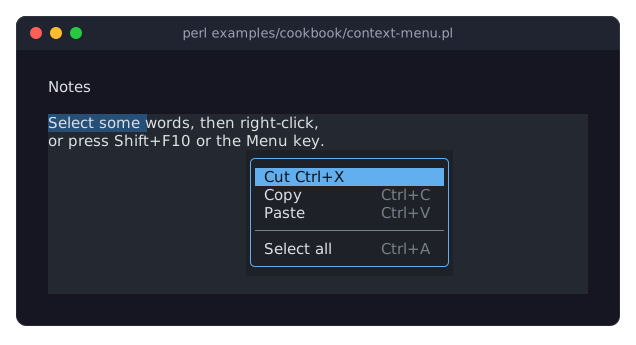
The items are hash references, because they belong to this menu only: a label, the keys to show, the code to run, and for Cut and Copy an
enabledcode that asks the editor of the text area whether text is selected. A menu of items that are used elsewhere too takes the ids of a Term::Fabulous::Commands table instead, as in the recipe above.The menu is built once and opened as often as needed.
$menu->open( $ui, x => ..., y => ... )puts its top left corner at a cell of the screen. Near the edge of the screen it moves left or up as far as it must, so it is always shown whole.The listener on the text area checks for the right button and lets every other mouse event pass with
CONTINUE, so a left click still places the cursor. A right click does not change the selection, which is why Cut and Copy are available in the picture.Not every terminal reports the Menu key.
Shift+F10, the usual alternative on other systems, works everywhere. The keyboard has no pointer to open the menu at, so the program opens it at the top left corner of the text area. To open a menu below a widget instead, passbelow => $widget.While the menu is open, it has the keyboard focus. The arrow keys, a letter or the mouse highlight an item, and
Enteror a click chooses it.Escapeor a click anywhere else closes the menu, and the focus goes back to the text area. Choosing an item closes the menu before the item runs, so Cut and Paste act on the text area as if the user had pressed their keys.The program passes
stop_on_ctrl_c => 0, soCtrl+Ccopies, as the menu says, and quits withCtrl+Qinstead.
Show messages and state in a status bar (StatusBar)
Goal: a journal with a status bar. The bar shows a hint when the program starts, a message when the user saves, and on the right the number of words and whether the entry has unsaved changes.
This program is shipped as examples/cookbook/status-bar.pl.
use v5.32;
use warnings;
use feature 'signatures';
no warnings 'experimental::signatures';

use Term::Fabulous;
use Term::Fabulous::Widget::Box;
use Term::Fabulous::Widget::StatusBar;
use Term::Fabulous::Widget::TextArea;
use Clay::UI::Enum::Result;
use Clay::XS qw(sizing_grow CLAY_TOP_TO_BOTTOM);

my $root    = Term::Fabulous::Widget::Box->new( layout => { layout_direction => CLAY_TOP_TO_BOTTOM, sizing => { width => sizing_grow(), height => sizing_grow() } } );
my $journal = Term::Fabulous::Widget::TextArea->new( wrap => 1, layout => { sizing => { width => sizing_grow(), height => sizing_grow() } } );
my $saved   = '';

# The parts on the right are read whenever a frame is drawn, so they
# follow the typing without any code that updates them.
my $status = Term::Fabulous::Widget::StatusBar->new(
	message => 'Write today\'s entry. Ctrl+S saves, Ctrl+Q quits.',
	timeout => 3,
	parts   => sub {
		my $text  = $journal->value;
		my $words = () = $text =~ /\S+/g;
		return ( ( $text ne $saved ? [ 'unsaved', 'accent' ] : () ), [ "$words words", 'dim' ] );
	},
);
$root->add_child( $journal, $status );

my $ui = Term::Fabulous->new( root => $root, width => 80, height => 24 );

$root->on(
	KeyPress => sub ($event) {
		my $key = $event->key_name // '';
		if ( $key eq 'Ctrl+S' ) {
			my $text = $journal->value;
			if ( $text =~ /\S/ ) {
				$saved = $text;
				$status->message( 'Saved the entry.', 'success' );
			}
			else {
				$status->message( 'Nothing to save yet.', 'warning' );
			}
			return;
		}
		if ( $key eq 'Ctrl+Q' ) {
			$ui->loop->stop;
			return;
		}
		return Clay::UI::Enum::Result->CONTINUE;
	}
);

$ui->interaction->set_focused_widget($journal);
$ui->run;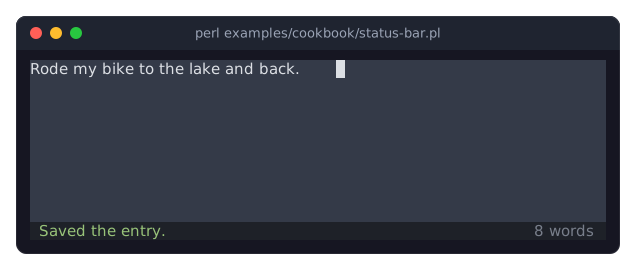
messageshows a message on the left. Its second argument is the kind, which gives the color:successis green,warningyellow,dangerred, andinfo, the default, the color of plain text.With
timeout => 3, every message goes away three seconds after it was shown. The hint given tonewis the exception and stays until the first message replaces it.The parts on the right come from a code reference. The bar calls it whenever a frame is drawn, and a frame is drawn after every key, so the word count follows the typing and nothing has to update it. The code returns a list of parts, each a text with a kind.
unsavedappears only while the text differs from the saved one.
Show the keys in a help screen (KeyReference)
Goal: a to-do list whose F1 key opens a help screen with every key of the program, made from the table of its commands, so the help never falls behind the keys.
This program is shipped as examples/cookbook/help-screen.pl.
use v5.32;
use warnings;
use feature 'signatures';
no warnings 'experimental::signatures';

use Term::Fabulous;
use Term::Fabulous::Commands;
use Term::Fabulous::Widget::Box;
use Term::Fabulous::Widget::Checkbox;
use Term::Fabulous::Widget::KeyReference;
use Term::Fabulous::Widget::Text;
use Clay::XS qw(sizing_grow CLAY_TOP_TO_BOTTOM);

my $root = Term::Fabulous::Widget::Box->new(
	layout => {
		layout_direction => CLAY_TOP_TO_BOTTOM,
		sizing           => { width => sizing_grow(), height => sizing_grow() },
		padding          => { left  => 2,             top    => 1 },
		child_gap        => 1,
	},
);
my $list = Term::Fabulous::Widget::Box->new( layout => { layout_direction => CLAY_TOP_TO_BOTTOM } );
$root->add_child( Term::Fabulous::Widget::Text->new( text => 'To do. F1 shows the keys.' ), $list );

my @todos = ( [ 'Water the plants', 1 ], [ 'Call the bank', 0 ], [ 'Fix the bike', 0 ], [ 'Book the train', 1 ] );

sub show_todos () {
	$list->clear_children;
	foreach my $todo (@todos) {
		my $box = Term::Fabulous::Widget::Checkbox->new( label => $todo->[0], checked => $todo->[1] );
		$box->on( Change => sub ($event) { $todo->[1] = $event->value; return } );
		$list->add_child($box);
	}
	return;
}
show_todos();

my ( $ui, $commands );

# The keys that no command runs: those of the list and of the help itself.
my @other_keys = (
	[ 'The list',  'Tab, Shift+Tab', 'The next, the previous to-do' ],
	[ 'The list',  'Space, Enter',   'Check or uncheck the to-do' ],
	[ 'This help', 'Typing',         'Show only the keys with the text' ],
	[ 'This help', 'Escape',         'Close the help' ],
);

sub show_keys () {
	Term::Fabulous::Widget::KeyReference->new( title => 'Keys of the to-do list', commands => $commands, keys => \@other_keys, width => 60, height => 26 )->open($ui);
	return;
}

$commands = Term::Fabulous::Commands->new(
	commands => [
		{ id => 'keys', label => 'Keys...',   keys => ['F1'],     run => \&show_keys },
		{ id => 'all',  label => 'Check all', keys => ['Ctrl+A'], run => sub { $_->[1] = 1 foreach @todos; show_todos() } },
		{
			id    => 'clean',
			label => 'Remove done',
			keys  => ['Ctrl+D'],
			run   => sub {
				@todos = grep { !$_->[1] } @todos;
				show_todos();
			}
		},
		{
			id    => 'sort',
			label => 'Sort by name',
			keys  => ['Alt+s'],
			run   => sub {
				@todos = sort { $a->[0] cmp $b->[0] } @todos;
				show_todos();
			}
		},
		{ id => 'quit', label => 'Quit', keys => ['Ctrl+Q'], run => sub { $ui->loop->stop } },
	],
);

$ui = Term::Fabulous->new( root => $root, width => 80, height => 24 );
$commands->listen($root);
$ui->run;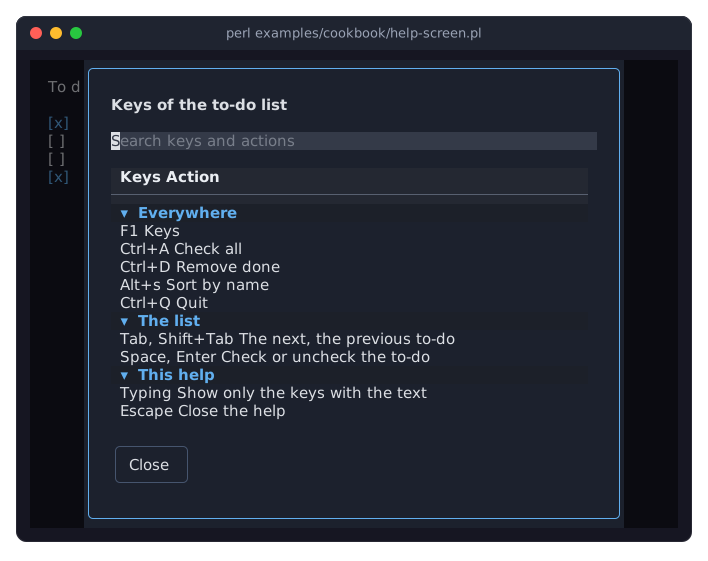
commands => $commandslists every command that has keys, with its keys and its label, in the groupEverywhere. The labelKeys...loses its..., which in a menu says that the command opens a dialog.keysadds the rows that no command has: the keys the check boxes use themselves, and those of the help screen. Each row names its group, and the groups appear in the order of their first row.The key reference is made anew each time F1 is pressed, so it always lists the commands as they are. A command added to the table, or a key changed, shows up in the help without a change to it.
When the help opens, the search field has the focus: typing
ctrlleaves the rows with Ctrl,removethe one that removes.EscapeorClosecloses it, and the focus goes back where it was.widthandheightare the largest size; on a smaller screen the help is as large as the screen, and the table scrolls.
Keep several documents open in tabs (DocumentTabs)
Goal: an editor with a tab for each open document. A dot marks the documents with unsaved changes, a click on a tab shows its document, the close mark closes it after a question when it has changes, and + adds a new one.
This program is shipped as examples/cookbook/document-tabs.pl.
use v5.32;
use warnings;
use feature 'signatures';
no warnings 'experimental::signatures';

use Term::Fabulous;
use Term::Fabulous::Commands;
use Term::Fabulous::Widget::Box;
use Term::Fabulous::Widget::DocumentTabs;
use Term::Fabulous::Widget::Prompt;
use Term::Fabulous::Widget::StatusBar;
use Term::Fabulous::Widget::Text;
use Term::Fabulous::Widget::TextArea;
use Clay::XS qw(sizing_grow CLAY_TOP_TO_BOTTOM);
use List::Util qw(min);

# Every document has a title, a text area and the text it had when it
# was last saved; it is modified while the two differ.
my @documents;
my $untitled = 0;

sub is_modified ($document) {
	return $document->{area}->value ne $document->{saved};
}

# The tabs read the documents whenever a frame is drawn, so the dot for
# unsaved changes comes and goes with the typing.
my $tabs = Term::Fabulous::Widget::DocumentTabs->new(
	tabs => sub {
		map { { title => $_->{title}, modified => is_modified($_) } } @documents;
	}
);
my $page  = Term::Fabulous::Widget::Box->new( layout => { sizing  => { width => sizing_grow(), height => sizing_grow() } } );
my $empty = Term::Fabulous::Widget::Box->new( layout => { padding => { left  => 2, top => 1 } } );
$empty->add_child( Term::Fabulous::Widget::Text->new( text => 'No document is open. Click + or press Ctrl+N for a new one.' ) );
my $status = Term::Fabulous::Widget::StatusBar->new(
	message => 'Ctrl+N new, Ctrl+S save, Alt+w close, Ctrl+Q quit.',
	timeout => 3,
);
my $root = Term::Fabulous::Widget::Box->new( layout => { layout_direction => CLAY_TOP_TO_BOTTOM, sizing => { width => sizing_grow(), height => sizing_grow() } } );
$root->add_child( $tabs, $page, $status );

my $ui = Term::Fabulous->new( root => $root, width => 80, height => 24 );

# Shows a document below the tabs (for undef, a hint) and tells the tabs
# which one it is.
sub show ($index) {
	$page->clear_children;
	$tabs->active($index);
	return $page->add_child($empty) if !defined $index;
	my $area = $documents[$index]{area};
	$page->add_child($area);
	$ui->interaction->set_focused_widget($area);
	return;
}

sub add_document ( $title, $text = '' ) {
	my $area = Term::Fabulous::Widget::TextArea->new( value => $text, wrap => 1, layout => { sizing => { width => sizing_grow(), height => sizing_grow() } } );
	push @documents, { title => $title, area => $area, saved => $text };
	show($#documents);
	return;
}

sub save_document ($index) {
	my $document = $documents[$index];
	$document->{saved} = $document->{area}->value;
	$status->message( "Saved $document->{title}.", 'success' );
	return;
}

sub remove_document ($index) {
	my $active = $tabs->active;
	splice @documents, $index, 1;
	if ( !@documents ) {
		show(undef);
		return;
	}
	show( $active > $index ? $active - 1 : min( $active, $#documents ) );
	return;
}

# A document with unsaved changes is closed only after a question.
sub close_document ($index) {
	my $document = $documents[$index];
	return remove_document($index) if !is_modified($document);
	Term::Fabulous::Widget::Prompt->confirm(
		$ui,
		title   => "Close $document->{title}?",
		message => 'Its changes are not saved.',
		ok      => 'Close',
		cancel  => 'Keep it',
		focus   => 'cancel',
	)->on(
		Answer => sub ($event) {
			remove_document($index) if $event->button eq 'ok';
			return;
		}
	);
	return;
}

# The tabs change nothing themselves: the program answers their events.
$tabs->on( Select   => sub ($event) { show( $event->index );                     return } );
$tabs->on( TabClose => sub ($event) { close_document( $event->index );           return } );
$tabs->on( TabAdd   => sub ($event) { add_document( 'Untitled ' . ++$untitled ); return } );

# The same through the keys. Each command that needs a document is
# enabled only while one is shown.
my $shown    = sub { defined $tabs->active };
my $commands = Term::Fabulous::Commands->new(
	commands => [
		{ id => 'new',      label => 'New',      keys => ['Ctrl+N'],       run => sub { add_document( 'Untitled ' . ++$untitled ) } },
		{ id => 'save',     label => 'Save',     keys => ['Ctrl+S'],       run => sub { save_document( $tabs->active ) },             enabled => $shown },
		{ id => 'close',    label => 'Close',    keys => ['Alt+w'],        run => sub { close_document( $tabs->active ) },            enabled => $shown },
		{ id => 'previous', label => 'Previous', keys => ['Alt+PageUp'],   run => sub { show( ( $tabs->active - 1 ) % @documents ) }, enabled => $shown },
		{ id => 'next',     label => 'Next',     keys => ['Alt+PageDown'], run => sub { show( ( $tabs->active + 1 ) % @documents ) }, enabled => $shown },
		{ id => 'quit',     label => 'Quit',     keys => ['Ctrl+Q'],       run => sub { $ui->loop->stop } },
	],
);
$commands->listen($root);

add_document( 'shopping.txt', "Milk\nBread\nApples\n" );
add_document( 'letter.txt',   "Dear Grace,\n\nthank you for the plums.\n" );
add_document( 'ideas.txt',    "A clock that runs backwards.\n" );
show(0);

$ui->run;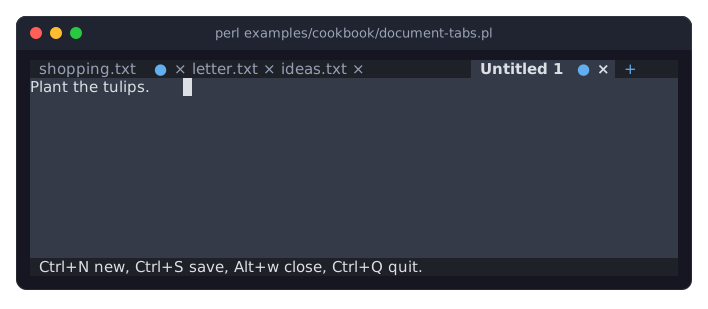
The tabs come from a code reference that maps the documents to tab hashes. The tabs call it whenever a frame is drawn, and a frame is drawn after every key, so the dot appears with the first change and goes away when the document is saved or the change undone.
The tabs never change anything themselves; they only fire events. A click on a tab fires
Select, and the program shows that document. A click on the close mark, or a middle click on the tab, firesTabClose, and the program decides: a saved document closes at once, one with changes only after aPromptquestion.+firesTabAdd.showputs the document's text area into the page, tells the tabs which tab is active withactive, which fires nothing, and gives the text area the focus. Each document keeps its own text area, so its cursor and its undo history survive a switch.Closing a document shows another one. When a tab before the active one closes, the active document stays and its position moves down by one. When the active tab closes, the tab that took its place is shown, or the last one. When the last document closes, the page shows a hint that
+orCtrl+Nmakes a new one.The tabs take no keys, so the commands give them keys:
Alt+PageUpandAlt+PageDownswitch,Alt+wcloses the document shown (the text area usesCtrl+Wto delete a word). Theirenabledcode turns them off while no document is open.When there are more tabs than fit, the row scrolls so that the active tab is always shown, and arrows at its ends lead to the hidden ones.
SEE ALSO
This page is part of Term::Fabulous::Cookbook. Previous page: Term::Fabulous::Cookbook::Forms. Next page: Term::Fabulous::Cookbook::Layout.
Term::Fabulous::Manual::Menus - commands, keys, menu bars and context menus.
"STATUS BARS" in Term::Fabulous::Manual::Feedback - the status bar.
"KEY REFERENCES" in Term::Fabulous::Manual::Menus - the help screen.
"Document tabs" in Term::Fabulous::Manual::Layout - the document tabs.
Term::Fabulous::Widget::MenuBar, Term::Fabulous::Widget::Menu, Term::Fabulous::Widget::StatusBar, Term::Fabulous::Widget::KeyReference, Term::Fabulous::Widget::DocumentTabs, Term::Fabulous::Commands - the class pages.