NAME
Term::Fabulous::Widget::KeyReference - A dialog that lists the keys of a program and what they do
SYNOPSIS
use Term::Fabulous::Widget::KeyReference;

# The keys of the program and of its $commands, a Term::Fabulous::Commands table:
sub show_keys () {
	Term::Fabulous::Widget::KeyReference->new(
		title    => 'Keys of the notes editor',
		commands => $commands,
		keys     => [
			[ 'Text', 'Ctrl+Z, Ctrl+Y', 'Undo, redo' ],
			[ 'Text', 'Shift+arrows',   'Select' ],
		],
	)->open($ui);
	return;
}

$commands->add( { id => 'keys', label => 'Keys...', keys => ['F1'], run => \&show_keys } );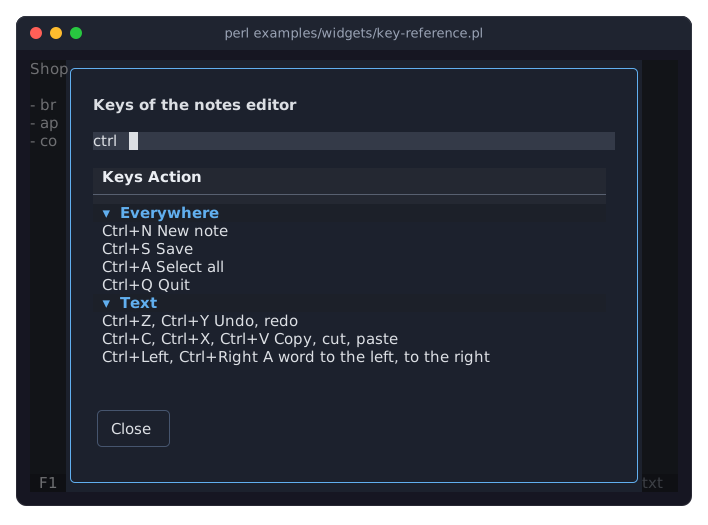
The program is examples/widgets/key-reference.pl. The picture shows the key reference after the user pressed F1 and typed ctrl into its search field: only the rows with that text are left, in their groups.
DESCRIPTION
A key reference is a Term::Fabulous::Widget::Dialog that answers the question "which key does what?". It shows a table with the keys of the program in one column and what they do in the other, in groups that say where the keys work, and a search field above it.
Rows
The rows come from two places, in this order:
the commands of a Term::Fabulous::Commands table (or a list of Term::Fabulous::Command objects): one row for every command with keys, with the keys as a menu shows them (
Ctrl+S, F2) and the label of the command. A label that ends in..., which in a menu means that the command opens a dialog, is shown without it. Commands without keys have no row. All of them are in one group,Everywhereunlessgroupnames another one;the rows of
keys, for the keys no command runs: the keys of a list, of a text area, of the dialogs of the program.
The groups are shown in the order they first appear in the rows, each under its name, and the rows of a group in the order they were given.
Searching and closing
When the key reference opens, the search field has the focus. Typing filters the table: only the rows whose keys or action contain the text are left, without regard to case. Tab moves to the table, where the arrow keys and the mouse wheel scroll it, and to the Close button (in the compact layout, see "Size", to the Close button first). Escape or Close closes the key reference, and the focus goes back to the widget that had it before.
Size
A key reference is as wide as width and as high as height, or as wide and as high as the screen when that is smaller. The table takes the room that is left below the search field and scrolls when the rows do not fit.
On a short screen, where the layout above would leave the table fewer than ten lines and fewer than its rows need, the key reference becomes compact: it drops the empty rows between its parts and above and below them, and puts the Close button next to the search field, above the table. It goes back when the screen grows again.
CONSTRUCTOR
new
my $reference = Term::Fabulous::Widget::KeyReference->new(%parameters);Accepts the parameters of "new" in Term::Fabulous::Widget::Dialog (id, layout, backdrop_color, close_on_escape, ...) and the ones below. All are optional, and unknown parameters die. A key reference is laid out like a dialog, with two columns of padding at the sides instead of one.
id-
The id of the dialog, a string. Its table gets the id
"$id/list", which keeps the place it is scrolled to. Default: a new id for each key reference. title-
A character string, drawn in bold on the first row. Default:
Keys. An empty string shows no title. commands-
A Term::Fabulous::Commands table or an array reference of Term::Fabulous::Command objects, whose keys the key reference lists (see "Rows"). Default:
undef, no commands. group-
The name of the group the rows of the commands are in, a string. Default:
Everywhere. keys-
An array reference of more rows, each an array reference of three strings: the name of the group, the keys, and what they do:
keys => [
	[ 'The list', 'Up, Down', 'Another note' ],
	[ 'The list', 'Enter',    'Open the note' ],
],
Default:
[]. width-
The largest width of the key reference in columns, a positive integer. Default: 78. A width in the
sizingoflayoutwins over it. height-
The largest height of the key reference in rows, a positive integer. Default: 30. A height in the
sizingoflayoutwins over it.
METHODS
A key reference has all methods of Term::Fabulous::Widget::Dialog (open, close, is_open, ...) plus these.
search
$reference->search->value($text);
$reference->table->search($text);
The Term::Fabulous::Widget::TextField that filters the table as the user types. Setting its value from the program fires no Change, so it does not filter: filter the table with its search as well.
table
my @ids = $reference->table->filtered_row_ids;The Term::Fabulous::Widget::Table of the keys.
EVENTS
A key reference fires the events of every dialog: Close when it closes. The events of its search field and its table bubble through it as usual. The Activate of its Close button stops at the button, which closes the key reference.
KDL PROPERTIES
A key reference is built in Perl only: its rows come from a command table, which a layout file cannot express.
SEE ALSO
Term::Fabulous::Commands, Term::Fabulous::Widget::Dialog, Term::Fabulous::Widget::Table, Term::Fabulous::Widget::MenuBar, which shows the same commands in menus.