NAME
Term::Fabulous::Widget::Slider - Choose a number from a range by moving a thumb
SYNOPSIS
use Clay::UI::Enum::Result;
use Term::Fabulous::Widget::Slider;

my $volume = Term::Fabulous::Widget::Slider->new(
	id           => 'volume',
	min          => 0,
	max          => 100,
	step         => 5,
	value        => 50,
	value_format => '%d%%',
);
$volume->on( Change => sub ($event) {
	set_volume( $event->value );
	return Clay::UI::Enum::Result->CONTINUE;
} );

say $volume->value;    # 50
$volume->value(75);    # programmatic: fires no Change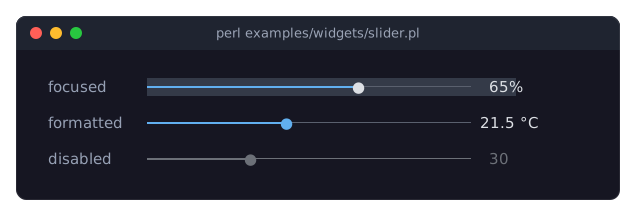
DESCRIPTION
The picture shows three sliders: a focused one at 65 percent (the thumb is in the text_color while the slider has the focus), one that formats its value with a code reference, and a disabled one. The program is examples/widgets/slider.pl.
A slider lets the user choose a number from a range. It shows a horizontal track with a thumb at the current value and, by default, the value itself right of the track:
==========o--------- 50(with line-drawing characters and a dot instead of the ASCII shown here). The part of the track left of the thumb is painted in the accent_color, the rest in track_color.
The value is always on the grid min, min + step, min + 2 * step, ... and never outside min..max. Values are rounded to as many decimal places as the step or min has (whichever has more), so with a step of 0.1 you get 0.3, not 0.30000000000000004, and min => 0.5, step => 1 gives 0.5, 1.5, 2.5, ... If the range is not a whole number of steps (min 0, max 10, step 3), the highest reachable value is the last grid value below max (9).
The user moves the value with the arrow keys, Page Up and Page Down, Home and End, by clicking or dragging on the track, or with the mouse wheel.
Disabling, colors, focus and sizing are described in Term::Fabulous::Widget::Input. Unless the layout sizes it, the slider is one row high and preferred_columns plus the width of the value label plus one column wide.
CONSTRUCTOR
new
my $slider = Term::Fabulous::Widget::Slider->new(%parameters);Accepts the parameters of "CONSTRUCTOR" in Term::Fabulous::Widget::Input (id, layout, background_color, the border parameters, disabled, can_focus, text_color, disabled_color, accent_color, focus_background_color, the other Box parameters) and the ones below. Unknown parameters die.
min-
A finite number. Default: 0. The lowest value. Must be less than
max, or the constructor dies. max-
A finite number. Default: 100. The highest value.
step-
A positive finite number. Default: 1. The distance between two values of the grid, and how far one arrow key press or wheel notch moves the value.
value-
A finite number in
min..max. Default:min. The initial value; it is rounded to the nearest grid value. Dies if outside the range. page_step-
A positive finite number, or
undef. Default:undef, which means a tenth of the range rounded to whole steps, but at least one step (10 for the default range 0..100). How farPageUpandPageDownmove the value. show_value-
A boolean, stored as 1 or 0. Default: 1. Whether the value is shown right of the track. A reference dies.
value_format-
How the value is shown: a
sprintfformat string such as'%d%%'or'%.1f C', or a code reference that gets the value and returns the text. Default:undef, which shows the value with as many decimal places as thesteporminhas, whichever has more. Anything other than a string, a code reference orundefdies. The label is as wide as the widest of the lowest value, the highest reachable value and the current value, so the track keeps its length while the value changes.value_format => sub ($value) { $value == 0 ? 'off' : "$value dB" }, preferred_columns-
A positive integer. Default: 20. The length of the track in columns when the
layoutgives the slider no width. The value label and one space are added to it. fill_glyph-
A single character one column wide. Default:
"\x{2501}"(heavy horizontal line). The track left of the thumb. track_glyph-
A single character one column wide. Default:
"\x{2500}"(light horizontal line). The track right of the thumb. thumb_glyph-
A single character one column wide. Default:
"\x{25CF}"(black circle). The thumb. It is painted inaccent_color, or intext_colorwhile the slider has the focus. track_color-
A color, in any format Term::Fabulous::Widget::Input accepts. The track right of the thumb. Default: the theme's
input.track,[90, 96, 110, 255]in the dark theme, a gray.
The glyph parameters die unless they are exactly one grapheme cluster one column wide; the numeric parameters die unless they are finite numbers in their range.
METHODS
The methods of "METHODS" in Term::Fabulous::Widget::Input (disabled, is_enabled, the color accessors, mark_changed), plus:
value
my $number = $slider->value;
$slider->value(42);
Accessor. Returns the current value, a number. Writing rounds the new value to the nearest grid value, marks the input changed, and returns the stored value. Dies if the new value is not a finite number or lies outside min..max. Writing fires no Change event.
min
my $min = $slider->min;
$slider->min(10);
Accessor for the lower end of the range. Writing moves the value into the new range if needed (without a Change event), marks the input changed and returns the new min. Dies if the new min is not a finite number less than max; the range then stays as it was. To move a range past its other end, use "set_range".
max
my $max = $slider->max;
$slider->max(200);
Accessor for the upper end of the range; works like "min". Dies if the new max is not a finite number greater than min.
set_range
$slider->set_range( min => 200, max => 300 );
$slider->set_range( step => 0.5 );
Changes min, max and step together: the parts not given keep their values, and the new range is checked as a whole, so a range can move anywhere in one call (with "min" and "max" one at a time, min 200 while max is still 100 dies). Moves the value into the new range and onto its grid if needed (without a Change event), marks the input changed and returns the slider. Dies, leaving the range as it was, when min is not less than max, the step is not positive, a part is not a finite number, or another name is given.
step
my $step = $slider->step;
$slider->step(0.5);
Accessor for the step. Writing moves the value onto the new grid, marks the input changed and returns the new step. Dies unless the step is a positive finite number; the step then stays as it was.
page_step
my $page = $slider->page_step;
$slider->page_step(25);
$slider->page_step(undef);    # back to a tenth of the range
Accessor. Reading returns the effective page step (the computed default when none was set); writing returns the new effective page step. A value that is not undef or a positive finite number dies and leaves the old one.
show_value
my $shown = $slider->show_value;
$slider->show_value(0);
Accessor for the show_value parameter. Returns 1 or 0, also for a value passed to new. Writing marks the input changed and returns the new value. Any plain value is accepted as a boolean; a reference dies and leaves the setting unchanged.
value_format
$slider->value_format('%.2f');Accessor for the value_format parameter. Writing marks the input changed and returns the new format. Anything other than a string, a code reference or undef dies and leaves the old format.
format_value
my $text = $slider->format_value(42);A number formatted as the slider shows it (see value_format).
preferred_columns
my $columns = $slider->preferred_columns;
$slider->preferred_columns(40);
Accessor for the preferred_columns parameter. Writing returns the new value, which takes effect at the next frame. A value that is not a positive integer dies and leaves the old value.
fill_glyph
$slider->fill_glyph('=');Accessor for the fill_glyph parameter. Writing marks the input changed and returns the new glyph. A value that is not a single one-column character dies and leaves the old glyph.
track_glyph
$slider->track_glyph('-');Accessor for the track_glyph parameter; works like "fill_glyph".
thumb_glyph
$slider->thumb_glyph('o');Accessor for the thumb_glyph parameter; works like "fill_glyph".
track_color
$slider->track_color('#444444');Accessor for the track_color parameter. Writing marks the input changed and returns the new color as [r, g, b, a]. An invalid color dies and leaves the old one.
KEYS
While the slider has the focus and is enabled:
Left,Down-
Decrease the value by one
step. Right,Up-
Increase the value by one
step. PageDown,PageUp-
Decrease or increase the value by
page_step. Home,End-
Go to the lowest or the highest reachable value.
The value never leaves the range; at either end these keys do nothing (but are still used). All other keys bubble to the ancestors.
MOUSE
- Click and drag
-
Pressing the left button on the track moves the thumb there, and dragging with the button held moves it along while the pointer stays over the slider. The track's first column is
min, its last columnmax, and the value is rounded to the grid. Clicks on the value label do nothing. - Wheel
-
Each notch moves the value by one
step: up increases, down decreases. A notch that cannot move the value (down atmin, up at the highest reachable value) is not used: inside a Term::Fabulous::Widget::ScrollBox it scrolls the scroll box instead.
EVENTS
Change-
Term::Fabulous::Event::Change whenever the user moves the value to a different grid value;
$event->valueis the new number. While dragging, it is fired for every new value. Programmatic writes tovalue,min,maxandstepfire nothing.
KDL PROPERTIES
The properties of "KDL PROPERTIES" in Term::Fabulous::Widget::Input, plus min, max, step, page_step, value, show_value (#true / #false), value_format (a format string only; code references cannot be written in KDL), preferred_columns, fill_glyph, track_glyph, thumb_glyph and track_color:
use Term::Fabulous::Widget::Slider as Slider

Slider "temperature" {
	min -10
	max 40
	step 0.5
	value 21.5
	value_format "%.1f C"
}min, max and step are applied together, through "set_range", and before value, so they may come in any order: min 200; max 300 works although the default max is 100.
EXAMPLES
A percentage with a custom label
my $opacity = Term::Fabulous::Widget::Slider->new(
	min          => 0,
	max          => 1,
	step         => 0.05,
	value        => 1,
	value_format => sub ($value) { sprintf '%3d%%', $value * 100 },
);
Keep two sliders in order
my $low  = Term::Fabulous::Widget::Slider->new( value => 20 );
my $high = Term::Fabulous::Widget::Slider->new( value => 80 );

$low->on( Change => sub ($event) {
	$high->value( $event->value ) if $high->value < $event->value;
	return;
} );
SEE ALSO
Term::Fabulous::Widget::Input, Term::Fabulous::Event::Change, the slider section of the forms guide, "Choose from options in Perl (Dropdown, RadioGroup, Slider)" in Term::Fabulous::Cookbook::Forms.