NAME
Term::Fabulous::Widget::TextArea - Multi-line text input
SYNOPSIS
use Clay::UI::Enum::Result;
use Term::Fabulous::Widget::TextArea;
use Clay::XS qw(sizing_grow sizing_fixed);

my $notes = Term::Fabulous::Widget::TextArea->new(
	id          => 'notes',
	placeholder => 'Notes',
	layout      => { sizing => { width => sizing_grow(), height => sizing_fixed(8) } },
);

my $dirty = 0;
$notes->on( Change => sub ($event) {
	$dirty = 1;
	return Clay::UI::Enum::Result->CONTINUE;
} );

my @lines = split /\n/, $notes->value, -1;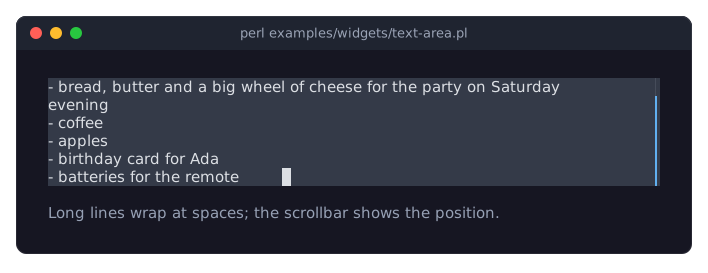
DESCRIPTION
The picture shows a focused text area of six rows with the cursor at the end of the text. The long line about the party wraps at a space, and the scrollbar on the right shows that the text has more rows than the area: the first line is scrolled out at the top. The program is examples/widgets/text-area.pl.
A text area holds text of several lines that the user can type, edit, select and copy. By default, lines longer than the area are wrapped at word boundaries; with wrap => 0 every line takes one row and the view scrolls sideways instead. The view scrolls up and down to keep the cursor visible, and while the text is taller than the area, a scrollbar is shown in its rightmost column.
The text (value) is a Perl character string; lines are separated by "\n". "\r\n" and "\r" in assigned or pasted text are converted to "\n".
The editing keys, mouse selection, the placeholder, max_length, read_only and the Change event are shared with the text field and described in Term::Fabulous::Widget::TextInput. Disabling, colors and sizing are described in Term::Fabulous::Widget::Input.
CONSTRUCTOR
new
my $area = Term::Fabulous::Widget::TextArea->new(%parameters);Accepts the parameters of "CONSTRUCTOR" in Term::Fabulous::Widget::TextInput (value, placeholder, max_length, read_only, placeholder_color, selection_color, background_color) and of "CONSTRUCTOR" in Term::Fabulous::Widget::Input (id, layout, disabled, can_focus, text_color, disabled_color, accent_color, focus_background_color, the border parameters, the other Box parameters), plus the ones below. Unknown parameters die.
preferred_columns-
A positive integer. Default: 40. The width of the text in columns when the
layoutgives the area no width. Dies if not a positive integer. preferred_rows-
A positive integer. Default: 5. The height of the text in rows when the
layoutgives the area no height. Dies if not a positive integer. wrap-
A boolean, stored as 1 or 0; a reference dies. Default: 1. When true, a line longer than the area continues on the next row, broken after the last space that fits, or inside a word that is wider than the area. A space at which a full row breaks is not shown at the start of the next row; the cursor before it shows there, on the same cell as the cursor after it, so
Rightover that space moves the cursor without visible change. A wide character that does not fit at the end of a row starts the next one. When false, every line takes exactly one row and the view scrolls sideways with the cursor, by the rule a text field follows (see "Scrolling" in Term::Fabulous::TextView): it shows the cursor's cell, starts where a character of the cursor's line starts and scrolls no further than needed to fill the area with that line. scrollbar-
A boolean, stored as 1 or 0; a reference dies. Default: 1. When true, a scrollbar is shown in the rightmost column while the text has more rows than the area; it then takes one column from the text. The scrollbar only shows the position; it cannot be dragged. It is drawn like every scrollbar (Term::Fabulous::Widget::Scrollbar), in the theme's
scrollbar.trackandscrollbar.thumbcolors.
METHODS
The methods of "METHODS" in Term::Fabulous::Widget::TextInput (value, max_length, placeholder, read_only, placeholder_color, selection_color, editor) and of "METHODS" in Term::Fabulous::Widget::Input (disabled, is_enabled, the color accessors, mark_changed), plus:
value
my $text = $area->value;
$area->value("first line\nsecond line");
As described in "value" in Term::Fabulous::Widget::TextInput. Writing also scrolls the view back to the top-left before it moves to the cursor at the end of the new text.
preferred_columns
my $columns = $area->preferred_columns;
$area->preferred_columns(60);
Accessor for the preferred_columns parameter. Writing returns the new value, which takes effect at the next frame. Dies if not a positive integer; the old value then stays.
preferred_rows
my $rows = $area->preferred_rows;
$area->preferred_rows(10);
Accessor for the preferred_rows parameter. Writing returns the new value, which takes effect at the next frame. Dies if not a positive integer; the old value then stays.
wrap
$area->wrap(0);Accessor for the wrap parameter. Returns 1 or 0, also for a value passed to new. Writing re-wraps the text, marks the input changed and returns the new value; the next frame scrolls to the cursor. Any plain value is accepted as a boolean; a reference dies and leaves the setting unchanged.
scrollbar
$area->scrollbar(0);Accessor for the scrollbar parameter. Returns 1 or 0, also for a value passed to new. Writing marks the input changed and returns the new value; the next frame scrolls to the cursor. Any plain value is accepted as a boolean; a reference dies and leaves the setting unchanged.
scroll_rows
$area->scroll_rows(-3);    # three rows towards the top
$area->scroll_rows(10);    # ten rows towards the end
Scrolls the view by visual rows (wrapped rows count separately) without moving the cursor. Negative numbers scroll towards the top. The view stops at the first and last row of the text. Returns the area. The view jumps back to the cursor when a frame is drawn after the cursor, the text or the size changed.
top_row
my $row = $area->top_row;The index of the first visual row shown, counted from 0. With wrapping, a long line spans several visual rows. The view follows the cursor when a frame is drawn, so after an edit or a cursor movement this is the row the next frame shows at the top; the wheel scrolls it at once.
KEYS
All keys of "KEYS" in Term::Fabulous::Widget::TextInput, plus:
Enter-
Starts a new line (inserts
"\n"at the cursor, replacing the selection). Whileread_onlyis set,Enteris not used and bubbles. A text area fires noSubmitevent. Up,Down-
Move the cursor one visual row up or down. While moving vertically, the cursor aims for the column it had when vertical movement started. Above the first row the cursor goes to the start of the text, below the last row to its end.
PageUp,PageDown-
Move the cursor by a page: the height of the area minus one row, but at least one row.
Shift+Up,Shift+Down,Shift+PageUp,Shift+PageDown-
The movements above, extending the selection.
Home and End move to the start and end of the text line, not of the wrapped row. Tab is not inserted: it bubbles, and Term::Fabulous moves the focus to the next widget. Escape and the function keys bubble too.
MOUSE
As described in "MOUSE" in Term::Fabulous::Widget::TextInput: click to place the cursor, drag (while the pointer stays over the input) to select, double-click to select a word. Each notch of the mouse wheel scrolls the view by three rows without moving the cursor.
EVENTS
Change-
Term::Fabulous::Event::Change after every change the user makes to the text (including
Enter);$event->valueis the whole new text.
KDL PROPERTIES
The properties of "KDL PROPERTIES" in Term::Fabulous::Widget::TextInput, plus preferred_columns, preferred_rows, wrap and scrollbar (#true / #false):
use Term::Fabulous::Widget::TextArea as TextArea

TextArea "log" {
	preferred_rows 10
	wrap #false
	read_only #true
	sizing width=grow
}
In KDL, value is a single string; write line breaks as \n inside the string (value "first\nsecond").
EXAMPLES
A read-only log that shows the newest line
my $log = Term::Fabulous::Widget::TextArea->new(
	read_only => 1,
	wrap      => 0,
	layout    => { sizing => { width => sizing_grow(), height => sizing_grow() } },
);

# Appends at the end through the editor: only the new line is wrapped
# and kept for undo, however long the log grows.
sub log_line ($line) {
	my $editor = $log->editor;
	$editor->move_document_end;
	$editor->insert( $editor->is_empty ? $line : "\n$line" );
	$log->mark_changed;    # the next frame scrolls to the new line
	return;
}
Count the lines while the user types
use Clay::UI::Enum::Result;

$notes->on( Change => sub ($event) {
	my $lines = () = $event->value =~ /\n/g;
	$status->text( sprintf '%d lines', $lines + 1 );
	return Clay::UI::Enum::Result->CONTINUE;
} );
CAVEATS
Inside a Term::Fabulous::Widget::ScrollBox, a notch of the mouse wheel over the text area scrolls the text area; once it shows its first (last) rows, a notch up (down) scrolls the scroll box instead.
SEE ALSO
Term::Fabulous::Widget::TextInput, Term::Fabulous::Widget::TextField, Term::Fabulous::Editor, the text area section of the forms guide, "Build a form from a KDL file (text fields, radio buttons, dropdown, slider, checkbox)" in Term::Fabulous::Cookbook::Forms.