NAME
Term::Fabulous::Widget::Toast - A notification that appears in a corner and goes away by itself
SYNOPSIS
use Term::Fabulous::Widget::Toast;

# From a listener or a timer, while the program runs:
Term::Fabulous::Widget::Toast->new(
	kind    => 'success',
	title   => 'Saved',
	message => 'Your changes were written to disk.',
)->show($ui);

# Stays until closed, in another corner, filled with its color:
my $alert = Term::Fabulous::Widget::Toast->new(
	kind      => 'danger',
	title     => 'Connection lost',
	message   => 'Reconnecting in the background.',
	timeout   => undef,
	important => 1,
	position  => 'bottom_right',
);
$alert->show($ui);
$alert->on( Close => sub ($event) { ...; return } );
$alert->hide;    # from the program

# Inside the layout, as an alert box: add it as a child instead of showing it.
$form->add_child( Term::Fabulous::Widget::Toast->new( kind => 'warning', message => 'Unsaved changes.', closable => 0 ) );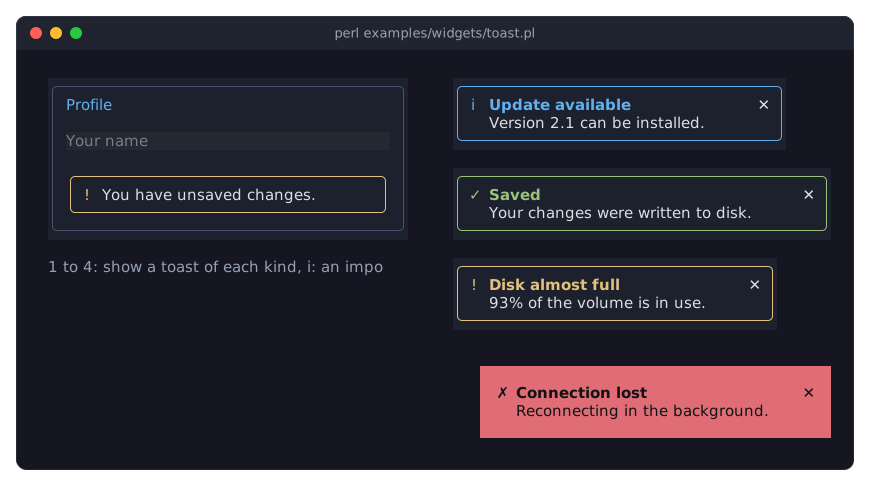
DESCRIPTION
The picture shows toasts of every kind stacked in the top right corner, a filled (important) one in the bottom right corner, and one used as an alert box inside the layout. The program is examples/widgets/toast.pl.
A toast is a short message the program shows the user without stopping them: a box with an icon, a title, a message and a close mark, in the color of its kind (info, success, warning or danger):
╭────────────────────────────────────╮
│ ✓ Saved                          ✕ │
│   Your changes were written to disk.│
╰────────────────────────────────────╯
"show" floats it into a corner of the screen, over everything else, where it lines up below the toasts shown there before, and takes it away again after timeout seconds (or never, when the timeout is undef); a click on the close mark takes it away at once, and so does "hide". Whichever way a toast goes, it fires Close (Term::Fabulous::Event::Close). Toasts take no focus and no keys, so the user goes on working while they are there. A hidden toast can be shown again.
The same widget is an alert when it is added to the layout as a child instead of being shown: it then stays where it is put, with or without a close mark (which removes it from its parent). important fills a toast with its color, for messages that must not be missed. The children you add to a toast go below the message, for a button or a link.
A toast is a Term::Fabulous::Widget::Box with a border in its color (in the theme's toast.border.style, round in the built-in themes), the theme's toast.background (a dark panel, [28, 33, 45, 255], in the dark theme), a cell of padding and a width that fits its text up to 44 columns, at which the message wraps; every one of these is an ordinary Box parameter and can be overridden.
CONSTRUCTOR
new
my $toast = Term::Fabulous::Widget::Toast->new(%parameters);Accepts the parameters of "CONSTRUCTOR" in Term::Fabulous::Widget::Box (id, layout, background_color, the border parameters, ...) and the ones below. All are optional; unknown parameters die.
kind-
info(the default),success,warningordanger: the color of the border, the icon and the title (blue, green, yellow, red) and the default icon. Anything else dies. title-
A character string, shown bold in the kind's color. Default:
''(no title line). message-
A character string, wrapped at words when it is wider than the toast. Default:
''(no message line). icon-
A character string shown before the title, or
undeffor the kind's icon:i, a check mark,!and a cross. Default:undef. closable-
A boolean. Default: 1. Whether the close mark is shown; a click on it hides the toast.
timeout-
A positive number of seconds after which a shown toast hides itself, or
undefto stay until it is closed. Default: 5. Counted from "show", on the event loop of "run" in Term::Fabulous; under "step" in Term::Fabulous, which runs no loop, the toast stays (see "expire"). important-
A boolean. Default: 0. True fills the toast with its color and writes the texts in a dark color on it.
position-
Where "show" puts the toast:
top_right(the default),top_left,top_center,bottom_right,bottom_leftorbottom_center. Toasts of one position stack top to bottom, newest last, with a row between them,margincells from the edges. Anything else dies. z_index-
An integer. Default: 2000, above a Term::Fabulous::Widget::Dialog (1000), so toasts show over an open dialog.
margin-
A non-negative integer. Default: 1. The cells between the stack of toasts and the edges of the screen.
color-
A color in any format Term::Fabulous::Color accepts, or
undef. Default:undef, the color of the kind: the theme'stoast.info,toast.success,toast.warningortoast.danger. A color of your own for the border, the icon and the title (and the fill of an important toast). text_color-
The color of the message and the close mark. Default: the theme's
toast.text,[220, 223, 228, 255]in the dark theme. An important toast writes in the theme'stoast.important_textinstead.
METHODS
The methods of Term::Fabulous::Widget, of which add_child, remove_child, remove_child_with_id, remove_children_with and clear_children act on the widgets below the message, plus:
show
$toast->show($ui);Shows the toast: adds it to the stack of its position on the root widget of the Term::Fabulous object (creating the stack when it is the first toast there) and starts the timeout. Showing a toast that is shown restarts its timeout. Dies without a Term::Fabulous (or Term::Fabulous::Static) object, or for a toast that is a child of another widget. Returns the toast.
hide
$toast->hide;Takes a shown toast off the screen, removes the stack when it was the last toast there, and fires Close on the toast. Does nothing for a toast that is not shown. Returns the toast.
is_shown
if ( $toast->is_shown ) { ... }True while the toast is on the screen through "show".
expire
$toast->expire;Lets the timeout run out now: hides the toast as the loop would when the time is up. For tests, which run no loop. A toast without a timeout, or one that is not shown, is left alone. Returns the toast.
stack
my $stack = $toast->stack;The Term::Fabulous::Widget::Toast::Stack the toast is shown in, or undef.
body
my $box = $toast->body;The box below the icon that holds the title, the message and the children you added.
kind_color
my $rgba = $toast->kind_color;The color in use: color, or the kind's.
kind
$toast->kind('danger');Accessor for the kind parameter: info, success, warning or danger.
title
$toast->title('Saved');Accessor for the title parameter.
message
$toast->message('Still trying.');Accessor for the message parameter.
icon
$toast->icon("\x{2691}");
$toast->icon(undef);    # the kind's icon
Accessor for the icon parameter.
closable
$toast->closable(0);Accessor for the closable parameter. Returns 1 or 0.
important
$toast->important(1);Accessor for the important parameter. Returns 1 or 0.
color
$toast->color('#c678dd');
$toast->color(undef);    # the kind's color
Accessor for the color parameter. The reader returns [r, g, b, a] or undef. An invalid color dies and leaves the old one.
text_color
$toast->text_color('#ffffff');Accessor for the text_color parameter; works like "color", but takes no undef.
Every writer updates the look, so the next frame shows it.
timeout
$toast->timeout(10);
$toast->timeout(undef);
Accessor for the timeout parameter. Writing restarts the timeout of a shown toast.
position
$toast->position('bottom_left');Accessor for the position parameter. Dies while the toast is shown; hide it first.
z_index
$toast->z_index(3000);Accessor for the z_index parameter; a shown toast's stack moves at once.
margin
$toast->margin(2);Accessor for the margin parameter, used when the stack is created.
MOUSE
A click on the close mark hides the toast. The rest of the toast paints its background and border, so clicks on it reach nothing behind it.
EVENTS
Close-
Term::Fabulous::Event::Close when a shown toast goes: by its timeout, the close mark or "hide". Fired on the toast after it has left the screen, so only listeners on the toast itself see it.
KDL PROPERTIES
The properties of "KDL PROPERTIES" in Term::Fabulous::Widget::Box, plus kind, title, message, icon, timeout, position, z_index, margin and color (strings, numbers and a color string), closable and important (#true / #false) and text_color (a color string). A toast built from a layout is a child of the widget it is in, an alert box; show one from Perl instead to float it.
use Term::Fabulous::Widget::Toast as Toast

Toast "unsaved" {
	kind "warning"
	message "You have unsaved changes."
	closable #false
}
EXAMPLES
A helper for the whole program
sub notify ( $kind, $title, $message = '' ) {
	Term::Fabulous::Widget::Toast->new( kind => $kind, title => $title, message => $message )->show($ui);
	return;
}
$save->on( Activate => sub ($event) { save(); notify( success => 'Saved' ); return } );
A toast with a button
my $toast = Term::Fabulous::Widget::Toast->new( kind => 'info', title => 'Update available', timeout => undef );
my $later = Term::Fabulous::Widget::Button->new( layout => { padding => { left => 1, right => 1 } } );
$later->add_child( Term::Fabulous::Widget::Text->new( text => 'Later', text_color => '#ffffff' ) );
$later->on( Activate => sub ($event) { $toast->hide; return } );
$toast->add_child($later);
$toast->show($ui);
SEE ALSO
Term::Fabulous::Widget::Toast::Stack, Term::Fabulous::Event::Close, Term::Fabulous::Widget::Dialog, "TOASTS AND ALERTS" in Term::Fabulous::Manual::Feedback.