NAME
Ado::Manual::Intro - General overview
What is Ado?
Ado was started in November 2013 as a rewrite of a previous project (MYDLjE) based on Mojolicious 1.9x. MYDLjE was too monolithic. It was not possible to start with minimum features, disable some of them and re-enable them only if needed. Ado is much more modular and flexible than MYDLjE and its name is not an acronym :).
Ado's purpose is the same as of MYDLjE – to quickly put together a lightweight web application and/or site based on Mojolicious with scalability, performance and growth in mind. An Ado system starts as a minimal application that can turn into an ERP, a CMS, a CRM or all in one by just adding plugins along the way as the organization which is using it grows.
It comes with default configuration file etc/ado.conf and a model Ado::Model, loaded at "startup" in Ado by Mojolicious::Plugin::DSC. An SQLite database is bundled with the distribution at etc/ado.sqlite to get started quickly.
Ado provides additional plugins and commands, which promote RAD, good practices, and team-work. The default Ado page uses Semantic UI via Mojolicious::Plugin::SemanticUI and is a good place to get acquainted. In short, Ado can be used right away as a CMS that can be extended with plugins and commands or as a CMF on which to build many different specific applications.
Here is the directory structure. It does not contain the files for brevity. It looks much the same as a full Mojolicious application would look and as described in "Differences" in Mojolicious::Guides::Growing. One noticeable difference is that Ado has it's starter script in bin instead of in script and this is only to ease the deployment. Another one is the Ado::Control namespace instead of Ado::Controlller. We did this for brevity. The third difference is site_templates, used for putting Ado system-templates which you want to override, e.g put our own copy of templates/partials/head.html.ep in site_templates/partials/head.html.ep and modify it. This way you can create your own themes without fearing that on the next upgrade your changes may be lost.
Ado                       # Application directory
├── bin                   # Script directory
├── etc                   # Configuration files and SQLite database directory
│   ├── commands          # Commands configuration files directory (Nothing here yet)
│   └── plugins           # Plugins configuration files directory
├── lib                   # Library directory where Ado.pm resides
│   └── Ado               # Application namespace
│       ├── Command       # Commands namespace for commands such as Ado::Command::adduser
│       │   └── generate  # Generators such as Ado::Command::generate::apache2vhost are here
│       ├── Control       # Controller namespace where controller classes
│       │                 # like Ado::Control::Users reside
│       ├── I18n          # Namespace for lexicon packages such as Ado::I18n::bg
│       ├── Manual        # Namespace for developer manuals like this very file
│       ├── Model         # Controller namespace where controller classes
│       │                 # like Ado::Model::Users reside
│       ├── Plugin        # Ado plugins namespace, e.g. Ado::Plugin::Auth
│       └── Sessions      # Server side sessions - e.g. Ado::Sessions::Database
├── log                   # Log directory
├── public                # Static file directory (served automatically)
│   │                     # Good for generated static pages served by e.g. Apache or Nginx
│   ├── css
│   │   └── flags
│   ├── doc
│   │   ├── bg
│   │   │   └── img
│   │   └── en
│   ├── fonts
│   ├── img
│   ├── js
│   └── vendor            # Directory for putting vendor specific JavaScript libraries
│       ├── crypto-js
│       │   └── rollups
│       └── pagedown
├── site_templates        # Template directory for site specific templates, used instead
│                         # of those with the same name found in templates directory
├── t                     # Test directory
│   ├── ado
│   │   ├── etc
│   │   │   └── plugins
│   │   └── lib
│   │       └── Ado
│   │           └── Plugin
│   ├── command
│   ├── plugin
│   └── sessions
└── templates             # Template directory. Copy from here to "site_templates" and
    │                     # modify if you want to override some of the system templates
    ├── default
    ├── doc
    ├── layouts
    ├── partials
    └── test
And here is how Ado looks as building blocks:
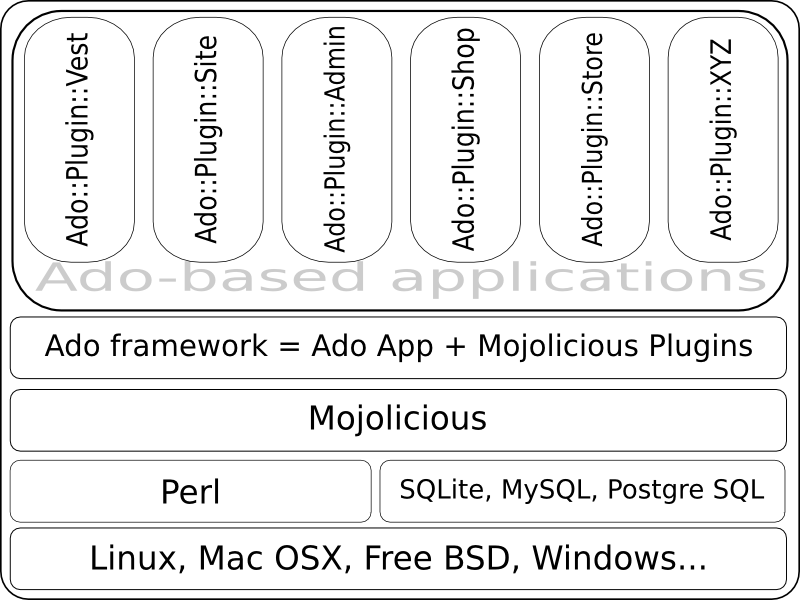
To learn more about Ado plugins, please look at Ado::Manual::Plugins. Now that you know what additional features Ado provides, you can proceed to Ado::Manual::Installation.
SEE ALSO
Ado::Manual, Ado::Manual::Installation, Ado::Manual::Plugins, Mojolicious::Guides
COPYRIGHT AND LICENSE
Copyright 2013-2015 Красимир Беров (Krasimir Berov).
This program is free software, you can redistribute it and/or modify it under the terms of the GNU Lesser General Public License v3 (LGPL-3.0).