NAME
svsh - Process supervision shell for daemontools/perp/s6/runit
SYNOPSIS
    # from the command line
    $ svsh --suite perp --basedir /etc/services

    # run one specific command and exit
    $ svsh --suite runit --basedir /var/services restart nginx
DESCRIPTION
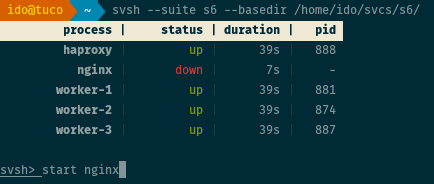
svsh is a command line shell for process supervision suites of the daemontools family. Currently, it supports
daemontools, perp, s6
and runit. It provides a unified interface allowing easy inspection
and manipulation of services (i.e. processes) managed by supported supervision suites.
svsh does not require any configurations or changes to your suite's service directories;
just point it at a base directory and you immediately get a usable shell, listing all
services and their statuses, and accepting commands to perform on them.
The shell provides a very simple syntax that is easy to remember, far simpler than the
particular syntax of the underlying supervision suite. Instead of having to execute
perpctl -b /services q nginx to restart an nginx service running from /services/nginx,
just execute restart nginx. Couldn't be simpler. Want to send a HUP signal to all
services whose names begin with "worker"? just execute signal hup worker*.
svsh is inspired by supervisord's supervisorctl shell. I've
attempted to provide a similar syntax and feature set.
OPTIONS
-d, --basedir
Required. Base directory of services supervised by the supervision suite.
-s, --suite
Required. The supervision suite managing the base directory. Either daemontools, perp,
s6 or runit.
-b, --bindir
If the supervision suite's tools are not in the environment PATH variable,
you can provide the directory where they are located (e.g. /usr/local/bin).
-c, --collapse
Collapse multi-process services to one line in status. See "COLLAPSE"
for more details. This can be changed from inside the shell too.
COMMANDS
The following commands are provided by svsh. Note that some suites do not
support all commands.
status
Prints a list of all services, their statuses (up, down, etc.), uptimes (or downtimes) and process IDs. This command is automatically executed upon initialization of the shell.
start service, ...
Starts a list of one or more services, if they are not already up.
svsh> start nginx haproxy
stop service, ...
Stops a list of one or more services. The services stopped will not be restarted.
svsh> stop nginx haproxy
restart service, ...
Restarts a list of one or more services. Generally, this means sending a QUIT signal to the services, which should cause them to shutdown and be restarted by the supervisor.
svsh> restart nginx haproxy
signal sig service, ...
Send a UNIX signal to a list of one or more services. The name of the signal can
be lowercase or uppercase, and may include the prefix "SIG".
    svsh> signal term nginx
    svsh> signal SIGUSR1 haproxy
rescan
Alias: update.
Causes the supervision suite to rescan the base directory for new or removed services.
fg service
"Moves" a service to the foreground, so that its output streams (at least standard output,
possibly standard error) are printed on screen. In reality, it determines where the process'
log file is located, and tails it with tail -f. See "LOG INSPECTION" for more details, as this
is a complicated subject.
svsh> fg nginx
terminate
Alias: shutdown.
Terminate the supervision suite. This will cause all services managed by the supervisor to terminate as well.
toggle option
Toggles a shell option on or off. Currently, only the collapse option is supported. The
status command will be automatically called after toggling the option.
svsh> toggle collapse
help [ command ]
Prints help information. Can also provide information about specific commands.
svsh> help signal
quit
Alias: exit.
Quits the shell.
ADVANCED FEATURES AND IMPORTANT INFORMATION
LOG INSPECTION
All of the supported supervision suites do not enforce a logging scheme on managed
services. While all of them provide a logging tool (daemontools provides multilog,
perp provides tinylog and sissylog; s6 provides s6-log; runit
provides svlogd), none of them enforce their usage. It is actually not uncommon
among users of these suites to use a logging tool provided by one suite for services
managed by another one. This means it is hard for an external program such as svsh
to determine where log files are stored, if at all.
Currently, svsh will attempt to find the log file of a service by checking the
pid of the associated log process, and if (and only if) that process is one of the
supported loggers (multilog, tinylog, s6-log or svlogd), it will try to find the
file descriptor used by that process under /proc/<pid>/fd. As long as your services
are being logged by one of these tools, svsh should be able to tail their log
files when the fg command is used. However, if the log file is being rotated
while it is being tailed, behavior is currently undefined (will probably stop working until
the command is run again).
WILDCARDS
svsh makes it easy to manipulate multiple services at once. Wildcards are supported
by the start, stop, restart and signal commands. If, for example, you have
several services whose names start with "worker", you can stop them all by executing
stop worker*. Wildcards are also supported at the beginning of the name, so
signal term *d will send a TERM signal to all services whose names end with "d".
    svsh> status
       process |     status | duration |   pid
      worker-1 |         up |    9813s | 25984
      worker-2 |         up |    9813s | 25976
      worker-3 |         up |    4393s | 2990

    svsh> stop worker*

    svsh> status
       process |     status | duration |   pid
      worker-1 |       down |       2s |     -
      worker-2 |       down |       2s |     -
      worker-3 |       down |       2s |     -
COLLAPSE
Often times you would like to run a certain service with X number of identical processes.
None of the supervision suites have any mechanism to allow this (none that I
know of at least), apart from creating identical copies of a service directory for every
process needed. While svsh can't help you with that, it provides a nice feature for collapsing
these identical services in the output of the "status" command to just one line. This can
be very useful with lots of multi-process services.
Currently, svsh determines multi-process services if their names are postfixed with a dash
and a number. For example, if you have a service called worker that you need 3 processes
of which to run, you can create worker-1, worker-2 and worker-3 service directories.
If the collapse option is on, svsh will collapse all of these into
just one line, under the name status.
    svsh> status
       process |     status | duration |   pid
      worker-1 |         up |    9813s | 25984
      worker-2 |         up |    9813s | 25976
      worker-3 |         up |    4393s | 2990

    svsh> toggle collapse
       process |     status | duration |   pid
        worker |       3 up |    9850s |     -
This feature combines well with the "WILDCARDS" feature.
Hopefully, future versions will find a more generic way of identifying multi-process services.
CONFIGURATION AND ENVIRONMENT
svsh requires no configuration files or environment variables.
DEPENDENCIES
svsh depends on the following modules:
INCOMPATIBILITIES
None reported.
BUGS AND LIMITATIONS
No bugs have been reported.
Please report any bugs or feature requests to
bug-Svsh@rt.cpan.org, or through the web interface at
http://rt.cpan.org/NoAuth/ReportBug.html?Queue=Svsh.
SUPPORT
You can find documentation for this module with the perldoc command.
perldoc svsh
You can also look for information at:
-
RT: CPAN's request tracker
-
AnnoCPAN: Annotated CPAN documentation
-
CPAN Ratings
-
Search CPAN
AUTHOR
Ido Perlmuter .
Thanks to the guys at the supervision mailing list for helping out with suggestions.
LICENSE AND COPYRIGHT
Copyright (c) 2015, Ido Perlmuter ido at ido50 dot net.
This module is free software; you can redistribute it and/or modify it under the same terms as Perl itself, either version 5.8.1 or any later version. See perlartistic and perlgpl.
The full text of the license can be found in the LICENSE file included with this module.
DISCLAIMER OF WARRANTY
BECAUSE THIS SOFTWARE IS LICENSED FREE OF CHARGE, THERE IS NO WARRANTY FOR THE SOFTWARE, TO THE EXTENT PERMITTED BY APPLICABLE LAW. EXCEPT WHEN OTHERWISE STATED IN WRITING THE COPYRIGHT HOLDERS AND/OR OTHER PARTIES PROVIDE THE SOFTWARE "AS IS" WITHOUT WARRANTY OF ANY KIND, EITHER EXPRESSED OR IMPLIED, INCLUDING, BUT NOT LIMITED TO, THE IMPLIED WARRANTIES OF MERCHANTABILITY AND FITNESS FOR A PARTICULAR PURPOSE. THE ENTIRE RISK AS TO THE QUALITY AND PERFORMANCE OF THE SOFTWARE IS WITH YOU. SHOULD THE SOFTWARE PROVE DEFECTIVE, YOU ASSUME THE COST OF ALL NECESSARY SERVICING, REPAIR, OR CORRECTION.
IN NO EVENT UNLESS REQUIRED BY APPLICABLE LAW OR AGREED TO IN WRITING WILL ANY COPYRIGHT HOLDER, OR ANY OTHER PARTY WHO MAY MODIFY AND/OR REDISTRIBUTE THE SOFTWARE AS PERMITTED BY THE ABOVE LICENCE, BE LIABLE TO YOU FOR DAMAGES, INCLUDING ANY GENERAL, SPECIAL, INCIDENTAL, OR CONSEQUENTIAL DAMAGES ARISING OUT OF THE USE OR INABILITY TO USE THE SOFTWARE (INCLUDING BUT NOT LIMITED TO LOSS OF DATA OR DATA BEING RENDERED INACCURATE OR LOSSES SUSTAINED BY YOU OR THIRD PARTIES OR A FAILURE OF THE SOFTWARE TO OPERATE WITH ANY OTHER SOFTWARE), EVEN IF SUCH HOLDER OR OTHER PARTY HAS BEEN ADVISED OF THE POSSIBILITY OF SUCH DAMAGES.