

NAME
nup - n-up, multi-column paged output for commands and files
SYNOPSIS
nup [ options ] file ...
nup -e [ options ] command ...

 -h  --help             show help
     --version          show version
 -d  --debug            debug mode
 -n  --dryrun           dry-run mode
 -e  --exec             execute command mode
     --alias=CMD=OPTS   set command alias
 -V  --parallel         parallel view mode
 -D  --document         document mode (default: on)
 -F  --no-paginate      disable page mode
 -A  --auto-paginate    auto disable page mode for single column
 -H  --filename         show filename headers (default: on)
 -G  --grid=#           grid layout (e.g., 2x3)
 -C  --pane=#           number of columns
 -R  --row=#            number of rows
 -P  --page=#           page height in lines
 -S  --pane-width=#     pane width (default: 85)
--bs --border-style=#   border style (default: heavy-box)
--ls --line-style=#     line style (none/truncate/wrap/wordwrap)
     --runin=#          run-in width for line breaking
     --runout=#         run-out width for line breaking
     --runlen=#         set both run-in and run-out
--cm --colormap=#       color mapping (LABEL=COLOR)
     --[no-]page-number page number on border (default: on)
     --textconv[=EXT]   textconv for non-text files
     --pager=#          pager command (empty to disable)
     --no-pager         disable pager
     --white-board      black on white board
     --black-board      white on black board
     --green-board      white on green board
     --slate-board      white on dark slate board
VERSION
Version 1.08
DESCRIPTION
N-up (command: nup) is a multi-column paged output tool.
It provides a convenient way to view files or run commands in
n-up layout using the App::optex::up module through optex.
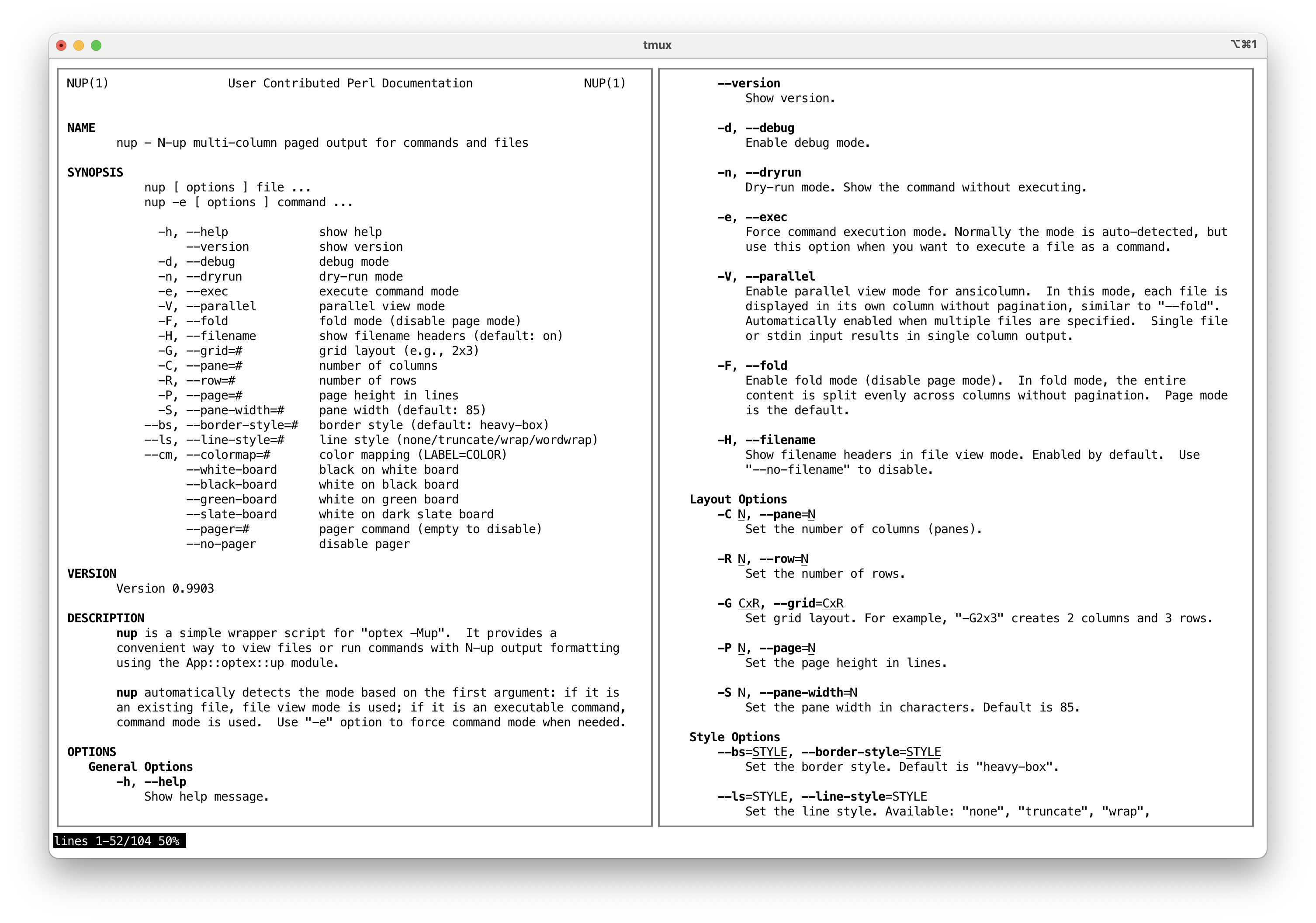
nup automatically detects the mode based on the first argument:
if it is an existing file, n-up file view mode is used; if it is an
executable command, n-up command mode is used. Use -e option to
force command mode when needed.
In file view mode, nup stops parsing its own options at the first
file name and hands the file names and everything after them to
ansicolumn unchanged. Options of ansicolumn that nup does
not provide can therefore be given after the file names:
nup -C2 file1.txt file2.txt -w 170
Here -w 170 sets the output width for ansicolumn. To set the
width when no terminal is available, the COLUMNS environment
variable works in both modes; see "Terminal Size".
OPTIONS
General Options
-
-h, --help
Show help message.
-
--version
Show version.
-
-d, --debug
Enable debug mode.
-
-n, --dryrun
Dry-run mode. Show the command without executing.
-
-e, --exec
Force command execution mode. Normally the mode is auto-detected, but use this option when you want to execute a file as a command.
-
--alias=NAME=CMD OPTS...
Define command alias. When a command matches NAME, it is replaced by CMD with specified OPTS. This can be used to add default options or to substitute a different command. Multiple
--aliasoptions can be specified.Default aliases:
  bat     bat --style=plain --color=always
  batcat  batcat --style=plain --color=always
  mdcat   mdcat --ansi
  rg      rg --color=always
  tree    tree -C
Example:
nup --alias='grep=ggrep --color=always' grep pattern file -
-V, --parallel
Enable parallel view mode for ansicolumn. In this mode, each file is displayed in its own column without pagination, similar to
--no-paginate. Automatically enabled when multiple files are specified. Single file or stdin input results in single column output. -
-D, --document
Enable document mode for ansicolumn. This mode is optimized for viewing documents with n-up page-based layout. Enabled by default. Use
--no-documentto disable. -
-F, --no-paginate
Disable page mode. Without pagination, the entire content is split evenly across columns. Page mode is the default; use --paginate to re-enable if needed.
-
-A, --auto-paginate
Automatically disable page mode when only one column fits the terminal. This is useful when using
nupasMANPAGER, where single-column page splitting wastes space. -
-H, --filename
Show filename headers in file view mode. Enabled by default. Use
--no-filenameto disable.
Layout Options
-
-C N, --pane=N
Set the number of columns (panes).
-
-R N, --row=N
Set the number of rows.
-
-G CxR, --grid=CxR
Set grid layout. For example,
-G2x3creates 2 columns and 3 rows. -
-P N, --page=N
Set the page height in lines.
-
-S N, --pane-width=N
Set the pane width in characters. Default is 85.
Style Options
-
--bs=STYLE, --border-style=STYLE
Set the border style. Default is
heavy-box. -
--ls=STYLE, --line-style=STYLE
Set the line style. Available:
none,truncate,wrap,wordwrap. -
--runin=N, --runout=N, --runlen=N
Set the run-in and run-out widths that ansicolumn uses for line breaking (kinsoku) when it folds long lines.
--runlensets both. They are given to ansicolumn after the values in~/.ansicolumnrc, so they take precedence. Without them, ansicolumn uses the values in~/.ansicolumnrc, or 2. -
--cm=SPEC, --colormap=SPEC
Set color mapping. Specify as
LABEL=COLOR(e.g.,--cm=BORDER=R). Available labels:TEXT,BORDER. -
--[no-]page-number
Show page number on the bottom border of each column. Enabled by default. Use
--no-page-numberto disable. -
--white-board, --black-board, --green-board, --slate-board
Predefined color schemes for board-style display.
Text Conversion
-
--textconv[=EXT,...]
Enable text conversion for non-text files using App::optex::textconv. When any of the specified file extensions are found in the arguments, the
textconvmodule is loaded to convert them to text before display.Default extensions:
pdf,docx,docm,pptx,pptm,xlsx,xlsm,jpg,jpeg.Use
--textconv=noneto disable.
Pager Options
-
--pager=COMMAND
Set the pager command. Default is
NUP_PAGERorless -F +Gg. When page mode is active,NUP_PAGE_PAGERtakes precedence overNUP_PAGER. Viewing multiple files (or-Vparallel view) produces parallel layout which has no page structure, sonupdisables page mode andNUP_PAGE_PAGERis not used there. ThePAGERvariable is not used to avoid an infinite loop whenPAGERis set tonup. Use--pager=(empty) or--no-pagerto disable pager. -
--no-pager
Disable pager.
Terminal Size
The terminal size is taken from the controlling terminal
(/dev/tty). When it is not available, as when nup is run
without a terminal, the COLUMNS environment variable gives the
width (default 80), and LINES gives the height (default 24) used
to split the screen when the number of rows is set with -R or
-G:
COLUMNS=170 nup -C2 file1.txt file2.txt
Less Environment Variables
nup sets the following environment variables when they are not
already defined, to ensure proper display with less:
-
LESSDefault:
-R. Required for ANSI color sequences. -
LESSANSIENDCHARSDefault:
mK. Recognizes SGR (m) and erase line (K) sequences.
EXAMPLES
Typical n-up usage:
nup man nup                # view manual in n-up layout
nup -C2 man perl           # 2 columns
nup -G2x2 man perl         # 2x2 grid (4-up layout)
nup -F man perl            # no pagination
nup file1.txt file2.txt    # view files side by side
nup -C2 a.txt b.txt -w 170 # 2 columns, width 170 (ansicolumn -w)
nup -e ./script.sh         # force command mode for a file
Using nup as a MANPAGER:
export MANPAGER="nup -A"
INSTALLATION
Homebrew
Use tecolicom/tap:
brew tap tecolicom/tap
brew install app-nup
CPAN
Using cpanminus:
cpanm -n App::nup
DIAGNOSTICS
Both stdout and stderr of the command are merged and passed through the n-up output filter. Error messages will appear in the paged output.
EXIT STATUS
The exit status of the executed command is not preserved because the output is passed through a filter pipeline.
SEE ALSO
App::optex::up (bundled), optex
AUTHOR
Kazumasa Utashiro
LICENSE
Copyright 2025-2026 Kazumasa Utashiro.
This software is released under the MIT License. https://opensource.org/licenses/MIT