NAME
Term::ANSIColor::Concise - Produce ANSI terminal sequence by concise notation
SYNOPSIS
use v5.14;
use Term::ANSIColor::Concise qw(ansi_color);

say ansi_color('R', 'This is Red');

say ansi_color('SDG', 'This is Reverse Bold Green');

say ansi_color('FUDI<Gold>/L10E',
               'Flashing Underlined Bold Italic Gold on Gray10 Bar');

say ansi_color('<red>+l20-s10', 'Lightened desaturated red');
say ansi_color('hsl(240,100,50)=y70+c', 'Blue set to 70% luminance then complemented');
say ansi_color('lab(50,20,-30)+h60', 'Lab color with hue shifted 60 degrees');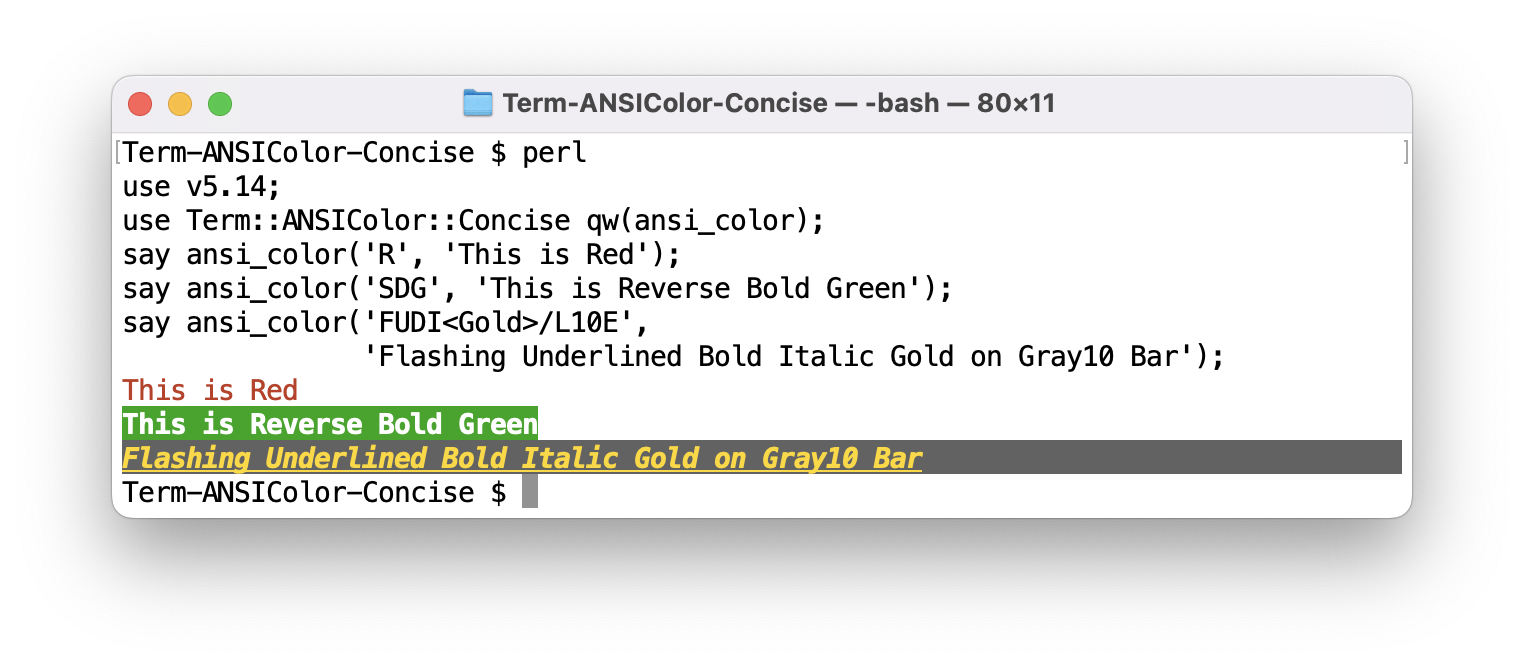
VERSION
Version 3.04
DESCRIPTION
This module provides a concise notation to describe colors and effects for ANSI terminals. The notation is meant to be used in parameters of command line options. A string in this notation is called a color spec in this document; see "COLOR SPEC".
By default, colors are produced as ANSI 256 color sequences: eight standard colors, eight high intensity colors, 6x6x6 216 colors and 24 gray scales. Colors given in other forms, such as RGB values or color names, are converted to the nearest of the 216 colors, or to one of the gray scales if all RGB values are the same. For a terminal which can display 24bit colors, 24bit sequences can be produced instead; see "ENVIRONMENT".
This module used to be a part of Getopt::EX::Colormap, which provides an interface to handle colors in command line options.
FUNCTION
- ansi_color(spec, text, ...)
-
Returns the colorized version of the given text. Produces 256 or 24bit colors depending on the setting.
In the result, the given text is enclosed by appropriate open/close sequences. The close sequence can vary according to the open sequence. See "RESET SEQUENCE".
If text already contains colored areas, the color spec is applied accumulatively. For example, if an underline is given for a string of red text, both are in effect.
The spec and text pairs can be repeated any number of times. In scalar context, the results from each pair are returned as a concatenated string. In list context, they are returned as a list.
- ansi_color([ spec1, spec2, ... ], text)
-
If the spec parameter is an ARRAYREF, multiple specs can be given at once. This is not useful for text color specs because they can be simply joined, but may be useful when mixed with "FUNCTION SPEC".
- ansi_color_24(spec, text)
- ansi_color_24([ spec1, spec2, ... ], text)
-
Same as ansi_color, but always produces 24bit color sequences for colors given in RGB, other color spaces or names.
- cached_ansi_color(cache, spec, text)
-
Backend interface for ansi_color. The first parameter is a hash object used to cache data. If you are concerned about cache mismatch situations, use this interface with an original cache.
- ansi_pair(spec)
-
Produces introducer and recovery sequences for the given spec.
An additional third value indicates if the introducer includes an Erase Line sequence. This gives a hint that the sequence is necessary for empty strings. See "RESET SEQUENCE".
- ansi_code(spec)
-
Produces introducer sequence for the given spec. Reset code can be obtained by ansi_code("Z").
- csi_code(name, params)
-
Produces a CSI (Control Sequence Introducer) sequence by name with numeric parameters. name is one of the names listed in "CSI SEQUENCES and OTHERS".
- csi_report(name, n, string)
-
Extracts parameters from the response string returned from the terminal. n specifies the number of parameters included in the response.
Currently, only
CPR(Cursor Position Report) is effective as name. The current cursor position can be obtained from the response string resulting from theDSR(Device Status Report) sequence as follows.my($line, $column) = csi_report('CPR', 2, $answer);
COLOR SPEC
A color spec is a combination of the components described below. Any number of components can be given in any order, and the sequences are produced in the order of their presence. So if they conflict, the later one overrides the earlier.
A color is taken as foreground at first, and slash (/) switches foreground and background. So R/W is red text on white.
Modifiers described in "COLOR ADJUSTMENT" can follow a color given in RGB, other color spaces or names.
BASIC 8+8
Single uppercase character representing 8 colors, and alternative (usually brighter) colors in lowercase:
R  r  Red
G  g  Green
B  b  Blue
C  c  Cyan
M  m  Magenta
Y  y  Yellow
K  k  Black
W  w  White
6x6x6 216 COLORS
Combination of 0..5 for 216 RGB values:
Deep          Light
<----------------->
000 111 222 333 444 : Black
500 511 522 533 544 : Red
050 151 252 353 454 : Green
005 115 225 335 445 : Blue
055 155 255 355 455 : Cyan
505 515 525 535 545 : Magenta
550 551 552 553 554 : Yellow
555 444 333 222 111 : White
24 GRAY SCALES + 2
24 gray scales are described by L01 (dark) to L24 (bright). Black and White can be described as L00 and L25, those are aliases for 000 and 555.
L00 : Level  0 (Black)
L01 : Level  1
 :
L24 : Level 24
L25 : Level 25 (White)
RGB
12bit/24bit RGB:
rgb(255,0,0)       : 24bit decimal RGB (0-255)
(255,0,0)          : same, rgb can be omitted
#000000 .. #FFFFFF : 24bit hex RGB
#000    .. #FFF    : 12bit hex RGB 4096 colors
The leading # can be omitted in 24bit hex RGB notation. So 6 consecutive digits mean a 24bit color, and 3 digits mean a 6x6x6 color, if they do not begin with #.
OTHER COLOR SPACES
- HSL (Hue, Saturation, Lightness)
-
hsl(0,100,50) # Red: hue=0°, saturation=100%, lightness=50% hsl(120,100,50) # Green: hue=120°, saturation=100%, lightness=50% hsl(240,100,50) # Blue: hue=240°, saturation=100%, lightness=50% - LCH (Lightness, Chroma, Hue) - CIE LCHab
-
lch(50,130,0) # Red: lightness=50, chroma=130, hue=0° lch(87,119,136) # Green: lightness=87, chroma=119, hue=136° lch(32,133,306) # Blue: lightness=32, chroma=133, hue=306° - Lab (Lightness, a*, b*) - CIE Lab
-
lab(50,68,48)     # Red: L*=50, a*=68, b*=48
lab(87,-79,80)    # Green: L*=87, a*=-79, b*=80
lab(32,79,-108)   # Blue: L*=32, a*=79, b*=-108
See Graphics::ColorObject for these color spaces.
NAMED COLORS
Color names enclosed by angle brackets:
<red> <blue> <green> <cyan> <magenta> <yellow>
<aliceblue> <honeydew> <hotpink> <moccasin>
<medium_aqua_marine> <gray50>
These colors are defined in 24bit RGB. Names are case insensitive and underscore (_) is ignored, but space and punctuation are not allowed. So <aliceblue>, <AliceBlue>, <ALICE_BLUE> are all valid but <Alice Blue> is not. See "COLOR NAMES" for the list.
EFFECTS and CONTROLS
Single case-insensitive character for special effects. Numbers indicate SGR (Select Graphic Rendition) parameter values:
N    None
Z  0 Zero (reset)
D  1 Double-struck (boldface)
P  2 Pale (faint/dim)
I  3 Italic
U  4 Underline
F  5 Flash (blink: slow)
Q  6 Quick (blink: rapid)
S  7 Stand-out (reverse video)
H  8 Hide (concealed)
X  9 Cross-out (strikethrough)

E    Erase Line (fill by background color)

;    No effect
/    Toggle foreground/background
^    Reset to foreground
~    Cancel following effect
Tilde (~) negates the following effect; ~S resets the effect of S. The negation of D is discussed in the Wikipedia page in "SEE ALSO"; at least Apple_Terminal (v2.10 433) does not reset it.
A colon after an effect, with the digits and colons that follow it, is put into its SGR parameter: U:3 produces ESC[4:3m. This is the form of a parameter in ECMA-48, and the text is not checked. Its meaning comes from the terminals. The one in common use is the underline style: terminals that support it commonly take 1 for straight, 2 for double, 3 for curly, 4 for dotted, 5 for dashed and 0 for none. A terminal without support may show something quite different: Apple_Terminal (v2.14 455.1) ignores the colons and shows ESC[4:3m as ESC[43m, with a yellow background.
Put ; before a color that starts with a digit, as in U:3;555. A negated effect such as ~U takes no colon.
E is an abbreviation for {EL} (Erase Line). It is not an attribute of the text, but paints the rest of the line by the background color.
CSI SEQUENCES and OTHERS
Native CSI (Control Sequence Introducer) sequences in the form of {NAME}.
ICH n   Insert Character
CUU n   Cursor up
CUD n   Cursor Down
CUF n   Cursor Forward
CUB n   Cursor Back
CNL n   Cursor Next Line
CPL n   Cursor Previous line
CHA n   Cursor Horizontal Absolute
CUP n,m Cursor Position
ED  n   Erase in Display (0 after, 1 before, 2 entire, 3 w/buffer)
EL  n   Erase in Line (0 after, 1 before, 2 entire)
IL  n   Insert Line
DL  n   Delete Line
DCH n   Delete Character (scroll rest to left)
SU  n   Scroll Up
SD  n   Scroll Down
ECH n   Erase Character
VPA n   Vertical Position Absolute
VPR n   Vertical Position Relative
HVP n,m Horizontal Vertical Position
SGR n*  Select Graphic Rendition
DSR n   Device Status Report (6 cursor position)
SCP     Save Cursor Position
RCP     Restore Cursor Position
And there are some non-standard CSI sequences.
CPR  n,m Cursor Position Report – VT100 to Host
STBM n,m Set Top and Bottom Margins
SLRM n,m Set Left Right Margins
These names can be followed by optional numerical parameters, using comma (,) or semicolon (;) to separate multiple ones, with optional parentheses. For example, color spec DK/544 can be described as {SGR1;30;48;5;224} or more readable {SGR(1,30,48,5,224)}.
The parameters of SGR can also have colons, as in {SGR4:2} or {SGR(4:3,58:2::255:0:0)}, which produces ESC[4:3;58:2::255:0:0m. They are passed as they are. See the notes on U:3 in "EFFECTS and CONTROLS" for what terminals do with them. Other names do not take colons.
Some other escape sequences are supported in the form of {NAME}. These do not take parameters. VT100 compatible terminals usually support DECSC and DECRC, and do not support the SCP and RCP CSI codes.
CSI      Control Sequence Introducer
OSC      Operating System Command
RIS      Reset to Initial State
DECSC    DEC Save Cursor
DECRC    DEC Restore Cursor
DECEC    DEC Enable Cursor
DECDC    DEC Disable Cursor
DECELRM  DEC Enable Left Right Margin Mode
DECDLRM  DEC Disable Left Right Margin Mode
EXAMPLES
8+8  6x6x6    12bit      24bit            names
===  =======  =========  =============    ==================
B    005      #00F       (0,0,255)        <blue>
 /M     /505      /#F0F     /(255,0,255)  /<magenta>
K/W  000/555  #000/#FFF  #000000/#FFFFFF  <black>/<white>
R/G  500/050  #F00/#0F0  #FF0000/#00FF00  <red>/<green>
     L05/L21  #333/#CCC  #333333/#CCCCCC  <gray20>/<gray80>
COLOR ADJUSTMENT
A color given in RGB, other color spaces or names can be adjusted by modifiers that follow it, such as luminance, lightness, saturation and hue. Basic 8+8 colors (R, G, B, etc.), 6x6x6 216 colors (555, etc.) and gray scales (L10, etc.) do not take modifiers.
<red>+l20-s10       # lighter and less saturated red
hsl(240,100,50)=y70 # blue set to luminance 70
MODIFIER SYNTAX
A modifier is an operation character, a parameter character and an optional value: [OPERATION][PARAMETER][VALUE]. The operation is required even for a parameter that takes no value, as in +i: <red>i is red with the italic effect I.
+- Add value (relative adjustment)-- Subtract value (relative adjustment)=- Set absolute value*- Multiply by percentage (value/100)%- Add value, and take the result modulo 100
ADJUSTABLE PARAMETERS
- l - Lightness (HSL lightness: 0-100)
-
<red>+l10 # Increase red lightness by 10 <green>-l15 # Decrease green lightness by 15 <blue>=l75 # Set blue lightness to 75 <orange>*l120 # Multiply orange lightness by 1.2 - y - Luminance (perceived brightness: 0-100)
-
<red>+y10 # Increase red luminance by 10 <blue>-y20 # Decrease blue luminance by 20 <green>=y50 # Set green luminance to 50 - s - Saturation (HSL saturation: 0-100)
-
<red>+s20 # Increase red saturation by 20 <yellow>-s30 # Decrease yellow saturation by 30 <magenta>=s0 # Set magenta saturation to 0 (grayscale) - h - Hue (HSL hue shift in degrees)
-
<red>+h60 # Shift red hue by 60 degrees <cyan>-h120 # Shift cyan hue by -120 degrees - r - Rotate Hue (LCH hue rotation, preserving luminance)
-
<red>+r60 # Rotate red hue by 60 degrees in LCH space <blue>+r180 # Opposite hue with the luminance preserved - c - Complement (180 degree hue shift in HSL)
-
<red>+c # Get complement of red (cyan) - i - Inverse (RGB inversion)
-
<red>+i # Invert red to cyan <blue>+i # Invert blue to yellow - g - Luminance Grayscale (convert to grayscale using luminance)
-
<red>+g # Convert red to luminance-based grayscale - G - Lightness Grayscale (convert to grayscale using lightness)
-
<red>+G # Convert red to lightness-based grayscale
The parameters h, r and c shift the hue: - shifts it backwards, and the other operations shift it forwards. =h180 does not set the hue to 180, but shifts it by 180 degrees.
The color adjustment is implemented by the Term::ANSIColor::Concise::Transform module, which uses Term::ANSIColor::Concise::ColorObject for color space conversions.
See "LABEL COLOR FOR A BACKGROUND" for an example of modifiers that make a text color from its background color.
COLOR NAMES
Color names listed in Graphics::ColorNames::X module can be used in the form of <NAME>.
aliceblue      antiquewhite   aqua         aquamarine
azure          beige          bisque       black
blanchedalmond blue           blueviolet   brown
burlywood      cadetblue      chartreuse   chocolate
coral          cornflowerblue cornsilk     crimson
cyan           darkolivegreen dimgray      dimgrey
dodgerblue     firebrick      floralwhite  forestgreen
fuchsia        gainsboro      ghostwhite   gold
goldenrod      gray           green        greenyellow
grey           honeydew       hotpink      indianred
indigo         ivory          khaki        lavender
lavenderblush  lawngreen      lemonchiffon lightgoldenrodyellow
lime           limegreen      linen        magenta
maroon         midnightblue   mintcream    mistyrose
moccasin       navajowhite    navy         navyblue
oldlace        olive          olivedrab    orange
orangered      orchid         papayawhip   peachpuff
peru           pink           plum         powderblue
purple         rebeccapurple  red          rosybrown
royalblue      saddlebrown    salmon       sandybrown
seagreen       seashell       sienna       silver
skyblue        slateblue      slategray    slategrey
snow           springgreen    steelblue    tan
teal           thistle        tomato       turquoise
violet         violetred      webgray      webgreen
webgrey        webmaroon      webpurple    wheat
white          whitesmoke     x11gray      x11green
x11grey        x11maroon      x11purple    yellow
yellowgreen
In the above list, next colors have variants with prefix of dark, light, medium, pale, deep.
aquamarine   medium_aquamarine
blue         dark_blue      light_blue       medium_blue
coral                       light_coral
cyan         dark_cyan      light_cyan
goldenrod    dark_goldenrod light_goldenrod  pale_goldenrod
gray         dark_gray      light_gray
green        dark_green     light_green      pale_green
grey         dark_grey      light_grey
khaki        dark_khaki
magenta      dark_magenta
orange       dark_orange
orchid       dark_orchid                     medium_orchid
pink         deep_pink      light_pink
purple                                       medium_purple
red          dark_red
salmon       dark_salmon    light_salmon
seagreen     dark_seagreen  light_seagreen   medium_seagreen
skyblue      deep_skyblue   light_skyblue
slateblue    dark_slateblue light_slateblue  medium_slateblue
slategray    dark_slategray light_slategray
slategrey    dark_slategrey light_slategrey
springgreen                                  medium_springgreen
steelblue                   light_steelblue
turquoise    dark_turquoise medium_turquoise pale_turquoise
violet       dark_violet
violetred                   medium_violetred pale_violetred
yellow                      light_yellow
The following colors have four variants. For example, color brown has brown1, brown2, brown3, brown4.
antiquewhite   aquamarine     azure          bisque
blue           brown          burlywood      cadetblue
chartreuse     chocolate      coral          cornsilk
cyan           darkgoldenrod  darkolivegreen darkorange
darkorchid     darkseagreen   darkslategray  deeppink
deepskyblue    dodgerblue     firebrick      gold
goldenrod      green          honeydew       hotpink
indianred      ivory          khaki          lavenderblush
lemonchiffon   lightblue      lightcyan      lightgoldenrod
lightpink      lightsalmon    lightskyblue   lightsteelblue
lightyellow    magenta        maroon         mediumorchid
mediumpurple   mistyrose      navajowhite    olivedrab
orange         orangered      orchid         palegreen
paleturquoise  palevioletred  peachpuff      pink
plum           purple         red            rosybrown
royalblue      salmon         seagreen       seashell
sienna         skyblue        slateblue      slategray
snow           springgreen    steelblue      tan
thistle        tomato         turquoise      violetred
wheat          yellow
gray and grey have 100 steps of variants.
gray gray0 .. gray100
grey grey0 .. grey100
See https://en.wikipedia.org/wiki/X11_color_names#Color_variations for detail.
FUNCTION SPEC
Color spec can be a CODEREF or object. If it is a CODEREF, that code is called with text as an argument, and returns the result.
If it is an object which has a method call, it is called with the variable $_ set as the target text.
RESET SEQUENCE
This module produces RESET and Erase Line sequences to recover from colored text. The Erase Line clears the background color that the terminal leaves on the new line when it scrolls in the middle of colored text at the bottom of the screen.
However, on some terminals, including Apple_Terminal, the Erase Line sequence clears the text at the cursor position when it is at the rightmost column of the screen. In other words, the rightmost character sometimes mysteriously disappears when it is the last character in the colored region. If you do not like this behavior, set the module variable $NO_RESET_EL or the ANSICOLOR_NO_RESET_EL environment variable.
The Erase Line sequence {EL} clears the line from the cursor position to the end of the line, which means filling the area with the background color. When Erase Line is explicitly found in the start sequence, it is copied to just before (not after) the ending reset sequence, with the preceding sequence if necessary, to keep the effect of filling the line even if the text is wrapped to multiple lines.
See "ENVIRONMENT" section.
LESS
Because the Erase Line sequence ends with K, it is a good idea to tell the less command so, if you want to see the output using it.
LESS=-cR
LESSANSIENDCHARS=mK
ENVIRONMENT
If the environment variable NO_COLOR is set, regardless of its value, the colorization interface in this module will never produce color sequences. Primitive functions such as ansi_code are not affected. See https://no-color.org/.
Function ansi_color produces 256 or 24bit colors depending on the value of the $RGB24 module variable. 24bit mode is also enabled when the environment variable ANSICOLOR_RGB24 is set or COLORTERM is truecolor.
If the module variable $NO_RESET_EL is set, or the ANSICOLOR_NO_RESET_EL environment variable is set, the Erase Line sequence is not produced with the RESET code. See "RESET SEQUENCE".
COLOR TABLE
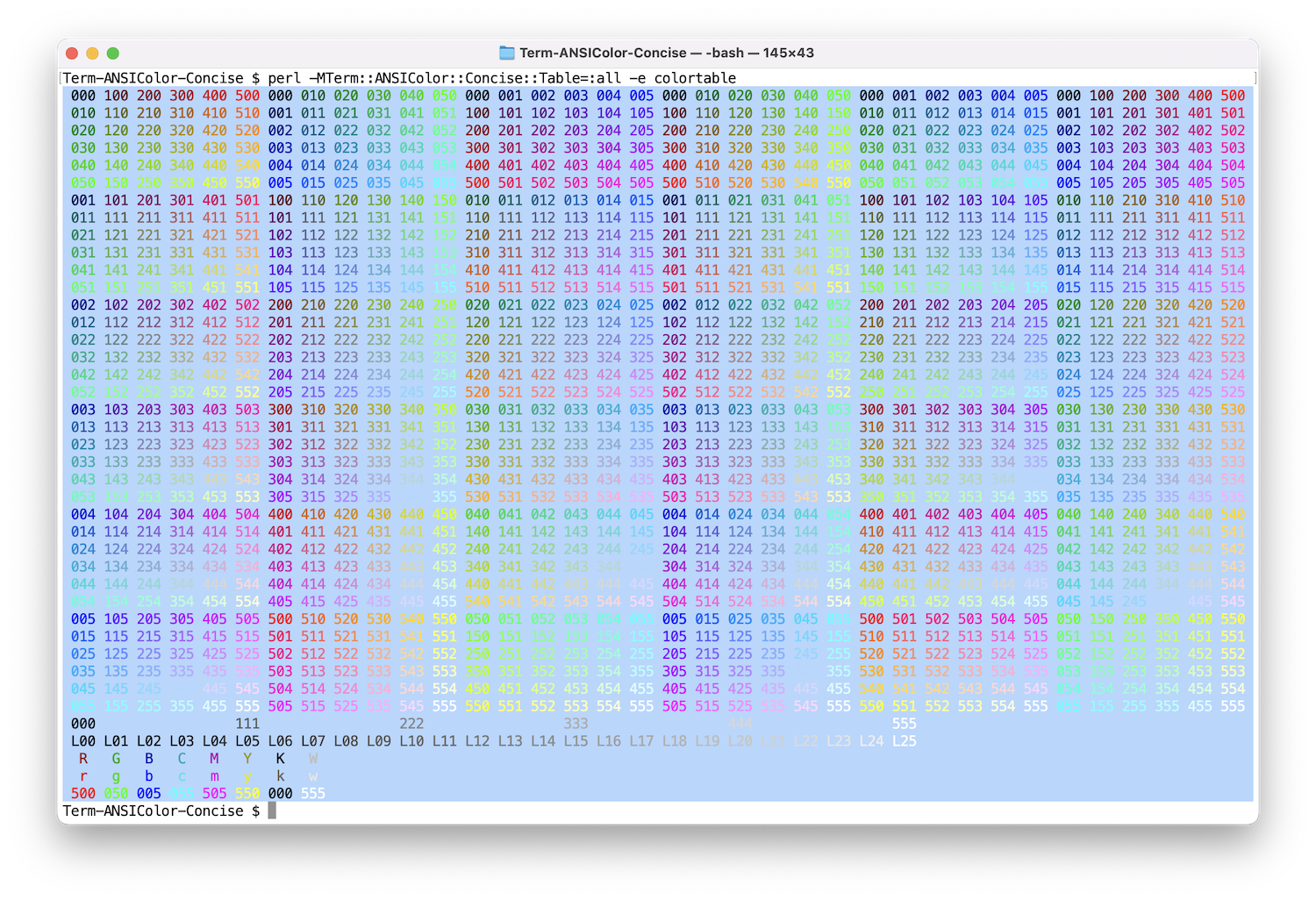
The color table can be shown by the Term::ANSIColor::Concise::Table module. The following command will show the table of 256 colors.
$ perl -MTerm::ANSIColor::Concise::Table=:all -e colortable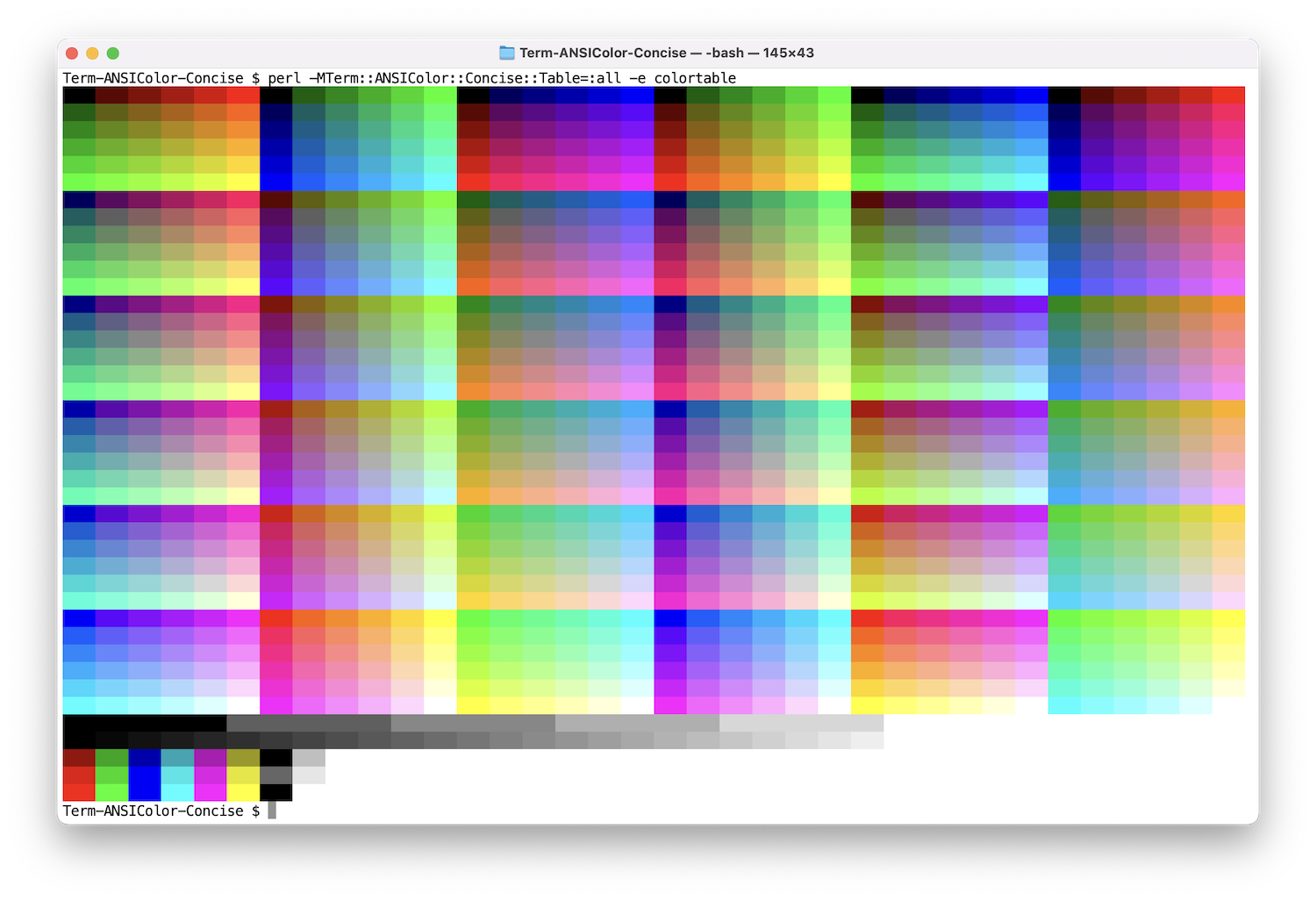
LABEL COLOR FOR A BACKGROUND
The modifier +r90%y50 makes the color of a label from the color of its background, as in a table of color samples:
<color>+r90%y50/<color>%y50 adds 50 to the luminance modulo 100, which puts the text in the other half of the luminance range. +r90 rotates the hue, and keeps the luminance that %y50 starts from. The background is the subject and the label only describes it, so the label should be readable without standing out, in an even tone over all backgrounds. The aim is not the highest contrast.
The tables below show the measurements behind this choice, for 960 background colors: hue 0 to 330 by 30, saturation 20, 50, 80 and 100, and lightness 0 to 95 by 5, in 24bit mode. Contrast is the WCAG contrast ratio between text and background, with the number of backgrounds below 4.5. Vivid is the median CIELAB chroma of the text on backgrounds of saturation 100 and lightness 30 to 70.
The rotation angle has almost no effect on the contrast, so it can be chosen by appearance. Vividness is at its lowest at 60 and 90 degrees, and at its highest at 180 degrees, where saturated text on a saturated background is hard on the eyes. With 90 degrees, text on a blue background has a red tint.
Modifier       Contrast     Median  <4.5  Vivid
%y50           4.38 - 5.89    5.24    14   28.0
+r30%y50       4.39 - 5.92    5.24    14   27.5
+r60%y50       4.39 - 5.89    5.24    14   24.5
+r90%y50       4.39 - 5.92    5.25    14   24.5
+r120%y50      4.38 - 5.91    5.25    15   26.0
+r150%y50      4.39 - 5.90    5.24    15   34.4
+r180%y50      4.38 - 5.89    5.25    15   48.0
+r210%y50      4.38 - 5.92    5.24    14   42.4
+r240%y50      4.38 - 5.90    5.24    13   42.1
+r270%y50      4.39 - 5.92    5.24    14   38.3
+r300%y50      4.38 - 5.91    5.25    15   34.4
+r330%y50      4.39 - 5.90    5.24    14   31.7
The other candidates do not keep the contrast as even. Hue rotation in HSL (+c) changes the luminance, and some text becomes unreadable. Lower saturation (*s50) changes the luminance after %y50 has set it. Gray text has no color at all. Black or white text, whichever is higher, gives the most contrast but the widest range.
Modifier        Contrast      Median  <4.5  Vivid
+c%y50          1.01 - 18.92    4.69   429   28.8
%y50*s50        3.67 -  7.71    5.35    47   17.3
+g%y50          4.21 -  5.89    5.16    49    0.0
black or white  4.59 - 21.00   12.05     0      -
For text to be read for its own sake, this is not enough: it does not fully meet the WCAG recommendations for normal text. +r90%y50 is below 4.5 (level AA) on 14 of the 960 backgrounds, by at most 0.11, all of them at luminance 48 to 50, where white text reaches only 4.5 to 4.8. It reaches 7 (level AAA) on none, while black or white reaches it on 762; on the other 198 no color can. Other offsets are worse: %y48 is below 4.5 on 138 backgrounds and %y52 on 65. Use black or white text where the recommendations have to be met, though the text then stands out against the background.
Contrast ratio and chroma are only guides to how the colors look. To compare them on your terminal, use t/cmap in the distribution:
t/cmap -m '%y50' -m '+r90%y50' -m '+r180%y50' -Z 100SEE ALSO
Getopt::EX::Colormap
This module was originally implemented in the Getopt::EX::Colormap module. It provides an easy way to maintain labeled and indexed lists for color handling in command line options.
You can handle user options like this:
use Getopt::Long;
my @opt_colormap;
GetOptions('colormap|cm:s' => @opt_colormap);

require Getopt::EX::Colormap;
my %label = ( FILE => 'DR', LINE => 'Y', TEXT => '' );
my @index = qw( /544 /545 /445 /455 /545 /554 );
my $cm = Getopt::EX::Colormap
    ->new(HASH => \%label, LIST => \@index)
    ->load_params(@opt_colormap);
And then program can use it in two ways:
print $cm->color('FILE', $filename);

print $cm->index_color($index, $pattern);
This interface provides a simple uniform way to handle coloring options for various tools.
App::ansiecho
To use this module's functions directly from the command line, App::ansiecho is a good choice. You can apply colors and effects to echoed arguments.
App::Greple
This code and Getopt::EX were originally implemented as part of the App::Greple command. It is still an intensive user of this module's capabilities and would be a good use case.
Graphics::ColorObject
For detailed information about color spaces other than RGB (such as HSL, LCH, Lab, YIQ, etc.), refer to Graphics::ColorObject which provides comprehensive color space conversion capabilities used by this module.
OTHERS
https://en.wikipedia.org/wiki/ANSI_escape_code
https://en.wikipedia.org/wiki/X11_color_names
https://www.ecma-international.org/wp-content/uploads/ECMA-48_5th_edition_june_1991.pdf
https://vt100.net/docs/vt100-ug/
AUTHOR
Kazumasa Utashiro
COPYRIGHT
The following copyright notice applies to all the files provided in this distribution, including binary files, unless explicitly noted otherwise.
Copyright ©︎ 2015-2026 Kazumasa Utashiro
LICENSE
This library is free software; you can redistribute it and/or modify it under the same terms as Perl itself.