NAME
Term::Fabulous::Widget::Menu - A list of commands, as a context menu, in a menu bar or on its own
SYNOPSIS
use Term::Fabulous::Widget::Menu;
use Term::Fabulous::Termbox qw(TB_KEY_MOUSE_RIGHT TB_MOD_MOTION);

# A context menu, opened at the pointer with a right click:
my $menu = Term::Fabulous::Widget::Menu->new(
	items => [
		{ label => 'Open',   run => sub { open_row() } },
		{ label => 'Rename', run => sub { rename_row() } },
		'-',
		{ label => 'Delete', run => sub { delete_row() }, enabled => sub { $row_is_selected } },
	],
);
$list->on( Mouse => sub ($event) {
	return Clay::UI::Enum::Result->CONTINUE unless $event->key == TB_KEY_MOUSE_RIGHT && !( $event->modifiers & TB_MOD_MOTION );
	$menu->open( $ui, x => $event->x, y => $event->y );
	return;
} );

# The same menu from the keyboard, below the widget with the focus:
$menu->open( $ui, below => $ui->interaction->get_focused_widget // $ui->root );

# Items from a command table, by id:
my $edit_menu = Term::Fabulous::Widget::Menu->new( commands => $commands, items => [qw(cut copy paste - select_all)] );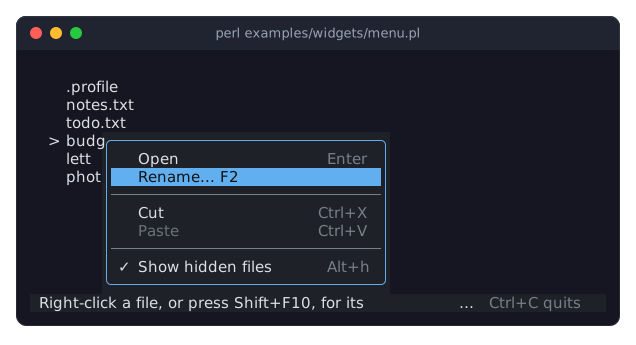
The program is examples/widgets/menu.pl. Paste is dimmed because nothing was cut yet, and Show hidden files has a check mark because the hidden file .profile is shown. The keys on the right work without the menu, because the menu and the keys run the same commands.
DESCRIPTION
A menu is a framed list of commands, one per row, with the keys that run them on the right. The user highlights an item with the arrow keys, its first letter or the mouse, and chooses it with Enter or a click. Choosing an item fires Choose and runs the item's command.
A menu has three uses:
-
"open" shows the menu over everything else, at a point (usually where the user clicked) or below a widget, and gives it the focus. It closes when the user chooses an item, presses
Escapeor clicks anywhere else, and the focus goes back where it was. See "POPUP MENUS". -
A Term::Fabulous::Widget::MenuBar makes one menu per title and shows it below its title. You build those menus from the bar's
menusparameter and do not handle them yourself. - On its own
-
Added to a box like any other widget, a menu stays on the screen: a list of actions in a side panel, for example. It takes the focus with Tab, and choosing an item runs it, as in a popup.
Items
An item is one of:
the id of a command in the "commands" table, such as
'save'.a hash reference of the parameters of "new" in Term::Fabulous::Command, for an item that is only in this menu. Its
idmay be left out, and is then its label. The keys of such an item are only shown. To make them work, put the command in a Term::Fabulous::Commands table that listens for its keys, or handle the keys yourself.'-', a separator: a line between groups of items.
An item whose command is disabled is drawn dimmed and cannot be highlighted or chosen. An item whose command is a toggle shows a check mark (✓) in front of its label while it is on. A menu with toggles leaves room for the mark in front of every label, so the labels line up. The menu asks the commands every time it is drawn, so it always shows the program's state.
Keys
Up,Down-
Highlight the item above or below, skipping separators and disabled items, and going round at the ends.
Home,PageUp,End,PageDown-
Highlight the first or the last item.
- a printable character
-
Highlights the next enabled item whose label starts with it, ignoring case. The item does not run until
Enteror a click chooses it. Enter,Space-
Choose the highlighted item.
A popup menu also takes Tab and Shift+Tab, which work like Down and Up, and Escape, which closes it. It keeps every other key for itself while it is open, as a dialog does, so the shortcuts of the program wait until the menu is closed. Ctrl+C still ends the program (unless the UI was made with stop_on_ctrl_c => 0).
The mouse
Moving the pointer over an item highlights it. Pressing a button on an item highlights it, and releasing the button over an item chooses it, so a click chooses, and so does pressing on a menu bar title, dragging down and letting go over an item. A release only chooses after a press or a move inside the menu since it opened: the release of the right click that opened a context menu does not choose the item that happens to be under the pointer.
POPUP MENUS
"open" adds the menu to the root of the UI as a floating widget, over everything else (dialogs included), and focuses it. At a point, the menu's top left corner is at that point. Below a widget, the menu starts at the widget's left edge, just below it, or just above it when it does not fit below and there is more room above. Either way, the menu moves left and up as far as it must to stay on the screen (one rule for every popup, Term::Fabulous::Placement). It finds its place again in every frame, so a menu that is open while the terminal shrinks stays on the screen. A menu does not scroll: one that is taller than the screen starts at the top row, and its last items are cut off. Keep menus shorter than the smallest screen the program expects, or split them.
The menu closes when:
the user chooses an item. The menu closes first, the focus goes back, and then
Choosefires and the command runs. A command that opens a dialog therefore works as it does from a key.the user presses
Escape, or the program calls "close". The focus goes back to the widget that had it when the menu opened.the focus goes elsewhere, for example because the user clicked outside the menu. The click reaches what is under the pointer, and the focus stays where the click put it.
Every time a popup closes, it fires Close (Term::Fabulous::Event::Close) on itself. A closed menu can be opened again, as often as needed.
CONSTRUCTOR
new
my $menu = Term::Fabulous::Widget::Menu->new(%parameters);Accepts the parameters of "new" in Term::Fabulous::Widget::Input (id, layout, disabled, text_color, ...) and the ones below. All are optional, and unknown parameters die.
items-
An array reference of items, as described under "Items". Default:
[]. commands-
A Term::Fabulous::Commands table, which items given as ids are looked up in. Default:
undef. An id that the table does not have dies, and so does an id without a table. keys_color-
The color of the keys on the right, in any format "Colors" in Term::Fabulous::Widget::Canvas accepts. Default: the theme's
menu.keys, the placeholder gray in the built-in themes. separator_color-
The color of the separator lines. Default: the theme's
menu.separator, the same gray. highlight_text_color,highlight_background_color-
The colors of the highlighted item. Default: the theme's
menu.highlight.textandmenu.highlight.background, dark text on the accent blue in the built-in dark theme.
The text of the items is text_color, and disabled_color for a disabled item (the theme's menu.text and its disabled state). The background and the frame come from the theme's menu family: a menu has a border unless the theme's menu.border.enabled is false or the program passes bordered => 0.
METHODS
A menu has the methods of Term::Fabulous::Widget::Input plus these.
open
$menu->open( $ui, x => 10, y => 4 );
$menu->open( $ui, below => $button );
Opens the menu as a popup, as described under "POPUP MENUS": at the cell x, y of the screen (both non-negative integers), or below a widget, a text included. The widget must have been drawn in the last frame, so that its place is known. The first enabled item is highlighted. Opening an open menu does nothing. Dies when $ui is not a Term::Fabulous, when the place is not x and y or below alone, for a widget the last frame did not draw, for a disabled menu, and when the menu is a child of another widget. Returns the menu.
close
$menu->close;Closes a popup menu: takes it off the screen, gives the focus back to the widget that had it when the menu opened (if the menu still had the focus and that widget can still take it; see "focus_heir") and fires Close. Closing a menu that is not open as a popup does nothing. Returns the menu.
focus_heir
The widget that had the focus when the popup opened (held weakly), or undef while the menu is not open as a popup. When the popup leaves the tree with the focus, the focus goes there if that widget can still take it (see "Focus heirs" in Clay::UI::Interaction). You do not call it yourself.
is_open
1 while the menu is open as a popup, 0 otherwise.
items
my @items = $menu->items;
$menu->items( [ 'copy', 'paste' ] );
The items: the Term::Fabulous::Command objects, and '-' for each separator. Writing them replaces every item, highlights the first enabled one and returns the new items.
highlighted, highlight
my $index = $menu->highlighted;
$menu->highlight(2);
The index of the highlighted item (from 0, separators counted), or undef. highlight highlights another one. It does nothing for a separator or a disabled item, and dies for an index past the last item. highlight(undef) highlights none. Returns the menu.
choose
$menu->choose(2);Chooses an item as the user does: closes a popup, fires Choose and runs the command. Does nothing for a separator or a disabled item. Dies for an index past the last item. Returns the menu.
show_below
$menu->show_below( $bar, 6 );Floats the menu below a widget, a number of columns from the widget's left edge (default 0), kept on the screen like a popup, without opening it. The menu does not take the focus, does not close by itself and fires no Close: the widget it is shown below hands it the keys with "handle_key" and takes it out of the tree again. When an item is chosen, that widget hears of it, after Choose and before the item's command runs, through its menu_chosen method (called with the menu) if it has one. Term::Fabulous::Widget::MenuBar shows its menus this way. Programs use "open". Returns the menu.
handle_key
return 1 if $menu->handle_key($event);Handles a Term::Fabulous::Event::KeyPress as described under "Keys", and returns 1 when the menu used the key and 0 when not. A menu calls it for the keys it receives while it has the focus. An owner that keeps the focus itself, like a menu bar, passes its keys on with it.
popup_position
my $position = $menu->popup_position; # { x => 3, y => 2 }Where an open menu floats in this frame, on the screen (see "POPUP MENUS" and "show_below"); undef for a menu that is neither open nor shown below a widget. The menu composes Term::Fabulous::Role::Popup, which calls it.
outer_size
my ( $columns, $rows ) = $menu->outer_size;The size of the menu on the screen: its items and its border.
keys_color, separator_color, highlight_text_color, highlight_background_color
Accessors for the themed colors, through "look_value" in Term::Fabulous::Role::Themed and "set_look" in Term::Fabulous::Role::Themed.
EVENTS
Choose(Term::Fabulous::Event::Choose)-
An item was chosen. Fired on the menu, after a popup closed and before the item's command runs. It bubbles up from a menu in a menu bar or on its own, and not from a popup, which has left the tree.
Close(Term::Fabulous::Event::Close)-
A popup menu closed. Fired on the menu after it left the screen.
KDL PROPERTIES
A menu is built in Perl only: its items run code, which a layout file cannot express.
SEE ALSO
Term::Fabulous::Command, Term::Fabulous::Commands, Term::Fabulous::Widget::MenuBar, Term::Fabulous::Event::Choose, Term::Fabulous::Manual::Menus, "Open a menu with a right click or the Menu key (Menu)" in Term::Fabulous::Cookbook::Menus.