NAME
Term::Fabulous::Widget::RichText - Text with styled spans and links: bold words, colored phrases, highlighted ranges, links to follow
SYNOPSIS
use Term::Fabulous::Widget::RichText;

# Markup in the syntax of Python's rich library:
my $hint = Term::Fabulous::Widget::RichText->new(
	markup => 'Press [bold]Enter[/] to save, [bold red]Esc[/] to leave. [dim]Unsaved changes are lost.[/]',
);

# Or text and spans:
my $line = Term::Fabulous::Widget::RichText->new(
	text  => 'error: file not found',
	spans => [ [ 0, 6, 'bold red' ] ],
);
$line->stylize( 'underline', 7, 11 );    # "file"
$line->stylize('on #3a3f4b');            # the whole text

# Links, followed with a click or with Tab, Left/Right and Enter:
my $help = Term::Fabulous::Widget::RichText->new(
	markup => 'See [link=https://perl.org]perl.org[/link] or the [link=faq]FAQ[/link].',
);
$help->on( LinkActivate => sub ($event) {
	open_page( $event->link );    # 'https://perl.org' or 'faq'
	return;
} );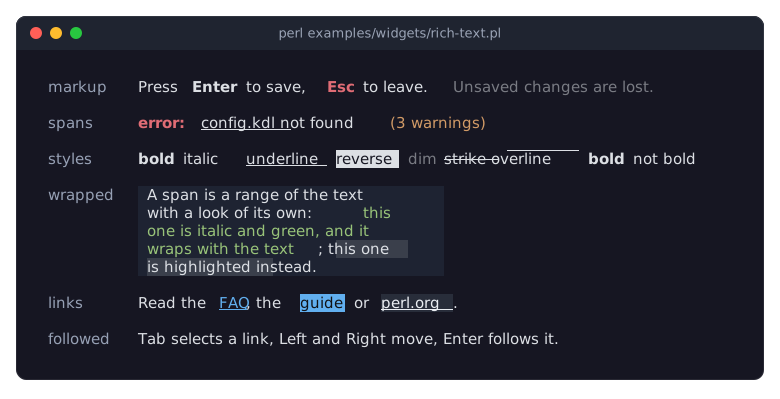
The program is examples/widgets/rich-text.pl. The last two rows show links in their three looks: FAQ as every link looks, guide selected with Tab and Right, and perl.org under the mouse pointer.
DESCRIPTION
A RichText is a Term::Fabulous::Widget::Text whose characters can differ in look: a span covers a range of the text and sets or clears style bits (bold, italic, underline, reverse, dim, blink, strike, overline, conceal), a text color and a background for the characters it covers. Clay lays the text out exactly like a Text, wrapping and aligning it; the renderer then paints each wrapped line with the spans applied. Everything a Text does, a RichText does too: text_color, bold, italic and underline are the base look of the whole text, and a span changes it where the span lies.
Spans are given as [ $start, $end, $style ]: the character offsets of the first character and of the one after the last, and a style string or hash of Term::Fabulous::Text::Style ('bold red on #202020'). They may overlap: later spans win where they do. A span boundary inside a grapheme cluster (a letter with a combining accent, an emoji with a modifier) snaps to the cluster.
Markup writes the same thing inline: [bold]Enter[/]; see Term::Fabulous::Text::Markup for the syntax.
A RichText can also have links: ranges of its text that point to a target and that the user can follow with the mouse or the keyboard (see "LINKS"). Like every Text, a RichText fires TextClick when a mouse button is pressed on one of its characters (see "click_at" in Term::Fabulous::Widget::Text).
The painter of a RichText needs Clay::XS 0.05 or later, which tells it where every wrapped line starts in the text.
CONSTRUCTOR
new
my $text = Term::Fabulous::Widget::RichText->new(%parameters);All parameters of "new" in Term::Fabulous::Widget::Text, plus:
spans-
An array reference of spans
[ $start, $end, $style ]. Default:[]. Offsets are non-negative integers with$start <= $end <= length $text;$styleis a style string or hash. Anything else dies. links-
An array reference of links
[ $start, $end, $target ]. Default:[]. Offsets are non-negative integers with$start < $end <= length $text;$targetis any defined value, kept as it is. Links must not overlap. Anything else dies. markup-
A string in the markup syntax of Term::Fabulous::Text::Markup, which gives the text, the spans and the links; it cannot be given together with
text,spansorlinks. Invalid markup dies. can_focus-
A boolean, default 1: whether the widget takes the keyboard focus while it has links (see "Keyboard"). Pass 0 when a widget around it selects its links instead (see "Links in a bigger widget"). Its accessor is that of "can_focus" in Clay::UI::Role::Interaction::Focusable.
METHODS
The methods of Term::Fabulous::Widget::Text, plus:
text
$text->text('Plain again');As for a Text, and setting it drops every span, every link and the markup, because they pointed into the old text. A RichText that has the focus loses it, since it has no links left.
markup
my $markup = $text->markup;    # undef when the text was not given as markup
$text->markup('[bold]New[/] text');
Accessor. Without an argument it returns the markup the text, spans and links were last set from, or undef when they were given or changed directly. With an argument it replaces the text, the spans and the links with what the markup says, and returns the markup. No link is selected or hovered afterwards. A RichText that has the focus keeps it when the new markup has links, and loses it when it has none. Invalid markup dies and leaves the widget as it was. The change shows in the next frame.
spans
my $spans = $text->spans; # [ [ 0, 6, { set => ..., clear => ..., color => ..., background => ... } ], ... ]The spans, in the order they apply, each with its normalized style hash (see "Style hashes" in Term::Fabulous::Text::Style). The result is a copy.
stylize
$text->stylize( 'bold red', 0, 6 );
$text->stylize('on #3a3f4b');    # the whole text
Adds a span after the existing ones, so it wins where they overlap. $start defaults to 0, $end to the length of the text. Returns the widget, so calls chain. Invalid offsets or styles die. The change shows in the next frame.
clear_spans
$text->clear_spans;Drops every span, keeping the text and the links. Returns the widget.
links
my $links = $text->links; # [ [ 4, 12, 'https://perl.org' ], ... ]The links [ $start, $end, $target ], ordered by their start. An index into this list is how the other link methods and the events name a link. The result is a copy; the targets are the values given.
add_link
$text->add_link( 'https://perl.org', 4, 12 );
$text->add_link($page);    # the whole text
Adds a link to $target, any defined value. $start defaults to 0, $end to the length of the text. The link takes its place by its start, so the indices of the links after it grow by one; the selected and the hovered link stay the same links. An empty link, one that overlaps another, invalid offsets and an undefined target die. Returns the widget. The change shows in the next frame.
clear_links
$text->clear_links;Drops every link, and with them the selected and the hovered link. Returns the widget. A RichText that has the focus loses it.
link_at
my $index = $text->link_at($offset); # or undefThe index of the link the character at $offset lies in, or undef.
selected_link
my $index = $text->selected_link; # or undefThe index of the selected link, the one Enter follows, or undef.
select_link
$text->select_link(2);
$text->select_link(undef);    # none
Selects the link with that index, or none. An index that is not a link dies. Returns the widget. The change shows in the next frame.
select_next_link, select_previous_link
$text->select_next_link or say 'that was the last link';Selects the link after (before) the selected one; without a selected link, the first (last) link. Returns 1 when the selection moved, 0 at the end of the links or without links.
activate_link
$text->activate_link;       # the selected link
$text->activate_link(1);    # the second link
Fires LinkActivate on the widget for the link with the given index, or for the selected one. Returns 1, or 0 when no index was given and no link is selected. An index that is not a link dies.
hovered_link
my $index = $text->hovered_link; # or undefThe index of the link under the mouse pointer, or undef.
hover_link
$text->hover_link(0);Called by Term::Fabulous when the pointer moves onto a link (undef when it leaves it). Gives the link its hovered look. Returns the widget.
accepts_focus
my $takes_focus = $text->accepts_focus;1 while the widget has links, 0 otherwise (see Clay::UI::Role::Interaction::Focusable). Whether it can take the focus now is can_focus, which also asks the can_focus parameter.
click_at
$text->click_at( $offset, TB_KEY_MOUSE_LEFT, $x, $y );As for a Text ("click_at" in Term::Fabulous::Widget::Text): fires TextClick, which here also carries the spans and the link at the offset. For the left button on a link it then selects the link and fires LinkActivate. Returns the widget.
line_styles
my $runs = $text->line_styles( $offset, $length );Used by the renderer (Term::Fabulous::Render::Text) for each wrapped line: the characters [ $offset, $offset + $length ) of the text cut into runs of one look, as [ $characters, $set, $clear, $fg_attr, $bg_attr ]: the number of characters, the termbox2 style bits the run's spans and link set and clear, and the text and background attributes they give it, undef where the base look stays. The runs are computed once per change of the text, the spans, the links, the selected or hovered link, or the theme.
LINKS
A link is a range of the text with a target: a string from markup ([link=TARGET]...[/link]), or any defined value given to "links" or "add_link", such as an object of your program. The widget does not go anywhere itself; it tells the program which link the user followed with a LinkActivate event, which bubbles from the RichText to its ancestors.
Looks
A link has one of three looks: normal, hovered while the mouse pointer is over it, and selected while it is the link Enter follows (a selected link under the pointer looks selected). The picture under "SYNOPSIS" shows all three. The theme gives the colors, from the slots link (the color of the words) and link.background of the text family (see "Families, slots and states" in Term::Fabulous::Theme); the default themes use these tokens:
normal: underlined, in
accent, on the background below the text;hovered: underlined, intext_brightonhover_background;selected:text_inverseonaccent, not underlined.
A link sets only the color of its words, their underline and, where the theme gives the link a background, their background, over whatever the spans give them; the other styles of the spans stay. So [bold][link=x]word[/link][/] is a bold link, and a red span over a link is drawn in the link color.
A theme of your own changes the looks for every RichText. This one draws links in the success green, and the selected link as dark text on that green, as in the picture of "Follow links in a text (RichText links)" in Term::Fabulous::Cookbook::KeyboardAndMouse:
my $theme = Term::Fabulous::Theme->new(
	name    => 'green-links',
	extends => 'dark',
	slots   => {
		'text.link'                     => 'success',
		'text.link.selected'            => 'text_inverse',
		'text.link.background.selected' => 'success',
	},
);
my $ui = Term::Fabulous->new( root => $root, theme => $theme );
A slot name without a state (text.link) sets the normal look; the hovered and the selected look keep their own defaults until you set them too. Set text.link.background to a token or color to give every link a background. The underline is not a theme setting.
Mouse
A left click on a link focuses the RichText (when it can take the focus), selects the link and fires LinkActivate, after the TextClick of the same press (see Term::Fabulous::Event::TextClick). The middle and the right button fire only TextClick. The pointer over a link gives it the hovered look. Term::Fabulous asks the terminal to report the pointer as it moves; on a terminal that does not report plain movement, links never look hovered.
Keyboard
A RichText with links is a Tab stop, unless it was created with can_focus => 0. When it gets the focus and no link is selected, the first link is selected. While it has the focus, Right selects the next link, Left the previous one, and Enter fires LinkActivate for the selected link; a key that moves nothing (Right on the last link, Enter without a selected link) goes on to the ancestors, and every other key does too. When it loses the focus, the selection is dropped. When its markup is replaced while it has the focus, it keeps the focus but selects no link until the user presses Right (the first link) or Left (the last).
Links in a bigger widget
A widget that shows many RichTexts (a document view, a help browser) may rather keep the focus itself and move one selection across all of them: create the RichTexts with can_focus => 0, show the selection with "select_link" on the RichText that has it (and undef on the others), and follow the selected link from the widget's own key handling with "activate_link", which fires LinkActivate on that RichText:
# $block is the RichText with the selected link, $index the link's index.
$block->select_link($index);
...
$block->activate_link;    # on Enter: LinkActivate bubbles up from $block
Clicks still select the clicked link and fire LinkActivate from the RichText, so the widget can listen for it to move its selection along.
KDL PROPERTIES
The properties of "KDL PROPERTIES" in Term::Fabulous::Widget::Text, plus markup:
RichText "hint" {
	markup "Press [bold]Enter[/] to save"
}
markup and text replace each other: whichever comes last wins. Spans and links cannot be given in KDL other than through markup.
SEE ALSO
Term::Fabulous::Widget::Text, Term::Fabulous::Text::Style, Term::Fabulous::Text::Markup, Term::Fabulous::Event::LinkActivate, Term::Fabulous::Event::TextClick, "TEXT" in Term::Fabulous::Manual::Looks, "Follow links in a text (RichText links)" in Term::Fabulous::Cookbook::KeyboardAndMouse, "React to a click on a word (TextClick)" in Term::Fabulous::Cookbook::KeyboardAndMouse.