NAME
Term::Fabulous::Widget::Text - A piece of text inside a box: plain, with styled spans, highlights and links
SYNOPSIS
use utf8;    # this source file contains non-ASCII text
use Term::Fabulous::Widget::Text;

my $title = Term::Fabulous::Widget::Text->new(
	text       => 'Settings',
	text_color => [ 255, 255, 255, 255 ],
);

# Text is a character string, like everywhere in Term::Fabulous:
my $greeting = Term::Fabulous::Widget::Text->new(
	id         => 'greeting',
	text       => 'Grüße',
	text_color => [ 230, 230, 230, 255 ],
);

# Later, change what it shows:
$greeting->text('Hello again');

# Markup in the syntax of Python's rich library:
my $hint = Term::Fabulous::Widget::Text->new(
	markup => 'Press [bold]Enter[/] to save, [bold red]Esc[/] to leave. [dim]Unsaved changes are lost.[/]',
);

# Or text and spans:
my $line = Term::Fabulous::Widget::Text->new(
	text  => 'error: file not found',
	spans => [ [ 0, 6, 'bold red' ] ],
);
$line->stylize( 'underline', 7, 11 );    # "file"
$line->stylize('on #3a3f4b');            # the whole text

# Links, followed with a click or with Tab, Left/Right and Enter:
my $help = Term::Fabulous::Widget::Text->new(
	markup => 'See [link=https://perl.org]perl.org[/link] or the [link=faq]FAQ[/link].',
);
$help->on( LinkActivate => sub ($event) {
	open_page( $event->link );    # 'https://perl.org' or 'faq'
	return;
} );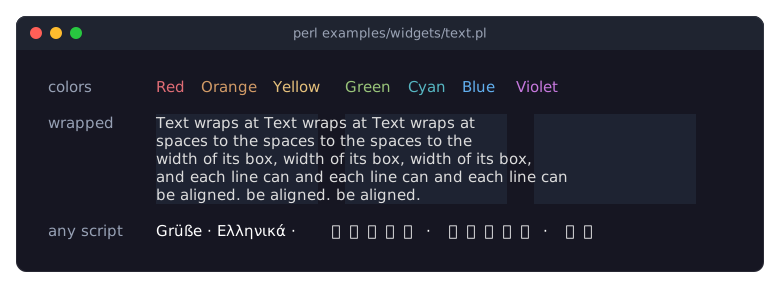
The program is examples/widgets/text.pl.
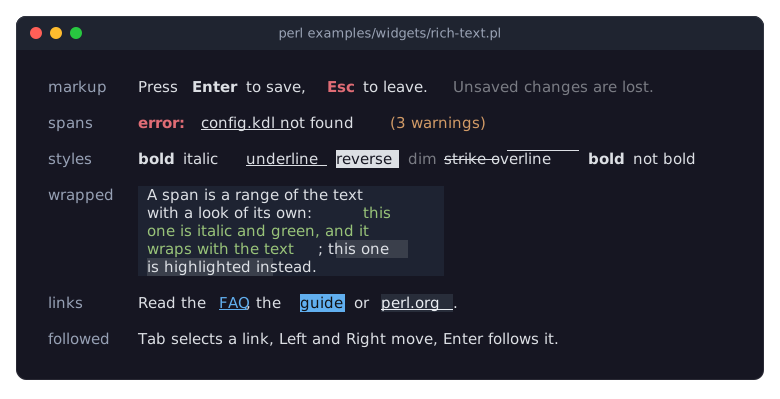
The program is examples/widgets/rich-text.pl. The links row shows links in their three looks: FAQ as every link looks, guide selected with Tab and Right, and perl.org under the mouse pointer.
DESCRIPTION
A Text widget shows text inside its parent widget, usually a Term::Fabulous::Widget::Box. The layout makes it as wide as its longest line and, in the default wrap mode, wraps it at spaces when the parent is too narrow and starts a new line at every "\n" (see wrap_mode under "new" for the others). Text has a color but no background of its own: every cell shows the background that was painted below it.
A Text widget is a leaf: it cannot have children, and it has no border, padding or background. To give text a background, a border or a fixed size, put it in a Box. Mouse events (Mouse, MouseMove) go to the box behind a text. A mouse button pressed on a character of the text also fires TextClick on the Text, with the character and the word under the pointer, so that the widgets around it can react to the words that were clicked (see "click_at").
The characters of a text can differ in look: a span covers a range of the text and sets or clears style bits (bold, italic, underline, reverse, dim, blink, strike, overline, conceal), a text color and a background for the characters it covers. Clay lays the text out the same way with or without spans; the renderer then paints each wrapped line with the spans applied. text_color, bold, italic and underline are the base look of the whole text, and a span changes it where the span lies.
Spans are given as [ $start, $end, $style ]: the character offsets of the first character and of the one after the last, and a style string or hash of Term::Fabulous::Text::Style ('bold red on #202020'). They may overlap: later spans win where they do. A span boundary inside a grapheme cluster (a letter with a combining accent, an emoji with a modifier) snaps to the cluster. A color in a style may be a palette token of the theme ('bold accent'): the text looks it up in its theme when it paints, so a theme switch recolors it. See "Styled spans inside one text" in Term::Fabulous::Manual::Looks.
Markup writes the same thing inline: [bold]Enter[/]; see Term::Fabulous::Text::Markup for the syntax.
Highlights are a second set of ranges, painted over the spans and kept apart from them: what a search marks in a text, without touching the styles the program gave it (see "highlights" and Term::Fabulous::Role::Searchable).
A text can also have links: ranges of its text that point to a target and that the user can follow with the mouse or the keyboard (see "LINKS"). A text with links is a Tab stop; one without never has the keyboard focus.
examples/text-features.pl shows the wrap modes, line height, bold, italic and underlined text, wide characters and control characters:
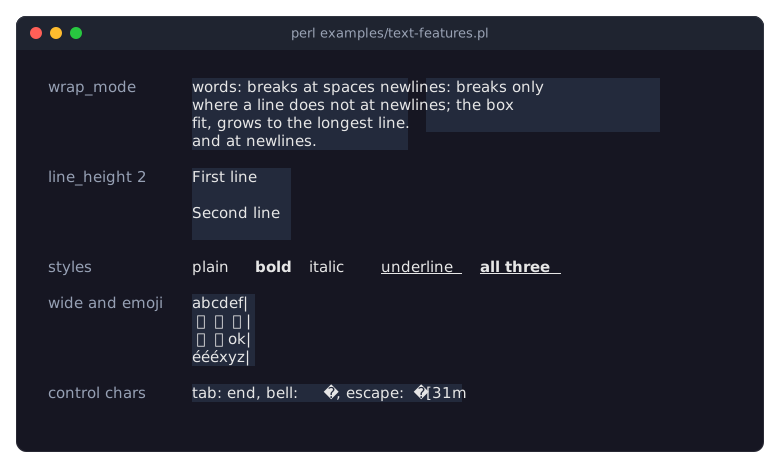
The text section of the looks guide explains all of this with examples. The class is built on Clay::UI::Text. The painter of spans, highlights and links needs Clay::XS 0.05 or later, which tells it where every wrapped line starts in the text.
CONSTRUCTOR
new
my $text = Term::Fabulous::Widget::Text->new(%parameters);All parameters are optional; unknown parameters die. Every parameter also has a method of the same name: id and links only read (change the links with "add_link" and "clear_links"), all others are accessors.
text-
A character string, like all text in Term::Fabulous. Default:
''.Bytes read from a file, a command or a socket must be decoded first with
Encode::decode('UTF-8', $bytes); otherwise each byte is shown as one Latin-1 character. Text read from a KDL layout is used as is. See "Text is character strings" in Term::Fabulous::Manual::Looks.Control characters are never sent to the terminal: a TAB is shown as one space and every other control character, a carriage return included, as U+FFFD (see "Control characters" in Term::Fabulous::Manual::Looks). Wide characters (most CJK characters and emoji) take two cells (see "Wide characters and emoji" in Term::Fabulous::Manual::Looks).
undefand references die. text_color-
The color of the characters, in any format Term::Fabulous::Color accepts:
[r, g, b, a](or[r, g, b]),{ r, g, b, a }, a string such as'#ffffff'or'rgb(255, 255, 255)', a packed0xRRGGBBinteger, or a Term::Fabulous::Color object such as an item of Term::Fabulous::Enum::WebColor; it is stored as[r, g, b, a]. An alpha from 1 to 254 is drawn opaque. Default: the theme'stext.color([220, 223, 228, 255]in the dark theme), or, inside a widget that colors its texts (a Term::Fabulous::Widget::Button), that widget's text look. Pass[0, 0, 0, 0](alpha 0) for the terminal's default foreground color. See "COLORS" in Term::Fabulous::Manual::Looks and "THEMES" in Term::Fabulous::Manual::Looks.Inside a disabled Term::Fabulous::Widget::Button, the text is drawn in the button's
disabled_colorinstead, whatever itstext_color. classes-
An array reference of strings. Default:
[]. Names that select the theme's variants of thetextfamily, as for "classes" in Term::Fabulous::Widget. bolditalicunderline-
Booleans, default 0: draw the characters bold, italic or underlined. Any true or false value; references die. Terminals show these styles with the font they have, so a font without an italic face may show italic text upright. They take no space and do not change the layout. They apply to the whole text; a span styles a range of it. See "Bold, italic and underline" in Term::Fabulous::Manual::Looks.
spans-
An array reference of spans
[ $start, $end, $style ]. Default:[]. Offsets are non-negative integers with$start <= $end <= length $text;$styleis a style string or hash. Anything else dies. links-
An array reference of links
[ $start, $end, $target ]. Default:[]. Offsets are non-negative integers with$start < $end <= length $text;$targetis any defined value, kept as it is. Links must not overlap. Anything else dies. markup-
A string in the markup syntax of Term::Fabulous::Text::Markup, which gives the text, the spans and the links; it cannot be given together with
text,spansorlinks. Invalid markup dies. Put text from outside (a file name, user input) into markup with "escape_markup" in Term::Fabulous::Text::Markup. can_focus-
A boolean, default 1: whether the widget takes the keyboard focus while it has links (see "Keyboard"). Pass 0 for a text whose links a widget around it selects. Its accessor is that of "can_focus" in Clay::UI::Role::Interaction::Focusable.
id-
A string naming the widget, for your own use (for example to find a Text in a tree built from a layout). Default: none. Unlike a Box's id, it is not passed to Clay and does not need to be unique, and "remove_child_with_id" in Term::Fabulous::Widget does not remove Text widgets by id ("remove_child" in Term::Fabulous::Widget removes the widget itself). Read it with
$text->id; there is no writer.find_by_idfinds Text widgets by this id. wrap_mode-
How lines are broken, one of the Clay::XS constants:
CLAY_TEXT_WRAP_WORDS(the default: break at"\n"and, where the text does not fit, at spaces),CLAY_TEXT_WRAP_NEWLINES(break only at"\n") andCLAY_TEXT_WRAP_NONE(never: the whole text is one line, and a"\n"in it is shown as a control character, see "Control characters" in Term::Fabulous::Manual::Looks). A line that is not broken keeps its width as long as the widgets beside it can still get narrower; after that it is cut off at the right edge of its parent (inside a box that scrolls sideways it keeps its width).No mode breaks a word: a single word that is wider than the space available, or text without spaces such as a Japanese sentence, is never broken. With
CLAY_TEXT_WRAP_WORDSit runs past the right edge of its parent and is cut off only at the edge of the terminal or of an enclosing Term::Fabulous::Widget::ScrollBox; with the other modes it is cut off like any line. See "Wrapping" in Term::Fabulous::Manual::Looks. text_alignment-
CLAY_TEXT_ALIGN_LEFT(the default),CLAY_TEXT_ALIGN_CENTERorCLAY_TEXT_ALIGN_RIGHT. Aligns the lines of a multi-line text against each other, within the width of its longest line. It has no visible effect on a single line: to center a Text in its box, setchild_alignmentin the box'slayout(see "new" in Term::Fabulous::Widget). line_height-
The number of rows each line takes, an integer from 0 to 65535; other values (such as
1.5) die. Default: 0, which means one row, like 1. A line is drawn in the middle row of its rows (the upper middle row when the number is even), so with2an empty row follows every line. See "Line height" in Term::Fabulous::Manual::Looks. font_idfont_sizeletter_spacing-
Accepted because Clay::UI supports them, but without effect in a terminal: every character is drawn in the terminal's font, one character per cell. Each is an integer from 0 to 65535; other values die. Defaults:
font_id0,font_size16,letter_spacing0.
METHODS
Besides the accessors below, a Text widget has the methods parent, root, ui and on that every widget has (see Term::Fabulous::Widget).
text
my $text = $label->text;
$label->text($new_text);
Accessor. Without an argument it returns the current value; with an argument it sets it and returns the new value. An invalid value dies like the constructor parameter. The change shows in the next frame. The text is a character string; the layout adapts to the new length. Setting the text drops every span, every highlight, every link and the markup, because they pointed into the old text. A text that has the focus loses it, since it has no links left.
text_color
my $rgba = $label->text_color;
$label->text_color( [ 255, 80, 80, 255 ] );
$label->text_color('#ff5050');
Accessor. Without an argument it returns the color in use, the given one or the theme's, as [r, g, b, a]; with an argument it sets it, in any format the constructor parameter accepts, and returns the stored [r, g, b, a]. An invalid value dies like the constructor parameter, and so does undef: $label->reset_look('text_color') returns the text to the theme. The change shows in the next frame.
classes
$label->classes( ['muted'] );Accessor for the classes parameter, as "classes" in Term::Fabulous::Widget.
reset_look
$label->reset_look('text_color');Drops the given text_color, so the theme's text color is drawn again; see "reset_look" in Term::Fabulous::Widget.
bold
$label->bold(1);italic
$label->italic(1);underline
$label->underline(1);Accessors for the constructor parameters of the same names (0 or 1). Without an argument they return the current value; with an argument they set it and return the new value. The change shows in the next frame.
style_attrs
my $bits = $label->style_attrs;The termbox2 style bits (TB_BOLD, TB_ITALIC, TB_UNDERLINE, see Term::Fabulous::Termbox) of the current bold, italic and underline values, combined; 0 for plain text. The renderer adds them to the text color.
id
my $id = $label->id;The id given to the constructor, or undef. There is no writer.
wrap_mode
$label->wrap_mode(CLAY_TEXT_WRAP_NONE);Accessor. Without an argument it returns the current value; with an argument it sets it and returns the new value. An invalid value dies like the constructor parameter. The change shows in the next frame. The reader returns undef when it was never set, which behaves as CLAY_TEXT_WRAP_WORDS.
text_alignment
$label->text_alignment(CLAY_TEXT_ALIGN_RIGHT);Accessor. Without an argument it returns the current value; with an argument it sets it and returns the new value. An invalid value dies like the constructor parameter. The change shows in the next frame. The reader returns undef when it was never set, which behaves as CLAY_TEXT_ALIGN_LEFT.
line_height
$label->line_height(2);Accessor. Without an argument it returns the current value; with an argument it sets it and returns the new value. An invalid value dies like the constructor parameter. The change shows in the next frame.
font_id
$label->font_id(1);Accessor. Without an argument it returns the current value; with an argument it sets it and returns the new value. An invalid value dies like the constructor parameter. It has no effect in a terminal.
font_size
$label->font_size(16);Accessor. Without an argument it returns the current value; with an argument it sets it and returns the new value. An invalid value dies like the constructor parameter. It has no effect in a terminal; the default is 16.
letter_spacing
$label->letter_spacing(0);Accessor. Without an argument it returns the current value; with an argument it sets it and returns the new value. An invalid value dies like the constructor parameter. It has no effect in a terminal.
markup
my $markup = $text->markup;    # undef when the text was not given as markup
$text->markup('[bold]New[/] text');
Accessor. Without an argument it returns the markup the text, spans and links were last set from, or undef when they were given or changed directly. With an argument it replaces the text, the spans and the links with what the markup says, drops the highlights, and returns the markup. No link is selected or hovered afterwards. A text that has the focus keeps it when the new markup has links, and loses it when it has none. Invalid markup dies and leaves the widget as it was. The change shows in the next frame. Put text from outside (a file name, user input) into markup with "escape_markup" in Term::Fabulous::Text::Markup.
spans
my $spans = $text->spans;    # [ [ 0, 6, { set => ..., clear => ..., color => ..., background => ... } ], ... ]
$text->spans( [ [ 0, 6, 'bold red' ] ] );
Accessor for the spans, in the order they apply, each with its normalized style hash (see "Style hashes" in Term::Fabulous::Text::Style); a palette token stays the token's name. The reader returns a copy. Writing replaces every span (the markup is then undef) and returns the new spans; invalid ranges or styles die (see "set_spans" in Term::Fabulous::Text::Marks). The change shows in the next frame. This accessor, "stylize", "clear_spans", "highlights", "clear_highlights" and "content_revision" come from Term::Fabulous::Role::MarkedText, which Term::Fabulous::Widget::CodeBlock composes too. text_marks returns the widget's Term::Fabulous::Text::Marks; marks_changed is the role's hook, not for programs.
stylize
$text->stylize( 'bold red', 0, 6 );
$text->stylize('on #3a3f4b');    # the whole text
Adds a span after the existing ones, so it wins where they overlap. $start defaults to 0, $end to the length of the text. Returns the widget, so calls chain. Invalid offsets or styles die. The change shows in the next frame.
clear_spans
$text->clear_spans;Drops every span, keeping the text, the highlights and the links. Returns the widget.
highlights
$text->highlights( [ [ 4, 10, 'on selection' ] ] );
my $highlights = $text->highlights;
Accessor for the highlights: ranges [ $start, $end, $style ] like spans, painted over the spans and under the links, and kept apart from them. Setting replaces every highlight; the spans, the markup and the links stay, and so does "content_revision", because highlights are not content. The reader returns a copy with normalized styles. Invalid ranges or styles die. The change shows in the next frame.
clear_highlights
$text->clear_highlights;Drops every highlight. Returns the widget.
content_revision
my $revision = $text->content_revision;A counter that grows whenever the text, the spans, the markup or the links change. A caller that recorded offsets into the text compares it to tell whether they still point where they did. Highlights, the selected link and the hovered link leave it alone.
links
my $links = $text->links; # [ [ 4, 12, 'https://perl.org' ], ... ]The links [ $start, $end, $target ], ordered by their start. An index into this list is how the other link methods and the events name a link. The result is a copy; the targets are the values given.
add_link
$text->add_link( 'https://perl.org', 4, 12 );
$text->add_link($page);    # the whole text
Adds a link to $target, any defined value. $start defaults to 0, $end to the length of the text. The link takes its place by its start, so the indices of the links after it grow by one; the selected and the hovered link stay the same links. An empty link, one that overlaps another, invalid offsets and an undefined target die. Returns the widget. The change shows in the next frame.
clear_links
$text->clear_links;Drops every link, and with them the selected and the hovered link. Returns the widget. A text that has the focus loses it.
link_at
my $index = $text->link_at($offset); # or undefThe index of the link the character at $offset lies in, or undef. An offset that is not a non-negative integer dies; an offset at or past the end of the text gives undef.
selected_link
my $index = $text->selected_link; # or undefThe index of the selected link, the one Enter follows, or undef.
select_link
$text->select_link(2);
$text->select_link(undef);    # none
Selects the link with that index, or none. An index that is not a link dies. Returns the widget. The change shows in the next frame.
select_next_link, select_previous_link
$text->select_next_link or say 'that was the last link';Selects the link after (before) the selected one; without a selected link, the first (last) link. Returns 1 when the selection moved, 0 at the end of the links or without links.
activate_link
$text->activate_link;       # the selected link
$text->activate_link(1);    # the second link
Fires LinkActivate on the widget for the link with the given index, or for the selected one. Returns 1, or 0 when no index was given and no link is selected. An index that is not a link dies.
hovered_link
my $index = $text->hovered_link; # or undefThe index of the link under the mouse pointer, or undef.
hover_link
$text->hover_link(0);Called by Term::Fabulous when the pointer moves onto a link (undef when it leaves it). Gives the link its hovered look. Returns the widget. An index that is not a link dies.
accepts_focus
my $takes_focus = $text->accepts_focus;1 while the widget has links, 0 otherwise (see Clay::UI::Role::Interaction::Focusable). Whether it can take the focus now is can_focus, which also asks the can_focus parameter.
estimated_rows
my $rows = $text->estimated_rows($columns);The rows the text will take when it is laid out in that many columns, worked out as Clay wraps it: at the spaces and the line breaks for CLAY_TEXT_WRAP_WORDS, at the line breaks only for CLAY_TEXT_WRAP_NEWLINES, never for CLAY_TEXT_WRAP_NONE (one row, newlines included). A word wider than the columns takes a row of its own. Widgets that build only part of their content, such as Term::Fabulous::Widget::DocumentView, ask this before the text was ever laid out; see "estimated_rows" in Term::Fabulous::Widget. $columns must be a positive integer.
row_of_offset
my $row = $text->row_of_offset( $offset, $columns );The row, from 0, of the character at $offset when the text is laid out in that many columns, wrapped as "estimated_rows" counts. Past the end of the text it is the last row. Term::Fabulous::Widget::DocumentView scrolls a search match into view with it when Clay left the match's line out of the last frame, below the window. Both arguments are checked.
search_texts, search_revision, highlight_text, clear_text_highlights, reveal_text
The methods of Term::Fabulous::Role::Searchable, which a Text does for its one text (through Term::Fabulous::Role::MarkedText): search_texts returns one entry, [ undef, $text ], search_revision is "content_revision", highlight_text sets "highlights", clear_text_highlights clears them, and reveal_text returns the text itself with no row, since where a character lies is known once the text was painted (see "text_rows" in Term::Fabulous::Render::Frame). The widget also has search_serial (see "search_serial" in Term::Fabulous::Role::Searchable).
tree_changed
Clay::UI calls it on every widget of a subtree whose place in a tree changed (see "tree_changed" in Clay::UI::Role::Layout::HasParent). A Text forgets the looks it fetched here, as "tree_changed" in Term::Fabulous::Widget does, and the runs it painted with, since the new tree may have another theme.
click_at
use Term::Fabulous::Termbox qw(TB_KEY_MOUSE_LEFT);

$text->click_at( $offset, TB_KEY_MOUSE_LEFT, $x, $y );
Fires TextClick on the widget for a press of the mouse button (TB_KEY_MOUSE_LEFT, TB_KEY_MOUSE_MIDDLE or TB_KEY_MOUSE_RIGHT) on the character at $offset of the text, with the pointer at the cell $x, $y. The event carries the word the character belongs to (the run of non-blank characters around it), the spans that cover the character and the link it lies in, if any. For the left button on a link it then selects the link and fires LinkActivate. Term::Fabulous calls it after the Mouse event of every button press on a character of the text; call it yourself to click a text in a test. An offset that is not a character of the text dies. Returns the widget.
line_styles
my $runs = $text->line_styles( $offset, $length );Used by the renderer (Term::Fabulous::Render::Text) for each wrapped line: the characters [ $offset, $offset + $length ) of the text cut into runs of one look, as [ $characters, $set, $clear, $fg_attr, $bg_attr ]: the number of characters, the termbox2 style bits the run's spans, highlights and link set and clear, and the text and background attributes they give it, undef where the base look stays. An empty array reference for a text without spans, highlights and links, which the renderer paints plain. The runs are computed once per change of the text, the spans, the highlights, the links, the selected or hovered link, or the theme.
LINKS
A link is a range of the text with a target: a string from markup ([link=TARGET]...[/link]), or any defined value given to "links" or "add_link", such as an object of your program. The widget does not go anywhere itself; it tells the program which link the user followed with a LinkActivate event, which bubbles from the text to its ancestors. "Follow links in a text (Text links)" in Term::Fabulous::Cookbook::KeyboardAndMouse builds a small help browser with them; "Links inside a text" in Term::Fabulous::Manual::Looks shows their looks.
Looks
A link has one of three looks: normal, hovered while the mouse pointer is over it, and selected while it is the link Enter follows (a selected link under the pointer looks selected). The picture under "SYNOPSIS" shows all three. The theme gives the colors, from the slots link (the color of the words) and link.background of the text family (see "Families, slots and states" in Term::Fabulous::Theme); the default themes use these tokens:
normal: underlined, in
accent, on the background below the text;hovered: underlined, intext_brightonhover_background;selected:text_inverseonaccent, not underlined.
A link sets only the color of its words, their underline and, where the theme gives the link a background, their background, over whatever the spans and highlights give them; the other styles stay. So [bold][link=x]word[/link][/] is a bold link, and a red span over a link is drawn in the link color.
A theme of your own changes the looks for every text. This one draws links in the success green, and the selected link as dark text on that green, as in the picture of "Follow links in a text (Text links)" in Term::Fabulous::Cookbook::KeyboardAndMouse:
my $theme = Term::Fabulous::Theme->new(
	name    => 'green-links',
	extends => 'dark',
	slots   => {
		'text.link'                     => 'success',
		'text.link.selected'            => 'text_inverse',
		'text.link.background.selected' => 'success',
	},
);
my $ui = Term::Fabulous->new( root => $root, theme => $theme );
A slot name without a state (text.link) sets the normal look; the hovered and the selected look keep their own defaults until you set them too. Set text.link.background to a token or color to give every link a background. The underline is not a theme setting.
Mouse
A left click on a link focuses the text (when it can take the focus), selects the link and fires LinkActivate, after the TextClick of the same press (see Term::Fabulous::Event::TextClick). The middle and the right button fire only TextClick. The pointer over a link gives it the hovered look. Term::Fabulous asks the terminal to report the pointer as it moves; on a terminal that does not report plain movement, links never look hovered.
Keyboard
A text with links is a Tab stop, unless it was created with can_focus => 0; a text without links never takes the focus. When it gets the focus and no link is selected, the first link is selected. While it has the focus, Right selects the next link, Left the previous one, and Enter fires LinkActivate for the selected link; a key that moves nothing (Right on the last link, Enter without a selected link) goes on to the ancestors, and every other key does too. When it loses the focus, the selection is dropped. When its markup is replaced while it has the focus, it keeps the focus but selects no link until the user presses Right (the first link) or Left (the last).
Links in a bigger widget
A widget that shows many texts (a document view, a help browser) may rather keep the focus itself and move one selection across all of them: show the selection with "select_link" on the text that has it (and undef on the others), and follow the selected link from the widget's own key handling with "activate_link", which fires LinkActivate on that text:
# $block is the text with the selected link, $index the link's index.
$block->select_link($index);
...
$block->activate_link;    # on Enter: LinkActivate bubbles up from $block
Clicks still select the clicked link and fire LinkActivate from the text, so the widget can listen for it to move its selection along. Term::Fabulous::Widget::DocumentView does all of this for the texts of its items.
EVENTS
A Text fires TextClick (Term::Fabulous::Event::TextClick) when a mouse button is pressed on one of its characters, and LinkActivate (Term::Fabulous::Event::LinkActivate) when a link is followed; both bubble to the widgets around the text. The recipe "React to a click on a word (TextClick)" in Term::Fabulous::Cookbook::KeyboardAndMouse looks up the clicked word, and "Follow links in a text (Text links)" in Term::Fabulous::Cookbook::KeyboardAndMouse follows the links. A Text can fire events of your own with fire_event (Clay::UI::Role::Events::Emitter), and on adds listeners to it.
KDL PROPERTIES
Text "greeting" {
	text "Gr\u{fc}\u{df}e, world"
	text_color "#e6e6e6"
	bold #true
	line_height 2
	wrap_mode newlines
	text_alignment center
}

Text "hint" {
	markup "Press [bold]Enter[/] to save"
}
The node's argument ("greeting") is the id. Inside the block:
text "..."-
Exactly one string. It is used as is, so write any characters directly (KDL files are UTF-8).
markup "..."-
Exactly one string in the markup syntax of Term::Fabulous::Text::Markup, which gives the text, the spans and the links.
markupandtextreplace each other: whichever comes last wins. Spans and links cannot be given in KDL other than through markup. text_color "..."-
Exactly one argument: any color string Term::Fabulous::Color understands, such as
"#ffffff","rgb(255, 255, 255)"or"hsl(0, 0%, 100%)". classes "name" ...-
One or more strings; see the
classesparameter of "new". bold #trueitalic #trueunderline #true-
Exactly one boolean each:
#true,#false,1or0. wrap_mode words-
Exactly one name:
words(CLAY_TEXT_WRAP_WORDS),newlines(CLAY_TEXT_WRAP_NEWLINES) ornone(CLAY_TEXT_WRAP_NONE). See thewrap_modeparameter of "new". text_alignment left-
Exactly one name:
left(CLAY_TEXT_ALIGN_LEFT),center(CLAY_TEXT_ALIGN_CENTER) orright(CLAY_TEXT_ALIGN_RIGHT). See thetext_alignmentparameter of "new". line_height Nfont_id Nfont_size Nletter_spacing N-
One integer each; see "new".
font_id,font_sizeandletter_spacinghave no effect in a terminal.
An unknown wrap_mode or text_alignment name dies with the known names. Any other property dies. A Text node cannot have child widgets.
SUBCLASS INTERFACE
These methods are used by Term::Fabulous::Layout; you do not call them yourself.
layout_properties
my %kind_of = Term::Fabulous::Widget::Text->layout_properties;The table of the properties a layout may set (see "layout_properties" in Term::Fabulous::Role::CanParseLayout): font_id, font_size, letter_spacing and line_height are scalars, text_color is a color, bold, italic and underline are booleans, and classes, text, markup, wrap_mode and text_alignment are structured properties the Text parses itself; see "KDL PROPERTIES".
SEE ALSO
"TEXT" in Term::Fabulous::Manual::Looks, Term::Fabulous::Widget::Box, Term::Fabulous::Text::Style, Term::Fabulous::Text::Markup, Term::Fabulous::Event::LinkActivate, Term::Fabulous::Event::TextClick, Term::Fabulous::Role::Searchable, Term::Fabulous::Unicode, Clay::UI::Text, "Wrap, align and space text" in Term::Fabulous::Cookbook::GettingStarted, "Show non-ASCII text (umlauts, CJK, combining accents)" in Term::Fabulous::Cookbook::GettingStarted, "Follow links in a text (Text links)" in Term::Fabulous::Cookbook::KeyboardAndMouse, "React to a click on a word (TextClick)" in Term::Fabulous::Cookbook::KeyboardAndMouse.