NAME
Term::Fabulous::Layout - Build a widget tree from a KDL layout description
SYNOPSIS
use Term::Fabulous;
use Term::Fabulous::Layout;

my $layout = Term::Fabulous::Layout->new( string => <<'KDL' );
use Term::Fabulous::Widget::Box as Box
use Term::Fabulous::Widget::Text as Text

Box "root" {
	layout direction=down gap=1
	sizing width=grow height=grow
	padding left=1 right=1
	border style=Round color="rgb(20, 140, 56)"
	bordered #true
	background_color "#141937"

	Text "greeting" {
		text "Hello!"
		text_color "rgba(220, 34, 220, 1.0)"
	}
}
KDL

my $root = $layout->build;
$root->find_by_id('greeting')->text('Hello, KDL!');
Term::Fabulous->new( root => $root, width => 80, height => 24 )->run;

# Or read the layout from a file:
my $from_file = Term::Fabulous::Layout->new( file => 'screens/main.kdl' );
DESCRIPTION
Instead of building a widget tree in Perl, you can describe it in a layout file written in KDL, a small document language of nested nodes (see https://kdl.dev). Term::Fabulous::Layout parses such a description with Text::KDL::XS, loads the widget classes it names and builds the widget tree. You then hand the root widget to Term::Fabulous or Term::Fabulous::Static as usual, and attach event listeners in Perl.
A layout file describes the static part of a user interface: which widgets there are, how they are nested, sized, colored and bordered, and the initial values of input widgets. Behavior (listeners, timers) stays in Perl. Everything a layout can do, Perl can do as well; a few options are available only in Perl (see "LIMITATIONS").
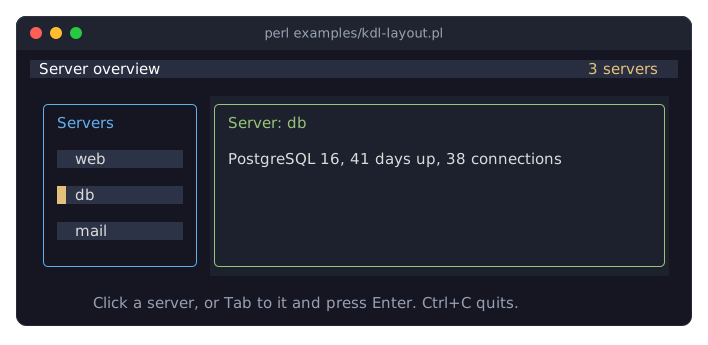
This page is the reference. The guide is the KDL chapter of the manual, with complete programs and their screenshots. This is examples/kdl-layout.pl, which builds its screen from the layout file examples/kdl-layout.kdl:
CONSTRUCTOR
new
my $layout = Term::Fabulous::Layout->new( string => $kdl_text );
my $layout = Term::Fabulous::Layout->new( file   => $path );
my $layout = Term::Fabulous::Layout->new( file   => $path, allowed_namespaces => ['Term::Fabulous::Widget'] );
Parses the document, checks its use instructions, loads the widget classes and finds the root widget node. The widgets themselves are built later, by "build". Every problem dies with a message that starts with Term::Fabulous::Layout: (see "ERRORS"). Unknown parameters die.
Give exactly one of string and file; giving none or both dies.
string-
The layout as a Perl character string (decoded text). A here-document in a source file with
use utf8is such a string. file-
The path of a layout file. The file is read as UTF-8 encoded bytes. Dies if it cannot be opened.
allowed_namespaces-
Optional. An array reference of package names, such as
[ 'Term::Fabulous::Widget', 'My::App::Widget' ]: the layout mayuseonly these packages and the modules below them (Term::Fabulous::Widget::Boxis belowTerm::Fabulous::Widget,Term::Fabulous::WidgetKitis not). Everyuseis checked before any module is loaded, so a refused one runs no code; it dies with'use MODULE' is not allowed; allowed_namespaces permits only modules in .... Default:undef, any module. Anything but a non-empty array reference of valid package names dies. See "SECURITY".
METHODS
build
my $root = $layout->build;Builds the widget tree and returns its root widget. The tree is built only once: later calls return the same root widget. Since a widget can be part of only one tree, build a new Term::Fabulous::Layout object if you need a second copy of the same widgets.
Each widget is built with $class->new( id => $id ), then its property nodes are applied to the finished widget with $widget->apply_layout_node($node) (see Term::Fabulous::Role::CanParseLayout), and then its child widgets are built and added. So a layout sets properties like a program calling the accessors after new, and the order of the properties of related values does not matter (a Slider's min and max, a Dropdown's options and value). Invalid properties die here, not in "new".
To get at the other widgets of the tree, call "find_by_id" in Term::Fabulous::Widget on the root (see "EXAMPLES").
root_widget
my $root = $layout->root_widget;The root widget built by "build", or undef before the first call of "build".
required_modules
my %module_by_alias = %{ $layout->required_modules }; # ( Box => 'Term::Fabulous::Widget::Box', ... )A hash reference that maps every widget name declared with use to its Perl module.
raw
my $document = $layout->raw;The parsed Text::KDL::XS::Document, for programs that want to inspect the layout's nodes themselves, for example a tool that lists the ids of a layout file.
walk_nodes
$layout->walk_nodes( sub ($node) {
	say $node->name;
} );
Calls the code reference once for every node of the document (Text::KDL::XS::Node objects), including use instructions and property nodes, breadth first: all top-level nodes, then their children, and so on. Nodes commented out with /- are not part of the document. Returns nothing.
THE KDL FORMAT
A short introduction to KDL
A KDL document is a list of nodes. A node has a name, followed by optional arguments, optional key=value properties and an optional block of child nodes in braces:
name argument1 argument2 key=value other="value" {
	child-node
	another-child 42
}
Nodes end at a line break or a semicolon, so short nodes can share a line: RadioButton { label "Small"; value "s"; }.
Values are written like this:
Value                          Example                Perl value
-----------------------------  ---------------------  -----------------
string in double quotes        "Hello, world"         'Hello, world'
bare word                      grow, Round, down      'grow', ...
integer or decimal number      40, 2.5, 0x1f          40, 2.5, 31
boolean                        #true, #false          1, 0
no value                       #null                  undef
Strings that contain spaces, parentheses, #, = or other special characters must be quoted: "#141937", "fixed(10)", "rgb(1, 2, 3)". Inside quotes, \n is a line break, \" a quote and \\ a backslash; a raw string, #"C:\path"#, takes backslashes as they are. Boolean properties must be written #true and #false (1 and 0 are accepted too); any other value, such as "no" or "false" in quotes, dies, and a bare true is a syntax error.
Comments are // to the end of the line, /* blocks */, and /- in front of a node, which comments out the whole node with its children:
/- Text { text "not shown"; }Top level: use instructions and one root widget
The top level of a layout contains use instructions, which declare the widget classes, and exactly one widget node, the root widget. Nothing else is allowed at the top level.
use Term::Fabulous::Widget::Box as Box
use Term::Fabulous::Widget::TextField as TextField
use My::App::Widget::Clock as Clock

Box "root" { ... }
use Module::Name as Alias declares that nodes named Alias build Module::Name widgets. Module::Name must be a plain Perl package name (letters, digits, _ and ::). Alias must start with an uppercase letter and contain only letters, digits and _. Each alias can be declared only once. The module is loaded with require and must compose Term::Fabulous::Role::CanParseLayout, which all Term::Fabulous widgets do (see "NODE TYPES"); your own widgets can too (see using your widget in KDL).
The short form use Module::Name uses the full module name as the widget node name, so the module name must start with an uppercase letter:
use Term::Fabulous::Widget::Box

Term::Fabulous::Widget::Box "root" { ... }
use takes no key=value properties and no children.
Widget nodes
Alias "id" {
	property-node ...
	ChildAlias "child-id" { ... }
}
A node whose name is a declared alias builds one widget. It takes at most one argument, a string, which becomes the widget's id, and no key=value properties. Inside its braces:
Nodes whose names start with an uppercase letter are child widgets. Their names must be declared aliases. Every widget except Term::Fabulous::Widget::Text and Term::Fabulous::Widget::Table accepts children.
Every other node is a property of the widget, such as
sizingortext. Each widget class documents its properties in the KDL PROPERTIES section of its page (see "NODE TYPES"); an unknown one dies with the list of the known names.
Properties are applied after the widget was constructed, with the same checks as the Perl method of the same name, in the order they appear; values that depend on each other are applied together, wherever they stand: a dropdown's options before its value, a slider's min, max and step as one range before its value, a text field's max_length before its value.
Ids are optional. They are used by Clay to keep track of widgets between frames, they are required for a ScrollBox, and they are how you find widgets after "build" (see "EXAMPLES"). Ids must be unique within the tree. "build" does not check this; the first frame drawn with duplicate ids dies with Clay error: An element with this ID was already previously declared during this layout.
Kinds of property nodes
A property node has one of two shapes:
One argument:
text "Hello",width_group 1,checked #true.Only key=value pairs:
padding left=1 right=1,bordered left=#true right=#true.
A property node never has children; the only exceptions are the structured properties of a few widgets that say so, such as a table's column with its style nodes. A property whose name ends in _color takes any color string Term::Fabulous::Color understands ("#61afef", "#61afef80", "rgb(97, 175, 239)", "rgba(97, 175, 239, 0.5)", "hsl(207, 82%, 66%)", ...; see "Color formats" in Term::Fabulous::Manual::Looks). Color names such as "red" are not color strings.
NODE TYPES
Every widget class of Term::Fabulous can be declared in a layout, except Term::Fabulous::Widget::Prompt, Term::Fabulous::Widget::FileDialog, Term::Fabulous::Widget::KeyReference, Term::Fabulous::Widget::DocumentTabs, Term::Fabulous::Widget::Menu and Term::Fabulous::Widget::MenuBar: their fields, items, rows and tabs come from code, and they answer through events, which a layout file cannot hold. The table lists the others with the alias the examples use; each link leads to the list of properties the class accepts. All of them except Text accept the "Box properties".
Alias             Class                                     Properties
----------------  ----------------------------------------  --------------------------------
Box               Term::Fabulous::Widget::Box               Box properties
Text              Term::Fabulous::Widget::Text              text, text_color, wrap_mode, ...
Button            Term::Fabulous::Widget::Button            Box + focus and press looks
Dialog            Term::Fabulous::Widget::Dialog            Box + backdrop, z_index
ScrollBox         Term::Fabulous::Widget::ScrollBox         Box + horizontal, vertical
Canvas            Term::Fabulous::Widget::Canvas            Box
PixelCanvas       Term::Fabulous::Widget::PixelCanvas       Box
Image             Term::Fabulous::Widget::Image             Box + file, base64, fit, ...
Sixel             Term::Fabulous::Widget::Sixel             Box + file, base64, fit, ...
TextField         Term::Fabulous::Widget::TextField         input widget + text options
TextArea          Term::Fabulous::Widget::TextArea          input widget + text options
Checkbox          Term::Fabulous::Widget::Checkbox          input widget + label, checked
RadioGroup        Term::Fabulous::Widget::RadioGroup        Box + value, disabled
RadioButton       Term::Fabulous::Widget::RadioButton       input widget + label, value
Dropdown          Term::Fabulous::Widget::Dropdown          input widget + options, value
Slider            Term::Fabulous::Widget::Slider            input widget + range, value
StarRating        Term::Fabulous::Widget::StarRating        input widget + max, value, half
SegmentedControl  Term::Fabulous::Widget::SegmentedControl  input widget + options, value
ColorPicker       Term::Fabulous::Widget::ColorPicker       Box + value, alpha, sliders, ...
Divider           Term::Fabulous::Widget::Divider           Box + text, line_style, ...
Accordion         Term::Fabulous::Widget::Accordion         Box + multiple, bordered, ...
Item              Term::Fabulous::Widget::Accordion::Item   Box + title, open, disabled
Tabs              Term::Fabulous::Widget::Tabs              Box + side, orientation, ...
Page              Term::Fabulous::Widget::Tabs::Page        Box + title, active, disabled
TabBar            Term::Fabulous::Widget::Tabs::Bar         Box + side, orientation, ...
Tab               Term::Fabulous::Widget::Tabs::Button      Button + title, icon
ProgressBar       Term::Fabulous::Widget::ProgressBar       Box + range, value, style, ...
Spinner           Term::Fabulous::Widget::Spinner           Box + style, frames, label
Toast             Term::Fabulous::Widget::Toast             Box + kind, title, message, ...
StatusBar         Term::Fabulous::Widget::StatusBar         Box + message, kind, timeout
Table             Term::Fabulous::Widget::Table             Box + columns, lines, sort, ...
LineChart         Term::Fabulous::Widget::LineChart         chart + series, axes, ...
AreaChart         Term::Fabulous::Widget::AreaChart         chart + series, axes, ...
BarChart          Term::Fabulous::Widget::BarChart          chart + series, axes, ...
ScatterPlot       Term::Fabulous::Widget::ScatterPlot       chart + series, axes, ...
Histogram         Term::Fabulous::Widget::Histogram         chart + series, bins, ...
Sparkline         Term::Fabulous::Widget::Sparkline         chart + values, type, ...
PieChart          Term::Fabulous::Widget::PieChart          chart + slice, sort, ...
DonutChart        Term::Fabulous::Widget::DonutChart        pie chart properties
PolarAreaChart    Term::Fabulous::Widget::PolarAreaChart    pie chart + max, ticks
RadarChart        Term::Fabulous::Widget::RadarChart        chart + series, labels, ticks
The properties of each class:
Box (summarized in "Box properties")
The properties shared by several classes are described once, on the page of their base class: those of all input widgets in "KDL PROPERTIES" in Term::Fabulous::Widget::Input, those of TextField and TextArea in "KDL PROPERTIES" in Term::Fabulous::Widget::TextInput, those of all charts in "KDL PROPERTIES" in Term::Fabulous::Widget::Chart and those of the charts with axes in "KDL PROPERTIES" in Term::Fabulous::Widget::XYChart. These four base classes are abstract and cannot be used as nodes themselves. The parts other widgets build for themselves (such as Term::Fabulous::Widget::Dialog::Backdrop, Term::Fabulous::Widget::Dropdown::List and the Term::Fabulous::Widget::Table::* parts) cannot be built from a layout either.
A Dialog is not drawn until it is opened from Perl, and it is opened on its own, not as a child of another widget: describe it as the root of a layout of its own, build it, and call $dialog->open($ui) (see Term::Fabulous::Widget::Dialog).
PROPERTIES
Box properties
Term::Fabulous::Widget::Box and every widget built on it (all widgets except Text) accept these property nodes. The KDL PROPERTIES section of the Box page describes each one with an example, and the layout chapter of the manual shows what they do, with pictures.
Property node                               Value
------------------------------------------  -------------------------------------------
layout direction=... gap=N                  direction: down, ttb, top_to_bottom
       line_gap=N line_sizing=...           (children top to bottom), right, ltr,
                                            left_to_right (left to right), wrap,
                                            ltr_wrap, left_to_right_wrap (left to
                                            right, wrapping onto new lines) or
                                            stack, back_to_front, btf (on top of
                                            each other);
                                            gap (alias child_gap): cells between
                                            children, an integer >= 0;
                                            line_gap: rows between wrapped lines,
                                            an integer >= 0; line_sizing: grow
                                            (the default) or fit
sizing width=... height=...                 each: grow, fit, "grow(MIN)",
                                            "grow(MIN, MAX)", "fit(MIN)",
                                            "fit(MIN, MAX)" with MIN and MAX integers
                                            >= 0 and MIN <= MAX (no MAX: no maximum),
                                            "percent(N)" with N in 0..100 (decimals
                                            allowed), or "fixed(N)" with N an
                                            integer >= 0
padding left=N right=N top=N bottom=N       any subset; integers >= 0
child_alignment x=... y=...                 x: left (the default), center or right;
                                            y: top (the default), center or bottom
floating attach_to=... parent_id="..."      takes the box out of the layout and
         element=... parent=...             draws it on top (see below)
         offset_x=N offset_y=N z_index=N
         pointer_capture=... clip_to=...
border style=... style-top=...              style: a border style name (Round, Solid,
       style-right=... style-bottom=...     Heavy, ...) for all four sides; the
       style-left=... color=...             style-SIDE keys override it for one side;
                                            color: a color string
bordered #true                              a border on all four sides (#false: none)
bordered top=#true left=#true ...           per side (top, right, bottom, left);
                                            missing sides have none
background_color "..."                      a color string
glyphs_show_through #true                   #true or #false (the default): whether text
                                            and borders below a translucent background
                                            stay visible (see Term::Fabulous::Widget)
border_color "..."                          a color string (same as border color=)
width_group N                               an integer 0..1048575; 0 means no group
height_group N an integer 0..1048575; 0 means no grouplayout, sizing, padding, border, child_alignment and floating take only the keys shown, and at least one of them. The border style names are those of Term::Fabulous::Enum::BorderStyle and are case sensitive. A border is only drawn on the sides bordered names; without bordered, the theme decides for the widget's family (no border for a Box, see "Borders from the theme" in Term::Fabulous::Manual::Looks).
width_group and height_group give widgets in different parts of the tree the same width or height; see "Equal sizes across the tree" in Term::Fabulous::Manual::Layout.
floating sets the widget's floating hash (see "floating" in Term::Fabulous::Widget and "Floating widgets" in Term::Fabulous::Manual::Layout); its keys are:
Key              Value
---------------  ----------------------------------------------------------
attach_to        parent (the default), root or element; element
                 requires parent_id
parent_id        the id of the widget to attach to (with attach_to=element)
element          the point of this box placed on the point "parent" of
parent           the widget it is attached to: left_top (the default),
                 left_center, left_bottom, center_top, center_center,
                 center_bottom, right_top, right_center, right_bottom
offset_x         an integer added to the position, in cells
offset_y         an integer added to the position, in cells
z_index          an integer -32768..32767; higher is drawn on top
pointer_capture  capture (the default) or passthrough
clip_to          none (the default) or attached_parent

Box "root" {
	Button "menu-button" { Text { text "Menu"; } }
	Box "menu" {
		floating attach_to=element parent_id="menu-button" parent=left_bottom
		floating z_index=10
	}
}
An unknown name in child_alignment or floating dies with the known names.
A property node may appear more than once. A second padding, sizing, layout, child_alignment or floating node changes only the keys it names and keeps the others.
Box "panel" {
	layout direction=down gap=1
	sizing width="percent(50)" height=fit
	padding left=1 right=1
	border style=Round style-top=Heavy color="#61afef"
	bordered #true
	background_color "rgb(28, 33, 45)"
}
EXAMPLES
A form, built from a layout
use v5.32;
use warnings;
use feature 'signatures';
no warnings 'experimental::signatures';

use Term::Fabulous;
use Term::Fabulous::Layout;

my $layout = Term::Fabulous::Layout->new( string => <<'KDL' );
use Term::Fabulous::Widget::Box as Box
use Term::Fabulous::Widget::Text as Text
use Term::Fabulous::Widget::TextField as TextField
use Term::Fabulous::Widget::Checkbox as Checkbox
use Term::Fabulous::Widget::RadioGroup as RadioGroup
use Term::Fabulous::Widget::RadioButton as RadioButton
use Term::Fabulous::Widget::Dropdown as Dropdown
use Term::Fabulous::Widget::Slider as Slider

Box "form" {
	layout direction=down gap=1
	sizing width=grow height=grow
	padding left=1 right=1
	border style=Round color="#61afef"
	bordered #true

	Text "title" {
		text "Sign up"
		text_color "rgb(255, 200, 80)"
	}
	TextField "name" {
		placeholder "Your name"
		max_length 40
	}
	TextField "password" {
		mask "*"
	}
	RadioGroup "plan" {
		layout direction=right gap=2
		value "pro"
		RadioButton { label "Free"; value "free"; }
		RadioButton { label "Pro"; value "pro"; }
	}
	Dropdown "country" {
		placeholder "Country"
		options "Austria" "Germany"
		option "Switzerland" value="CH"
		value "CH"
	}
	Slider "age" {
		min 18
		max 99
		value 30
		value_format "%d years"
	}
	Checkbox "news" {
		label "Send me news"
		checked #true
	}
}
KDL

my $root  = $layout->build;
my $title = $root->find_by_id('title');

# Every Change event bubbles up to the form box.
$root->on( Change => sub ($event) {
	$title->text( 'Changed: ' . $event->target->id );
	return;
} );

Term::Fabulous->new( root => $root, width => 80, height => 24 )->run;
examples/kdl-form.pl is a longer form of the same kind, and examples/kdl-layout.pl loads its layout from a file; both are shown with screenshots in "KDL LAYOUT FILES" in Term::Fabulous::Manual::KDL.
Finding widgets by id
"build" returns only the root widget. To get at the other widgets, call "find_by_id" in Term::Fabulous::Widget on the root: it returns the first widget (in depth-first order) whose id is the argument, Text widgets included, or undef when there is none. See also "Find widgets by id" in Term::Fabulous::Cookbook::Forms.
my $country = $root->find_by_id('country');
say $country->value;    # CH
Adding what a layout cannot express
Build first, then set the remaining options in Perl:
my $age = $root->find_by_id('age');
$age->value_format( sub ($value) { $value < 21 ? "$value (young)" : "$value years" } );
$age->on( Change => sub ($event) { ...; return } );
LIMITATIONS
These options exist in Perl but cannot be written in a layout:
event listeners, and the
classesof a widget;border_cornersandouter_border_sides(see Term::Fabulous::Role::HasBorderStyle);the
expandkey of a widget'sfloatinghash;the
child_offsetof a ScrollBox;code references, such as a Slider's
value_formatas code, and the other widget-specific options their KDL PROPERTIES sections name as Perl-only (for example a table's rows and a chart's data callbacks).
Set them in Perl after "build", as shown in "Adding what a layout cannot express".
ERRORS
Everything that is wrong with a layout dies, either in "new" or in "build". Messages start with Term::Fabulous::Layout:; errors in a widget's properties also name the widget and its id, followed by the widget class's own message:
Term::Fabulous::Layout: cannot build widget 'Box' "panel": Term::Fabulous::Widget::Box: unknown layout property 'colour' (known: background_color, border, border_color, bordered, child_alignment, classes, floating, glyphs_show_through, height_group, layout, padding, sizing, width_group)"new" dies for:
neither or both of
stringandfile, or a file that cannot be opened;KDL syntax errors (
failed to parse KDL: KDL parse error; the parser does not report a line number);a malformed
use, an invalid module name or alias, or an alias declared twice;a module outside the
allowed_namespaces, or an invalidallowed_namespaces;a module that cannot be loaded, or that does not compose Term::Fabulous::Role::CanParseLayout;
a top-level node that is neither
usenor a declared widget, no root widget, or more than one.
"build" dies for:
an undeclared widget name (
unknown widget 'Foo'; declare it with 'use Module::Name as Foo');a widget node with
key=valueproperties, more than one argument, or a non-string id;child widgets inside a widget that cannot hold children;
a widget the class cannot construct with only an id: an abstract base class, or a ScrollBox without an id;
unknown property names, property nodes of the wrong shape, unknown keys, and invalid values.
SECURITY
A layout names the Perl modules it loads, and loading a module runs its code. Only syntactically valid package names are accepted (no paths), and a module that does not compose Term::Fabulous::Role::CanParseLayout is rejected, but only after it has been loaded, so its top-level code has already run. A layout can therefore load and run any module installed on the system. Treat layout files like program code: do not load layouts from untrusted sources.
A program that loads layouts its users write can restrict them with "new"'s allowed_namespaces: a use of any module outside these namespaces dies before any module of the layout is loaded. Choose namespaces that hold only widget classes; every module in them can still be loaded and run.
Properties can only call the accessors a widget class declares in its layout_properties (see Term::Fabulous::Role::CanParseLayout), so a layout cannot call arbitrary methods.
SEE ALSO
"KDL LAYOUT FILES" in Term::Fabulous::Manual::KDL (the guide), Term::Fabulous::Role::CanParseLayout (widget classes in layouts), "KDL PROPERTIES" in Term::Fabulous::Widget::Box, "LAYOUT" in Term::Fabulous::Manual::Layout, "Build a form from a KDL file (text fields, radio buttons, dropdown, slider, checkbox)" in Term::Fabulous::Cookbook::Forms, "Describe a table in a KDL layout (columns, lines, sort, groups)" in Term::Fabulous::Cookbook::Tables, "Describe charts in a KDL layout (series, slices, transforms)" in Term::Fabulous::Cookbook::ChartTechniques, "Make a widget usable from KDL" in Term::Fabulous::Cookbook::Extending, Text::KDL::XS, https://kdl.dev.