NAME
Term::Fabulous::Widget::Image - Show a picture in half-block pixels
SYNOPSIS
use Clay::XS qw(sizing_fixed);
use Term::Fabulous::Widget::Image;

# At its natural size: a column per pixel, a row per two pixel rows.
my $icon = Term::Fabulous::Widget::Image->new( file => 'examples/images/rainbow_circle.png' );

# Scaled to fit 40 columns and 20 rows, from bytes or base64 text.
my $photo = Term::Fabulous::Widget::Image->new(
	data   => $png_bytes,
	fit    => 'contain',
	layout => { sizing => { width => sizing_fixed(40), height => sizing_fixed(20) } },
);
my $logo = Term::Fabulous::Widget::Image->new( base64 => $base64_text );
my $mark = Term::Fabulous::Widget::Image->new( data_url => 'data:image/png;base64,iVBORw0KGgo...' );

# Another picture later.
$icon->file('examples/images/other.png');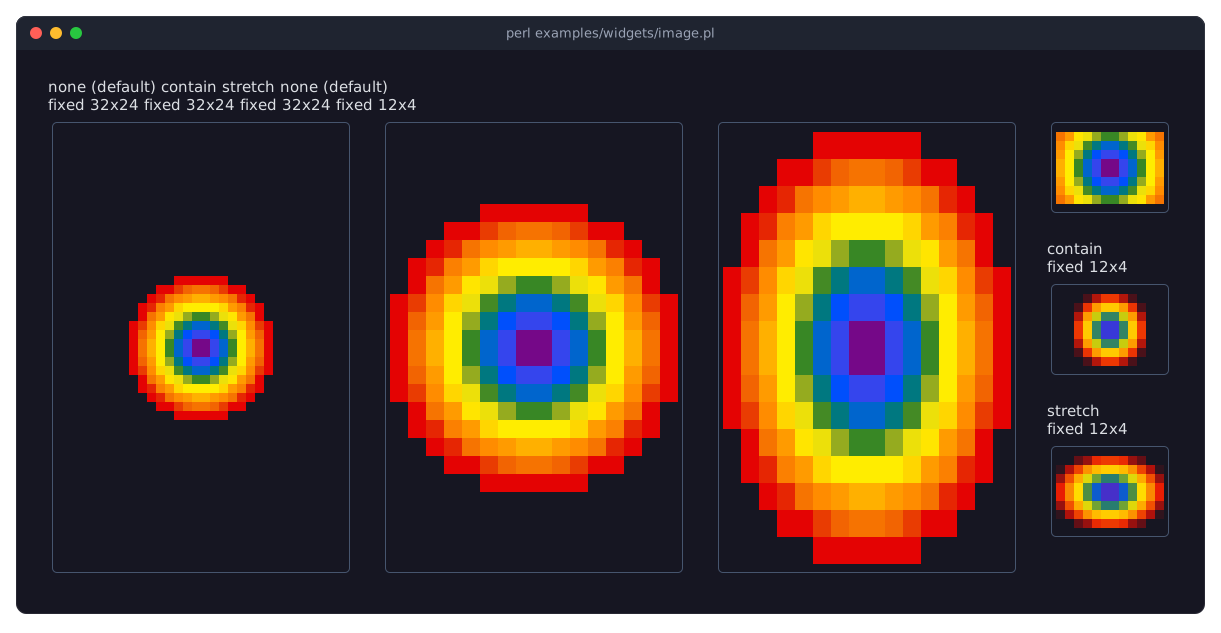
DESCRIPTION
The picture shows a 16x16 PNG in three widgets of a fixed 32x24 cells, one per "fit": none (the default) keeps its natural size, contain scales it to fit and keeps its proportions, stretch fills the widget. In the three widgets of 12x4 cells, smaller than the picture, none cuts it, contain shrinks it to half its size and stretch shrinks it to fill the widget. The program is examples/widgets/image.pl.
An image widget reads a picture (PNG, JPEG, GIF, BMP, ... whatever formats your Imager was built with) from a file, from bytes, from base64 text or from a data URL, and draws it the way a Term::Fabulous::Widget::PixelCanvas draws pixels: two per cell, the upper one as the color of an upper half block (U+2580), the lower one as its background. Unless the layout sizes it, the widget is as big as the picture: a column per pixel and a row per two rows of pixels. Given another size, the picture keeps its natural size, or is scaled as "fit" says.
Transparent pixels are not drawn, so the background below the widget shows through them. Translucent pixels are mixed with that background (the widget's own background_color or the nearest one below it, see "background_below" in Term::Fabulous::Widget), and drawn opaque where there is none, on the terminal's default background.
Without Imager
Imager is not a requirement of Term::Fabulous, only a recommendation: the widget is the only part that needs it. Without it, the class still loads and takes the same parameters, so programs and layouts work unchanged, but it shows a notice in its place instead of the picture:
Image needs the Perl module
Imager, which is not
installed.
The notice is drawn in notice_color, wrapped at 28 columns unless the layout gives the widget another width. The sources given are kept (their accessors return them) but not read, so a bad one does not die. Install Imager (cpanm Imager, with the development files of libpng, libjpeg, ... installed first for the formats you need) to see the pictures.
CONSTRUCTOR
new
my $image = Term::Fabulous::Widget::Image->new(%parameters);Accepts the parameters of "CONSTRUCTOR" in Term::Fabulous::Widget::Box (id, layout, background_color, the border parameters, ...) and the ones below. All are optional; unknown parameters die. Give at most one of file, data, base64 and data_url; without any, the widget shows nothing and has no natural size.
file-
The path of a picture file.
data-
The bytes of a picture, as read from a file in
:rawmode. A string with characters above 0xFF dies. base64-
The bytes of a picture in base64 text, in either alphabet: standard base64 (
+and/) or base64url (-and_, RFC 4648). The=padding may be left out; whitespace and line breaks are ignored. data_url-
A data URL,
data:[MEDIA TYPE][;base64],DATA, such asdata:image/png;base64,iVBORw0KGgo.... Its data is base64 text with;base64, percent-encoded bytes without. The media type is not needed: Imager recognizes the format by the bytes. fit-
How the picture fills a widget whose size is not the picture's:
none(the default) draws it at its natural size, cut on every side if it is larger;containscales it to the largest size that fits, keeping its proportions;stretchscales it to fill the widget exactly. The picture is centered in the widget. Enlarging repeats pixels (nearest neighbor), which keeps pixel art crisp; shrinking, on either axis, mixes them. Anything else dies. notice_color-
The color of the notice shown without Imager, in any format "Colors" in Term::Fabulous::Widget::Canvas accepts. Default: the theme's
image.notice,[150, 160, 180, 255]in the dark theme.
A source that cannot be read dies: a missing file, bytes of no format Imager knows (or knows but was built without), base64 text with foreign characters or a length no base64 text has, a data_url that does not start with data: or has no comma. The message names the source and includes Imager's error.
METHODS
The methods of Term::Fabulous::Widget::Display (mark_changed, the Box and Canvas methods), plus:
file
my $path = $image->file;
$image->file('examples/images/rainbow_circle.png');
Accessor for the file parameter. Writing reads the picture and replaces the one shown, whatever its source; the reader returns undef unless the picture came from a file. Writing undef removes the picture. A source that cannot be read dies and keeps the old picture.
data
$image->data($png_bytes);Accessor for the data parameter; works like "file".
base64
$image->base64($base64_text);Accessor for the base64 parameter; works like "file". The reader returns the text as given.
data_url
$image->data_url('data:image/png;base64,iVBORw0KGgo...');Accessor for the data_url parameter; works like "file".
fit
$image->fit('stretch');Accessor for the fit parameter.
notice_color
$image->notice_color('#e5c07b');Accessor for the notice_color parameter. The reader returns [r, g, b, a]. An invalid color dies and leaves the old one.
image_width
my $pixels = $image->image_width;The width of the picture in pixels, undef without a picture or without Imager. Read-only.
image_height
my $pixels = $image->image_height;The height of the picture in pixels, undef without a picture or without Imager. Read-only.
Every writer marks the image changed, so the next frame paints it.
EVENTS
An image fires no events of its own.
KDL PROPERTIES
The properties of "KDL PROPERTIES" in Term::Fabulous::Widget::Box, plus file, base64, data_url and fit (strings) and notice_color (a color string). A relative file is found from the program's working directory.
use Term::Fabulous::Widget::Image as Image

Image "logo" {
	file "examples/images/rainbow_circle.png"
	sizing width="fixed(32)" height="fixed(16)"
	fit "contain"
}
SEE ALSO
Imager, Term::Fabulous::Widget::PixelCanvas, Term::Fabulous::Widget::Display, "Show a picture file (Image, fit)" in Term::Fabulous::Cookbook::Canvases, "Embed a logo in the program (Image, base64)" in Term::Fabulous::Cookbook::Canvases.