NAME
Term::Fabulous::Color - An immutable RGBA color, parsed from many notations
SYNOPSIS
use Term::Fabulous::Color;
use Term::Fabulous::Widget::Box;

# One constructor that understands every notation ...
my $purple = Term::Fabulous::Color->new( color => '#7c3aed' );
my $faded  = Term::Fabulous::Color->new( color => 'rgba(255, 0, 128, 0.5)' );
my $teal   = Term::Fabulous::Color->new( color => 'hsl(174, 72%, 56%)' );
my $blue   = Term::Fabulous::Color->new( color => [ 40, 80, 200 ] );
my $gray   = Term::Fabulous::Color->new( color => { r => 128, g => 128, b => 128, a => 255 } );

# ... and shortcuts for the common cases.
my $red    = Term::Fabulous::Color->rgb( 255, 0, 0 );
my $glass  = Term::Fabulous::Color->rgba( 255, 0, 0, 128 );
my $violet = Term::Fabulous::Color->hex('#7c3aed');
my $mint   = Term::Fabulous::Color->hsl( 150, 60, 70 );

# Derive new colors; the original never changes.
my $hover  = $purple->lighten(0.1);
my $shadow = $purple->darken(0.2);
my $mix    = $red->blend( $blue, 0.25 );

# Widgets take the object itself, or any of the formats new() accepts.
my $box = Term::Fabulous::Widget::Box->new( background_color => $shadow );
DESCRIPTION
A color with red, green, blue and alpha (opacity) channels, each an integer from 0 to 255. Color objects are immutable: methods such as "lighten" and "blend" return a new object.
Term::Fabulous uses this class to parse every color given as a string: colors in KDL layout files, the colors of the input widgets and the cell colors of a canvas, and every widget color (background_color, border_color, the text_color of a Text widget, the input widget colors) takes a Color object or any input "new" accepts. See "COLORS" in Term::Fabulous::Manual::Looks.
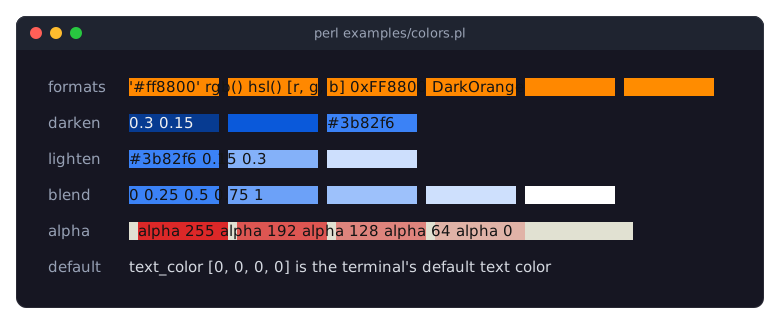
examples/colors.pl shows one color written in six formats, colors derived with "darken", "lighten" and "blend", and backgrounds with less and less alpha:
Alpha
An alpha of 0 means "no color": a background with alpha 0 is not painted, so whatever is below it shows through, and a text or foreground color with alpha 0 uses the terminal default color. An alpha from 1 to 254 (see "is_translucent") makes a widget background translucent: it is blended with the colors below it when it is painted. Text and border colors with such an alpha are drawn opaque. See "Alpha and the terminal default color" in Term::Fabulous::Manual::Looks.
Channel rules
Every channel is rounded to the nearest integer once, when the color is built (an exact half rounds up), and the rounded value must be from 0 to 255. So 255.4 becomes 255, 0.5 becomes 1 and -0.4 becomes 0, while 255.5 and -1 die. Undefined values, non-numbers, NaN and infinities die too. The error names the channel and the value:
Term::Fabulous::Color: red must be a number in 0..255, got '300'CONSTRUCTOR
new
my $color = Term::Fabulous::Color->new( color => $spec );Builds a color from $spec. color is the only parameter and it is required; unknown parameters die. $spec can be any of the following.
- A Term::Fabulous::Color object
-
Its four channels are copied. Objects of subclasses work as well.
- An array reference
-
[ $r, $g, $b ]or[ $r, $g, $b, $a ]. Alpha defaults to 255. Any other number of elements dies. - A hash reference
-
With exactly the keys
r,g,b(and optionallya), or exactlyred,green,blue(and optionallyalpha). Alpha defaults to 255. Any other set of keys dies. - A string
-
In one of the notations below. The string must not have leading or trailing whitespace; whitespace after
(and around the commas is allowed. The function names are lowercase. Three-digit hex such as'#f00'is not supported.String Example Meaning ------------------ -------------------------- --------------------------------- #rrggbb '#7c3aed', '7c3aed' hex, alpha 255; '#' is optional #rrggbbaa '#7c3aed80' hex with alpha packed integer 0xFF8800, '16746496' 0xRRGGBB as one number, alpha 255 rgb(r, g, b) 'rgb(124, 58, 237)' channels 0..255, alpha 255 rgba(r, g, b, a) 'rgba(124, 58, 237, 0.5)' alpha as described below hsl(h, s%, l%) 'hsl(262, 83%, 58%)' hue in degrees, alpha 255 hsla(h, s%, l%, a) 'hsla(262, 83%, 58%, 50%)' alpha as described below web color name 'SteelBlue', 'steelblue' a CSS named color, alpha 255Hex digits may be upper or lower case. A string of digits only is a packed
0xRRGGBBinteger (the form the canvas drawing methods take as well), so a hex color that consists of digits only, such as'123456', needs its#. A packed integer above0xFFFFFFdies. Channel values inrgb()andrgba()may have decimals; they are rounded (see "Channel rules").In
hsl()andhsla(), the hue is in degrees and taken modulo 360, so360is the same as0and-90the same as270. Saturation and lightness are percentages from 0 to 100 and must be written with a%sign.The alpha of
rgba()andhsla()is read according to how it is written, in the strings and in the "rgba" and "hsla" class methods alike:Written as Example Meaning Alpha --------------------- -------- -------------------- ----- integer, no point 128 channel value 0..255 128 number with a point 0.5 fraction 0..1 128 number with % 50% percentage 0..100 128Watch the difference between
1and1.0:'rgba(0, 0, 0, 1)'has alpha 1 (almost fully transparent), while'rgba(0, 0, 0, 1.0)'has alpha 255. In Perl code, a number without a fractional part is written without a point when it becomes a string, so->rgba( 0, 0, 0, 1.0 )is alpha 1 as well; pass'100%'or255for opaque.A web color name is one of the 148 CSS named colors of Term::Fabulous::Enum::WebColor (
GrayandGreyspellings,RebeccaPurple), in any case:'SteelBlue','steelblue'and'STEELBLUE'are the same color. Where a name could also mean something else, the other meaning is looked up first: a palette token of a theme (accent,text, ...; none of them is a web color name) and the words of a style string (bold,default, ...).This grammar is the one of every color in Term::Fabulous: widget color parameters and accessors, canvas cells, KDL layout files, theme files and rich text markup.
Anything else (undef, other references or objects, unknown strings) dies with the offending value in the message.
rgb
my $color = Term::Fabulous::Color->rgb( $r, $g, $b );Class method. An opaque color (alpha 255) from three channels from 0 to 255 (see "Channel rules").
rgba
my $color = Term::Fabulous::Color->rgba( $r, $g, $b, $a );Class method. Like "rgb" with an explicit alpha, read with the alpha grammar of the rgba() string (see "new"): a bare integer is the channel value from 0 to 255, a number with a decimal point a fraction of 1, and a string ending in % a percentage.
hex
my $color = Term::Fabulous::Color->hex('#7c3aed');
my $color = Term::Fabulous::Color->hex('7c3aed80');
Class method. A color from a six- or eight-digit hex string with an optional leading #. Any other string dies, even one that "new" would accept.
hsl
my $color = Term::Fabulous::Color->hsl( $hue, $saturation, $lightness );Class method. An opaque color from a hue in degrees (taken modulo 360) and saturation and lightness as plain numbers from 0 to 100 (no % sign). The conversion is computed in floating point, and each channel is rounded once at the end.
hsla
my $color = Term::Fabulous::Color->hsla( $hue, $saturation, $lightness, $alpha );Class method. Like "hsl", plus an alpha read with the same grammar as in "rgba" and in the hsla() string: ->hsla( 0, 0, 0, 0.5 ) and ->hsla( 0, 0, 0, '50%' ) give alpha 128, while ->hsla( 0, 0, 0, 1 ) gives alpha 1, not opaque.
METHODS
red
my $r = $color->red;The red channel, an integer from 0 to 255.
green
my $g = $color->green;The green channel, an integer from 0 to 255.
blue
my $b = $color->blue;The blue channel, an integer from 0 to 255.
alpha
my $a = $color->alpha;The alpha channel, an integer from 0 (transparent) to 255 (opaque).
is_translucent
if ( $color->is_translucent ) { ... }True when the alpha is from 1 to 254: the color is neither "no color" (alpha 0) nor opaque (alpha 255). A translucent background is blended with what is below it; see "Alpha".
to_rgba
my ( $r, $g, $b, $a ) = $color->to_rgba;Returns the four channels as a list. Widgets take the Color object itself; wrap the result in [ ] where a plain [r, g, b, a] array is wanted.
to_hsl
my ( $hue, $saturation, $lightness ) = $color->to_hsl;Returns hue (0 to 359), saturation and lightness (0 to 100) of the color, each rounded to an integer. Alpha is ignored.
lighten
my $brighter = $color->lighten(0.15);Returns a color with more lightness in HSL terms. $amount is a fraction added to the lightness: 0.15 adds 15 percentage points. The result is clamped to 0% to 100% lightness, so lighten(1) is white. Hue, saturation and alpha stay the same, and lighten(0) returns an identical color. A negative amount darkens. Dies if $amount is not a number.
darken
my $shadow = $color->darken(0.15);The same as $color->lighten(-$amount).
blend
my $mix = $color->blend( $other, $ratio );Returns a mix of this color and $other, channel by channel, alpha included: $ratio 0 gives this color, 1 gives $other, 0.5 the middle. Channels of the result are rounded like every other channel (see "Channel rules"): black blended with white at 0.5 is (128, 128, 128). $other must be a Term::Fabulous::Color object and $ratio a number from 0 to 1; anything else dies with a message that names the offending argument.
with_alpha
my $translucent = $color->with_alpha(128);Returns a copy with a different alpha channel (0 to 255, rounded as described in "Channel rules").
rgb_int
my $packed = $color->rgb_int; # 0xRRGGBBThe red, green and blue channels packed into one integer, 0xRRGGBB. This is also the fast way to give a color to the canvas drawing methods (see "Colors" in Term::Fabulous::Widget::Canvas), but note that a packed integer has no alpha channel.
rgba_int
my $packed = $color->rgba_int; # 0xRRGGBBAAAll four channels packed into one integer, 0xRRGGBBAA.
rgb_float
my ( $r, $g, $b ) = $color->rgb_float;The red, green and blue channels scaled to the range 0 to 1.
rgba_float
my ( $r, $g, $b, $a ) = $color->rgba_float;All four channels scaled to the range 0 to 1.
hexString
my $hex = $color->hexString; # '#7c3aedff'The color as a lowercase #rrggbbaa string. Alpha is always included.
ansi
print $color->ansi, 'colored text', "\e[0m";The 24-bit ANSI escape sequence that sets this color as the foreground color (ESC [ 38 ; 2 ; r ; g ; b m). Alpha is ignored.
ansi_bg
print $color->ansi_bg, ' ', "\e[0m";The 24-bit ANSI escape sequence that sets this color as the background color (ESC [ 48 ; 2 ; r ; g ; b m). Alpha is ignored.
fg_sgr
print $color->fg_sgr;Like "ansi", except that a color with alpha 0 returns ESC [ 39 m, which switches back to the terminal's default foreground color.
bg_sgr
print $color->bg_sgr;Like "ansi_bg", except that a color with alpha 0 returns ESC [ 49 m, which switches back to the terminal's default background color.
hsl_to_rgb
my ( $r, $g, $b ) = Term::Fabulous::Color->hsl_to_rgb( $hue, $saturation, $lightness );Class method. Converts hue (degrees, taken modulo 360), saturation and lightness (0 to 100) to red, green and blue (0 to 255), computed in floating point and rounded once. Dies if saturation or lightness are outside 0..100.
rgb_to_hsl
my ( $hue, $saturation, $lightness ) = Term::Fabulous::Color->rgb_to_hsl( $r, $g, $b );Class method. Converts red, green and blue (numbers from 0 to 255) to hue (0 to 359) and saturation and lightness (0 to 100), each rounded to an integer. Dies if a channel is outside 0..255.
SEE ALSO
"COLORS" in Term::Fabulous::Manual::Looks, Term::Fabulous::Render::Attr, "Colors" in Term::Fabulous::Widget::Canvas, Term::Fabulous::Enum::WebColor, Term::Fabulous::Theme, "Switch themes at run time (built-in themes and a theme file)" in Term::Fabulous::Cookbook::Layout.