NAME
Term::Fabulous::Widget::StatusBar - A row at the bottom of the screen for messages and the program's state
SYNOPSIS
use Term::Fabulous::Widget::StatusBar;

my $status = Term::Fabulous::Widget::StatusBar->new(
	message => 'Ready.',
	parts   => sub { ( [ "Line $line", 'info' ], [ 'F1 help', 'dim' ] ) },
	timeout => 5,
);
$root->add_child( $content, $status );

# Later, from a key binding or a timer:
$status->message( 'Saved notes.txt.', 'success' );
$status->message( 'The disk is full.', 'danger' );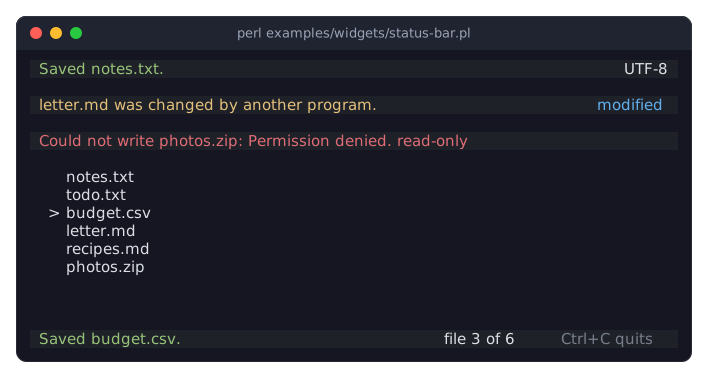
The program is examples/widgets/status-bar.pl. Its status bar at the bottom shows what the keys do until a key shows a message, and the position of the cursor on the right. The three bars above the list show a success, a warning and a danger message.
DESCRIPTION
A status bar is a single row, usually the last one of the screen. Its left side shows a message: what just happened, or what a key does now. Its right side shows parts, short texts about the program's state, such as the position of the cursor, whether a file has unsaved changes, or a reminder of a key.
A message has a kind, which decides its color: info for plain news, success when something worked, warning when something needs attention, and danger when something failed. These are the kinds a Term::Fabulous::Widget::Toast has. A part has one of these kinds as well, or dim for a hint that should not draw the eye, or accent for one that should.
A message stays until the program shows another one or calls "clear_message". With a "timeout", every message goes away by itself after that many seconds.
When the message and the parts do not fit next to each other, the parts win: the message is cut where it would run into them and ends in an ellipsis (…). A status bar has no line breaks, so line breaks and runs of white space in a message or a part become a single space.
A status bar takes no input. It grows to the width of its parent and is one row high (see "Size" in Term::Fabulous::Widget::Display).
CONSTRUCTOR
new
my $status = Term::Fabulous::Widget::StatusBar->new(%parameters);Accepts the parameters of "CONSTRUCTOR" in Term::Fabulous::Widget::Box (id, layout, background_color, ...) and the ones below. All are optional, and unknown parameters die.
message-
The message the bar starts with, a character string. Default:
'', no message. The timeout does not apply to it: it stays until the program changes it. kind-
The kind of that message:
info(the default),success,warningordanger. Anything else dies. parts-
What the right side shows. Either an array reference of parts, or a code reference that returns a list of parts. Default:
[], no parts.A part is a string, which is drawn like an
infomessage, or an array reference[ $text, $kind ]whose kind is one of the message kinds,dimoraccent. The parts are drawn from left to right with two columns between them, and the last one ends a column before the right edge. Anything else dies, when it is given and, for a code reference, when the parts it returned are drawn.A code reference is called whenever a frame is drawn, so the parts always show the program's state without being set again. It is not a timer, though: a frame is drawn when something happens (a key, the mouse, a change of a widget), so a part that shows the time of day needs a timer that makes a frame due (see "request_frame_at" in Term::Fabulous).
timeout-
A positive number of seconds, or
undef(the default). With a timeout, each message that "message" shows goes away by itself after that many seconds, and the bar is empty again until the next one. The timer runs on the IO::Async loop that "run" in Term::Fabulous drives. text_color,dim_color,accent_color,success_color,warning_color,danger_color-
The colors of the kinds, in any format "Colors" in Term::Fabulous::Widget::Canvas accepts. A message or a part of the kind
infois drawn intext_color, every other kind in the color of its name. Default: the theme'sstatus_bar.text,status_bar.dim,status_bar.accent,status_bar.success,status_bar.warningandstatus_bar.danger. In the dark theme these are the text color, a gray, a blue, a green, a yellow and a red. background_color-
As for every widget. Default: the theme's
status_bar.background,surface_lowin the built-in themes, which sets the bar apart from the screen.
METHODS
The methods of Term::Fabulous::Widget::Display (mark_changed, the Box and Canvas methods), plus these. The accessors work like those of the other widgets. Without an argument they return the current value. With one they set the value, checked as new checks it, mark the bar changed, so the next frame paints it, and return the new value. An invalid value dies and leaves the old one.
message
my $text = $status->message;
$status->message('Opened notes.txt.');
$status->message( 'Could not write notes.txt: Permission denied.', 'danger' );
Without an argument, returns the message shown now ('' when there is none). With a text and an optional kind (info by default), shows that message instead of the one before, starts the timeout again when there is one, and returns the text as it is shown. An empty text removes the message, like "clear_message".
kind
$status->kind('warning');The kind of the message shown now. Writing it recolors the message and keeps its text.
clear_message
$status->clear_message;Removes the message, and stops its timeout. Returns the status bar.
parts
$status->parts( [ 'UTF-8', [ 'modified', 'accent' ] ] );
$status->parts( sub { [ $mode, 'info' ] } );
The parts of the right side, as described under "new". Reading it returns the parts as [ $text, $kind ] pairs (a string part reads back as [ $text, 'info' ]), or the code reference.
current_parts
my @parts = $status->current_parts;The parts the bar shows now, as a list of [ $text, $kind ] pairs. For a code reference, it calls it.
timeout
$status->timeout(3);
$status->timeout(undef);    # messages stay
Writing it starts the timeout of the message shown now again.
expire
$status->expire;Lets the timeout of the message shown now run out at once, as the loop would when the time is up. For tests that drive the UI with "step" in Term::Fabulous, which runs no timers. Does nothing when no timeout is running. Returns the status bar.
text_color, dim_color, accent_color, success_color, warning_color, danger_color
$status->success_color('#98c379');
$status->reset_look('success_color');    # back to the theme
The readers return [r, g, b, a].
EVENTS
A status bar fires no events of its own.
KDL PROPERTIES
The properties of "KDL PROPERTIES" in Term::Fabulous::Widget::Box, plus message and kind (strings), timeout (a number), and the six colors (color strings). The parts can only be set from Perl:
use Term::Fabulous::Widget::StatusBar as StatusBar

StatusBar "status" {
	message "Ready."
	timeout 5
}
my $status = $root->find_by_id('status');
$status->parts( sub { [ $mode, 'info' ] } );SEE ALSO
"STATUS BARS" in Term::Fabulous::Manual::Feedback, "Show messages and state in a status bar (StatusBar)" in Term::Fabulous::Cookbook::Menus, Term::Fabulous::Widget::Toast for messages that float over the screen, Term::Fabulous::Widget::Display.