NAME
Term::Fabulous::Widget::Table::Filter - Conditions that decide which rows a table shows
SYNOPSIS
use Term::Fabulous::Widget::Table::Filter;
my $F = 'Term::Fabulous::Widget::Table::Filter';

# Conditions on one column:
$table->filter( adults   => $F->new( column => 'age',  op => '>=', value => 18 ) );
$table->filter( name     => $F->new( column => 'name', op => 'contains', value => 'ann' ) );
$table->filter( spring   => $F->new( column => 'joined', op => 'between', value => [ '2024-03', '2024-05' ] ) );
$table->filter( shown_as => $F->new( column => 'size', op => 'starts_with', value => '1.5', on => 'display' ) );

# Any test of your own, on a value or on the whole row:
$table->filter( even  => $F->new( column => 'id', test => sub ( $value, $row ) { $value % 2 == 0 } ) );
$table->filter( mine  => sub ($row) { $row->{owner} eq $ENV{USER} } );    # a code reference is a row test

# Combinations:
$table->filter( active => $F->any(
	$F->new( column => 'status', op => 'in', value => [ 'open', 'pending' ] ),
	$F->not( $F->new( column => 'closed', op => 'not_empty' ) ),
) );

# What a user types into a filter field:
my $filter = $F->parse( '>=2024-05', column => 'joined', type => 'date' );
DESCRIPTION
A filter is a condition on a row. Term::Fabulous::Widget::Table shows the rows that match all of its filters (see "FILTERING" in Term::Fabulous::Manual::TableRows). Filters are immutable objects; build one with "new" or "parse" and combine them with "all", "any" and "not". Give them to the table with "filter" in Term::Fabulous::Widget::Table.
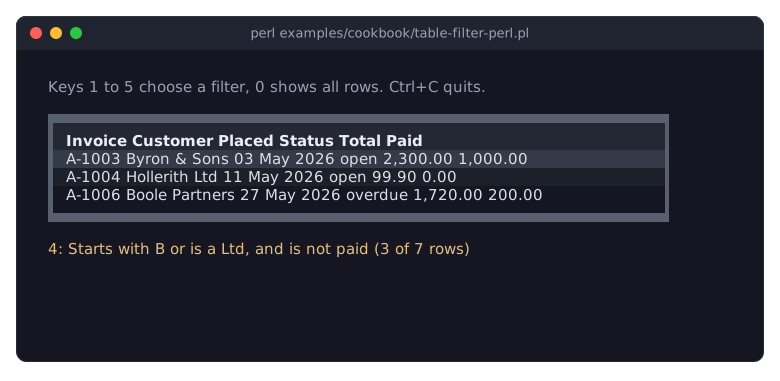
The picture shows a table filtered by a combination of conditions; the program is in "Filter rows from Perl (numbers, dates, text, raw or shown values)" in Term::Fabulous::Cookbook::TableRows.
What a condition compares
A condition on a column compares the cell of each row with an operand (value). By default it reads the cell's raw value, what the column's value option gives (the row's entry under the column key); with on => 'display' it reads the text the column shows instead, the value after the column's mutators. Use display to filter by what the user sees, for example a formatted date, and value to filter by what the data says, for example the epoch seconds behind it.
How the cell and the operand are compared depends on the type: the filter's type, or else the column's type:
string-
Text comparison, case-insensitive (with
fc) unlesscase_sensitiveis true. The comparison ops order text the waycmpdoes. number-
Both sides are read as numbers (see "number_of" in Term::Fabulous::Widget::Table::Value). An operand that is not a number dies when the filter is made or first used.
date-
The cell is read as a date (epoch seconds, a date string, or an object with an
epochmethod; see "date_epoch" in Term::Fabulous::Widget::Table::Value). The operand is a span of time: a date string covers what it names (2024-05is all of May 2024,2024-05-03that whole day, see "date_interval" in Term::Fabulous::Widget::Table::Value), epoch seconds cover one second. A date is equal to a span when it lies inside it, less when it lies before it and greater when it lies after it. Soop => '=', value => '2024-05-03'matches every time of that day,'<='everything up to its end,'>'everything from the next day on.
Cells that are blank (undef or '') or that cannot be read as the type match none of the comparison ops, not even !=; use empty and not_empty for them. The text ops read every cell as text, blank cells as ''.
CONSTRUCTORS
new
my $filter = Term::Fabulous::Widget::Table::Filter->new(%parameters);One of three kinds, chosen by the parameters; unknown parameters and mixed kinds die.
A condition takes column and op, and value for every op but empty and not_empty:
column-
The key of the column whose cells are compared. The table checks that the column exists when the filter is set.
op-
The text ops (they read every cell as text):
contains       the text contains the value
not_contains   it does not
equals         the text is the value
not_equals     it is not
starts_with    the text starts with the value
ends_with      the text ends with the value
matches        the text matches a pattern: a qr// (used as it is,
               with its own flags) or a string with a regular
               expression (case-insensitive unless case_sensitive);
               an invalid pattern dies
The comparison ops (they compare as the type says):
=   ==  eq     equal
!=  ne         not equal
<   lt         less
<=  le         less or equal
>   gt         greater
>=  ge         greater or equal
between        from value->[0] to value->[1], both included
in             equal to one of the values in an array reference
And for blank cells:
empty the cell is undef or '' not_empty it is not value-
The operand: a plain value, an array reference of two for
between, of any number forin, or a pattern formatches. Copied. on-
'value'(the default) or'display'; see "What a condition compares". type-
'string','number'or'date', orundef(the default) for the type of the column. case_sensitive-
A boolean, default 0: whether text comparisons tell upper and lower case apart.
A test takes test, a code reference, and optionally column and on. With a column, it is called as $test->( $cell, $row ) for every row, with the cell (its raw value or its display text, as on says) and a copy of the row's data; without one, as $test->($row). A true return value is a match. A code reference given to "filter" in Term::Fabulous::Widget::Table is a row test.
The combinations are made with "all", "any" and "not".
all
my $filter = $F->all( $f1, $f2, sub ($row) { ... } );Matches rows that match every filter given (code references are row tests). An empty all matches every row.
any
my $filter = $F->any( $f1, $f2 );Matches rows that match at least one of the filters. An empty any matches no row.
not
my $filter = $F->not($f1);Matches rows that do not match the filter.
parse
my $filter = $F->parse( $text, column => 'age', type => 'number' );Makes a condition from a filter expression, the short notation a user types into a filter field of a table (see "filter_row" in Term::Fabulous::Widget::Table). Returns undef for an empty expression (no filter) and dies for one it cannot read, with a message that shows the notation. Options: column (required), type ('string', the default, 'number' or 'date'), on and case_sensitive (as for "new"). Spaces around the expression, and between an operator and its value, are ignored. Dates are read in local time; a T may stand for the space before the time, and a Z after the time reads it as UTC. Epoch seconds are not a date expression. The notation:
Text columns
  ann          contains "ann"
  !ann         does not contain "ann"
  =Ann Lee     is "Ann Lee"
  !=Ann Lee    is not "Ann Lee"
  ^An          starts with "An"
  Lee$         ends with "Lee"
  ^Ann Lee$    is "Ann Lee"
  /^a.*e$/     matches the regular expression

Number columns
  42  =42      is 42
  !=42         is not 42
  >42  >=42    greater (or equal)
  <42  <=42    less (or equal)
  10..20       from 10 to 20

Date columns: the same as numbers, with dates
  2024-05-03         that day
  >=2024-05          from May 2024 on
  <2024-05-03 14:30  before that minute
  2024-01..2024-03   from January to the end of March 2024

Every column
  =            the cell is empty
  !=           the cell is not empty
METHODS
matches
my $yes = $filter->matches( $row, $source );True when the row matches. $row is the row's data (a hash reference); $source is an object with the methods value_of( $row, $key ), display_of( $row, $key ) and type_of($key) - the table passes itself. You rarely call this yourself.
check
$filter->check($source);Dies when the filter compares a column $source does not have ($source->has_column($key)) or has an operand that cannot be read as the type of its column ($source->type_of($key)), for example op => '>', value => 'abc' on a number column. Returns the filter. The table method filter calls it for every filter it is given, so a bad filter dies there and not while the table is drawn.
The readers below return the parameters the filter was made with.
column
The key of the column the filter compares (a condition, or a test with a column), or undef.
op
The op of a condition, with aliases resolved ('==' and 'eq' are '=', 'ne' is '!=', ...), or undef for other filters.
value
The operand of a condition (a copy when it is an array reference), or undef.
on
'value' or 'display'.
type
'string', 'number' or 'date', or undef for the type of the column.
case_sensitive
1 if text comparisons tell upper and lower case apart, 0 otherwise.
test
The code reference of a test, or undef for other filters.
combine
'all', 'any' or 'not' for a combination, undef for other filters.
filters
The filters of a combination, as a list (empty for other filters).
columns
The keys of all columns the filter (and every filter it combines) compares, as a list.
SEE ALSO
Term::Fabulous::Widget::Table, Term::Fabulous::Widget::Table::Value, "FILTERING" in Term::Fabulous::Manual::TableRows, "Let the user filter rows (filter row and search box)" in Term::Fabulous::Cookbook::TableRows.