NAME
Term::Fabulous::Cookbook::Output - Recipes: reports and tests without a terminal
DESCRIPTION
This page is part of Term::Fabulous::Cookbook. Previous page: Term::Fabulous::Cookbook::Canvases. Next page: Term::Fabulous::Cookbook::Extending.
This page shows two uses of Term::Fabulous without an interactive terminal: printing a widget tree as text, for reports in pipes, files and cron jobs, and testing a program's widgets in an automated test by giving them input and reading the screen. They use Term::Fabulous::Static and Term::Fabulous::Terminal::Memory. Both are explained in "RENDERING WITHOUT A TERMINAL" in Term::Fabulous::Manual::Programs and "TESTING" in Term::Fabulous::Manual::Programs. Tables and charts in reports have recipes of their own: "Print a table as a report (Static)" in Term::Fabulous::Cookbook::Tables and "Print charts in a report (Static)" in Term::Fabulous::Cookbook::ChartTechniques.
The recipes on this page:
Render a report to a file or pipe (Static)
Goal: lay out a widget tree once and print it as text, with colors on a terminal and plain in a pipe or a file.
This program is shipped as examples/cookbook/report-to-file.pl.
use v5.32;
use warnings;
use feature 'signatures';
no warnings 'experimental::signatures';

use Term::Fabulous::Static;
use Term::Fabulous::Enum::BorderStyle;
use Term::Fabulous::Widget::Box;
use Term::Fabulous::Widget::Text;
use Clay::XS qw(sizing_grow sizing_fit CLAY_TOP_TO_BOTTOM);

my %sales = ( 'North' => 1250, 'South' => 980, 'East' => 1530 );

my $report = Term::Fabulous::Widget::Box->new(
	bordered     => 1,
	border_style => Term::Fabulous::Enum::BorderStyle->Round,
	border_color => [ 120, 180, 240, 255 ],
	layout       => {
		layout_direction => CLAY_TOP_TO_BOTTOM,
		sizing           => { width => sizing_grow(), height => sizing_fit() },
		padding          => { left  => 1,             right  => 1 },
	},
);
$report->add_child( Term::Fabulous::Widget::Text->new( text => 'Sales per region (in EUR)', text_color => [ 255, 200, 80, 255 ] ) );
foreach my $region ( sort keys %sales ) {
	my $line = sprintf '%-8s %6d', $region, $sales{$region};
	$report->add_child( Term::Fabulous::Widget::Text->new( text => $line, text_color => [ 230, 230, 230, 255 ] ) );
}

my $page = Term::Fabulous::Static->new( root => $report, width => 40 );

# To the terminal or a pipe: colors only when STDOUT is a terminal.
$page->print;

# To a file, always without colors. print() encodes the text as UTF-8
# itself, so open the file without an encoding layer.
open my $file, '>', 'report.txt' or die "Cannot write report.txt: $!";
$page->print( fh => $file, colors => 0 );
close $file;

# As a string, for example for an e-mail body (a character string).
my $text = $page->render_string( colors => 0 );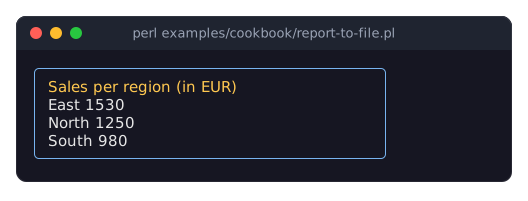
The program prints a 40 column box with rounded corners holding a title and three lines, and writes the same box without color codes to report.txt. In a pipe or a file, and in report.txt, the box is:
╭──────────────────────────────────────╮
│ Sales per region (in EUR)            │
│ East       1530                      │
│ North      1250                      │
│ South       980                      │
╰──────────────────────────────────────╯
Term::Fabulous::Static lays out and draws exactly like Term::Fabulous, but into memory. It never opens the terminal, so it works in pipes, cron jobs and tests. Only
widthis required; the output ends with the last row the widgets painted.printwrites UTF-8 bytes. With nocolorsargument it uses colors only when the handle is a terminal. Open files without an encoding layer, or the text is encoded twice.render_stringandrender_linesreturn character strings (one string, or one per row). See "RENDERING WITHOUT A TERMINAL" in Term::Fabulous::Manual::Programs.The root uses
sizing_fit()for its height; withsizing_grow()it would fill the default height of 4096 rows.Spaces at the end of a row are dropped unless they have a background color. Pass
trim_trailing_whitespace => 0tonewto get every row padded towidthcolumns, for example for fixed-width files.
Test a widget without a terminal
Goal: test the behavior of a screen in an automated test: type into it, press keys, click it, and check the values and what the screen shows, exactly as a user at a real terminal would see it.
This program is shipped as examples/cookbook/test-a-widget.pl.
use v5.32;
use warnings;
use feature 'signatures';
no warnings 'experimental::signatures';

use Test2::V0;
use Clay::XS qw(sizing_fixed sizing_grow CLAY_TOP_TO_BOTTOM);
use Term::Fabulous;
use Term::Fabulous::Terminal::Memory;
use Term::Fabulous::Widget::Box;
use Term::Fabulous::Widget::Button;
use Term::Fabulous::Widget::Text;
use Term::Fabulous::Widget::TextField;

my $field = Term::Fabulous::Widget::TextField->new( preferred_columns => 10, max_length => 8 );
my $save  = Term::Fabulous::Widget::Button->new(
	background_color => [ 40, 90, 160, 255 ],
	layout           => { sizing => { width => sizing_fixed(6), height => sizing_fixed(1) }, padding => { left => 1 } },
);
$save->add_child( Term::Fabulous::Widget::Text->new( text => 'Save', text_color => [ 255, 255, 255, 255 ] ) );

my $root = Term::Fabulous::Widget::Box->new( layout => { layout_direction => CLAY_TOP_TO_BOTTOM, sizing => { width => sizing_grow(), height => sizing_grow() }, child_gap => 1 } );
$root->add_child( $field, $save );

my ( @changes, @saved );
$field->on( Change => sub ($event) { push @changes, $event->value; return } );
$save->on( Activate => sub ($event) { push @saved, $field->value; return } );

# The program's widget tree on a terminal in memory, 20 columns by 3 rows.
my $terminal = Term::Fabulous::Terminal::Memory->new( width => 20, height => 3 );
my $ui       = Term::Fabulous->new( root => $root, width => 20, height => 3, terminal => $terminal );
$ui->step;    # opens the terminal and draws the first frame

# Tab focuses the field; the keys go to it as on a real terminal.
$terminal->press_key('Tab')->type_text('hello')->press_key('Left')->type_text('X');
$ui->step;
is $field->value, 'hellXo', 'typing and cursor movement';
is $changes[-1],  'hellXo', 'Change carries the new text';

$terminal->type_text('abcdef');
$ui->step;
is $field->value, 'hellXabo', 'max_length stops the input at 8 characters';

# The field is 10 columns wide and has a background color, so its
# empty cells are kept as spaces.
is [ $terminal->lines ], [ 'hellXabo  ', '', ' Save ' ], 'what the screen shows';

# A click on the button: hit-tested, pressed and released like a real one.
$terminal->click( 2, 2 );
$ui->step;
is \@saved, ['hellXabo'], 'the click activates the button';
ref_is $ui->interaction->get_focused_widget, $save, 'and focuses it';

done_testing;
Run it like any test, with prove or perl. Run with perl, it prints (the first line is a note from Test2::V0, with the seed of the day):
# Seeded srand with seed '20261003' from local date.
ok 1 - typing and cursor movement
ok 2 - Change carries the new text
ok 3 - max_length stops the input at 8 characters
ok 4 - what the screen shows
ok 5 - the click activates the button
ok 6 - and focuses it
1..6
Term::Fabulous::Terminal::Memory is a terminal that exists only in memory. Given to
newasterminal, it receives the frames and supplies the input.stepis one turn ofrunwithout an event loop: the first call opens the terminal and firesStart, and every call reads the queued input, dispatches it and draws the frames that are due.The input goes through everything real input goes through: the keys go to the focused widget, Tab moves the focus, a click is hit-tested against the last frame, focuses the button and presses and releases it, which fires
Activate.press_keytakes the nameskey_namegives keys ('Enter','Ctrl+Shift+Left','BackTab'),clickthe cell on the screen.linesreturns what the screen shows, one string per row, without the blanks at the end of a row unless they have a background color: the field has one, so its empty cells are kept as spaces.cellreturns a single cell with its colors.To test one widget's own key handling in isolation, fire events at it directly instead:
$widget->fire_event($event)with a Term::Fabulous::Event::KeyPress. Such events bubble to the root, but nothing around them happens (no focus, no Tab, no hit-testing). See "TESTING" in Term::Fabulous::Manual::Programs.
SEE ALSO
This page is part of Term::Fabulous::Cookbook. Previous page: Term::Fabulous::Cookbook::Canvases. Next page: Term::Fabulous::Cookbook::Extending.