NAME
Term::Fabulous::Cookbook::TableRows - Recipes: sort, filter, group, nest and page table rows
DESCRIPTION
This page is part of Term::Fabulous::Cookbook. Previous page: Term::Fabulous::Cookbook::Tables. Next page: Term::Fabulous::Cookbook::TableStyles.
The recipes on this page decide which rows a Term::Fabulous::Widget::Table shows and in which order: they sort the rows, let the user filter them, filter them from Perl, put them into groups the user can open and close, show nested rows as a tree, and split many rows into pages. Each recipe is a complete program, shipped in examples/cookbook/, with a screenshot and notes on every feature it uses. Besides the table, the recipes use Term::Fabulous::Widget::Table::Filter (conditions on rows) and Term::Fabulous::Widget::Table::Mutator (number and date formats).
Term::Fabulous::Manual::TableRows explains the concepts behind these recipes: sorting, filtering, groups, trees and pages. Term::Fabulous::Manual::Tables explains rows, columns and display text, and Term::Fabulous::Manual::TableStyles the lines and colors. The reference of every parameter, method, key and event is on Term::Fabulous::Widget::Table. For a first table, start with Term::Fabulous::Cookbook::Tables.
All recipes on this page give the table the look of the recipe A table with colored rows and titles: border => 'Outer', column_lines => 'none', header_line => 'none' and a stripe_color. Leave these four parameters out for the default look: a rounded frame with thin lines between the columns and below the titles.
The recipes on this page:
Sort rows, also with your own comparison
Goal: sort a table by two columns at the start, sort version numbers and ticket names in natural order, order priorities with a function of your own, and report every sort the user chooses.
This program is shipped as examples/cookbook/table-sort.pl.
use v5.32;
use warnings;
use feature 'signatures';
no warnings 'experimental::signatures';

use Term::Fabulous;
use Term::Fabulous::Widget::Box;
use Term::Fabulous::Widget::Table;
use Term::Fabulous::Widget::Text;
use Clay::XS qw(sizing_grow CLAY_TOP_TO_BOTTOM);

my @tickets = (
	{ ticket => 'T-9',   title => 'Crash on empty config',    priority => 'high',   version => '2.10.1', opened => '2026-05-12', note => 'add a test' },
	{ ticket => 'T-10',  title => 'Typo in the help text',    priority => 'low',    version => '2.9',    opened => '2026-05-20', note => '' },
	{ ticket => 'T-2',   title => 'Slow start, 1000 rows',    priority => 'normal', version => '2.10',   opened => '2026-04-02', note => 'profile' },
	{ ticket => 'T-11',  title => 'Dark theme for the pager', priority => 'normal', version => '2.9.3',  opened => '2026-05-28', note => '' },
	{ ticket => 'T-101', title => 'Wrong date in reports',    priority => 'high',   version => '2.9.12', opened => '2026-05-30', note => 'customer' },
	{ ticket => 'T-7',   title => 'Mouse wheel too fast',     priority => 'low',    version => '2.10',   opened => '2026-03-15', note => '' },
);

# The order of the priorities: a custom comparison gets two raw values
# (and copies of the two rows) and returns a number like <=> does.
my %RANK = ( high => 1, normal => 2, low => 3 );

sub by_priority ( $left, $right, $left_row, $right_row ) {
	return ( $RANK{ $left // '' } // 9 ) <=> ( $RANK{ $right // '' } // 9 );
}

my $root = Term::Fabulous::Widget::Box->new(
	layout => {
		layout_direction => CLAY_TOP_TO_BOTTOM,
		sizing           => { width => sizing_grow(), height => sizing_grow() },
		padding          => { left  => 2, right => 2, top => 1, bottom => 1 },
		child_gap        => 1,
	},
);

my $table = Term::Fabulous::Widget::Table->new(
	id     => 'tickets',
	row_id => 'ticket',
	sort   => [ 'priority', [ opened => 'desc' ] ],    # highest priority first, newest first within each
		# The look: a block frame, and colors instead of grid lines.
	border       => 'Outer',
	column_lines => 'none',
	header_line  => 'none',
	stripe_color => '#1c2029',
	columns      => [
		{ key => 'ticket',   title => 'Ticket', compare => 'natural' },    # T-2 before T-10
		{ key => 'title',    title => 'Title' },
		{ key => 'priority', title => 'Priority', compare  => \&by_priority },
		{ key => 'version',  title => 'Version',  compare  => 'natural' },    # 2.9.3 before 2.10
		{ key => 'opened',   title => 'Opened',   type     => 'date' },
		{ key => 'note',     title => 'Note',     sortable => 0 },
	],
	rows => \@tickets,
);

sub describe_sort ($spec) {
	return 'Not sorted: the rows are in data order.' unless @$spec;
	return 'Sorted by ' . join ', then ', map { "$_->[0] ($_->[1])" } @$spec;
}

my $help   = Term::Fabulous::Widget::Text->new( text => 'Click a title to sort, Ctrl+click adds it. Keys: Up into the titles, then Enter or Space.', text_color => [ 150, 160, 180, 255 ] );
my $status = Term::Fabulous::Widget::Text->new( text => describe_sort( $table->sort_spec ),                                                          text_color => [ 229, 192, 123, 255 ] );
$root->add_child( $help, $table, $status );

$table->on(
	SortChange => sub ($event) {
		$status->text( describe_sort( $event->sort ) );
		return;
	}
);

my $ui = Term::Fabulous->new( root => $root, width => 96, height => 20 );
$ui->interaction->set_focused_widget($table);
$ui->run;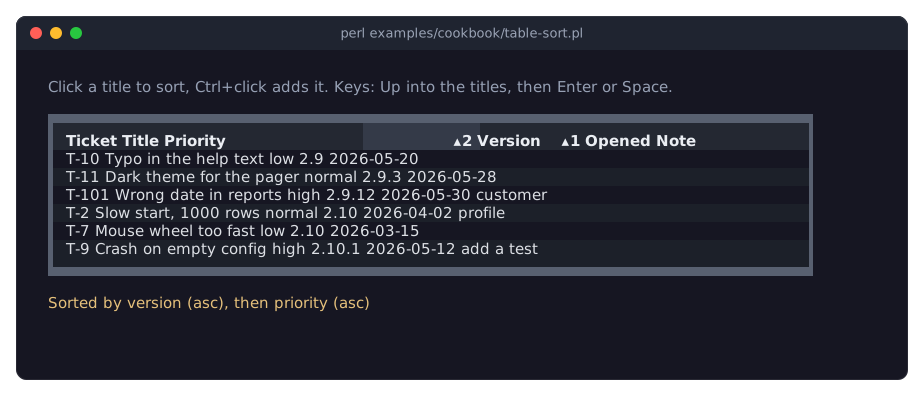
The picture shows the table after the keys Up, Right three times, Enter (sort by Version alone), Left and Space (add Priority to the sort).
sort => [ 'priority', [ opened => 'desc' ] ]sorts by priority first; rows with the same priority are ordered by the opening date, newest first. A plain key sorts ascending,[ $key, 'desc' ]descending. Rows that are equal in every sort column keep their data order. See "Sorting from Perl" in Term::Fabulous::Manual::TableRows and "Sorting by several columns" in Term::Fabulous::Manual::TableRows.compare => 'natural'compares runs of digits as numbers:T-2comes beforeT-10, and version2.9.12before2.10. The default for text columns,'string', would putT-10beforeT-2. See "How values are compared" in Term::Fabulous::Manual::TableRows.comparealso takes a code reference. It gets the two raw values and copies of the two rows, and returns a negative number, 0 or a positive number for ascending order, like<=>andcmp. The table reverses the result for descending order. The named comparisons put blank values, and values they cannot read, last in both directions; a function gets every value, blank ones (undef) included, so it must handle them itself, asby_prioritydoes with//. See "Custom sort functions" in Term::Fabulous::Manual::TableRows.sortable => 0keeps the user from sorting by theNotecolumn: clicks and keys on its title do nothing. Your program can still sort by it with sort_by.The user sorts by one column with a click on its title, which cycles through ascending, descending and unsorted.
Ctrl+click (orShift+click orAlt+click) adds a column to the sort. With the keyboard,Upon the first row moves into the titles,LeftandRightchoose one,Entersorts by it alone andSpaceadds it to the sort. The markers▴1and▾2show the direction and the place of each column in the sort. See "Sorting by the user" in Term::Fabulous::Manual::TableRows and "In the header" in Term::Fabulous::Widget::Table.SortChangefires for every sort the user chooses.$event->sortis the new sort as a list of[ $key, $direction ]pairs, the same form sort_spec returns. Thesortparameter fires no event, so the program writes the first status line itself from$table->sort_spec.
Let the user filter rows (filter row and search box)
Goal: let the user filter a table by typing expressions such as >=80000 or 2019..2021 under the column titles, search all columns from a text field above the table, and show how many rows pass.
This program is shipped as examples/cookbook/table-filter.pl.
use v5.32;
use warnings;
use feature 'signatures';
no warnings 'experimental::signatures';

use Term::Fabulous;
use Term::Fabulous::Widget::Box;
use Term::Fabulous::Widget::Table;
use Term::Fabulous::Widget::Table::Mutator qw(date number);
use Term::Fabulous::Widget::Text;
use Term::Fabulous::Widget::TextField;
use Clay::XS qw(sizing_grow sizing_fixed CLAY_TOP_TO_BOTTOM);

my @staff = (
	{ id => 1,  name => 'Ada Lovelace',      team => 'Core',     started => '2019-03-04', salary => 81000 },
	{ id => 2,  name => 'Grace Hopper',      team => 'Web',      started => '2021-11-15', salary => 92500 },
	{ id => 3,  name => 'Linus Torvalds',    team => 'Core',     started => '2017-06-01', salary => 90000 },
	{ id => 4,  name => 'Margaret Hamilton', team => 'Platform', started => '2016-02-22', salary => 99000 },
	{ id => 5,  name => 'Ken Thompson',      team => 'Core',     started => '2023-01-09', salary => 70000 },
	{ id => 6,  name => 'Barbara Liskov',    team => 'Platform', started => '2018-09-17', salary => 95500 },
	{ id => 7,  name => 'Dennis Ritchie',    team => 'Core',     started => '2020-05-11', salary => 78000 },
	{ id => 8,  name => 'Radia Perlman',     team => 'Network',  started => '2022-08-29', salary => 76000 },
	{ id => 9,  name => 'Tim Berners-Lee',   team => 'Web',      started => '2020-10-05', salary => 74500 },
	{ id => 10, name => 'Frances Allen',     team => 'Platform', started => '2024-02-12', salary => 68000 },
	{ id => 11, name => 'Hedy Lamarr',       team => 'Network',  started => '2019-12-02', salary => 88000 },
	{ id => 12, name => 'Katherine Johnson', team => 'Research', started => '2021-03-08', salary => 83000 },
);

my $root = Term::Fabulous::Widget::Box->new(
	layout => {
		layout_direction => CLAY_TOP_TO_BOTTOM,
		sizing           => { width => sizing_grow(), height => sizing_grow() },
		padding          => { left  => 2, right => 2, top => 1, bottom => 1 },
		child_gap        => 1,
	},
);

my $search = Term::Fabulous::Widget::TextField->new(
	id          => 'search',
	placeholder => 'Search all columns',
	layout      => { sizing => { width => sizing_fixed(30) } },
);

my $table = Term::Fabulous::Widget::Table->new(
	id         => 'staff',
	row_id     => 'id',
	filter_row => 1,
	sort       => ['name'],
	layout     => { sizing => { width => sizing_grow() } },

	# The look: a block frame, and colors instead of grid lines.
	border       => 'Outer',
	column_lines => 'none',
	header_line  => 'none',
	stripe_color => '#1c2029',
	columns      => [
		{ key => 'name',    title => 'Name',    width => 'grow' },
		{ key => 'team',    title => 'Team',    width => 'fixed(14)' },
		{ key => 'started', title => 'Started', width => 'fixed(16)', type => 'date',   mutator => date('%d %b %Y') },
		{ key => 'salary',  title => 'Salary',  width => 'fixed(14)', type => 'number', mutator => number( decimals => 0 ) },
	],
	rows => \@staff,
);

my $status = Term::Fabulous::Widget::Text->new( text => '',                                                                  text_color => [ 229, 192, 123, 255 ] );
my $help   = Term::Fabulous::Widget::Text->new( text => 'Tab: next field. Try "core", ">=80000", ">=2020" or "2019..2021".', text_color => [ 150, 160, 180, 255 ] );
$root->add_child( $search, $table, $status, $help );

# The count of the rows that pass, or why a filter field is not used.
sub show_count () {
	foreach my $key ( $table->column_keys ) {
		my $error = $table->filter_error($key) // next;
		$status->text( sprintf '%s: %s', $table->column($key)->title, $error );
		return;
	}
	$status->text( sprintf '%d of %d rows', scalar $table->filtered_row_ids, $table->row_count );
	return;
}

$search->on(
	Change => sub ($event) {
		$table->search( $event->value );
		show_count();
		return;
	}
);

$table->on(
	FilterChange => sub ($event) {
		show_count();
		return;
	}
);

my $ui = Term::Fabulous->new( root => $root, width => 80, height => 24 );
show_count();
$ui->interaction->set_focused_widget($search);
$ui->run;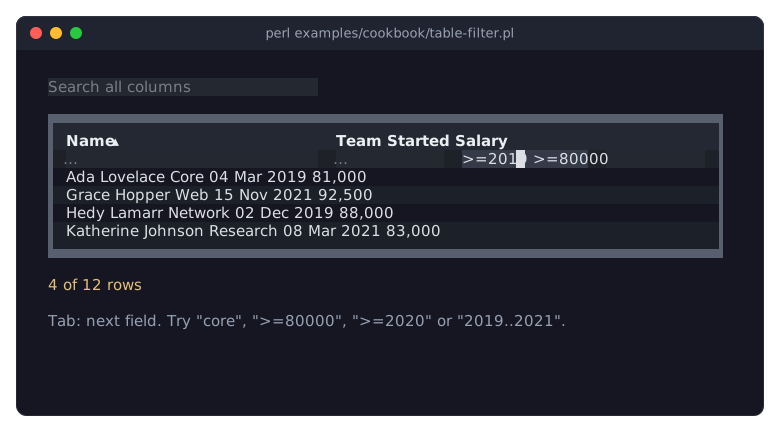
The picture shows the table after the user moved to the Salary field with Tab, typed >=80000, went back to the Started field with Shift+Tab and typed >=2019.
filter_row => 1puts a text field under every column title. The table filters while the user types, and shows only the rows that match all fields. See "The filter row" in Term::Fabulous::Manual::TableRows.What a field accepts depends on the column's
type. In text columns,corekeeps the rows whose cell contains "core" (upper and lower case do not matter),^Adathose whose cell starts with "Ada", and!Webthose whose cell does not contain "Web". In number columns,>=80000,<70000and70000..90000compare numbers. In date columns,>=2019,2021-03and2019..2021compare dates, and a date stands for the whole year, month or day it names. In every column,=alone keeps the rows whose cell is empty and!=alone those whose cell is not empty. The filter row section of the manual lists the full notation.Number and date fields compare the raw value, not the display text: type
80000, not80,000, and2019-03-04, not04 Mar 2019. Text fields compare the display text. A column'sfilter_onchanges this; see "Raw value or display text" in Term::Fabulous::Manual::TableRows.The columns have fixed or growing widths so that the filter fields are wide enough to type in. A filter field is as wide as its column.
TabandShift+Tabmove between the search field, the table and the filter fields. In a filter field,EnterorDowngo to the rows andEscapeempties the field.The search field is a plain Term::Fabulous::Widget::TextField. Its
Changelistener passes the text to search, which keeps the rows where the display text of at least one visible cell contains the text. The search and the filter fields work together: a row must pass both. See "Searching all columns" in Term::Fabulous::Manual::TableRows.FilterChangefires after every change the user makes in a filter field. When a field holds an expression its column cannot read, such as>abcin the Salary field, its text turns red, the column is not filtered, and filter_error returns the reason, whichshow_countshows. Otherwise it shows the number of rows that pass, from filtered_row_ids, and of all rows. Callingsearchfrom Perl fires no event, so theChangelistener of the search field callsshow_countitself.When no row passes, the table shows
No rows match. See "What a filtered table shows" in Term::Fabulous::Manual::TableRows.
Filter rows from Perl (numbers, dates, text, raw or shown values)
Goal: give the user a choice of ready-made filters, such as "placed in May" or "not paid", built from conditions on numbers, dates and text, combined with and, or and not.
This program is shipped as examples/cookbook/table-filter-perl.pl.
use v5.32;
use warnings;
use feature 'signatures';
no warnings 'experimental::signatures';

use Term::Fabulous;
use Term::Fabulous::Widget::Box;
use Term::Fabulous::Widget::Table;
use Term::Fabulous::Widget::Table::Filter;
use Term::Fabulous::Widget::Table::Mutator qw(date lookup number);
use Term::Fabulous::Widget::Text;
use Clay::XS qw(sizing_grow CLAY_TOP_TO_BOTTOM);

my $F = 'Term::Fabulous::Widget::Table::Filter';

my @invoices = (
	{ invoice => 'A-1001', customer => 'Babbage Ltd',      placed => '2026-04-14', status => 'p', total => 1250.00, paid => 1250.00 },
	{ invoice => 'A-1002', customer => 'Analytical Works', placed => '2026-04-29', status => 'd', total => 480.50,  paid => 0 },
	{ invoice => 'A-1003', customer => 'Byron & Sons',     placed => '2026-05-03', status => 'o', total => 2300.00, paid => 1000.00 },
	{ invoice => 'A-1004', customer => 'Hollerith Ltd',    placed => '2026-05-11', status => 'o', total => 99.90,   paid => 0 },
	{ invoice => 'A-1005', customer => 'Countess Supply',  placed => '2026-05-20', status => 'p', total => 640.00,  paid => 640.00 },
	{ invoice => 'A-1006', customer => 'Boole Partners',   placed => '2026-05-27', status => 'd', total => 1720.00, paid => 200.00 },
	{ invoice => 'A-1007', customer => 'Jacquard Looms',   placed => '2026-06-01', status => 'o', total => 315.25,  paid => 0 },
);

# Key 1 to 5 sets one of these filters under the name 'chosen'; key 0
# removes it.
my @choices = (
	[ 'Totals of 1,000 or more' => $F->new( column => 'total',  op => '>=', value => 1000 ) ],
	[ 'Placed in May 2026'      => $F->new( column => 'placed', op => '=',  value => '2026-05' ) ],
	[
		'Open or overdue, totals from 100 to 2,000' => $F->all(
			$F->new( column => 'status', op => 'in', value => [ 'open', 'overdue' ], on => 'display' ),
			$F->new( column => 'total',  op => 'between', value => [ 100, 2000 ] ),
		)
	],
	[
		'Starts with B or is a Ltd, and is not paid' => $F->all(
			$F->any(
				$F->new( column => 'customer', op => 'starts_with', value => 'B' ),
				$F->new( column => 'customer', op => 'matches',     value => qr/\bLtd\z/ ),
			),
			$F->not( $F->new( column => 'status', op => 'equals', value => 'p' ) ),
		)
	],
	[ 'More than 500 still owed' => sub ($row) { $row->{total} - $row->{paid} > 500 } ],
);

my $root = Term::Fabulous::Widget::Box->new(
	layout => {
		layout_direction => CLAY_TOP_TO_BOTTOM,
		sizing           => { width => sizing_grow(), height => sizing_grow() },
		padding          => { left  => 2, right => 2, top => 1, bottom => 1 },
		child_gap        => 1,
	},
);

my $table = Term::Fabulous::Widget::Table->new(
	id     => 'invoices',
	row_id => 'invoice',

	# The look: a block frame, and colors instead of grid lines.
	border       => 'Outer',
	column_lines => 'none',
	header_line  => 'none',
	stripe_color => '#1c2029',
	columns      => [
		{ key => 'invoice',  title => 'Invoice' },
		{ key => 'customer', title => 'Customer' },
		{ key => 'placed',   title => 'Placed', type    => 'date', mutator => date('%d %b %Y') },
		{ key => 'status',   title => 'Status', mutator => lookup( { o => 'open', p => 'paid', d => 'overdue' } ) },
		{ key => 'total',    title => 'Total',  type    => 'number', mutator => number( decimals => 2 ) },
		{ key => 'paid',     title => 'Paid',   type    => 'number', mutator => number( decimals => 2 ) },
	],
	rows => \@invoices,
);

my $help   = Term::Fabulous::Widget::Text->new( text => 'Keys 1 to 5 choose a filter, 0 shows all rows. Ctrl+C quits.', text_color => [ 150, 160, 180, 255 ] );
my $status = Term::Fabulous::Widget::Text->new( text => '',                                                             text_color => [ 229, 192, 123, 255 ] );
$root->add_child( $help, $table, $status );

sub choose_filter ($number) {
	if ( $number == 0 ) {
		$table->remove_filter('chosen');
		$status->text( sprintf '0: all rows (%d)', $table->row_count );
		return;
	}
	my ( $label, $filter ) = $choices[ $number - 1 ]->@*;
	$table->filter( chosen => $filter );
	$status->text( sprintf '%d: %s (%d of %d rows)', $number, $label, scalar $table->filtered_row_ids, $table->row_count );
	return;
}

# The table does not use the digit keys, so they bubble up to the root.
$root->on(
	KeyPress => sub ($event) {
		my $key = $event->key_name // return;
		return unless $key =~ /\A[0-5]\z/;
		choose_filter($key);
		return;
	}
);

my $ui = Term::Fabulous->new( root => $root, width => 80, height => 24 );
choose_filter(0);
$ui->interaction->set_focused_widget($table);
$ui->run;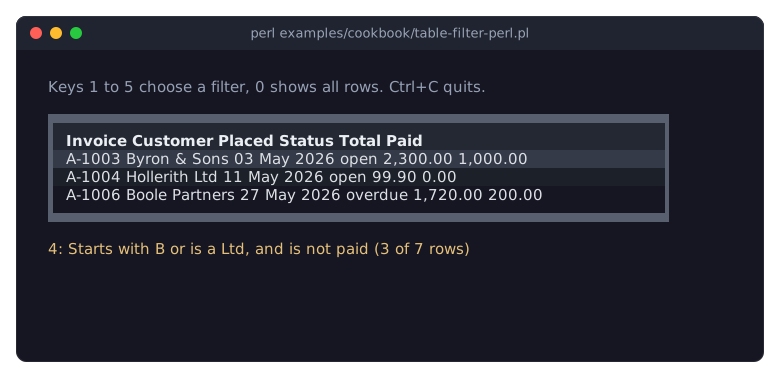
The picture shows the table after the user pressed 4.
A condition is a Term::Fabulous::Widget::Table::Filter with a
column, anopand avalue. The comparison ops (=,!=,<,<=,>,>=,between,in) compare as the column'stypesays: numbers as numbers, dates as dates. The text ops (contains,not_contains,equals,not_equals,starts_with,ends_withandmatches) compare text and ignore case unless the condition sayscase_sensitive => 1.emptyandnot_emptyneed novalue: they keep the rows whose cell is blank, or not blank. See "Filters from Perl" in Term::Fabulous::Manual::TableRows and "new" in Term::Fabulous::Widget::Table::Filter.A date in a filter stands for the span of time it names:
2026-05is all of May 2026, soop => '=', value => '2026-05'keeps every row placed in May.betweenincludes both ends; its value is an array reference of two.matchestakes aqr//pattern, which is used with its own flags, or a string with a regular expression.$F->all(...)matches rows that match every filter given,$F->any(...)rows that match at least one, and$F->not(...)rows that do not match. They nest, as filter 4 shows. See "all" in Term::Fabulous::Widget::Table::Filter.A code reference is a filter, too: it gets a copy of the row's data and returns true for the rows to keep. Filter 5 compares two entries of the row, which no single condition can do.
Conditions compare the raw value unless they say
on => 'display'. Thestatuscolumn holds the codeso,pandd, shown asopen,paidandoverdueby its mutator. Filter 3 compares the shown words (on => 'display'), filter 4 the raw codep. See "Raw value or display text" in Term::Fabulous::Manual::TableRows.filter sets a filter under a name; setting another filter under the same name replaces it, and remove_filter removes it. A table shows the rows that match all its named filters, its filter row and its search. A filter that names an unknown column, or compares with a value its column cannot read, dies in
filter.Filters set from Perl fire no event;
choose_filterwrites the status line itself after setting one.The
KeyPresslistener sits on the root. The table, which has the focus, uses keys such asUpandSpaceitself and stops them; the digits it does not use bubble up to the root. A listener on the table itself would get every key the table gets. See "EVENTS" in Term::Fabulous::Widget::Table.
Group rows by a column (collapsible group headers)
Goal: show the rows of a table in groups, one per value of a column, under headers that show a sum for the group and that the user can open and close.
This program is shipped as examples/cookbook/table-groups.pl.
use v5.32;
use warnings;
use feature 'signatures';
no warnings 'experimental::signatures';

use Term::Fabulous;
use Term::Fabulous::Widget::Box;
use Term::Fabulous::Widget::Table;
use Term::Fabulous::Widget::Table::Mutator qw(date number);
use Term::Fabulous::Widget::Text;
use Clay::XS qw(sizing_grow CLAY_TOP_TO_BOTTOM);

my @staff = (
	{ id => 1,  name => 'Ada Lovelace',      team => 'Core',     role => 'Engineer',  started => '2019-03-04', salary => 81000 },
	{ id => 2,  name => 'Grace Hopper',      team => 'Web',      role => 'Lead',      started => '2021-11-15', salary => 92500 },
	{ id => 3,  name => 'Linus Torvalds',    team => 'Core',     role => 'Engineer',  started => '2017-06-01', salary => 90000 },
	{ id => 4,  name => 'Margaret Hamilton', team => 'Platform', role => 'Architect', started => '2016-02-22', salary => 99000 },
	{ id => 5,  name => 'Ken Thompson',      team => 'Core',     role => 'Engineer',  started => '2023-01-09', salary => 70000 },
	{ id => 6,  name => 'Barbara Liskov',    team => 'Platform', role => 'Lead',      started => '2018-09-17', salary => 95500 },
	{ id => 7,  name => 'Dennis Ritchie',    team => 'Core',     role => 'Engineer',  started => '2020-05-11', salary => 78000 },
	{ id => 8,  name => 'Radia Perlman',     team => 'Network',  role => 'Engineer',  started => '2022-08-29', salary => 76000 },
	{ id => 9,  name => 'Tim Berners-Lee',   team => 'Web',      role => 'Engineer',  started => '2020-10-05', salary => 74500 },
	{ id => 10, name => 'Hedy Lamarr',       team => 'Network',  role => 'Lead',      started => '2019-12-02', salary => 88000 },
);

my $money = number( decimals => 0, prefix => '$' );

# The text of a group header: the team, its size and its salaries.
sub team_label ($group) {
	my $total = 0;
	$total += $group->{table}->value( $_, 'salary' ) foreach @{ $group->{ids} };
	return sprintf '%s: %d people, %s per year', $group->{display}, $group->{count}, $money->( $total, {} );
}

my $root = Term::Fabulous::Widget::Box->new(
	layout => {
		layout_direction => CLAY_TOP_TO_BOTTOM,
		sizing           => { width => sizing_grow(), height => sizing_grow() },
		padding          => { left  => 2, right => 2, top => 1, bottom => 1 },
		child_gap        => 1,
	},
);

my $table = Term::Fabulous::Widget::Table->new(
	id          => 'staff',
	row_id      => 'id',
	group_by    => 'team',
	group_label => \&team_label,
	group_style => { background_color => [ 40, 45, 58, 255 ], text_color => [ 229, 192, 123, 255 ] },
	sort        => [ [ salary => 'desc' ] ],    # within each group
		# The look: a block frame, and colors instead of grid lines.
	border       => 'Outer',
	column_lines => 'none',
	header_line  => 'none',
	stripe_color => '#1c2029',
	columns      => [
		{ key => 'name',    title => 'Name' },
		{ key => 'team',    title => 'Team', visible => 0 },    # the group header shows it
		{ key => 'role',    title => 'Role' },
		{ key => 'started', title => 'Started', type => 'date',   mutator => date('%d %b %Y') },
		{ key => 'salary',  title => 'Salary',  type => 'number', mutator => $money },
	],
	rows => \@staff,
);

my $help   = Term::Fabulous::Widget::Text->new( text => 'On a group header, Left closes it, Right opens it, Enter or a click toggles it.', text_color => [ 150, 160, 180, 255 ] );
my $status = Term::Fabulous::Widget::Text->new( text => 'All groups are open.',                                                            text_color => [ 229, 192, 123, 255 ] );
$root->add_child( $help, $table, $status );

$table->on(
	Collapse => sub ($event) {
		my $path = $event->group_path // return;
		$status->text( 'Closed the group ' . join ' / ', @$path );
		return;
	}
);
$table->on(
	Expand => sub ($event) {
		my $path = $event->group_path // return;
		$status->text( 'Opened the group ' . join ' / ', @$path );
		return;
	}
);

my $ui = Term::Fabulous->new( root => $root, width => 80, height => 24 );
$ui->interaction->set_focused_widget($table);
$ui->run;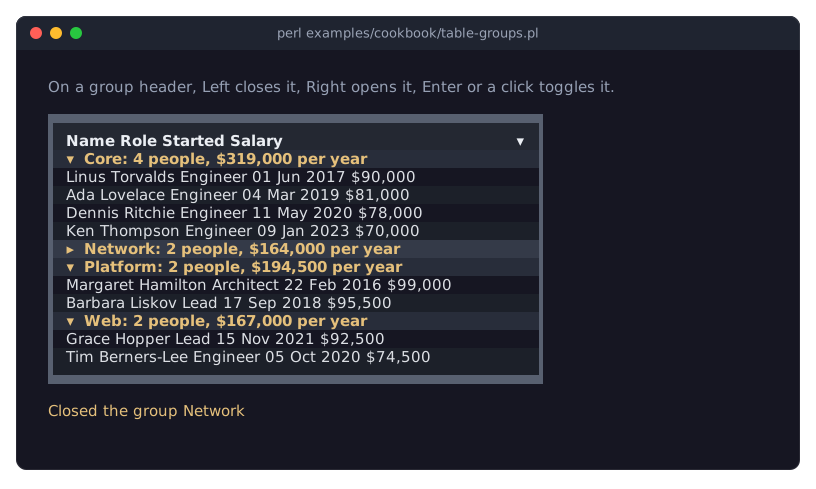
The picture shows the table after the user moved the cursor down to the header of the Network group and pressed Left.
group_by => 'team'puts the rows into one group per value of theteamcolumn. Each group starts with a group header, a line across the whole table. The groups are ordered by their value; thesortorders the rows within each group, here by salary, highest first. See "GROUPING" in Term::Fabulous::Manual::TableRows.The
teamcolumn is hidden withvisible => 0, since the group headers show the team. A hidden column still groups, sorts and filters. See "Choosing the visible columns" in Term::Fabulous::Manual::Tables.Without
group_label, a header shows the column title, the value and the number of rows, such asTeam: Core (4).group_labelreplaces that text: it gets a hash reference about the group and returns a string (or a widget).team_labelusesdisplay,countandids, the ids of the group's rows, and reads each salary with$group->{table}->value. See "Group headers" in Term::Fabulous::Manual::TableRows.A mutator is a plain code reference, so
team_labeluses$money, the mutator of the Salary column, to format the sum.group_stylesets the colors of all group headers, and can also draw lines around them (border_bottom => 'Solid'). See "Style keys" in Term::Fabulous::Manual::TableStyles.The user opens and closes a group with a click on its header, or with the cursor on the header:
EnterorSpacetoggle it,Rightor+open it,Leftor-close it. A closed header shows▸, an open one▾. See "Opening and closing groups" in Term::Fabulous::Manual::TableRows.Opening and closing fire
ExpandandCollapse.$event->group_pathis the group's path: an array reference with the group's raw value (with several group columns, the values of the groups around it come first). It isundefwhen a tree row opened or closed instead (see "Show nested data as a tree (expand and collapse rows)").From Perl,
$table->collapse_group('Network'),expand_group,collapse_all_groupsandexpand_all_groupsdo the same without events.group_by => [ 'team', 'role' ]makes groups within groups. Their paths then have two values, such as[ 'Core', 'Engineer' ], and$table->collapse_group( 'Core', 'Engineer' )closes one.
Show nested data as a tree (expand and collapse rows)
Goal: show a folder tree in a table, with sizes and dates, folders that open and close, and one folder whose entries are read only when the user opens it.
This program is shipped as examples/cookbook/table-tree.pl.
use v5.32;
use warnings;
use feature 'signatures';
no warnings 'experimental::signatures';

use Term::Fabulous;
use Term::Fabulous::Widget::Box;
use Term::Fabulous::Widget::Table;
use Term::Fabulous::Widget::Table::Mutator qw(bytes datetime);
use Term::Fabulous::Widget::Text;
use Clay::XS qw(sizing_grow CLAY_TOP_TO_BOTTOM);

sub file ( $path, $size, $modified ) {
	my ($name) = $path =~ m{([^/]+)\z};
	return { path => $path, name => $name, size => $size, modified => $modified };
}

sub folder ( $path, $modified, @children ) {
	my ($name) = $path =~ m{([^/]+)\z};
	return { path => $path, name => "$name/", modified => $modified, children => \@children };
}

# A folder whose entries are read only when the user opens it: its one
# child is a placeholder, which the Expand listener below replaces.
sub folder_to_load ( $path, $modified ) {
	return folder( $path, $modified, { path => "$path/...", name => 'loading...' } );
}

# What a real program would read from the disk with opendir and stat.
my %ON_DISK = (
	'/project/releases' => [
		file( '/project/releases/app-1.0.tar.gz', 48_211,  1767225600 ),
		file( '/project/releases/app-1.1.tar.gz', 51_876,  1772323200 ),
		file( '/project/releases/app-2.0.tar.gz', 204_413, 1779753600 ),
	],
);

my $table = Term::Fabulous::Widget::Table->new(
	id           => 'files',
	row_id       => 'path',
	children_key => 'children',
	tree_column  => 'name',

	# The look: a block frame, and colors instead of grid lines.
	border       => 'Outer',
	column_lines => 'none',
	header_line  => 'none',
	stripe_color => '#1c2029',
	columns      => [
		{ key => 'name',     title => 'Name' },
		{ key => 'size',     title => 'Size',     type => 'number', mutator => bytes() },
		{ key => 'modified', title => 'Modified', type => 'date',   mutator => datetime( '%Y-%m-%d %H:%M', utc => 1 ) },
	],
	rows => [
		folder(
			'/project', 1780310460,
			folder(
				'/project/src', 1780307100,
				file( '/project/src/main.pl', 2_841, 1780307100 ),
				folder(
					'/project/src/lib', 1780220400,
					file( '/project/src/lib/App.pm',  18_506, 1780220400 ),
					file( '/project/src/lib/Util.pm', 4_402,  1779874800 ),
				),
			),
			folder( '/project/t', 1780138200, file( '/project/t/basic.t', 1_377, 1780138200 ), file( '/project/t/util.t', 2_019, 1779960000 ) ),
			folder_to_load( '/project/releases', 1779753600 ),
			file( '/project/README.md',   6_310, 1780048800 ),
			file( '/project/Makefile.PL', 912,   1777996800 ),
		),
	],
);
$table->expand( '/project', '/project/src' );

my $root = Term::Fabulous::Widget::Box->new(
	layout => {
		layout_direction => CLAY_TOP_TO_BOTTOM,
		sizing           => { width => sizing_grow(), height => sizing_grow() },
		padding          => { left  => 2, right => 2, top => 1, bottom => 1 },
		child_gap        => 1,
	},
);
my $help   = Term::Fabulous::Widget::Text->new( text => 'Right opens a folder, Left closes it. Click a marker to toggle.', text_color => [ 150, 160, 180, 255 ] );
my $status = Term::Fabulous::Widget::Text->new( text => 'Open releases/ to load its files.',                               text_color => [ 229, 192, 123, 255 ] );
$root->add_child( $help, $table, $status );

$table->on(
	Expand => sub ($event) {
		my $path = $event->row_id // return;
		if ( $table->has_row("$path/...") ) {
			$table->remove_row("$path/...");
			$table->add_rows( $ON_DISK{$path} // [], parent => $path );
		}
		$status->text( sprintf 'Opened %s: %d entries', $path, scalar $table->children_of($path) );
		return;
	}
);
$table->on(
	Collapse => sub ($event) {
		my $path = $event->row_id // return;
		$status->text("Closed $path");
		return;
	}
);

my $ui = Term::Fabulous->new( root => $root, width => 80, height => 24 );
$ui->interaction->set_focused_widget($table);
$ui->run;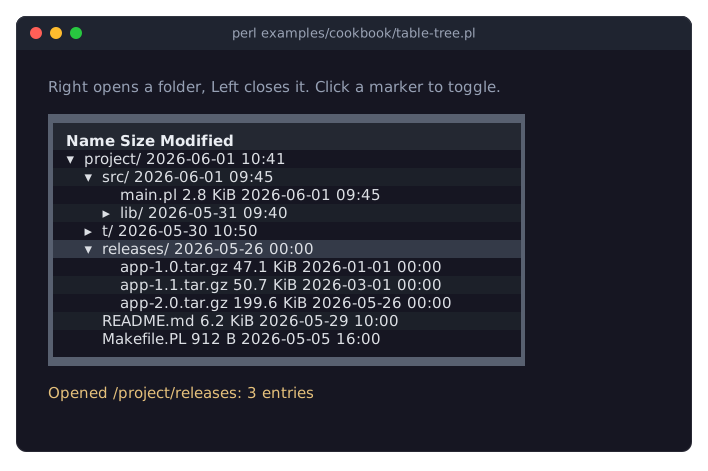
The picture shows the tree after the user moved the cursor to releases/ and pressed Right, which loaded its three files.
children_key => 'children'makes the table a tree: a row'schildrenentry holds its child rows, which can have children of their own. Every row at every level is a row of the table with its own id, sorow_idmust be unique in the whole tree; a full path is a good id. See "TREES" in Term::Fabulous::Manual::TableRows.tree_columnnames the column that shows the tree: it indents each row by two columns per level and shows▸in front of closed rows with children and▾in front of open ones. Withouttree_column, the tree column is the first visible column, which here isnameas well.Rows with children start closed.
$table->expand(...)opens rows from Perl and fires no event;tree_expanded => 1would start them all open. See "Opening and closing tree rows" in Term::Fabulous::Manual::TableRows.The user opens a row with
Rightor+and closes it withLeftor-, or clicks its marker.Righton an open row moves the cursor to its first child;Lefton a closed row, or on a row without children, moves it to the parent row.ExpandandCollapsefire when the user opens or closes a row.$event->row_idis the row's id (it isundefwhen a group opened or closed instead). children_of returns the ids of a row's child rows.A row needs at least one child row to get a marker.
folder_to_loadgives releases/ a placeholder child,loading.... When the user opens the folder, theExpandlistener removes the placeholder and adds the real entries withadd_rows( ..., parent => $path ). Thehas_rowcheck makes this happen only on the first opening. Here%ON_DISKstands for reading the directory; a real program would useopendirandstat. See "Loading child rows when a row opens" in Term::Fabulous::Manual::TableRows and "Changing a tree" in Term::Fabulous::Manual::TableRows.Folders have no
sizeentry, so their size cells stay empty: thebytesmutator shows a blank value as nothing.
Split many rows into pages (pager and page sizes)
Goal: show 300 orders ten at a time, with a pager below the table, a choice of page sizes, and a status line that follows the page.
This program is shipped as examples/cookbook/table-pages.pl.
use v5.32;
use warnings;
use feature 'signatures';
no warnings 'experimental::signatures';

use Term::Fabulous;
use Term::Fabulous::Widget::Box;
use Term::Fabulous::Widget::Table;
use Term::Fabulous::Widget::Table::Mutator qw(datetime number);
use Term::Fabulous::Widget::Text;
use Clay::XS qw(sizing_grow CLAY_TOP_TO_BOTTOM);

# 300 orders, made up from fixed lists, so every run shows the same data.
my @customers = ( 'Acme Corp', 'Globex', 'Initech', 'Umbrella', 'Hooli', 'Stark Industries', 'Wayne Enterprises' );
my @states    = qw(open paid shipped);
my $first_day = 1767225600;    # 2026-01-01 00:00 UTC

my @orders = map {
	{
		number   => 10_000 + $_,
		placed   => $first_day + $_ * 41_113,
		customer => $customers[ $_ * 5 % @customers ],
		state    => $states[ $_ * 7 % @states ],
		total    => ( $_ * 7_919 % 90_000 ) / 100 + 10,
	}
} 1 .. 300;

my $root = Term::Fabulous::Widget::Box->new(
	layout => {
		layout_direction => CLAY_TOP_TO_BOTTOM,
		sizing           => { width => sizing_grow(), height => sizing_grow() },
		padding          => { left  => 2, right => 2, top => 1, bottom => 1 },
		child_gap        => 1,
	},
);

my $table = Term::Fabulous::Widget::Table->new(
	id         => 'orders',
	row_id     => 'number',
	page_size  => 10,
	page_sizes => [ 10, 20, 50 ],

	# The look: a block frame, and colors instead of grid lines.
	border       => 'Outer',
	column_lines => 'none',
	header_line  => 'none',
	stripe_color => '#1c2029',
	columns      => [
		{ key => 'number',   title => 'Order',  type => 'number' },
		{ key => 'placed',   title => 'Placed', type => 'date', mutator => datetime( '%d %b %Y %H:%M', utc => 1 ) },
		{ key => 'customer', title => 'Customer' },
		{ key => 'state',    title => 'State' },
		{ key => 'total',    title => 'Total', type => 'number', mutator => number( decimals => 2, prefix => '$' ) },
	],
	rows => \@orders,
);

my $status = Term::Fabulous::Widget::Text->new( text => '', text_color => [ 150, 160, 180, 255 ] );
$root->add_child( $table, $status );

sub show_page ( $page, $page_size ) {
	my @shown = $table->page_row_ids;
	$status->text( sprintf 'Page %d of %d, %d per page: orders %d to %d', $page, $table->page_count, $page_size, $shown[0], $shown[-1] );
	return;
}

# The pager, Ctrl+PageDown and Ctrl+PageUp fire PageChange, and so does a
# new size from the pager's list of page sizes.
$table->on( PageChange => sub ($event) { show_page( $event->page, $event->page_size ); return } );

show_page( $table->page, $table->page_size );
my $ui = Term::Fabulous->new( root => $root, width => 80, height => 24 );
$ui->interaction->set_focused_widget($table);
$ui->run;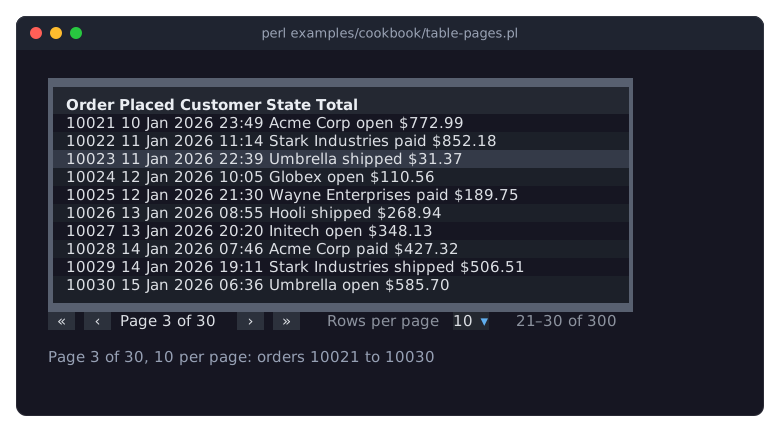
The picture shows the third page, after the keys Ctrl+PageDown twice and Down twice, which put the cursor on order 10023.
page_size => 10cuts the view into pages of ten lines and shows the pager below the table: buttons for the first, previous, next and last page, the page number, a list of page sizes and the range of lines shown. See "PAGES" in Term::Fabulous::Manual::TableRows.page_sizesis the choice in the pager's list. Apage_sizethat is not in the list is added to it.Tabmoves the focus from the table to the list;UpandDownchoose another size there. After a new size, the table shows the page that holds the cursor's line.The user turns pages with the pager's buttons and with
Ctrl+PageDownandCtrl+PageUp;Ctrl+HomeandCtrl+Endgo to the first and last line of all pages.PageUp,PageDown,HomeandEndstay within the page.Every page turn and every new page size from the user fires
PageChange. Itspageandpage_sizeare the new values;page_countandpage_row_idsask the table for the rest.Your program turns pages with
page,next_pageandprevious_page, and changes the size withpage_size. These fire no event, so the program shows the first status line itself.Pages count lines, not rows: in a grouped table, every group header is a line of its own.
Use pages for tables with more than a few hundred rows. Only the cells of the current page are widgets, so a table of 10,000 rows with pages of 50 lines still answers a key at once, while the same table without pages builds widgets for every row and, with the default
max_element_count, dies once it has more than about 750 rows of 5 columns. See "PERFORMANCE" in Term::Fabulous::Widget::Table.datetime( '%d %b %Y %H:%M', utc => 1 )shows the epoch seconds ofplacedin UTC; withoututc, the dates are in local time.
SEE ALSO
This page is part of Term::Fabulous::Cookbook. Previous page: Term::Fabulous::Cookbook::Tables. Next page: Term::Fabulous::Cookbook::TableStyles.
Term::Fabulous::Manual::TableRows - the guide to sorting, filtering, groups, trees and pages.
Term::Fabulous::Widget::Table - the reference: parameters, methods, keys, mouse actions and events.
Term::Fabulous::Widget::Table::Filter - conditions on rows and their combinations.
Term::Fabulous::Widget::Table::Mutator - the ready-made display formats (numbers, dates, sizes, lookups).
Term::Fabulous::Cookbook::Tables - the first table, cell formats, editing, the column chooser, tables in KDL layouts and printed reports.