NAME
Term::Fabulous::Cookbook::Tables - Recipes: show, format, edit and print tables
DESCRIPTION
This page is part of Term::Fabulous::Cookbook. Previous page: Term::Fabulous::Cookbook::Layout. Next page: Term::Fabulous::Cookbook::TableRows.
The recipes on this page show data in a Term::Fabulous::Widget::Table: they turn a list of Perl hashes into a table the user can sort, select in and open rows from, format raw values for display, edit the rows and columns while the program runs, let the user choose the visible columns, describe a table in a KDL layout, and print a table as a report without an event loop. Each recipe is a complete program, shipped in examples/cookbook/, with a screenshot and notes on every feature it uses. Besides the table, the recipes use Term::Fabulous::Widget::Table::Mutator (number and date formats), Term::Fabulous::Layout (KDL) and Term::Fabulous::Static (printing).
Term::Fabulous::Manual::Tables explains the concepts behind these recipes: rows and row ids, columns, raw values and display text, and cell widgets. Term::Fabulous::Manual::TableRows explains sorting, filtering, groups, trees, pages, the cursor and the selection, and Term::Fabulous::Manual::TableStyles the lines, colors and styles. The reference of every parameter, method, key and event is on Term::Fabulous::Widget::Table, and the table feature index lists every table feature with the place that explains it.
More table recipes are on the next two pages: Term::Fabulous::Cookbook::TableRows sorts, filters, groups, nests and pages the rows, and Term::Fabulous::Cookbook::TableStyles sizes, aligns and wraps the columns (Size, align and wrap columns) and gives rows, columns and cells their own lines and colors.
Most recipes on this page give the table the look of the recipe A table with colored rows and titles: border => 'Outer', column_lines => 'none', header_line => 'none' and a stripe_color. Leave these four parameters out for the default look: a rounded frame with thin lines between the columns and below the titles.
The recipes on this page:
"Show a list of hashes in a table (sort, select, open a row)"
"Edit the data of a table (widget cells, add and remove rows and columns)"
"Describe a table in a KDL layout (columns, lines, sort, groups)"
Show a list of hashes in a table (sort, select, open a row)
Goal: show a list of Perl hashes as a table that the user can sort, select rows in and open a row from, with a status line that follows what the user does.
This program is shipped as examples/cookbook/table-basics.pl.
use v5.32;
use warnings;
use feature 'signatures';
no warnings 'experimental::signatures';

use Term::Fabulous;
use Term::Fabulous::Widget::Box;
use Term::Fabulous::Widget::Table;
use Term::Fabulous::Widget::Text;
use Clay::XS qw(sizing_grow CLAY_TOP_TO_BOTTOM);

my @users = (
	{ login => 'ada',      name => 'Ada Lovelace',      shell => '/bin/zsh',  uid => 1001, last_login => '2026-05-31 22:14' },
	{ login => 'grace',    name => 'Grace Hopper',      shell => '/bin/bash', uid => 1002, last_login => '2026-06-01 08:02' },
	{ login => 'linus',    name => 'Linus Torvalds',    shell => '/bin/bash', uid => 1003, last_login => '2026-05-28 17:45' },
	{ login => 'margaret', name => 'Margaret Hamilton', shell => '/bin/zsh',  uid => 1004, last_login => '2026-04-12 09:30' },
	{ login => 'ken',      name => 'Ken Thompson',      shell => '/bin/sh',   uid => 1005, last_login => '2026-06-01 07:55' },
	{ login => 'barbara',  name => 'Barbara Liskov',    shell => '/bin/fish', uid => 1006, last_login => '2026-05-30 13:20' },
	{ login => 'dennis',   name => 'Dennis Ritchie',    shell => '/bin/sh',   uid => 1007, last_login => '2026-03-02 11:05' },
);

my $root = Term::Fabulous::Widget::Box->new(
	layout => {
		layout_direction => CLAY_TOP_TO_BOTTOM,
		sizing           => { width => sizing_grow(), height => sizing_grow() },
		padding          => { left  => 2, right => 2, top => 1, bottom => 1 },
		child_gap        => 1,
	},
);

my $table = Term::Fabulous::Widget::Table->new(
	id        => 'users',
	row_id    => 'login',
	selection => 'multiple',
	sort      => ['name'],

	# The look: a block frame, and colors instead of grid lines.
	border       => 'Outer',
	column_lines => 'none',
	header_line  => 'none',
	stripe_color => '#1c2029',
	columns      => [
		{ key => 'name',       title => 'Name' },
		{ key => 'shell',      title => 'Shell' },
		{ key => 'uid',        title => 'UID',        type => 'number' },
		{ key => 'last_login', title => 'Last login', type => 'date' },
	],
	rows => \@users,
);

my $help      = Term::Fabulous::Widget::Text->new( text => 'Space selects, Enter opens, a click on a title sorts. q quits.', text_color => [ 150, 160, 180, 255 ] );
my $selected  = Term::Fabulous::Widget::Text->new( text => 'Selected: nothing',                                              text_color => [ 230, 230, 230, 255 ] );
my $activated = Term::Fabulous::Widget::Text->new( text => 'Opened: nothing yet',                                            text_color => [ 229, 192, 123, 255 ] );
$root->add_child( $help, $table, $selected, $activated );

$table->on(
	SelectionChange => sub ($event) {
		my $logins = $event->selected_ids;
		$selected->text( @$logins ? 'Selected: ' . join( ', ', @$logins ) : 'Selected: nothing' );
		return;
	}
);

$table->on(
	RowActivate => sub ($event) {
		my $user = $event->row;
		$activated->text( sprintf 'Opened: %s (%s, uid %d)', $user->{name}, $user->{shell}, $user->{uid} );
		return;
	}
);

my $ui = Term::Fabulous->new( root => $root, width => 80, height => 24 );

$root->on(
	KeyPress => sub ($event) {
		my $key = $event->key_name // return;
		$ui->loop->stop if $key eq 'q';
		return;
	}
);

$ui->interaction->set_focused_widget($table);
$ui->run;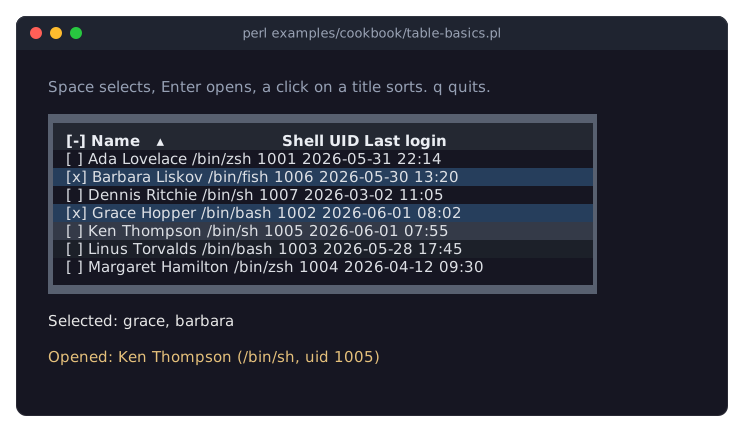
The picture shows the table after the user selected two rows with Space and pressed Enter on a third.
rowstakes an array reference of hash references. The table copies them; changing@userslater changes nothing. A row can hold entries that are not columns: hereloginis no column, but it names the rows. See "ROWS" in Term::Fabulous::Manual::Tables.Every table needs an
id; without one,newdies, because the table's scrolling body uses it to keep its scroll position. See "id" in Term::Fabulous::Widget::Table.row_id => 'login'makes each row'sloginentry its row id, the name the row has in every method and event. Withoutrow_id, the table numbers the rows 1, 2, 3 and so on. See "Row ids" in Term::Fabulous::Manual::Tables.Each column needs a
key, the row entry it shows.titleis the header text, andtypedecides the alignment and the sort order:numbercolumns are right-aligned and sort as numbers,datecolumns sort as points in time and accept date strings such as2026-05-31 22:14. See "COLUMNS" in Term::Fabulous::Manual::Tables and "How values are compared" in Term::Fabulous::Manual::TableRows.sort => ['name']sorts by name when the program starts. A click on a column title sorts by that column; clicking it again cycles through descending and unsorted. With the keyboard,Upon the first row moves into the titles,LeftandRightchoose one, andEntersorts. See "Sorting by the user" in Term::Fabulous::Manual::TableRows.selection => 'multiple'adds a column of check boxes.Spaceselects or deselects the cursor's row,Shift+UpandShift+Downselect a range,Ctrl+Aselects all rows that pass the filters, or none when all are selected. A click selects only the clicked row,Ctrl+click adds it to the selection. See "Selection" in Term::Fabulous::Manual::TableRows.SelectionChangefires after every change of the selection by the user.$event->selected_idslists the ids of all selected rows in data order, the order of@users, not the order on the screen: that is why the picture showsgrace, barbara.Enteron a row and a double click on it fireRowActivate, the table's "open this row" event.$event->rowis a copy of the row's data, with all its entries. See "Activating a row" in Term::Fabulous::Manual::TableRows.set_focused_widget($table)gives the table the keyboard at the start. The cursor, the highlighted line the keys work on, is drawn only while the table has the focus. See "The cursor" in Term::Fabulous::Manual::TableRows.The table stops the keys it uses from bubbling up, so the
KeyPresslistener on the root sees only the others, such asq. See "EVENTS" in Term::Fabulous::Widget::Table.
Format cells: dates, numbers, sizes and flags (mutators)
Goal: show raw data, such as epoch seconds, byte counts and state codes, as readable text, while sorting and filtering keep using the raw values.
This program is shipped as examples/cookbook/table-format.pl.
use v5.32;
use warnings;
use feature 'signatures';
no warnings 'experimental::signatures';

use Term::Fabulous;
use Term::Fabulous::Widget::Box;
use Term::Fabulous::Widget::Table;
use Term::Fabulous::Widget::Table::Mutator qw(datetime number percent bytes duration boolean lookup truncate);
use Term::Fabulous::Widget::Text;
use Clay::XS qw(sizing_grow CLAY_TOP_TO_BOTTOM);

# Raw data, as a backup tool would report it: epoch seconds, byte counts,
# seconds, fractions, flags and short state codes.
my @backups = (
	{ id => 1, job => 'home directories', state => 'ok',   started => 1780266600, seconds => 3725, size => 48_318_382_080,  files => 182_340, changed => 0.153,  encrypted => 1 },
	{ id => 2, job => 'mail',             state => 'ok',   started => 1780268400, seconds => 845,  size => 9_663_676_416,   files => 96_112,  changed => 0.021,  encrypted => 1 },
	{ id => 3, job => 'database dumps',   state => 'fail', started => 1780270200, seconds => 61,   size => 524_288_000,     files => 12,      changed => 1,      encrypted => 0 },
	{ id => 4, job => 'photos',           state => 'run',  started => 1780295400, seconds => 7290, size => 214_748_364_800, files => 51_207,  changed => 0.0042, encrypted => 0 },
	{ id => 5, job => 'wiki',             state => 'ok',   started => 1780272900, seconds => 42,   size => 157_286_400,     files => 2_311,   changed => 0.087,  encrypted => 1 },
);

# A mutator of your own: any code reference that gets a value and a copy
# of the row, and returns the text.
my $per_second = sub ( $text, $row ) {
	return $text eq '' ? '' : "$text/s";
};

my $root = Term::Fabulous::Widget::Box->new(
	layout => {
		layout_direction => CLAY_TOP_TO_BOTTOM,
		sizing           => { width => sizing_grow(), height => sizing_grow() },
		padding          => { left  => 2, right => 2, top => 1, bottom => 1 },
		child_gap        => 1,
	},
);

my $table = Term::Fabulous::Widget::Table->new(
	id     => 'backups',
	row_id => 'id',
	sort   => [ [ size => 'desc' ] ],

	# The look: a block frame, and colors instead of grid lines.
	border       => 'Outer',
	column_lines => 'none',
	header_line  => 'none',
	stripe_color => '#1c2029',
	columns      => [
		{ key => 'job',     title => 'Job',     mutator => truncate(9) },
		{ key => 'state',   title => 'State',   mutator => lookup( { ok => 'done', fail => 'failed', run => 'running' }, default => 'unknown' ) },
		{ key => 'started', title => 'Started', type    => 'date',   mutator => datetime( '%a %H:%M', utc => 1 ) },
		{ key => 'seconds', title => 'Took',    type    => 'number', mutator => duration() },
		{ key => 'size',    title => 'Size',    type    => 'number', mutator => bytes() },
		{ key => 'files',   title => 'Files',   type    => 'number', mutator => number( decimals => 0 ) },
		{ key => 'changed', title => 'Changed', type    => 'number', mutator => percent( decimals => 1 ) },

		# A computed column: its raw value is bytes per second, shown with
		# two mutators in a row, bytes() and then $per_second.
		{
			key     => 'rate',
			title   => 'Rate',
			type    => 'number',
			value   => sub ($row) { $row->{size} / $row->{seconds} },
			mutator => [ bytes( decimals => 0 ), $per_second ],
		},
		{ key => 'encrypted', title => 'Enc', align => 'center', mutator => boolean( "\x{2714}", '' ) },
	],
	rows => \@backups,
);

my $help   = Term::Fabulous::Widget::Text->new( text => 'Sorted by size. Up, then Left/Right and Enter on a title sorts by another column.', text_color => [ 150, 160, 180, 255 ] );
my $detail = Term::Fabulous::Widget::Text->new( text => 'Move the cursor to see a raw value.',                                               text_color => [ 229, 192, 123, 255 ] );
$root->add_child( $help, $table, $detail );

# The cursor's row: the raw value and the display text of its size.
$table->on(
	CursorMove => sub ($event) {
		my $id = $event->row_id // return;
		$detail->text( sprintf 'Size of %s: raw value %s, display text %s', $table->value( $id, 'job' ), $table->value( $id, 'size' ), $table->display_value( $id, 'size' ) );
		return;
	}
);

my $ui = Term::Fabulous->new( root => $root, width => 100, height => 24 );
$ui->interaction->set_focused_widget($table);
$ui->run;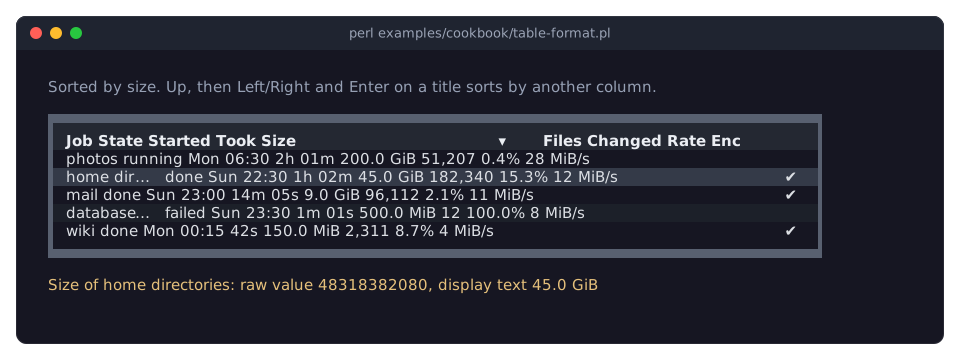
The picture shows the program in a terminal 100 columns wide, after Down moved the cursor to the second row. The table and the padding around it need 90 columns: in a narrower terminal, the columns at the right are cut off. (The width given to new is only the size before the terminal is opened; see "new" in Term::Fabulous.)
A column's
mutatorturns the cell's raw value into its display text. The table keeps both: it shows the display text, and it sorts and filters by the raw value. The table is sorted by size, so200.0 GiBcomes first and500.0 MiBafter9.0 GiB; sorting the text would put9.0 GiBfirst. See "DISPLAY TEXT AND MUTATORS" in Term::Fabulous::Manual::Tables.Term::Fabulous::Widget::Table::Mutator makes the common mutators. Here: truncate cuts long text to 9 terminal columns with an ellipsis; lookup turns codes into words; datetime formats epoch seconds with a
strftimeformat; duration shows seconds as1h 02m; bytes shows sizes in KiB, MiB and GiB; number adds thousands separators; percent shows fractions as percentages; and boolean shows a check mark for true values and nothing for false ones.datetimeshows local time unless it hasutc => 1. date is the same function with the format%Y-%m-%d. Both accept epoch seconds, date strings such as2026-05-31 22:30, and objects with anepochmethod.Give every column of numbers or dates its
type. The type, not the mutator, decides that the column sorts as numbers or dates; number columns are also right-aligned. TheEnccolumn has no type and is centered withalign => 'center'.A mutator of your own is any code reference: it gets the value and a copy of the row and returns the text.
$per_secondis one. See "WRITING YOUR OWN" in Term::Fabulous::Widget::Table::Mutator.An array reference of mutators runs them in order, each on the result of the one before:
[ bytes( decimals => 0 ), $per_second ]turns the raw value of the first job, about 12971377, into12 MiBand then into12 MiB/s.The
ratecolumn is computed: itsvaluecode reference returns the raw value from the row, here bytes per second. The rows have norateentry; the column sorts and filters by the computed number like any other. See "Computed columns" in Term::Fabulous::Manual::Tables.value and display_value read a cell's raw value and its display text; the
CursorMovelistener shows both for the size of the cursor's row.The table runs each mutator once per row and keeps the result until the row or the column changes, so mutators may do some work.
Edit the data of a table (widget cells, add and remove rows and columns)
Goal: a to-do list in a table, with a check box and a delete button in every row, and keys that add a task, remove the selected tasks, change a value and show or hide a column.
This program is shipped as examples/cookbook/table-edit.pl.
use v5.32;
use warnings;
use feature 'signatures';
no warnings 'experimental::signatures';

use Term::Fabulous;
use Term::Fabulous::Widget::Box;
use Term::Fabulous::Widget::Button;
use Term::Fabulous::Widget::Checkbox;
use Term::Fabulous::Widget::Table;
use Term::Fabulous::Widget::Table::Mutator qw(date);
use Term::Fabulous::Widget::Text;
use Clay::XS qw(sizing_grow CLAY_TOP_TO_BOTTOM);

my @tasks = (
	{ id => 1, done => 1, task => 'Order new monitors',  due => '2026-06-02', hours => 1, note => 'Two 27 inch' },
	{ id => 2, done => 0, task => 'Review pull request', due => '2026-06-03', hours => 2, note => '' },
	{ id => 3, done => 0, task => 'Write release notes', due => '2026-06-05', hours => 3, note => 'Ask Grace' },
	{ id => 4, done => 1, task => 'Book meeting room',   due => '2026-06-01', hours => 1, note => '' },
	{ id => 5, done => 0, task => 'Update test server',  due => '2026-06-08', hours => 4, note => 'After 18:00' },
);
my $next_id = @tasks + 1;

my $root = Term::Fabulous::Widget::Box->new(
	layout => {
		layout_direction => CLAY_TOP_TO_BOTTOM,
		sizing           => { width => sizing_grow(), height => sizing_grow() },
		padding          => { left  => 2, right => 2, top => 1, bottom => 1 },
		child_gap        => 1,
	},
);

# A check box per row. It writes its state back into the row data;
# update_cell keeps the same check box when that data changes.
my $done_column = {
	key        => 'done',
	title      => 'Done',
	filterable => 0,
	cell       => sub ($cell) {
		my ( $table, $id ) = @{$cell}{qw(table id)};
		my $box = Term::Fabulous::Widget::Checkbox->new( checked => $cell->{value} ? 1 : 0 );
		$box->on( Change => sub ($event) { $table->set_value( $id, done => $event->value ? 1 : 0 ); show_status(); return } );
		return $box;
	},
	update_cell => sub ( $box, $cell ) { $box->checked( $cell->{value} ? 1 : 0 ) },
};

# A button per row that removes its own row. The button goes with the
# row; the table then takes the keyboard focus.
my $delete_column = {
	key        => 'delete',
	title      => '',
	sortable   => 0,
	filterable => 0,
	cell       => sub ($cell) {
		my ( $table, $id ) = @{$cell}{qw(table id)};
		my $button = Term::Fabulous::Widget::Button->new( background_color => [ 90, 40, 45, 255 ], layout => { padding => { left => 1, right => 1 } } );
		$button->add_child( Term::Fabulous::Widget::Text->new( text => 'Delete', text_color => [ 255, 255, 255, 255 ] ) );
		$button->on(
			Activate => sub ($event) {
				$table->remove_row($id);
				show_status();
				return;
			}
		);
		return $button;
	},
};

my $note_column = { key => 'note', title => 'Note' };

my $table = Term::Fabulous::Widget::Table->new(
	id        => 'tasks',
	row_id    => 'id',
	selection => 'multiple',

	# The look: a block frame, and colors instead of grid lines.
	border       => 'Outer',
	column_lines => 'none',
	header_line  => 'none',
	stripe_color => '#1c2029',
	columns      => [
		$done_column,
		{ key => 'task',  title => 'Task' },
		{ key => 'due',   title => 'Due',   type => 'date', mutator => date('%a %d %b') },
		{ key => 'hours', title => 'Hours', type => 'number' },
		$delete_column,
	],
	rows => \@tasks,
);

my $status = Term::Fabulous::Widget::Text->new( text => '', text_color => [ 150, 160, 180, 255 ] );
my $help   = Term::Fabulous::Widget::Text->new(
	text       => 'a: add a task   Delete: remove selected tasks   h: one more hour   n: notes',
	text_color => [ 110, 120, 140, 255 ],
);
$root->add_child( $table, $status, $help );

# Changes from Perl fire no events, so the program updates the status
# line itself after each change it makes.
sub show_status () {
	my @ids      = $table->row_ids;
	my @selected = $table->selected_ids;
	my $done     = grep { $table->value( $_, 'done' ) } @ids;
	$status->text( sprintf '%d of %d tasks done, %d selected', $done, scalar @ids, scalar @selected );
	return;
}

my %action_of_key = (
	a => sub () {
		$table->add_row( { id => $next_id, done => 0, task => "New task $next_id", due => '2026-06-10', hours => 1, note => '' } );
		$next_id++;
	},
	Delete => sub () {
		my @selected = $table->selected_ids;
		$table->remove_rows(@selected) if @selected;
	},
	h => sub () {
		my $id = $table->cursor // return;
		$table->update_row( $id, { hours => $table->value( $id, 'hours' ) + 1 } );
	},
	n => sub () {
		if ( grep { $_ eq 'note' } $table->column_keys ) {
			$table->remove_column('note');
			return;
		}
		$table->add_column( $note_column, index => 2 );
	},
);

# The table does not use these keys, so they bubble up to the root.
$root->on(
	KeyPress => sub ($event) {
		my $action = $action_of_key{ $event->key_name // '' } // return;
		$action->();
		show_status();
		return;
	}
);
$table->on( SelectionChange => sub ($event) { show_status(); return } );

show_status();
my $ui = Term::Fabulous->new( root => $root, width => 80, height => 24 );
$ui->interaction->set_focused_widget($table);
$ui->run;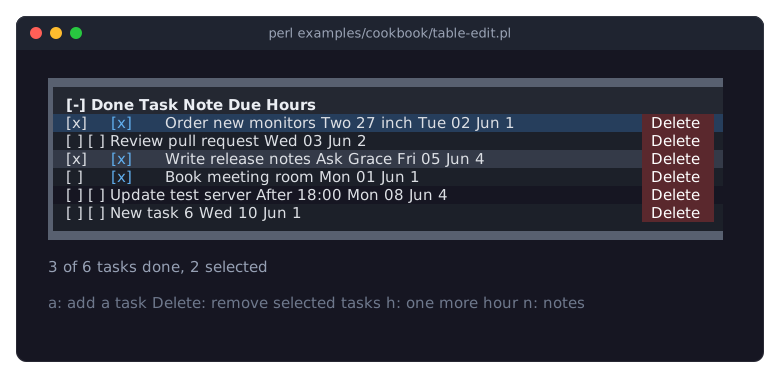
The picture shows the program after the notes column was shown (n), two tasks were selected (Space), a task was added (a), the check box of the third task was clicked, and that task got one more hour (h).
The
cellcode of a column returns any widget for a cell; here a Term::Fabulous::Widget::Checkbox and a Term::Fabulous::Widget::Button. It gets the cell context, a hash with the raw value, the row id, a copy of the row data and the table itself. See "CELL WIDGETS" in Term::Fabulous::Manual::Tables.The check box writes its state back into the row with
set_value. The row data is the truth: sorting, filtering and the nextcellcall read it, not the widget.update_cellmatters for every input widget. Without it, the table builds new widgets for a row whenever the row's data changes, so the check box that the user just clicked would be replaced by a new one, and its focus would be lost. Withupdate_cell, the table keeps the widget and calls the code with the new cell context instead. See "Updating cell widgets instead of rebuilding them" in Term::Fabulous::Manual::Tables.Cell widgets can be built again at other times, too: after a page turn, a filter, a closed group, or a change of the columns (see "When cell widgets are built" in Term::Fabulous::Manual::Tables). Keep all state in the row data, never only in a widget.
The delete button removes its own row with
remove_row. The button goes with the row; when it had the keyboard focus, the table takes the focus, so the user can go on with the keys. See "Keys and clicks in cell widgets" in Term::Fabulous::Manual::Tables.The keys
a,Delete,handnare bound on the root box. The table does not use them, so they bubble up from the table, or from the check box that has the focus, to the root. See "KEYS" in Term::Fabulous::Widget::Table and "Bind a key to an action" in Term::Fabulous::Cookbook::KeyboardAndMouse.add_rowadds a row at the end of the data (index => 0adds it at the top). Withrow_id => 'id', every row needs its ownid, so the program counts the ids up itself.remove_rowsremoves the rows ofselected_ids; removed rows leave the selection. See "Changing the data" in Term::Fabulous::Manual::Tables.update_rowmerges changes into a row;set_valuechanges one cell. Both work for rows the user does not see, too.add_columnandremove_columnchange the columns at run time. The rows keep theirnoteentries while the column is gone, so the notes come back with it. A new column builds all cell widgets again; a check box that had the focus is replaced, and the table takes the focus. See "Changing columns" in Term::Fabulous::Manual::Tables.Changes from your program fire no events, so
show_statusis called after each of them. Only the user's changes fire events, hereSelectionChange.
Let the user choose the visible columns (column chooser)
Goal: a table with more columns than the screen needs, where the user picks the columns in a list and the program learns the choice, to store it for the next start.
This program is shipped as examples/cookbook/table-columns.pl.
use v5.32;
use warnings;
use feature 'signatures';
no warnings 'experimental::signatures';

use Term::Fabulous;
use Term::Fabulous::Widget::Box;
use Term::Fabulous::Widget::Table;
use Term::Fabulous::Widget::Table::Mutator qw(date number);
use Term::Fabulous::Widget::Text;
use Clay::XS qw(sizing_grow CLAY_TOP_TO_BOTTOM);

my @staff = (
	[ 'Ada Lovelace',   'Core',     'Engineer',  'London',    'ada@example.com',     '555-0101', '2019-03-04', 81_000 ],
	[ 'Grace Hopper',   'Web',      'Lead',      'New York',  'grace@example.com',   '555-0102', '2021-11-15', 92_500 ],
	[ 'Linus Torvalds', 'Core',     'Engineer',  'Portland',  'linus@example.com',   '555-0103', '2017-06-01', 90_000 ],
	[ 'Radia Perlman',  'Network',  'Engineer',  'Boston',    'radia@example.com',   '555-0104', '2022-08-29', 76_000 ],
	[ 'Barbara Liskov', 'Platform', 'Architect', 'Cambridge', 'barbara@example.com', '555-0105', '2018-09-17', 95_500 ],
	[ 'Ken Thompson',   'Core',     'Engineer',  'Berkeley',  'ken@example.com',     '555-0106', '2023-01-09', 70_000 ],
);
my @keys = qw(name team role city email phone started salary);
my @rows = map {
	my %row;
	@row{@keys} = @$_;
	\%row;
} @staff;

my $root = Term::Fabulous::Widget::Box->new(
	layout => {
		layout_direction => CLAY_TOP_TO_BOTTOM,
		sizing           => { width => sizing_grow(), height => sizing_grow() },
		padding          => { left  => 2, right => 2, top => 1, bottom => 1 },
		child_gap        => 1,
	},
);

my $table = Term::Fabulous::Widget::Table->new(
	id     => 'staff',
	row_id => 'email',

	# The look: a block frame, and colors instead of grid lines.
	border       => 'Outer',
	column_lines => 'none',
	header_line  => 'none',
	stripe_color => '#1c2029',
	columns      => [
		{ key => 'name',    title => 'Name' },
		{ key => 'team',    title => 'Team' },
		{ key => 'role',    title => 'Role' },
		{ key => 'city',    title => 'City' },
		{ key => 'email',   title => 'E-mail',  visible => 0 },
		{ key => 'phone',   title => 'Phone',   visible => 0 },
		{ key => 'started', title => 'Started', type    => 'date',   mutator => date('%b %Y') },
		{ key => 'salary',  title => 'Salary',  type    => 'number', mutator => number( decimals => 0 ), visible => 0 },
	],
	rows => \@rows,
);

my $status = Term::Fabulous::Widget::Text->new( text => '', text_color => [ 150, 160, 180, 255 ] );
my $help   = Term::Fabulous::Widget::Text->new(
	text       => 'F2 or c in the header: choose columns   F3: name and contact   F4: all   F5: no contact',
	text_color => [ 110, 120, 140, 255 ],
);
$root->add_child( $table, $status, $help );

# A real program would store the list, for example in a settings file.
sub show_columns_to_save (@visible) {
	$status->text( 'Would save: ' . join ', ', @visible );
	return;
}

# The user's changes in the column chooser.
$table->on( ColumnsChange => sub ($event) { show_columns_to_save( @{ $event->visible } ); return } );

# Changes from Perl fire no ColumnsChange.
my %action_of_key = (
	F2 => sub () { $table->open_column_chooser },
	F3 => sub () { $table->set_visible_columns(qw(name email phone)) },
	F4 => sub () { $table->show_columns( $table->column_keys ) },
	F5 => sub () { $table->hide_columns(qw(email phone)) },
);
$root->on(
	KeyPress => sub ($event) {
		my $action = $action_of_key{ $event->key_name // '' } // return;
		$action->();
		show_columns_to_save( $table->visible_columns );
		return;
	}
);

show_columns_to_save( $table->visible_columns );
my $ui = Term::Fabulous->new( root => $root, width => 80, height => 24 );
$ui->interaction->set_focused_widget($table);
$ui->run;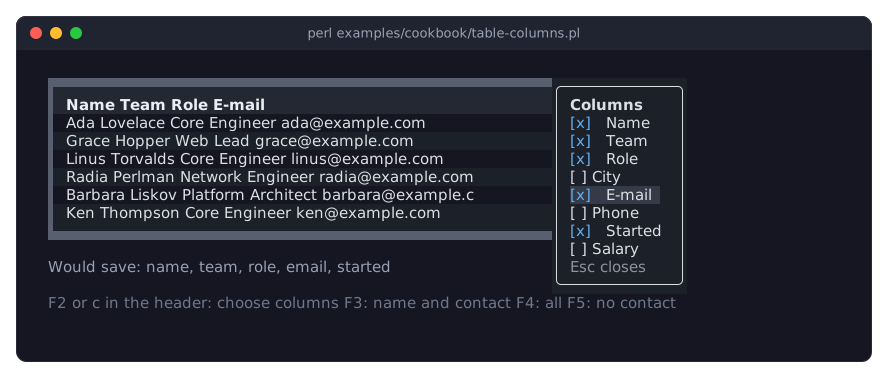
The picture shows the column chooser after F2, with City hidden and E-mail shown by the user.
visible => 0hides a column at the start. A hidden column is still part of the table: its values can be read, sorted by and filtered on. See "Choosing the visible columns" in Term::Fabulous::Manual::Tables.The column chooser is a list with a check box per column, over the table's top right corner. The user opens it with a right click on a column title, or with
cwhile the keyboard is in the header (Upon the first row leads there).Tabmoves between its check boxes,Spaceshows or hides a column at once, andEscapecloses it.open_column_chooseropens it from your program, here on F2, and gives it the focus. The table does not use F2, so the key bubbles to the root box.Every change the user makes in the chooser fires
ColumnsChange. Itsvisibleis an array reference of the keys of the visible columns, in order: what a program would save and give toset_visible_columnsat the next start.set_visible_columnsshows exactly the named columns,show_columnsandhide_columnsshow or hide some. They fire no event, so the key handler updates the status line itself. The columns always keep the order of thecolumnslist; showing a column puts it back at its place.row_id => 'email'names the rows by the e-mail address, which is unique. Theemailcolumn can still be hidden.
Describe a table in a KDL layout (columns, lines, sort, groups)
Goal: describe the table in a KDL layout, with its columns, lines, sort, groups and selection, and give it the rows and the display formats from Perl.
This program is shipped as examples/cookbook/table-kdl.pl.
use v5.32;
use warnings;
use feature 'signatures';
no warnings 'experimental::signatures';

use Term::Fabulous;
use Term::Fabulous::Layout;
use Term::Fabulous::Widget::Table::Mutator qw(date number);

my $layout = Term::Fabulous::Layout->new( string => <<'KDL' );
use Term::Fabulous::Widget::Box as Box
use Term::Fabulous::Widget::Text as Text
use Term::Fabulous::Widget::Table as Table

Box "root" {
	layout direction=down gap=1
	sizing width=grow height=grow
	padding left=2 right=2 top=1 bottom=1

	Text { text "Stock by category. Space selects, Enter on a group header closes it."; text_color "#dcdcdc"; }

	Table "stock" {
		row_id "sku"
		selection multiple
		lines frame=Heavy columns=none header=Heavy color="#5c6370"
		stripe_color "#1c2029"
		group_text_color "#e5c07b"

		column "sku" title="SKU" width="fixed(9)"
		column "name" title="Item" compare=natural
		column "category" title="Category" visible=#false
		column "qty" title="Qty" type=number {
			style text_color="#61afef" bold=#true border_left=Solid
			header_style text_color="#61afef"
		}
		column "price" title="Price" type=number
		column "updated" title="Updated" type=date

		sort "qty" "desc"
		group_by "category"
	}

	Text "status" { text "Nothing selected."; text_color "#96a0b4"; }
}
KDL

my $root   = $layout->build;
my $table  = $root->find_by_id('stock');
my $status = $root->find_by_id('status');

# The data and every code reference come from Perl.
$table->rows(
	[
		{ sku => 'CAB-001', name => 'USB-C cable 1 m', category => 'Cables',   qty => 140, price => 9.9,  updated => '2026-05-28' },
		{ sku => 'CAB-002', name => 'USB-C cable 2 m', category => 'Cables',   qty => 35,  price => 12.5, updated => '2026-05-30' },
		{ sku => 'CAB-010', name => 'HDMI cable 2 m',  category => 'Cables',   qty => 62,  price => 14,   updated => '2026-05-12' },
		{ sku => 'KEY-001', name => 'Keyboard DE',     category => 'Input',    qty => 18,  price => 49,   updated => '2026-05-21' },
		{ sku => 'KEY-002', name => 'Keyboard US',     category => 'Input',    qty => 24,  price => 49,   updated => '2026-05-21' },
		{ sku => 'MOU-001', name => 'Mouse, wireless', category => 'Input',    qty => 51,  price => 29.9, updated => '2026-05-31' },
		{ sku => 'MON-024', name => 'Monitor 24 inch', category => 'Displays', qty => 7,   price => 189,  updated => '2026-05-02' },
		{ sku => 'MON-027', name => 'Monitor 27 inch', category => 'Displays', qty => 12,  price => 279,  updated => '2026-05-19' },
	]
);
$table->update_column( price   => mutator => number( decimals => 2, suffix => ' EUR' ) );
$table->update_column( updated => mutator => date('%d %b') );

$table->on(
	SelectionChange => sub ($event) {
		my @names = map { $_->{name} } $table->selected_rows;
		$status->text( @names ? 'Selected: ' . join( ', ', @names ) : 'Nothing selected.' );
		return;
	}
);

my $ui = Term::Fabulous->new( root => $root, width => 80, height => 24 );
$ui->interaction->set_focused_widget($table);
$ui->run;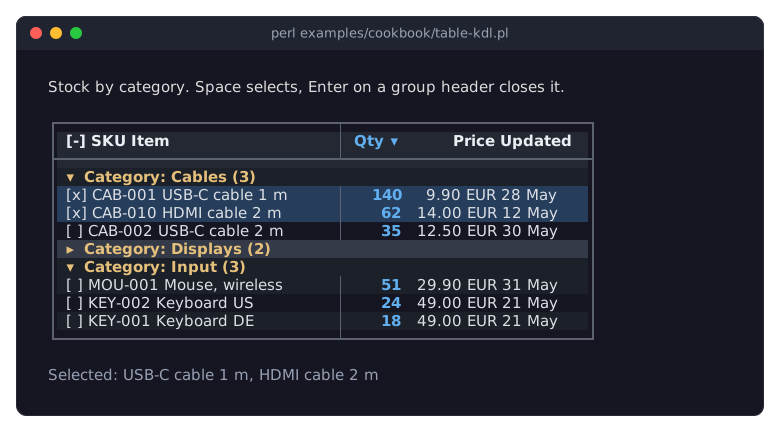
The picture shows the table after selecting two cables with Space and closing the Displays group with Enter on its header.
use Term::Fabulous::Widget::Table as Tablemakes the table available in the layout. TheTablenode takes no child widgets; everything inside it describes the table. See "KDL PROPERTIES" in Term::Fabulous::Widget::Table.Every
columnnode is one column, in order, with the key as its argument and the column parameters as properties (title,type,width,compare,visible, ...). Inside its block,styleandheader_stylenodes hold the style hashes of the column and its title.linessets all lines of the table in one node:frameis theborderparameter,columnsthecolumn_lines,rowstherow_lines,headertheheader_lineandcolortheline_color. A Boxborderproperty would draw a second frame around the whole table instead.sortandgroup_byare applied last, wherever they stand in the block, so the columns they name exist by then. Repeatsortfor more sort columns. Here the table is grouped bycategory, a hidden column, and sorted byqtywithin each group.The rows and everything that is code come from Perl after
build:find_by_idfinds the table,rowsgives it the data, andupdate_columnadds the mutators.update_columnkeeps the column's place, its other parameters and whether it is visible.EnterorSpaceon a group header opens or closes the group; on a data row,Spaceselects the row. See "Opening and closing groups" in Term::Fabulous::Manual::TableRows and "Selection" in Term::Fabulous::Manual::TableRows.For a KDL layout of input widgets, see "Build a form from a KDL file (text fields, radio buttons, dropdown, slider, checkbox)" in Term::Fabulous::Cookbook::Forms.
Print a table as a report (Static)
Goal: print a sorted sales table with formatted numbers and a totals row, without an event loop, to the terminal, a pipe or a file.
This program is shipped as examples/cookbook/table-report.pl.
use v5.32;
use warnings;
use feature 'signatures';
no warnings 'experimental::signatures';

use List::Util qw(sum);
use Term::Fabulous::Static;
use Term::Fabulous::Widget::Box;
use Term::Fabulous::Widget::Table;
use Term::Fabulous::Widget::Table::Mutator qw(number percent);
use Term::Fabulous::Widget::Text;
use Clay::XS qw(sizing_fit CLAY_TOP_TO_BOTTOM);

my @sales = (
	{ product => 'Desk lamp',       units => 412,   revenue => 16_068.00 },
	{ product => 'Office chair',    units => 87,    revenue => 26_013.00 },
	{ product => 'Standing desk',   units => 34,    revenue => 20_366.00 },
	{ product => 'Monitor arm',     units => 156,   revenue => 9_204.00 },
	{ product => 'Cable organizer', units => 1_208, revenue => 4_820.00 },
);
my $total_revenue = sum( map { $_->{revenue} } @sales );
my @rows          = (
	(
		map {
			{ %$_, section => 0 }
		} @sales
	),
	{ product => 'Total', units => sum( map { $_->{units} } @sales ), revenue => $total_revenue, section => 1 },
);

my $report = Term::Fabulous::Widget::Box->new(
	layout => {
		layout_direction => CLAY_TOP_TO_BOTTOM,
		sizing           => { height => sizing_fit() },
		child_gap        => 1,
	},
);

my $table = Term::Fabulous::Widget::Table->new(
	id           => 'sales',
	row_id       => 'product',
	scrollbar    => 0,    # nothing scrolls on paper
	hover        => 0,
	header_style => { text_color => '#e5c07b' },

	# The look: a block frame, and colors instead of grid lines.
	border       => 'Outer',
	column_lines => 'none',
	header_line  => 'none',
	stripe_color => '#1c2029',
	columns      => [
		{ key => 'section', visible => 0 },    # 0 for products, 1 for the totals row
		{ key => 'product', title   => 'Product' },
		{ key => 'units',   title   => 'Units',   type => 'number', mutator => number() },
		{ key => 'revenue', title   => 'Revenue', type => 'number', mutator => number( decimals => 2, suffix => ' EUR' ) },
		{
			key     => 'share',
			title   => 'Share',
			type    => 'number',
			value   => sub ($row) { $row->{revenue} / $total_revenue },
			mutator => percent( decimals => 1 ),
		},
	],
	rows => \@rows,
	sort => [ 'section', [ revenue => 'desc' ] ],    # the totals row last, the products by revenue
);
$table->set_row_style( Total => { border_top => 'Double', bold => 1 } );

$report->add_child(
	Term::Fabulous::Widget::Text->new( text => 'Sales, second quarter 2026', text_color => [ 230, 230, 230, 255 ] ),
	$table,
);

# Colors when STDOUT is a terminal, plain text in a pipe or a file.
Term::Fabulous::Static->new( root => $report, width => 72 )->print;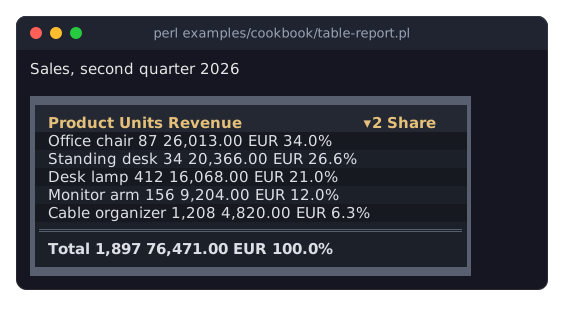
Term::Fabulous::Static lays out and draws the widget tree once and prints it; the program ends right after. Run it as
perl examples/cookbook/table-report.pl > report.txtto get plain text without colors. See "Render a report to a file or pipe (Static)" in Term::Fabulous::Cookbook::Output and "PRINTING A TABLE" in Term::Fabulous::Manual::TableStyles.scrollbar => 0removes the scrollbar column, which a printed table does not need.hover => 0turns off the highlight under the mouse pointer. Without the keyboard focus, the table draws no cursor.numberandpercentfrom Term::Fabulous::Widget::Table::Mutator format the display text. The raw values stay numbers, so the table sorts them as numbers.The
sharecolumn computes its value from the row withvalue. See "Computed columns" in Term::Fabulous::Manual::Tables.The sort puts the totals row last: the hidden
sectioncolumn (0 for the products, 1 for the total) is the first sort column, the revenue, descending, the second. A hidden column still sorts. TheRevenuetitle shows the descending marker with a 2: the second sort column. See "Sorting by several columns" in Term::Fabulous::Manual::TableRows.row_id => 'product'names the rows by product, soset_row_stylecan name the totals row asTotal. Its style draws a double line above the row and makes its text bold.The root box has the height
sizing_fit(), so the output is as high as the report. The table is as wide as its columns; thewidthof Term::Fabulous::Static is only the room it may take.The cells always have a background color. In a live program they are painted in what the table lies on, at the latest the screen color of the theme; a Term::Fabulous::Static report paints no screen, so in a tree without a background, as here, it is
[22, 25, 31]. Give the table or the box abackground_colorto choose another. See "Colors" in Term::Fabulous::Manual::TableStyles.
SEE ALSO
This page is part of Term::Fabulous::Cookbook. Previous page: Term::Fabulous::Cookbook::Layout. Next page: Term::Fabulous::Cookbook::TableRows.
Term::Fabulous::Manual::Tables - the guide to rows, columns, display text and cell widgets.
Term::Fabulous::Widget::Table - the reference: parameters, methods, keys, mouse actions and events.
Term::Fabulous::Widget::Table::Mutator - the ready-made display formats (numbers, dates, sizes, lookups).
Term::Fabulous::Cookbook::TableRows - sorting, filtering, groups, trees and pages.
Term::Fabulous::Cookbook::TableStyles - column widths, alignment and wrapping; lines and colors per row, column and cell.