NAME
Term::Fabulous::Enum::BorderStyle - The border styles a widget can be drawn with
SYNOPSIS
use Term::Fabulous::Enum::BorderStyle;
use Term::Fabulous::Widget::Box;

# A box with a rounded border on all four sides.
my $box = Term::Fabulous::Widget::Box->new(
	bordered     => 1,
	border_color => [ 180, 200, 220, 255 ],
	border_style => Term::Fabulous::Enum::BorderStyle->Round,
);

# A heavier line on top only.
$box->border_style_top( Term::Fabulous::Enum::BorderStyle->Heavy );

# Look a style up by its name, for example from a configuration file.
my $style = Term::Fabulous::Enum::BorderStyle->from_name('Double')
	// die "unknown border style\n";

# All styles, in the order listed below.
my @names = map { $_->name } Term::Fabulous::Enum::BorderStyle->values;
DESCRIPTION
This enumeration holds the 20 border styles Term::Fabulous can draw. Each style is a single, shared object that you get with a class method named after the style, for example Term::Fabulous::Enum::BorderStyle->Round. Give it to a widget's border_style parameter (all four sides) or to one of border_style_top, border_style_right, border_style_bottom and border_style_left (one side each); see Term::Fabulous::Role::HasBorderStyle. A border is only drawn on the sides where the widget has one (its bordered, or the theme's border.enabled) and the style is not "Hidden"; see "BORDERS" in Term::Fabulous::Manual::Looks.
In a KDL layout file, a style is named in the border node, for example border style=Round style-top=Heavy (see "KDL PROPERTIES" in Term::Fabulous::Widget::Box).
The styles and their glyphs come from the Python TUI library Textual. To see all of them, run examples/border-showcase.pl from the distribution.
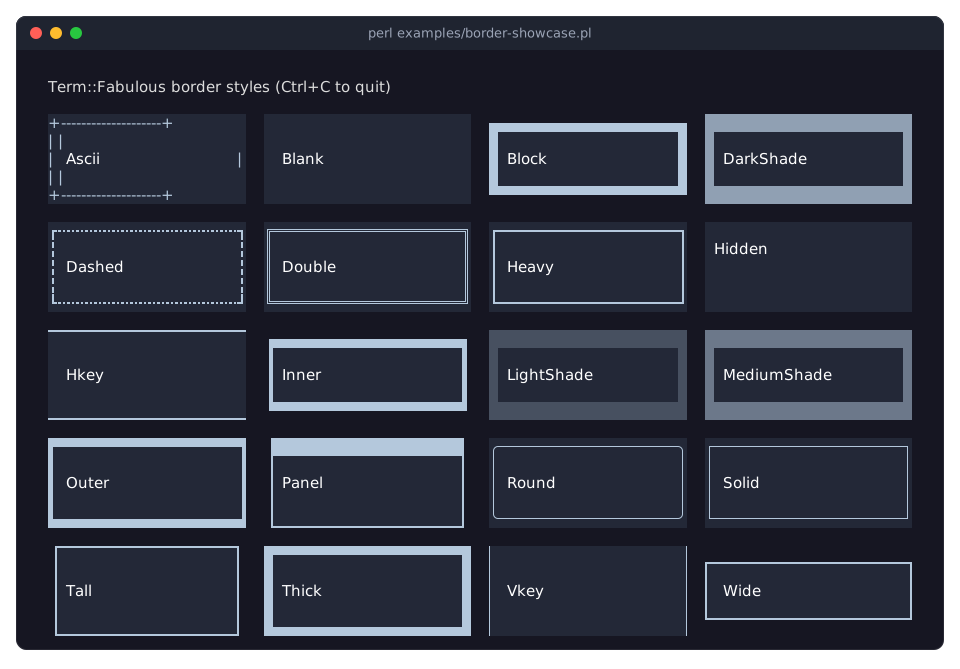
STYLES
Every style is a class method that returns the style object. Names are case sensitive.
Ascii
+ corners, - and | lines. Works on every terminal and font.
Blank
Spaces on the widget's own background: the border takes space but shows nothing, so the border color has no effect. This is also the style used for a side that has a positive width but no style.
Block
A frame of solid block characters drawn half into the parent's background: lower half blocks on top, full blocks on the sides, upper half blocks at the bottom.
DarkShade
Every border cell is a dark shade character (U+2593).
Dashed
Heavy box-drawing corners with dashed heavy lines.
Double
Double-line box drawing.
Heavy
Heavy (bold) box-drawing lines.
Hidden
The side takes no space and draws nothing, even where the widget has a border. Use it to switch one side off while the widget's bordered (or the theme's border.enabled) gives the others; see Term::Fabulous::Role::HasBorderStyle.
Hkey
A thin line (upper one eighth block) along the top edge and a thin line (lower one eighth block) along the bottom edge; the sides are blank.
Inner
A thin frame of quadrant and half blocks along the inner side of the border cells; the outer half of the border cells shows the parent's background.
LightShade
Every border cell is a light shade character (U+2591).
MediumShade
Every border cell is a medium shade character (U+2592).
Outer
A thin frame of quadrant and half blocks along the outer side of the border cells; the inner half shows the widget's own background.
Panel
A solid top bar in the border color, with thin bars at the sides and the bottom; good as a panel with a title row.
Round
Light box-drawing lines with rounded corners.
Solid
Light box-drawing lines with square corners.
Tall
Like "Panel", but with a thin top line instead of a solid top bar.
Thick
Full and half blocks: a thick, solid frame.
Vkey
Thin vertical bars at the left and right edges; no lines at the top and bottom.
Wide
A frame drawn just outside the widget's content: a thin line (lower one eighth block) along the bottom of the top row, a thin line (upper one eighth block) along the top of the bottom row, and bars at the sides. The top and bottom rows show the parent's background.
METHODS
values
my @styles = Term::Fabulous::Enum::BorderStyle->values;Class method. All styles, in the order of "STYLES".
from_name
my $style = Term::Fabulous::Enum::BorderStyle->from_name('Round');Class method. The style with that name, or undef if there is none. The name is case sensitive: 'round' returns undef. KDL layouts use this lookup for border style=Round.
from_ordinal
my $style = Term::Fabulous::Enum::BorderStyle->from_ordinal(0); # AsciiClass method. The style at a position of "values", counted from 0, or undef when there is no style at that position.
name
say $style->name; # 'Round'The name of the style.
ordinal
my $position = $style->ordinal; # 14 for RoundThe position of the style in "values", counted from 0.
glyphs
my ( $top_left, $top, $top_right, $left, $right, $bottom_left, $bottom, $bottom_right ) = @{ $style->glyphs };An array reference of the eight characters the style draws, in this order: top-left corner, top edge, top-right corner, left edge, right edge, bottom-left corner, bottom edge, bottom-right corner.
locations
my @codes = @{ $style->locations };An array reference of eight location codes, one per glyph in the order of "glyphs". The code decides which colors the glyph is drawn in:
Code  Foreground                Background
----  ------------------------  ------------------------------------
0     border color              the widget's own background
1     border color              the parent's background
2     the parent's background   border color (reverse video of 1)
3     the widget's background   border color (reverse video of 0)
"The parent's background" is the color of the cell just outside the widget's box on the same side. Codes 2 and 3 use the terminal's reverse video attribute, which also works when one of the colors is the terminal default color.
get_top_glyphs
my ( $left_corner, $edge, $right_corner ) = $style->get_top_glyphs;The three glyphs of the top side: top-left corner, top edge, top-right corner.
get_bottom_glyphs
my ( $left_corner, $edge, $right_corner ) = $style->get_bottom_glyphs;The three glyphs of the bottom side: bottom-left corner, bottom edge, bottom-right corner.
get_left_glyphs
my $edge = $style->get_left_glyphs;The glyph of the left edge.
get_right_glyphs
my $edge = $style->get_right_glyphs;The glyph of the right edge.
get_top_locations
my @codes = $style->get_top_locations;The location codes of "get_top_glyphs", in the same order.
get_bottom_locations
my @codes = $style->get_bottom_locations;The location codes of "get_bottom_glyphs", in the same order.
get_left_locations
my $code = $style->get_left_locations;The location code of "get_left_glyphs".
get_right_locations
my $code = $style->get_right_locations;The location code of "get_right_glyphs".
GRID JOINTS
Some styles also carry the glyphs needed where lines of a grid meet. Term::Fabulous::Widget::Table draws its grid lines with them (through "junction"); the methods are also there for your own widgets.
joints
my ( $h_line, $v_line, $cross, $t_down, $t_up, $t_right, $t_left ) = @{ $style->joints };An array reference of seven glyphs, or undef for styles without grid joints: horizontal line, vertical line, cross, T pointing down (a horizontal line with a line going down), T pointing up, T pointing right and T pointing left. "Ascii", "Dashed", "Double", "Heavy", "Round" and "Solid" have joints; "Dashed" uses the joints of "Heavy", and "Round" those of "Solid".
junction
my $glyph = Term::Fabulous::Enum::BorderStyle->junction(
	up    => Term::Fabulous::Enum::BorderStyle->Solid,
	down  => Term::Fabulous::Enum::BorderStyle->Solid,
	right => Term::Fabulous::Enum::BorderStyle->Heavy,
);    # "\x{251D}", a light vertical line with a heavy line to the right
Class method. The glyph for a cell where lines meet: each of the arms up, right, down and left names the style of the line that leaves the cell in that direction (undef or missing: no line). Only styles with "joints" take part; an arm in another style counts as no line. Returns undef when no arm is left.
One arm, or two opposite arms: the style's own edge glyph (the top edge for a horizontal line, the left edge for a vertical one), so a "Dashed" line stays dashed.
Two arms at a right angle: a corner glyph from the style's "glyphs", so "Round" lines get round corners.
Three arms (a T) or four (a cross): the glyph from "joints", or from "get_mixed_joint" when the horizontal and the vertical lines belong to different families ("Round" counts as "Solid", "Dashed" as "Heavy"). Without a mixed table, the horizontal line's joints are used.
The horizontal style is the one of the right arm, or of the left arm when there is no right one; the vertical style is the one of the down arm, or of the up arm. Unknown arm names and arms that are not style objects die.
get_grid_styles
my @styles = Term::Fabulous::Enum::BorderStyle->get_grid_styles;Class method. The styles that have "joints", in the order of "values".
get_mixed_joint
my $table = $horizontal_style->get_mixed_joint($vertical_style);
my ( $cross, $t_down, $t_up, $t_right, $t_left ) = @$table if $table;
The five joint glyphs to use where horizontal lines of this style meet vertical lines of $vertical_style, as an array reference, or undef when there is no such table. Tables exist for "Double" with "Solid", "Heavy" with "Solid", and "Solid" with "Heavy" or "Double". Dies if $vertical_style is not a Term::Fabulous::Enum::BorderStyle object (a style name string is not enough).
get_mixed_joints
my $table = Term::Fabulous::Enum::BorderStyle->get_mixed_joints( $horizontal_style, $vertical_style );Class method form of "get_mixed_joint". Dies if either argument is not a Term::Fabulous::Enum::BorderStyle object.
mixed_joints
my $builder = $style->mixed_joints; # a code reference, or undefInternal: a code reference that builds the tables of "get_mixed_joint". Use "get_mixed_joint" instead.
SEE ALSO
"BORDERS" in Term::Fabulous::Manual::Looks, Term::Fabulous::Role::HasBorderStyle, Term::Fabulous::Render::Border, Object::PadX::Enum, "Use a different border style on each side" in Term::Fabulous::Cookbook::Layout.