NAME
Term::Fabulous::Widget::PixelCanvas - A canvas of square-ish pixels, two per cell
SYNOPSIS
use Clay::XS qw(sizing_grow);
use Term::Fabulous::Termbox qw(TB_KEY_MOUSE_LEFT);
use Term::Fabulous::Widget::PixelCanvas;

my $image = Term::Fabulous::Widget::PixelCanvas->new(
	background_color => [ 0, 0, 0, 255 ],
	layout           => { sizing => { width => sizing_grow(), height => sizing_grow() } },
);

# Draw when the size is known, and again after every resize.
$image->on( CanvasResize => sub ($event) {
	my ( $width, $height ) = ( $image->pixel_width, $image->pixel_height );
	$image->clear;
	$image->draw_line( 0, $height - 1, $width - 1, 0, 0x00FF00 );
	$image->draw_circle( $width / 2, $height / 2, $height / 3, '#ff8800' );
	$image->fill_rect( 2, 2, 6, 4, [ 40, 80, 200 ] );
	return;
} );

# Paint with the left mouse button.
$image->on( Mouse => sub ($event) {
	return unless $event->key == TB_KEY_MOUSE_LEFT;
	my ( $x, $y ) = $image->pixel_at($event) or return;
	$image->set_pixel( $x, $y, 0xFFFFFF )->set_pixel( $x, $y + 1, 0xFFFFFF );
	return;
} );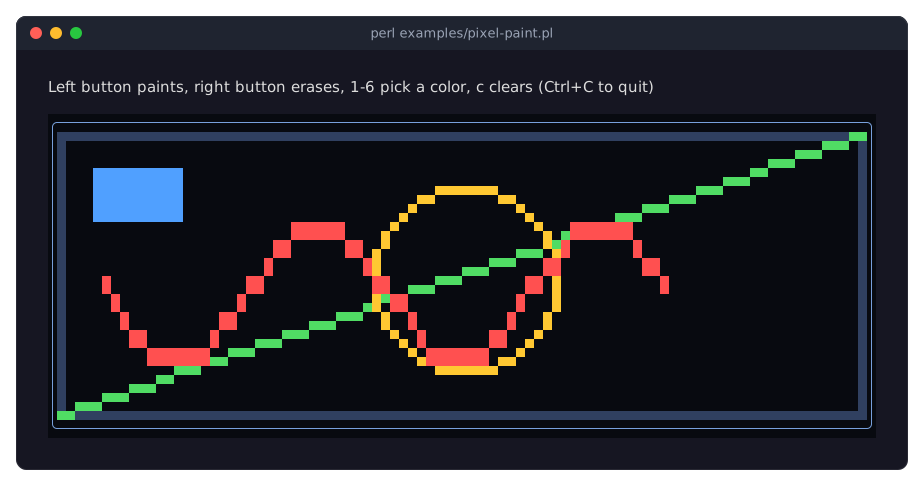
examples/pixel-paint.pl draws these shapes and lets you paint with the mouse.
DESCRIPTION
A PixelCanvas is a Term::Fabulous::Widget::Canvas that you draw on in pixels instead of characters. Every terminal cell shows two pixels stacked on top of each other, using the half block characters U+2580 (UPPER HALF BLOCK) and U+2584 (LOWER HALF BLOCK): the top pixel is the character's color, the bottom pixel its background. A terminal cell is about twice as high as it is wide, so the pixels come out roughly square. An image is columns pixels wide and 2 * rows pixels high.
Everything else works as for a Canvas: the layout decides the size, CanvasResize tells you when it changes (draw then), only changed cells are sent to the terminal, and unset pixels show the canvas's background (or that of its nearest ancestor with one, or the screen color).
Pixels and cells
The pixels are stored in the cells themselves. The inherited cell methods (put, put_text, fill, erase, clear) therefore still work, for example to write text over an image. A cell written that way shows no pixels any more (unless the character written is one of the two half blocks): both of its pixels count as unset until a pixel is set in it again, and setting one leaves the other unset.
Coordinates and colors
$x counts pixels from the left, $y pixels from the top, both from 0. Coordinates, sizes and the radius may be any finite numbers and are rounded down to whole pixels; undef, non-numbers, NaN and infinities die. Pixels outside the image are silently dropped, so shapes may extend past its edges.
Colors are given as for the canvas (see "Colors" in Term::Fabulous::Widget::Canvas): a packed 0xRRGGBB integer, a Term::Fabulous::Color, or anything Term::Fabulous::Color->new accepts. undef, or a color with alpha 0, unsets the pixels instead of coloring them.
CONSTRUCTOR
new
my $image = Term::Fabulous::Widget::PixelCanvas->new(%parameters);Takes exactly the parameters of Term::Fabulous::Widget::Canvas (the Box parameters, see "new" in Term::Fabulous::Widget). Unknown parameters die. Give it a sizing, otherwise the image has no pixels.
METHODS
The drawing methods return the pixel canvas, so calls chain. A PixelCanvas also has every method of Term::Fabulous::Widget::Canvas.
set_pixel
$image->set_pixel( $x, $y, $color );Colors one pixel. undef as the color unsets it.
unset_pixel
$image->unset_pixel( $x, $y );Unsets one pixel, so it shows the background.
pixel
my $attr = $image->pixel( $x, $y );Reads one pixel back: the termbox2 attribute number of its color (see Term::Fabulous::Render::Attr; compare it with Term::Fabulous::Render::Attr::cell_color_attr( color = $color )>), or undef when the pixel is unset or outside the image.
fill_rect
$image->fill_rect( $x, $y, $width, $height, $color );Colors every pixel of the rectangle that starts at ($x, $y) and is $width pixels wide and $height pixels high. A width or height below 1 draws nothing.
draw_rect
$image->draw_rect( $x, $y, $width, $height, $color );Colors the one-pixel outline of the same rectangle as fill_rect.
draw_line
$image->draw_line( $from_x, $from_y, $to_x, $to_y, $color );Colors every pixel on the straight line between the two points, both end points included (Bresenham's algorithm). Only the part inside the image is computed, so a line far longer than the image costs no more than one across it.
draw_circle
$image->draw_circle( $center_x, $center_y, $radius, $color );Colors the one-pixel outline of a circle (midpoint algorithm). Radius 0 is a single pixel; a negative radius dies.
pixel_at
my ( $x, $y ) = $image->pixel_at($mouse_event);The pixel under a Term::Fabulous::Event::Mouse (see "cell_at" in Term::Fabulous::Widget::Canvas). The terminal reports the mouse per cell, not per pixel, so this is always the upper pixel of the cell; the pixel below it, $y + 1, is under the pointer as well. Returns the empty list when the pointer is outside the image (on the border or padding, for example) or before the first frame.
pixel_width
my $width = $image->pixel_width;The width of the image in pixels: the same as columns. 0 before the first frame.
pixel_height
my $height = $image->pixel_height;The height of the image in pixels: 2 * rows. 0 before the first frame.
EVENTS
The events of "EVENTS" in Term::Fabulous::Widget::Canvas: CanvasResize when the size changes (its columns and rows are in cells; use "pixel_width" and "pixel_height" for pixels), Mouse and MouseMove (use "pixel_at" to find the pixel).
KDL PROPERTIES
The properties of "KDL PROPERTIES" in Term::Fabulous::Widget::Box:
use Term::Fabulous::Widget::PixelCanvas as PixelCanvas

PixelCanvas "image" {
	sizing width=grow height=grow
	background_color "#000000"
}
SEE ALSO
"CANVASES" in Term::Fabulous::Manual::Charts (the guide), Term::Fabulous::Widget::Canvas, "Plot data on a pixel canvas (PixelCanvas)" in Term::Fabulous::Cookbook::Canvases, the example program examples/pixel-paint.pl.