NAME
Term::Fabulous::Widget::Prompt - A dialog that asks a question and waits for the answer
SYNOPSIS
use Term::Fabulous::Widget::Prompt;

# A message with an OK button:
Term::Fabulous::Widget::Prompt->alert( $ui, title => 'Saved', message => 'The notes are in [bold]notes.txt[/].' );

# A question:
Term::Fabulous::Widget::Prompt->confirm(
	$ui,
	title   => 'Quit?',
	message => 'Your notes have unsaved changes.',
	ok      => 'Quit',
	cancel  => 'Keep editing',
	focus   => 'cancel',
)->on( Answer => sub ($event) {
	$ui->loop->stop if $event->button eq 'ok';
	return;
} );

# One value:
Term::Fabulous::Widget::Prompt->ask(
	$ui,
	title     => 'Save as',
	label     => 'File',
	value     => 'notes.txt',
	required  => 1,
)->on( Answer => sub ($event) {
	save_as( $event->value('value') ) if $event->button eq 'ok';
	return;
} );

# A form of your own:
my $prompt = Term::Fabulous::Widget::Prompt->new(
	title   => 'New contact',
	fields  => [
		{ name => 'name',  label => 'Name',   input => Term::Fabulous::Widget::TextField->new( required  => 1 ) },
		{ name => 'email', label => 'E-mail', input => Term::Fabulous::Widget::TextField->new( validator => 'email' ) },
	],
	buttons => [ { id => 'add', label => 'Add', primary => 1 }, { id => 'cancel', label => 'Cancel' } ],
);
$prompt->on( Answer => sub ($event) { add_contact( $event->values ) if $event->button eq 'add'; return } );
$prompt->open($ui);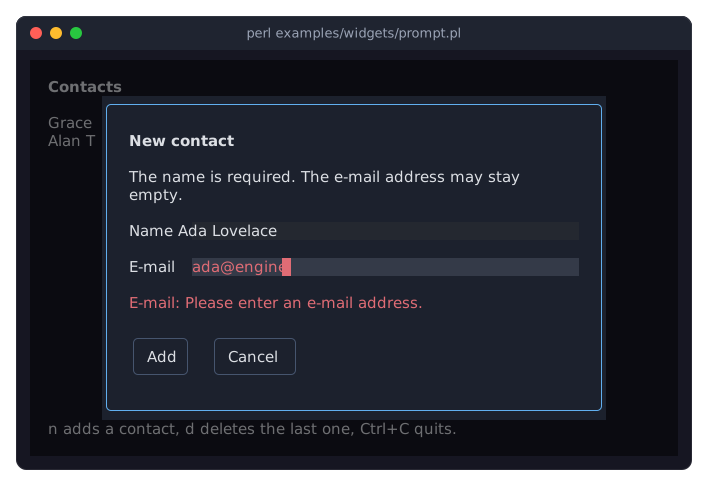
The program is examples/widgets/prompt.pl. The picture shows the prompt after the user pressed Add with an e-mail address that is not valid: the prompt stays open, says what is wrong, and puts the cursor in the field.
DESCRIPTION
A prompt is a Term::Fabulous::Widget::Dialog made for the questions a program asks again and again: to confirm a step that cannot be undone, to ask for a name, or to say that something happened. It has a title, a message, optional input fields and a row of buttons, and it reports the answer with one event, Answer.
Prompts in one call
The class methods "alert", "confirm" and "ask" build the three most common prompts, open them and return them, so a program only adds its Answer listener. Every other prompt is built with "new" and opened with open, like any dialog.
Answers
Every button has an id. When the user presses a button, the prompt closes, the focus goes back to the widget that had it before, and the prompt fires Answer with the id of the button and the values of its fields. Escape closes the prompt as well. It then answers with the button id cancel, and the event's dismissed is true. Name a button cancel, as the shortcuts do, and Escape and that button are handled by the same code. A prompt answers once each time it is opened.
Fields and their checks
A field is any input widget, with a name for its value and an optional label in front of it. The prompt does not check values itself: it asks the inputs, which check their values with their required and validator parameters (see "validator" in Term::Fabulous::Widget::Input).
A button marked as primary checks the values before it answers. If an input is not valid, the prompt stays open, shows the label of the field and what is wrong with its value in the line above the buttons, and moves the focus to that input. An input made of other widgets, such as a Term::Fabulous::Widget::ColorPicker, passes the focus to its first invalid part that can take it (the picker's text field), or else to the first focusable widget inside it. A check of the whole prompt runs after the inputs, for rules that involve more than one field. Buttons that are not primary, such as Cancel, answer without checking.
Keys
Tab and Shift+Tab move between the fields and the buttons, as in every dialog. Enter on a button presses it. Enter in a text field presses the default button, the first primary button (or the first button when none is primary). Escape dismisses the prompt.
When the prompt opens, the first field gets the focus, or the first button when there are no fields. The focus parameter names another one; a field whose input cannot take the focus itself passes it to the first focusable widget inside that input. A prompt that asks before deleting something can start on its Cancel button, so that a hasty Enter does not delete anything.
CONSTRUCTOR
new
my $prompt = Term::Fabulous::Widget::Prompt->new(%parameters);Accepts the parameters of "new" in Term::Fabulous::Widget::Dialog (id, layout, backdrop_color, close_on_escape, ...) and the ones below. All are optional, and unknown parameters die. A prompt is laid out like a dialog, with two columns of padding at the sides instead of one.
title-
A character string, drawn in bold on the first row. Default:
'', no title. message-
The text below the title, in the rich markup of Term::Fabulous::Text::Markup, so
[bold]notes.txt[/]is bold. Default:'', no message. The message wraps at the width of the prompt. A tag with a style that does not exist dies. fields-
An array reference of fields, each a hash reference:
name-
The name of the value, a string. Required. Two fields with the same name die.
input-
The input widget: a Term::Fabulous::Widget::TextField, a Term::Fabulous::Widget::Dropdown, a Term::Fabulous::Widget::Checkbox, or any other widget that has a
valuemethod. Required. Give a text field the width to grow into, withlayout => { sizing => { width => sizing_grow() } }, otherwise it is only as wide as its text. label-
A string shown in front of the input. Optional. The labels of all fields share a column as wide as the longest of them.
Default:
[], no fields. Unknown keys die. -
An array reference of buttons, each a hash reference with an
id(a string, required, unique), alabel(a string, required) andprimary(a boolean, default 0). Primary buttons get the classprimary, which a theme may give a look of its own (see "Variants and classes" in Term::Fabulous::Manual::Looks), and check the values before they answer. The buttons are drawn in the order given, from the left. Default: one primary buttonoklabelledOK. width-
The width of the prompt in columns, a positive integer. Default: 60. On a screen narrower than that, the prompt is as wide as the screen, and its message wraps to fit. A width in the
sizingoflayoutwins over it. focus-
The name of a field or the id of a button, which gets the focus when the prompt opens. Default:
undef, the first field or button. A name that is no field and no button dies, and so does one that is both. check-
A code reference that checks the values of the whole prompt, after the inputs found nothing wrong. It is called with a hash reference of the values by field name and returns what is wrong, as a sentence the prompt shows, or a false value when everything is fine:
check => sub ($values) {
	return 'The passwords differ.' if $values->{password} ne $values->{again};
	return;
},
Default:
undef, no check.
CLASS METHODS
Each of these builds a prompt, opens it in $ui and returns it. The parameters are those of "new", except buttons (and fields for ask), which these methods set themselves, plus the ones named below.
alert
Term::Fabulous::Widget::Prompt->alert( $ui, title => 'Done', message => 'Copied 3 files.' );A message with one primary button ok. ok is its label, OK by default.
confirm
my $prompt = Term::Fabulous::Widget::Prompt->confirm( $ui, title => 'Delete 3 files?', ok => 'Delete', focus => 'cancel' );A question with a primary button ok and a button cancel. ok and cancel are their labels, OK and Cancel by default.
ask
my $prompt = Term::Fabulous::Widget::Prompt->ask( $ui, title => 'Rename', label => 'Name', value => 'notes.txt', required => 1 );A question with one text field named value, and the buttons ok and cancel. The field starts with the text of value, all of it selected, so typing replaces it. placeholder, required and validator are passed to the Term::Fabulous::Widget::TextField, label is the label of the field, and ok and cancel are the labels of the buttons. The answer's $event->value('value') is the text.
METHODS
A prompt has all methods of Term::Fabulous::Widget::Dialog (open, close, is_open, ...) plus these.
answer
$prompt->answer('ok');Answers the prompt as the button with this id does when the user presses it: a primary button checks the values first and keeps the prompt open while something is wrong. Otherwise the prompt closes and fires Answer. Dies for an id the prompt has no button of, and when the prompt is not open. Returns the prompt.
values
my $values = $prompt->values; # { name => 'Ada', email => '' }The values of the fields as they are now, by field name, as a new hash reference.
input
my $field = $prompt->input('email');The input widget of a field. Dies for a name the prompt has no field of.
button
$prompt->button('delete')->disabled(1);The Term::Fabulous::Widget::Button of a button. Dies for an id the prompt has no button of.
field_names, button_ids
my @names = $prompt->field_names;
my @ids   = $prompt->button_ids;
The names of the fields and the ids of the buttons, in order.
default_button
my $id = $prompt->default_button;The id of the button that Enter in a text field presses: the first primary button, or the first button when none is primary.
error
my $problem = $prompt->error;What the line above the buttons says is wrong, or undef while it says nothing. Opening the prompt again empties it.
title, message
$prompt->title('Delete 4 files?');
$prompt->message('They go to the trash.');
Accessors for the parameters of the same names. Writing one changes the open prompt with the next frame. An empty string takes the title or the message away.
EVENTS
Besides the events of every dialog, a prompt fires:
Answer(Term::Fabulous::Event::Answer)-
The prompt was answered. Fired on the prompt after it closed and gave the focus back, once per opening. The
Closeevent of the dialog comes first.
The Submit of a text field inside the prompt presses the default button. The Activate events of the buttons and the Change events of the inputs bubble through the prompt as usual.
KDL PROPERTIES
A prompt is built in Perl only. Its fields are widgets and its answer comes as an event, which a layout file cannot express. For a dialog from a layout file, see "KDL PROPERTIES" in Term::Fabulous::Widget::Dialog.
SEE ALSO
Term::Fabulous::Event::Answer, Term::Fabulous::Widget::Dialog, "PROMPTS" in Term::Fabulous::Manual::Feedback, "Confirm before quitting (Prompt)" in Term::Fabulous::Cookbook::Forms, "Ask for a number and check it (Prompt, validator)" in Term::Fabulous::Cookbook::Forms, Term::Fabulous::Manual::Forms for checks of input values.