NAME
Term::Fabulous::Cookbook::Extending - Recipes: your own widgets and events
DESCRIPTION
This page is part of Term::Fabulous::Cookbook. Previous page: Term::Fabulous::Cookbook::Output.
This page shows how to extend Term::Fabulous with classes of your own: an input widget written with Object::Pad on top of Term::Fabulous::Widget::Input, a container widget in its own module that KDL layouts can use (through Term::Fabulous::Role::CanParseLayout), and events of your own, built on Clay::UI::Events::Event. The concepts are explained in Term::Fabulous::Manual::CustomWidgets, Term::Fabulous::Manual::KDL and the section on firing your own events.
The recipes on this page:
Write a custom input widget (a toggle switch)
Goal: an input widget of your own that behaves like the built-in ones: it takes the focus, reacts to keys and clicks, fires Change and can be used from a KDL layout. This program is also shipped as examples/custom-widget.pl.
# A widget of your own: an on/off switch built on
# Term::Fabulous::Widget::Input. It takes the focus, reacts to keys and
# clicks, fires Change events, and can be used from a KDL layout.
#
#     perl examples/custom-widget.pl

use v5.32;
use warnings;
use strict;
use experimental 'signatures';
no warnings 'experimental::signatures';

use FindBin;
use lib "$FindBin::Bin/../lib/";

use Object::Pad 0.825;

use Term::Fabulous;
use Term::Fabulous::Layout;
use Term::Fabulous::Widget::Input;

class My::ToggleSwitch :isa(Term::Fabulous::Widget::Input) :strict(params) {
	use Term::Fabulous::Unicode qw(string_columns);

	use constant ON_MARK  => '[ ON]';
	use constant OFF_MARK => '[OFF]';

	field $on    :param = 0;
	field $label :param = '';

	# Accessor of the state. Like the built-in inputs, a write from the
	# program marks the widget changed, so the next frame paints it, but
	# fires no Change event.
	method value (@new) {
		return $on unless @new;
		$on = $new[0] ? 1 : 0;
		$self->mark_changed;
		return $on;
	}

	method label (@new) {
		return $label unless @new;
		$label = $new[0];
		$self->mark_changed;
		return $label;
	}

	# The properties a KDL layout may set, on top of those of every input,
	# and how each is read: value takes #true or #false.
	method layout_properties :common () {
		return ( $class->SUPER::layout_properties, value => 'boolean', label => 'scalar' );
	}

	# Columns and rows of content the widget needs when the layout does
	# not size it.
	method natural_size () {
		my $label_columns = length $label ? 1 + string_columns($label) : 0;
		return ( string_columns(ON_MARK) + $label_columns, 1 );
	}

	# Draws into the cleared buffer; called while a frame is drawn, when
	# the state, the focus, the colors or the size changed.
	method paint () {
		my $bg   = $self->paint_focus_background;
		my $mark = $on ? ON_MARK : OFF_MARK;
		my $x    = $self->paint_text( 0, 0, $mark, $on ? $self->accent_attr : $self->foreground_attr, $bg );
		$self->paint_text( $x + 1, 0, $label, $self->foreground_attr, $bg ) if length $label;
		return;
	}

	# The user changes the state: show it and tell the listeners.
	method _switch ($new) {
		return if $new == $on;
		$self->value($new);
		$self->fire_change($on);
		return;
	}

	# Return true for keys the widget uses; they stop bubbling. Others
	# (Tab, Escape, ...) bubble on to the ancestors.
	method handle_key ($event) {
		my $name             = $event->key_name // return 0;
		my %new_state_by_key = ( Space => !$on, Enter => !$on, Left => 0, Right => 1 );
		return 0 unless exists $new_state_by_key{$name};
		$self->_switch( $new_state_by_key{$name} ? 1 : 0 );
		return 1;
	}

	# A click: the left mouse button pressed and released over the widget.
	method activate () {
		$self->_switch( $on ? 0 : 1 );
		return;
	}
}

# Term::Fabulous::Layout loads the classes a layout names with require.
# This class lives in this script, so mark it as loaded.
$INC{'My/ToggleSwitch.pm'} = __FILE__;

my $layout = Term::Fabulous::Layout->new( string => <<'KDL' );
use Term::Fabulous::Widget::Box as Box
use Term::Fabulous::Widget::Text as Text
use My::ToggleSwitch as Toggle

Box "root" {
	layout direction=down gap=1
	sizing width=grow height=grow
	padding left=2 right=2 top=1 bottom=1

	Text { text "Tab moves, Space, Enter, Left, Right or a click switch. Ctrl+C ends."; text_color "#dcdcdc"; }
	Toggle "wifi" { label "Wi-Fi"; value #true; }
	Toggle "bluetooth" { label "Bluetooth"; }
	Toggle "airplane" { label "Airplane mode"; accent_color "#e5c07b"; }
	Text "status" { text " "; text_color "#96a0b4"; }
}
KDL

my $root = $layout->build;

my $status = $root->find_by_id('status');

$root->on(
	Change => sub ($event) {
		$status->text( sprintf '%s switched %s', $event->target->label, $event->value ? 'on' : 'off' );
		return;
	}
);

my $ui = Term::Fabulous->new( width => 80, height => 24, root => $root );
$ui->interaction->focus_next;
$ui->run;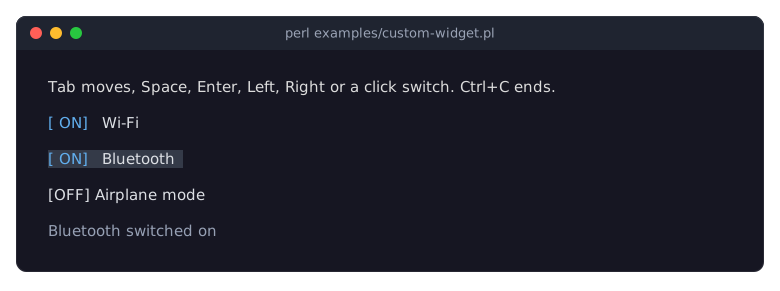
Term::Fabulous::Widget::Input is the base of all input widgets. A subclass implements
natural_size(the columns and rows it needs) andpaint(draw into the cleared buffer). Everything else is optional:handle_keyandhandle_mousereturn true for events they used,activateruns on a click. See "SUBCLASS INTERFACE" in Term::Fabulous::Widget::Input and "WRITING YOUR OWN WIDGETS" in Term::Fabulous::Manual::CustomWidgets.paint_textpaints a character string with the attributes it is given.foreground_attrandaccent_attrreturn the text and accent colors, and switch todisabled_colorwhile the widget is disabled;paint_focus_backgroundfills the widget withfocus_background_colorwhile it has the focus.accent_color "#e5c07b"in the layout changes the accent of the third switch.Call
mark_changedafter every change of what the widget shows or of the size it asks for, andfire_changeonly for changes the user makes. The widget does not paint itself:mark_changedmakes a frame due, also when the change is made from a timer, and that frame callspaint(Term::Fabulous skips frames while nothing changed). See "Painting" in Term::Fabulous::Widget::Input.Focus handling, Tab, the disabled state and the colors come from the base class; the widget does nothing for them.
layout_propertiesdeclares the accessors a KDL layout may set and how each is read (valuetakes#trueor#false). A layout that is to use a class defined inside the program needs the$INC{...}line, because Term::Fabulous::Layout loads every class it names withrequire. A class in its own .pm file somewhere in@INCneeds nothing of the kind; see "Make a widget usable from KDL".
Make a widget usable from KDL
Goal: a reusable container widget in its own module that KDL layouts can use, with a property that takes more than a single value.
Both files are shipped in the examples/cookbook directory: examples/cookbook/lib/My/Panel.pm and examples/cookbook/kdl-panel.pl.
The widget, saved as lib/My/Panel.pm:
package My::Panel;

use v5.32;
use warnings;
use Object::Pad 0.825;

use Term::Fabulous::Widget::Box;

class My::Panel :isa(Term::Fabulous::Widget::Box) :strict(params) {
	use Clay::XS qw(CLAY_TOP_TO_BOTTOM);
	use Term::Fabulous::Enum::BorderStyle;
	use Term::Fabulous::Widget::Text;

	field $title_widget = Term::Fabulous::Widget::Text->new( text => '', text_color => [ 255, 200, 80, 255 ] );

	# Defaults; a layout's properties are applied after construction and
	# override them.
	ADJUST {
		my $layout = $self->layout;
		$self->layout( { %$layout, layout_direction => CLAY_TOP_TO_BOTTOM } ) unless exists $layout->{layout_direction};
		$self->bordered(1) unless $self->has_look_override('bordered');
		foreach my $side (qw(top right bottom left)) {
			my $accessor = "border_style_$side";
			$self->$accessor( Term::Fabulous::Enum::BorderStyle->Round ) unless defined $self->$accessor;
		}
		$self->add_child($title_widget);    # the first child; the layout adds the others after it
	}

	# Title text, a character string.
	method title (@new) {
		$title_widget->text( $new[0] ) if @new;
		return $title_widget->text;
	}

	# A structured property: 'title "Settings" color="#ffcc00"' has an
	# argument and a key=value property, so a handler of its own parses
	# the node.
	method layout_properties :common () {
		return ( $class->SUPER::layout_properties, title => \&_parse_title );
	}

	method _parse_title ($kid) {
		my @args  = $kid->args->@*;
		my %props = map { $_->[0] => $_->[1]->as_perl } $kid->props->@*;
		die "My::Panel: 'title' takes one string and an optional color=..."
			unless @args == 1 && $args[0]->is_string && !grep { $_ ne 'color' } keys %props;

		$self->title( $args[0]->value );
		$title_widget->text_color( $props{color} ) if exists $props{color};
		return;
	}
}

1;
A program that uses it from a layout, saved next to the lib directory:
use v5.32;
use warnings;
use feature 'signatures';
no warnings 'experimental::signatures';

use FindBin;
use lib "$FindBin::Bin/lib";    # where My/Panel.pm lives

use Term::Fabulous::Layout;
use Term::Fabulous::Static;

my $root = Term::Fabulous::Layout->new( string => <<'KDL' )->build;
use Term::Fabulous::Widget::Box as Box
use Term::Fabulous::Widget::Text as Text
use My::Panel as Panel

Box {
	layout direction=down gap=1
	sizing width=grow

	Panel "network" {
		title "Network" color="#61afef"
		sizing width=grow
		padding left=1 right=1
		Text { text "Connected to the office network."; text_color "#dcdcdc"; }
	}
	Panel "disk" {
		title "Disk"
		border style=Double color="#e5c07b"
		sizing width=grow
		padding left=1 right=1
		Text { text "42 % used"; text_color "#dcdcdc"; }
	}
}
KDL

Term::Fabulous::Static->new( root => $root, width => 40 )->print;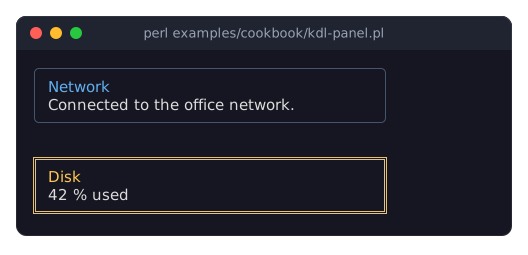
The program prints two framed panels: "Network" (in blue) above "Connected to the office network." in a rounded frame, and "Disk" above "42 % used" in a double-lined frame. In a pipe or a file, it prints the same without colors:
╭──────────────────────────────────────╮
│ Network                              │
│ Connected to the office network.     │
╰──────────────────────────────────────╯

╔══════════════════════════════════════╗
║ Disk                                 ║
║ 42 % used                            ║
╚══════════════════════════════════════╝
Term::Fabulous::Layout creates every widget with
$class->new( id => $id )and then applies the layout's properties to the finished widget withapply_layout_node(from Term::Fabulous::Role::CanParseLayout, which every class based on Term::Fabulous::Widget::Box has). So theADJUSTblock above runs first and sets defaults, and the layout's properties override them, as if a program called the accessors afternew.layout_propertiesdeclares how each property node is read: the inherited Box properties plustitle, a structured property whose handler,_parse_title, gets the node and parses it itself. Simple properties are declared as'scalar','boolean'or'color'instead and set through the accessor of the same name. See "layout_properties" in Term::Fabulous::Role::CanParseLayout.Die with a clear message for malformed properties; the layout adds the widget's name to it. Unknown property names already die with the list of known names.
The child widgets of the node are added by the layout after the widget has been constructed, so the title added in
ADJUSTstays the first child.
Fire your own events
Goal: let one part of the program announce that something happened, and let any ancestor widget react, with the same on listeners as for the built-in events.
This program is shipped as examples/cookbook/custom-events.pl.
use v5.32;
use warnings;
use feature 'signatures';
no warnings 'experimental::signatures';

use Object::Pad 0.825;

use Clay::UI::Enum::Bubble;
use Clay::UI::Enum::Result;
use Clay::UI::Events::Event;
use Term::Fabulous::Widget::Box;

# An event class with data of its own. event_name is the name listeners
# register for.
class My::Event::Saved :isa(Clay::UI::Events::Event) :strict(params) {
	field $path :param :reader;

	method event_name :common { 'Saved' }
}

my $app    = Term::Fabulous::Widget::Box->new( id => 'app' );
my $editor = Term::Fabulous::Widget::Box->new( id => 'editor' );
$app->add_child($editor);

$editor->on(
	Saved => sub ($event) {
		say 'editor: saved ', $event->path;
		return Clay::UI::Enum::Result->CONTINUE;    # let the ancestors see it too
	}
);
$app->on(
	Saved => sub ($event) {
		say 'app: ', $event->target->id, ' saved ', $event->path;
		return;
	}
);
$app->on( Refresh => sub ($event) { say 'app: refresh requested by ', $event->target->id; return } );

# Fire an event of the class; every event object can be fired once.
$editor->fire_event( My::Event::Saved->new( path => '/tmp/notes.txt' ) );

# A plain event needs only a name. ALWAYS bubbles to every ancestor,
# whatever the listeners return.
$editor->fire_event( Clay::UI::Events::Event->new( name => 'Refresh', bubble_mode => Clay::UI::Enum::Bubble->ALWAYS ) );
The program prints:
editor: saved /tmp/notes.txt
app: editor saved /tmp/notes.txt
app: refresh requested by editor
Clay::UI::Events::Event->new( name => 'Refresh' )creates an event with a name; listeners register for that name with$widget->on( Refresh => ... ).For an event with data of its own, subclass Clay::UI::Events::Event with Object::Pad, add fields and return the name from
event_name.fire_eventis available on Box-based widgets (all widgets except Text). The event is delivered to the widget's own listeners first and then bubbles to its ancestors while the listeners returnClay::UI::Enum::Result->CONTINUE; a widget without listeners for the name passes it on.bubble_mode => Clay::UI::Enum::Bubble->ALWAYSdelivers it to all ancestors regardless,NEVERonly to the widget itself. See "Firing your own events" in Term::Fabulous::Manual::Events.$event->targetis the widget the event was fired on. An event object can be fired only once; create a new one each time.
SEE ALSO
This page is part of Term::Fabulous::Cookbook. Previous page: Term::Fabulous::Cookbook::Output.