NAME
Term::Fabulous::Cookbook::GettingStarted - Recipes: a first program, quitting and text
DESCRIPTION
This page is part of Term::Fabulous::Cookbook. Previous page: Term::Fabulous::Cookbook. Next page: Term::Fabulous::Cookbook::KeyboardAndMouse.
This page starts the cookbook with a minimal full-screen program, the model for the interactive programs of the other recipes, and shows how to quit it, how to show text in any writing system (umlauts, CJK, combining accents), how to wrap and align it, and how to leave the mouse to the terminal. It uses Term::Fabulous, Term::Fabulous::Widget::Box and Term::Fabulous::Widget::Text. The concepts are explained in the first program of the manual, Term::Fabulous::Manual::Layout and Term::Fabulous::Manual::Looks (text and colors).
The recipes on this page:
A minimal program to start from
Goal: a full-screen program that shows a line of text and ends when the user presses q, Escape or Ctrl+C. The interactive programs of the other recipes are built the same way.
This program is shipped as examples/cookbook/minimal-program.pl.
use v5.32;
use warnings;
use feature 'signatures';
no warnings 'experimental::signatures';

use Term::Fabulous;
use Term::Fabulous::Widget::Box;
use Term::Fabulous::Widget::Text;
use Clay::XS qw(sizing_grow CLAY_TOP_TO_BOTTOM);

my $root = Term::Fabulous::Widget::Box->new(
	layout => {
		layout_direction => CLAY_TOP_TO_BOTTOM,
		sizing           => { width => sizing_grow(), height => sizing_grow() },
		padding          => { left  => 2, right => 2, top => 1, bottom => 1 },
		child_gap        => 1,
	},
);
$root->add_child(
	Term::Fabulous::Widget::Text->new(
		text       => 'Hello from Term::Fabulous! Press q, Escape or Ctrl+C to quit.',
		text_color => [ 230, 230, 230, 255 ],
	)
);

my $ui = Term::Fabulous->new( root => $root, width => 80, height => 24 );

$root->on(
	KeyPress => sub ($event) {
		my $key = $event->key_name // return;
		$ui->loop->stop if $key eq 'q' || $key eq 'Escape';
		return;
	}
);

$ui->run;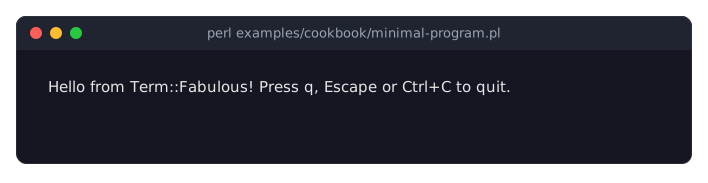
The root widget is a Term::Fabulous::Widget::Box that grows to fill the whole terminal (
sizing_grow()on both axes), lays its children out from top to bottom and keeps one cell of padding at the top and bottom and two at the sides. See "LAYOUT" in Term::Fabulous::Manual::Layout.background_colortakes[ $red, $green, $blue, $alpha ], each 0..255. Without a background, the terminal's default color shows. See "COLORS" in Term::Fabulous::Manual::Looks.Always give a Term::Fabulous::Widget::Text a
text_color: the default is opaque black, which is invisible on a dark terminal.widthandheightin "new" in Term::Fabulous are only the starting size;runreplaces them with the real terminal size.runopens the terminal and runs the event loop: it handles input and draws a new frame whenever something changed (it checks 30 times per second). When the loop stops,runrestores the terminal and returns. See "run" in Term::Fabulous.
Quit with q or Escape
Goal: end the program on a key of your choice, not only on Ctrl+C.
This is the KeyPress listener of the program in "A minimal program to start from":
$root->on(
	KeyPress => sub ($event) {
		my $key = $event->key_name // return;
		$ui->loop->stop if $key eq 'q' || $key eq 'Escape';
		return;
	}
);$ui->loopis the IO::Async::Loop thatrunis running. Stopping it makesrunreturn after the terminal has been restored, so code after$ui->runruns on a normal screen. Ctrl+C, SIGINT, SIGTERM and SIGHUP stop it in the same way. See "Quitting" in Term::Fabulous::Manual::Programs.key_namereturns names likeq,Escape,Ctrl+SorF1, orundeffor a key without a name, hence the// return.Key presses go to the focused widget first and bubble up to the root. While a text field has the focus, it uses the q (it types it), so the root never sees it. Escape reaches the root unless a widget on the way uses it, as an open dropdown list does to close itself or a dialog to close the dialog. See "Which widget receives key presses" in Term::Fabulous::Manual::Events.
Alt plus a letter arrives as one key named
Alt+x, not as Escape followed by x, so binding Escape does not catch Alt combinations. The key names section of the events chapter has the details.The listener is registered after
$uiexists, because it uses$ui.
Show non-ASCII text (umlauts, CJK, combining accents)
Goal: show text with umlauts, CJK characters or combining accents in Term::Fabulous::Widget::Text widgets.
This program is shipped as examples/cookbook/non-ascii-text.pl.
use v5.32;
use warnings;
use feature 'signatures';
no warnings 'experimental::signatures';

use Term::Fabulous::Static;
use Term::Fabulous::Widget::Box;
use Term::Fabulous::Widget::Text;
use Clay::XS qw(CLAY_TOP_TO_BOTTOM);

sub text ($string) {
	return Term::Fabulous::Widget::Text->new( text => $string, text_color => [ 230, 230, 230, 255 ] );
}

my $root = Term::Fabulous::Widget::Box->new( layout => { layout_direction => CLAY_TOP_TO_BOTTOM } );
$root->add_child(
	text("Gr\x{fc}\x{df}e aus M\x{fc}nchen"),    # German umlauts and sharp s
	text("\x{3044}\x{308d}\x{306f}\x{306b}\x{307b}\x{3078}\x{3068}|"),    # Japanese, two columns each
	text("e\x{301} is one character|"),    # e and a combining acute accent
);

Term::Fabulous::Static->new( root => $root, width => 30 )->print( colors => 0 );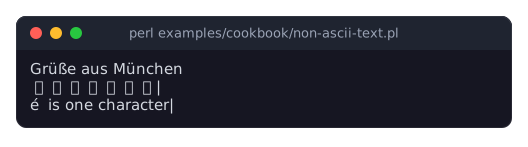
The program prints three lines: the German greeting, seven Japanese characters that take two columns each (14 columns) followed by |, and an e with an acute accent followed by the rest of the line. In a pipe or a file, it prints:
Grüße aus München
いろはにほへと|
é is one character|
Text widgets take Perl character strings, like everything else in Term::Fabulous (canvases, input widgets, KDL layouts). See "Text is character strings" in Term::Fabulous::Manual::Looks.
The
\x{...}escapes keep this recipe's source ASCII. Withuse utf8;at the top of a UTF-8 encoded source file you can write the characters directly; both give the same character strings.Text from outside the program (a file, a command, a socket) is bytes. Decode it with
Encode::decode('UTF-8', ...)before passing it to a widget, or each byte shows as one Latin-1 character.Wide characters take two columns, and a base character with combining marks takes one cell. Term::Fabulous measures text with termbox2's own width functions; see "Wide characters and emoji" in Term::Fabulous::Manual::Looks.
Wrap, align and space text
Goal: control how a Term::Fabulous::Widget::Text breaks its lines, how it aligns them and how much room each line gets.
This program is shipped as examples/cookbook/wrap-and-align-text.pl.
use v5.32;
use warnings;
use feature 'signatures';
no warnings 'experimental::signatures';

use Term::Fabulous::Static;
use Term::Fabulous::Enum::BorderStyle;
use Term::Fabulous::Widget::Box;
use Term::Fabulous::Widget::Text;
use Clay::XS qw(
	sizing_fixed CLAY_TOP_TO_BOTTOM CLAY_ALIGN_X_CENTER
	CLAY_TEXT_ALIGN_CENTER CLAY_TEXT_ALIGN_RIGHT CLAY_TEXT_WRAP_NEWLINES
);

my $words = "Text wraps at spaces to the width of its box.\nA line break starts a new line.";

# A framed box, 24 columns wide, with a caption and a Text that gets the
# given options. 'box_layout' replaces the layout of the box.
sub sample ( $caption, $text, %options ) {
	my $box_layout = delete $options{box_layout} // { layout_direction => CLAY_TOP_TO_BOTTOM, sizing => { width => sizing_fixed(24) } };
	my $box        = Term::Fabulous::Widget::Box->new(
		bordered     => 1,
		border_style => Term::Fabulous::Enum::BorderStyle->Ascii,
		border_color => [ 120, 160, 220, 255 ],
		layout       => $box_layout,
	);
	$box->add_child(
		Term::Fabulous::Widget::Text->new( text => $caption, text_color => [ 255, 200, 80,  255 ] ),
		Term::Fabulous::Widget::Text->new( text => $text,    text_color => [ 230, 230, 230, 255 ], %options ),
	);
	return $box;
}

# Three samples side by side in each row.
sub row (@samples) {
	my $row = Term::Fabulous::Widget::Box->new( layout => { child_gap => 2 } );
	$row->add_child(@samples);
	return $row;
}

my $root = Term::Fabulous::Widget::Box->new( layout => { layout_direction => CLAY_TOP_TO_BOTTOM, child_gap => 1 } );
$root->add_child(
	row(
		sample( 'Default: wrap at words', $words ),
		sample( 'Centered lines',         $words, text_alignment => CLAY_TEXT_ALIGN_CENTER ),
		sample( 'Right-aligned lines',    $words, text_alignment => CLAY_TEXT_ALIGN_RIGHT ),
	),
	row(
		sample( 'Line breaks only',  "No wrapping at spaces,\nonly at line breaks.", wrap_mode   => CLAY_TEXT_WRAP_NEWLINES ),
		sample( 'Two rows per line', "First line\nSecond line",                      line_height => 2 ),
		sample(
			'A centered label', 'OK',
			box_layout => { layout_direction => CLAY_TOP_TO_BOTTOM, sizing => { width => sizing_fixed(24) }, child_alignment => { x => CLAY_ALIGN_X_CENTER } },
		),
	),
);

# Colors only when STDOUT is a terminal.
Term::Fabulous::Static->new( root => $root, width => 76 )->print;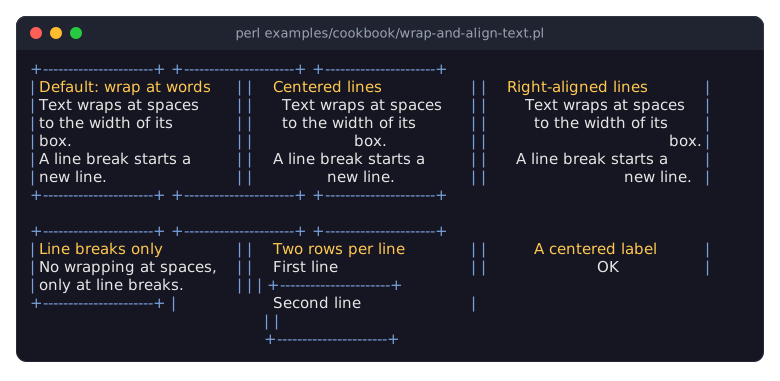
In a pipe or a file, the program prints the same without colors:
+----------------------+  +----------------------+  +----------------------+
|Default: wrap at words|  |Centered lines        |  |Right-aligned lines   |
|Text wraps at spaces  |  | Text wraps at spaces |  |  Text wraps at spaces|
|to the width of its   |  | to the width of its  |  |   to the width of its|
|box.                  |  |         box.         |  |                  box.|
|A line break starts a |  |A line break starts a |  | A line break starts a|
|new line.             |  |      new line.       |  |             new line.|
+----------------------+  +----------------------+  +----------------------+

+----------------------+  +----------------------+  +----------------------+
|Line breaks only      |  |Two rows per line     |  |   A centered label   |
|No wrapping at spaces,|  |First line            |  |          OK          |
|only at line breaks.  |  |                      |  +----------------------+
+----------------------+  |Second line           |
                          |                      |
+----------------------+wrap_modedecides where lines break. The default,CLAY_TEXT_WRAP_WORDS, breaks at spaces to fit the width of the box and at line breaks ("\n").CLAY_TEXT_WRAP_NEWLINESbreaks only at line breaks (forCLAY_TEXT_WRAP_NONE, see "new" in Term::Fabulous::Widget::Text). A line that does not fit its box then runs past the right edge of the box (the border is drawn over it and hides the character there) and is cut off only at the edge of the terminal; keep such lines short or give the box room. A single word wider than the box is never broken, whatever the mode. See "Wrapping" in Term::Fabulous::Manual::Looks.text_alignment(CLAY_TEXT_ALIGN_LEFT,CLAY_TEXT_ALIGN_CENTER,CLAY_TEXT_ALIGN_RIGHT) aligns the lines of a text against each other, within the width of the Text widget: the width of the box for a text that wraps, otherwise the width of its longest line. A single-line text is exactly as wide as its words, so there is nothing to align. To center or right-align a short label in its box, setchild_alignmenton the box that holds it, as the last sample does. See "Alignment" in Term::Fabulous::Manual::Looks and "Aligning and centering children" in Term::Fabulous::Manual::Layout.line_heightis the number of rows per line, an integer (0, the default, means 1). See "Line height" in Term::Fabulous::Manual::Looks.font_idandfont_sizehave no visible effect in a terminal.letter_spacingchanges where Clay breaks the lines but is not drawn, so do not use it. For bold, italic and underlined text, see thebold,italicandunderlineparameters of "new" in Term::Fabulous::Widget::Text.The samples are printed with Term::Fabulous::Static, which uses colors only when its output goes to a terminal; see "Render a report to a file or pipe (Static)" in Term::Fabulous::Cookbook::Output.
All these options are accessors too, for example
$text->text_alignment(CLAY_TEXT_ALIGN_RIGHT); the next frame shows the change.
Let the terminal handle the mouse (select and copy text)
Goal: leave the mouse to the terminal, so that the user can select and copy text on the screen with the terminal's own selection.
Create the Term::Fabulous object of the program in "A minimal program to start from" with mouse => 0:
my $ui = Term::Fabulous->new( root => $root, width => 80, height => 24, mouse => 0 );With
mouse => 0, Term::Fabulous does not ask the terminal for mouse reports (see "new" in Term::Fabulous; inline mode always works this way). The terminal then handles clicks and drags itself, usually by selecting text. The program receives no Term::Fabulous::Event::Mouse events, clicks neither focus nor activate widgets, buttons and input widgets can be used only with the keyboard, and the mouse wheel does not scroll scroll boxes.Some terminals turn the mouse wheel into Up and Down key presses while a full-screen program runs without mouse reports.
Many terminals also let you select text while the program does use the mouse, if you hold Shift (or another key, depending on the terminal) while dragging.
SEE ALSO
This page is part of Term::Fabulous::Cookbook. Previous page: Term::Fabulous::Cookbook. Next page: Term::Fabulous::Cookbook::KeyboardAndMouse.