NAME
Term::Fabulous::Widget::MenuBar - A row of menus at the top of the screen
SYNOPSIS
use Term::Fabulous::Commands;
use Term::Fabulous::Widget::MenuBar;

my $commands = Term::Fabulous::Commands->new(
	commands => [
		{ id => 'new',  label => 'New',  keys => ['Ctrl+N'], run => sub { new_file() } },
		{ id => 'save', label => 'Save', keys => ['Ctrl+S'], run => sub { save_file() }, enabled => sub { $modified } },
		{ id => 'quit', label => 'Quit', keys => ['Ctrl+Q'], run => sub { $ui->loop->stop } },
		{ id => 'wrap', label => 'Wrap long lines', run => sub { $wrap = !$wrap }, checked => sub { $wrap } },
	],
);
my $menu_bar = Term::Fabulous::Widget::MenuBar->new(
	commands => $commands,
	caption  => 'Notes',
	menus    => [
		{ title => 'File', items => [ 'new', 'save', '-', 'quit' ] },
		{ title => 'View', items => ['wrap'] },
		{ title => 'Help', items => [ { label => 'About', run => sub { show_about() } } ] },
	],
);
$root->add_child( $menu_bar, $content, $status_bar );

my $ui = Term::Fabulous->new( root => $root );
$commands->listen($root);    # Ctrl+N, Ctrl+S, Ctrl+Q
$menu_bar->listen($root);    # F10, Alt+F, Alt+V, Alt+H
$ui->run;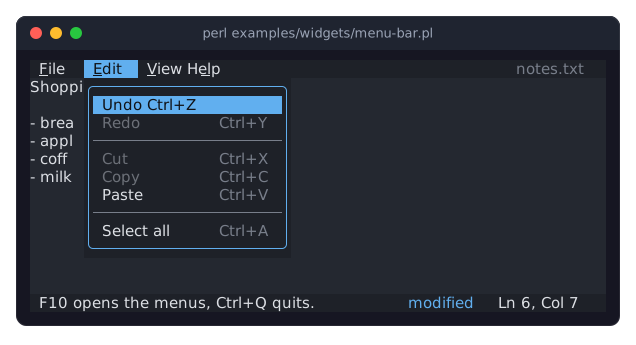
The program is examples/widgets/menu-bar.pl, a small notes editor. The user typed a line and pressed Alt+e. Undo is the first item that can run. Redo, Cut and Copy are dimmed, because there is nothing to redo and no text is selected.
DESCRIPTION
A menu bar is one row of menu titles, usually the first row of the screen. Each title opens a Term::Fabulous::Widget::Menu below it, whose items are commands. Together with a Term::Fabulous::Commands table, the menus show the user what the program can do and which keys do it, while the keys keep working without the menus.
Each title has a mnemonic, a letter of the title that is underlined. Alt with that letter opens the menu, and F10 opens the first one. These two keys come from the rest of the program, so the bar needs to hear them: "listen" on the root does that, as "listen" in Term::Fabulous::Commands does for the keys of the commands.
The bar takes the keyboard focus only while a menu is open, so Tab never stops on it. When the menu closes, the focus goes back to the widget that had it, so the user goes on typing where they were. A click on a title does not take the focus from that widget either (see "KEYBOARD AND FOCUS" in Term::Fabulous).
Keys while a menu is open
Up,Down,Home,End,PageUp,PageDown, letters-
Move the highlight in the menu (see "Keys" in Term::Fabulous::Widget::Menu).
Enter,Space-
Choose the highlighted item: the menu closes, the focus goes back, and the command runs.
Left,Right,Shift+Tab,Tab-
Open the menu to the left or to the right, going round at the ends.
-
Open that menu.
Escape,F10-
Close the menu.
- other keys with
CtrlorAlt -
Close the menu and go on to the program. So
Ctrl+Ssaves even while a menu is open.
Other keys do nothing while a menu is open.
The mouse
A click on a title opens its menu, and a click on the title of the open menu closes it. While a menu is open, moving the pointer over another title opens that one. A click on an item chooses it, and so does pressing the button on a title, dragging down to an item and releasing it there. A click anywhere else closes the menu and goes on to what was clicked.
Where the menus go
A menu opens just below its title. Near the right edge of the screen it moves left as far as it must to stay on the screen, and when there is no room below the bar, it opens above it. The menus float over every other widget, dialogs included.
CONSTRUCTOR
new
my $menu_bar = Term::Fabulous::Widget::MenuBar->new(%parameters);Accepts the parameters of "new" in Term::Fabulous::Widget::Input (id, layout, text_color, ...) and the ones below. menus is required, the others are optional, and unknown parameters die. Without a sizing in layout, the bar is one row high and grows to the width of its parent.
-
A non-empty array reference of menus, from left to right, each a hash reference:
title-
The title shown in the bar, a non-empty string. Required.
key-
The mnemonic: one letter or digit of the title. Default: the first character of the title. It is underlined in the title, and
Altwith it opens the menu. Two menus with the same mnemonic die, so give one of them another letter ({ title => 'Format', key => 'o' }next toFile). When the bar hascommands, a mnemonic whoseAltkey runs a command dies as well.F10is not checked in this way, so do not give it to a command: the command would run instead of opening the menus. items-
The items of the menu, as for "items" in Term::Fabulous::Widget::Menu: commands, ids of
commands, hash references and'-'for separators.
commands-
A Term::Fabulous::Commands table, which items given as ids are looked up in. Default:
undef. caption-
A string shown at the right end of the bar, such as the name of the program or of the open file. Default:
''. It is left out when the bar is too narrow for it. text_color,caption_color-
The colors of the titles and of the caption, in any format "Colors" in Term::Fabulous::Widget::Canvas accepts. Default: the theme's
menu_bar.textandmenu_bar.caption. highlight_text_color,highlight_background_color-
The colors of the title of the open menu. Default: the theme's
menu_bar.highlight.textandmenu_bar.highlight.background.
The background is the theme's menu_bar.background. The menus are drawn in the theme's menu family, like every Term::Fabulous::Widget::Menu.
METHODS
A menu bar has the methods of Term::Fabulous::Widget::Input plus these.
listen
$menu_bar->listen( $ui->root );Adds a KeyPress listener to a widget that calls "handle_shortcut", so the keys that reach that widget open the menus. Listen on the root for keys that work everywhere. A listener cannot be taken away again. Returns the bar.
handle_shortcut
return Clay::UI::Enum::Result->HANDLED if $menu_bar->handle_shortcut($event);Opens the first menu for F10, or the menu of Alt and a letter, and returns 1. Returns 0 for every other key. For programs that handle their keys in one listener of their own.
open, close
$menu_bar->open(1);
$menu_bar->close;
Open a menu by its index (from 0), or switch to it, and close the open menu. open dies for an index past the last menu, while the bar is not part of a UI and while it is disabled. Both return the bar. A disabled bar ignores the keys of "handle_shortcut" and the mouse.
is_open, open_menu
if ( $menu_bar->is_open ) { say 'Menu ', $menu_bar->open_menu, ' is open' }Whether a menu is open (1 or 0), and the index of the open menu or undef.
value
my $index = $menu_bar->value;The index of the open menu, or undef, the same as "is_open, open_menu". A menu bar is an input widget, and this is its value.
menu
my $file_menu = $menu_bar->menu(0);The Term::Fabulous::Widget::Menu of a menu, by index. To change the items of a menu, write its items.
titles
my @titles = $menu_bar->titles;The titles, from left to right.
menu_for_key
my $index = $menu_bar->menu_for_key('f');The index of the menu whose mnemonic is a letter, or undef.
caption
$menu_bar->caption('notes.txt');Accessor for the parameter of the same name.
caption_color, highlight_text_color, highlight_background_color
Accessors for the colors.
EVENTS
The menus of the bar are its children while they are open, so the Choose events of their items (Term::Fabulous::Event::Choose) bubble through the bar. One listener on the bar hears every choice:
$menu_bar->on( Choose => sub ($event) {
	$status->message( $event->command->label );
	return Clay::UI::Enum::Result->CONTINUE;
} );
KDL PROPERTIES
A menu bar is built in Perl only: its menus hold commands, which run code that a layout file cannot express.
SEE ALSO
Term::Fabulous::Widget::Menu, Term::Fabulous::Commands, Term::Fabulous::Command, Term::Fabulous::Widget::StatusBar, Term::Fabulous::Manual::Menus, "Give a program a menu bar (MenuBar, Commands)" in Term::Fabulous::Cookbook::Menus.