NAME
Term::Fabulous::Widget::Sixel - Show a picture in sixel graphics
SYNOPSIS
use Clay::XS qw(sizing_fixed);
use Term::Fabulous::Widget::Sixel;

# At its natural size: as many cells as its pixels cover.
my $photo = Term::Fabulous::Widget::Sixel->new( file => 'examples/images/mandelbrot.png' );

# Scaled to fit 40 columns and 12 rows, from bytes or base64 text.
my $preview = Term::Fabulous::Widget::Sixel->new(
	data   => $png_bytes,
	fit    => 'contain',
	layout => { sizing => { width => sizing_fixed(40), height => sizing_fixed(12) } },
);
my $logo = Term::Fabulous::Widget::Sixel->new( base64 => $base64_text );

# Another picture later.
$photo->file('examples/images/other.png');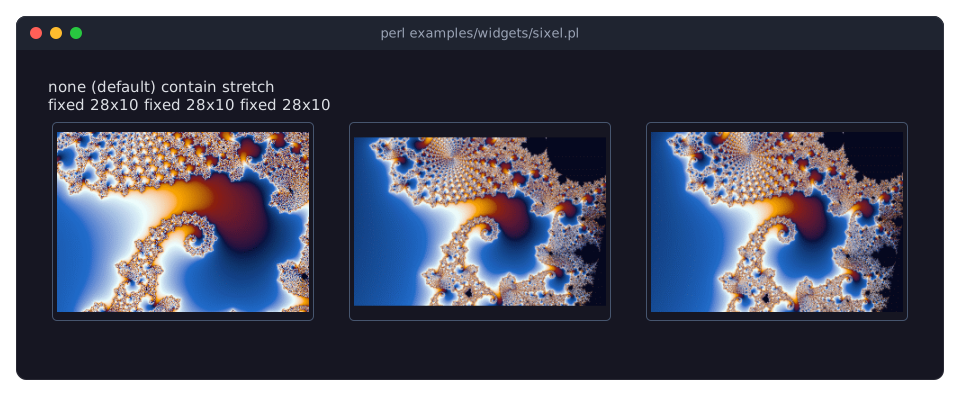
DESCRIPTION
The picture shows a 480x320 PNG of the Mandelbrot set in three widgets of a fixed 28x10 cells, one per fit, in a terminal with cells of 10x20 pixels: none (the default) keeps its natural size of 48x16 cells, cut to the widget on every side, contain scales it to fit and keeps its proportions, stretch fills the widget. The program is examples/widgets/sixel.pl.
A sixel widget shows a picture like Term::Fabulous::Widget::Image, but in the terminal's own pixels instead of half blocks: the terminal draws it as a sixel image over the widget's cells. It reads the same sources (a file, bytes, base64 text or a data URL, in whatever formats your Imager was built with), takes the same parameters and scales the same way (see "fit"); it is a subclass of Image.
Unless the layout sizes it, the widget is as big as the picture: as many columns and rows as its pixels cover, with the size of a cell the terminal reports. Given another size, the picture keeps its natural size, or is scaled as "fit" says, and is centered in the widget.
Term::Fabulous sends a picture to the terminal when it first shows, when it changes, moves or is resized, and when the cells below it are drawn again; otherwise the terminal keeps it on the screen. A picture that disappears gets its cells drawn again, which erases it.
What covers the picture
Everything the frame paints over the widget hides the picture there, cell by cell: a dialog, a dropdown's list, a toast, another widget floating over it. Those cells are left out of the picture (its pixels there are transparent), so they show what is painted in them. In a Term::Fabulous::Widget::ScrollBox, the picture shows only in the visible cells of the widget.
A picture never covers the last row of the terminal: the terminal would scroll the screen up to place its cursor below it. The cells of the widget in that row stay empty.
Transparency
Transparent pixels are not drawn, so the cells below them show the background. Translucent pixels are mixed with the background below the widget (the widget's own background_color or the nearest one below it, see "background_below" in Term::Fabulous::Widget), like Image does. Where there is none, on the terminal's default background, pixels with an alpha of at least 128 are drawn opaque and the others are left out.
Without sixel
The widget needs the Perl modules Imager and Imager::File::SIXEL, and a terminal that shows sixel graphics and reports the size of its cells in pixels. Neither module is a requirement of Term::Fabulous, only a recommendation. Without one of them, or on another terminal, the class still loads and takes the same parameters, so programs and layouts work unchanged, but it shows a notice in its place instead of the picture, like Image does without Imager:
Sixel needs a terminal that
shows sixel graphics and
reports the size of its
cells.
The notices name the missing module instead, for example Sixel needs the Perl module Imager::File::SIXEL, which is not installed. They are drawn in notice_color, wrapped at 28 columns unless the layout gives the widget another width.
Term::Fabulous::Terminal::Termbox asks the terminal when it opens it: the terminal shows sixel graphics when its primary device attributes (the answer to ESC [ c) list 4, as those of xterm (started with -ti vt340), foot, WezTerm, mlterm, Contour, Konsole, iTerm2 and Windows Terminal do. The size of a cell comes from the terminal's answer to ESC [ 16 t, else from the pixel size of the terminal device's window (TIOCGWINSZ). A terminal that shows sixel graphics is asked again after it is resized, since a new font size changes the size of a cell. Term::Fabulous::Static and Term::Fabulous::Terminal::Memory (unless given sixel_cell_size) show no sixel graphics.
CONSTRUCTOR
new
my $picture = Term::Fabulous::Widget::Sixel->new(%parameters);Accepts the parameters of "new" in Term::Fabulous::Widget::Image: file, data, base64, data_url, fit and notice_color, besides those of "CONSTRUCTOR" in Term::Fabulous::Widget::Box. They work the same, except:
fit-
none(the default) draws the picture at its natural size, cut on every side if it is larger than the widget;containscales it to the largest size that fits the widget's pixels, keeping its proportions;stretchscales it to fill them. The widget's pixels are its columns and rows times the size of a cell. Enlarging repeats pixels (nearest neighbor), shrinking mixes them. notice_color-
The color of the notice shown without sixel. Default: the theme's
image.notice, like Image.
METHODS
The methods of Term::Fabulous::Widget::Image: file, data, base64, data_url, fit, notice_color, image_width and image_height, plus:
sixel_data
my $data = $picture->sixel_data( shown => [ 0, 0, 8, 4 ], covered => [], cell_size => [ 10, 20 ] );Called by the renderer (see "sixel_data" in Term::Fabulous::Widget::Canvas) once per frame: the picture's pixels in the shown cells of the widget as SIXEL data, transparent in the covered ones, or undef when the widget shows a notice or has no picture. The data of the last call is kept and returned again while nothing changes.
EVENTS
A sixel widget fires no events of its own.
KDL PROPERTIES
The properties of "KDL PROPERTIES" in Term::Fabulous::Widget::Image.
use Term::Fabulous::Widget::Sixel as Sixel

Sixel "photo" {
	file "examples/images/mandelbrot.png"
	sizing width="fixed(32)" height="fixed(10)"
	fit "contain"
}
SEE ALSO
Imager::File::SIXEL, Term::Fabulous::Widget::Image, Term::Fabulous::Render::Target::Sixel, "Show a photo in sixel graphics (Sixel)" in Term::Fabulous::Cookbook::Canvases.