
NAME
App::Greple::xlate - translation support module for greple
SYNOPSIS
greple -Mxlate -e ENGINE --xlate pattern target-file

greple -Mxlate::deepl --xlate pattern target-file
VERSION
Version 0.26
DESCRIPTION
Greple xlate module find text blocks and replace them by the
translated text. Include DeepL (deepl.pm) and ChatGPT (gpt3.pm)
module for back-end engine.
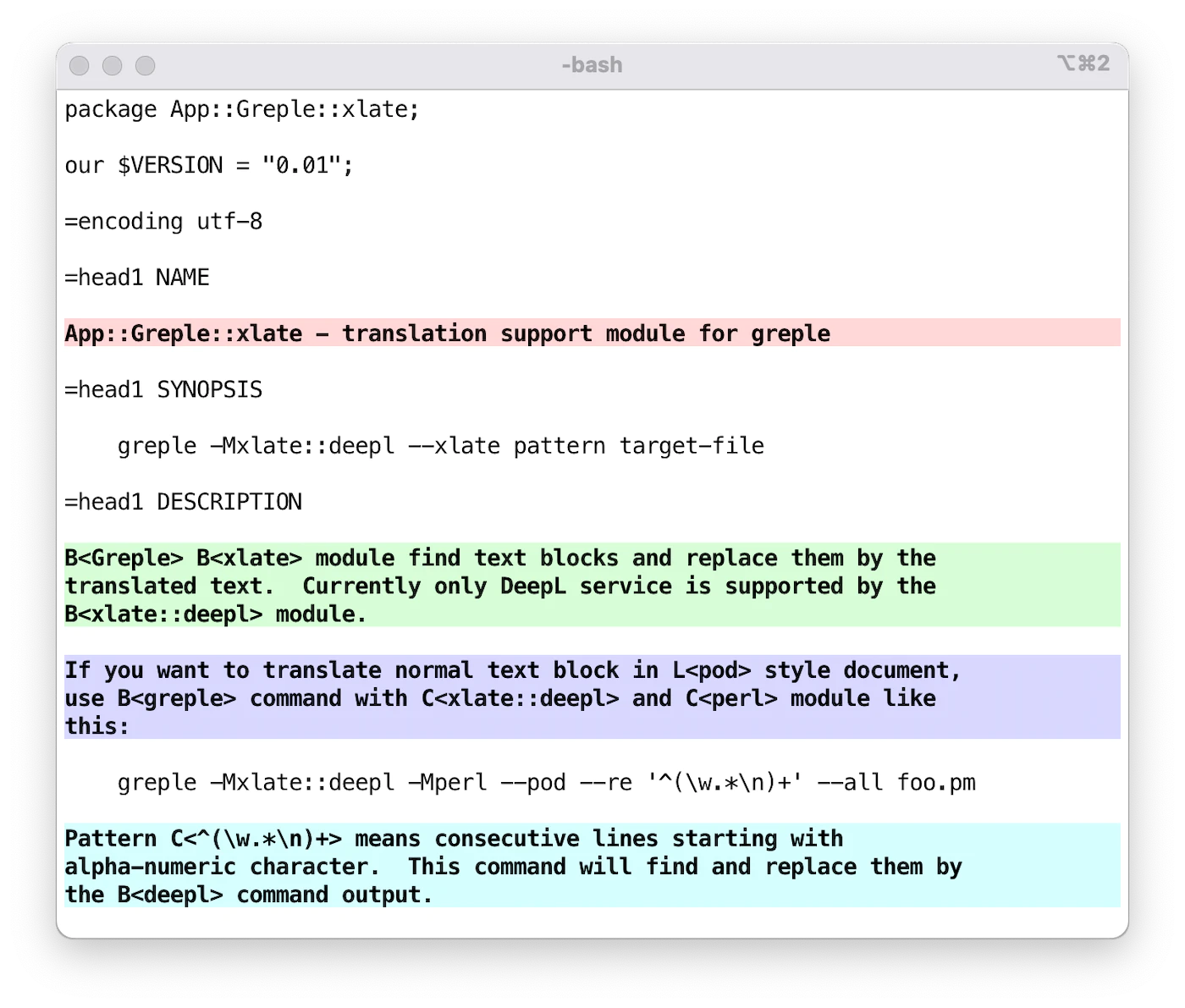
If you want to translate normal text block in pod style document,
use greple command with xlate::deepl and perl module like
this:
greple -Mxlate::deepl -Mperl --pod --re '^(\w.*\n)+' --all foo.pm
Pattern ^(\w.*\n)+ means consecutive lines starting with
alpha-numeric letter. This command show the area to be translated.
Option --all is used to produce entire text.
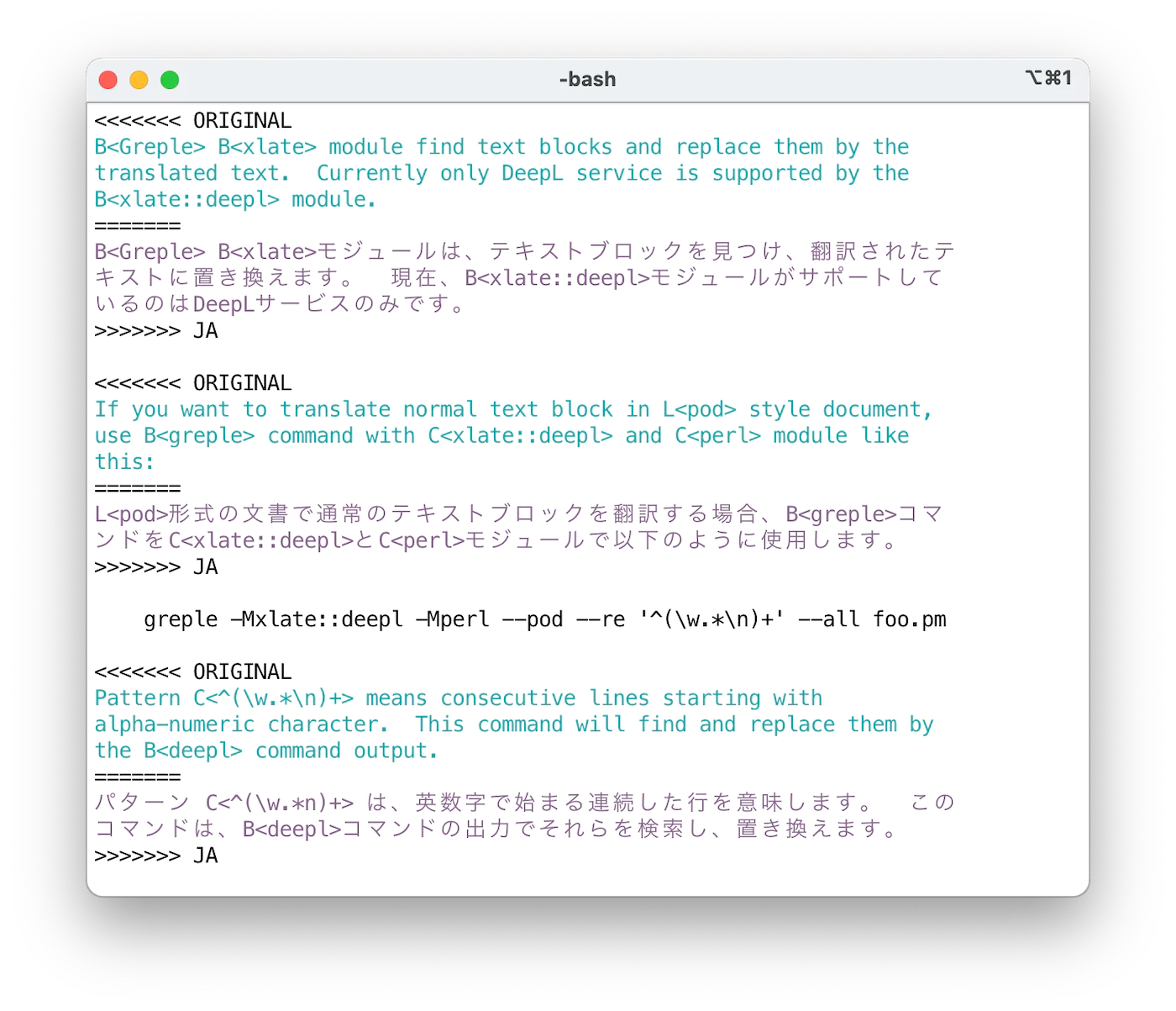
Then add --xlate option to translate the selected area. It will
find and replace them by the deepl command output.
By default, original and translated text is printed in the "conflict
marker" format compatible with git(1). Using ifdef format, you
can get desired part by unifdef(1) command easily. Format can be
specified by --xlate-format option.
If you want to translate entire text, use --match-all option.
This is a short-cut to specify the pattern matches entire text
(?s).+.
OPTIONS
-
--xlate
-
--xlate-color
-
--xlate-fold
-
--xlate-fold-width=n (Default: 70)
Invoke the translation process for each matched area.
Without this option, greple behaves as a normal search command. So you can check which part of the file will be subject of the translation before invoking actual work.
Command result goes to standard out, so redirect to file if necessary, or consider to use App::Greple::update module.
Option --xlate calls --xlate-color option with --color=never option.
With --xlate-fold option, converted text is folded by the specified width. Default width is 70 and can be set by --xlate-fold-width option. Four columns are reserved for run-in operation, so each line could hold 74 characters at most.
-
--xlate-engine=engine
Specifies the translation engine to be used. If you specify the engine module directly, such as
-Mxlate::deepl, you do not need to use this option. -
--xlate-labor
-
--xlabor
Insted of calling translation engine, you are expected to work for. After preparing text to be translated, they are copied to the clipboard. You are expected to paste them to the form, copy the result to the clipboard, and hit return.
-
--xlate-to (Default:
EN-US)Specify the target language. You can get available languages by
deepl languagescommand when using DeepL engine. -
--xlate-format=format (Default:
conflict)Specify the output format for original and translated text.
-
conflict, cm
Print original and translated text in git(1) conflict marker format.
  <<<<<<< ORIGINAL
  original text
  =======
  translated Japanese text
  >>>>>>> JA
You can recover the original file by next sed(1) command.
sed -e '/^<<<<<<< /d' -e '/^=======$/,/^>>>>>>> /d' -
ifdef
Print original and translated text in cpp(1)
#ifdefformat.#ifdef ORIGINAL original text #endif #ifdef JA translated Japanese text #endifYou can retrieve only Japanese text by the unifdef command:
unifdef -UORIGINAL -DJA foo.ja.pm -
space
Print original and translated text separated by single blank line.
-
xtxt
If the format is
xtxt(translated text) or unkown, only translated text is printed.
-
-
--xlate-maxlen=chars (Default: 0)
Specify the maximum length of text to be sent to the API at once. Default value is set as for free account service: 128K for the API (--xlate) and 5000 for the clipboard interface (--xlate-labor). You may be able to change these value if you are using Pro service.
-
--[no-]xlate-progress (Default: True)
See the tranlsation result in real time in the STDERR output.
-
--match-all
Set the whole text of the file as a target area.
CACHE OPTIONS
xlate module can store cached text of translation for each file and
read it before execution to eliminate the overhead of asking to
server. With the default cache strategy auto, it maintains cache
data only when the cache file exists for target file.
-
--cache-clear
The --cache-clear option can be used to initiate cache management or to refresh all existing cache data. Once executed with this option, a new cache file will be created if one does not exist and then automatically maintained afterward.
-
--xlate-cache=strategy
-
auto(Default)Maintain the cache file if it exists.
-
createCreate empty cache file and exit.
-
always,yes,1Maintain cache anyway as far as the target is normal file.
-
clearClear the cache data first.
-
never,no,0Never use cache file even if it exists.
-
accumulateBy default behavior, unused data is removed from the cache file. If you don't want to remove them and keep in the file, use
accumulate.
-
COMMAND LINE INTERFACE
You can easily use this module from the command line by using the
xlate command included in the repository. See the xlate help
information for usage.
EMACS
Load the xlate.el file included in the repository to use xlate
command from Emacs editor. xlate-region function translate the
given region. Default language is EN-US and you can specify
language invoking it with prefix argument.
ENVIRONMENT
-
DEEPL_AUTH_KEY
Set your authentication key for DeepL service.
-
OPENAI_API_KEY
OpenAI authentication key.
INSTALL
CPANMINUS
$ cpanm App::Greple::xlate
TOOLS
You have to install command line tools for DeepL and ChatGPT.
https://github.com/DeepLcom/deepl-python
https://github.com/tecolicom/App-gpty
SEE ALSO
-
https://github.com/DeepLcom/deepl-python
DeepL Python library and CLI command.
-
https://github.com/openai/openai-python
OpenAI Python Library
-
https://github.com/tecolicom/App-gpty
OpenAI command line interface
-
See the greple manual for the detail about target text pattern. Use --inside, --outside, --include, --exclude options to limit the matching area.
-
You can use
-Mupdatemodule to modify files by the result of greple command. -
Use sdif to show conflict marker format side by side with -V option.
AUTHOR
Kazumasa Utashiro
LICENSE
Copyright © 2023 Kazumasa Utashiro.
This library is free software; you can redistribute it and/or modify it under the same terms as Perl itself.