NAME
Term::Fabulous::Widget::Canvas - A widget you draw on cell by cell
SYNOPSIS
use Clay::XS qw(sizing_grow);
use Term::Fabulous::Color;
use Term::Fabulous::Widget::Canvas;

my $canvas = Term::Fabulous::Widget::Canvas->new(
	background_color => [ 10, 10, 20, 255 ],
	layout           => { sizing => { width => sizing_grow(), height => sizing_grow() } },
);

# The canvas gets its size from the layout; draw when it is known.
$canvas->on( CanvasResize => sub ($event) {
	$canvas->clear;
	$canvas->put_text( 0, 0, "Gr\x{fc}\x{df}e", '#ffcc00' );           # a character string
	$canvas->put( 3, 1, "\x{2580}", 0xFF0000, 0x0000FF );               # red over blue
	$canvas->fill( 0, 2, 10, 1, '#', Term::Fabulous::Color->rgb( 0, 200, 0 ) );
	$canvas->put( $_, $event->rows - 1, "\x{2500}", 0x808080 ) foreach 0 .. $event->columns - 1;
	return;
} );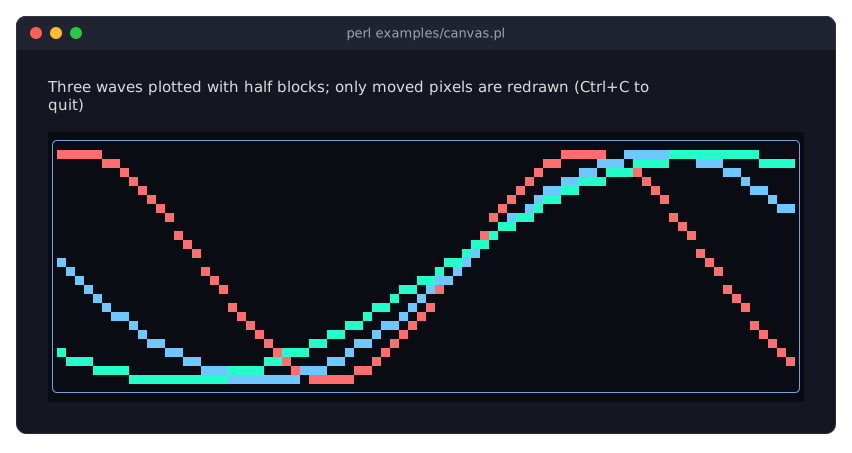
examples/canvas.pl animates three waves on a canvas and redraws only the cells that change.
DESCRIPTION
A Canvas is a Term::Fabulous::Widget::Box that holds a grid of cells you fill yourself: any character (more exactly, any grapheme cluster) in any foreground and background color at any cell. Use it for plots, maps, games, images made of half blocks (see Term::Fabulous::Widget::PixelCanvas) and anything else that is not made of boxes and text. For charts of data, the chart widgets (Term::Fabulous::Widget::Chart and its subclasses) are canvases that draw themselves.
The cells are drawn inside the canvas's content box, that is the canvas without its border and padding. A Canvas has every parameter of a Box, so it can have a background, a border and padding around the drawing.
Buffer size
The layout decides how big the canvas is, and the cell buffer follows: before the first frame it has 0 x 0 cells, and every time the content box gets a new size (the first frame, terminal resizes, layout changes), the buffer is resized to it and the canvas fires a CanvasResize event (Term::Fabulous::Event::CanvasResize) just before that frame is drawn. Cells that are still inside the new size keep their contents; a wide character cut by the new right edge is removed. Draw in a CanvasResize listener (and whenever your data changes); drawing outside the buffer, including everything drawn before the first frame, is silently dropped. For a canvas of a known, constant size, use sizing_fixed for both axes.
Cells
A cell is either unset, or holds one grapheme cluster (what a reader sees as one character, for example e followed by a combining accent) with an optional foreground and an optional background color.
An unset cell, and a set cell without a background color, show the canvas's
background_color. When the canvas has none, they show the background of the nearest ancestor that has one (translucent ones count; the cell is blended over it), or else the screen color of the theme, or else (in a Term::Fabulous::Static) the terminal's default background: "background_below" in Term::Fabulous::Widget withtranslucent => 1.A cell without a foreground color uses the terminal's default foreground color.
A character that is two columns wide, such as most CJK characters and many emoji, covers the cell to its right as well. Writing into either of its cells replaces the other one with a space in the same colors. A wide character that would cross the right edge of the buffer is not drawn.
Control characters are shown as U+FFFD (the replacement character); a TAB is shown as a space.
Colors
Every $fg and $bg argument accepts:
a packed integer
0xRRGGBB(fastest;0x000000is black),undeffor "no color of its own" (see "Cells"),a Term::Fabulous::Color object,
anything
Term::Fabulous::Color->new( color => ... )accepts:'#rrggbb','rgb(r, g, b)','hsl(h, s%, l%)',[r, g, b],[r, g, b, a],{ r =..., g => ..., b => ... }>, ...
A color with alpha 0 counts as no color; any other alpha is drawn fully opaque. Integers above 0xFFFFFF and invalid colors die.
Coordinates
$x is the column and $y the row in the buffer, both counted from 0 at the top-left corner of the content box. Coordinates and sizes may be any finite numbers; they are rounded down to whole cells, so a plotter can pass computed positions directly. undef, strings that are not numbers, NaN and infinities die.
Efficient updates
The canvas remembers which cells changed since it was last drawn: cells that hold something else now, not cells that were only written again with what they held. Under Term::Fabulous, a canvas that is in the same place as in the previous frame and that nothing else is drawn over sends only its changed cells to the terminal; so clearing a canvas and drawing the same content again costs nothing on the terminal. You can therefore redraw a few cells many times per second (an animation, a live chart) cheaply. A canvas is drawn in full in the first frame, after it moved or changed size, while it is scrolled, and while other widgets (including its own children) overlap it. See Term::Fabulous::Render::Canvas.
CONSTRUCTOR
new
my $canvas = Term::Fabulous::Widget::Canvas->new(%parameters);All parameters are optional; unknown parameters die. A Canvas takes exactly the parameters of Term::Fabulous::Widget::Box: id, layout, background_color, bordered, border_color, border_style, ... (see "new" in Term::Fabulous::Widget). Without a sizing, the canvas has no content and therefore a 0 x 0 buffer, so always give it a size.
METHODS
The drawing methods (put, put_text, fill, erase, clear) return the canvas, so calls chain: $canvas->clear->put_text( 0, 0, 'Score: 0' ). A drawn change appears in the next frame, also when it is drawn from a timer: the drawing methods mark the canvas changed (see "mark_changed" in Clay::UI::Role::Core::Element). A Canvas also has all methods of Term::Fabulous::Widget.
put
$canvas->put( $x, $y, $glyph );
$canvas->put( $x, $y, $glyph, $fg );
$canvas->put( $x, $y, $glyph, $fg, $bg );
Sets one cell. $glyph is a character string (not UTF-8 bytes) of exactly one grapheme cluster, such as '#', "\x{2588}" or "e\x{301}"; an empty string, several clusters or a reference die. $fg and $bg are optional colors (see "Colors").
put_text
$canvas->put_text( $x, $y, $text );
$canvas->put_text( $x, $y, $text, $fg, $bg );
Writes a character string from ($x, $y) to the right, one cluster per cell (two for wide characters), all in the same colors. The text does not wrap: clusters beyond the right edge of the buffer are dropped. $text may be empty; undef or a reference dies.
fill
$canvas->fill( $x, $y, $width, $height, $glyph );
$canvas->fill( $x, $y, $width, $height, $glyph, $fg, $bg );
Puts $glyph into every cell of the rectangle that starts at ($x, $y) and is $width columns wide and $height rows high. A wide glyph is repeated every two columns. Parts outside the buffer are skipped; a width or height of 0 or less fills nothing. Use fill( $x, $y, $w, $h, ' ', undef, $color ) for a solid colored rectangle.
erase
$canvas->erase( $x, $y );Unsets one cell, so it shows the background again.
clear
$canvas->clear;Unsets every cell. The buffer keeps its size.
cell
if ( my $cell = $canvas->cell( $x, $y ) ) {
	my ( $glyph, $fg_attr, $bg_attr ) = @$cell;
	...
}
Reads one cell back. Returns [ $glyph, $fg, $bg ] for a set cell, or undef for an unset cell, for the right half of a wide character and for a position outside the buffer. $glyph is the cluster as it is shown (control characters already replaced). $fg and $bg are not the colors you passed but termbox2 attribute numbers (see Term::Fabulous::Render::Attr), or undef where the cell has no color of its own; compare them with Term::Fabulous::Render::Attr::cell_color_attr( fg = $color )>.
cell_at
$canvas->on( Mouse => sub ($event) {
	my ( $x, $y ) = $canvas->cell_at($event) or return Clay::UI::Enum::Result->CONTINUE;
	$canvas->put( $x, $y, '*', 0xFFFF00 );
	return;
} );
Translates a mouse position into buffer coordinates. Takes a Term::Fabulous::Event::Mouse (or any object with x and y methods giving a terminal cell) and returns the buffer cell ($x, $y) under it, based on where the canvas was drawn in the last frame. Returns the empty list when the position is outside the buffer (for example on the border or the padding) or before the first frame.
content_origin
my ( $left, $top ) = $canvas->content_origin;The terminal cell where buffer cell (0, 0) was drawn in the last frame, or the empty list before the first frame. It can lie outside the terminal when the canvas is scrolled or partly clipped.
columns
my $width = $canvas->columns;The width of the buffer in cells; 0 before the first frame.
rows
my $height = $canvas->rows;The height of the buffer in cells; 0 before the first frame.
EVENTS
CanvasResize(Term::Fabulous::Event::CanvasResize)-
Fired on the canvas when the layout gives its buffer a new size, before the frame that shows it is drawn.
$event->columnsand$event->rowsare the new size; they are also available as$canvas->columnsand$canvas->rows. Draw (again) in a listener; anything drawn in it appears in the same frame. Mouse(Term::Fabulous::Event::Mouse)-
Fired for mouse buttons and the wheel over the canvas, including over its unset cells. Use "cell_at" to find the cell.
MouseMove(Term::Fabulous::Event::MouseMove)-
Fired when the pointer moves over the canvas with no button held. It has
xandylike aMouseevent, so "cell_at" takes it too.
MOUSE
A Canvas does nothing with the mouse by itself; listen for Mouse (and MouseMove) events and use "cell_at". The recipe "Paint with the mouse (Canvas, clicks and drags)" in Term::Fabulous::Cookbook::Canvases paints with clicks and drags.
KDL PROPERTIES
The properties of "KDL PROPERTIES" in Term::Fabulous::Widget::Box. The drawing itself is done from Perl:
use Term::Fabulous::Widget::Canvas as Canvas

Canvas "chart" {
	sizing width=grow height="fixed(10)"
	background_color "#0a0a14"
}
EXAMPLES
A bar chart that is redrawn whenever the canvas changes size:
use Clay::XS qw(sizing_grow sizing_fixed);
use List::Util qw(max);
use Term::Fabulous::Widget::Canvas;

my @values = ( 3, 7, 2, 9, 5 );
my $chart  = Term::Fabulous::Widget::Canvas->new(
	layout => { sizing => { width => sizing_grow(), height => sizing_fixed(8) } },
);

sub draw_chart () {
	my $scale = $chart->rows / max(@values);
	$chart->clear;
	foreach my $index ( 0 .. $#values ) {
		my $height = int( $values[$index] * $scale + 0.5 );
		$chart->fill( 3 * $index, $chart->rows - $height, 2, $height, "\x{2588}", 0x50A0FF );
	}
	return;
}
$chart->on( CanvasResize => sub ($event) { draw_chart(); return } );
Call draw_chart() again whenever @values changes; the next frame shows the new bars. Complete programs are in Term::Fabulous::Cookbook::Canvases; for real charts, see Term::Fabulous::Widget::BarChart.
SUBCLASS INTERFACE
put_attrs
$canvas->put_attrs( $x, $y, $glyph, $fg_attr, $bg_attr );Like "put" but without any conversion, for subclasses that draw a lot of cells (Term::Fabulous::Widget::PixelCanvas, the input widgets). $x and $y must be integers; $fg_attr and $bg_attr must be termbox2 attributes or undef, as "cell" returns them (convert colors once with Term::Fabulous::Render::Attr::cell_color_attr). An undef glyph unsets the cell. Returns the canvas.
content_insets
my ( $left, $top, $right, $bottom ) = $canvas->content_insets;The number of cells the widget's declaration puts between its outer box and its content box on each side, as its configuration says now: padding plus one cell where a border is drawn on the side (see "drawn_border_sides" in Term::Fabulous::Role::HasBorderStyle). It is for a canvas that no frame has laid out yet, such as the natural width of a Term::Fabulous::Widget::Dropdown before its first frame. Once a frame laid the canvas out, the renderer and the subclasses take the insets of that frame from "content_box" in Clay::UI instead, so a change made since that frame does not mix with its box.
RENDERER INTERFACE
These methods are called by Term::Fabulous::Render::Canvas while a frame is drawn. Applications do not call them.
set_content_origin
$canvas->set_content_origin( $x, $y );Records the terminal cell where the content box starts, for "cell_at" and "content_origin".
fit_to
$canvas->fit_to( $columns, $rows );Resizes the buffer and fires CanvasResize, unless it already has that size. Dies unless both are non-negative integers.
refresh
method refresh :override () { ... }A hook for subclasses that paint from state of their own. The renderer calls it for every canvas of a frame, after "fit_to" and before it paints the cells, through refresh_for_frame. A plain canvas does nothing here: its users draw into it themselves. Term::Fabulous::Widget::Input paints itself here. Cell writes made while it runs belong to the frame being drawn, so they do not mark the canvas changed and make no further frame due.
refresh_for_frame
$canvas->refresh_for_frame;Calls "refresh" as the renderer does ("plan_canvases" in Term::Fabulous::Render::Canvas); you do not call it yourself.
sixel_data
method sixel_data :override (%frame) { ... }A hook for subclasses that show a sixel picture over their cells, as Term::Fabulous::Widget::Sixel does. On a cell target that shows sixel (Term::Fabulous::Render::Target::Sixel), the renderer calls it for every visible canvas of a frame, after the frame's cells are painted ("sixel_placements" in Term::Fabulous::Render::Canvas), with:
shown-
The
[x0, y0, x1, y1]cells of the content box the picture covers, counted from the content box's top left cell: the visible ones the target can show. covered-
The
[x0, y0, x1, y1]rectangles among them that the frame paints over, in the same coordinates; they may overlap. cell_size-
[width, height], the pixels of a cell.
Returns the picture of the shown cells as SIXEL data, (x1 - x0) * width pixels wide and (y1 - y0) * height pixels high, transparent in the covered cells; or undef for none, which a plain canvas returns. The renderer calls it every frame, so a subclass keeps the data of the last call while nothing changed.
take_changed_spans
my $spans = $canvas->take_changed_spans;An array reference indexed by row: [ $from, $to ] ($to exclusive) covering the columns whose cells differ from what the last call handed out, or undef for an unchanged row; a cell written again with the same glyph and colors does not count. After a resize, every row is reported in full. The changes are forgotten.
cell_row
my ( $glyphs, $fgs, $bgs ) = $canvas->cell_row($y);The three array references holding row $y. A glyph entry is undef (unset), '' (the right half of a wide character) or [ $cluster, $columns, $base_character, @combining_characters ].
SEE ALSO
"CANVASES" in Term::Fabulous::Manual::Charts (the guide), Term::Fabulous::Widget::PixelCanvas, Term::Fabulous::Event::CanvasResize, Term::Fabulous::Render::Canvas, Term::Fabulous::Cookbook::Canvases, the example program examples/canvas.pl.