NAME
Term::Fabulous::Cookbook::LiveData - Recipes: timers, logs and the output of commands
DESCRIPTION
This page is part of Term::Fabulous::Cookbook. Previous page: Term::Fabulous::Cookbook::KeyboardAndMouse. Next page: Term::Fabulous::Cookbook::Forms.
This page shows programs whose screen changes while the user does nothing: a clock updated by a timer, a log that grows, a view that follows the newest line of the log, and the output of a command that runs in the background. They use IO::Async timers and processes together with Term::Fabulous::Widget::ScrollBox and Term::Fabulous::Widget::Text. How the event loop, timers and frames work together is explained in the timers section of the programs chapter; scrolling in the scrolling section of the events chapter. For charts that follow new data, see "A live chart that follows new data (append, max_points, span)" in Term::Fabulous::Cookbook::ChartTechniques.
The recipes on this page:
Update the screen from a timer (a clock)
Goal: change what the screen shows at regular intervals, here a clock in the middle of the terminal.
This program is shipped as examples/cookbook/clock.pl.
use v5.32;
use warnings;
use feature 'signatures';
no warnings 'experimental::signatures';

use IO::Async::Loop;
use IO::Async::Timer::Periodic;
use POSIX qw(strftime);
use Term::Fabulous;
use Term::Fabulous::Widget::Box;
use Term::Fabulous::Widget::Text;
use Clay::XS qw(sizing_grow CLAY_ALIGN_X_CENTER CLAY_ALIGN_Y_CENTER);

my $clock = Term::Fabulous::Widget::Text->new( text => '--:--:--', text_color => [ 255, 200, 80, 255 ] );
my $root  = Term::Fabulous::Widget::Box->new(
	layout => {
		sizing          => { width => sizing_grow(),       height => sizing_grow() },
		child_alignment => { x     => CLAY_ALIGN_X_CENTER, y      => CLAY_ALIGN_Y_CENTER },
	},
);
$root->add_child($clock);

my $timer = IO::Async::Timer::Periodic->new(
	interval       => 1,
	first_interval => 0,
	on_tick        => sub { $clock->text( strftime( '%H:%M:%S', localtime ) ) },
);
$timer->start;
IO::Async::Loop->new->add($timer);

Term::Fabulous->new( root => $root, width => 80, height => 24 )->run;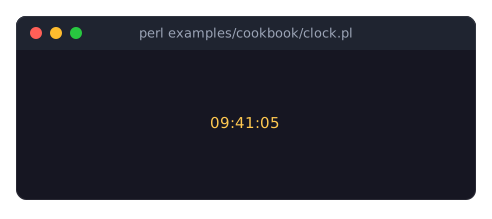
runuses the process-wide IO::Async::Loop, whichIO::Async::Loop->newreturns. Timers, sockets and other IO::Async notifiers added to it run while the user interface runs. Add them beforerun, or later from any listener. See "Timers and other asynchronous work" in Term::Fabulous::Manual::Programs.You never redraw by hand: Term::Fabulous checks 30 times per second whether a widget changed and then draws a new frame, so changing a widget (here the text) is all a timer has to do.
first_interval => 0makes the first tick happen at once instead of after one second.child_alignmentcenters the clock in the root box. See "Aligning and centering children" in Term::Fabulous::Manual::Layout.
Add lines to a scrolling log (ScrollBox)
Goal: a box that receives a new line every half second, can be scrolled with the mouse wheel, and never holds more than 500 lines.
This program is shipped as examples/cookbook/scrolling-log.pl.
use v5.32;
use warnings;
use feature 'signatures';
no warnings 'experimental::signatures';

use IO::Async::Loop;
use IO::Async::Timer::Periodic;
use POSIX qw(strftime);
use Term::Fabulous;
use Term::Fabulous::Enum::BorderStyle;
use Term::Fabulous::Widget::Box;
use Term::Fabulous::Widget::ScrollBox;
use Term::Fabulous::Widget::Text;
use Clay::XS qw(sizing_grow CLAY_TOP_TO_BOTTOM);

use constant MAX_LINES => 500;

my $root = Term::Fabulous::Widget::Box->new(
	layout => {
		layout_direction => CLAY_TOP_TO_BOTTOM,
		sizing           => { width => sizing_grow(), height => sizing_grow() },
		padding          => { left  => 1,             right  => 1 },
	},
);

# A ScrollBox needs an id: Clay keeps the scroll position by id.
my $log = Term::Fabulous::Widget::ScrollBox->new(
	id               => 'log',
	background_color => [ 30, 35, 50, 255 ],
	bordered         => 1,
	border_color     => [ 120, 160, 220, 255 ],
	border_style     => Term::Fabulous::Enum::BorderStyle->Round,
	layout           => {
		layout_direction => CLAY_TOP_TO_BOTTOM,
		sizing           => { width => sizing_grow(), height => sizing_grow() },
		padding          => { left  => 1,             right  => 1 },
	},
);
$root->add_child($log);

my $count = 0;
my $timer = IO::Async::Timer::Periodic->new(
	interval => 0.5,
	on_tick  => sub {
		$count++;
		$log->add_child(
			Term::Fabulous::Widget::Text->new(
				text       => strftime( '%H:%M:%S', localtime ) . " event number $count",
				text_color => [ 200, 210, 230, 255 ],
			)
		);

		# Keep the log from growing forever: drop the oldest line.
		my $oldest = $log->children->[0];
		$log->remove_child($oldest) if @{ $log->children } > MAX_LINES;
		return;
	},
);
$timer->start;
IO::Async::Loop->new->add($timer);

Term::Fabulous->new( root => $root, width => 80, height => 24 )->run;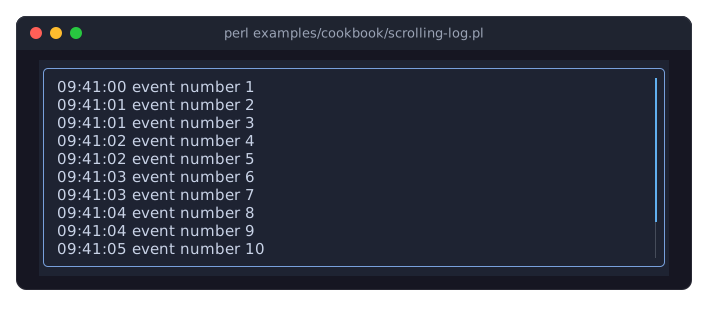
Term::Fabulous::Widget::ScrollBox clips its content to its box and scrolls it vertically. It needs an
id, because the scroll position is stored by id. The mouse wheel scrolls the scroll box under the pointer by three rows per notch. See "SCROLLING" in Term::Fabulous::Manual::Events.Widgets added with
add_childappear in the next frame, at the end of the box. The scroll position does not follow new lines automatically: the view stays where the user scrolled to.To keep the newest line in view, see "Scroll a ScrollBox from code (keep a log at the newest line)".
remove_childremoves the widgets it is given from the box. A removed widget can be added again, to the same box or another one, and keeps its children and its state. See "Changing the tree" in Term::Fabulous::Manual::Layout.
Scroll a ScrollBox from code (keep a log at the newest line)
Goal: a log that always shows its newest line, until the user scrolls up to read older lines; keys that scroll the log up, down and sideways.
This program is shipped as examples/cookbook/follow-log.pl.
use v5.32;
use warnings;
use feature 'signatures';
no warnings 'experimental::signatures';

use IO::Async::Loop;
use IO::Async::Timer::Periodic;
use List::Util qw(min);
use Term::Fabulous;
use Term::Fabulous::Enum::BorderStyle;
use Term::Fabulous::Widget::Box;
use Term::Fabulous::Widget::ScrollBox;
use Term::Fabulous::Widget::Text;
use Clay::XS qw(sizing_grow CLAY_TOP_TO_BOTTOM);

my $root = Term::Fabulous::Widget::Box->new(
	layout => {
		layout_direction => CLAY_TOP_TO_BOTTOM,
		sizing           => { width => sizing_grow(), height => sizing_grow() },
		padding          => { left  => 1,             right  => 1 },
	},
);
$root->add_child(
	Term::Fabulous::Widget::Text->new(
		text       => 'Wheel or Up/Down scroll, Left/Right scroll sideways, Home goes to the top, End follows the newest line.',
		text_color => [ 230, 230, 230, 255 ],
	)
);

my $log = Term::Fabulous::Widget::ScrollBox->new(
	id               => 'log',
	horizontal       => 1,    # vertical scrolling is on by default
	background_color => [ 30, 35, 50, 255 ],
	bordered         => 1,
	border_color     => [ 120, 160, 220, 255 ],
	border_style     => Term::Fabulous::Enum::BorderStyle->Round,
	layout           => {
		layout_direction => CLAY_TOP_TO_BOTTOM,
		sizing           => { width => sizing_grow(), height => sizing_grow() },
	},
);
$root->add_child($log);

my $ui = Term::Fabulous->new( root => $root, width => 80, height => 24 );

# scroll_state describes the last frame: the scroll position, the visible
# size of the box (viewport) and the size of its content. The position is
# 0 at the top and left and negative when scrolled down or right; the
# lowest one shows the bottom of the content.
sub lowest_y ($state) { return min( 0, $state->{viewport}{height} - $state->{content}{height} ) }

# Moves the view; scroll_to keeps it within the content.
sub scroll_by ( $columns, $rows ) {
	my $state = $ui->scroll_state($log) or return;    # not laid out yet
	$ui->scroll_to( $log, { x => $state->{position}{x} - $columns, y => $state->{position}{y} - $rows } );
	return;
}

# Follow the newest line until the user scrolls up; End follows again.
my $follow = 1;
$log->on(
	OnScroll => sub ($event) {
		$follow = 0 if $event->delta_y > 0;    # positive: the view moved up
		return;
	}
);

my %action_by_key = (
	Up    => sub { $follow = 0; scroll_by( 0, -1 ) },
	Down  => sub { scroll_by( 0,  1 ) },
	Left  => sub { scroll_by( -4, 0 ) },
	Right => sub { scroll_by( 4,  0 ) },
	Home  => sub { $follow = 0; $ui->scroll_to( $log, { x => 0, y => 0 } ) },
	End   => sub { $follow = 1 },
);
$root->on(
	KeyPress => sub ($event) {
		my $action = $action_by_key{ $event->key_name // '' } or return;
		$action->();
		return;
	}
);

my $count = 0;
my $loop  = IO::Async::Loop->new;
$loop->add(
	IO::Async::Timer::Periodic->new(
		interval => 0.25,
		on_tick  => sub {
			$count++;
			my $text = sprintf 'Line %4d', $count;
			$text .= ' ' . ( '-' x 150 ) . ' a wide line' if $count % 5 == 0;    # wider than the box
			$log->add_child( Term::Fabulous::Widget::Text->new( text => $text, text_color => [ 200, 210, 230, 255 ] ) );
			return;
		},
	)->start
);

# The content height is known only after the frame that lays out a new
# line, so keep moving to the bottom as long as the view follows.
$loop->add(
	IO::Async::Timer::Periodic->new(
		interval => 1 / 30,
		on_tick  => sub {
			return unless $follow;
			my $state = $ui->scroll_state($log) or return;
			$ui->scroll_to( $log, { y => lowest_y($state) } ) if $state->{position}{y} != lowest_y($state);
			return;
		},
	)->start
);

$ui->run;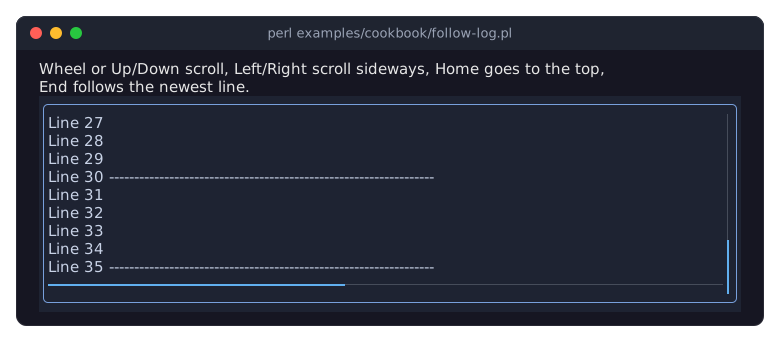
$ui->scroll_state($scroll_box)returns a hash that describes the scroll box as the last frame left it:position(xandy),viewport(the visible size of the box, in cells) andcontent(the size of everything inside it, padding included). The position is 0 at the top and the left and negative when the content is scrolled down or right; the lowest possibleyis the viewport height minus the content height. Before the box has been laid out once,scroll_statereturnsundef, henceor return. See "scroll_state" in Clay::UI; Term::Fabulous inherits it from Clay::UI.$ui->scroll_to( $scroll_box, { x => ..., y => ... } )moves the view; an axis left out keeps its position. It keeps the position within the content, soscroll_byneed not check the limits, and it makes a frame due, which shows the new position even when nothing else changed. See "scroll_to" in Clay::UI.The content size of a new line is known only after the frame that lays it out, so a timer running at the frame rate moves the view to the bottom while the log follows. The newest line therefore appears one frame (1/30 s) after it was added. The timer compares the positions first, so it makes a frame due only when the view has to move.
OnScrollis fired on the scroll box whenever the mouse wheel changed its position during a frame.delta_yis positive when the view moved up, negative when it moved down. The recipe stops following on the first move up.scroll_tofires noOnScroll.horizontal => 1lets the content be wider than the box. A horizontal wheel (or a sideways tilt of the wheel) scrolls it by three columns per notch; for a mouse without one, add code such as the Left and Right keys here.To position the content entirely yourself, set the scroll box's
child_offsetto{ x => ..., y => ... }(the same signs as the scroll position). While it is set, it alone decides what is shown; the wheel andscroll_tostill move the scroll position, which shows again oncechild_offsetis set back toundef. See Term::Fabulous::Widget::ScrollBox and "SCROLLING" in Term::Fabulous::Manual::Events.
Show the output of a running command
Goal: run a command, show its output and its errors line by line while it runs, and its exit status when it ends.
This program is shipped as examples/cookbook/show-output.pl.
use v5.32;
use warnings;
use feature 'signatures';
no warnings 'experimental::signatures';

use Encode qw(decode);
use IO::Async::Loop;
use IO::Async::Process;
use IO::Async::Timer::Periodic;
use List::Util qw(min);
use Term::Fabulous;
use Term::Fabulous::Enum::BorderStyle;
use Term::Fabulous::Widget::Box;
use Term::Fabulous::Widget::ScrollBox;
use Term::Fabulous::Widget::Text;
use Clay::XS qw(sizing_grow CLAY_TOP_TO_BOTTOM);

# The command to run: the program's arguments, or a default.
my @command = @ARGV ? @ARGV : ( 'ls', '-l', '/' );

my $root = Term::Fabulous::Widget::Box->new(
	layout => {
		layout_direction => CLAY_TOP_TO_BOTTOM,
		sizing           => { width => sizing_grow(), height => sizing_grow() },
		padding          => { left  => 1,             right  => 1 },
	},
);

# The arguments are bytes, like the command's output.
my $title  = Term::Fabulous::Widget::Text->new( text => decode( 'UTF-8', "Running: @command" ), text_color => [ 255, 200, 80, 255 ] );
my $output = Term::Fabulous::Widget::ScrollBox->new(
	id               => 'output',
	background_color => [ 30, 35, 50, 255 ],
	bordered         => 1,
	border_color     => [ 120, 160, 220, 255 ],
	border_style     => Term::Fabulous::Enum::BorderStyle->Round,
	layout           => { layout_direction => CLAY_TOP_TO_BOTTOM, sizing => { width => sizing_grow(), height => sizing_grow() } },
);
$root->add_child( $title, $output );

sub add_line ( $line, $color = [ 200, 210, 230, 255 ] ) {
	$output->add_child( Term::Fabulous::Widget::Text->new( text => $line, text_color => $color ) );
	return;
}

# Turns the bytes of one output line into a character string; bytes
# that are not valid UTF-8 become U+FFFD.
sub clean ($bytes) {
	$bytes =~ s/\r\z//;
	return decode( 'UTF-8', $bytes );
}

# Hands every complete line of a stream to add_line.
sub line_reader ($color) {
	return sub ( $stream, $buffer_ref, $eof ) {
		add_line( clean($1), $color ) while $$buffer_ref =~ s/\A([^\n]*)\n//;
		if ( $eof && length $$buffer_ref ) {    # a last line without a line break
			add_line( clean($$buffer_ref), $color );
			$$buffer_ref = '';
		}
		return 0;
	};
}

my $loop    = IO::Async::Loop->new;
my $process = IO::Async::Process->new(
	command   => \@command,
	stdin     => { from    => '' },    # the command must not read the terminal
	stdout    => { on_read => line_reader( [ 200, 210, 230, 255 ] ) },
	stderr    => { on_read => line_reader( [ 255, 110, 110, 255 ] ) },
	on_finish => sub ( $process, $exit_code ) {
		add_line( sprintf( 'Finished with exit status %d. Press Ctrl+C to quit.', $exit_code >> 8 ), [ 255, 200, 80, 255 ] );
		return;
	},
	on_exception => sub ( $process, $exception, $errno, $exit_code ) {

		# A failed exec leaves $exception empty and the reason in $errno.
		my $reason = length( $exception // '' ) ? $exception : "$errno";
		add_line( "Could not run the command: $reason", [ 255, 110, 110, 255 ] );
		return;
	},
);
$loop->add($process);

my $ui = Term::Fabulous->new( root => $root, width => 80, height => 24 );

# Keep the newest line in view (see the recipe "Scroll a ScrollBox from
# code").
$loop->add(
	IO::Async::Timer::Periodic->new(
		interval => 1 / 30,
		on_tick  => sub {
			my $state  = $ui->scroll_state($output) or return;
			my $lowest = min( 0, $state->{viewport}{height} - $state->{content}{height} );
			$ui->scroll_to( $output, { y => $lowest } ) if $state->{position}{y} != $lowest;
			return;
		},
	)->start
);

$ui->run;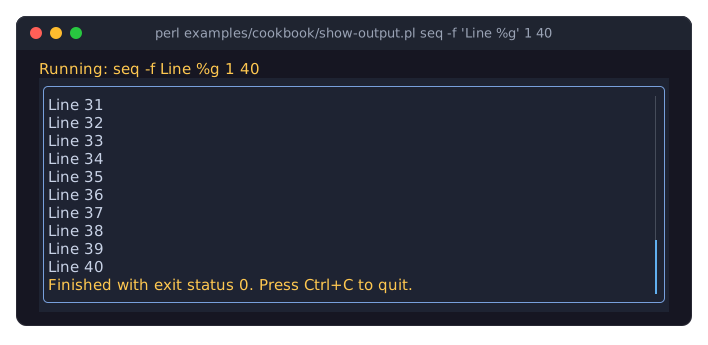
Run it with a command and its arguments, for example perl examples/cookbook/show-output.pl ping -c 5 localhost; without arguments it runs ls -l /. The picture shows it running seq -f 'Line %g' 1 40.
IO::Async::Process runs the command in the event loop that Term::Fabulous uses, so the screen stays responsive while the command runs. Its
on_readcallbacks get the output as it arrives, which may be several lines or part of a line at a time; the reader takes complete lines out of the buffer and keeps the rest for the next call.stdin => { from => '' }gives the command an empty input. Without it the command would share the terminal with the program and could read the user's key presses.Command output is bytes, and Text widgets take character strings, so
cleandecodes every line. Decoding also turns bytes that are not valid UTF-8 into U+FFFD. The same decoded lines can go into a Term::Fabulous::Widget::TextArea or a canvas.Errors (
stderr) are shown in red.on_finishreports the exit status,on_exceptiona command that could not be started.The timer at the end keeps the newest line in view, as explained in "Scroll a ScrollBox from code (keep a log at the newest line)".
SEE ALSO
This page is part of Term::Fabulous::Cookbook. Previous page: Term::Fabulous::Cookbook::KeyboardAndMouse. Next page: Term::Fabulous::Cookbook::Forms.