NAME
Term::Fabulous::Cookbook::KeyboardAndMouse - Recipes: key bindings and buttons
DESCRIPTION
This page is part of Term::Fabulous::Cookbook. Previous page: Term::Fabulous::Cookbook::GettingStarted. Next page: Term::Fabulous::Cookbook::LiveData.
This page shows how a program reacts to the user: key bindings for the whole program, buttons that can be clicked or pressed with the keyboard, links inside a text, and clicks on single words. It uses Term::Fabulous::Event::KeyPress, Term::Fabulous::Widget::Button, Term::Fabulous::Widget::RichText and Term::Fabulous::Event::TextClick. The concepts (key names, bubbling, focus, clicks and hover) are explained in Term::Fabulous::Manual::Events. Drawing with the mouse is shown in the recipe Paint with the mouse.
The recipes on this page:
Bind a key to an action
Goal: run code when the user presses a key or a key combination, and show what the terminal reports for every key.
This program is shipped as examples/cookbook/key-bindings.pl.
use v5.32;
use warnings;
use feature 'signatures';
no warnings 'experimental::signatures';

use Term::Fabulous;
use Term::Fabulous::Widget::Box;
use Term::Fabulous::Widget::Text;
use Clay::XS qw(sizing_grow CLAY_TOP_TO_BOTTOM);

my $root = Term::Fabulous::Widget::Box->new(
	layout => {
		layout_direction => CLAY_TOP_TO_BOTTOM,
		sizing           => { width => sizing_grow(), height => sizing_grow() },
		padding          => { left  => 2, right => 2, top => 1, bottom => 1 },
	},
);
my $help = Term::Fabulous::Widget::Text->new( text => 'Try F1, Ctrl+R, Alt+Down, Ctrl+Shift+Left or any letter.', text_color => [ 230, 230, 230, 255 ] );
my $last = Term::Fabulous::Widget::Text->new( text => 'No key yet.',                                              text_color => [ 150, 200, 255, 255 ] );
$root->add_child( $help, $last );

my %action_by_key = (
	'F1'              => sub { $help->text('F1: this is the help.') },
	'Ctrl+R'          => sub { $help->text('Ctrl+R: reloaded.') },
	'Alt+Down'        => sub { $help->text('Alt+Down: moved down.') },
	'Ctrl+Shift+Left' => sub { $help->text('Ctrl+Shift+Left: selected a word to the left.') },
);

$root->on(
	KeyPress => sub ($event) {
		my $name = $event->key_name;
		my $text = $event->text;
		$last->text( sprintf 'key_name: %s, text: %s', $name // 'undef', defined $text ? "'$text'" : 'undef' );

		my $action = $action_by_key{ $name // '' } or return;
		$action->();
		return;
	}
);

Term::Fabulous->new( root => $root, width => 80, height => 24 )->run;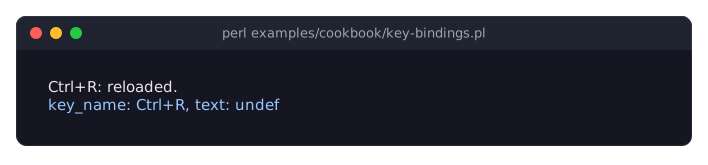
key_namedescribes a key with its modifiers in a fixed order:Ctrl+Alt+Shift+followed by the key, for exampleCtrl+R,Alt+Down,Ctrl+Shift+Left,F1,Enter,Spaceor a typed character such asaorA. A table keyed by these names is the simplest way to bind keys. See "Key names" in Term::Fabulous::Manual::Events and Term::Fabulous::Event::KeyPress.textis the character a key types (forSpacea single space), orundeffor keys that type nothing and for keys pressed with Ctrl or Alt. Use it to read typed text; usekey_namefor bindings.Most terminals send some Ctrl combinations as other keys: Ctrl+H arrives as
Backspace, Ctrl+I asTab, Ctrl+M asEnter, and Ctrl+Shift+W asCtrl+W. Terminals that speak the kitty keyboard protocol, which Term::Fabulous switches on when it is available, tell all of them apart; see "THE KITTY KEYBOARD PROTOCOL" in Term::Fabulous::Event::KeyPress. So bind keys that work in every terminal, or offer a second key.Ctrl+C ends the program (unless the UI was made with
stop_on_ctrl_c => 0), and Tab and Shift+Tab always move the focus after their KeyPress has been delivered; see "Keys Term::Fabulous handles itself" in Term::Fabulous::Manual::Events.Alt with a printable key arrives as one key, such as
Alt+x: the terminal sends it as Escape followed by x, in one write, and Term::Fabulous tells that from a lone Escape. Only Alt+[ and Alt+O cannot be bound (except with the kitty keyboard protocol), because they begin the escape sequences of other keys. Alt with a special key (arrows, Home, End, Page Up, Page Down, Insert, Delete, F1 to F12) arrives as one key too, such asAlt+Down. See "Key names" in Term::Fabulous::Manual::Events.Listening on the root makes these application shortcuts: the root receives every key that nothing below it uses. To treat the keys of the number pad like the main keys they stand for, compare
$event->main_key_nameinstead ofkey_name. See "Application shortcuts" in Term::Fabulous::Manual::Events.
Add buttons for the mouse and the keyboard (Button)
Goal: buttons that can be clicked with the mouse and pressed with the keyboard, that show which one has the focus, which one the pointer is over and which one is being pressed, together with application shortcuts and a clock. This program is also shipped as examples/buttons-and-keys.pl.
# Buttons that react to the mouse and the keyboard, application key
# bindings and a clock that a timer updates once per second.
#
#     perl examples/buttons-and-keys.pl

use v5.32;
use warnings;
use strict;
use experimental 'signatures';
no warnings 'experimental::signatures';

use FindBin;
use lib "$FindBin::Bin/../lib/";

use IO::Async::Loop;
use IO::Async::Timer::Periodic;
use POSIX qw(strftime);
use Term::Fabulous;
use Term::Fabulous::Color;
use Term::Fabulous::Enum::BorderStyle;
use Term::Fabulous::Widget::Box;
use Term::Fabulous::Widget::Button;
use Term::Fabulous::Widget::Text;

use Clay::XS qw(sizing_grow CLAY_TOP_TO_BOTTOM);

my $button_color = Term::Fabulous::Color->new( color => '#2b3a55' );
my $hover_color  = $button_color->lighten(0.15);
my $border_color = Term::Fabulous::Color->new( color => '#5a6b8c' );

my $root = Term::Fabulous::Widget::Box->new(
	layout => {
		layout_direction => CLAY_TOP_TO_BOTTOM,
		sizing           => { width => sizing_grow(), height => sizing_grow() },
		padding          => { left  => 2, right => 2, top => 1, bottom => 1 },
		child_gap        => 1,
	},
);

sub label ( $text, $color = [ 220, 220, 220, 255 ] ) {
	return Term::Fabulous::Widget::Text->new( text => $text, text_color => $color );
}

my $clock   = label( 'Time: --:--:--', [ 150, 160, 180, 255 ] );
my $counter = label('Counter: 0');
my $status  = label('Tab focuses a button, Enter or Space presses it, or click one. + - r change the counter, q, Escape or Ctrl+Q quits.');
$root->add_child( $clock, $counter );

my $count = 0;

sub set_count ($new) {
	$count = $new;
	$counter->text("Counter: $count");
	return;
}

# A Button shows its state by itself: its border takes the focus color
# while it has the focus, and its colors are swapped while the mouse
# button is held on it. The pointer is reported as it moves, so
# OnHoverStart and OnHoverStopped follow the mouse; here they lighten the
# background. Activate fires for a click and for Enter or Space while the
# button has the focus.
sub button ( $id, $caption, $action ) {
	my $button = Term::Fabulous::Widget::Button->new(
		id               => $id,
		background_color => $button_color,
		border_color     => $border_color,
		bordered         => 1,
		border_style     => Term::Fabulous::Enum::BorderStyle->Round,
		layout           => { padding => { left => 1, right => 1 } },
	);
	$button->add_child( label($caption) );

	$button->on( OnHoverStart   => sub ($event) { $button->background_color($hover_color);  return } );
	$button->on( OnHoverStopped => sub ($event) { $button->background_color($button_color); return } );
	$button->on( Activate       => sub ($event) { $action->();                              return } );
	return $button;
}

my $buttons = Term::Fabulous::Widget::Box->new( layout => { child_gap => 2 } );
$buttons->add_child(
	button( increase => 'Increase', sub { set_count( $count + 1 ) } ),
	button( decrease => 'Decrease', sub { set_count( $count - 1 ) } ),
	button( reset    => 'Reset',    sub { set_count(0) } ),
);
$root->add_child( $buttons, $status );

my $ui = Term::Fabulous->new( width => 80, height => 24, root => $root );

# Application shortcuts. KeyPress reaches the root when nothing has the
# focus, or when the focused widget's listeners let it bubble; a Button
# keeps only Enter and Space for itself. Alt plus a letter arrives as one
# key (Alt+x), so binding Escape does not catch Alt combinations.
my %action_by_key = (
	'+'      => sub { set_count( $count + 1 ) },
	'-'      => sub { set_count( $count - 1 ) },
	'r'      => sub { set_count(0) },
	'q'      => sub { $ui->loop->stop },
	'Escape' => sub { $ui->loop->stop },
	'Ctrl+Q' => sub { $ui->loop->stop },
);
$root->on(
	KeyPress => sub ($event) {
		my $action = $action_by_key{ $event->key_name // '' } or return;
		$action->();
		return;
	}
);

# A frame is drawn whenever a widget changed, so changing the text is all
# the timer has to do.
my $timer = IO::Async::Timer::Periodic->new(
	interval       => 1,
	first_interval => 0,
	on_tick        => sub { $clock->text( strftime( 'Time: %H:%M:%S', localtime ) ); return },
);
$timer->start;
IO::Async::Loop->new->add($timer);

$ui->run;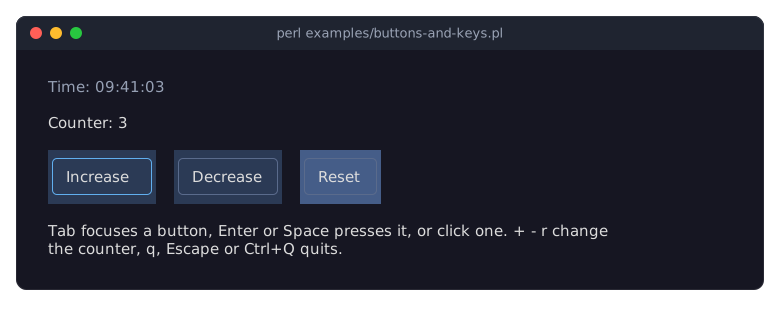
Term::Fabulous::Widget::Button is a Box that can take the focus and that tracks hover and press state. It draws its border in
focus_border_colorwhile it has the focus and swaps its colors while the mouse button is held on it; both can be changed or switched off with thefocus_border_colorandpressed_background_colorparameters.Activatefires for a complete click (the left button pressed and released over the button) and for Enter or Space while the button has the focus, so one listener covers the mouse and the keyboard. The lower-levelOnPress,OnReleaseandKeyPressevents are still there.The terminal reports the pointer as it moves, so
OnHoverStartandOnHoverStoppedfollow the mouse; the program lightens the background of the button under the pointer. See "Clicks, hover and press" in Term::Fabulous::Manual::Events.A Button keeps only Enter and Space for itself and lets every other key bubble, so the shortcuts on the root keep working while a button has the focus. See "Return values and bubbling" in Term::Fabulous::Manual::Events.
Clicking the text inside a button clicks the button: the
Mouseevents of a click on text go to the box behind it. The text itself only fires TextClick, see "React to a click on a word (TextClick)".$ui->loopis used to stop the program from a shortcut; see "Quit with q or Escape" in Term::Fabulous::Cookbook::GettingStarted. The clock is explained in the recipe Update the screen from a timer.
Follow links in a text (RichText links)
Goal: a help text with links that the user follows with the mouse or the keyboard, links whose targets are pages of the program, a URL and code to run, and links in colors of your own.
This program is shipped as examples/cookbook/follow-links.pl.
use v5.32;
use warnings;
use feature 'signatures';
no warnings 'experimental::signatures';

use Term::Fabulous;
use Term::Fabulous::Theme;
use Term::Fabulous::Widget::Box;
use Term::Fabulous::Widget::RichText;
use Term::Fabulous::Widget::Text;
use Clay::XS qw(sizing_grow sizing_fixed CLAY_TOP_TO_BOTTOM);

# The pages of a small help text, in markup. A link's target is the
# name of another page, or a URL.
my %markup_of_page = (
	start => join(
		' ',
		"[bold]Help[/]\n\nStart with the [link=keys]keys[/link], or read what a [link=links]link[/link] is.",
		'The whole manual is on [link=https://metacpan.org/pod/Term::Fabulous]MetaCPAN[/link].',
	),
	keys => join(
		' ',
		"[bold]Keys[/]\n\nTab selects the first link of a page, Left and Right select the others,",
		'Enter follows the selected one. Backspace goes back to the page before,',
		'or click [link=start]the start page[/link].',
	),
	links => join(
		' ',
		"[bold]Links[/]\n\nA link is a range of the text with a target. Following it fires LinkActivate,",
		'and the program decides what the target means: here, the name of a page such as',
		'[bold][link=keys]keys[/link][/] (a bold link) or a URL.',
	),
);

# Links in the theme's success green instead of the accent color; the
# selected link is green with dark text.
my $theme = Term::Fabulous::Theme->new(
	name    => 'green-links',
	extends => 'dark',
	slots   => {
		'text.link'                     => 'success',
		'text.link.selected'            => 'text_inverse',
		'text.link.background.selected' => 'success',
	},
);

my $root = Term::Fabulous::Widget::Box->new(
	layout => {
		layout_direction => CLAY_TOP_TO_BOTTOM,
		sizing           => { width => sizing_grow(), height => sizing_grow() },
		padding          => { left  => 2, right => 2, top => 1, bottom => 1 },
		child_gap        => 1,
	},
);

# The page wraps at 60 columns: the width of the box around it.
my $page_box = Term::Fabulous::Widget::Box->new( layout => { sizing => { width => sizing_fixed(60) } } );
my $page     = Term::Fabulous::Widget::RichText->new( markup => $markup_of_page{start} );
$page_box->add_child($page);
my $status = Term::Fabulous::Widget::Text->new( text => 'Tab selects a link, Enter follows it.', text_color => [ 150, 160, 180, 255 ] );

# A footer whose links are given from Perl: any value can be a target,
# here the code to run.
my $footer = Term::Fabulous::Widget::RichText->new( text => 'Back   Quit' );
$root->add_child( $page_box, $footer, $status );

my $ui = Term::Fabulous->new( width => 80, height => 24, root => $root, theme => $theme );

my $current_page = 'start';
my @history;

sub show_page ($name) {
	push @history, $current_page;
	$current_page = $name;
	$page->markup( $markup_of_page{$name} );
	$status->text("You are on the page '$name'.");
	return;
}

sub go_back () {
	my $name = pop @history // return;
	$current_page = $name;
	$page->markup( $markup_of_page{$name} );
	$status->text("Back on the page '$name'.");
	return;
}

$footer->add_link( \&go_back,               0, 4 );
$footer->add_link( sub { $ui->loop->stop }, 7, 11 );

# LinkActivate bubbles up from both RichTexts, so one listener on the
# root follows every link, clicked or chosen with the keyboard.
$root->on(
	LinkActivate => sub ($event) {
		my $target = $event->link;
		return $target->() if ref $target eq 'CODE';
		return show_page($target) if exists $markup_of_page{$target};
		$status->text("This would open $target in a browser.");
		return;
	}
);

# Keys the focused RichText does not use bubble on to the root.
$root->on(
	KeyPress => sub ($event) {
		my $key = $event->key_name // '';
		return go_back() if $key eq 'Backspace';
		return $ui->loop->stop if $key eq 'Escape';
		return;
	}
);

$ui->run;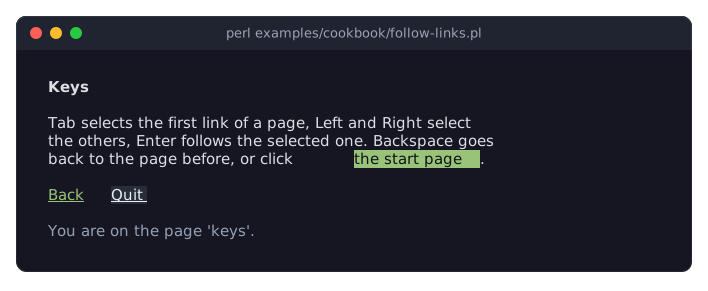
The picture shows the program after three keys: Tab selected the first link of the start page (keys), Enter followed it, and Right selected the only link of the new page. The mouse pointer is over Quit.
[link=TARGET]words[/link]in the markup of a Term::Fabulous::Widget::RichText makeswordsa link toTARGET, which is the text between=and](see Term::Fabulous::Text::Markup). The widget does not go anywhere by itself: following a link fires LinkActivate, and$event->linkis the target. Here the target is the name of a page, or a URL that the program only reports.add_link( $target, $start, $end )adds a link from Perl, over the characters$startup to (not including)$endof the text. Such a target can be any value, not only a string: the footer's links carry the code they run, and the listener calls it.LinkActivatebubbles from the RichText to its ancestors, so one listener on the root follows the links of both RichTexts. It fires the same way for a left click on a link and for Enter on the selected link.A RichText with links is a Tab stop. When it gets the focus, its first link is selected; Left and Right select the previous and the next one. Keys it does not use, such as Backspace and Escape here, go on to the root. Giving the page new markup keeps the focus, but selects no link until the user presses Left or Right.
The theme decides how links look. The slots
text.link(the color of the words) andtext.link.backgroundexist in the states normal,hovered(under the mouse pointer) andselected(the link Enter follows); this program's theme draws links in thesuccessgreen and the selected link as dark text on that green. The defaults, an underline in the accent color, are in the picture of Term::Fabulous::Widget::RichText. A link changes only the color, the background and the underline of its words: the bold link on the pagelinksstays bold. See "Looks" in Term::Fabulous::Widget::RichText.For many RichTexts that share one selection, as in a document viewer, see "Links in a bigger widget" in Term::Fabulous::Widget::RichText.
React to a click on a word (TextClick)
Goal: find out which word of a text the user clicked, with which mouse button, and which styled spans lie under the pointer.
This program is shipped as examples/cookbook/click-a-word.pl.
use v5.32;
use warnings;
use feature 'signatures';
no warnings 'experimental::signatures';

use Term::Fabulous;
use Term::Fabulous::Termbox qw(TB_KEY_MOUSE_LEFT TB_KEY_MOUSE_MIDDLE TB_KEY_MOUSE_RIGHT);
use Term::Fabulous::Widget::Box;
use Term::Fabulous::Widget::RichText;
use Term::Fabulous::Widget::Text;
use Clay::XS qw(sizing_grow sizing_fixed CLAY_TOP_TO_BOTTOM);

my %meaning_of = (
	cell     => 'one character position of the terminal',
	grapheme => 'what a reader sees as one character',
	span     => 'a range of a RichText with a look of its own',
	terminal => 'the program that shows this one',
	widget   => 'a part of the screen that draws itself',
);

my $root = Term::Fabulous::Widget::Box->new(
	layout => {
		layout_direction => CLAY_TOP_TO_BOTTOM,
		sizing           => { width => sizing_grow(), height => sizing_grow() },
		padding          => { left  => 2, right => 2, top => 1, bottom => 1 },
		child_gap        => 1,
	},
);

# A plain Text and a RichText, wrapped at 48 columns by the box around
# them. A click on either fires TextClick on it.
my $article = Term::Fabulous::Widget::Box->new( layout => { layout_direction => CLAY_TOP_TO_BOTTOM, sizing => { width => sizing_fixed(48) }, child_gap => 1 } );
$article->add_child(
	Term::Fabulous::Widget::Text->new( text => 'Every widget draws into the cells of the terminal. A wide grapheme takes two cells.' ),
	Term::Fabulous::Widget::RichText->new( markup => 'A [bold #e5c07b]span[/] changes the look of part of a text; the click reports the spans under the pointer.' ),
);

my $meaning = Term::Fabulous::Widget::Text->new( text => 'Left-click a word to look it up.',                       text_color => [ 152, 195, 121, 255 ] );
my $details = Term::Fabulous::Widget::Text->new( text => 'Right-click a character to see what the click reports.', text_color => [ 150, 160, 180, 255 ] );
$root->add_child( $article, $meaning, $details );

my %name_of_button = ( TB_KEY_MOUSE_LEFT() => 'left', TB_KEY_MOUSE_MIDDLE() => 'middle', TB_KEY_MOUSE_RIGHT() => 'right' );

sub look_up ($word) {
	my $key = lc( $word =~ s/[^\w]+//gr );    # "terminal." -> "terminal"
	my $meaning_text = $meaning_of{$key} // 'is not in the glossary';
	$meaning->text("$key: $meaning_text");
	return;
}

sub describe_click ($event) {
	my @styles = map { $_->[0] . '-' . $_->[1] } @{ $event->spans };
	$details->text(
		sprintf '%s button at column %d, row %d: offset %d, word %s (%s to %s), spans [%s]',
		$name_of_button{ $event->button },
		$event->x,                $event->y,                 $event->offset,
		$event->word // '(none)', $event->word_start // '-', $event->word_end // '-',
		join( ', ', @styles )
	);
	return;
}

# TextClick bubbles from the Text that was clicked to its ancestors, so
# one listener on the root hears every text.
$root->on(
	TextClick => sub ($event) {
		return describe_click($event) if $event->button == TB_KEY_MOUSE_RIGHT;
		return look_up( $event->word ) if defined $event->word;
		$meaning->text('That was a blank.');
		return;
	}
);

my $ui = Term::Fabulous->new( width => 80, height => 24, root => $root );
$root->on( KeyPress => sub ($event) { $ui->loop->stop if ( $event->key_name // '' ) eq 'Escape'; return } );
$ui->run;![Two paragraphs, the second with the word span in bold yellow; below them the line terminal: the program that shows this one, and the line right button at column 5, row 4: offset 3, word span (2 to 6), spans [2-6]](https://raw.githubusercontent.com/davenonymous/perl-term-fabulous/v0.01/screenshots/cookbook-click-a-word.svg)
The picture shows the program after a left click on terminal. and a right click on the bold span.
A mouse button pressed on a character of a Term::Fabulous::Widget::Text or a Term::Fabulous::Widget::RichText fires TextClick on that text. Every button counts, the left, the middle and the right one; dragging, releasing and the wheel fire nothing. A click on the empty part of a line, after its last character, fires nothing either.
$event->wordis the run of non-blank characters around the clicked one, punctuation included (terminal.), so the program strips what it does not want. On a blank it isundef.$event->offsetis the position of the clicked character in the widget's text, counted in characters from 0, also on the second line of a wrapped text;word_startandword_endare the offsets of the word's first character and of the character after its last.For a RichText,
$event->spanslists the spans under the pointer as[ $start, $end, $style ], and$event->linkis the target of the link there, if any.TextClickbubbles, so a listener on any box around the texts hears every one of them;$event->targetis the Text that was clicked. TheMouseevent of the same press still goes to the box behind the text, before theTextClick, so programs that listen forMousesee no change.
SEE ALSO
This page is part of Term::Fabulous::Cookbook. Previous page: Term::Fabulous::Cookbook::GettingStarted. Next page: Term::Fabulous::Cookbook::LiveData.