NAME
Term::Fabulous::Static - Render a widget tree to text once, without a terminal
SYNOPSIS
use Term::Fabulous::Static;
use Term::Fabulous::Widget::Box;
use Term::Fabulous::Widget::Text;
use Term::Fabulous::Enum::BorderStyle;
use Clay::XS qw(sizing_grow sizing_fit CLAY_TOP_TO_BOTTOM);

my $root = Term::Fabulous::Widget::Box->new(
	layout => {
		layout_direction => CLAY_TOP_TO_BOTTOM,
		sizing           => { width => sizing_grow(), height => sizing_fit() },
		padding          => { left => 1, right => 1 },
	},
	bordered     => 1,
	border_style => Term::Fabulous::Enum::BorderStyle->Round,
	border_color => [ 180, 200, 220, 255 ],
);
$root->add_child( Term::Fabulous::Widget::Text->new( text => 'Hello', text_color => [ 255, 255, 255, 255 ] ) );

my $page = Term::Fabulous::Static->new( root => $root, width => 40 );
$page->print;                                      # colored if STDOUT is a terminal
my @lines = $page->render_lines( colors => 0 );    # plain text, one string per row
DESCRIPTION
Term::Fabulous::Static lays out and paints a widget tree exactly like Term::Fabulous does, but into memory instead of the terminal. The result is text: one string per row, optionally with 24-bit ANSI color sequences. No terminal is opened and no event loop runs, so you can print the result, write it to a file, pipe it to another program or compare it in a test.
Use it for:
reports and other one-off output of command line tools, with the same boxes, borders and colors as an interactive program;
tests of widgets and layouts (see "TESTING" in Term::Fabulous::Manual::Programs);
previews of a layout in a non-interactive environment.
Every widget works: text, borders, colors, canvases and input widgets are painted as on screen. Cells that nothing painted are spaces in the terminal's default colors. Since there is no pointer, nothing is ever hovered or pressed.
Term::Fabulous::Static is a Clay::UI subclass composing Term::Fabulous::Render, so their methods (draw, interaction, last_frame, ...) are available too. It paints into a Term::Fabulous::Render::Target::Grid ("cell_target").
CONSTRUCTOR
new
my $page = Term::Fabulous::Static->new( root => $root, width => 80 );Unknown parameters die, and so does measure_text: text is always measured in terminal columns.
root-
Required. The root widget of the tree to render: any widget, a Term::Fabulous::Widget::Text included. It must not have a parent (see "WIDGETS AND THE WIDGET TREE" in Term::Fabulous::Manual::Layout). A widget tree can belong to only one live Term::Fabulous::Static or Term::Fabulous object at a time: a second
newwith the same root dies withClay::UI: 'root' is already the root of another Clay::UI. Once the first object is gone, the root can be used again. To render the same tree repeatedly, keep one object and call "render_lines" again. width-
Required. The number of columns the layout may use, a positive number. A root widget sized with
growfills it. height-
The number of rows the layout may use. Default: 4096. Rows below the last painted one are not part of the output, so a root widget sized with
fitproduces exactly as many rows as its content needs. A root with agrowheight fills allheightrows: give such a root an explicitheight, or you get 4096 lines. trim_trailing_whitespace-
A boolean. Default: 1. When true, cells at the end of each row that would print as plain spaces are left out: cells nothing painted, and spaces in the terminal's default background. Spaces on a colored background are kept. When false, every row is padded with spaces to
widthcolumns. output_mode-
Accepted for symmetry with Term::Fabulous; it must be
TB_OUTPUT_TRUECOLOR, the default (see "CONSTRUCTOR PARAMETERS" in Term::Fabulous::Render). Leave it out. memory_size-
Passed to Clay::UI: the bytes Clay reserves for a layout. Rarely needed; it does not raise the limit on the number of widgets (see "LIMITATIONS" in Term::Fabulous).
max_element_count-
Passed to Clay::UI: how many widgets a frame may hold (default 8192, of which Clay keeps two for itself). Raise it for very large trees; see "new" in Term::Fabulous.
max_measure_text_cache_word_count-
Passed to Clay::UI: how many words Clay's text-measurement cache holds (default twice
max_element_count). Raise it for pages with a lot of text; see "new" in Term::Fabulous. error_handler-
Passed to Clay::UI; see there.
theme-
The Term::Fabulous::Theme the widgets draw with: a theme object or a built-in name,
dark(the default) orlight; thethemeaccessor changes it. Unlike Term::Fabulous, Static paints no screen background from the theme: the lines are printed into whatever the terminal shows, and a root with abackground_colorpaints its own. See "new" in Term::Fabulous and "THEMES" in Term::Fabulous::Manual::Looks.
METHODS
render_lines
my @lines = $page->render_lines;
my @plain = $page->render_lines( colors => 0 );
Lays the tree out, paints it and returns one character string per row, from the first row to the last row anything was painted in. The strings contain no newlines. Each call renders the tree again, so changes to the widgets show in the next call. colors is the only option; any other option name dies (so does colour).
colors is a boolean, default 1. When true, every run of cells with the same colors and attributes is preceded by one SGR escape sequence that combines 38;2;r;g;b for the foreground, 48;2;r;g;b for the background, 7 for reverse video (used by some border styles and the text cursor), and 1 (bold), 3 (italic) and 4 (underline) when a cell carries those termbox2 flags (Text widgets with bold, italic or underline, and canvas cells written with put_attrs). Terminal default colors produce no code. Where the style changes in the middle of a row, ESC [ 0 m resets the previous style first, so a run in default colors is preceded by just ESC [ 0 m. Every row that contains a sequence ends with ESC [ 0 m. When false, the strings contain only the characters.
The strings are Perl character strings; encode them (for example with Encode::encode('UTF-8', ...)) before writing them to a handle that has no encoding layer, or use "print".
cell
my ( $glyph, $fg, $bg ) = @{ $page->cell( $x, $y ) // [] };What the last frame painted into one cell, as "cell" in Term::Fabulous::Render::Target::Grid describes it, or undef for a cell nothing painted. Call "draw" in Term::Fabulous::Render or "render_lines" first.
cell_target
my $grid = $page->cell_target;The Term::Fabulous::Render::Target::Grid the frames are painted into, for reading the cells and their colors directly. It is the same object for the lifetime of the page. See "CELL TARGET" in Term::Fabulous::Render.
render_string
my $text = $page->render_string( colors => 0 );The rows of "render_lines" joined into one character string, each row followed by "\n". Takes the same colors option.
$page->print;
$page->print( fh => \*STDERR, colors => 0 );
$page->print( fh => $file_handle );
Writes "render_string", encoded as UTF-8, to a file handle. Any option other than the two below dies.
fh-
The handle to write to. Default:
STDOUT. Dies withTerm::Fabulous::Static: fh must be an open file handleif it is not one. Do not put an:encodingor:utf8layer on the handle, since the text is encoded already. colors-
A boolean. Default: true if
fhis connected to a terminal (-t), false otherwise, so piping the output into a file or another program gives plain text.
EXAMPLES
Write a report to a file, without colors:
open my $out, '>', 'report.txt' or die "report.txt: $!";
Term::Fabulous::Static->new( root => $root, width => 72 )->print( fh => $out, colors => 0 );
close $out;
Check what a widget shows, in a test:
use Test2::V0;
use Term::Fabulous::Static;
use Term::Fabulous::Widget::Box;
use Term::Fabulous::Widget::Text;

my $root = Term::Fabulous::Widget::Box->new;
$root->add_child( Term::Fabulous::Widget::Text->new( text => 'Hello', text_color => [ 255, 255, 255, 255 ] ) );

my $page = Term::Fabulous::Static->new( root => $root, width => 20 );
is [ $page->render_lines( colors => 0 ) ], [ 'Hello' ], 'the greeting is shown';
done_testing;
For tests of programs that take input (keys, clicks), use Term::Fabulous::Terminal::Memory instead; see "TESTING" in Term::Fabulous::Manual::Programs.
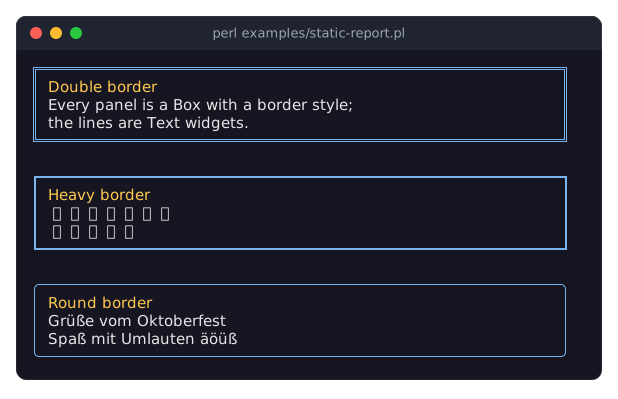
The script examples/static-report.pl in the distribution renders several bordered panels with non-ASCII text.
SEE ALSO
"RENDERING WITHOUT A TERMINAL" in Term::Fabulous::Manual::Programs, "TESTING" in Term::Fabulous::Manual::Programs, Term::Fabulous, Term::Fabulous::Render, Term::Fabulous::Render::Target::Grid, "Render a report to a file or pipe (Static)" in Term::Fabulous::Cookbook::Output, "Test a widget without a terminal" in Term::Fabulous::Cookbook::Output, "Print a table as a report (Static)" in Term::Fabulous::Cookbook::Tables, "Print charts in a report (Static)" in Term::Fabulous::Cookbook::ChartTechniques.