NAME
Term::Fabulous::Widget::FileDialog - A dialog that asks for a file to open or save, or for a folder
SYNOPSIS
use Term::Fabulous::Widget::FileDialog;

# A file to open, from the theme files or from all files:
my $dialog = Term::Fabulous::Widget::FileDialog->new(
	mode      => 'open',
	directory => "$ENV{HOME}/themes",
	filters   => [ [ 'Theme files' => '*.kdl' ], [ 'All files' => '*' ] ],
);
$dialog->on( Answer => sub ($event) {
	load_theme( $event->value('path') ) if $event->button eq 'open';    # bytes, ready for open
	return;
} );
$dialog->open($ui);

# Where to save: a name without a dot gets .kdl, and a file other
# than the one being saved is replaced only after a question.
Term::Fabulous::Widget::FileDialog->new(
	mode              => 'save',
	name              => 'ocean.kdl',
	current_file      => $document->path,    # absolute, or undef for an untitled one
	default_extension => 'kdl',
)->on( Answer => sub ($event) {
	$document->save_as( $event->value('path') ) if $event->button eq 'save';
	return;
} )->open($ui);

# A folder:
Term::Fabulous::Widget::FileDialog->new( mode => 'folder' )->on( Answer => sub ($event) {
	chdir $event->value('path') if $event->button eq 'choose';
	return;
} )->open($ui);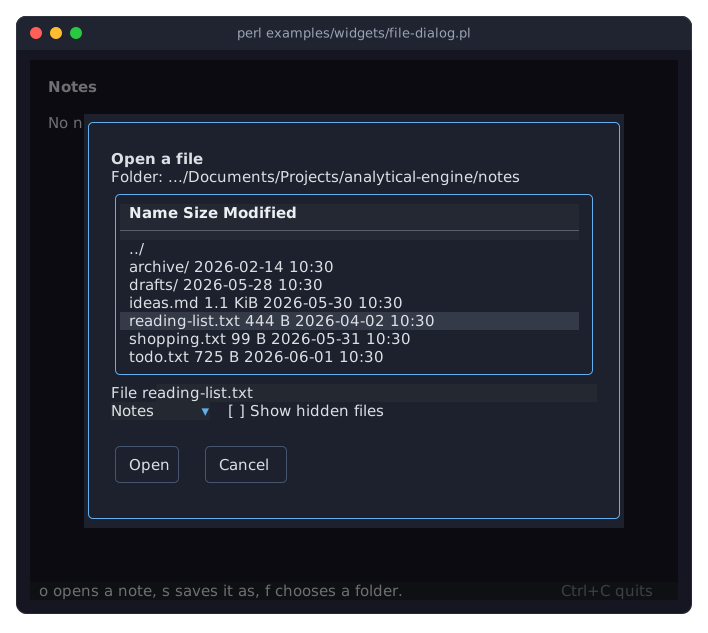
The program is examples/widgets/file-dialog.pl. The picture shows the dialog to open a note after the cursor moved down to reading-list.txt: the cursor put the name into the field, and the filter Notes hides the files that are no notes.
DESCRIPTION
A file dialog is a Term::Fabulous::Widget::Dialog that lists the folders and files of a folder and lets the user walk through the folders, pick an entry or type a name. Like a Term::Fabulous::Widget::Prompt, it reports the result with one event, Answer, after it closed.
From the top, it shows its title, the folder it lists, the list, a field for a name or a path (File, or Name in folder mode), a row with the filter dropdown and the Show hidden files checkbox, a line that says what is wrong while something is (one row, empty otherwise, so the dialog keeps its height), and the buttons. The folder line shows as much of the end of the path as fits the width the dialog gets, after ... when its start had to go; so does the message line for a path it names.
On a screen too low for the whole dialog, the list gives up rows first, down to two entries; on a narrower screen than width, the dialog is as wide as the screen.
Modes
open-
The user chooses a file that exists. The button is
Open. save-
The user chooses a name for a file, in a folder that exists. The button is
Save. A name without a dot gets thedefault_extension, when there is one. The dialog opens with the focus in the field and the name selected up to its extension, so typing replaces the name and keeps the extension. See "Saving over a file". folder-
The user chooses a folder. The list shows folders only and has no
Sizecolumn, the field is labelledName, and the button isChoose.
The list
The list has three columns: the name (folders end in /), the size of a file (not in folder mode) and the time it was last modified. A name too long for its column is cut from the left, after ..., so the size and the time stay in view. The parent folder ../ comes first, then the folders, then the files, each sorted by name without regard to case. Names that start with a dot are shown only while Show hidden files is checked.
The list has its frame in the accent color while it has the keyboard focus, and it has the focus when the dialog opens in open and folder mode. Enter or a double click on an entry opens a folder (../ is the parent folder) or chooses a file; Backspace goes to the parent folder.
What the list does to the field depends on the mode. In open mode, the cursor on a file puts its name into the field. In folder mode, the cursor on a folder puts its name into the field, and the cursor on ../ empties it. In both, going to another folder empties the field. In save mode, the field keeps the name typed: the cursor and going to another folder leave it alone, and only Enter or a double click on a file puts that file's name into it (and saves to it, see "Saving over a file").
Typing a name
Enter in the field takes the name or path in it: relative to the folder shown, absolute, or starting with ~ for the home folder. A folder opens, and the field empties. In open and save mode, anything else is chosen as the button does.
The messages name what was typed: a file that is not there is There is no file notes.txt in this folder. when opening (for an absolute path or one with ~, the path and a full stop), and a file in a folder that is not there is There is no folder drafts in this folder. when saving drafts/notes.txt. A name that names a folder only once the default_extension is added (notes when there is a folder notes.kdl) is notes.kdl is a folder. when saving.
In folder mode, Enter in the field opens the folder typed, and with an empty field it chooses the folder shown. Choose answers the folder in the field (relative to the folder shown) when the field has text, and otherwise the folder shown. A folder that is not there is There is no folder ... in this folder.
Tab and Shift+Tab move between the parts. Escape or Cancel closes the dialog without a choice.
Filters and hidden files
A filter has a label and one or more patterns: globs separated by spaces, where * stands for any text and ? for one character, so *.txt *.md lets text and Markdown files through. Patterns are matched against the whole name without regard to case, and folders always show. With two or more filters, a Term::Fabulous::Widget::Dropdown in front of the checkbox picks the active one, the first at the start. With one filter, it applies and no dropdown shows. Without filters, the list shows all files.
File names
The file system's names are bytes. The dialog shows them decoded from UTF-8, with a byte that is no UTF-8 shown as \xHH, so every name shows and can be chosen; filters match the decoded names. A text typed into the field is encoded to UTF-8 for the file system, except a name that the list shows (one with \xHH too), which is the entry as the file system has it.
The path of an answer is a byte string, exactly what the file system uses, ready for open; decode it to show it. The parameters directory, name and current_file, and the "directory" the dialog shows, are byte strings too. The field's text ("typed", "choose") is characters.
Saving over a file
In save mode, a file that exists is replaced only after a question, unless it is the current_file, the file of the document being saved. The question is a Term::Fabulous::Widget::Prompt (Replace the file?, with the buttons Replace and Cancel) that opens above the file dialog, which is dimmed behind it, with the focus on Cancel. Replace closes both and the file dialog answers. Cancel or Escape on the question puts the focus back into the file dialog, which stays open. Closing the file dialog from the program closes the question too. An untitled document has no current_file, so saving it over any existing file asks. confirm_overwrite => 0 never asks.
Answers
When the user chose a file or a folder, the dialog closes, the focus goes back to the widget that had it before, and the dialog fires Answer. The button of the answer is the mode's: open, save or choose, and its values are { path => $path }, the absolute path of the file or folder (with no symbolic links in its folders), as bytes (see "File names"). The dialog checks only that a file to open is there, and that the folder of a file to save is there and the file is not a folder: reading and writing are up to the program.
The Cancel button answers cancel, with dismissed false. Escape, or "close" from the program, answers cancel as well, with dismissed true. A cancelled dialog's values are {}. A file dialog answers once each time it is opened.
CONSTRUCTOR
new
my $dialog = Term::Fabulous::Widget::FileDialog->new(%parameters);Accepts the parameters of "new" in Term::Fabulous::Widget::Dialog (id, layout, backdrop_color, z_index, ...) and the ones below. All are optional, and unknown parameters die. A file dialog is laid out like a dialog, with two columns of padding at the sides instead of one.
id-
The dialog's id, a string; the list inside it gets the id
"$id/list". Default: a new id,file-dialog-1,file-dialog-2and so on. mode-
open,saveorfolder. Default:open. Anything else dies. directory-
The folder the dialog starts in, a byte string (see "File names"). Default: the current working directory. A path that is no folder, and a string with characters above 255, die.
name-
The name the field starts with, such as the name a document had, a byte string; the field shows it decoded. Default:
''. current_file-
The absolute path of the file of the document being saved, a byte string, or
undeffor a document that has no file yet. Saving to this file asks no question. Default:undef. A relative path dies. title-
A character string, drawn in bold on the first row. Default:
Open a file,Save the file asorChoose a folder, after the mode. filters-
An array reference of filters, each
[ $label, $patterns ]: the label is the text the dropdown shows, and the patterns are globs separated by spaces (see "Filters and hidden files"). Default:[], all files. A filter without patterns and two filters with the same label die. default_extension-
The extension a name without a dot gets when saving, without its dot:
default_extension => 'kdl'. Default:undef, none. An empty extension, one that starts with a dot, and one with a slash or white space die. confirm_overwrite-
A boolean: whether saving over an existing file other than the
current_fileasks first. Default: 1. -
A boolean: whether the
Show hidden filescheckbox starts checked. Default: 0. list_rows-
The number of entries the list shows, a positive integer. Default: 10. On a screen too low for the dialog, the list shows fewer, down to two (or
list_rows, when that is less). width-
The width of the dialog in columns, a positive integer. Default: 70. On a screen narrower than that, the dialog is as wide as the screen. A width in the
sizingoflayoutwins over it.
In folder mode, filters, default_extension, name and confirm_overwrite mean nothing, and giving any of them dies.
METHODS
A file dialog has all methods of Term::Fabulous::Widget::Dialog (open, close, is_open, ...) plus these. Opening it reads the folder; the list is empty until then.
choose
$dialog->choose('notes/todo.txt');Does what the dialog's button does with this text (a character string) in the field: a folder in open or save mode opens it, a file is chosen (and may ask before it is replaced), and in folder mode the folder is chosen (the folder shown for an empty text). What is wrong shows above the buttons and keeps the dialog open. Dies when the dialog is not open. Returns the dialog.
typed
my $text = $dialog->typed;The text in the field, a character string.
directory
my $folder = $dialog->directory;The absolute path of the folder the dialog shows, a byte string.
list
my $table = $dialog->list;The Term::Fabulous::Widget::Table of the folder's entries. Its rows have the keys name (the name shown, decoded, with a / after a folder), entry (the name as the file system has it, bytes; .. for ../), kind (up, folder or file), size and modified, and entry is the row id.
filter
my $label = $dialog->filter;
$dialog->filter('All files');
Accessor for the active filter, by its label; undef for a dialog without filters. Writing makes another filter active, shows it in the dropdown and lists the folder again. A label no filter has dies.
show_hidden
$dialog->show_hidden(1);Accessor for whether names that start with a dot are shown. Writing checks or unchecks the checkbox and lists the folder again.
close
$dialog->close;Closes the dialog without a choice, as Escape does, and the Replace question above it when that is open: after the dialog's Close, it answers cancel with dismissed true. Does nothing while the dialog is closed.
EVENTS
Besides the events of every dialog, a file dialog fires:
Answer(Term::Fabulous::Event::Answer)-
The user chose a file or a folder, or cancelled. Fired on the dialog after it closed and gave the focus back, once per opening; the dialog's
Closecomes first. See "Answers".
The Change events of the filter dropdown and the checkbox bubble through the dialog as usual.
KDL PROPERTIES
A file dialog is built in Perl only. Its answer comes as an event, which a layout file cannot express.
SEE ALSO
Term::Fabulous::Event::Answer, Term::Fabulous::Widget::Dialog, Term::Fabulous::Widget::Prompt, Term::Fabulous::Widget::Table.