NAME
Term::Fabulous::Widget::Table::Pager - The page controls below a table
DESCRIPTION
The row below a Term::Fabulous::Widget::Table with pages:
« ‹ Page 2 of 7 › » Rows per page 25 ▾ 26–50 of 160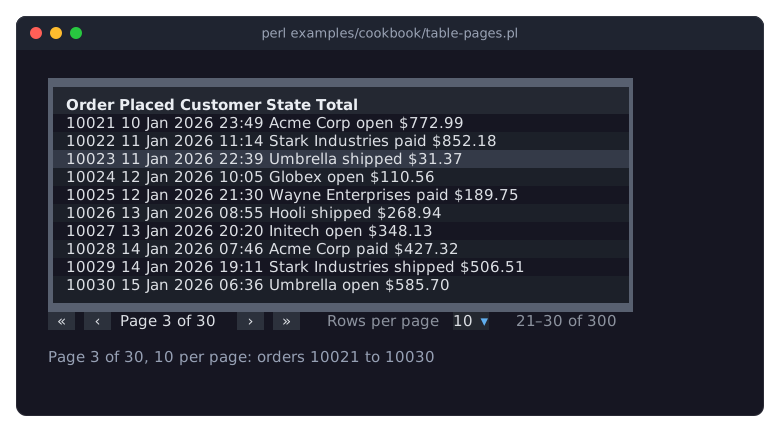
Buttons for the first, previous, next and last page (disabled where they lead nowhere; they take no focus, the table has keys for them, see "KEYS" in Term::Fabulous::Widget::Table), the page number, a Term::Fabulous::Widget::Dropdown with the page sizes and which lines are shown out of how many. When the table is too narrow for one line, the three parts flow onto more lines.
The table builds it, wires its buttons and list, keeps it up to date and shows it while it has pages (see the table's pager parameter); do not change it. Its colors follow the table's text_color and muted_color. Pages are explained in "PAGES" in Term::Fabulous::Manual::TableRows, and "pager_widget" in Term::Fabulous::Widget::Table returns the pager of a table.
CONSTRUCTOR
my $pager = Term::Fabulous::Widget::Table::Pager->new( page_sizes => [ 10, 25, 50 ] );The table makes its pager itself. Unknown parameters die.
page_sizes-
Required. An array reference of positive integers, the choices of the list. Anything else dies.
text_color-
The color of the page number and the button glyphs. Default:
[220, 223, 228, 255]. muted_color-
The color of the label, the count and disabled buttons. Default:
[140, 146, 158, 255]. -
The background of the buttons. Default:
[44, 49, 60, 255]; the table passes its theme'stable.pager.button.
The colors take any format of Term::Fabulous::Color. The pager is a Term::Fabulous::Widget::Box; its layout is set by the constructor.
METHODS
button
my $next = $pager->button('next'); # first, previous, next, lastA button, by what it does; an unknown name dies.
size_list
The dropdown with the page sizes; its value is the page size.
show
$pager->show( page => 2, page_count => 7, page_size => 25, first => 26, last => 50, total => 160 );Shows a state of the table: the current page and the number of pages, the page size, and the first and last line shown and the number of lines (counted from 1). The first and previous buttons are disabled on the first page, the next and last buttons on the last one. A page size that is not in the list is added to it. Returns the pager.
SEE ALSO
Term::Fabulous::Widget::Table, "PAGES" in Term::Fabulous::Manual::TableRows, "Split many rows into pages (pager and page sizes)" in Term::Fabulous::Cookbook::TableRows.