NAME
Term::Fabulous::Widget::TextField - Single-line text input
SYNOPSIS
use Term::Fabulous::Widget::TextField;

my $name = Term::Fabulous::Widget::TextField->new(
	id          => 'name',
	placeholder => 'Your name',
	max_length  => 40,
);
$name->on( Submit => sub ($event) {
	say 'Hello, ', $event->value;
	return;
} );

my $password = Term::Fabulous::Widget::TextField->new(
	id   => 'password',
	mask => '*',
);

say $name->value;    # the text, a character string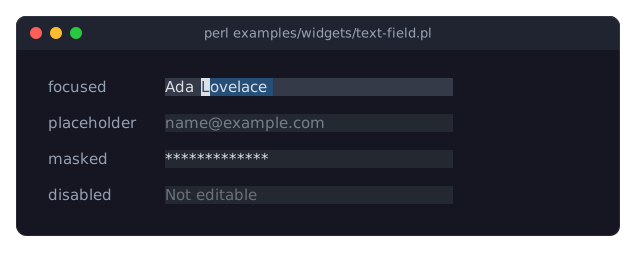
DESCRIPTION
The picture shows the states of a text field: focused, with part of the text selected (the block cursor stands on the first selected character); empty, showing its placeholder; masked for a password; and disabled. The program is examples/widgets/text-field.pl.
A text field holds one line of text that the user can type, edit, select and copy. When the text is wider than the field, the field scrolls sideways to keep the cursor visible: just far enough to show the cursor's cell (the cell after the text when the cursor is at its end), never so far that the field ends in empty cells while text is hidden on the left, and always starting at a whole character (see "Scrolling" in Term::Fabulous::TextView). Line breaks never get into the text: in pasted or assigned text they become spaces. Pressing Enter fires a Term::Fabulous::Event::Submit.
The text is a Perl character string (decoded text), not UTF-8 encoded bytes.
The editing keys, mouse selection, the placeholder, max_length, read_only and the Change event are the same as in the text area and are described in Term::Fabulous::Widget::TextInput. Disabling, colors and sizing are described in Term::Fabulous::Widget::Input.
CONSTRUCTOR
new
my $field = Term::Fabulous::Widget::TextField->new(%parameters);Accepts the parameters of "CONSTRUCTOR" in Term::Fabulous::Widget::TextInput (value, placeholder, max_length, read_only, placeholder_color, selection_color, background_color) and of "CONSTRUCTOR" in Term::Fabulous::Widget::Input (id, layout, disabled, can_focus, text_color, disabled_color, accent_color, focus_background_color, the border parameters, the other Box parameters), plus the two below. Unknown parameters die.
preferred_columns-
A positive integer. Default: 20. The width of the text in columns when the
layoutgives the field no width. The field is one row high unless thelayoutgives it a height. Padding and border are added to these sizes. Dies if not a positive integer. mask-
A single character that is one column wide, or
undef. Default:undef(the text is shown). When set, every character of the text is shown as this character, for passwords.valueand theChangeandSubmitevents still give the real text. While the mask is set, the text cannot be copied or cut to the clipboard, and the word keys and the double click act on the whole text, so they do not tell where its spaces are (see "KEYS" in Term::Fabulous::Widget::TextInput). Dies if the mask is not exactly one grapheme cluster one column wide.
METHODS
The methods of "METHODS" in Term::Fabulous::Widget::TextInput (value, max_length, placeholder, read_only, placeholder_color, selection_color, editor) and of "METHODS" in Term::Fabulous::Widget::Input (disabled, is_enabled, the color accessors, mark_changed), plus:
preferred_columns
my $columns = $field->preferred_columns;
$field->preferred_columns(30);
Accessor for the preferred_columns parameter. A new value takes effect at the next frame. Writing returns the new value. Dies if not a positive integer; the old value then stays.
mask
$field->mask('*');      # hide the text
$field->mask(undef);    # show it again
Accessor for the mask parameter. Writing marks the field changed and returns the new mask. A mask that is not a single one-column character dies; the old mask then stays.
KEYS
All keys of "KEYS" in Term::Fabulous::Widget::TextInput, plus:
Enter-
Fires Term::Fabulous::Event::Submit with the text. The key is used (it does not bubble). This also happens when the field is
read_only.
Up, Down, PageUp and PageDown are not used by a text field and bubble to its ancestors, as do Escape, Tab, the function keys and every other key not listed in "KEYS" in Term::Fabulous::Widget::TextInput.
MOUSE
As described in "MOUSE" in Term::Fabulous::Widget::TextInput: click to place the cursor, drag (while the pointer stays over the input) to select, double-click to select a word. The mouse wheel is not used.
EVENTS
Change-
Term::Fabulous::Event::Change after every change the user makes to the text;
$event->valueis the new text. Submit-
Term::Fabulous::Event::Submit when the user presses
Enter;$event->valueis the text.
Neither is fired for changes made by the program. Both bubble to the ancestors (see "Return values and bubbling" in Term::Fabulous::Manual::Events).
KDL PROPERTIES
The properties of "KDL PROPERTIES" in Term::Fabulous::Widget::TextInput, plus preferred_columns and mask:
use Term::Fabulous::Widget::TextField as TextField

TextField "email" {
	placeholder "name@example.com"
	preferred_columns 30
	max_length 80
}
EXAMPLES
A search field that reacts to Enter and to typing
use Clay::UI::Enum::Result;
use Clay::XS qw(sizing_grow);
use Term::Fabulous::Widget::TextField;

my $search = Term::Fabulous::Widget::TextField->new(
	id          => 'search',
	placeholder => 'Search (Enter to run)',
	layout      => { sizing => { width => sizing_grow() } },
);
$search->on( Change => sub ($event) {
	show_suggestions( $event->value );
	return Clay::UI::Enum::Result->CONTINUE;
} );
$search->on( Submit => sub ($event) {
	run_search( $event->value );
	return;
} );
A password field that is enabled by a checkbox
use Term::Fabulous::Widget::Checkbox;

my $password = Term::Fabulous::Widget::TextField->new( mask => '*', disabled => 1 );
my $enable   = Term::Fabulous::Widget::Checkbox->new( label => 'Set a password' );
$enable->on( Change => sub ($event) {
	$password->disabled( !$event->value );
	return;
} );
Give the field the focus when the program starts
my $ui = Term::Fabulous->new( root => $root, width => 80, height => 24 );
$ui->interaction->set_focused_widget($name);
$ui->run;
SEE ALSO
Term::Fabulous::Widget::TextInput, Term::Fabulous::Widget::TextArea, Term::Fabulous::Event::Submit, the text field section of the forms guide, "A login form (centered dialog, masked password)" in Term::Fabulous::Cookbook::Forms.