NAME
Term::Fabulous::Manual::KDL - KDL layout files
DESCRIPTION
This page is part of Term::Fabulous::Manual. Previous page: Term::Fabulous::Manual::TableStyles. Next page: Term::Fabulous::Manual::Programs.
This page is a guide to KDL layout files: text files that describe a widget tree, which Term::Fabulous::Layout turns into widgets. It shows a complete program, explains how a layout is written (widget classes, nodes, ids, properties, colors and names), how a program uses the widgets a layout built (finding them by id, attaching listeners, combining several files), and what happens when a layout is wrong.
The reference for the format, the methods and every error message is Term::Fabulous::Layout. The properties each widget accepts are listed in the KDL PROPERTIES section of the widget's page; the list of node types links to all of them.
KDL LAYOUT FILES
Instead of building the widget tree with Perl calls, you can describe it in a KDL document. KDL is a small configuration language made of nested nodes: a name, optional values and an optional block of child nodes in braces. In a layout file, a node is either a widget or a property of the widget it is in:
use Term::Fabulous::Widget::Box as Box
use Term::Fabulous::Widget::Text as Text

Box "root" {
	layout direction=down gap=1
	sizing width=grow height=grow
	background_color "#141937"

	Text "title" {
		text "Who are you?"
		text_color "#ffffff"
	}
}
This builds the same tree as:
use Clay::XS qw(sizing_grow CLAY_TOP_TO_BOTTOM);

my $root = Term::Fabulous::Widget::Box->new(
	id               => 'root',
	layout           => { layout_direction => CLAY_TOP_TO_BOTTOM, child_gap => 1, sizing => { width => sizing_grow(), height => sizing_grow() } },
	background_color => '#141937',
);
$root->add_child( Term::Fabulous::Widget::Text->new( id => 'title', text => 'Who are you?', text_color => '#ffffff' ) );
A layout file describes the static part of a screen: which widgets there are, how they are nested, sized, colored and bordered, and the initial values of input widgets. Behavior (listeners, timers, data that changes) stays in Perl. Everything a layout can do, Perl can do as well; a few options exist only in Perl (see "LIMITATIONS" in Term::Fabulous::Layout).
Use a layout file when the screen is mostly fixed and you want to read and change its structure at a glance, or let someone change the looks without touching the program. Build in Perl when the tree depends on data, such as one row per record. Both mix well: a layout can hold an empty box that the program fills (see "Combining layouts and Perl").
A complete program
The program examples/kdl-layout.pl loads the layout file examples/kdl-layout.kdl: a title bar, a sidebar of buttons, a main panel and a status line. The picture shows it after Tab, Tab and Enter picked the second server.
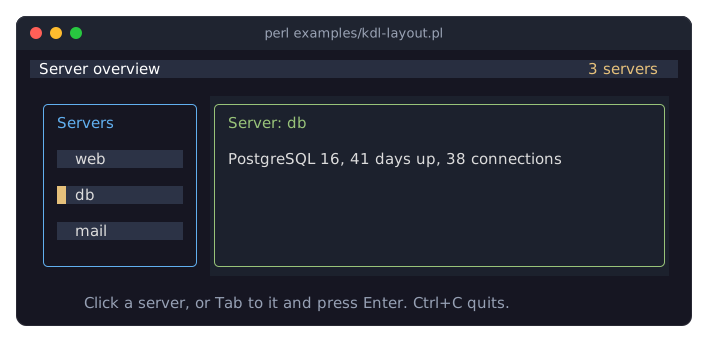
The layout file:
// The screen of examples/kdl-layout.pl: a title bar, a sidebar, a main
// panel and a status line. The program loads this file with
// Term::Fabulous::Layout->new( file => ... ) and finds the widgets it
// changes by their ids.

use Term::Fabulous::Widget::Box as Box
use Term::Fabulous::Widget::Text as Text
use Term::Fabulous::Widget::Button as Button

Box "root" {
	layout direction=down
	sizing width=grow height=grow

	// The title bar: the title on the left, a summary pushed to the right
	// by a growing box between them.
	Box "title-bar" {
		sizing width=grow
		padding left=1 right=1
		background_color "rgb(40, 46, 64)"
		Text { text "Server overview"; text_color "#ffffff"; }
		Box { sizing width=grow; }
		Text "summary" { text "3 servers"; text_color "#e5c07b"; }
	}

	Box "body" {
		layout gap=1
		sizing width=grow height=grow
		padding left=1 right=1 top=1 bottom=1

		// A sidebar of fixed width with one button per server. A button
		// shows the focus with the color of its thick left border.
		Box "sidebar" {
			layout direction=down gap=1
			sizing width="fixed(18)" height=grow
			padding left=1 right=1
			border style=Round color="#61afef"
			bordered #true
			Text { text "Servers"; text_color "#61afef"; }
			Button "web" {
				sizing width=grow
				padding left=1
				border style=Thick color="#2c3346"
				bordered left=#true
				focus_border_color "#e5c07b"
				background_color "#2c3346"
				Text { text "web"; text_color "#dcdcdc"; }
			}
			Button "db" {
				sizing width=grow
				padding left=1
				border style=Thick color="#2c3346"
				bordered left=#true
				focus_border_color "#e5c07b"
				background_color "#2c3346"
				Text { text "db"; text_color "#dcdcdc"; }
			}
			Button "mail" {
				sizing width=grow
				padding left=1
				border style=Thick color="#2c3346"
				bordered left=#true
				focus_border_color "#e5c07b"
				background_color "#2c3346"
				Text { text "mail"; text_color "#dcdcdc"; }
			}
		}

		// The main panel takes the rest of the width.
		Box "details" {
			layout direction=down gap=1
			sizing width=grow height=grow
			padding left=1 right=1
			border style=Round color="hsl(95, 38%, 62%)"
			bordered #true
			background_color "#1c212d"
			Text "details-title" { text "Pick a server on the left."; text_color "#98c379"; }
			Text "details-text" { text ""; text_color "#dcdcdc"; }
		}
	}

	// The status line, centered.
	Box {
		sizing width=grow
		child_alignment x=center
		Text "status" {
			text "Click a server, or Tab to it and press Enter. Ctrl+C quits."
			text_color "#96a0b4"
		}
	}
}
The program loads the file, finds the widgets it needs by their ids and attaches a listener:
# A screen described in a KDL layout file, examples/kdl-layout.kdl: a
# title bar, a sidebar of buttons, a main panel and a status line. The
# program loads the file, finds widgets by their ids and attaches the
# behavior: a click on a server button (or Enter on it) shows that
# server in the main panel. Ctrl+C quits.
#
#     perl examples/kdl-layout.pl

use v5.32;
use warnings;
use feature 'signatures';
no warnings 'experimental::signatures';

use FindBin;
use lib "$FindBin::Bin/../lib/";

use Term::Fabulous;
use Term::Fabulous::Layout;

my %SERVERS = (
	web  => 'nginx 1.26, 14 days up, 210 requests per second',
	db   => 'PostgreSQL 16, 41 days up, 38 connections',
	mail => 'Postfix 3.8, 3 days up, 12 messages queued',
);

my $layout = Term::Fabulous::Layout->new( file => "$FindBin::Bin/kdl-layout.kdl" );
my $root   = $layout->build;

my $title = $root->find_by_id('details-title');
my $text  = $root->find_by_id('details-text');

# Activate bubbles from the button up to the sidebar, so one listener
# serves all buttons; the event's target is the button.
$root->find_by_id('sidebar')->on(
	Activate => sub ($event) {
		my $server = $event->target->id;
		$title->text("Server: $server");
		$text->text( $SERVERS{$server} );
		return;
	}
);

Term::Fabulous->new( width => 80, height => 24, root => $root )->run;
Loading a layout
use Term::Fabulous::Layout;

my $layout = Term::Fabulous::Layout->new( file => 'screens/main.kdl' );
my $root   = $layout->build;
Term::Fabulous->new( root => $root, width => 80, height => 24 )->run;
new takes either file, the path of a UTF-8 encoded file, or string, the layout as a Perl character string (a here-document in a source file with use utf8, or text you decoded yourself):
my $layout = Term::Fabulous::Layout->new( string => <<'KDL' );
use Term::Fabulous::Widget::Text as Text
Text { text "Hello"; text_color "#ffffff"; }
KDL
new parses the document and loads the widget classes it declares; build creates the widgets and returns the root widget. Calling build again returns the same root widget. To get a second, separate copy of the widgets, create a second Term::Fabulous::Layout object.
The root widget works everywhere a root built in Perl does: with Term::Fabulous, with Term::Fabulous::Static for printed output, or as a child of another widget.
WRITING A LAYOUT
KDL in brief
A node ends at the end of the line or at a semicolon, so short nodes can share a line: Text { text "web"; text_color "#dcdcdc"; }. A node's values come after its name: arguments (text "Hello") and key=value pairs (padding left=1 right=1).
Value                            Example                 Perl value
-------------------------------  ----------------------  --------------
string in double quotes          "Hello, world"          'Hello, world'
bare word (an identifier)        grow, Round, down       'grow', ...
integer or decimal number        40, 2.5, 0x1f           40, 2.5, 31
boolean                          #true, #false           1, 0
no value                         #null                   undef
Quote every string that contains spaces, parentheses, #, =, a comma or a quote: "#141937", "fixed(10)", "rgb(1, 2, 3)". Inside quotes, \n is a line break and \" a quote. Booleans are #true and #false; a bare true is a syntax error.
Comments are // to the end of the line, /* blocks */, and /- in front of a node, which comments out the whole node with its children:
/- Text { text "not shown"; }The KDL format section of Term::Fabulous::Layout has the details, and https://kdl.dev the complete language.
Declaring widget classes
A layout starts with use instructions. Each one declares a widget class and the node name that builds it:
use Term::Fabulous::Widget::Box as Box
use Term::Fabulous::Widget::TextField as Field
use My::App::Widget::Clock as Clock
The name after as (the alias) must start with an uppercase letter and contain only letters, digits and _; it does not have to match the class name. Only declared classes can be used, and each alias can be declared once. The short form use Term::Fabulous::Widget::Box uses the full module name as the node name (Term::Fabulous::Widget::Box "root" { ... }).
Every Term::Fabulous widget can be declared; the list of node types names them all. Your own widget classes can be used too, see "Your own widgets in a layout".
Widget nodes and ids
After the use instructions comes exactly one widget node, the root widget. A widget node is the alias, an optional id in quotes and a block:
Box "sidebar" {
	sizing width="fixed(18)" height=grow
	Text { text "Servers"; }
	Button "web" { Text { text "web"; } }
}
Inside the block, the case of the first letter decides what a node is:
Nodes whose names start with an uppercase letter are child widgets, in the order they are drawn. Every widget except Text and Table accepts them (a table's cells come from its columns and rows).
All other nodes are properties of the widget (
sizing,text, ...).
The id is the widget's id (see "Widget ids" in Term::Fabulous::Manual::Layout): your program finds the widget by it, and two widgets in one tree must not share one. A Term::Fabulous::Widget::ScrollBox and a Term::Fabulous::Widget::Table need an id, because they keep their scroll position by it. Give ids to the widgets your program uses and leave them out elsewhere.
Properties
A property node sets one property of the widget. The properties of the built-in widgets have one of two shapes:
One argument:
text "Hello",width_group 1,checked #true.Only key=value pairs:
padding left=1 right=1,bordered left=#true right=#true,sizing width=grow.
A widget class of your own decides the shape of its own properties; it may also take an argument and key=value pairs together (see "Your own widgets in a layout").
Most property names are the names of the Perl accessors they call; the structured ones (layout, sizing, padding, child_alignment, border, floating, and a few per widget, such as a table's column) gather several settings in one node. They are explained in the KDL properties of Box and in the KDL PROPERTIES section of each widget's page.
A structured property may appear more than once; a second padding, sizing, layout, child_alignment or floating node changes only the keys it names:
Box {
	padding left=2 right=2
	padding top=1          // left and right stay 2
}
The properties are applied after the widget was created, with the same checks as the Perl accessors, in the order they appear. Values that depend on each other are applied together, wherever they stand: a dropdown's options before its value, a slider's min, max and step as one range before its value, a text field's max_length, accept and validator before its value.
Numbers, booleans and text
Numbers are written as they are: width_group 1, preferred_columns 30, min 0.5. Boolean properties take #true or #false (1 and 0 work too); a quoted "false" dies instead of counting as true. #null means "no value" where a property allows one, for example max_length #null for no limit.
Strings are character strings and are passed to the widgets as they are, so non-ASCII text needs no special treatment:
Text { text "Grüße, 世界"; }Colors
A property whose name ends in _color (and the color= key of border) takes a color string:
background_color "#141923"                 // hex
border_color "#61afef80"                   // hex with alpha
text_color "rgb(97, 175, 239)"             // red, green, blue 0..255
text_color "rgba(97, 175, 239, 0.5)"       // with alpha
text_color "hsl(207, 82%, 66%)"            // hue, saturation, lightness
text_color "SteelBlue"                     // a web color name, in any case
All formats are described in the color formats section of the looks page, the grammar in "A string" in Term::Fabulous::Color. Note that the alpha of rgba() is read by how it is written: 1.0 is opaque, while 1 is the channel value 1, almost transparent.
Names instead of constants
Where Perl code passes a constant or an object, a layout writes a name. The most common ones:
Perl                                         KDL
-------------------------------------------  ----------------------------------
layout_direction => CLAY_TOP_TO_BOTTOM       layout direction=down
                    CLAY_LEFT_TO_RIGHT                        right
                    CLAY_LEFT_TO_RIGHT_WRAP                   wrap
                    CLAY_BACK_TO_FRONT                        stack
line_sizing => CLAY_LINE_SIZING_FIT          layout line_sizing=fit (or grow)
sizing_grow(), sizing_fit()                  sizing width=grow height=fit
sizing_grow(10, 40), sizing_fit(30)          "grow(10, 40)", "fit(30)"
sizing_fixed(20)                             "fixed(20)"
sizing_percent(0.5)                          "percent(50)"   (a percentage!)
CLAY_ALIGN_X_CENTER, CLAY_ALIGN_Y_...        child_alignment x=center y=bottom
BorderStyle->Round                           border style=Round
floating => { attach_to => ... }             floating attach_to=element ...
wrap_mode => CLAY_TEXT_WRAP_NONE             wrap_mode none   (Text)
text_alignment => CLAY_TEXT_ALIGN_...        text_alignment center   (Text)
Border style names are case sensitive and are the names of the Term::Fabulous::Enum::BorderStyle items (Round, Solid, Double, Heavy, ...). The other names are lowercase. An unknown name dies with the list of the known ones. The layout chapter of the manual shows the KDL form of every layout option next to its Perl form.
USING A LAYOUT FROM PERL
Finding widgets after the build
build returns only the root widget. Get the other widgets with find_by_id, which searches the tree below a widget and returns the first widget with that id, or undef:
my $root   = $layout->build;
my $status = $root->find_by_id('status');
my $name   = $root->find_by_id('name');
say $name->value;
Look the widgets up once, right after the build, and keep them in variables. A misspelled id gives undef; check the result when the widget is required:
my $status = $root->find_by_id('status') // die "the layout has no 'status' widget\n";Listeners
A layout cannot contain listeners; attach them in Perl after the build, exactly as for widgets built in Perl (see "EVENTS" in Term::Fabulous::Manual::Events):
$root->find_by_id('save')->on( Activate => sub ($event) {
	save_document();
	return;
} );
Events bubble up the tree, so one listener on a container serves all widgets inside it. $event->target->id tells them apart; the listener on the sidebar of examples/kdl-layout.pl above works this way, and so does the Change listener of examples/kdl-form.pl:
$root->find_by_id('form')->on( Change => sub ($event) {
	$status->text( $event->target->id . ' is now ' . ( $event->value // '' ) );
	return;
} );
Setting what a layout cannot express
Some options can only be given in Perl: listeners, the classes of a widget, code references (such as a slider's value_format as code, a table's rows and cell widgets, a chart's data callbacks), and a few others listed in the limitations of layouts. Build first, then set them:
my $volume = $root->find_by_id('volume');
$volume->value_format( sub ($value) { $value == 0 ? 'muted' : "$value%" } );
Combining layouts and Perl
A layout has one root widget, and there is no include instruction. To assemble a screen from several files, or from a file and widgets built in Perl, leave an empty box with an id in one layout and add the other widgets to it:
my $main  = Term::Fabulous::Layout->new( file => 'screens/main.kdl' )->build;
my $panel = Term::Fabulous::Layout->new( file => 'screens/settings.kdl' )->build;
$main->find_by_id('content')->add_child($panel);

# Rows built in Perl, inside a box of the layout:
my $list = $main->find_by_id('list');
$list->add_child( Term::Fabulous::Widget::Text->new( text => $_->{name}, text_color => '#dcdcdc' ) ) foreach @records;
Ids must stay unique in the combined tree.
Your own widgets in a layout
A class can be declared in a layout when it composes Term::Fabulous::Role::CanParseLayout. A subclass of Term::Fabulous::Widget::Box (or of any other widget) inherits the role and all properties of its parent, and adds its own with a layout_properties method:
use My::Panel as Panel

Panel "network" {
	title "Network" color="#61afef"
	Text { text "Connected."; text_color "#dcdcdc"; }
}
The recipe Make a widget usable from KDL is a complete program, and Term::Fabulous::Manual::CustomWidgets explains widget classes in general.
THEME FILES
A layout file says what the widgets are; a theme file says what colors, border styles and borders they draw with, for every widget that is not given its own. Theme files are KDL too, kept apart from the layouts, and loaded with "from_file" in Term::Fabulous::Theme:
theme "ocean" extends="dark"

palette {
	accent "#5fd3c0"
	surface "#10242f"
}

button {
	border style=Round
	variant "primary" { border color="accent" }
}
my $theme = Term::Fabulous::Theme->from_file('ocean.kdl');
my $ui = Term::Fabulous->new( root => $layout->build, width => 80, height => 24, theme => $theme );A widget node sets its theme variants with the classes property: classes "primary" "wide" on a Box, a Button or a Text. The grammar of theme files is described in "THEME FILES" in Term::Fabulous::Theme, and themes in "THEMES" in Term::Fabulous::Manual::Looks.
ERRORS
Everything that is wrong with a layout dies with a message that starts with Term::Fabulous::Layout:. Problems with the document itself die in new:
Term::Fabulous::Layout: failed to parse KDL: KDL parse error
Term::Fabulous::Layout: invalid widget alias 'text'; it must start with an uppercase letter and contain only letters, digits and '_'
Term::Fabulous::Layout: cannot load 'My::Panel' for widget alias 'Panel': Can't locate My/Panel.pm in @INC ...
Term::Fabulous::Layout: multiple root widgets found in the layout (Box, Box)
Problems with a widget or one of its properties die in build. The message names the node, its id and the widget class, followed by the class's own message:
Term::Fabulous::Layout: cannot build widget 'Box' "panel": Term::Fabulous::Widget::Box: unknown layout property 'colour' (known: background_color, border, border_color, bordered, child_alignment, classes, floating, glyphs_show_through, height_group, layout, padding, sizing, width_group)
Term::Fabulous::Layout: cannot build widget 'Box': Term::Fabulous::Widget::Box: sizing width percentage must be in 0..100, got 'percent(150)'
Term::Fabulous::Layout: widget 'Text' cannot contain child widgets (found 'Text')
The KDL parser does not report the line of a syntax error. When a large layout does not parse, comment out parts of it with /- until it does. Two widgets with the same id are not detected by build; the first frame dies with Clay error: An element with this ID was already previously declared during this layout. The errors section of Term::Fabulous::Layout lists every error.
SECURITY
A layout names the Perl modules it loads, and loading a module runs its code. Treat layout files like program code: do not load layouts from untrusted sources. A program that lets its users edit layouts (a dashboard configuration, say) can limit the modules to the namespaces of its widgets with allowed_namespaces; any other use dies before anything is loaded:
my $layout = Term::Fabulous::Layout->new(
	file               => $user_layout,
	allowed_namespaces => [ 'Term::Fabulous::Widget', 'My::App::Widget' ],
);
See "SECURITY" in Term::Fabulous::Layout.
MORE EXAMPLES
"Build a form from a KDL file (text fields, radio buttons, dropdown, slider, checkbox)" in Term::Fabulous::Cookbook::Forms: a form of every input widget, shipped as examples/kdl-form.pl.
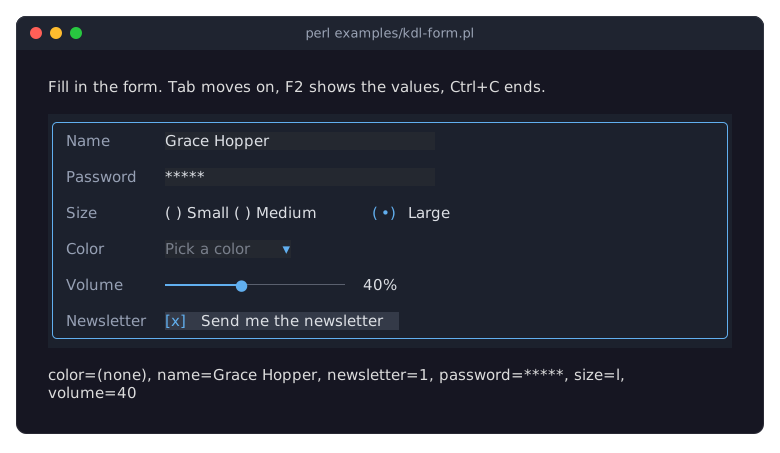
"Describe a table in a KDL layout (columns, lines, sort, groups)" in Term::Fabulous::Cookbook::Tables: a table's columns, lines, sorting and grouping in KDL.
"Describe charts in a KDL layout (series, slices, transforms)" in Term::Fabulous::Cookbook::ChartTechniques: charts with their series and options in KDL.
"Make a widget usable from KDL" in Term::Fabulous::Cookbook::Extending: a widget class of your own with its own KDL properties.
SEE ALSO
This page is part of Term::Fabulous::Manual. Previous page: Term::Fabulous::Manual::TableStyles. Next page: Term::Fabulous::Manual::Programs.
Term::Fabulous::Layout (the reference), Term::Fabulous::Role::CanParseLayout, "KDL PROPERTIES" in Term::Fabulous::Widget::Box, "LAYOUT" in Term::Fabulous::Manual::Layout, https://kdl.dev.