NAME
Term::Fabulous::Widget::ColorPicker - A field, sliders and swatches for choosing a color
SYNOPSIS
use Clay::UI::Enum::Result;
use Term::Fabulous::Widget::ColorPicker;

my $picker = Term::Fabulous::Widget::ColorPicker->new(
	id       => 'accent',
	value    => '#61afef',
	swatches => [ [ blue => 'Blue', '#61afef' ], [ red => 'Red', '#e06c75' ], [ none => 'No color' ] ],
);
$picker->on( Change => sub ($event) {
	preview( $event->value );    # '#3b82f6', 'red', 'none', ...
	return Clay::UI::Enum::Result->CONTINUE;
} );

say $picker->value;               # #61afef
$picker->value('red');            # programmatic: fires no Change
say join ', ', @{ $picker->rgba };    # 224, 108, 117, 255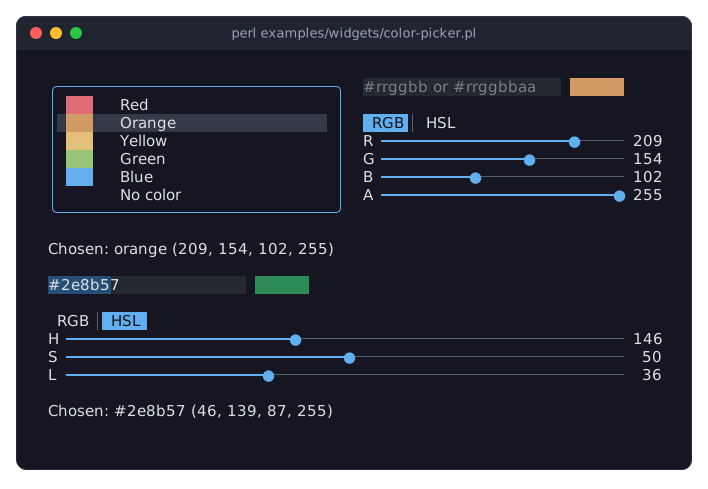
The program is examples/widgets/color-picker.pl. The upper picker offers named swatches next to its field and sliders; the lower one has no swatches and no alpha slider and shows its sliders in HSL. The line below each picker shows the value it has chosen.
DESCRIPTION
A color picker lets the user choose a color in three ways: by writing it into a field (#rrggbb, #rrggbbaa, rgb(...), hsl(...), a color name; everything Term::Fabulous::Color reads), by moving sliders, and, when the program gives it a list of swatches, by picking a named one from a list. A sample next to the field shows the color.
The sliders show red, green and blue (each 0 to 255), or hue (0 to 359), saturation and lightness (each 0 to 100). A Term::Fabulous::Widget::SegmentedControl above them switches between the two. An alpha slider (0 to 255) below them is there unless the picker is built with alpha => 0.
The picker's value is a string:
what the user typed, when it is a color;
the color the sliders give, written as
#rrggbb(#rrggbbaawhen the alpha is not 255);a swatch's value, which need not be a color at all: a theme's token name such as
accent, ornonefor no color.
"rgba" gives the color the value stands for as numbers.
The picker is built from other widgets (a Term::Fabulous::Widget::TextField, a Term::Fabulous::Widget::Table in a frame, a SegmentedControl, Term::Fabulous::Widget::Sliders) and takes the keyboard focus only through them; Tab moves from part to part. It sits inline in a screen, a form or a Term::Fabulous::Widget::Prompt (see "As a field of a prompt"), and has no theme family of its own: its parts are drawn as their families say. It grows to the width of its parent. When that is narrow, the field shrinks from 22 columns to 10 and the sliders get shorter, while the swatch list keeps room for labels of up to 20 columns.
How the parts follow each other
Typing a valid color sets the value; the sliders move to it and the list loses its selection. A text that is no color yet changes nothing but the field, which shows the invalid look.
Moving a slider sets the value to the color of the three sliders (and the alpha slider) and writes it into the field; the list loses its selection. The other sliders stay where they are, so in HSL mode the hue is kept when the saturation goes to 0 and back, although a gray has no hue.
The cursor on a swatch sets the value to the swatch's value. The field shows it when it starts with
#and is empty otherwise; the sliders move to the swatch's color, or to black for a swatch without one.The RGB/HSL switch reads the sliders from the color again and leaves the value as it is.
Setting "value" from the program does all of this at once: field, sliders and list show the new value.
As a field of a prompt
A picker can be the input of a field of a Term::Fabulous::Widget::Prompt. Its validate, error and is_valid (see "validate, error, is_valid") are those of its text field, so a primary button keeps the prompt open while the field holds something that is no color (or a translucent one with alpha => 0), the prompt's error line says why, and the focus goes to the text field. Enter in the field or on a swatch presses the prompt's default button, and the answer's values hold the picker's "value".
CONSTRUCTOR
new
my $picker = Term::Fabulous::Widget::ColorPicker->new(%parameters);Accepts the parameters of "CONSTRUCTOR" in Term::Fabulous::Widget::Box (id, layout, background_color, ...) and the ones below. All are optional, and unknown parameters die.
id-
As for every widget. The swatch list is a table whose id is
"$id/list"; without an id, the picker makes one up for it. value-
The value the picker starts with: a swatch's value, a color in any format Term::Fabulous::Color reads, or
undef(the default: no value, empty field, sliders at black). Anything else dies, and so does a translucent color withalpha => 0. alpha-
A boolean. Default: 1. With 1 there is an alpha slider and the field takes translucent colors. With 0 the alpha slider is left out, the sliders always write opaque colors, and the field rejects a color whose alpha is not 255 (swatches are not checked).
swatches-
An array reference of swatches, or
undef(the default: no list). A swatch is[ $value, $label, $color ]: the value the picker takes (a non-empty string, unique among the swatches), the label the list shows (the value when left out), and the color the sample, the sliders and "rgba" show for it, in any format Term::Fabulous::Color reads (none when left out orundef, as fornone). The list shows the color as a sample before the label. Anything else dies. sliders-
rgb(the default) orhsl: what the sliders show first. The user switches with the control above them. list_rows-
A positive integer. Default: 12. How many swatches the list shows at once; it scrolls for more.
METHODS
The methods of Term::Fabulous::Widget::Box, plus these. The accessors work like those of the other widgets: without an argument they return the current value, with one they set it, checked as new checks it, and return the new value. An invalid value dies and leaves the old one. Setting from the program fires no events.
value
my $spec = $picker->value;
$picker->value('#ff8800');
$picker->value('accent');    # a swatch's value
$picker->value(undef);       # no value
The value chosen now (see "DESCRIPTION"), or undef. Setting it shows the new value in the field, the sliders and the list.
rgba
my ( $red, $green, $blue, $alpha ) = @{ $picker->rgba // [ 0, 0, 0, 255 ] };The color of the value as a new array reference [r, g, b, a] with channels from 0 to 255, or undef when the value has no color (no value, or a swatch without a color). There is no writer; set "value".
sliders
$picker->sliders('hsl');rgb or hsl: what the sliders show. Setting it moves the switch and reads the sliders from the color again; the value stays.
alpha
$picker->alpha(0);Whether there is an alpha slider and the field takes translucent colors. Turning it off dies while the value is a translucent color (not a swatch).
list_rows
$picker->list_rows(8);How many swatches the list shows at once.
validate, error, is_valid
if ( !$picker->is_valid ) {
	$message->text( $picker->error );
}
Those of the text field (see "error" in Term::Fabulous::Widget::Input): error is what is wrong with the text in the field, or undef for an empty field or a valid color; is_valid says whether there is nothing wrong; validate reports a changed message with a ValidityChange event of the field and returns it.
EVENTS
The picker fires its own events, with itself as the target. The Change, Submit, CursorMove and RowActivate events of its parts stop at the parts, so a listener on the picker or above it sees only these:
Change-
Term::Fabulous::Event::Change when the user changes the value: types a valid color, moves a slider, or moves the cursor onto a swatch.
valueis the new value. The RGB/HSL switch and programmatic changes fire none. Submit-
Term::Fabulous::Event::Submit when the user presses
Enterin the field or activates a swatch (Enter, a double click). A swatch that is not the value yet (the cursor stayed on it while the user typed or moved a slider) becomes the value first, with itsChange.valueis the value; checkis_validfirst if the field may hold an invalid text.
The text field still fires its ValidityChange, which bubbles on as usual.
KDL PROPERTIES
The properties of "KDL PROPERTIES" in Term::Fabulous::Widget::Box, plus value and sliders (strings), alpha (a boolean) and list_rows (a number). The swatches can only be given from Perl, so a picker built from a layout has no list:
use Term::Fabulous::Widget::ColorPicker as ColorPicker

ColorPicker "background" {
	value "#282c34"
	alpha #false
	sliders "hsl"
}
my $picker = $root->find_by_id('background');
$picker->on( Change => sub ($event) { ...; return } );SEE ALSO
Term::Fabulous::Color for the color formats, Term::Fabulous::Widget::Prompt, Term::Fabulous::Widget::Slider, Term::Fabulous::Widget::SegmentedControl, Term::Fabulous::Widget::TextField, Term::Fabulous::Widget::Box.