NAME
Term::Fabulous::Widget::Table - Rows and columns with sorting, filtering, grouping, trees, pages and selection
SYNOPSIS
use Term::Fabulous::Widget::Table;
use Term::Fabulous::Widget::Table::Mutator qw(date number);

my $table = Term::Fabulous::Widget::Table->new(
	id        => 'staff',
	row_id    => 'id',              # the rows' 'id' entry names each row
	selection => 'multiple',        # check boxes, Space, Shift+arrows, Ctrl+A
	columns   => [
		{ key => 'name',    title => 'Name' },
		{ key => 'team',    title => 'Team' },
		{ key => 'started', title => 'Started', type => 'date',   mutator => date('%d %b %Y') },
		{ key => 'salary',  title => 'Salary',  type => 'number', mutator => number( decimals => 0 ) },
	],
	rows => [
		{ id => 1, name => 'Ada',   team => 'Core', started => '2019-03-04', salary => 81000 },
		{ id => 2, name => 'Grace', team => 'Web',  started => '2021-11-15', salary => 76500 },
		{ id => 3, name => 'Linus', team => 'Core', started => '2017-06-01', salary => 90000 },
	],
	sort       => [ [ started => 'desc' ] ],
	filter_row => 1,                # a filter field under every column title
	page_size  => 25,               # pages of 25 lines, with a pager below
);

$table->on( RowActivate => sub ($event) {       # Enter or a double click
	say 'open ', $event->row->{name};
	return;
} );
$table->on( SelectionChange => sub ($event) {
	say scalar @{ $event->selected_ids }, ' selected';
	return;
} );

$table->add_row( { id => 4, name => 'Ken', team => 'Web', started => '2023-01-09', salary => 70000 } );
$table->set_value( 2, salary => 79000 );
$table->group_by('team');
my @chosen = $table->selected_rows;              # copies of the selected rows' data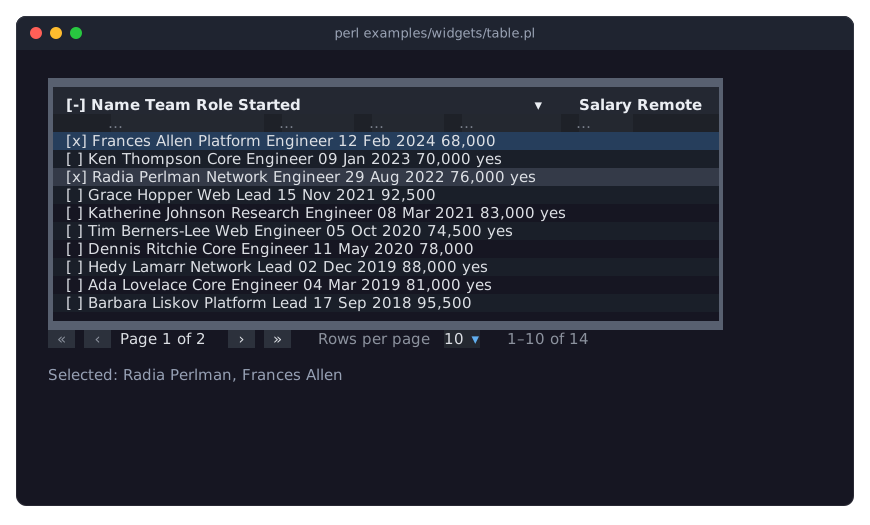
The program is examples/widgets/table.pl.
DESCRIPTION
A table shows a list of Perl hashes as rows and columns. You describe the columns once; the table takes care of everything the user does with the rows: moving through them with the keyboard and the mouse, sorting by a click on a column title, filtering, opening and closing groups and tree rows, turning pages and selecting rows. Your program reads and changes the data at any time through the table's methods, and learns about the user's actions through events.
This page is the reference: the exact contract of every parameter, method, key, mouse action, event and KDL property (what it takes, returns and when it dies), in "CONSTRUCTOR", "METHODS", "KEYS", "MOUSE", "EVENTS" and "KDL PROPERTIES". To find a name in a terminal, run perldoc Term::Fabulous::Widget::Table and search with /, for example /filter_row.
The table guide explains every feature with examples, organized by feature, on three pages of the manual:
- Term::Fabulous::Manual::Tables
-
How a table works, the terms used, rows, columns, display text and mutators, and widgets in cells. Its FEATURE INDEX lists every feature with the section that explains it.
- Term::Fabulous::Manual::TableRows
-
Sorting, filtering, grouping, trees, pages, the cursor and the selection.
- Term::Fabulous::Manual::TableStyles
-
Colors, styles, lines between and around the cells, padding, size, scrolling and printing.
Complete programs that use tables are in Term::Fabulous::Cookbook::Tables, Term::Fabulous::Cookbook::TableRows, Term::Fabulous::Cookbook::TableStyles and Term::Fabulous::Examples.
Features
Any number of columns, each with its own width (fit, fixed, grow, percent, with limits), alignment and text wrapping; rows are as high as their tallest cell. See "COLUMNS" in Term::Fabulous::Manual::Tables.
Mutators turn raw values into display text, for example epoch seconds into a date, while sorting and filtering keep using the raw value. See "DISPLAY TEXT AND MUTATORS" in Term::Fabulous::Manual::Tables.
Any widget as a cell: buttons, check boxes, text fields, canvases. See "CELL WIDGETS" in Term::Fabulous::Manual::Tables.
Sorting by one or several columns, by the user or from Perl, with built-in comparisons for text, natural text, numbers and dates, or your own function. See "SORTING" in Term::Fabulous::Manual::TableRows.
Filtering: a filter row where the user types expressions such as
>=100or2024-05, named filters from Perl (text, number and date comparisons, on the raw value or the display text, combined with and, or, not), and a search over all columns. See "FILTERING" in Term::Fabulous::Manual::TableRows.Grouping rows by the values of one or more columns, under group headers that open and close. See "GROUPING" in Term::Fabulous::Manual::TableRows.
Trees: rows with child rows, opened and closed with a marker. See "TREES" in Term::Fabulous::Manual::TableRows.
Pages with a pager and a choice of page sizes. See "PAGES" in Term::Fabulous::Manual::TableRows.
A cursor and no, single or multiple selection, with check boxes. See "SELECTION AND CURSOR" in Term::Fabulous::Manual::TableRows.
Choosing the visible columns, also by the user in a column chooser. See "Choosing the visible columns" in Term::Fabulous::Manual::Tables.
Colors, striped rows, and lines (borders) per table, column, row and cell, joined into a clean grid. See "STYLES AND BORDERS" in Term::Fabulous::Manual::TableStyles.
Changing the data at any time: cells, whole rows, adding and removing rows and columns. See "Changing the data" in Term::Fabulous::Manual::Tables.
Full keyboard and mouse use (see "KEYS" and "MOUSE"), events for every user action (see "EVENTS"), and tables in KDL layout files (see "KDL PROPERTIES").
CONSTRUCTOR
new
my $table = Term::Fabulous::Widget::Table->new( id => 'orders', %parameters );Makes a table. id is required. Unknown parameters and invalid values die, naming the parameter. The parameters of a Box work too; the useful ones are layout (only its sizing; see "SIZE AND SCROLLING" in Term::Fabulous::Manual::TableStyles) and background_color (see "Colors" in Term::Fabulous::Manual::TableStyles). Most parameters have an accessor of the same name, described under "METHODS".
Data
id-
Required. A string, unique among the widgets of the program, as for every widget. The table also uses the id
"$id/body"for its scrolling body, so that one must not be used either. columns-
An array reference of column definitions, hash references (see "COLUMNS" in Term::Fabulous::Manual::Tables and "PARAMETERS" in Term::Fabulous::Widget::Table::Column) or Term::Fabulous::Widget::Table::Column objects. Default: no columns. Two columns with the same key die.
rows-
An array reference of hash references, the rows (see "ROWS" in Term::Fabulous::Manual::Tables). They are copied. Default: no rows.
row_id-
Where row ids come from: a key of the rows, a code reference
sub ($row) { ... }, orundef(the default) for ids the table counts up from 1. See "Row ids" in Term::Fabulous::Manual::Tables. children_key-
The key under which a row holds its child rows, as an array reference of rows; this makes the table a tree (see "TREES" in Term::Fabulous::Manual::TableRows). Default:
undef, no tree. tree_expanded-
A boolean. Default: 0. When true, rows with children start open.
tree_column-
The key of the column that shows the tree's indentation and markers. Default:
undef, the first visible column.
Sorting, filtering, grouping, pages
sort-
An array reference of column keys (ascending) and
[ $key, 'asc' ]or[ $key, 'desc' ]pairs; the first one decides first. Default:[], unsorted. See "SORTING" in Term::Fabulous::Manual::TableRows. filter_row-
A boolean. Default: 0. When true, a row of filter fields shows below the column titles. See "The filter row" in Term::Fabulous::Manual::TableRows.
group_by-
A column key, or an array reference of column keys (outermost first). Default: no groups. See "GROUPING" in Term::Fabulous::Manual::TableRows.
group_label-
A code reference that gets a hash about a group and returns the text or the widget of its header. Default:
undef,Title: value (count). See "Group headers" in Term::Fabulous::Manual::TableRows. page_size-
A non-negative integer, the number of lines per page. Default: 0, no pages. See "PAGES" in Term::Fabulous::Manual::TableRows.
page_sizes-
A non-empty array reference of positive integers, the page sizes the pager offers. Default:
[10, 25, 50, 100]. pager-
undef(the default): show the pager whilepage_sizeis above 0. 1: always show it. 0: never.
Selection and input
selection-
'none'(the default),'single'or'multiple'. With'single', the selection follows the cursor: every move onto a data row selects that row. See "Selection" in Term::Fabulous::Manual::TableRows. selection_column-
A boolean: whether the selection column with check boxes is shown. Default:
undef, which means 1 for'multiple'and 0 otherwise. Never shown with'none'. hover-
A boolean. Default: 1. Whether the line under the mouse pointer is highlighted with the
hover_color.
Parts shown
header-
A boolean. Default: 1. Whether the column titles are shown. Without them, the user cannot sort by clicking, and
Updoes not lead into the header. scrollbar-
A boolean. Default: 1. Whether the scrollbar column is shown inside the frame, right of the rows, while they do not fit.
empty_text-
A string. Default:
'No rows'. Shown, in themuted_colorand italic, when the table has no rows. no_match_text-
A string. Default:
'No rows match'. Shown instead when the table has rows but none passes the filters.
Lines and spacing
border-
The line style of all four sides of the frame. Default:
'Round'. The values of this and the following parameters are described in "Lines between and around the cells" in Term::Fabulous::Manual::TableStyles. The table draws its frame itself: it takes nobordered(giving it dies), and thetablefamily has noborder.enabled, so no theme frames it (see "Borders" in Term::Fabulous::Theme);'none'leaves the frame out. border_top,border_right,border_bottom,border_left-
One side of the frame. Default:
undef, the style ofborder. column_lines-
The lines between the columns. Default:
'Solid'. row_lines-
The lines between the rows. Default:
undef, none. header_line-
The line below the column titles and the filter row. Default:
'Solid'.undeftakes the style ofrow_lines. cell_padding-
A non-negative integer (the left and right padding) or a hash reference with any of
left,right,topandbottom. Default: 1. See "Cell padding" in Term::Fabulous::Manual::TableStyles.
Styles and colors
row_style-
A code reference
sub ( $row, $id ) { ... }that returns a style hash of the row kind, orundef. Default: none. See "Styles of rows and cells" in Term::Fabulous::Manual::TableStyles. header_style-
A style hash of the row kind for the column titles. Default: none.
group_style-
A style hash of the row kind for group headers. Default: none.
stripe_color-
A color, or
undef(the default) for no stripes. See "Striped rows" in Term::Fabulous::Manual::TableStyles. text_color,header_text_color,header_background_color,group_text_color,group_background_color,cursor_color,selected_color,hover_color,filter_background_color,error_color,muted_color,line_color-
Colors in any format of Term::Fabulous::Color. What each one colors, and its default, is described in "Colors" in Term::Fabulous::Manual::TableStyles.
METHODS
The methods are listed by topic. Unless a method says otherwise:
A method that changes the table fires no event. The change shows in the next frame.
A method that is not an accessor and changes the table returns the table, so calls can be chained.
Accessors return the value when called without an argument, and set it with one. Setting returns the new value, except for
rows,search,filter_text,group_by,page,page_sizeandcursor, which return the table.Methods that take a row id die when no row has that id; methods that take a column key die when there is no such column.
Methods for rows
rows
my $rows = $table->rows;
$table->rows( \@rows );
Without an argument: copies of all rows as an array reference, in data order, in the form you gave them (in a tree, with the child rows nested under children_key). With an array reference of hash references: replaces all rows. Rows whose id stays keep their selection; all tree rows are closed again (or open, with tree_expanded). Returns the table.
add_row
my $id = $table->add_row( \%row );
my $id = $table->add_row( \%row, index => 0 );
my $id = $table->add_row( \%row, parent => $parent_id, index => 2 );
Adds one row and returns its id. index is the position among its siblings in data order (0 is the first; default: after the last); parent makes it a child row of that row, which needs a tree. Dies for an index out of range, an id in use, or other options.
add_rows
my @ids = $table->add_rows( \@rows, %options );Adds several rows, at one position, with the same options as add_row. Returns their ids. If one row is invalid, none is added.
update_row
$table->update_row( $id, { name => 'Ada L.', team => 'Web' } );Merges the hash of changes into the row's data. The keys need not be column keys. Dies when the changes would give the row another id, or contain children_key. Returns the table.
replace_row
$table->replace_row( $id, \%data );Replaces the row's data with a copy of \%data (an entry under children_key is ignored; the child rows stay). Dies when the data would give the row another id. Returns the table.
set_value
$table->set_value( $id, $key, $value );Sets one entry of the row's data. $key must be a column key; use update_row for other entries. Returns the table.
remove_row
$table->remove_row($id);Removes a row and all its child rows. They leave the selection, and their styles from set_row_style and set_cell_style are forgotten. Returns the table.
remove_rows
$table->remove_rows(@ids);Like remove_row, for several rows. Dies before removing anything when one of the ids is unknown.
clear_rows
$table->clear_rows;Removes all rows. Returns the table.
row
my $data = $table->row($id);A copy of the row's data (without its child rows).
value
my $raw = $table->value( $id, $key );The raw value of a cell: what the column reads or computes from the row.
display_value
my $text = $table->display_value( $id, $key );The display text of a cell: the raw value after the column's mutators, as a string ('' for undef).
has_row
if ( $table->has_row($id) ) { ... }1 when a row has the id, 0 otherwise. Never dies.
row_ids
my @ids = $table->row_ids;The ids of all rows, in data order (in a tree: each row, then its children).
row_count
my $count = $table->row_count;The number of rows, child rows included, filtered or not.
filtered_row_ids
my @ids = $table->filtered_row_ids;The ids of the rows that pass the filters and the search, in view order (sorted and grouped), including rows inside closed groups and tree rows.
page_row_ids
my @ids = $table->page_row_ids;The ids of the data rows on the current page, in the order they are shown.
parent_of
my $parent = $table->parent_of($id);The id of the row's parent row, or undef for a top-level row.
children_of
my @ids = $table->children_of($id);The ids of the row's child rows, in data order (all of them, filtered or not).
Methods for columns
columns
my @columns = $table->columns;The Term::Fabulous::Widget::Table::Column objects, in order, hidden ones included.
column
my $column = $table->column('salary');One column object. Dies for an unknown key.
column_keys
my @keys = $table->column_keys;The keys of all columns, in order, hidden ones included.
add_column
my $column = $table->add_column( \%definition );
my $column = $table->add_column( \%definition, index => 0 );
Adds a column at the end, or at index (0 is the first). Returns the new column object. Dies when a column has the key already, for an index out of range, or other options.
remove_column
$table->remove_column('email');Removes a column, also from the sort and the grouping, with every filter that compares it and its filter field text. Returns the table.
move_column
$table->move_column( email => 0 );Moves a column to an index (0 is the first, the highest is the number of columns minus 1). Returns the table.
update_column
my $column = $table->update_column( salary => title => 'Pay', align => 'center' );Replaces a column with a new one made from its parameters and the changes, and returns the new column object. The column keeps its place and whether it is visible: visible in the changes has no effect (use "show_columns" and "hide_columns"). The key cannot be changed (that dies).
visible_columns
my @keys = $table->visible_columns;The keys of the visible columns, in order.
is_column_visible
if ( $table->is_column_visible('email') ) { ... }1 or 0.
show_columns
$table->show_columns(qw(email phone));Shows the named columns, each at its place in the order of the columns. Returns the table.
hide_columns
$table->hide_columns('note');Hides the named columns. Returns the table.
set_visible_columns
$table->set_visible_columns(qw(name team));Shows exactly the named columns and hides all others. The order of the columns does not change. Returns the table.
open_column_chooser
$table->open_column_chooser;Opens the column chooser (see "Choosing the visible columns" in Term::Fabulous::Manual::Tables) and gives it the focus. Does nothing when it is open. Returns the table. Changes the user makes in it fire ColumnsChange.
close_column_chooser
$table->close_column_chooser;Closes the column chooser; when it had the focus, the table gets the focus. Does nothing when it is closed. Returns the table.
is_column_chooser_open
1 while the column chooser is open, 0 otherwise.
Methods for sorting
sort_by
$table->sort_by( 'team', [ salary => 'desc' ] );
$table->sort_by;    # no sort
Sorts by the columns given, replacing the sort (see "Sorting from Perl" in Term::Fabulous::Manual::TableRows). Without arguments, the table is unsorted. Dies for an unknown column, a direction other than 'asc' or 'desc', or a column named twice. Returns the table.
clear_sort
$table->clear_sort;The same as sort_by without arguments.
sort_spec
my $spec = $table->sort_spec; # [ [ 'team', 'asc' ], [ 'salary', 'desc' ] ]The sort, as an array reference of [ $key, $direction ] pairs (a copy). [] when unsorted.
Methods for filtering
filter
$table->filter( $name => $filter );
$table->filter( $name => sub ($row) { ... } );
$table->filter( $name => undef );    # remove it
Sets the filter of a name: a Term::Fabulous::Widget::Table::Filter, a code reference (called with a copy of each row's data; true keeps the row), or undef to remove it. A filter under the same name is replaced. Dies for a name that is not a non-empty string or that starts with column: (those belong to the filter row), for a filter of another kind, and for a filter that names an unknown column or compares with a value its column's type cannot read. In a tree, opens the rows that lead to matching rows. Returns the table.
remove_filter
$table->remove_filter('adults');Removes the filter of that name; does nothing when there is none. Returns the table.
filter_names
my @names = $table->filter_names;The names of the filters set with filter, in the order they were first set. The filter row's filters are not listed.
clear_filters
$table->clear_filters;Removes all filters: those set with filter, the search, and the text of every filter field. Returns the table.
search
$table->search('ada');
my $text = $table->search;
Accessor for the search text (see "Searching all columns" in Term::Fabulous::Manual::TableRows). '' or undef ends the search. Setting it returns the table. In a tree, opens the rows that lead to matching rows.
filter_text
$table->filter_text( size => '>=1000' );
my $text = $table->filter_text('size');
Accessor for the filter expression of a column's filter field (see "The filter row" in Term::Fabulous::Manual::TableRows), also while the filter row is hidden. '' or undef removes the column's filter. An invalid expression does not die: the column is then unfiltered, and filter_error says why. Setting it returns the table and fires no FilterChange.
filter_error
my $message = $table->filter_error('size');Why the column's filter expression is invalid, or undef when it is valid or empty.
filter_row
$table->filter_row(1);
my $shown = $table->filter_row;
Accessor for the filter_row parameter. Hiding the filter row keeps the filters of its fields; use clear_filters or filter_text to remove them. Setting it returns the new value.
Methods for groups
group_by
$table->group_by( 'team', 'city' );
$table->group_by(undef);           # no groups
my @keys = $table->group_by;
Groups by the columns given, outermost first (see "GROUPING" in Term::Fabulous::Manual::TableRows), and returns the table. Without arguments, returns the keys of the group columns (an empty list when not grouped). Dies for an unknown column or a column named twice.
ungroup
$table->ungroup;Ends the grouping. Returns the table.
is_group_expanded
if ( $table->is_group_expanded( 'Sales', 'Berlin' ) ) { ... }1 when the group with that path is open, 0 when it is closed. Also 1 for a path that names no group.
expand_group
$table->expand_group('Sales');
$table->expand_group( 'Sales', 'Berlin' );
Opens the group with that path (the raw values of the group and the groups around it, outermost first). Returns the table.
collapse_group
$table->collapse_group( 'Sales', 'Berlin' );Closes the group with that path. Returns the table.
expand_all_groups
$table->expand_all_groups;Opens every group, nested groups included. Returns the table.
collapse_all_groups
$table->collapse_all_groups;Closes every group there is now (with the current filters), nested groups included. Groups that appear later start open. Returns the table.
cursor_group
my $path = $table->cursor_group;The path of the group header the cursor is on (an array reference), or undef when the cursor is on a data row or there is no cursor.
Methods for trees
is_expanded
if ( $table->is_expanded($id) ) { ... }1 when the row is open, 0 otherwise.
expand
$table->expand( '/src', '/src/lib' );Opens the rows with these ids. Returns the table.
collapse
$table->collapse('/src');Closes the rows with these ids; their child rows keep their own state. Returns the table.
expand_all
$table->expand_all;Opens every row that has child rows. Returns the table.
collapse_all
$table->collapse_all;Closes every row that has child rows. Returns the table.
children_key
$table->children_key('children');Accessor for the children_key parameter. Setting it dies while the table has rows; set it before adding rows. Setting returns the new value.
tree_expanded
$table->tree_expanded(1);Accessor for the tree_expanded parameter. Setting it affects rows added afterwards, not the rows the table has. Setting returns the new value.
tree_column
$table->tree_column('name');
$table->tree_column(undef);    # the first visible column
Accessor for the tree_column parameter. Dies for an unknown column. Setting returns the new value.
Methods for pages
page
$table->page(3);
my $page = $table->page;    # from 1
Accessor for the current page, counted from 1. Setting turns to that page (a number above the last page turns to the last page) and, when the page changes, puts the cursor on its first line; it dies for a number that is not a whole number from 1. Setting returns the table. Without pages, the page is always 1.
page_count
my $pages = $table->page_count;The number of pages, at least 1.
page_size
$table->page_size(50);
my $size = $table->page_size;
Accessor for the number of lines per page, 0 for no pages. Setting keeps the cursor on its line and shows that line's page; it returns the table. Dies for a value that is not a non-negative integer.
next_page
$table->next_page;Turns one page forward; on the last page, nothing happens. Returns the table.
previous_page
$table->previous_page;Turns one page back; on the first page, nothing happens. Returns the table.
page_sizes
$table->page_sizes( [ 20, 50 ] );Accessor for the page_sizes parameter. Setting returns a copy of the new list.
pager
$table->pager(0);Accessor for the pager parameter (undef, 1 or 0). Setting returns the new value.
Methods for selection and cursor
selection
$table->selection('multiple');
my $mode = $table->selection;
Accessor for the selection mode. Setting keeps the part of the selection the new mode allows (see "Selection" in Term::Fabulous::Manual::TableRows), shows or hides the selection column as selection_column says, and returns the new mode.
selection_column
$table->selection_column(0);Accessor for the selection_column parameter. Once set (by parameter or accessor), it no longer follows the selection mode. Setting returns the new value.
selected_ids
my @ids = $table->selected_ids;The ids of the selected rows, in data order.
selected_rows
my @rows = $table->selected_rows;Copies of the data of the selected rows, in data order.
is_selected
if ( $table->is_selected($id) ) { ... }1 or 0. Never dies.
set_selection
$table->set_selection(@ids);
$table->set_selection;    # nothing selected
Selects exactly these rows. Dies with selection => 'none' when ids are given, and for more than one id with 'single'. Returns the table.
select
$table->select(@ids);Adds rows to the selection; with 'single', selects the row instead of the one selected before. Dies like set_selection. Returns the table.
deselect
$table->deselect(@ids);Removes rows from the selection. Returns the table.
select_all
$table->select_all;Adds every row that passes the filters to the selection. Dies unless the mode is 'multiple'. Returns the table.
clear_selection
$table->clear_selection;Selects nothing. Returns the table.
cursor
my $id = $table->cursor;
$table->cursor($id);
Without an argument: the id of the row the cursor is on, or undef when it is on a group header or the view is empty. With a row id: puts the cursor on that row, turns to its page, scrolls it into view and returns the table. Dies when the row is not shown (filtered out, or inside a closed group or tree row). Does not change the selection. See "The cursor" in Term::Fabulous::Manual::TableRows.
scroll_to_row
$table->scroll_to_row($id);The same as $table->cursor($id).
Methods for styles
set_row_style
$table->set_row_style( $id, { background_color => '#3b3222', border_top => 'Double' } );Sets the style hash (row kind) of a row, replacing what was set for it before; {} or undef removes it. Dies for unknown keys or invalid values. Returns the table.
row_style_of
my $style = $table->row_style_of($id);A copy of what set_row_style set for the row (colors as [ $r, $g, $b, $a ], lines as Term::Fabulous::Enum::BorderStyle objects), {} when nothing.
set_cell_style
$table->set_cell_style( $id, 'amount', { text_color => '#e06c75' } );Sets the style hash (cell kind) of one cell, like set_row_style.
cell_style_of
my $style = $table->cell_style_of( $id, 'amount' );A copy of what set_cell_style set for the cell, {} when nothing.
row_style
$table->row_style( sub ( $row, $id ) { ... } );
$table->row_style(undef);
Accessor for the row_style code reference; undef removes it. Setting returns the new value.
group_label
$table->group_label( sub ($group) { ... } );Accessor for the group_label code reference; undef brings back the default label. Setting returns the new value.
header_style
$table->header_style( { background_color => '#2c313c' } );Accessor for the header_style style hash. Returns a copy; setting returns a copy of the checked style.
group_style
$table->group_style( { text_color => '#e5c07b' } );Accessor for the group_style style hash, like header_style.
Methods for lines and spacing
The line accessors below take a line style name, a Term::Fabulous::Enum::BorderStyle object, 'none' or undef (see "Lines between and around the cells" in Term::Fabulous::Manual::TableStyles). They return the style as an object (the Hidden style for 'none'), or undef for no line. Term::Fabulous::Widget::Table::Borders explains how the lines are worked out, who draws which side, and the scrollbar column.
border
$table->border('Double');
my $style = $table->border;
Sets all four sides of the frame and returns the style of the top side. Reading returns the style the four sides share, or undef when they differ or none has a style.
border_top
$table->border_top('Heavy');Accessor for the top side of the frame.
border_right
Accessor for the right side of the frame.
border_bottom
Accessor for the bottom side of the frame.
border_left
Accessor for the left side of the frame.
column_lines
$table->column_lines('none');Accessor for the lines between the columns.
row_lines
$table->row_lines('Dashed');Accessor for the lines between the rows.
header_line
$table->header_line('Heavy');Accessor for the line below the column titles. undef takes the style of row_lines, as in the constructor.
cell_padding
$table->cell_padding( { left => 2, right => 2 } );
my $padding = $table->cell_padding;    # { left => 2, right => 2, top => 0, bottom => 0 }
Accessor for the cell_padding parameter; returns a hash with all four sides. Setting rebuilds every cell.
Methods for colors
$table->cursor_color('#3e4451');
my $rgba = $table->cursor_color;    # [ 62, 68, 81, 255 ]
Every color has an accessor of its name. It takes any format of Term::Fabulous::Color and returns [ $r, $g, $b, $a ]; an invalid color dies and keeps the old one. The colors section of the table styles guide describes what each color colors.
text_color
The text of the data cells and the filter fields, the pager's buttons and page number, the text and frame of the column chooser, and the scrollbar's thumb.
header_text_color
The text of the column titles.
header_background_color
The background of the column titles.
group_text_color
The text of group headers.
group_background_color
The background of group headers and of the column chooser.
cursor_color
The background of the cursor's line while the table has the focus, of the column title the keyboard is on, and of a focused filter field.
selected_color
The background of selected rows.
hover_color
The background of the line under the mouse pointer.
filter_background_color
The background of the filter row.
error_color
The text of a filter field with an invalid expression.
muted_color
The text shown in an empty table, and the pager's count.
line_color
Every line that no style gives a border_color, and the scrollbar's track; while the scrollbar column is shown, also the right side of the frame.
stripe_color
The background of every second data row; undef for no stripes.
background_color
The background of cells that have no other; undef for the background of the nearest opaque ancestor.
Other accessors
Accessors for parameters with a single value. Setting returns the new value.
header
$table->header(0);Whether the column titles are shown.
scrollbar
$table->scrollbar(0);Whether the scrollbar column is shown while the rows do not fit.
hover
$table->hover(0);Whether the line under the mouse pointer is highlighted.
empty_text
$table->empty_text('Nothing here yet');The text of a table without rows.
no_match_text
$table->no_match_text('Nothing found');The text of a table whose rows all are filtered out.
row_id
$table->row_id('sku');Where row ids come from (see "Row ids" in Term::Fabulous::Manual::Tables). Setting it dies while the table has rows.
estimated_rows
my $rows = $table->estimated_rows($columns);The rows the table will take before it is laid out (see "estimated_rows" in Term::Fabulous::Widget): the header, the rows of the current page and the pager when there are pages, inside the border. The lines between the rows are not counted.
Methods for searching
The table does Term::Fabulous::Role::Searchable, so a widget that searches its contents, such as Term::Fabulous::Widget::DocumentView, reaches every row of the table: the rows on other pages, and the rows below collapsed rows and groups.
search_texts
my @entries = $table->search_texts;    # ( [ [ $id, $key ], $text ], ... )
                                       # [ $id, $key, $index, $inner ] in a custom cell
The text of every visible column of every row the filters let through, in the order of the rows and the columns, as the cells show it ("display_of" in Term::Fabulous::Widget::Table::Column): the key is the row id and the column key. A column with a cell widget has no text of its own; the texts of the searchable widgets inside the cell follow instead, with the index and the key of the widget added, and only while the row is built (on the current page, after a frame). Group labels and column titles are not searched.
search_revision
my $revision = $table->search_revision( [ $id, $key ] );Changes when the row or the columns change; 'gone' for a row or a column that no longer exists, and for a widget in a custom cell that is not built.
highlight_text
$table->highlight_text( [ $id, $key ], [ [ $start, $end, 'on selection' ] ] );Marks ranges of a cell's text, now and whenever the cell is built again (on another page, after sorting), until the row's data change or "clear_text_highlights" is called. Offsets past the cell's text die at the call, also for a row that is not built. For a widget in a custom cell the highlights go to that widget whenever the cell is built, and the widget checks them then: its text exists only while the row is built.
clear_text_highlights
$table->clear_text_highlights;Removes every highlight of every cell.
reveal_text
my ( $text, $row ) = @{ $table->reveal_text( [ $id, $key ], $offset ) };Shows the row: expands the rows and the groups above it, and moves the cursor to it, which turns to its page and scrolls the body to it; it fires no event and the selection does not change. Returns the cell's Text once the row is built, which is after the next frame when the page turned, else undef; the second value (the row of the offset, see "reveal_text" in Term::Fabulous::Role::Searchable) is undef for a text cell. For a key into a custom cell, both values are those the widget inside returns, once the row is built. A row the filters keep out cannot be shown and gives undef too.
Widgets of the table
The table builds its widgets itself; these methods give access to them for reading and testing. Do not add, remove or rearrange their children.
cell_widget
my $widget = $table->cell_widget( $id, $key );The widget a cell shows: the widget of the column's cell code, or a Term::Fabulous::Widget::Text. undef when the row is not on the current page, the column is hidden, or the table has not been drawn since the row was added.
body
The Term::Fabulous::Widget::ScrollBox that holds the rows, with the id "$id/body".
pager_widget
The Term::Fabulous::Widget::Table::Pager, also while it is not shown.
model
The Term::Fabulous::Widget::Table::Model that holds the data and the view. Read from it as you like, for example the lines of the view; change the table only through the table's methods.
prepare_layout
Called by Clay::UI once per frame, before the layout, when the table changed (see Clay::UI::Role::Core::Preparable); it brings the widgets up to date. You do not call it.
layout_properties
The table of the KDL properties (see "KDL PROPERTIES" and "layout_properties" in Term::Fabulous::Role::CanParseLayout).
apply_layout_node
Called by Term::Fabulous::Layout when it builds a table from a KDL node (see Term::Fabulous::Role::CanParseLayout). Dies for child widget nodes. You do not call it.
apply_layout_settings
Called by "apply_layout_node" with the properties of the node. Applies row_id and children_key first, then the columns, then the other properties, and sort and group_by last. You do not call it.
KEYS
The table uses these keys while it has the focus. Keys it does not use bubble to its ancestors (see "KEYBOARD" in Term::Fabulous::Manual::Events), among them Tab, which moves the focus on.
On the rows
Up, Down                 the previous or next line of the page
PageUp, PageDown         as many lines back or forward as the rows show, minus one,
                         so that one line stays in view (within the page)
Home, End                the first or last line of the page
Ctrl+Home, Ctrl+End      the first or last line of all pages
Ctrl+PageUp              the previous page (the cursor goes to its first line)
Ctrl+PageDown            the next page
Up on the first line     into the header (see below), when titles are shown

Enter                    on a data row: fire RowActivate
                         on a group header: open or close the group
Space                    selection 'multiple': select or deselect the row
                         selection 'single': select the row
                         on a group header: open or close the group
Shift+Up, Shift+Down,    selection 'multiple': select the range from the line where the
Shift+PageUp/PageDown,   range started to the new cursor line
Shift+Home, Shift+End
Ctrl+A                   selection 'multiple': select every row that passes the filters,
                         or deselect them all when all of them are selected already
                         (selected rows hidden by a filter stay selected)

Right, +                 open the tree row or group; on an open one, Right goes to the
                         first line inside it
Left, -                  close the tree row or group; on a closed one (or a row without
                         children), Left goes to the parent row or the group header above
With selection 'single', every move of the cursor onto a data row also selects that row. A moving key fires CursorMove when the cursor moves, then PageChange when the page changes, then SelectionChange when the selection changes.
In the header
Up on the first line of the page moves the keyboard into the row of column titles; the title it is on is drawn in the cursor_color.
Left, Right              the previous or next column title
Home, End                the first or last column title
Enter                    sort by this column alone: ascending, descending, unsorted
Space                    add this column to the sort, or cycle its direction
                         (Enter and Space do nothing on a column with sortable => 0)
Enter or Space on [ ]    the same as Ctrl+A on the rows
c                        open the column chooser
Down, Escape             back to the rows
In the filter row
Enter, Down              back to the rows
Escape                   empty the field (when it has text)
All other keys edit the text as in any Term::Fabulous::Widget::TextField. Tab and Shift+Tab move between the fields.
In the column chooser
Tab, Shift+Tab           the next or previous check box; Tab after the last one
                         leaves the chooser, which closes it
Space, Enter             show or hide the column
Escape                   close the chooser; the table gets the focus
In a widget inside a cell
The widget gets the keys first. Movement keys it does not use move the table's cursor and give the focus back to the table; Enter and Space are left to the widget. See "Keys and clicks in cell widgets" in Term::Fabulous::Manual::Tables.
MOUSE
Click on a row: moves the cursor there (
CursorMove). Withselection => 'single', selects the row. With'multiple', a plain click selects only that row;Ctrl+click orAlt+click selects or deselects it and keeps the others;Shift+click selects the range from where the range started to that row; a click into the selection column selects or deselects that row and keeps the others.Double click on a row (two presses of the left button on the same character of a line, without moving the pointer, a click_count of 2 within the UI's double_click_seconds): each click does what a click does (moves the cursor, selects), then the second one fires
RowActivate. A third quick click is a single click again, a fourth a double click.Click on a group header or on the marker of a tree row: opens or closes it (
ExpandorCollapse) and moves the cursor there.Click on a column title: sorts by it alone (ascending, descending, unsorted). With
Shift,CtrlorAlt: adds it to the sort, or cycles it within the sort. A click on the title of the selection column does whatCtrl+Adoes on the rows (see "Selection" in Term::Fabulous::Manual::TableRows).Right click on a column title: opens the column chooser.
Click or drag on the scrollbar: scrolls so that the thumb is centered where the pointer is.
Wheel: scrolls the rows up and down; a horizontal wheel scrolls them sideways, and the titles and the bottom of the frame follow (not while a column is
groworpercent: such a table wraps the text of its columns instead).Pointer over a row: with
hover => 1, the line under the pointer is drawn in thehover_color.Click on an input in a cell: goes to the input; the table moves its cursor to the row (with
selection => 'single', that selects it). See "Keys and clicks in cell widgets" in Term::Fabulous::Manual::Tables.
EVENTS
The table fires these events on itself when the user acts; changes from your program fire none. Listen with $table->on( Name => sub ($event) { ... } ). Every event bubbles to the table's ancestors like all events (see "Return values and bubbling" in Term::Fabulous::Manual::Events), and $event->target is the table. Each event's page describes it in full.
CursorMove-
Term::Fabulous::Event::CursorMove: the user moved the cursor.
$event->row_idis the row it is on now, orundefon a group header, where$event->group_pathis the group's path. SelectionChange-
Term::Fabulous::Event::SelectionChange: the user changed the selection.
$event->selected_ids,$event->added_idsand$event->removed_idsare array references of row ids. RowActivate-
Term::Fabulous::Event::RowActivate:
Enteron a data row or a double click on it.$event->row_idand$event->row(a copy of its data). SortChange-
Term::Fabulous::Event::SortChange: the user changed the sort with a click or a key in the header.
$event->sortis the new sort, likesort_spec. FilterChange-
Term::Fabulous::Event::FilterChange: the user changed the text of a filter field.
$event->column,$event->text, and$event->error(the reason the text is not a valid expression, elseundef). PageChange-
Term::Fabulous::Event::PageChange: the user turned the page or changed the page size.
$event->pageand$event->page_size. Expand,Collapse-
Term::Fabulous::Event::Expand and Term::Fabulous::Event::Collapse: the user opened or closed a tree row (
$event->row_id) or a group ($event->group_path; the other one isundef). ColumnsChange-
Term::Fabulous::Event::ColumnsChange: the user showed or hid a column in the column chooser.
$event->visibleis the keys of the visible columns.
When one key or click causes several events, they come in this order: CursorMove, PageChange, SelectionChange, then RowActivate, Expand or Collapse.
To add keys of your own, listen for KeyPress (see "KEYBOARD" in Term::Fabulous::Manual::Events). A listener on the table itself gets every key the table gets, also the ones the table uses (Up, Enter, ...); it must return Clay::UI::Enum::Result->CONTINUE for keys it does not use, or they stop at the table (Tab too, see "Return values and bubbling" in Term::Fabulous::Manual::Events). A listener on an ancestor of the table gets only the keys the table does not use, because the table stops the others from bubbling further.
KDL PROPERTIES
A table can be part of a KDL layout (see "KDL LAYOUT FILES" in Term::Fabulous::Manual::KDL). The layout describes the table: its columns, sort, grouping, lines, colors and options. The rows, everything that is a code reference (mutators, cell widgets, callbacks) and the style hashes header_style and group_style of the table come from Perl.
use Term::Fabulous::Widget::Table as Table

Table "inventory" {
	sizing width=grow height=grow
	selection multiple
	row_id "sku"
	page_size 25
	page_sizes 25 50 100
	filter_row #true
	stripe_color "#1c2029"
	lines frame=Round columns=Solid rows=none header=Heavy color="#5c6370"
	cell_padding left=1 right=1

	column "sku" title="SKU" width="fixed(10)"
	column "name" title="Name" width=grow compare=natural
	column "qty" title="Qty" type=number {
		style text_color="#e5c07b" border_left=Heavy
		header_style text_color="#e5c07b"
	}
	column "updated" title="Updated" type=date visible=#false
	column "category" title="Category"

	sort "qty" "desc"
	sort "name"
	group_by "category"
}

use Term::Fabulous::Layout;
use Term::Fabulous::Widget::Table::Mutator qw(date);

my $root  = Term::Fabulous::Layout->new( file => 'inventory.kdl' )->build;
my $table = $root->find_by_id('inventory');    # here the root itself
$table->rows( \@items );
$table->update_column( updated => mutator => date() );
The properties:
column "key" ...-
A column, with the key as its argument. Properties:
title,type,width,align,header_align,wrap,sortable,filterable,filter_on,compare(not a code reference) andvisible, with the values of the column parameters. Inside its block, an optionalstylenode with the keys of a style hash of the column kind (text_color,background_color,bold,italic,underline,border_color,border_left,border_right,row_lines), and an optionalheader_stylenode with the keys of the header kind (the first six of these); see "Style keys" in Term::Fabulous::Manual::TableStyles. Repeatcolumnfor every column, in order. The other column parameters (value,mutator,cell, ...) are code references; add them from Perl with "update_column", as below. sort "key" ["asc" or "desc"]-
Adds a column to the sort; the direction defaults to
asc. Repeat it for a sort by several columns, the first one first. group_by "key" ...-
The group columns, outermost first.
lines frame=... top=... right=... bottom=... left=... columns=... rows=... header=... color=...-
The lines:
frameis the parameterborder,toptoleftareborder_toptoborder_left,columnsiscolumn_lines,rowsisrow_lines,headerisheader_line,colorisline_color. Each takes a line style name ornone. Every key is optional. cell_padding N,cell_padding left=... right=... top=... bottom=...-
The
cell_paddingparameter. page_sizes N N ...-
The
page_sizesparameter. selection,selection_column,page_size,pager,filter_row,header,scrollbar,hover,row_id,children_key,tree_expanded,tree_column,empty_text,no_match_text-
The parameters of the same names, with one value each (booleans as
#trueand#false;row_idonly as a key). text_color,header_text_color,header_background_color,group_text_color,group_background_color,cursor_color,selected_color,hover_color,filter_background_color,error_color,muted_color,line_color,stripe_color-
The colors of the parameters of the same names, in any of the color forms of a layout file.
- the properties of a Box
-
sizing,background_colorand the other KDL properties of a Box. Note that a Box'sborderproperty is the Box border around the whole widget, not the table's frame; the frame islines frame=....
row_id and children_key are applied first, then the columns, then the other properties, and sort and group_by last, wherever they stand in the block. A table takes no child widget nodes; one dies.
PERFORMANCE
Term::Fabulous lays out every widget of the screen in every frame that changed, and a table makes about two widgets per cell. What costs time is therefore the number of cells shown, not the number of rows:
Up to a few hundred rows, a table without pages responds at once.
For more rows, use
page_size. With pages, only the cells of one page are widgets, and a table of 10,000 rows with pages of 50 lines answers a key press in a few hundredths of a second. Sorting or filtering 10,000 rows takes a few tenths of a second the first time; the table keeps the display texts, so later searches are fast.A table without pages builds widgets for all its rows, about two per cell. A Term::Fabulous program fits about 8,190 widgets on the screen by default (
max_element_count8192), so a table of 5 columns without pages reaches the limit at about 750 rows and then dies when it is drawn. Raisemax_element_count(see "new" in Term::Fabulous) or, better, use pages: with a limit high enough, 1,000 rows of 5 columns without pages take about half a second per key press. The same limit applies to a large page of many columns.Custom
comparefunctions are called for every comparison of a sort; named comparisons compute one key per row. Mutators andvaluecode run once per cell and row change.
CAVEATS
A table needs an
id, and uses"$id/body"as the id of its body.A table takes no child widgets: its cells come from its columns and rows. Do not call
add_childon it, and do not change itslayoutother than itssizing.Cell widgets can be replaced by new ones at any time (see "When cell widgets are built" in Term::Fabulous::Manual::Tables). Keep state in the row data.
The cursor is drawn only while the table has the focus.
Changes from your program fire no events. If a listener also has to run for them, call it yourself.
Many terminals keep
Shift+click for selecting text on the screen and do not report it to programs;Ctrl+click and the keyboard work there.
SEE ALSO
Term::Fabulous::Widget::Table::Column, Term::Fabulous::Widget::Table::Mutator, Term::Fabulous::Widget::Table::Filter, Term::Fabulous::Widget::Table::Value, Term::Fabulous::Widget::Table::Model, Term::Fabulous::Widget::Table::Style, Term::Fabulous::Widget::Table::Borders, Term::Fabulous::Widget::Table::Pager, Term::Fabulous::Widget::Table::ColumnChooser, Term::Fabulous::Widget::Table::EdgeView, Term::Fabulous::Widget::Table::Cell, Term::Fabulous::Manual::Tables, Term::Fabulous::Manual::TableRows, Term::Fabulous::Manual::TableStyles, Term::Fabulous::Cookbook::Tables, Term::Fabulous::Cookbook::TableRows, Term::Fabulous::Cookbook::TableStyles, Term::Fabulous::Examples.