NAME
Term::Fabulous::Cookbook::Canvases - Recipes: draw on a canvas
DESCRIPTION
This page is part of Term::Fabulous::Cookbook. Previous page: Term::Fabulous::Cookbook::ChartStyles. Next page: Term::Fabulous::Cookbook::Output.
This page shows how to draw freely, without a chart widget: on a Term::Fabulous::Widget::Canvas, which holds a character in every cell, with the mouse, and on a Term::Fabulous::Widget::PixelCanvas, which has two pixels per cell, from data; and how to show pictures with Term::Fabulous::Widget::Image, which draws them in the same pixels, and with Term::Fabulous::Widget::Sixel, which has the terminal draw them in its own pixels. Canvases, their size and the CanvasResize event are explained in the canvases chapter of the manual; the mouse events in the mouse section of the events chapter. For charts that draw themselves from data, see Term::Fabulous::Cookbook::Charts.
The recipes on this page:
Paint with the mouse (Canvas, clicks and drags)
Goal: let the user draw on a canvas by clicking and dragging.
This program is shipped as examples/cookbook/paint-with-the-mouse.pl.
use v5.32;
use warnings;
use feature 'signatures';
no warnings 'experimental::signatures';

use Term::Fabulous;
use Term::Fabulous::Enum::BorderStyle;
use Term::Fabulous::Widget::Box;
use Term::Fabulous::Widget::Canvas;
use Term::Fabulous::Widget::Text;
use Term::Fabulous::Termbox qw(TB_KEY_MOUSE_LEFT TB_KEY_MOUSE_RIGHT TB_MOD_MOTION);
use Clay::XS qw(sizing_grow CLAY_TOP_TO_BOTTOM);

my $root = Term::Fabulous::Widget::Box->new(
	layout => {
		layout_direction => CLAY_TOP_TO_BOTTOM,
		sizing           => { width => sizing_grow(), height => sizing_grow() },
		padding          => { left  => 2, right => 2, top => 1, bottom => 1 },
		child_gap        => 1,
	},
);
my $help   = Term::Fabulous::Widget::Text->new( text => 'Left button draws, right button erases. Drag to draw lines.', text_color => [ 230, 230, 230, 255 ] );
my $canvas = Term::Fabulous::Widget::Canvas->new(
	background_color => [ 10, 12, 20, 255 ],
	bordered         => 1,
	border_style     => Term::Fabulous::Enum::BorderStyle->Round,
	border_color     => [ 120, 160, 220, 255 ],
	layout           => { sizing => { width => sizing_grow(), height => sizing_grow() } },
);
$root->add_child( $help, $canvas );

$canvas->on(
	Mouse => sub ($event) {
		my $key = $event->key;
		return unless $key == TB_KEY_MOUSE_LEFT || $key == TB_KEY_MOUSE_RIGHT;

		# cell_at turns the pointer position into a cell of the canvas, or
		# the empty list when the pointer is on the border.
		my ( $x, $y ) = $canvas->cell_at($event) or return;
		my $dragging = $event->modifiers & TB_MOD_MOTION;

		if ( $key == TB_KEY_MOUSE_RIGHT ) {
			$canvas->erase( $x, $y );
		}
		else {
			$canvas->put( $x, $y, $dragging ? '*' : 'o', $dragging ? 0xFFC832 : 0x50DC64 );
		}
		return;
	}
);

Term::Fabulous->new( root => $root, width => 80, height => 24 )->run;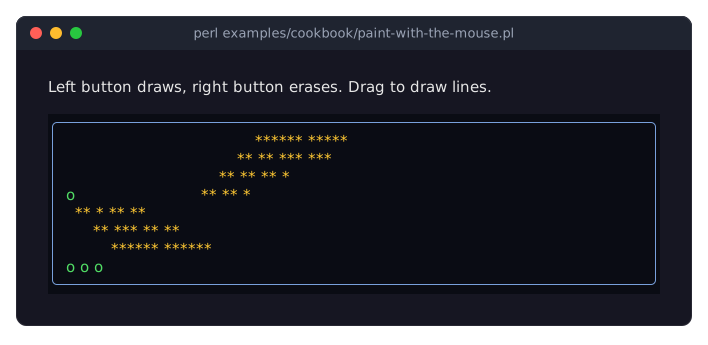
The Term::Fabulous::Event::Mouse event is fired on the topmost widget under the pointer that painted something there, here the canvas.
keysays what happened:TB_KEY_MOUSE_LEFT,TB_KEY_MOUSE_RIGHT,TB_KEY_MOUSE_MIDDLE,TB_KEY_MOUSE_RELEASE,TB_KEY_MOUSE_WHEEL_UP,TB_KEY_MOUSE_WHEEL_DOWN,TF_KEY_MOUSE_WHEEL_LEFTorTF_KEY_MOUSE_WHEEL_RIGHT(constants of Term::Fabulous::Termbox).While a button is held and the mouse moves, the terminal repeats the button's key with
TB_MOD_MOTIONset inmodifiers; that is how a drag is recognized.$canvas->cell_at($event)converts the event's terminal position into a cell of the canvas. It returns the empty list when the pointer is outside the drawing area, for example on the border, henceor return. See "cell_at" in Term::Fabulous::Widget::Canvas.For pixels instead of cells, use a Term::Fabulous::Widget::PixelCanvas and its
pixel_at; examples/pixel-paint.pl is a complete paint program with a color palette.
Plot data on a pixel canvas (PixelCanvas)
Goal: draw a line chart of a series of numbers, filling whatever room the terminal gives.
This program is shipped as examples/cookbook/pixel-canvas-plot.pl.
use v5.32;
use warnings;
use feature 'signatures';
no warnings 'experimental::signatures';

use Term::Fabulous;
use Term::Fabulous::Enum::BorderStyle;
use Term::Fabulous::Widget::Box;
use Term::Fabulous::Widget::PixelCanvas;
use Term::Fabulous::Widget::Text;
use Clay::XS qw(sizing_grow CLAY_TOP_TO_BOTTOM);

# Some data: one value per pixel column is plotted, so any number of
# points works.
my @temperatures = map { 12 + 8 * sin( $_ / 9 ) + 3 * sin( $_ / 2.3 ) } 0 .. 199;

my $root = Term::Fabulous::Widget::Box->new(
	layout => {
		layout_direction => CLAY_TOP_TO_BOTTOM,
		sizing           => { width => sizing_grow(), height => sizing_grow() },
		padding          => { left  => 2, right => 2, top => 1, bottom => 1 },
		child_gap        => 1,
	},
);
$root->add_child( Term::Fabulous::Widget::Text->new( text => 'Temperature over 200 hours', text_color => [ 230, 230, 230, 255 ] ) );

my $plot = Term::Fabulous::Widget::PixelCanvas->new(
	background_color => [ 10, 12, 20, 255 ],
	bordered         => 1,
	border_style     => Term::Fabulous::Enum::BorderStyle->Round,
	border_color     => [ 120, 160, 220, 255 ],
	layout           => { sizing => { width => sizing_grow(), height => sizing_grow() } },
);
$root->add_child($plot);

# The pixel size is known only once the layout has sized the canvas, and
# it changes with the terminal: draw whenever it is (re)sized.
$plot->on(
	CanvasResize => sub ($event) {
		my ( $width, $height ) = ( $plot->pixel_width, $plot->pixel_height );
		return if $width < 2 || $height < 2;
		my ( $low, $high ) = ( -5, 30 );
		my $y_of = sub ($value) { ( $height - 1 ) * ( $high - $value ) / ( $high - $low ) };

		$plot->clear;
		$plot->draw_line( 0, $y_of->(0), $width - 1, $y_of->(0), 0x404860 );    # the zero line

		my $previous;
		foreach my $x ( 0 .. $width - 1 ) {
			my $value = $temperatures[ int( $x * @temperatures / $width ) ];
			my @point = ( $x, $y_of->($value) );
			$plot->draw_line( @$previous, @point, $value > 20 ? '#ff6e6e' : '#6ec8ff' ) if $previous;
			$previous = \@point;
		}
		$plot->put_text( 1, 0,               "$high C", 0x9098B0 );
		$plot->put_text( 1, $plot->rows - 1, "$low C",  0x9098B0 );
		return;
	}
);

Term::Fabulous->new( root => $root, width => 80, height => 24 )->run;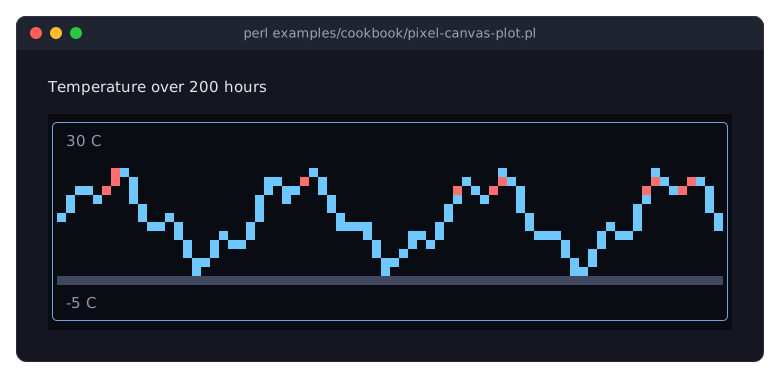
A Term::Fabulous::Widget::PixelCanvas has two pixels per cell, one above the other, so a 70 x 20 cell canvas is 70 x 40 pixels. Its size comes from the layout and is known only after the first layout; the
CanvasResizeevent is fired whenever it changes, before the frame is drawn. Draw in its listener. See "The canvas size" in Term::Fabulous::Manual::Charts.draw_line,draw_rect,fill_rect,draw_circleandset_pixeltake pixel coordinates from the top-left corner. Fractions are rounded down, so computed coordinates can be passed directly. Pixels outside the canvas are dropped.Colors on a canvas may be packed integers (
0x404860), color strings ('#ff6e6e'), arrays or Term::Fabulous::Color objects.put_textwrites text over the image in cells (character strings, not bytes). A cell with text shows no pixels.To draw characters instead of pixels, use Term::Fabulous::Widget::Canvas and its
put,put_textandfill; examples/canvas.pl animates a plot with a timer and redraws only the cells that changed.
Show a picture file (Image, fit)
Goal: show a picture file in the whole window and let the user choose how it is scaled and what is behind it.
This program is shipped as examples/cookbook/picture-viewer.pl. It shows the file named as its argument, or the example picture: perl examples/cookbook/picture-viewer.pl photo.jpg.
use v5.32;
use warnings;
use feature 'signatures';
no warnings 'experimental::signatures';

use FindBin;
use Term::Fabulous;
use Term::Fabulous::Enum::BorderStyle;
use Term::Fabulous::Widget::Box;
use Term::Fabulous::Widget::Image;
use Term::Fabulous::Widget::Text;
use Clay::XS qw(sizing_grow CLAY_TOP_TO_BOTTOM);

# The picture to show: the first argument, or the example picture.
my $file = shift // "$FindBin::Bin/../images/translucent_circles.png";

my $root = Term::Fabulous::Widget::Box->new(
	layout => {
		layout_direction => CLAY_TOP_TO_BOTTOM,
		sizing           => { width => sizing_grow(), height => sizing_grow() },
		padding          => { left  => 2, right => 2, top => 1, bottom => 1 },
		child_gap        => 1,
	},
);
my $header = Term::Fabulous::Widget::Box->new( layout => { layout_direction => CLAY_TOP_TO_BOTTOM } );
my $status = Term::Fabulous::Widget::Text->new( text_color => [ 230, 230, 230, 255 ] );
$header->add_child( $status, Term::Fabulous::Widget::Text->new( text => 'n, c, s: fit    b: background    q: quit', text_color => [ 150, 160, 180, 255 ] ) );

# The picture fills a frame; its background is the area inside the frame.
my $frame = Term::Fabulous::Widget::Box->new(
	bordered     => 1,
	border_style => Term::Fabulous::Enum::BorderStyle->Round,
	border_color => [ 120, 160, 220, 255 ],
	layout       => { sizing => { width => sizing_grow(), height => sizing_grow() } },
);
my $picture = Term::Fabulous::Widget::Image->new(
	file   => $file,
	fit    => 'contain',
	layout => { sizing => { width => sizing_grow(), height => sizing_grow() } },
);
$frame->add_child($picture);
$root->add_child( $header, $frame );

sub show_status () {
	my $size = defined $picture->image_width ? $picture->image_width . 'x' . $picture->image_height : 'unknown size';
	$status->text( sprintf '%s  %s  fit: %s', $file =~ s{.*/}{}r, $size, $picture->fit );
	return;
}
show_status();

my %fit_by_key = ( n => 'none', c => 'contain', s => 'stretch' );

# b switches between the screen's background and a white one: the
# transparent parts of the picture show it, the translucent ones are
# mixed with it.
my $white = 0;

sub toggle_background () {
	$white = !$white;
	$picture->background_color( $white ? [ 255, 255, 255, 255 ] : undef );
	return;
}

my $ui = Term::Fabulous->new( root => $root, width => 80, height => 24 );
$root->on(
	KeyPress => sub ($event) {
		my $key = $event->key_name // return;
		$ui->loop->stop if $key eq 'q';
		toggle_background() if $key eq 'b';
		my $fit = $fit_by_key{$key} or return;
		$picture->fit($fit);
		show_status();
		return;
	}
);
$ui->run;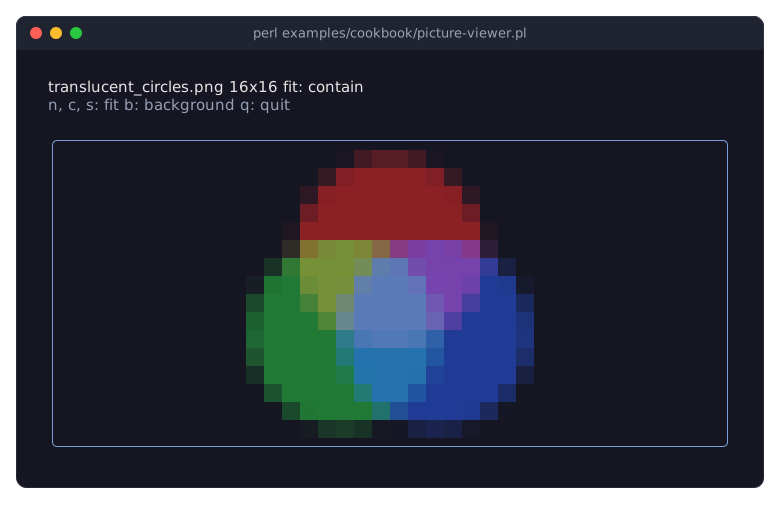
Term::Fabulous::Widget::Image reads the picture when it is given: in
newhere, or later with$picture->file($other). A file that cannot be read (missing, or of a format your Imager was built without) dies right there, with a message that names the file; wrap the call intryto show an error instead.Without
fit, a picture keeps its natural size, one column per pixel and one row per two rows of pixels, and a smaller widget cuts it.containscales it to the largest size that fits and keeps its proportions,stretchfills the widget.fitis an accessor, so the keys change it and the next frame draws the picture again.Enlarging repeats pixels, which keeps pixel art crisp. A whole-number factor makes every pixel the same size: in the picture, a terminal of 80x23 leaves 16 rows, 32 pixels, for the 16x16 picture, so it is scaled exactly twice. Other factors make some rows and columns of pixels wider than others. Shrinking mixes pixels.
The example picture is translucent: transparent pixels are not drawn, so they show the background, and translucent ones are mixed with it. That is the background of the image itself, or the nearest one behind it. b sets the image's
background_colorto white and back toundef, the screen behind it; the next frame draws the picture again, mixed with the new color. The image sits in a frame of its own, so its background fills the area inside the border.image_widthandimage_heightare the size of the picture in pixels,undefwhen Imager is not installed. Without Imager, the widget shows a notice in place of the picture, so the program still runs.
Embed a logo in the program (Image, base64)
Goal: show a small logo without shipping or finding a picture file.
This program is shipped as examples/cookbook/embedded-logo.pl.
use v5.32;
use warnings;
use feature 'signatures';
no warnings 'experimental::signatures';

use Term::Fabulous;
use Term::Fabulous::Enum::BorderStyle;
use Term::Fabulous::Widget::Box;
use Term::Fabulous::Widget::Image;
use Term::Fabulous::Widget::Text;
use Clay::XS qw(CLAY_TOP_TO_BOTTOM CLAY_ALIGN_Y_CENTER);

# The logo, a 16x16 PNG as base64 text: no file to ship or to find.
# The line breaks are ignored.
my $LOGO = <<'BASE64';
iVBORw0KGgoAAAANSUhEUgAAABAAAAAQCAYAAAAf8/9hAAABiklEQVQ4ja2TwUoCURSGvzujwQRh
JIOBLoSE7AFmIRK0aBXYMqNo2QO09x16AJdiZJsgoZW7iIJ5gAoMWxhUg9LdKJR6W9xJJ5tN0lme
y/9xz/+fIwiptmmqsH5qOBTTvR+Nb2E0p7CyEIlpzkAK+vfweSN+gURQbKzA4vYIa1lBDLD9Rw+Q
0H8RvF8YjB4nEBEU23sjIkkFeSAx9ddX4BoGzwLvZAIZA5aORlirCrag8zlPzbWpNOcAOMh8UHQ8
4tEeXEL/QdA9NkgNhyLSNk0VzSn97bwW754laXT3oVMA4FbWOW9VOd15Jp7vYUlFNKdo35jKALCy
6JkTUHNtLb4r4TylcZ7ScFei0d2n5tp6tJivAQzw3fYNqzTnoFPA6Uk2rspsXJVxehI6hfFI2JOE
jLC8/1IR0DnjqbFht7KO+1aC9UMA3PkYxOscZD7GsQ6kmAD697CQ1VEVHY/zVpXGGri+icTrbC5V
KTqejlNqDQT2YNYY/2eRgpCZVjkIgRmPKQw0XWHn/AWQfdWh/qecnAAAAABJRU5ErkJggg==
BASE64

my $about = Term::Fabulous::Widget::Box->new(
	bordered     => 1,
	border_style => Term::Fabulous::Enum::BorderStyle->Round,
	border_color => [ 120, 160, 220, 255 ],
	layout       => {
		padding         => { left => 2, right => 2, top => 1, bottom => 1 },
		child_gap       => 3,
		child_alignment => { y => CLAY_ALIGN_Y_CENTER },
	},
);
my $text = Term::Fabulous::Widget::Box->new( layout => { layout_direction => CLAY_TOP_TO_BOTTOM, child_gap => 1 } );
$text->add_child(
	Term::Fabulous::Widget::Text->new( text => 'Prism 2.4',                text_color => [ 255, 255, 255, 255 ] ),
	Term::Fabulous::Widget::Text->new( text => 'Colors for your terminal', text_color => [ 150, 160, 180, 255 ] ),
	Term::Fabulous::Widget::Text->new( text => 'Press q to quit.',         text_color => [ 150, 160, 180, 255 ] ),
);
$about->add_child( Term::Fabulous::Widget::Image->new( base64 => $LOGO ), $text );

my $root = Term::Fabulous::Widget::Box->new( layout => { padding => { left => 2, top => 1 } } );
$root->add_child($about);

my $ui = Term::Fabulous->new( root => $root, width => 80, height => 24 );
$root->on(
	KeyPress => sub ($event) {
		$ui->loop->stop if ( $event->key_name // '' ) eq 'q';
		return;
	}
);
$ui->run;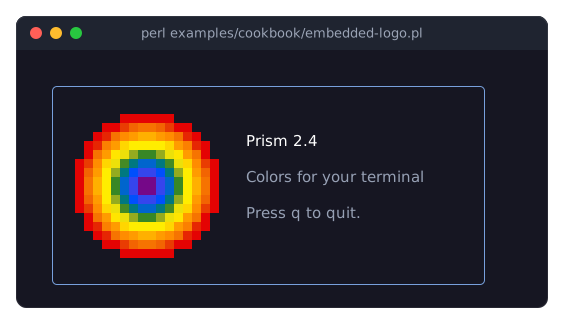
base64takes the bytes of a picture as base64 text, in the standard alphabet or in base64url; line breaks, indentation and missing=padding do not matter. Make the text withperl -MMIME::Base64 -0777 -ne 'print encode_base64($_)' logo.png.data_urltakes a data URL (data:image/png;base64,...), anddatathe bytes themselves.The image has no
layoutsizing, so it is as big as the picture: a 16x16 PNG takes 16 columns and 8 rows, andchild_alignmentcenters the text next to it.Transparent pixels are not drawn, so the corners around the circle show the background of the box; half-transparent ones are mixed with it.
Show a photo in sixel graphics (Sixel)
Goal: show a picture file sharply, in the terminal's own pixels, with a help box over it.
This program is shipped as examples/cookbook/sixel-viewer.pl. It shows the file named as its argument, or the example picture: perl examples/cookbook/sixel-viewer.pl photo.jpg.
use v5.32;
use warnings;
use feature 'signatures';
no warnings 'experimental::signatures';

use FindBin;
use Term::Fabulous;
use Term::Fabulous::Enum::BorderStyle;
use Term::Fabulous::Widget::Box;
use Term::Fabulous::Widget::Sixel;
use Term::Fabulous::Widget::Text;
use Clay::XS qw(sizing_grow CLAY_TOP_TO_BOTTOM CLAY_ATTACH_TO_PARENT CLAY_ATTACH_POINT_CENTER_TOP);

# The picture to show: the first argument, or the example picture.
my $file = shift // "$FindBin::Bin/../images/mandelbrot.png";

my $root = Term::Fabulous::Widget::Box->new(
	layout => {
		layout_direction => CLAY_TOP_TO_BOTTOM,
		sizing           => { width => sizing_grow(), height => sizing_grow() },
		padding          => { left  => 2, right => 2, top => 1, bottom => 1 },
		child_gap        => 1,
	},
);
my $status = Term::Fabulous::Widget::Text->new( text => 'n, c, s: fit    h: help    q: quit', text_color => [ 150, 160, 180, 255 ] );

my $frame = Term::Fabulous::Widget::Box->new(
	bordered     => 1,
	border_style => Term::Fabulous::Enum::BorderStyle->Round,
	border_color => [ 120, 160, 220, 255 ],
	layout       => { sizing => { width => sizing_grow(), height => sizing_grow() } },
);
my $picture = Term::Fabulous::Widget::Sixel->new(
	file   => $file,
	fit    => 'contain',
	layout => { sizing => { width => sizing_grow(), height => sizing_grow() } },
);
$frame->add_child($picture);
$root->add_child( $status, $frame );

# The help floats over the top of the picture, which leaves those cells
# out.
my $help = Term::Fabulous::Widget::Box->new(
	layout           => { layout_direction => CLAY_TOP_TO_BOTTOM, padding => { left => 1, right => 1 } },
	background_color => [ 40, 44, 52, 255 ],
	bordered         => 1,
	border_color     => [ 229, 192, 123, 255 ],
	floating         => { attach_to => CLAY_ATTACH_TO_PARENT, attach_points => { element => CLAY_ATTACH_POINT_CENTER_TOP, parent => CLAY_ATTACH_POINT_CENTER_TOP } },
);
$help->add_child( map { Term::Fabulous::Widget::Text->new( text => $_ ) } 'n  natural size', 'c  contain', 's  stretch', 'h  this help' );

sub toggle_help () {
	$help->parent ? $frame->remove_child($help) : $frame->add_child($help);
	return;
}

my %fit_by_key = ( n => 'none', c => 'contain', s => 'stretch' );

my $ui = Term::Fabulous->new( root => $root, width => 80, height => 24 );
$root->on(
	KeyPress => sub ($event) {
		my $key = $event->key_name // return;
		$ui->loop->stop if $key eq 'q';
		toggle_help() if $key eq 'h';
		my $fit = $fit_by_key{$key} or return;
		$picture->fit($fit);
		return;
	}
);
$ui->run;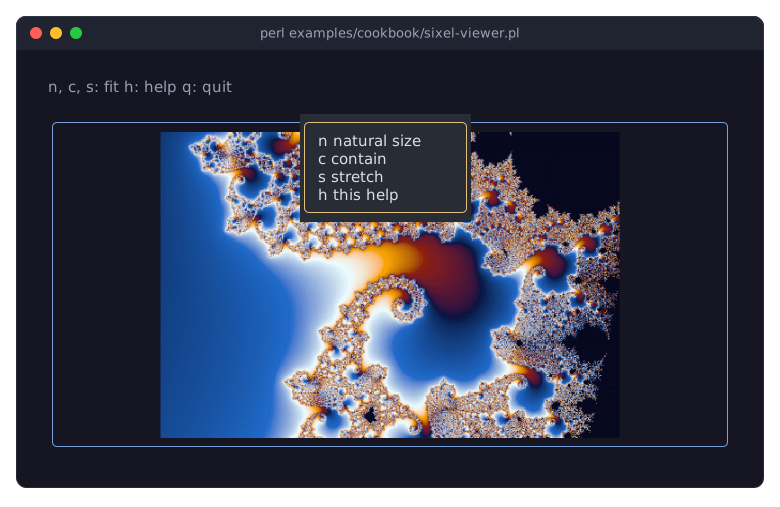
Term::Fabulous::Widget::Sixel needs Imager, Imager::File::SIXEL and a terminal that shows sixel graphics and reports the size of its cells: xterm started with
-ti vt340, foot, WezTerm, mlterm, Konsole and others. Term::Fabulous asks the terminal when it opens it and again after a resize. Without the modules, or in another terminal, the widget shows a notice in place of the picture, so the program still runs.Without
fit, a picture keeps its natural size: as many columns and rows as its pixels cover, with the size of a cell the terminal reports.containandstretchscale it in the widget's pixels, its columns and rows times the size of a cell, so it comes out much finer than in half blocks.fitis an accessor, so the keys change it and the next frame sends the picture again.The help is a box floating over the top center of the frame, and so of the picture; h adds it to the frame and removes it again. Everything painted over the picture hides it, cell by cell: the cells of the help box are cut out of the picture (its pixels there are transparent), so they show the box. Dialogs, dropdown lists and toasts work the same way, and in a Term::Fabulous::Widget::ScrollBox only the visible cells show the picture.
The terminal keeps a picture on the screen. Term::Fabulous sends it again only when it changes, moves or is resized, or when the cells below it are drawn again, for example when the help box opens or closes. A picture that disappears gets its cells drawn again, which erases it.
A picture never covers the last row of the terminal: the terminal would scroll the screen up to place its cursor below it. Here the bottom padding keeps the frame off that row; a picture that reaches it leaves its cells there empty.
SEE ALSO
This page is part of Term::Fabulous::Cookbook. Previous page: Term::Fabulous::Cookbook::ChartStyles. Next page: Term::Fabulous::Cookbook::Output.