NAME
Term::Fabulous::Cookbook::Forms - Recipes: forms, dialogs and input widgets
DESCRIPTION
This page is part of Term::Fabulous::Cookbook. Previous page: Term::Fabulous::Cookbook::LiveData. Next page: Term::Fabulous::Cookbook::Menus.
The recipes on this page build forms: they read text, choices and numbers from the user, check and collect the values, open a dialog over the screen, ask a question below the shell's output, and control the keyboard focus. Most recipes are complete programs, shipped in examples/cookbook/ (one in examples/), with a screenshot and notes on every feature they use; the others are short snippets for one of these programs.
The recipes use the input widgets Term::Fabulous::Widget::TextField, Term::Fabulous::Widget::TextArea, Term::Fabulous::Widget::Checkbox, Term::Fabulous::Widget::RadioGroup with Term::Fabulous::Widget::RadioButton, Term::Fabulous::Widget::Dropdown and Term::Fabulous::Widget::Slider, the checks of Term::Fabulous::Validator, the dialog Term::Fabulous::Widget::Dialog, the prompt Term::Fabulous::Widget::Prompt, the file dialog Term::Fabulous::Widget::FileDialog, the color picker Term::Fabulous::Widget::ColorPicker, the clipboard of Term::Fabulous::Editor, and Term::Fabulous::Layout for a form described in KDL.
Term::Fabulous::Manual::Forms explains the input widgets and what they have in common: values, the Change event, disabling, colors and size. The focus chapter of the manual explains the keyboard focus and the Tab order, and Term::Fabulous::Manual::KDL the KDL layout files.
The recipes on this page:
"Write your own checks and restrict typing (accept, pattern, code)"
"Choose from options in Perl (Dropdown, RadioGroup, Slider)"
"Build a form from a KDL file (text fields, radio buttons, dropdown, slider, checkbox)"
A login form (centered dialog, masked password)
Goal: a centered dialog with a user name, a masked password and a check box, which checks that both fields are filled in when the user presses Enter.
This program is shipped as examples/cookbook/login-form.pl.
use v5.32;
use warnings;
use feature 'signatures';
no warnings 'experimental::signatures';

use Term::Fabulous;
use Term::Fabulous::Enum::BorderStyle;
use Term::Fabulous::Widget::Box;
use Term::Fabulous::Widget::Checkbox;
use Term::Fabulous::Widget::Text;
use Term::Fabulous::Widget::TextField;
use Clay::XS qw(sizing_grow sizing_fixed CLAY_TOP_TO_BOTTOM CLAY_ALIGN_X_CENTER CLAY_ALIGN_Y_CENTER);

my $root = Term::Fabulous::Widget::Box->new(
	layout => {
		sizing          => { width => sizing_grow(),       height => sizing_grow() },
		child_alignment => { x     => CLAY_ALIGN_X_CENTER, y      => CLAY_ALIGN_Y_CENTER },
	},
);

my $dialog = Term::Fabulous::Widget::Box->new(
	background_color => [ 28, 33, 45, 255 ],
	bordered         => 1,
	border_color     => [ 97, 175, 239, 255 ],
	border_style     => Term::Fabulous::Enum::BorderStyle->Round,
	layout           => {
		layout_direction => CLAY_TOP_TO_BOTTOM,
		sizing           => { width => sizing_fixed(44) },
		padding          => { left  => 1, right => 1, top => 1, bottom => 1 },
		child_gap        => 1,
	},
);
$root->add_child($dialog);

sub text ( $string, $color = [ 220, 220, 220, 255 ] ) {
	return Term::Fabulous::Widget::Text->new( text => $string, text_color => $color );
}

my $user = Term::Fabulous::Widget::TextField->new(
	id               => 'user',
	placeholder      => 'User name',
	required         => 1,
	required_message => 'Please enter your user name.',
	accept           => 'a-zA-Z0-9_.-',
	layout           => { sizing => { width => sizing_grow() } },
);
my $password = Term::Fabulous::Widget::TextField->new(
	id               => 'password',
	placeholder      => 'Password',
	required         => 1,
	required_message => 'Please enter your password.',
	mask             => '*',
	layout           => { sizing => { width => sizing_grow() } },
);
my $remember = Term::Fabulous::Widget::Checkbox->new( id => 'remember', label => 'Remember me' );
my $message  = text( 'Enter in a field logs in.', [ 150, 160, 180, 255 ] );
$dialog->add_child( text('Log in'), $user, $password, $remember, $message );

my $ui = Term::Fabulous->new( root => $root, width => 80, height => 24 );

sub log_in () {
	if ( my @invalid = $dialog->invalid_inputs ) {
		$message->text( $invalid[0]->error );
		$ui->interaction->set_focused_widget( $invalid[0] );
		return;
	}
	$message->text( sprintf 'Welcome, %s!%s', $user->value, $remember->checked ? ' (remembered)' : '' );
	return;
}

# Enter in either field fires Submit on that field; both bubble to the dialog.
$dialog->on( Submit => sub ($event) { log_in(); return } );

$ui->interaction->set_focused_widget($user);
$ui->run;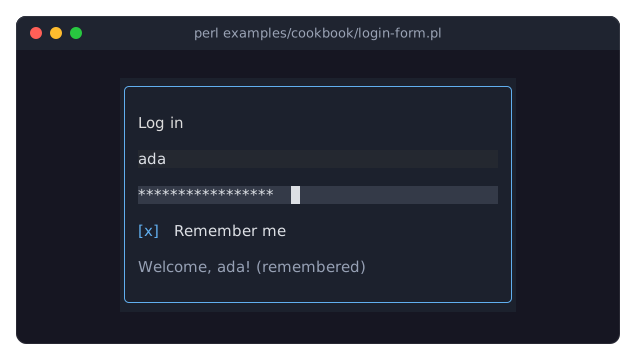
Term::Fabulous::Widget::TextField with
mask => '*'shows a star for every character.valuestill returns the real text.Pressing Enter in a text field fires Term::Fabulous::Event::Submit on it. Events bubble up the tree, so one listener on the dialog box handles Enter in both fields. The check box fires no
Submit: Enter and Space toggle it.Both fields are
required, with a message of their own. An empty required field is invalid, so$dialog->invalid_inputslists it, even though it looks like any empty field: it still shows its placeholder in gray, because these fields have no border to draw in red (see "Invalid values" in Term::Fabulous::Widget::Input). TheSubmitlistener shows the first invalid field'serrorand moves the focus to it; see "Checking input" in Term::Fabulous::Manual::Forms and the next recipe.acceptrestricts what the user can type into the user name to the characters of a login name: letters, digits,_,.and-. Typing any other character does nothing. A validator (validator => 'email', say) would check the whole value instead; see "Write your own checks and restrict typing (accept, pattern, code)".The inputs size themselves: a text field is one row high and
preferred_columns(default 20) wide unless thelayoutsays otherwise. Heresizing_grow()makes the fields as wide as the dialog.$ui->interaction->set_focused_widget($widget)moves the keyboard focus from code: here to the first field at the start, and to the first invalid field when the input is incomplete. See "Moving the focus" in Term::Fabulous::Manual::Events.This dialog is the whole screen. For a dialog that opens over a running screen and closes again, use Term::Fabulous::Widget::Dialog; see "Ask a question in a dialog (Dialog widget)".
Check the values of a form (required, validator)
Goal: a sign-up form that insists on some fields, checks e-mail addresses, URLs, host names, IP addresses, times, numbers and dates, shows what is wrong next to each field while the user types, and refuses to be sent until everything is right.
This program is shipped as examples/cookbook/check-form.pl.
use v5.32;
use warnings;
use feature 'signatures';
no warnings 'experimental::signatures';

use Term::Fabulous;
use Term::Fabulous::Validator;
use Term::Fabulous::Widget::Box;
use Term::Fabulous::Widget::Checkbox;
use Term::Fabulous::Widget::Dropdown;
use Term::Fabulous::Widget::Text;
use Term::Fabulous::Widget::TextField;
use Clay::XS qw(sizing_grow CLAY_TOP_TO_BOTTOM);

my $root = Term::Fabulous::Widget::Box->new(
	layout => {
		layout_direction => CLAY_TOP_TO_BOTTOM,
		sizing           => { width => sizing_grow(), height => sizing_grow() },
		padding          => { left  => 2, right => 2, top => 1, bottom => 1 },
		child_gap        => 1,
	},
);
my $form = Term::Fabulous::Widget::Box->new( layout => { layout_direction => CLAY_TOP_TO_BOTTOM } );
$root->add_child($form);

# One row per input: a label, the input and a message beside it, which
# the ValidityChange listener below fills in. The width groups line up
# the inputs and the messages.
my %message_of;

sub row ( $label, $input ) {
	my $label_box = Term::Fabulous::Widget::Box->new( width_group => 1 );
	$label_box->add_child( Term::Fabulous::Widget::Text->new( text => $label, text_color => [ 150, 160, 180, 255 ] ) );
	my $input_box = Term::Fabulous::Widget::Box->new( width_group => 2 );
	$input_box->add_child($input);
	$message_of{ $input->id } = Term::Fabulous::Widget::Text->new( text => ' ', text_color => [ 224, 108, 117, 255 ] );
	my $row = Term::Fabulous::Widget::Box->new( layout => { child_gap => 2 } );
	$row->add_child( $label_box, $input_box, $message_of{ $input->id } );
	$form->add_child($row);
	return $input;
}

sub text_field ( $id, %parameters ) {
	return Term::Fabulous::Widget::TextField->new( id => $id, preferred_columns => 22, %parameters );
}

# Required fields, and fields checked by a named validator. An optional
# field may stay empty; its validator only checks what the user typed.
row( 'Name', text_field( 'name', required => 1, required_message => 'Please tell us your name.' ) );
row( 'E-mail', text_field( 'email', required => 1, validator => 'email', placeholder => 'name@example.com' ) );

row( 'Website', text_field( 'website', validator => 'url',      placeholder => 'https://...' ) );
row( 'Server',  text_field( 'server',  validator => 'hostname', placeholder => 'db.example.com' ) );
row( 'Address', text_field( 'address', validator => 'ip',       placeholder => '192.0.2.1 or 2001:db8::1' ) );
row( 'Alarm',   text_field( 'alarm',   validator => 'time',     placeholder => 'HH:MM' ) );

# Validators with options are objects. integer, number and date also
# restrict what the user can type: integer lets through only digits and
# the minus sign.
my $port_validator     = Term::Fabulous::Validator->integer( min => 1, max => 65535 );
my $price_validator    = Term::Fabulous::Validator->number( min => 0 );
my $birthday_validator = Term::Fabulous::Validator->date( message => 'Please enter your birthday as YYYY-MM-DD.' );
row( 'Port',     text_field( 'port',     validator => $port_validator,     value       => '8080' ) );
row( 'Price',    text_field( 'price',    validator => $price_validator,    placeholder => '9.99' ) );
row( 'Birthday', text_field( 'birthday', validator => $birthday_validator, placeholder => 'YYYY-MM-DD' ) );

# A dropdown without a choice and an unchecked check box count as empty.
row( 'Color', Term::Fabulous::Widget::Dropdown->new( id => 'color', required => 1, options => [qw(Red Green Blue)], placeholder => 'Choose one' ) );

row( 'Terms', Term::Fabulous::Widget::Checkbox->new( id => 'terms', required => 1, required_message => 'Please accept the terms.', label => 'I accept the terms' ) );

my $status = Term::Fabulous::Widget::Text->new( text => 'Enter in a text field sends the form.' );
$root->add_child($status);

# Every input reports a change of its message; the event bubbles up to
# the form. A valid value reports undef as its error.
$form->on(
	ValidityChange => sub ($event) {
		$message_of{ $event->target->id }->text( $event->error // ' ' );
		return;
	}
);

my $ui = Term::Fabulous->new( root => $root, width => 80, height => 24 );

# Enter in a text field fires Submit, which bubbles up to the form. An
# input that was never changed has reported nothing yet: validate makes
# it report its message now.
$form->on(
	Submit => sub ($event) {
		my @invalid = $form->invalid_inputs;
		if ( !@invalid ) {
			$status->text('Thank you, the form is complete.');
			return;
		}
		$_->validate foreach @invalid;
		$status->text( sprintf '%d fields need your attention.', scalar @invalid );
		$ui->interaction->set_focused_widget( $invalid[0] );
		return;
	}
);

$ui->run;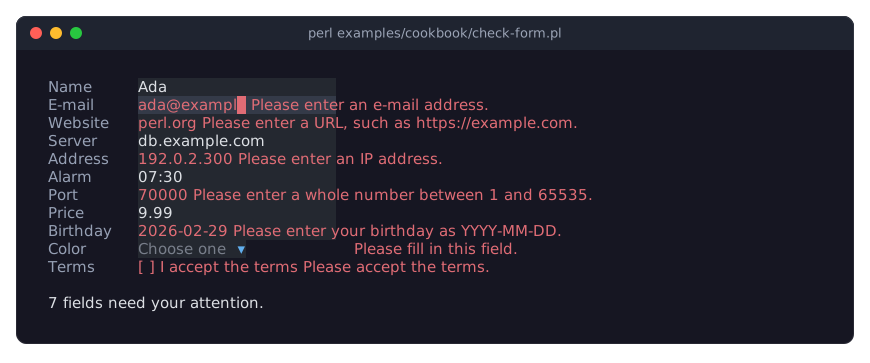
The picture shows the form after the user typed a value into every text field and pressed Enter in the last one. The fields with an accepted value (Ada, db.example.com, 07:30, 9.99) look normal; the others are red and have a message. The x typed into the port was dropped, because an integer field only takes digits and a minus sign.
required => 1makes an empty value invalid. What counts as empty depends on the widget: an empty text, a dropdown without a choice, an unchecked check box. Its message isrequired_message, by defaultPlease fill in this field.validatorchecks a value that is not empty. A string names one of the built-in validators:email,integer,number,url,hostname,ip,dateandtime. A field that is notrequiredmay stay empty, whatever its validator says: the website, server, address and alarm fields are optional. A field that must be filled in and must be an e-mail address needs both, like the e-mail field here.The validators that take options, such as the range of
integerandnumberor a message of your own, are built as objects with Term::Fabulous::Validator. Each message names what is expected, including the range:Please enter a whole number between 1 and 65535.integer,number,dateandtimealso restrict typing to the characters their values are made of; see "accept" in Term::Fabulous::Widget::TextInput.An input checks its value after every change the user makes. When the result differs from what it reported last, it fires ValidityChange, which bubbles up to the form:
$event->erroris the new message, orundefonce the value is fine. One listener on the form keeps all messages up to date.$form->invalid_inputslists the invalid inputs inside a widget, in the order of the widget tree: here from the top of the form down. An input that the user never touched has not reported anything yet, even when it is invalid (the color dropdown and the terms box here).$input->validatemakes it report now; theSubmitlistener calls it for every invalid input, and then moves the focus to the first one.The invalid look of the inputs (red text, a red check box) comes from the theme, see "Invalid values" in Term::Fabulous::Widget::Input. The messages are ordinary Text widgets: where and how they are shown is up to the program.
A KDL layout takes
required #true,required_message "...",validator "email"and, for a text input,accept "0-9"as properties (see "KDL PROPERTIES" in Term::Fabulous::Widget::Input); validators with options and patterns are set from Perl.
Write your own checks and restrict typing (accept, pattern, code)
Goal: fields that accept only some characters, checks the built-in validators do not have (a product code, an even number, a host in one domain), and a check of every line of a text area.
This program is shipped as examples/cookbook/own-checks.pl.
use v5.32;
use warnings;
use feature 'signatures';
no warnings 'experimental::signatures';

use Term::Fabulous;
use Term::Fabulous::Validator;
use Term::Fabulous::Widget::Box;
use Term::Fabulous::Widget::Text;
use Term::Fabulous::Widget::TextArea;
use Term::Fabulous::Widget::TextField;
use Clay::XS qw(sizing_grow CLAY_TOP_TO_BOTTOM);

my $root = Term::Fabulous::Widget::Box->new(
	layout => {
		layout_direction => CLAY_TOP_TO_BOTTOM,
		sizing           => { width => sizing_grow(), height => sizing_grow() },
		padding          => { left  => 2, right => 2, top => 1, bottom => 1 },
		child_gap        => 1,
	},
);

# A label, the input and its message below it.
sub row ( $label, $input ) {
	my $label_box = Term::Fabulous::Widget::Box->new( width_group => 1 );
	$label_box->add_child( Term::Fabulous::Widget::Text->new( text => $label, text_color => [ 150, 160, 180, 255 ] ) );
	my $message = Term::Fabulous::Widget::Text->new( text => ' ', text_color => [ 224, 108, 117, 255 ] );
	my $column  = Term::Fabulous::Widget::Box->new( layout => { layout_direction => CLAY_TOP_TO_BOTTOM } );
	$column->add_child( $input, $message );
	my $row = Term::Fabulous::Widget::Box->new( layout => { child_gap => 2 } );
	$row->add_child( $label_box, $column );
	$root->add_child($row);

	$input->on( ValidityChange => sub ($event) { $message->text( $event->error // ' ' ); return } );
	return $input;
}

# accept with a character class body: only capital letters and digits
# can be typed; a pattern checks the whole value, with its own message.
row(
	'Product code',
	Term::Fabulous::Widget::TextField->new(
		accept     => 'A-Z0-9',
		max_length => 6,
		validator  => Term::Fabulous::Validator->pattern( qr/\A[A-Z]{3}[0-9]{3}\z/, message => 'Three letters and three digits, such as ABC123.' ),
	)
);

# accept with a regular expression, tested on every typed character:
# letters of any script, blanks, hyphens and apostrophes.
row( 'Name', Term::Fabulous::Widget::TextField->new( accept => qr/[\p{L} '-]/, placeholder => 'José Saramago' ) );

# A code reference returns what is wrong with the value, or nothing.
row(
	'Even number',
	Term::Fabulous::Widget::TextField->new(
		validator => sub ($value) {
			return 'Please enter a whole number.' unless $value =~ /\A-?[0-9]+\z/;
			return 'Please enter an even number.' if $value % 2;
			return;
		},
	)
);

# A list: every validator must pass, the first message wins.
row(
	'Mail server',
	Term::Fabulous::Widget::TextField->new(
		validator   => [ 'hostname', Term::Fabulous::Validator->pattern( qr/\.example\.com\z/i, message => 'Please use a host in example.com.' ) ],
		placeholder => 'mail.example.com',
	)
);

# A validator object can check values outside of a widget too: here
# each line of a text area.
my $hostname = Term::Fabulous::Validator->hostname;
row(
	'Hosts',
	Term::Fabulous::Widget::TextArea->new(
		preferred_rows => 3,
		validator      => sub ($value) {
			my @lines = split /\n/, $value;
			foreach my $number ( 1 .. @lines ) {
				my $error = $hostname->check( $lines[ $number - 1 ] ) // next;
				return "Line $number: $error";
			}
			return;
		},
	)
);

$root->add_child( Term::Fabulous::Widget::Text->new( text => 'Tab moves to the next field, Escape quits.', text_color => [ 150, 160, 180, 255 ] ) );

my $ui = Term::Fabulous->new( root => $root, width => 80, height => 24 );
$root->on( KeyPress => sub ($event) { $ui->loop->stop if ( $event->key_name // '' ) eq 'Escape'; return } );
$ui->run;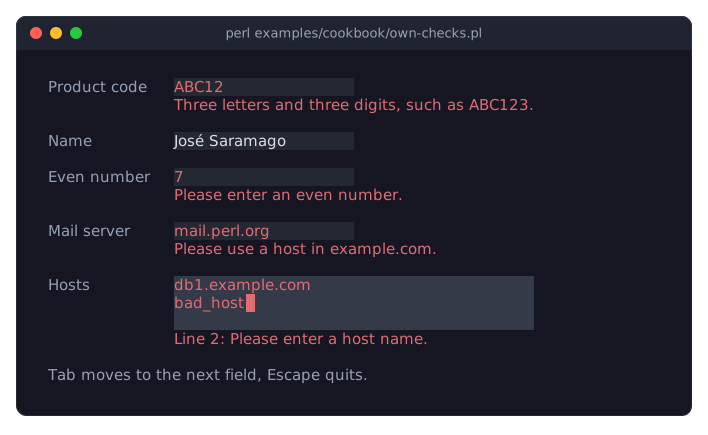
The picture shows the program after the user typed abcABC12 into the product code, José2 Saramago into the name, 7, mail.perl.org and two lines of hosts. The lower-case abc and the 2 were dropped while typing; every other field shows its message.
acceptdecides which characters the user can type or paste into a text input. A string is what goes between the brackets of a character class in a regular expression:'A-Z0-9'means[A-Z0-9],'^0-9'everything but digits. A regular expression (qr/[\p{L} '-]/) is matched against each typed character, and a code reference gets each character and returns true to let it in. A rejected key does nothing; pasted text keeps only its accepted characters. Settingvaluefrom Perl to a text with a rejected character dies.acceptandvalidatordo different jobs:acceptlooks at one character at a time while the user types,validatorlooks at the whole value. The product code needs both:acceptkeeps out lower-case letters, and the pattern says thatABC12is not complete yet.A regular expression as a
validatormust match the whole value, so anchor it with\Aand\z. Given directly (validator => qr/.../) its message isPlease match the expected format.;Term::Fabulous::Validator->patterntakes amessageof your own.A code reference gets the value and returns what is wrong with it: a message string, or nothing (
return;) for a valid value. It is never called with an empty value.An array reference of validators checks them in order; all must pass, and the first one that fails gives the message. The mail server must be a host name and end in
.example.com.A Term::Fabulous::Validator object works without a widget too:
$validator->check($value)returns the message orundef. The text area checks each of its lines with thehostnamevalidator and names the first bad line.Each input here has its own
ValidityChangelistener that writes the message below it; compare the single listener on the form in "Check the values of a form (required, validator)".
Ask a question in a dialog (Dialog widget)
Goal: a "Really quit?" dialog that opens over the screen when the user presses Ctrl+Q, keeps the keyboard focus inside itself, and closes on Escape or a button.
This recipe builds the dialog from its parts, which shows how a dialog works. For a question with a few buttons, a Term::Fabulous::Widget::Prompt does the same in one call: see the next recipe, "Confirm before quitting (Prompt)".
This program is shipped as examples/cookbook/confirm-dialog.pl.
use v5.32;
use warnings;
use feature 'signatures';
no warnings 'experimental::signatures';

use Term::Fabulous;
use Term::Fabulous::Widget::Box;
use Term::Fabulous::Widget::Button;
use Term::Fabulous::Widget::Dialog;
use Term::Fabulous::Widget::Text;
use Term::Fabulous::Widget::TextArea;
use Term::Fabulous::Enum::BorderStyle;
use Clay::UI::Enum::Result;
use Clay::XS qw(sizing_grow sizing_fixed CLAY_TOP_TO_BOTTOM);

sub text ( $string, $color = [ 220, 220, 220, 255 ] ) {
	return Term::Fabulous::Widget::Text->new( text => $string, text_color => $color );
}

my $root = Term::Fabulous::Widget::Box->new(
	layout => {
		layout_direction => CLAY_TOP_TO_BOTTOM,
		sizing           => { width => sizing_grow(), height => sizing_grow() },
		padding          => { left  => 2, right => 2, top => 1, bottom => 1 },
		child_gap        => 1,
	},
);
my $notes = Term::Fabulous::Widget::TextArea->new( id => 'notes', layout => { sizing => { width => sizing_grow(), height => sizing_grow() } } );
$root->add_child( text('Type some notes. Ctrl+Q asks before quitting.'), $notes );

my $ui = Term::Fabulous->new( root => $root, width => 80, height => 24 );

# The dialog is built once and opened as often as needed. Its look
# (border, background, padding) comes with the widget.
my $dialog = Term::Fabulous::Widget::Dialog->new( id => 'confirm', layout => { sizing => { width => sizing_fixed(44) } } );

sub button ( $caption, $action ) {
	my $button = Term::Fabulous::Widget::Button->new(
		background_color => [ 43, 58, 85, 255 ],
		bordered         => 1,
		border_color     => [ 28, 33, 45, 255 ],    # the dialog background: only the focus shows
		border_style     => Term::Fabulous::Enum::BorderStyle->Round,
		layout           => { padding => { left => 1, right => 1 } },
	);
	$button->add_child( text($caption) );
	$button->on( Activate => sub ($event) { $action->(); return } );
	return $button;
}

my $buttons = Term::Fabulous::Widget::Box->new( layout => { child_gap => 2 } );
$buttons->add_child(
	button( 'Quit',   sub { $ui->loop->stop } ),
	button( 'Cancel', sub { $dialog->close } ),
);
$dialog->add_child( text('Really quit? Unsaved notes are lost.'), $buttons );

$root->on(
	KeyPress => sub ($event) {
		return Clay::UI::Enum::Result->CONTINUE unless ( $event->key_name // '' ) eq 'Ctrl+Q';
		$dialog->open($ui);
		return;
	}
);

$ui->interaction->set_focused_widget($notes);
$ui->run;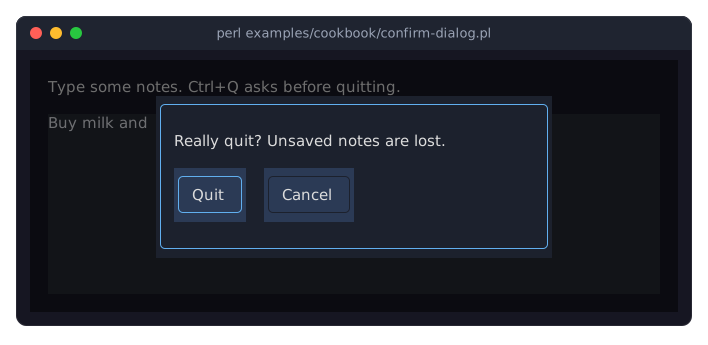
$dialog->open($ui)adds the dialog to the screen: centered, on top of everything, behind a translucent backdrop that dims the rest. The first focusable widget inside it (the Quit button) gets the focus, Tab and Shift+Tab cycle through the dialog's widgets only, and clicks outside it reach nothing behind it. See Term::Fabulous::Widget::Dialog.A button shows the focus only through its border, which turns blue (
focus_border_color). So the buttons get a rounded border in the color of the dialog's background, which does not stand out until the button has the focus. In the picture, the blue border shows that Enter would press Quit. See "focus_border_color" in Term::Fabulous::Widget::Button.Escape closes the dialog (
close_on_escape, on by default), and so does$dialog->close; the Cancel button calls it. Closing puts the focus back on the text area and fires Close on the dialog.The Ctrl+Q shortcut lives on the root. The text area types letters such as q itself, so they never reach the root, but it passes Ctrl+Q on. While the dialog is open, no key gets past it: the backdrop stops every key the dialog's widgets do not use, so the shortcuts of the program behind the dialog are off until it closes.
The text area keeps its text while the dialog is open and after it closes: the dialog is added to and removed from the tree, nothing else changes. The dialog itself keeps its children between openings.
Confirm before quitting (Prompt)
Goal: ask "Quit?" before the program ends, in one call, and start on the button that does no harm.
This program is shipped as examples/cookbook/confirm-prompt.pl.
use v5.32;
use warnings;
use feature 'signatures';
no warnings 'experimental::signatures';

use Term::Fabulous;
use Term::Fabulous::Widget::Box;
use Term::Fabulous::Widget::Prompt;
use Term::Fabulous::Widget::Text;
use Term::Fabulous::Widget::TextArea;
use Clay::UI::Enum::Result;
use Clay::XS qw(sizing_grow CLAY_TOP_TO_BOTTOM);

my $root = Term::Fabulous::Widget::Box->new(
	layout => {
		layout_direction => CLAY_TOP_TO_BOTTOM,
		sizing           => { width => sizing_grow(), height => sizing_grow() },
		padding          => { left  => 2, right => 2, top => 1, bottom => 1 },
		child_gap        => 1,
	},
);
my $notes = Term::Fabulous::Widget::TextArea->new( layout => { sizing => { width => sizing_grow(), height => sizing_grow() } } );
$root->add_child( Term::Fabulous::Widget::Text->new( text => 'Type some notes. Ctrl+Q asks before quitting.' ), $notes );

my $ui = Term::Fabulous->new( root => $root, width => 80, height => 24 );

$root->on(
	KeyPress => sub ($event) {
		return Clay::UI::Enum::Result->CONTINUE unless ( $event->key_name // '' ) eq 'Ctrl+Q';
		Term::Fabulous::Widget::Prompt->confirm(
			$ui,
			title   => 'Quit?',
			message => 'Your notes are not saved anywhere.',
			ok      => 'Quit',
			cancel  => 'Keep writing',
			focus   => 'cancel',
		)->on(
			Answer => sub ($event) {
				$ui->loop->stop if $event->button eq 'ok';
				return;
			}
		);
		return;
	}
);

$ui->interaction->set_focused_widget($notes);
$ui->run;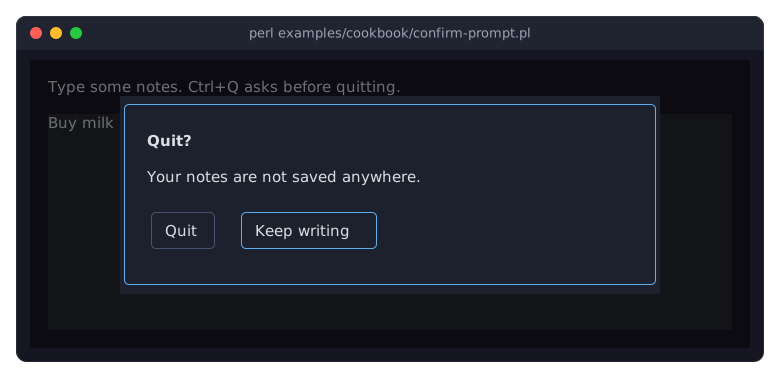
Term::Fabulous::Widget::Prompt->confirmbuilds a prompt with a title, a message and two buttons, opens it, and returns it. The buttons have the idsokandcancel, andokandcancelset their labels. The prompt is a Term::Fabulous::Widget::Dialog, so it keeps the focus while it is open, as the dialog of the previous recipe does.focus => 'cancel'puts the focus on Keep writing, so a hastyEnterkeeps the notes. Without it, the first button would start with the focus.The prompt reports the answer with an
Answerevent (Term::Fabulous::Event::Answer), andonreturns the prompt, so the listener follows the call.$event->buttonis the id of the button.Escapeanswerscanceltoo, so the program needs no code for it.When the
Answerlistener runs, the prompt is closed and the focus is back on the text area, so the user can go on writing.
Ask for a number and check it (Prompt, validator)
Goal: ask for a number of minutes in a prompt, accept only whole numbers from 1 to 120, and keep the prompt open with a message until the value is right.
This program is shipped as examples/cookbook/ask-prompt.pl.
use v5.32;
use warnings;
use feature 'signatures';
no warnings 'experimental::signatures';

use Term::Fabulous;
use Term::Fabulous::Widget::Box;
use Term::Fabulous::Widget::Prompt;
use Term::Fabulous::Widget::Text;
use Clay::UI::Enum::Result;
use Clay::XS qw(sizing_grow CLAY_TOP_TO_BOTTOM);

my $minutes = 25;

my $root = Term::Fabulous::Widget::Box->new(
	layout => {
		layout_direction => CLAY_TOP_TO_BOTTOM,
		sizing           => { width => sizing_grow(), height => sizing_grow() },
		padding          => { left  => 2, right => 2, top => 1, bottom => 1 },
		child_gap        => 1,
	},
);
my $session = Term::Fabulous::Widget::Text->new( text => "The next session lasts $minutes minutes." );
$root->add_child( $session, Term::Fabulous::Widget::Text->new( text => 't changes it, q quits.' ) );

my $ui = Term::Fabulous->new( root => $root, width => 80, height => 24 );

# The field checks that it holds a whole number; the check of the
# prompt runs after it and keeps the number in range.
sub ask_minutes () {
	Term::Fabulous::Widget::Prompt->ask(
		$ui,
		title     => 'Session length',
		message   => 'How many minutes should the next session last?',
		label     => 'Minutes',
		value     => $minutes,
		required  => 1,
		validator => 'integer',
		check     => sub ($values) { return $values->{value} >= 1 && $values->{value} <= 120 ? undef : 'A session lasts 1 to 120 minutes.' },
		width     => 52,
	)->on(
		Answer => sub ($event) {
			return if $event->button ne 'ok';
			$minutes = $event->value('value');
			$session->text("The next session lasts $minutes minutes.");
			return;
		}
	);
	return;
}

$root->on(
	KeyPress => sub ($event) {
		my $key = $event->key_name // '';
		if ( $key eq 't' ) {
			ask_minutes();
			return;
		}
		if ( $key eq 'q' ) {
			$ui->loop->stop;
			return;
		}
		return Clay::UI::Enum::Result->CONTINUE;
	}
);

$ui->run;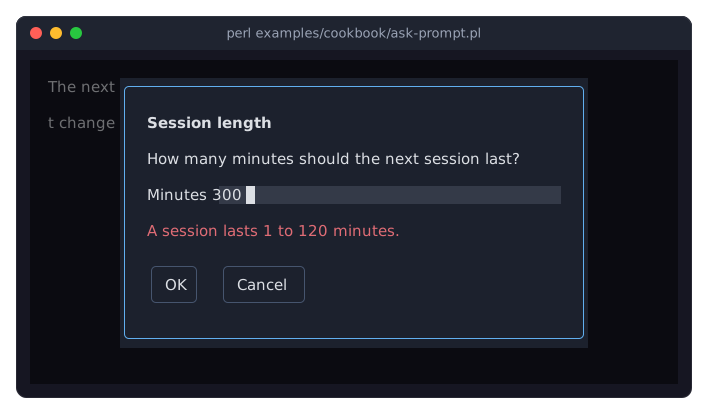
Term::Fabulous::Widget::Prompt->askbuilds a prompt with one text field, namedvalue, and the buttonsokandcancel. The field starts with the text ofvalue, all of it selected, so typing replaces it.requiredandvalidatorgo to the text field and work as in a form (see "Check the values of a form (required, validator)"): the field must not be empty and must hold a whole number.Enterin the field presses OK, and OK checks the field before it answers. While something is wrong, the prompt stays open, shows the label of the field and what is wrong with it in red, and puts the cursor back in the field.checkruns after the field found nothing wrong. It gets the values of all fields, so it can check a range, as here, or compare two fields. It returns what is wrong, as a sentence, orundefwhen everything is fine.$event->value('value')is the text of the field when the user pressed OK.
Open and save a file (FileDialog)
Goal: a notes editor that opens a file with a file dialog, saves it again with one key, and asks for a name when the note has none yet or the user wants another one.
This program is shipped as examples/cookbook/open-and-save.pl. It starts in a folder of sample notes that it makes in a temporary directory and deletes when it ends, so it never writes your files.
use v5.32;
use warnings;
use feature 'signatures';
no warnings 'experimental::signatures';

use Term::Fabulous;
use Term::Fabulous::Commands;
use Term::Fabulous::Widget::Box;
use Term::Fabulous::Widget::FileDialog;
use Term::Fabulous::Widget::StatusBar;
use Term::Fabulous::Widget::TextArea;
use Clay::XS qw(sizing_grow CLAY_TOP_TO_BOTTOM);
use Encode qw(decode);
use File::Basename qw(basename dirname);
use File::Path qw(make_path);
use File::Temp;
use Time::Local qw(timegm);

# A folder of sample notes in a temporary directory, deleted when the
# program ends. The days are fixed and the folder is deep enough that
# the dialog shows only the end of its path, so the picture is the same
# on every run.
my $temporary = File::Temp->newdir;
my $samples   = "$temporary/home/grace/Documents/garden-club/season-2026/notes";
make_path($samples);
foreach my $sample ( [ 'groceries.txt', "Milk\nBread\nApples\n", 28 ], [ 'ideas.md', "# Ideas\n\nA clock that runs backwards.\n", 30 ], [ 'garden.txt', "Water the tomatoes.\n" x 5, 31 ] ) {
	my ( $name, $text, $day ) = @$sample;
	write_text( "$samples/$name", $text ) or die "Cannot write $samples/$name: $!\n";
	my $time = timegm( 0, 30, 10, $day, 4, 2026 );    # 10:30 on a day in May 2026
	utime $time, $time, "$samples/$name";
}

my $notes  = Term::Fabulous::Widget::TextArea->new( wrap => 1, layout => { sizing => { width => sizing_grow(), height => sizing_grow() } } );
my $path   = undef;    # the file of the note; undef until it has one
my $status = Term::Fabulous::Widget::StatusBar->new(
	message => 'Ctrl+O opens, Ctrl+S saves, Alt+s saves as, Ctrl+Q quits.',
	parts   => sub { [ defined $path ? name_of($path) : 'untitled', 'dim' ] },
);
my $root = Term::Fabulous::Widget::Box->new( layout => { layout_direction => CLAY_TOP_TO_BOTTOM, sizing => { width => sizing_grow(), height => sizing_grow() } } );
$root->add_child( $notes, $status );

my $ui = Term::Fabulous->new( root => $root, width => 80, height => 24 );

# A path is bytes, as the file system and the dialog's answer have it;
# the status bar shows the file's name decoded.
sub name_of ($file) {
	return decode( 'UTF-8', basename($file), Encode::FB_PERLQQ | Encode::LEAVE_SRC );
}

# Both return false when the file cannot be read or written; $! says why.
sub read_text ($file) {
	open my $in, '<:encoding(UTF-8)', $file or return;
	my $text = do { local $/; <$in> };
	close $in;
	return $text;
}

sub write_text ( $file, $text ) {
	open my $out, '>:encoding(UTF-8)', $file or return;
	print {$out} $text;
	return close $out;
}

sub open_note ($file) {
	my $text = read_text($file);
	if ( !defined $text ) {
		$status->message( 'Cannot read ' . name_of($file) . ": $!", 'danger' );
		return;
	}
	$notes->value($text);
	$path = $file;
	$status->message( 'Opened ' . name_of($file) . '.', 'success' );
	return;
}

sub save_note ($file) {
	if ( !write_text( $file, $notes->value ) ) {
		$status->message( 'Cannot write ' . name_of($file) . ": $!", 'danger' );
		return;
	}
	$path = $file;
	$status->message( 'Saved ' . name_of($file) . '.', 'success' );
	return;
}

# The dialogs start in the folder of the note, or in the samples.
sub folder () {
	return defined $path ? dirname($path) : $samples;
}

sub ask_to_open () {
	Term::Fabulous::Widget::FileDialog->new(
		mode      => 'open',
		directory => folder(),
		filters   => [ [ 'Notes' => '*.txt *.md' ], [ 'All files' => '*' ] ],
		list_rows => 5,
		width     => 60,
	)->on(
		Answer => sub ($event) {
			open_note( $event->value('path') ) if $event->button eq 'open';
			return;
		}
	)->open($ui);
	return;
}

sub ask_to_save () {
	Term::Fabulous::Widget::FileDialog->new(
		mode              => 'save',
		directory         => folder(),
		name              => defined $path ? basename($path) : 'untitled.txt',
		current_file      => $path,
		default_extension => 'txt',
		list_rows         => 5,
		width             => 60,
	)->on(
		Answer => sub ($event) {
			save_note( $event->value('path') ) if $event->button eq 'save';
			return;
		}
	)->open($ui);
	return;
}

my $commands = Term::Fabulous::Commands->new(
	commands => [
		{ id => 'open',    label => 'Open...',    keys => ['Ctrl+O'], run => \&ask_to_open },
		{ id => 'save',    label => 'Save',       keys => ['Ctrl+S'], run => sub { defined $path ? save_note($path) : ask_to_save() } },
		{ id => 'save_as', label => 'Save as...', keys => ['Alt+s'],  run => \&ask_to_save },
		{ id => 'quit',    label => 'Quit',       keys => ['Ctrl+Q'], run => sub { $ui->loop->stop } },
	],
);
$commands->listen($root);

$ui->interaction->set_focused_widget($notes);
$ui->run;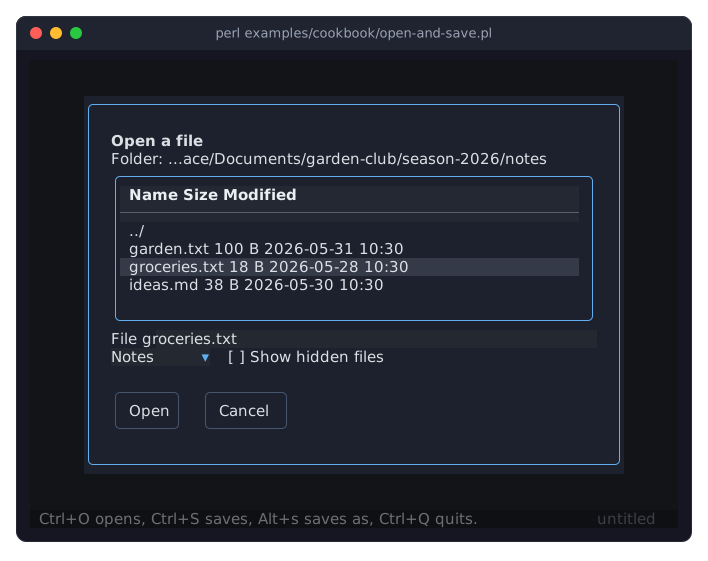
Term::Fabulous::Widget::FileDialog->newbuilds the dialog andopenshows it;onreturns the dialog, so the three calls make one statement. The dialog reports the result with anAnswerevent (Term::Fabulous::Event::Answer), as a prompt does: the button is the mode,openorsave, and$event->value('path')is the absolute path.CancelandEscapeanswercancel, which the listeners simply ignore.The path is a byte string, exactly what the file system uses, so it goes to
openas it is. To show a file's name,name_ofdecodes it from UTF-8 (a byte that is no UTF-8 becomes\xHH).In the open dialog, the cursor on a file puts its name into the
Filefield, andEnteror a double click opens it.Enteron a folder, orBackspace, walks through the folders. The two filters make a dropdown:Notesshows the text and Markdown files,All filesall of them. Folders always show.The dialog only chooses the path. Reading and writing the file is up to the program:
read_textandwrite_textreturn false when they fail, and the status bar says what went wrong.Ctrl+Ssaves to the note's file without a question once it has one; only an untitled note opens the save dialog.Alt+salways opens it. The save dialog starts in theFilefield with the name selected up to its extension, so typing a new name keeps.txt; moving through the list leaves the name alone. A name typed without a dot gets.txt(default_extension).The save dialog asks before it replaces a file that exists, with a second prompt above it, which starts on
Cancel.current_filenames the file the note already has, so saving under its own name asks nothing; for an untitled note it isundef, and every existing file is asked for.The commands and their keys are in a Term::Fabulous::Commands table (see "Give a program a menu bar (MenuBar, Commands)" in Term::Fabulous::Cookbook::Menus), which a menu bar could show as well.
Ask for a color (ColorPicker in a Prompt)
Goal: a setting for a color, changed in a prompt where the user picks a named color, types one, or moves sliders, and OK only takes a color that is valid.
This program is shipped as examples/cookbook/color-prompt.pl.
use v5.32;
use warnings;
use feature 'signatures';
no warnings 'experimental::signatures';

use Term::Fabulous;
use Term::Fabulous::Widget::Box;
use Term::Fabulous::Widget::ColorPicker;
use Term::Fabulous::Widget::Prompt;
use Term::Fabulous::Widget::Text;
use Clay::UI::Enum::Result;
use Clay::XS qw(sizing_grow sizing_fixed CLAY_TOP_TO_BOTTOM);

my $color = '#e5c07b';    # the setting: the color of the highlight

my $root = Term::Fabulous::Widget::Box->new(
	layout => {
		layout_direction => CLAY_TOP_TO_BOTTOM,
		sizing           => { width => sizing_grow(), height => sizing_grow() },
		padding          => { left  => 2, right => 2, top => 1, bottom => 1 },
		child_gap        => 1,
	},
);
my $sample = Term::Fabulous::Widget::Box->new( background_color => $color, layout => { sizing => { width => sizing_fixed(24), height => sizing_fixed(3) } } );
my $label  = Term::Fabulous::Widget::Text->new( text => "Highlight color: $color" );
$root->add_child( $label, $sample, Term::Fabulous::Widget::Text->new( text => 'c changes the color, q quits.' ) );

my $ui = Term::Fabulous->new( root => $root, width => 80, height => 24 );

sub ask_color () {
	my $picker = Term::Fabulous::Widget::ColorPicker->new(
		value     => $color,
		alpha     => 0,
		list_rows => 6,
		swatches  => [
			[ '#e5c07b', 'Sand',  '#e5c07b' ],
			[ '#61afef', 'Sky',   '#61afef' ],
			[ '#98c379', 'Mint',  '#98c379' ],
			[ '#e06c75', 'Rose',  '#e06c75' ],
			[ '#c678dd', 'Lilac', '#c678dd' ],
			[ '#56b6c2', 'Teal',  '#56b6c2' ],
		],
	);
	Term::Fabulous::Widget::Prompt->new(
		title   => 'Highlight color',
		message => 'Pick a color, type one or move the sliders.',
		fields  => [ { name => 'color', label => 'Color',  input   => $picker } ],
		buttons => [ { id   => 'ok',    label => 'Use it', primary => 1 }, { id => 'cancel', label => 'Cancel' } ],
		width   => 66,
	)->on(
		Answer => sub ($event) {
			return if $event->button ne 'ok';
			$color = $event->value('color');
			$sample->background_color( $picker->rgba );
			$label->text("Highlight color: $color");
			return;
		}
	)->open($ui);
	return;
}

$root->on(
	KeyPress => sub ($event) {
		my $key = $event->key_name // '';
		if ( $key eq 'c' ) {
			ask_color();
			return;
		}
		if ( $key eq 'q' ) {
			$ui->loop->stop;
			return;
		}
		return Clay::UI::Enum::Result->CONTINUE;
	}
);

$ui->run;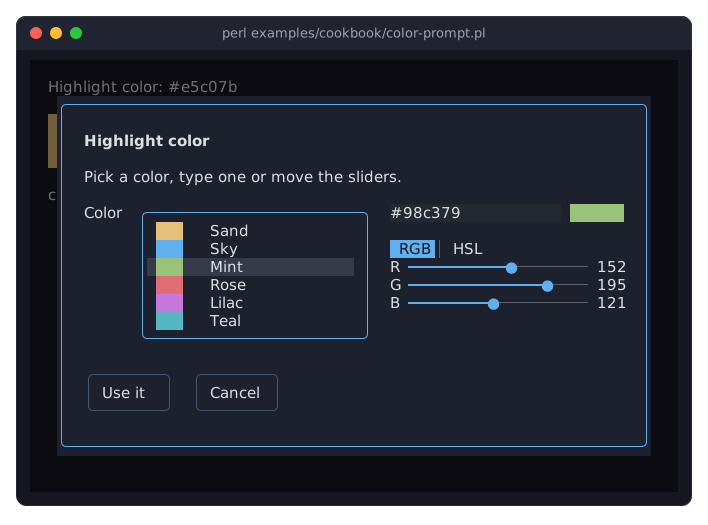
A Term::Fabulous::Widget::ColorPicker is one field of a Term::Fabulous::Widget::Prompt, like a text field would be. The answer's
$event->value('color')is the picker's value. Itslabelstands in front of it and starts the error line, so the user reads "Color: Please enter a color without transparency." and not the field's name. The picker is built anew for every prompt, so it starts with the current setting.Each swatch is
[ $value, $label, $color ]. Here the value is the color itself, so it shows in the field when the user picks it. A swatch's value may also be a name the program understands, such as a theme's token, with the color only for the sample.The value is what the user chose, as text: a swatch's value, a color typed as
#rrggbb,rgb(...)or a name, or the color of the sliders as#rrggbb. The label shows it as it is. To paint with it, the listener asks$picker->rgba, which gives every kind as numbers.alpha => 0leaves out the alpha slider, and the field refuses a translucent color: a highlight should hide what is behind it.The prompt focuses the swatch list when it opens.
Tabmoves on to the field, the RGB/HSL switch and the sliders. While the field holds text that is no color,Use itandEnterkeep the prompt open and show what is wrong, as for any field with a validator (see "Ask for a number and check it (Prompt, validator)").
Ask for input below the shell's output (inline mode)
Goal: a prompt that asks for a name in three rows below what the shell showed before, instead of taking the whole screen, and leaves its answer there when the program goes on.
This program is shipped as examples/cookbook/inline-prompt.pl.
use v5.32;
use warnings;
use feature 'signatures';
no warnings 'experimental::signatures';

use Term::Fabulous;
use Term::Fabulous::Widget::Box;
use Term::Fabulous::Widget::Text;
use Term::Fabulous::Widget::TextField;
use Clay::XS qw(sizing_grow CLAY_TOP_TO_BOTTOM);

my $root = Term::Fabulous::Widget::Box->new(
	layout => {
		layout_direction => CLAY_TOP_TO_BOTTOM,
		sizing           => { width => sizing_grow(), height => sizing_grow() },
		padding          => { left  => 1,             right  => 1 },
	},
);
my $name = Term::Fabulous::Widget::TextField->new( id => 'name', placeholder => 'Your name', layout => { sizing => { width => sizing_grow() } } );
my $help = Term::Fabulous::Widget::Text->new( text => 'Enter answers, Escape cancels.', text_color => [ 150, 160, 180, 255 ] );
$root->add_child( Term::Fabulous::Widget::Text->new( text => 'What is your name?', text_color => [ 230, 230, 230, 255 ] ), $name, $help );

# Three rows below the shell's output instead of the whole screen.
my $ui = Term::Fabulous->new( root => $root, width => 80, height => 3, inline => 3 );
$ui->interaction->set_focused_widget($name);

my $answered = 0;
$root->on(
	Submit => sub ($event) {
		$answered = 1;
		$help->text('Thank you!');    # drawn before run returns, and left on the screen
		$ui->loop->stop;
		return;
	}
);
$root->on(
	KeyPress => sub ($event) {
		my $key = $event->key_name // return;
		$ui->loop->stop if $key eq 'Escape';
		return;
	}
);

$ui->run;
say $answered ? 'Hello, ' . $name->value . '!' : 'Cancelled.';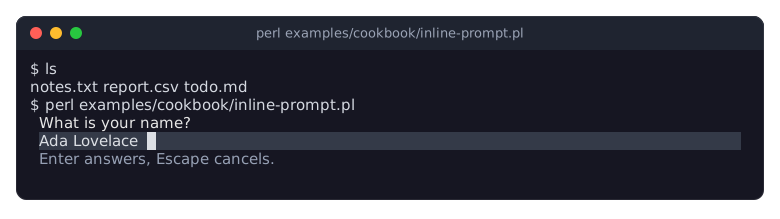
inline => 3makesrundraw into three rows starting at the cursor's line (the line below it when text precedes the cursor on its line); the terminal scrolls up first when they do not fit below it. The layout is as wide as the terminal and three rows high, soheightinnewonly matters beforerun. See "INLINE MODE" in Term::Fabulous.Enter in the text field fires
Submit, which bubbles to the root. The listener changes the help line and stops the loop;rundraws that change before it returns, and the three rows stay on the screen with the cursor below them, so thesayafterrunprints on the next line.Inline mode has no mouse support, so the terminal keeps the mouse for selecting and copying text, as with
mouse => 0.
Choose from options in Perl (Dropdown, RadioGroup, Slider)
Goal: let the user pick one of several options, from a list that opens and from radio buttons, and a number from a range, all built in Perl.
This program is shipped as examples/cookbook/choose-options.pl.
use v5.32;
use warnings;
use feature 'signatures';
no warnings 'experimental::signatures';

use Term::Fabulous;
use Term::Fabulous::Widget::Box;
use Term::Fabulous::Widget::Dropdown;
use Term::Fabulous::Widget::RadioButton;
use Term::Fabulous::Widget::RadioGroup;
use Term::Fabulous::Widget::Slider;
use Term::Fabulous::Widget::Text;
use Clay::XS qw(sizing_grow CLAY_TOP_TO_BOTTOM CLAY_LEFT_TO_RIGHT);

my $root = Term::Fabulous::Widget::Box->new(
	layout => {
		layout_direction => CLAY_TOP_TO_BOTTOM,
		sizing           => { width => sizing_grow(), height => sizing_grow() },
		padding          => { left  => 2, right => 2, top => 1, bottom => 1 },
		child_gap        => 1,
	},
);

# Options are labels, [ label, value ] pairs or { label, value } hashes.
my $country = Term::Fabulous::Widget::Dropdown->new(
	id          => 'country',
	placeholder => 'Choose a country',
	options     => [ [ 'Germany' => 'DE' ], [ 'France' => 'FR' ], [ 'Italy' => 'IT' ], { label => 'United Kingdom', value => 'GB' } ],
);

# The group holds the value; each button says which value it stands for.
my $shipping = Term::Fabulous::Widget::RadioGroup->new( id => 'shipping', value => 'standard', layout => { layout_direction => CLAY_LEFT_TO_RIGHT, child_gap => 2 } );
$shipping->add_child( Term::Fabulous::Widget::RadioButton->new( label => $_->[0], value => $_->[1] ) )
	foreach [ 'Standard' => 'standard' ], [ 'Express' => 'express' ], [ 'Pick up' => 'pickup' ];

# value_format may be a code reference.
my $tip = Term::Fabulous::Widget::Slider->new(
	id           => 'tip',
	min          => 0,
	max          => 20,
	step         => 2.5,
	value        => 10,
	value_format => sub ($percent) { sprintf '%4.1f %%', $percent },
);

my $status = Term::Fabulous::Widget::Text->new( text => 'Nothing chosen yet.', text_color => [ 150, 200, 255, 255 ] );
$root->add_child( $country, $shipping, $tip, $status );

$root->on(
	Change => sub ($event) {
		$status->text( sprintf '%s: %s', $event->target->id, $event->value // 'none' );
		return;
	}
);

# Choosing from code fires no Change; the user's choices do.
$country->value('FR');

my $ui = Term::Fabulous->new( root => $root, width => 80, height => 24 );
$ui->interaction->set_focused_widget($country);
$ui->run;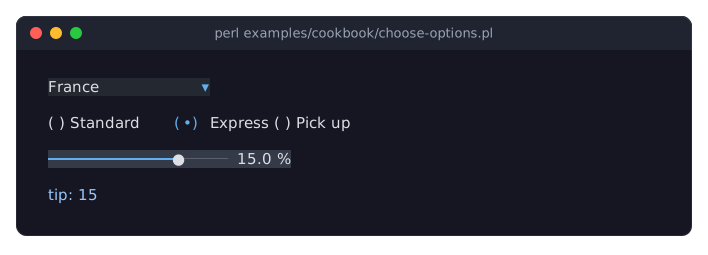
A Term::Fabulous::Widget::Dropdown shows the selected option's label; its
valueis the option's value. Enter, Space, Alt+Down, F4 or a click open the list. While the list is closed, Up and Down select the previous or next option directly (this firesChange); while it is open, they move the highlight, and Enter or Space chooses. Typing letters jumps to the next option that starts with them.A Term::Fabulous::Widget::RadioGroup holds the value and takes the focus for all its buttons, so Tab moves past the whole group in one step; the arrow keys choose a button. The buttons can be anywhere inside the group, also in nested boxes.
A Term::Fabulous::Widget::Slider keeps its value on the grid
min,min + step, ...;value_formatmay be asprintfformat or a code reference that formats the value.All three fire
Changeon themselves when the user changes the value, and the event bubbles to the root, where one listener shows it. Setting the value from code ($country->value('FR')) fires nothing.
Read all values of a form
Goal: collect the values of all input widgets of a form into a hash, for example to save them. This snippet works with any form; the example output below is for the program of "Build a form from a KDL file (text fields, radio buttons, dropdown, slider, checkbox)" (examples/kdl-form.pl).
# { id => value } of every input widget at or below $node that has an id.
# A radio group counts as one input; its buttons are skipped.
sub form_values ( $node, $values = {} ) {
	my $is_input = $node->isa('Term::Fabulous::Widget::Input') || $node->isa('Term::Fabulous::Widget::RadioGroup');
	$values->{ $node->id } = $node->value
		if $is_input && defined $node->id && !$node->isa('Term::Fabulous::Widget::RadioButton');
	if ( $node->can('children') ) {
		form_values( $_, $values ) foreach @{ $node->children };
	}
	return $values;
}
Added to examples/kdl-form.pl and called right after $layout->build, form_values($root) returns:
{
	name       => '',
	password   => '',
	size       => 'm',
	color      => undef,
	volume     => 30,
	newsletter => 0,
}
Every input widget (subclasses of Term::Fabulous::Widget::Input) and Term::Fabulous::Widget::RadioGroup have a
valuereader. Text inputs return their text, a check box 1 or 0, a slider a number, a dropdown the value of the selected option (undefwhile none is selected) and a radio group the value of its selected button.Radio buttons are inputs too, but their
valueis the value they give their group when selected, not a state; the group holds the state.Only widgets with an
idare collected; give the inputs ids, as inTerm::Fabulous::Widget::TextField->new( id => 'name' )orTextField "name"in KDL.
Find widgets by id
Goal: get hold of a widget by the id you gave it, typically after building the tree from a KDL layout, which returns only the root.
my $volume = $root->find_by_id('volume');
say $volume->value;
Here $root is the root of the form of "Build a form from a KDL file (text fields, radio buttons, dropdown, slider, checkbox)", which has a slider with the id volume; that program finds all its inputs this way.
find_by_idsearches the widget itself and everything below it, depth first, and returns the first widget whose id is the argument, orundefwhen there is none. Text widgets with an id are found too. Call it on any widget to search only its part of the tree.For the direct children only, a box has get_children_with:
$box->get_children_with( sub ($child) { ... } )returns the list of children for which the code returns true. The code gets each child both as its argument and in$_, so$box->get_children_with( sub { ( $_->id // '' ) eq 'name' } )works too (idisundeffor a widget without an id).Search once and keep the result instead of searching in every event;
find_by_idwalks the tree on every call.
Build a form from a KDL file (text fields, radio buttons, dropdown, slider, checkbox)
Goal: describe the form in a KDL layout instead of Perl code, then find the inputs by id, react to changes and print all values when the program ends. This program is also shipped as examples/kdl-form.pl.
# A form of input widgets described in KDL. The program finds the inputs
# by their ids, shows every change in a status line and prints the values
# when it ends.
#
#     perl examples/kdl-form.pl

use v5.32;
use warnings;
use strict;
use experimental 'signatures';
no warnings 'experimental::signatures';

use FindBin;
use lib "$FindBin::Bin/../lib/";

use Term::Fabulous;
use Term::Fabulous::Layout;

my $layout = Term::Fabulous::Layout->new( string => <<'KDL' );
use Term::Fabulous::Widget::Box as Box
use Term::Fabulous::Widget::Text as Text
use Term::Fabulous::Widget::TextField as TextField
use Term::Fabulous::Widget::Checkbox as Checkbox
use Term::Fabulous::Widget::RadioGroup as RadioGroup
use Term::Fabulous::Widget::RadioButton as RadioButton
use Term::Fabulous::Widget::Dropdown as Dropdown
use Term::Fabulous::Widget::Slider as Slider

Box "root" {
	layout direction=down gap=1
	sizing width=grow height=grow
	padding left=2 right=2 top=1 bottom=1

	Text { text "Fill in the form. Tab moves on, F2 shows the values, Ctrl+C ends."; text_color "#dcdcdc"; }

	Box "form" {
		layout direction=down gap=1
		sizing width=grow
		padding left=1 right=1
		border style=Round color="#61afef"
		bordered #true
		background_color "#1c212d"

		Box {
			layout gap=1
			Box { width_group 1; Text { text "Name"; text_color "#96a0b4"; } }
			TextField "name" { placeholder "Your name"; preferred_columns 30; required #true; }
		}
		Box {
			layout gap=1
			Box { width_group 1; Text { text "Password"; text_color "#96a0b4"; } }
			TextField "password" { mask "*"; preferred_columns 30; }
		}
		Box {
			layout gap=1
			Box { width_group 1; Text { text "Size"; text_color "#96a0b4"; } }
			RadioGroup "size" {
				layout direction=right gap=2
				value "m"
				RadioButton { label "Small"; value "s"; }
				RadioButton { label "Medium"; value "m"; }
				RadioButton { label "Large"; value "l"; }
			}
		}
		Box {
			layout gap=1
			Box { width_group 1; Text { text "Color"; text_color "#96a0b4"; } }
			Dropdown "color" {
				placeholder "Pick a color"
				options "Red" "Green" "Blue"
				option "Dark blue" value="navy"
			}
		}
		Box {
			layout gap=1
			Box { width_group 1; Text { text "Volume"; text_color "#96a0b4"; } }
			Slider "volume" { step 5; value 30; value_format "%d%%"; }
		}
		Box {
			layout gap=1
			Box { width_group 1; Text { text "Newsletter"; text_color "#96a0b4"; } }
			Checkbox "newsletter" { label "Send me the newsletter"; }
		}
	}

	Text "status" { text "Nothing changed yet."; text_color "#dcdcdc"; }
}
KDL

my $root = $layout->build;

my %input  = map { $_ => $root->find_by_id($_) } qw(name password size color volume newsletter);
my $status = $root->find_by_id('status');

# The password is shown as stars, here and in the status line.
sub shown_value ( $id, $value ) {
	return '*' x length $value if $id eq 'password';
	return $value // '(none)';
}

sub values_text () {
	return join ', ', map { sprintf '%s=%s', $_, shown_value( $_, $input{$_}->value ) } sort keys %input;
}

# Change events bubble from every input up to the form box.
$root->find_by_id('form')->on(
	Change => sub ($event) {
		my $id = $event->target->id;
		$status->text( sprintf '%s is now %s', $id, shown_value( $id, $event->value ) );
		return;
	}
);

$root->on(
	KeyPress => sub ($event) {
		return unless ( $event->key_name // '' ) eq 'F2';
		my ($invalid) = $root->invalid_inputs;
		$status->text( defined $invalid ? sprintf( '%s: %s', $invalid->id, $invalid->error ) : values_text() );
		return;
	}
);

my $ui = Term::Fabulous->new( width => 80, height => 24, root => $root );
$ui->interaction->set_focused_widget( $input{name} );
$ui->run;

say values_text();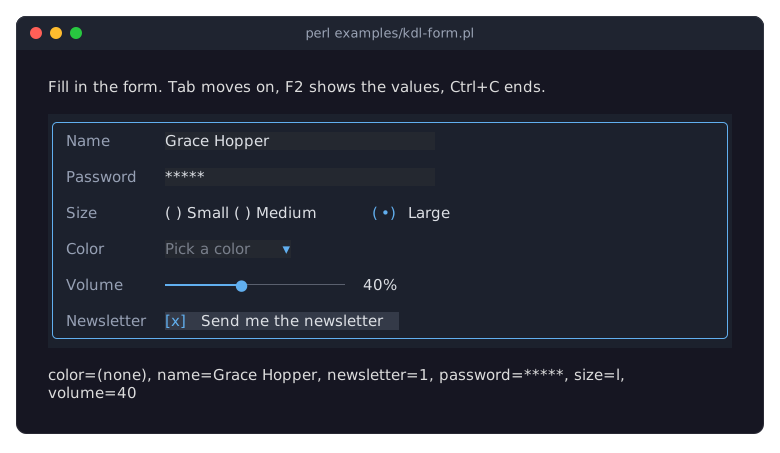
A layout starts with
use Module::Name as Aliaslines for the widget classes it uses, followed by exactly one root widget. Nodes that start with an uppercase letter are widgets; their optional string argument is the widget id. Nodes that start with a lowercase letter are properties of the widget around them. See "KDL LAYOUT FILES" in Term::Fabulous::Manual::KDL and Term::Fabulous::Layout.Several properties can share a line when separated by semicolons:
Text { text "Name"; text_color "#96a0b4"; }.Colors in KDL are strings in any format Term::Fabulous::Color understands, such as
"#61afef"or"rgb(97, 175, 239)". Text in KDL is a character string and is used as is.Properties are applied in the order they appear. Give what a value depends on first: the dropdown's options before a
value, the slider's range before itsvalue.required #trueon the name makes an empty name invalid: the status line shows the message of the first invalid input on F2, and$form->invalid_inputswould list it (see "Checking input" in Term::Fabulous::Manual::Forms). KDL takes the name of a validator too:validator "email".To load the layout from a file, use
Term::Fabulous::Layout->new( file => 'form.kdl' ); the file is read as UTF-8.Every
Changeevent bubbles from the input to the form box, so one listener reports all changes;$event->targetis the input that changed. The password is shown as stars in the status line and in the printed values.The labels sit in boxes with
width_group 1, so they all get the width of the widest label; see "Line up labels with equal widths (width_group)" in Term::Fabulous::Cookbook::Layout.runreturns when the user presses Ctrl+C; the values are printed after the terminal has been restored.
Disable inputs until a checkbox is checked
Goal: a text field that can only be used while a check box is checked.
This program is shipped as examples/cookbook/disable-inputs.pl.
use v5.32;
use warnings;
use feature 'signatures';
no warnings 'experimental::signatures';

use Term::Fabulous;
use Term::Fabulous::Widget::Box;
use Term::Fabulous::Widget::Checkbox;
use Term::Fabulous::Widget::TextField;
use Clay::UI::Enum::Result;
use Clay::XS qw(sizing_grow CLAY_TOP_TO_BOTTOM);

my $root = Term::Fabulous::Widget::Box->new(
	layout => {
		layout_direction => CLAY_TOP_TO_BOTTOM,
		sizing           => { width => sizing_grow(), height => sizing_grow() },
		padding          => { left  => 2, right => 2, top => 1, bottom => 1 },
		child_gap        => 1,
	},
);

my $company = Term::Fabulous::Widget::Checkbox->new( id => 'company', label => 'I order for a company' );
my $vat_id  = Term::Fabulous::Widget::TextField->new( id => 'vat_id', placeholder => 'VAT number', disabled => 1 );
$root->add_child( $company, $vat_id );

$company->on(
	Change => sub ($event) {
		$vat_id->disabled( !$event->value );
		return Clay::UI::Enum::Result->CONTINUE;    # let ancestors see the change too
	}
);

my $ui = Term::Fabulous->new( root => $root, width => 80, height => 24 );
$ui->interaction->set_focused_widget($company);
$ui->run;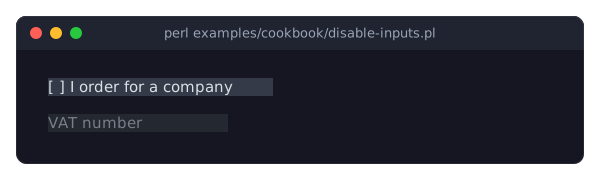
$input->disabled(1)grays the input out (it is drawn in itsdisabled_color), makes it ignore keys and the mouse, removes the focus from it at once and makes Tab skip it.disabled(0)undoes all of that. Buttons can be disabled the same way. The flag comes from Clay::UI::Role::Interaction::Disableable, so$widget->DOES('Clay::UI::Role::Interaction::Disableable')tells whether a widget has it. See "disabled" in Term::Fabulous::Widget::Input.Changecarries the check box's new state invalue(1 or 0). It is fired when the user toggles the box and when the program callstoggle, which acts as the user does; settingcheckedfrom the program fires nothing.The listener returns
CONTINUEso that a form-wideChangelistener on an ancestor still sees the change.
Show a status line that follows the focus (OnFocus)
Goal: show a help text for the input that currently has the focus.
This program is shipped as examples/cookbook/focus-help-line.pl.
use v5.32;
use warnings;
use feature 'signatures';
no warnings 'experimental::signatures';

use Term::Fabulous;
use Term::Fabulous::Widget::Box;
use Term::Fabulous::Widget::Slider;
use Term::Fabulous::Widget::Text;
use Term::Fabulous::Widget::TextArea;
use Term::Fabulous::Widget::TextField;
use Clay::XS qw(sizing_grow sizing_fixed CLAY_TOP_TO_BOTTOM);

my %help_by_id = (
	title  => 'A short title, at most 40 characters.',
	notes  => 'Enter starts a new line; Ctrl+Z undoes.',
	rating => 'Left and Right change the rating.',
);

my $root = Term::Fabulous::Widget::Box->new(
	layout => {
		layout_direction => CLAY_TOP_TO_BOTTOM,
		sizing           => { width => sizing_grow(), height => sizing_grow() },
		padding          => { left  => 2, right => 2, top => 1, bottom => 1 },
		child_gap        => 1,
	},
);
my $status = Term::Fabulous::Widget::Text->new( text => 'Press Tab to start.', text_color => [ 150, 200, 255, 255 ] );
$root->add_child(
	Term::Fabulous::Widget::TextField->new( id => 'title', placeholder => 'Title', max_length => 40 ),
	Term::Fabulous::Widget::TextArea->new( id => 'notes', placeholder => 'Notes', layout => { sizing => { width => sizing_grow(), height => sizing_fixed(5) } } ),
	Term::Fabulous::Widget::Slider->new( id => 'rating', min => 1, max => 5, value => 3 ),
	$status,
);

# OnFocus is fired on the widget that gets the focus and bubbles up to
# the root, because the inputs' own OnFocus listeners return CONTINUE.
$root->on(
	OnFocus => sub ($event) {
		$status->text( $help_by_id{ $event->target->id } // '' );
		return;
	}
);

Term::Fabulous->new( root => $root, width => 80, height => 24 )->run;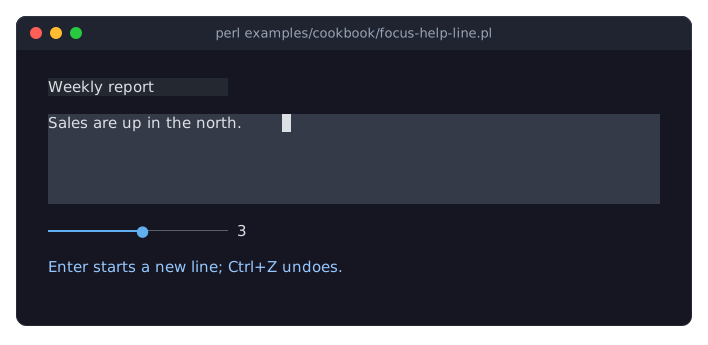
OnFocusis fired on the widget that gets the focus. It bubbles to the ancestors because the input widgets' ownOnFocuslisteners returnCONTINUE, so a single listener on the root hears about every focus change.$event->targetis the widget that got the focus.OnBlurworks the same way for the widget that lost it.The same pattern works for
Change(show the value that changed) andSubmit.
Change the Tab order (HasFocusOrder)
Goal: make Tab visit the inputs in an order that differs from their order on the screen.
This program is shipped as examples/cookbook/tab-order.pl.
use v5.32;
use warnings;
use feature 'signatures';
no warnings 'experimental::signatures';

use Object::Pad 0.825;

use Term::Fabulous;
use Term::Fabulous::Widget::Box;
use Term::Fabulous::Widget::TextField;
use Clay::UI::Role::Interaction::HasFocusOrder;
use Clay::XS qw(sizing_grow);

# A box that decides the Tab order of everything inside it. It must be
# the root: with nothing focused, only the root is asked.
class My::OrderedBox :isa(Term::Fabulous::Widget::Box) :does(Clay::UI::Role::Interaction::HasFocusOrder) :strict(params) {
	field @order;

	method focus_order (@widgets) {
		@order = @widgets;
		return $self;
	}

	method _neighbour ($direction) {
		my $focused = $self->ui->interaction->get_focused_widget;
		my ($index) = grep { defined $focused && $order[$_] == $focused } 0 .. $#order;
		return $order[ $direction > 0 ? 0 : -1 ] unless defined $index;
		return $order[ ( $index + $direction ) % @order ];
	}

	method get_next_focus ()     { return $self->_neighbour(1) }
	method get_previous_focus () { return $self->_neighbour(-1) }
}

my %field = map { $_ => Term::Fabulous::Widget::TextField->new( id => $_, placeholder => ucfirst, preferred_columns => 12 ) } qw(street city zip);
my $root  = My::OrderedBox->new(
	layout => { sizing => { width => sizing_grow(), height => sizing_grow() }, padding => { left => 2, top => 1 }, child_gap => 2 },
);

# Shown left to right as street, city, zip; Tab goes street, zip, city.
$root->add_child( @field{qw(street city zip)} );
$root->focus_order( @field{qw(street zip city)} );

Term::Fabulous->new( root => $root, width => 80, height => 24 )->run;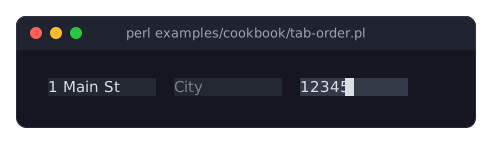
The picture shows the program after Tab, typing a street, Tab and typing a zip code: the second Tab skipped the city field in the middle.
By default Tab visits the focusable widgets in tree order (depth first, in the order they were added) and wraps around at the end.
A widget that composes Clay::UI::Role::Interaction::HasFocusOrder decides the order for the widgets inside it: its
get_next_focusandget_previous_focusreturn the widget to focus, orundefto keep the focus where it is. While nothing has the focus, only the root is asked, so make the ordering box the root (or let the program focus a widget inside it first).A widget returned while it cannot take the focus (for example a disabled input) leaves the focus where it is. See "Custom focus order" in Term::Fabulous::Manual::Events.
My::OrderedBoxkeeps the list given tofocus_orderand returns the widget after (Tab) or before (Shift+Tab) the focused one, wrapping around at both ends. With nothing focused, Tab gives the first widget of the list and Shift+Tab the last.
Copy and paste through the clipboard
Goal: exchange text between the program and the text inputs' clipboard. In the snippet, $field is any Term::Fabulous::Widget::TextField or Term::Fabulous::Widget::TextArea of your program.
use Term::Fabulous::Editor;

# Put text on the clipboard; Ctrl+V or Shift+Insert in any text input pastes it.
Term::Fabulous::Editor->clipboard('order-4711');

# Read what the user copied with Ctrl+Insert or cut with Ctrl+X.
my $copied = Term::Fabulous::Editor->clipboard;

# Copy the whole text of a field from code, and show the selection.
$field->editor->select_all;
$field->editor->copy;
$field->mark_changed;
All text inputs of the process share one clipboard, a character string held by Term::Fabulous::Editor. It is not connected to the desktop clipboard; to connect it, read and write it in your own key binding, for example with an external tool.
Ctrl+C is not copy: it ends the program. Copy is Ctrl+Insert, cut is Ctrl+X or Shift+Delete, paste is Ctrl+V or Shift+Insert. See "KEYS" in Term::Fabulous::Widget::TextInput.
$field->editorgives access to the cursor, the selection and undo of a text input. After changing them from code, call$field->mark_changedso that a frame is drawn: the field scrolls to the cursor and shows the change in it.
SEE ALSO
This page is part of Term::Fabulous::Cookbook. Previous page: Term::Fabulous::Cookbook::LiveData. Next page: Term::Fabulous::Cookbook::Menus.
Term::Fabulous::Manual::Forms - the guide to the input widgets and what they have in common.
Term::Fabulous::Manual::Events - events, the keyboard focus and the Tab order.
Term::Fabulous::Widget::Dialog - dialogs that open over the screen.
Term::Fabulous::Widget::Prompt - questions and small forms in a dialog.
Term::Fabulous::Manual::KDL - layouts described in KDL files.