NAME
Term::Fabulous::Manual - The Term::Fabulous user guide
HOW TO READ THIS MANUAL
This manual explains how Term::Fabulous works and how you use it. This page is its starting point: it introduces the library, shows a first program and ends with the "FEATURE INDEX", which maps tasks to the sections, recipes and class pages that describe them. The topics themselves are on pages of their own, listed under "CONTENTS".
- To learn Term::Fabulous
-
Read "INTRODUCTION" and "YOUR FIRST PROGRAM" on this page, then the topic pages in the order of "CONTENTS". Every topic page links to the previous and the next page at its top and bottom, so you can read the whole manual from start to end.
- To find something
-
Look the task up in the "FEATURE INDEX". Every topic has its own heading, so you can also search a page: with
/inperldoc, or with the table of contents on MetaCPAN. Terms the manual uses are defined in Term::Fabulous::Manual::Glossary.
The manual is one of four kinds of documentation:
- The manual (this page and its topic pages)
-
Explains the concepts: layout, text and colors, events, the keyboard, the mouse and the focus, forms, tables, charts, KDL layout files, the event loop, testing and writing widgets of your own.
- Term::Fabulous::Cookbook
-
Recipes: complete, runnable programs for common tasks, each with a picture and notes on the lines that matter. Its index page lists every recipe; the recipes themselves are on fifteen topic pages, from Term::Fabulous::Cookbook::GettingStarted to Term::Fabulous::Cookbook::Extending.
- Term::Fabulous::Examples
-
The example programs of the distribution, each with a picture: demo programs, one program per widget, and the programs of the cookbook.
- The class pages
-
One reference page per class, such as Term::Fabulous (the application object), Term::Fabulous::Widget::Box or Term::Fabulous::Widget::TextField. A class page lists every constructor parameter, method, event, key, mouse action and KDL property of the class. The list of modules on the main page names all of them, grouped by purpose.
Conventions
Every example uses subroutine signatures. A complete program starts with this header, which works on every Perl that Term::Fabulous supports (5.32.1 and later):
use v5.32;
use warnings;
use feature 'signatures';
no warnings 'experimental::signatures';
Shorter snippets leave the header out. A snippet may use variables from an earlier snippet of the same section, and usually $root (the root widget) and $ui (the Term::Fabulous object).
Code in these documents is indented. When you copy an example that contains a here-document (<<'KDL'), remove the indentation from the line that ends it (KDL): Perl recognizes the terminator only at the start of a line.
CONTENTS
The manual has these pages, in reading order:
- This page
-
"INTRODUCTION": what Term::Fabulous does, the libraries it builds on, and how a frame is drawn. "REQUIREMENTS", "YOUR FIRST PROGRAM" and the "FEATURE INDEX".
- Term::Fabulous::Manual::Layout
-
The widgets and the widget tree, widget ids, and how the layout engine sizes and places widgets: direction, sizing, padding, gaps, alignment, flow and stack layouts, floating widgets and equal sizes across the tree. Dividers between widgets, accordions whose sections open and close, tabs, and the tabs of the open documents of a program.
- Term::Fabulous::Manual::Looks
-
Text (character strings, wrapping, alignment, wide characters and emoji), colors (formats, alpha, the terminal's default colors, lighter and darker colors), borders and themes.
- Term::Fabulous::Manual::Events
-
Events and listeners, bubbling, the keyboard and key names, the focus, the mouse, hover and press, and scrolling.
- Term::Fabulous::Manual::Forms
-
The input widgets (text fields, text areas, check boxes, radio buttons, dropdowns, sliders, star ratings, segmented controls, color pickers), what they have in common, editing text, the clipboard, undo, and complete forms.
- Term::Fabulous::Manual::Feedback
-
The widgets that show what the program is doing: progress bars, with and without a known extent, spinners, toasts that appear in a corner and go away by themselves, status bars, and how widgets animate without timers. Also prompts, which ask the user a question and wait for the answer, and file dialogs, which ask for a file or a folder.
- Term::Fabulous::Manual::Menus
-
Commands and the keys that run them, menu bars, context menus, a help screen that lists the keys, and the shape of an application window with a menu bar and a status bar.
- Term::Fabulous::Manual::Charts
-
Canvases you draw on yourself, and the chart widgets that draw themselves from data.
- Term::Fabulous::Manual::Tables
-
The table widget: how it works, rows, columns, display text and mutators, widgets in cells, and the feature index of the table.
- Term::Fabulous::Manual::TableRows
-
Tables, continued: sorting, filtering, groups, trees, pages, the cursor and the selection.
- Term::Fabulous::Manual::TableStyles
-
Tables, continued: colors, styles, lines, padding, size, scrolling and printing a table.
- Term::Fabulous::Manual::KDL
-
Describing the widget tree in a KDL layout file instead of Perl code.
- Term::Fabulous::Manual::Programs
-
The event loop, timers and other asynchronous work, quitting, errors, output without a terminal, and testing.
- Term::Fabulous::Manual::CustomWidgets
-
Writing widgets of your own.
- Term::Fabulous::Manual::Troubleshooting
-
Solutions to common problems.
- Term::Fabulous::Manual::Glossary
-
The terms used in this documentation.
INTRODUCTION
Term::Fabulous builds terminal user interfaces in Perl: forms, dashboards, log viewers, data browsers, editors, games. You describe the screen as a tree of widgets: boxes, text, buttons, input fields, tables, charts, scrollable areas and canvases. Term::Fabulous sizes and positions the widgets, draws them, and turns key presses, mouse clicks and terminal resizes into events that your code reacts to.
A program usually takes over the whole terminal while it runs and gives it back unchanged when it ends. It can also draw into a few rows below the shell's output instead, like a prompt (see "INLINE MODE" in Term::Fabulous), or print a widget tree once as text, without any interaction (see "RENDERING WITHOUT A TERMINAL" in Term::Fabulous::Manual::Programs).
The parts of a program are always the same:
- The widget tree
-
The widgets, built in Perl with
newandadd_child, or read from a KDL layout file. The top of the tree is the root widget. See Term::Fabulous::Manual::Layout. - Listeners
-
Code references registered with
$widget->on( EventName => sub {...} )that run when an event happens: a key press, a click, a changed value. See Term::Fabulous::Manual::Events. - The application object
-
A Term::Fabulous object that holds the tree. Its
runmethod opens the terminal, runs the event loop and returns when the program should end.
Three libraries do the heavy lifting:
- Clay
-
A layout engine (used through Clay::XS and Clay::UI). It decides the position and size of every widget from rules such as "fill the remaining width" or "be as tall as the content". Term::Fabulous measures in terminal cells, so for Clay one unit is one cell.
- termbox2
-
A small C library, compiled into Term::Fabulous::Termbox, that switches the terminal into full-screen mode, reads keys and mouse input, and writes characters with 24-bit colors.
- IO::Async
-
The event loop (IO::Async::Loop). It waits for input, draws the screen when something changed, and runs your timers, sockets and child processes in the same loop.
You do not need to know these libraries in detail. The manual explains everything you need from them and links to their documentation for the rest.
How a frame is drawn
A frame is one complete layout and drawing of the screen. While run is active, Term::Fabulous checks 30 times per second whether anything changed since the last frame: a widget was changed through one of its methods, input arrived, the terminal was resized, or the program asked for a frame with invalidate. When nothing changed, nothing is drawn. When something changed, a frame is drawn in three steps:
Clay lays out the widget tree for the current terminal size.
Term::Fabulous draws every widget into termbox2's screen buffer: backgrounds, borders, text and canvases.
termbox2 compares the buffer with what the terminal already shows and sends only the cells that changed.
Because the whole screen is laid out again in every frame, there is no "redraw" method to call. Change a widget (its text, color, size or children), and the change is visible in the next frame, at most 1/30 second later. The widget methods tell Term::Fabulous that a frame is needed; only a widget of your own that draws from state it keeps itself has to say so (see telling Term::Fabulous that something changed).
Pointer movement is the one exception to "drawn at the next check": when frames take long to draw, a frame that only shows the pointer at a new position is drawn at most at every other check, so that moving the mouse cannot keep the program busy with nothing but redrawing.
REQUIREMENTS
Perl 5.32.1 or later.
A C compiler. termbox2 ships with the distribution and is compiled into Term::Fabulous::Termbox when Term::Fabulous is installed, with truecolor and grapheme cluster support always on; there is no separate library to install or find.
A terminal that understands 24-bit ("truecolor") colors. Most modern terminals do (xterm, GNOME Terminal, Konsole, kitty, iTerm2, Windows Terminal), and so does tmux with truecolor enabled (see "Colors are wrong or look washed out" in Term::Fabulous::Manual::Troubleshooting). In a terminal without truecolor support, the colors come out wrong.
A UTF-8 locale, for example
LANG=C.UTF-8orLANG=en_US.UTF-8(locale -alists the installed ones). Without it, wide characters such as CJK text and emoji cannot be placed correctly, and run warns about it when it starts.For mouse support, a terminal that reports mouse events. Nearly all do; see "MOUSE" in Term::Fabulous::Manual::Events for what is reported.
Optional: Imager, for pictures in Term::Fabulous::Widget::Image, with the image libraries (libpng, libjpeg, ...) of the formats you want to show. Installing Term::Fabulous does not require it; without it, an image widget shows a notice in its place.
Optional: Imager::File::SIXEL with Imager, for pictures in sixel graphics in Term::Fabulous::Widget::Sixel, and a terminal that shows sixel graphics and reports the size of its cells. Without them, a sixel widget shows a notice in its place.
YOUR FIRST PROGRAM
This program shows a dark blue screen with a framed greeting in the middle and ends when you press q, Escape or Ctrl+C. It is shipped as examples/cookbook/first-program.pl; run it with perl examples/cookbook/first-program.pl (see "RUNNING THE EXAMPLES" in Term::Fabulous::Examples).
use v5.32;
use warnings;
use feature 'signatures';
no warnings 'experimental::signatures';

use Clay::XS qw(sizing_grow CLAY_ALIGN_X_CENTER CLAY_ALIGN_Y_CENTER);
use Term::Fabulous;
use Term::Fabulous::Enum::BorderStyle;
use Term::Fabulous::Widget::Box;
use Term::Fabulous::Widget::Text;

# The root widget fills the whole terminal and centers its child.
my $root = Term::Fabulous::Widget::Box->new(
	background_color => [ 20, 25, 45, 255 ],
	layout           => {
		sizing          => { width => sizing_grow(),       height => sizing_grow() },
		child_alignment => { x     => CLAY_ALIGN_X_CENTER, y      => CLAY_ALIGN_Y_CENTER },
	},
);

# A box with a rounded border, one cell of space left and right of the text.
my $frame = Term::Fabulous::Widget::Box->new(
	bordered     => 1,
	border_style => Term::Fabulous::Enum::BorderStyle->Round,
	border_color => [ 120, 170, 255, 255 ],
	layout       => { padding => { left => 1, right => 1 } },
);
$frame->add_child(
	Term::Fabulous::Widget::Text->new(
		text       => 'Hello, terminal! Press q to quit.',
		text_color => [ 255, 255, 255, 255 ],
	)
);
$root->add_child($frame);

my $ui = Term::Fabulous->new( root => $root, width => 80, height => 24 );

# Nothing has the keyboard focus, so key presses go to the root widget.
$root->on(
	KeyPress => sub ($event) {
		my $name = $event->key_name // '';
		$ui->loop->stop if $name eq 'q' || $name eq 'Escape';
		return;
	}
);

$ui->run;    # returns when the loop stops
say 'Bye!';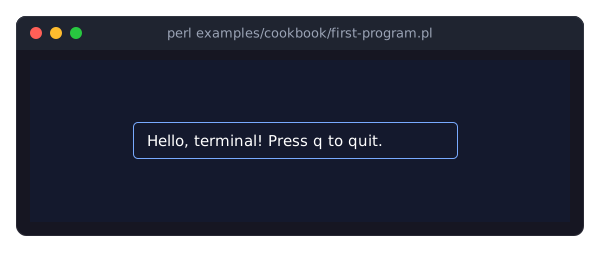
What happens here:
Term::Fabulous::Widget::Box is the general container. It can have a background color, a border and any number of children.
The
layouthash tells Clay how to size and arrange the box and its children (see "LAYOUT" in Term::Fabulous::Manual::Layout).sizing_grow()means "take all the room the parent offers"; a box withoutsizingis as big as its content.child_alignmentcenters the children (see "Aligning and centering children" in Term::Fabulous::Manual::Layout).Term::Fabulous::Widget::Text shows one piece of text. Colors are
[red, green, blue, alpha]arrays with values from 0 to 255; color strings such as'#78aaff'work too (see "COLORS" in Term::Fabulous::Manual::Looks). The border style comes from Term::Fabulous::Enum::BorderStyle (see "BORDERS" in Term::Fabulous::Manual::Looks).Term::Fabulous->newtakes the root widget and an initial size.widthandheightare required, butrunreplaces them with the real terminal size.$root->on( KeyPress => sub { ... } )registers a listener: code that runs when the event happens (see "EVENTS" in Term::Fabulous::Manual::Events). Key presses go to the widget that has the keyboard focus, or to the root widget when no widget has it, as here.key_namereturns a readable name of the key, such asq,EscapeorCtrl+Left(see "KEYBOARD" in Term::Fabulous::Manual::Events).$ui->runopens the terminal, handles input and draws frames until the loop stops: when a listener calls$ui->loop->stop, when the user pressesCtrl+C, or when the process receivesSIGINT,SIGTERMorSIGHUP. Then it restores the terminal and returns, and the program printsBye!on the normal screen.Quitting on
Escapedoes not catchAltplus a letter: terminals send that asEscapefollowed by the letter, in one write, and Term::Fabulous names itAlt+x(see "Key names" in Term::Fabulous::Manual::Events).
Where to go next: Term::Fabulous::Manual::Layout explains the widget tree and the layout, and the recipe A minimal program to start from is a program to start your own from.
FEATURE INDEX
Where to find what, by task. Each entry names the section of the manual that explains the feature, the recipes that show it in a complete program, and the class pages with the reference.
Programs and the event loop
- Start a full-screen application
-
"YOUR FIRST PROGRAM", "run" in Term::Fabulous, "A minimal program to start from" in Term::Fabulous::Cookbook::GettingStarted.
- Quit the program on a key
-
"Quitting" in Term::Fabulous::Manual::Programs, "Quit with q or Escape" in Term::Fabulous::Cookbook::GettingStarted.
- Ask for input below the shell's output instead of taking the whole screen (inline mode)
-
"INLINE MODE" in Term::Fabulous, "Ask for input below the shell's output (inline mode)" in Term::Fabulous::Cookbook::Forms.
- Timers, animation, background work, sockets, child processes
-
"Timers and other asynchronous work" in Term::Fabulous::Manual::Programs, "Update the screen from a timer (a clock)" in Term::Fabulous::Cookbook::LiveData, "Show the output of a running command" in Term::Fabulous::Cookbook::LiveData.
- React to the terminal size and to resizes
-
"Event reference" in Term::Fabulous::Manual::Events (
Start,Resize), Term::Fabulous::Event::Start, Term::Fabulous::Event::Resize, "Change the layout with the terminal size (Start and Resize events)" in Term::Fabulous::Cookbook::Layout. - Errors, crashes, restoring the terminal
-
"Errors and terminal restore" in Term::Fabulous::Manual::Programs.
- Draw a frame now, or after the next frame
-
"invalidate" in Term::Fabulous, "after_draw" in Term::Fabulous::Render.
Widgets, layout and the widget tree
- Which widgets there are
-
"The widgets" in Term::Fabulous::Manual::Layout, "MODULES" in Term::Fabulous.
- Build, change and search the widget tree; widget ids
-
"Building the tree" in Term::Fabulous::Manual::Layout, "Widget ids" in Term::Fabulous::Manual::Layout, "Changing the tree" in Term::Fabulous::Manual::Layout, "Find widgets by id" in Term::Fabulous::Cookbook::Forms, Term::Fabulous::Widget.
- Arrange widgets in rows and columns; sizes, padding and gaps
-
"LAYOUT" in Term::Fabulous::Manual::Layout, Term::Fabulous::Widget::Box.
- Center something
-
"Aligning and centering children" in Term::Fabulous::Manual::Layout, "Alignment" in Term::Fabulous::Manual::Looks.
- Let widgets wrap onto the next line, or stack them on top of each other
-
"Flow layout" in Term::Fabulous::Manual::Layout, "Stack layout" in Term::Fabulous::Manual::Layout.
- Place a widget over the others (floating widgets, overlays)
-
"Floating widgets" in Term::Fabulous::Manual::Layout, "floating" in Term::Fabulous::Widget.
- Give widgets in different places the same width or height
-
"Equal sizes across the tree" in Term::Fabulous::Manual::Layout, "Line up labels with equal widths (width_group)" in Term::Fabulous::Cookbook::Layout.
- Change the layout while the program runs
-
"Changing the layout at run time" in Term::Fabulous::Manual::Layout.
- Scroll content that is larger than its box; scroll it from code
-
"Scrolling content" in Term::Fabulous::Manual::Layout, "SCROLLING" in Term::Fabulous::Manual::Events, Term::Fabulous::Widget::ScrollBox, "bounding_box, scroll_state, scroll_to" in Term::Fabulous, "Add lines to a scrolling log (ScrollBox)" in Term::Fabulous::Cookbook::LiveData, "Scroll a ScrollBox from code (keep a log at the newest line)" in Term::Fabulous::Cookbook::LiveData.
- Mark widgets with states and classes and style them by those
-
"add_state" in Term::Fabulous::Widget, "Mark widgets with states and classes" in Term::Fabulous::Cookbook::Layout.
- Draw a line between widgets, with a heading on it
-
"DIVIDERS" in Term::Fabulous::Manual::Layout, Term::Fabulous::Widget::Divider.
- Sections that open and close under their headers (an accordion)
-
"ACCORDIONS" in Term::Fabulous::Manual::Layout, Term::Fabulous::Widget::Accordion, Term::Fabulous::Event::Select.
- Pages behind a row of tabs, on any side of the page
-
"TABS" in Term::Fabulous::Manual::Layout, Term::Fabulous::Widget::Tabs, Term::Fabulous::Widget::Tabs::Page, Term::Fabulous::Event::Select.
- A tab for each open document, with marks for unsaved changes and errors (document tabs)
-
"Document tabs" in Term::Fabulous::Manual::Layout, Term::Fabulous::Widget::DocumentTabs, Term::Fabulous::Event::TabClose, Term::Fabulous::Event::TabAdd, "Keep several documents open in tabs (DocumentTabs)" in Term::Fabulous::Cookbook::Menus.
Text, colors and borders
- Show text; wrap, align and space it; bold, italic and underlined text
-
"TEXT" in Term::Fabulous::Manual::Looks, "Bold, italic and underline" in Term::Fabulous::Manual::Looks, Term::Fabulous::Widget::Text, "Wrap, align and space text" in Term::Fabulous::Cookbook::GettingStarted.
- Non-ASCII text, wide characters, emoji, combining characters
-
"Text is character strings" in Term::Fabulous::Manual::Looks, "Wide characters and emoji" in Term::Fabulous::Manual::Looks, Term::Fabulous::Unicode, "Show non-ASCII text (umlauts, CJK, combining accents)" in Term::Fabulous::Cookbook::GettingStarted.
- Colors and color strings; lighter, darker and mixed colors
-
"COLORS" in Term::Fabulous::Manual::Looks, Term::Fabulous::Color.
- Themes: colors, border styles and borders for every widget, theme files, variants, switching at run time
-
"THEMES" in Term::Fabulous::Manual::Looks, Term::Fabulous::Theme, "Switch themes at run time (built-in themes and a theme file)" in Term::Fabulous::Cookbook::Layout, "theme" in Term::Fabulous.
- Make and change themes in an editor with a live preview, check theme files from a script
-
"The theme editor" in Term::Fabulous::Manual::Looks, Term::Fabulous::ThemeEditor, Term::Fabulous::Theme::Document, "Design a theme against your own screen (the theme editor)" in Term::Fabulous::Cookbook::Layout.
- Named colors (Tomato, SteelBlue, ...)
- Transparent and translucent backgrounds; the terminal's default colors
-
"Alpha and the terminal default color" in Term::Fabulous::Manual::Looks.
- Borders on all or some sides, border styles, a different style per side
-
"BORDERS" in Term::Fabulous::Manual::Looks, "Borders and space" in Term::Fabulous::Manual::Looks, "Borders from the theme" in Term::Fabulous::Manual::Looks, Term::Fabulous::Enum::BorderStyle, Term::Fabulous::Role::HasBorderStyle, "Use a different border style on each side" in Term::Fabulous::Cookbook::Layout.
Events, keyboard, focus and mouse
- Listen to events; stop an event from reaching the parent widgets
-
"Listening to events" in Term::Fabulous::Manual::Events, "Return values and bubbling" in Term::Fabulous::Manual::Events.
- The list of all events
-
"Event reference" in Term::Fabulous::Manual::Events, "EVENTS" in Term::Fabulous.
- Fire events of your own
-
"Firing your own events" in Term::Fabulous::Manual::Events, "Fire your own events" in Term::Fabulous::Cookbook::Extending.
- React to keys; key bindings and shortcuts
-
"KEYBOARD" in Term::Fabulous::Manual::Events, "KEY NAMES" in Term::Fabulous::Event::KeyPress, "Bind a key to an action" in Term::Fabulous::Cookbook::KeyboardAndMouse.
- Keys that only some terminals can tell apart (Ctrl+I and Tab, Super, F13 and up)
-
"THE KITTY KEYBOARD PROTOCOL" in Term::Fabulous::Event::KeyPress, "new" in Term::Fabulous (
kitty_keyboard). - Move or set the keyboard focus; react to focus changes
-
"FOCUS" in Term::Fabulous::Manual::Events, "KEYBOARD AND FOCUS" in Term::Fabulous, "Show a status line that follows the focus (OnFocus)" in Term::Fabulous::Cookbook::Forms.
- Change the Tab order
-
"Custom focus order" in Term::Fabulous::Manual::Events, "Change the Tab order (HasFocusOrder)" in Term::Fabulous::Cookbook::Forms.
- Buttons, clicks, hover and press
-
"Clicks, hover and press" in Term::Fabulous::Manual::Events, Term::Fabulous::Widget::Button, "Add buttons for the mouse and the keyboard (Button)" in Term::Fabulous::Cookbook::KeyboardAndMouse.
-
"MOUSE" in Term::Fabulous::Manual::Events, Term::Fabulous::Event::Mouse, Term::Fabulous::Event::MouseMove, "Paint with the mouse (Canvas, clicks and drags)" in Term::Fabulous::Cookbook::Canvases.
- Mouse wheel
-
"SCROLLING" in Term::Fabulous::Manual::Events, "MOUSE WHEEL SCROLLING" in Term::Fabulous.
- Let the terminal keep the mouse, so the user can select and copy text
-
"new" in Term::Fabulous (
mouse), "Let the terminal handle the mouse (select and copy text)" in Term::Fabulous::Cookbook::GettingStarted. - Dialogs and modal windows
-
Term::Fabulous::Widget::Dialog, "Ask a question in a dialog (Dialog widget)" in Term::Fabulous::Cookbook::Forms.
- Ask a question, ask for a value, say that something happened (prompts)
-
"PROMPTS" in Term::Fabulous::Manual::Feedback, Term::Fabulous::Widget::Prompt, "Confirm before quitting (Prompt)" in Term::Fabulous::Cookbook::Forms, "Ask for a number and check it (Prompt, validator)" in Term::Fabulous::Cookbook::Forms.
- Ask for a file to open or save, or for a folder (file dialogs)
-
"FILE DIALOGS" in Term::Fabulous::Manual::Feedback, Term::Fabulous::Widget::FileDialog, "Open and save a file (FileDialog)" in Term::Fabulous::Cookbook::Forms.
- Keep a widget from taking the focus when it is clicked (toolbars)
-
"Moving the focus" in Term::Fabulous::Manual::Events, "KEYBOARD AND FOCUS" in Term::Fabulous.
Forms and input
- The input widgets and what they have in common
-
"FORMS AND INPUT WIDGETS" in Term::Fabulous::Manual::Forms, Term::Fabulous::Widget::Input.
- Text input, password fields, multi-line text
-
"Text fields" in Term::Fabulous::Manual::Forms, "Password fields" in Term::Fabulous::Manual::Forms, "Text areas" in Term::Fabulous::Manual::Forms, Term::Fabulous::Widget::TextField, Term::Fabulous::Widget::TextArea, "A login form (centered dialog, masked password)" in Term::Fabulous::Cookbook::Forms.
-
"THE INPUT WIDGETS ONE BY ONE" in Term::Fabulous::Manual::Forms, "Choose from options in Perl (Dropdown, RadioGroup, Slider)" in Term::Fabulous::Cookbook::Forms, Term::Fabulous::Widget::StarRating, Term::Fabulous::Widget::SegmentedControl.
- Choose a color: type it, move sliders or pick a named swatch (color pickers)
-
"Color pickers" in Term::Fabulous::Manual::Forms, Term::Fabulous::Widget::ColorPicker, "Ask for a color (ColorPicker in a Prompt)" in Term::Fabulous::Cookbook::Forms.
- Read the values of a form; react to changes and to Enter
-
"Values" in Term::Fabulous::Manual::Forms, "The Change and Submit events" in Term::Fabulous::Manual::Forms, "Read all values of a form" in Term::Fabulous::Cookbook::Forms.
- Disable inputs, make text read-only
-
"Disabled inputs" in Term::Fabulous::Manual::Forms, "Read-only text" in Term::Fabulous::Manual::Forms, "Disable inputs until a checkbox is checked" in Term::Fabulous::Cookbook::Forms.
- Editing keys, selection, clipboard, undo
-
"EDITING TEXT" in Term::Fabulous::Manual::Forms, "KEYS OF THE INPUT WIDGETS" in Term::Fabulous::Manual::Forms, Term::Fabulous::Editor, "Copy and paste through the clipboard" in Term::Fabulous::Cookbook::Forms.
- Check what the user typed
Progress and feedback
- Show how much of a task is done; a bar for a task of unknown extent
-
"PROGRESS BARS" in Term::Fabulous::Manual::Feedback, Term::Fabulous::Widget::ProgressBar.
- Show that the program is busy (a spinner)
-
"SPINNERS" in Term::Fabulous::Manual::Feedback, Term::Fabulous::Widget::Spinner.
- Show a notification that goes away by itself (a toast); an alert box
-
"TOASTS AND ALERTS" in Term::Fabulous::Manual::Feedback, Term::Fabulous::Widget::Toast.
- Show messages and the program's state in the last row (a status bar)
-
"STATUS BARS" in Term::Fabulous::Manual::Feedback, Term::Fabulous::Widget::StatusBar, "Show messages and state in a status bar (StatusBar)" in Term::Fabulous::Cookbook::Menus.
- Animate a widget without a timer
-
"ANIMATION" in Term::Fabulous::Manual::Feedback, "ANIMATION" in Term::Fabulous::Widget::Display, "request_frame_at" in Term::Fabulous.
Commands and menus
- Keep the program's commands and their keys in one table
-
"COMMANDS" in Term::Fabulous::Manual::Menus, Term::Fabulous::Commands, Term::Fabulous::Command.
- Commands that cannot run now, and settings that are on or off
-
"Commands that cannot run now" in Term::Fabulous::Manual::Menus, "Settings that are on or off" in Term::Fabulous::Manual::Menus.
-
"MENU BARS" in Term::Fabulous::Manual::Menus, Term::Fabulous::Widget::MenuBar, "Give a program a menu bar (MenuBar, Commands)" in Term::Fabulous::Cookbook::Menus.
-
"CONTEXT MENUS" in Term::Fabulous::Manual::Menus, Term::Fabulous::Widget::Menu, "Open a menu with a right click or the Menu key (Menu)" in Term::Fabulous::Cookbook::Menus.
- A help screen that lists the keys of the program (key references)
-
"KEY REFERENCES" in Term::Fabulous::Manual::Menus, Term::Fabulous::Widget::KeyReference, "Show the keys in a help screen (KeyReference)" in Term::Fabulous::Cookbook::Menus.
Tables
- Show rows of data in a table
-
"TABLES" in Term::Fabulous::Manual::Tables, Term::Fabulous::Widget::Table, "Show a list of hashes in a table (sort, select, open a row)" in Term::Fabulous::Cookbook::Tables.
- Every table feature, by task
-
The table's own feature index: "FEATURE INDEX" in Term::Fabulous::Manual::Tables.
- Columns: widths, alignment, wrapping, computed columns, the visible columns
-
"COLUMNS" in Term::Fabulous::Manual::Tables, Term::Fabulous::Widget::Table::Column, "Size, align and wrap columns (widths, wrapping, widget titles)" in Term::Fabulous::Cookbook::TableStyles, "Let the user choose the visible columns (column chooser)" in Term::Fabulous::Cookbook::Tables.
- Format dates, numbers and sizes in cells
-
"DISPLAY TEXT AND MUTATORS" in Term::Fabulous::Manual::Tables, Term::Fabulous::Widget::Table::Mutator, "Format cells: dates, numbers, sizes and flags (mutators)" in Term::Fabulous::Cookbook::Tables.
- Widgets in cells; edit the data of a table
-
"CELL WIDGETS" in Term::Fabulous::Manual::Tables, "Changing the data" in Term::Fabulous::Manual::Tables, "Edit the data of a table (widget cells, add and remove rows and columns)" in Term::Fabulous::Cookbook::Tables.
- Sort and filter rows
-
"SORTING" in Term::Fabulous::Manual::TableRows, "FILTERING" in Term::Fabulous::Manual::TableRows, Term::Fabulous::Widget::Table::Filter, "Sort rows, also with your own comparison" in Term::Fabulous::Cookbook::TableRows, "Let the user filter rows (filter row and search box)" in Term::Fabulous::Cookbook::TableRows, "Filter rows from Perl (numbers, dates, text, raw or shown values)" in Term::Fabulous::Cookbook::TableRows.
- Group rows, trees of nested rows, pages
-
"GROUPING" in Term::Fabulous::Manual::TableRows, "TREES" in Term::Fabulous::Manual::TableRows, "PAGES" in Term::Fabulous::Manual::TableRows, "Group rows by a column (collapsible group headers)" in Term::Fabulous::Cookbook::TableRows, "Show nested data as a tree (expand and collapse rows)" in Term::Fabulous::Cookbook::TableRows, "Split many rows into pages (pager and page sizes)" in Term::Fabulous::Cookbook::TableRows.
- The cursor, selecting rows, opening a row
-
"SELECTION AND CURSOR" in Term::Fabulous::Manual::TableRows.
- Colors, striped rows, lines and styles of rows, columns and cells
-
"STYLES AND BORDERS" in Term::Fabulous::Manual::TableStyles, "Lines and colors per row, column and cell (conditional formatting)" in Term::Fabulous::Cookbook::TableStyles, "A table with colored rows and titles (block frame, no grid lines)" in Term::Fabulous::Cookbook::TableStyles, "Compare the line options of a table (frames, grid lines, block frames)" in Term::Fabulous::Cookbook::TableStyles.
- Print a table as a report
-
"PRINTING A TABLE" in Term::Fabulous::Manual::TableStyles, "Print a table as a report (Static)" in Term::Fabulous::Cookbook::Tables.
Canvases and charts
- Draw freely in character cells or pixels
-
"CANVASES" in Term::Fabulous::Manual::Charts, Term::Fabulous::Widget::Canvas, Term::Fabulous::Widget::PixelCanvas, "Plot data on a pixel canvas (PixelCanvas)" in Term::Fabulous::Cookbook::Canvases.
- Show a picture (PNG, JPEG, GIF, ...)
-
Term::Fabulous::Widget::Image, "Show a picture file (Image, fit)" in Term::Fabulous::Cookbook::Canvases, "Embed a logo in the program (Image, base64)" in Term::Fabulous::Cookbook::Canvases.
- Show a picture in the terminal's own pixels (sixel graphics)
-
Term::Fabulous::Widget::Sixel, "Show a photo in sixel graphics (Sixel)" in Term::Fabulous::Cookbook::Canvases.
- Charts that draw themselves from data
-
"CHARTS" in Term::Fabulous::Manual::Charts, Term::Fabulous::Widget::Chart.
- Chart titles and legends
-
"Titles and legends" in Term::Fabulous::Manual::Charts, "Title and legend" in Term::Fabulous::Widget::Chart.
- Line, area, bar and scatter charts
-
Term::Fabulous::Widget::XYChart, "Draw a line chart with labels and points (LineChart)" in Term::Fabulous::Cookbook::Charts, "Grouped, stacked and horizontal bars (BarChart)" in Term::Fabulous::Cookbook::Charts, "A scatter plot with trend lines (ScatterPlot)" in Term::Fabulous::Cookbook::Charts.
- Axes: ranges, ticks, titles and number or date formats of the labels
-
"AXES" in Term::Fabulous::Widget::XYChart, "Axis keys" in Term::Fabulous::Widget::XYChart, Term::Fabulous::Chart::Format.
-
"STACKING" in Term::Fabulous::Widget::XYChart, "Grouped, stacked and horizontal bars (BarChart)" in Term::Fabulous::Cookbook::Charts, "Stacked areas and shares of 100% (AreaChart)" in Term::Fabulous::Cookbook::Charts, "Line styles, gaps, bar widths, stack groups and grid lines" in Term::Fabulous::Cookbook::ChartStyles.
- Time axes and logarithmic axes
-
"Time axes" in Term::Fabulous::Widget::XYChart, "Logarithmic axes" in Term::Fabulous::Widget::XYChart, "Plot values over time (time axis, from and to, a dashed forecast)" in Term::Fabulous::Cookbook::ChartTechniques, "Show values of very different sizes (logarithmic axis)" in Term::Fabulous::Cookbook::ChartTechniques.
- Pie, donut, polar area and radar charts
-
Term::Fabulous::Widget::PieChart, Term::Fabulous::Widget::DonutChart, Term::Fabulous::Widget::PolarAreaChart, Term::Fabulous::Widget::RadarChart, "Show shares as a pie or donut (PieChart, DonutChart)" in Term::Fabulous::Cookbook::Charts, "Compare profiles on radar and polar area charts (RadarChart, PolarAreaChart)" in Term::Fabulous::Cookbook::Charts.
- Histograms and sparklines
-
Term::Fabulous::Widget::Histogram, Term::Fabulous::Widget::Sparkline, "How values are distributed (Histogram)" in Term::Fabulous::Cookbook::Charts, "Show sparklines in table cells (Sparkline)" in Term::Fabulous::Cookbook::Charts.
- Live charts; smoothing and other transforms of chart data
-
"DATA" in Term::Fabulous::Widget::XYChart, Term::Fabulous::Chart::Transform, "A live chart that follows new data (append, max_points, span)" in Term::Fabulous::Cookbook::ChartTechniques, "Smooth noisy data and index it to 100 (transforms)" in Term::Fabulous::Cookbook::ChartTechniques.
- Curves, markers, line styles, palettes and light backgrounds
-
"LOOKS" in Term::Fabulous::Widget::XYChart, Term::Fabulous::Chart::Curve, Term::Fabulous::Chart::Marker, Term::Fabulous::Chart::Palette, "Connect points with curves and easings (curve)" in Term::Fabulous::Cookbook::ChartStyles, "Draw with Braille, blocks or box lines (marker)" in Term::Fabulous::Cookbook::ChartStyles, "Light backgrounds, palettes and colors of your own" in Term::Fabulous::Cookbook::ChartStyles, "Line styles, gaps, bar widths, stack groups and grid lines" in Term::Fabulous::Cookbook::ChartStyles.
- Show what the pointer is on in a chart (hover)
-
"Hover and emphasis" in Term::Fabulous::Widget::Chart, Term::Fabulous::Event::SeriesHover, "Show details of the point under the pointer (SeriesHover, highlight)" in Term::Fabulous::Cookbook::ChartStyles.
Layout files
- Describe the screen in a KDL file
-
"KDL LAYOUT FILES" in Term::Fabulous::Manual::KDL, Term::Fabulous::Layout, "Build a form from a KDL file (text fields, radio buttons, dropdown, slider, checkbox)" in Term::Fabulous::Cookbook::Forms.
- The KDL properties of each widget
-
The KDL PROPERTIES section of every class page, for example "KDL PROPERTIES" in Term::Fabulous::Widget::Box; the list of node types links to all of them.
- Tables and charts in a KDL file
-
"Describe a table in a KDL layout (columns, lines, sort, groups)" in Term::Fabulous::Cookbook::Tables, "Describe charts in a KDL layout (series, slices, transforms)" in Term::Fabulous::Cookbook::ChartTechniques.
Output without a terminal, tests and pictures
- Print boxes, tables and charts to STDOUT or a file (reports)
-
"RENDERING WITHOUT A TERMINAL" in Term::Fabulous::Manual::Programs, Term::Fabulous::Static, "Render a report to a file or pipe (Static)" in Term::Fabulous::Cookbook::Output, "Print a table as a report (Static)" in Term::Fabulous::Cookbook::Tables, "Print charts in a report (Static)" in Term::Fabulous::Cookbook::ChartTechniques.
- Test a program or a widget without a terminal
-
"TESTING" in Term::Fabulous::Manual::Programs, Term::Fabulous::Terminal::Memory, "step" in Term::Fabulous, "Test a widget without a terminal" in Term::Fabulous::Cookbook::Output.
- Take a screenshot of your program
-
"PICTURES OF YOUR OWN PROGRAMS" in Term::Fabulous::Examples.
Extending Term::Fabulous
- Write widgets of your own
-
"WRITING YOUR OWN WIDGETS" in Term::Fabulous::Manual::CustomWidgets, Term::Fabulous::Widget::Input, "Write a custom input widget (a toggle switch)" in Term::Fabulous::Cookbook::Extending.
- Use your own widgets in KDL layout files
-
Term::Fabulous::Role::CanParseLayout, "Make a widget usable from KDL" in Term::Fabulous::Cookbook::Extending.
- Check property values the way the built-in widgets do
- Run on another terminal, or write a terminal of your own
-
"new" in Term::Fabulous (
terminal), Term::Fabulous::Terminal::Termbox, Term::Fabulous::Role::Terminal. - Use termbox2 directly
Help
- Something does not work
-
"TROUBLESHOOTING" in Term::Fabulous::Manual::Troubleshooting.
- A term in the documentation is unclear
- What Term::Fabulous cannot do
SEE ALSO
Next page: Term::Fabulous::Manual::Layout.
Term::Fabulous, Term::Fabulous::Cookbook, Term::Fabulous::Examples, Clay::UI, Clay::XS, Term::Fabulous::Termbox, IO::Async, Object::Pad.